 UPDF
 UPDF for Windows
 UPDF for Mac
 UPDF for iPhone/iPad
 UPDF for Android
 Nomostar
 UPDF AI Online
 UPDF Sign
 IvyCraft
 Edit PDF
 Annotate PDF
 Create PDF
 PDF Form
 Edit links
 Convert PDF
 OCR
 PDF to Word
 PDF to Image
 PDF to Excel
 Organize PDF
 Merge PDF
 Split PDF
 Crop PDF
 Rotate PDF
 Protect PDF
 Sign PDF
 Redact PDF
 Sanitize PDF
 Remove Security
 Read PDF
 UPDF Cloud
 Compress PDF
 Print PDF
 Batch Process

 About UPDF AI
 UPDF AI Solutions
 AI User Guide
 FAQ about UPDF AI
 Summarize PDF
 Translate PDF
 Chat with PDF
 Chat with AI
 Chat with image
 PDF to Mind Map
 Explain PDF
 PDF AI Tools
 Image AI Tools
 AI Chat Tools
 AI Writing Tools
 AI Study Tools
 AI Working Tools
 Other AI Tools
 AI Bookmark Generation
 AI Bookmark Summary
 AI Watermark Generation
 AI Background Generation
 AI Sticker Generation
 AI Stamp Generation
 AI Editing Suite
 UPDF Copilot
 AI Page Management
 AI Semantic Search
 PDF to Word
 PDF to Excel
 PDF to PowerPoint
 Enterprise Solution
 Enterprise Sign
 Enterprise AI
 Enterprise Plan
 Enterprise User Guide
 Enterprise Webinar
 IT
 Education
 Construction
 Financial Service
 Healthcare
 Insurance
 Legal
 Manufacturing
 Government
 Researchers & PhDs
 Solopreneurs & Freelancers
 Lawyers & Legal Professionals
 Real Estate Agents & Brokers
 Education Solution
 Customer Stories
 User Guide
 UPDF Tricks
 FAQs
 UPDF Reviews
 Download Center
 Blog
 Newsroom
 Tech Spec
 Updates
 UPDF vs. Adobe Acrobat
 UPDF vs. Foxit
 UPDF vs. PDF Expert


Quick Answer
PDFAid is an online PDF editor and converter that advertises 50+ tools — edit, convert, compress, sign, and merge — with a 4.5/5 rating on its own site. Here's what the homepage doesn't tell you up front: every download sits behind a paywall, and the $0.95 trial auto-renews at $49 every 4 weeks.
In this PDFAid review, we test the tools hands-on, verify the real pricing (including what happens after the trial), and show you exactly when it's worth paying for — and when an alternative like UPDF gives you more for less.
Part 1. What Is PDFAid? What Can It Do?
PDFAid is an online, browser-based PDF toolkit offering 50+ tools: editing, conversion between PDF and Word/PPTX/Excel/PNG/JPG, compression, merging, splitting, page deletion, watermarks, rotation, e-signatures, password protection, and a library of 2,000+ fillable form templates for contracts, invoices, and tax forms. Files up to 100 MB are accepted, and everything runs without installing software.
Key features at a glance:
- Edit PDF: add, edit, and highlight text; add watermarks, rotate pages, and sign.
- Organize PDF: merge, split, delete, and reorder pages.
- Convert to PDF: Word, PPTX, Excel, PNG, JPG.
- Convert from PDF: Word, PPTX, Excel, PNG, JPG (with OCR-assisted conversion of scans on some tools).
- Optimize PDF: compress and crop.
- PDF Security: password-protect files.
- Forms: 2,000+ fillable templates.
Simply put, PDFAid covers the essential features for day-to-day PDF work — as long as you're willing to pay to download the results. See Part 2 before you enter your card details.

Part 2. PDFAid Pricing: What the Trial Actually Costs
This is the most important section of this review, so let's be precise. PDFAid offers three plans:
| Plan | Entry price | What happens next |
| 7-day limited access | $0.95 | Auto-renews after 7 days at $49, billed every 4 weeks 7-day |
| full access | $1.95 | Same renewal: $49 every 4 weeks |
| Annual plan | $24.9 | month equivalent/Billed yearly; access to all features |
The renewal is disclosed — but only in small print at the bottom of the checkout page ("After 7 days, the price is $49 with auto-renewal. Billed every 4 weeks. Cancel anytime"). Nothing on the homepage or tool pages mentions it. Users who miss it pay roughly $600 per year.
Check PDFAid's Trustpilot page and you'll see the pattern in recent reviews: a $0.95 trial followed days later by an unexpected $39–49 charge. The positive news buried in those same reviews: PDFAid's support does process refunds when asked — several reviewers report getting their money back after complaining.
If you do subscribe: mark day 6 on your calendar, cancel from your account settings before day 7, and keep the confirmation email. If you've already been charged unexpectedly, contact [email protected] or +1 888 857 5569 — reviewers report refunds are granted, usually quickly.
Honest framing: PDFAid's tools work. The pricing model is what you need to go in with open eyes about.
Part 3. Is PDFAid Worth It? Our Hands-On Test
PDFAid gives the impression of being a solid PDF tool, but we need to test them before making any judgments. So, let's now get deep into PDFAid review and test its various features:
Edit PDF
We headed to the PDFAid website, selected its "Edit PDF" feature, and uploaded the PDF. After uploading, it took us to its PDF editor, which gave us access to various editing tools.
We were able to add and edit text, highlight, add images, draw, insert links, and more. The experience was smooth and intuitive.
However, when we edited the original text in the PDF, the font changed — PDFAid redraws existing text in its own font instead of preserving the original typeface. On a branded or design-heavy document, this is a visible quality loss. UPDF, by contrast, preserves the original font and font size when editing, and adds annotation options like strikethrough, underline, and squiggly that PDFAid lacks.

Moreover, it felt that editing features are limited compared to other PDF editors out there. For example, UPDF is another PDF editor, but it also allows editing of images, backgrounds, and more. UPDF won't change the font or font size of the original text. In addition, it offers more annotation features, such as strikethrough, underline, squiggly, and more.

When we tried to save the file after editing, it asked us to create an account — and then it required a premium plan before we could download. Not even a single free download, watermarked or otherwise. Whatever you build in PDFAid stays in PDFAid until you pay.

Convert PDF
Next, we tried its convert PDF feature. It allows us to convert PDF Next, we tried its convert PDF feature... The conversion itself was smooth, but — same pattern — the file can't be reviewed or downloaded without a plan. One concrete limit we did hit: uploads cap at 100 MB, and everything lives in the browser, so there's no desktop app or offline mode to fall back on.

Organize PDF
In the PDFAid review so far, we have seen that it offers many PDF organization features, such as merge PDF, split PDF, and more.
We tried its split PDF feature to see how smoothly it can split a PDF into multiple files. The interface was intuitive, as we were able to easily specify the split areas. However, we were again asked to purchase a premium plan to access the file.

Sign PDF
PDFAid also allows you to sign PDFs electronically. We were able to add a signature by drawing, typing, or uploading the image.

However, PDFAid could have provided more advanced signature features and more color selection. For example, UPDF allows us to sign PDFs both electronically and digitally. Moreover, we get a complete color selection to customize the signature according to the document requirements.
User Reviews
PDFAid has received mixed reviews from users. Some have praised the tool for its features, while others have shown concerns over unknown transactions. A few of the positive and negative reviews are as follows:
Positive Reviews:
- "For the product itself, indeed it such a great product whereas u can easily edit all your pdf. For the customer service, as for now -- it is simply awesome where the agent is super helpful."
- "The service helped me quickly process and organise my PDF documents. I'm very happy with the result."
Negative Reviews:
- "They said it was $1 for a single service, no sign I was signing up for anything, and then out of the blue, they took $49 from my account 5-6 days later. I rushed to cancel, but they use sneaky, dirty tricks to block you from canceling, like asking "are you sure...?" They even quickly let you pay $10 instead of $49..."
- "I never agreed to a monthly payment, all I agreed to was a singular usage for a day, 1.45 USD. And just a few days later they charged me with 49 USD payment. Total SCAM."
Pricing
PDFAid does not display its pricing plans on the website, which confuses many users into thinking it may be offering free services. However, nothing is free with PDFAid. It does not offer a free trial or free version.
The pricing plans are as follows:
- 7-day limited access: $0.95 (after 7 days, the price is $49/month with auto-renewal)
- 7-day full access: $1.95 (after 7 days, the price is $49/month with auto-renewal)
- Annual plan: $24.9/month
If we compare the PDFAid pricing plan with other PDF editors like UPDF, it does not seem to offer value for money. For example, UPDF offers more friendly pricing plans, as follows:
- Free Forever Plan: $0/month (access to all basic PDF features with no download restrictions; some features might have limitations)
- UPDF Pro: $64.99/year or $94.99/lifetime (access to all advanced PDF features, including OCR, annotation, advanced editing, essential AI features and more)
From the above pricing comparison, you can see that the PDFAid annual plan costs $24.9/month ($298.8) but still offers limited features. In contrast, UPDF costs only $64.99/year or $94.99/lifetime and even offers more advanced features.
Final Verdict
After the above PDFAid review, we can say that this tool isn't the best one out there. The tool seems usable if you have basic PDF needs to fulfill. However, it does not offer advanced features like deep PDF editing, AI assistant, OCR, and more. In addition, it has reports of unknown transactions. So, we would recommend that you opt for a better PDFAid alternative that is more reliable.
Part 4. Switching from PDFAid? Here's What Changes with UPDF
If you've used PDFAid for a while and you're weighing a switch, here's the practical difference, feature by feature:
Editing without font damage. PDFAid re-renders your text in its own font. UPDF edits text in the original font and size, and lets you edit images, links, backgrounds, and watermarks — not just text.
Downloads, free. With UPDF's free version you edit and save files without a card. There's no download paywall at all.
OCR for scans. PDFAid has no way to properly edit scanned documents. UPDF's built-in OCR turns scans into editable, searchable files and lets you edit them in the same session.
Batch instead of one-by-one. Every PDFAid operation is one file at a time. UPDF converts, compresses, OCRs, and encrypts files in batches.
Offline and on every platform. PDFAid is a browser tab. UPDF runs on Windows, Mac, iOS, and Android, processing files locally on your device — which also means confidential documents never have to touch a third-party server.
AI assistance. UPDF AI summarizes, translates, and answers questions about your documents. PDFAid has nothing comparable.
Cost math: PDFAid's renewal is $49 every 4 weeks — about $600 a year. A UPDF annual license is a small fraction of that and includes everything above.
| Item | PDFAid | UPDF |
|---|---|---|
| Real free downloads | None — every download requires a plan | Free version saves files, no card |
| Trial | $0.95–$1.95 for 7 days, then $49 every 4 weeks auto-renewal | Free trial, no card tricks |
| Cost of regular use | ~$600/year at renewal rates | Low annual or one-time price, clearly listed |
| Text editing | Font changes to PDFAid's own font | Original font and size preserved |
| OCR | Not available | Built-in, editable scans |
| Annotation | Highlight, draw only | Highlight, underline, strikethrough, comments, stamps |
| Batch processing | One file at a time | True batch across tools |
| Platforms | Browser only | Windows, Mac, iOS, Android, online |
| Offline use | No | Yes, files processed locally |
| AI features | None | Summarize, translate, chat with PDF |
| File limit | 100 MB upload cap | Handles large files locally |
| Form templates | 2,000+ | Yes, plus create your own forms |
| Support | Email, phone (24/7) | Email, plus in-app support |
If PDFAid's renewal math doesn't work for you, try UPDF free — editing that respects your fonts, real free saves, and OCR for everything including scans.
Windows • macOS • iOS • Android 100% secure
Part 5. A More Reliable and Feature-Packed PDFAid Alternative
Now that we have come to the stage to talk about the PDFAid alternative, let's not waste your time and quickly present to you the best reliable and feature-packed alternative. This tool is known as UPDF.
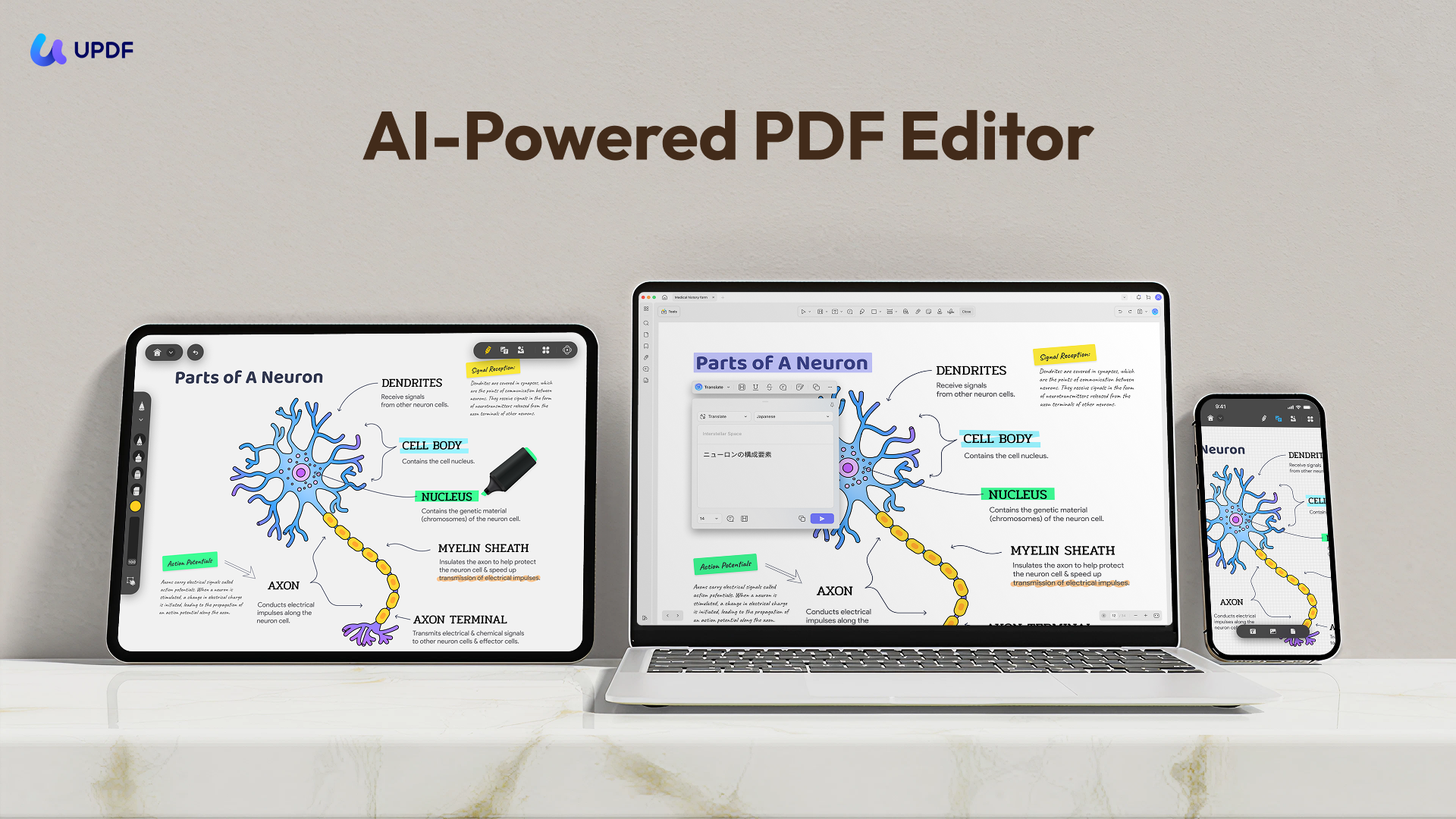
UPDF is an AI-powered PDF editor that incorporates all the basic to advanced PDF-related features you can imagine. With UPDF, you can:
- View PDFs: Open any PDF file and read through it without any trouble or delay. You can also change PDF background color as you like.
- Edit PDF text, images, links, headers/footers, backgrounds, and more.
- Annotate PDF with 13 markup tools, such as highlight, underline, strikethrough, draw, add stamps/stickers, etc.
- PDF Creation: Effortlessly create stunning PDFs from Word, images, or even clipboard content. Merge files or create a PDF Portfolio—all in just a few clicks!
- OCR: It can extract text and images from scanned documents and convert them into editable and searchable files while preserving the original formatting.
- Batch Processing: You can batch convert, compress PDF files, OCR and so on to save your time.
- UPDF Cloud: Store PDFs in secure cloud storage so that you can handle your files anywhere you can.
But that's not all! UPDF offers all the imaginable features you can expect from a PDF tool to deliver. It is compatible with Windows, Mac, iOS, and Android.
In addition, it also offers web access to AI assistant.
- Summarize PDF: UPDF AI can summarize your PDF files and present the main idea to you logically. It can also create a mind map for you according to the content.
- PDF Translation: It can translate your files to more than 30 languages. It can translate the texts in the images as well.
- Paper Reaserch: By importing topics and keywords, UPDF AI can search for the papers you need in a second to boost your academic effeciency.
- Grammar Check: It can check the grammar of your paper and offer brilliant advise for you to polish your writing! By the way, you can also ask it to check your spelling.
- 10 AI Agents: With UPDF 2.5, UPDF AI has even more to discover: 10 powerful AI Agents, including AI Sticker Search, UPDF Copilot, AI Watermark Generation, and much more!
Curious about the 10 AI Agents? Let the video below do the talking!
Don't just believe in our words. Try out UPDF for free and see its features in action yourself.
Windows • macOS • iOS • Android 100% secure
Check out the quick comparison between PDFAid vs. UPDF to better understand who dominates the race:
| Features | PDFAid | UPDF | |
| Edit PDF | Text | ||
| Images | (Only add new images) | (Add new images and edit existing ones) | |
| Links | |||
| Backgrounds | |||
| Headers/Footers | |||
| Annotate PDF | Highlight | ||
| Underline | |||
| Strikeout | |||
| Draw | |||
| Stamps | |||
| Stickers | |||
| Convert PDF | Word | ||
| Excel | |||
| PPT | |||
| HTML | |||
| Image | (JPG & PNG only) | (JPEG, PNG, TIFF, GIF, BMP) | |
| CSV | |||
| Text | |||
| RFT | |||
| XML | |||
| Batch Process PDF | Merge PDF | ||
| Encrypt PDF | |||
| Insert PDF | |||
| Print PDF | |||
| Convert PDF | |||
| Organize PDF | Add, Delete, and Rotate PDF pages | ||
| Split PDF | |||
| Rotate PDF | |||
| Crop PDF | |||
| Sign PDF | Electronic Signature | ||
| Digital Signature | |||
| Protect PDF | Open Password | ||
| Permission Password | |||
| Redaction | |||
| Other Features | AI Assistant (Summarize/Translate/Explain) | ||
| Cloud Storage | |||
| Compare PDFs | |||
| OCR | |||
| Compatibility | Compatible OS | Web | Windows, Mac, iOS, and Android |
| Pricing | Free Plan Benefits | None | - 2 file conversions per day; - Access to all PDF tools (with some limitations); - 1GB cloud storage; - 5 files analysis and 100 questions with UPDF AI |
| Paid Plans | - 7-day limited access: $0.957-day; - Full access: $1.95; - Annual plan: $24.9/month | - UPDF Pro: $64.99/year or $94.99/lifetime; - UPDF AI: $29/quarter, $79/year |
FAQs About PDFAid
Is PDFAid free?
No. You can upload and edit files without paying, but downloading anything requires a subscription. There are no free downloads, even watermarked ones.
How much does PDFAid cost after the trial?
The $0.95 or $1.95 trial lasts 7 days, then auto-renews at $49 billed every 4 weeks — roughly $600 per year. The annual plan works out to $24.9/month billed yearly. This renewal price appears only in small print at checkout.
How do I cancel PDFAid and get a refund?
Cancel from your account settings before the 7-day trial ends to avoid the renewal charge. If you were already charged, contact [email protected] — Trustpilot reviewers report that refunds are processed, usually quickly.
Is PDFAid safe to use?
The tool itself is functional and malware-free. The main risk is the subscription model — go in knowing that the trial converts to a $49/4-week plan. For confidential documents, remember everything is processed on external servers.
What is the best alternative to PDFAid?
For genuinely free downloads: UPDF's free version saves edited files without a card. For everything PDFAid does plus OCR, batch processing, offline apps, and AI features at a lower yearly cost, UPDF is the closest like-for-like upgrade.
Conclusion
PDFAid is a competent toolkit wrapped in an aggressive pricing model. The editor works, conversions are clean, and the form template library is genuinely useful. But between the total download paywall and a $49-every-4-weeks renewal that only surfaces at checkout, "free" is a marketing word here, not a plan.
If you have exactly one document and the discipline to cancel on day 6, PDFAid will get it done. If PDFs are part of your weekly workflow, the math flips fast — UPDF preserves your fonts when editing, adds OCR and batch processing, runs offline on every platform, and costs less per year than a single quarter of PDFAid's renewal. Try UPDF free and compare for yourself.
Windows • macOS • iOS • Android 100% secure







 Lizzy Lozano

 Enola Miller

 Enya Moore

