UPDF
UPDF
 UPDF for Windows
 UPDF for Mac
 UPDF for iPhone/iPad
 UPDF for Android
 Nomostar
 UPDF AI Online
 UPDF Sign
 IvyCraft
 Edit PDF
 Annotate PDF
 Create PDF
 PDF Form
 Edit links
 Convert PDF
 OCR
OCR PDF to Word
 PDF to Image
 PDF to Excel
 Organize PDF
 Merge PDF
 Split PDF
 Crop PDF
 Rotate PDF
 Protect PDF
 Sign PDF
 Redact PDF
 Sanitize PDF
 Remove Security
 Read PDF
 UPDF Cloud
 Compress PDF
 Print PDF
 Batch Process
 About UPDF AI
 UPDF AI Solutions
 AI User Guide
 FAQ about UPDF AI
 Summarize PDF
 Translate PDF
 Chat with PDF
 Chat with AI
 Chat with image
 PDF to Mind Map
 Explain PDF
 PDF AI Tools
 Image AI Tools
 AI Chat Tools
 AI Writing Tools
 AI Study Tools
 AI Working Tools
 Other AI Tools
 AI Bookmark Generation
 AI Bookmark Summary
 AI Watermark Generation
 AI Background Generation
 AI Sticker Generation
 AI Stamp Generation
 AI Editing Suite
 UPDF Copilot
 AI Page Management
 AI Semantic Search
 PDF to Word
 PDF to Excel
 PDF to PowerPoint
 Enterprise Solution
 Enterprise Sign
 Enterprise AI
 Enterprise Plan
 Enterprise User Guide
 Enterprise Webinar
 IT
IT Education
 Construction
 Financial Service
 Healthcare
 Insurance
 Legal
Legal Manufacturing
 Government
 Researchers & PhDs
 Solopreneurs & Freelancers
 Lawyers & Legal Professionals
 Real Estate Agents & Brokers
 Education Solution
 Customer Stories
 User Guide
 UPDF Tricks
 FAQs
FAQs UPDF Reviews
 Download Center
 Blog
Blog Newsroom
 Tech Spec
 Updates
 UPDF vs. Adobe Acrobat
 UPDF vs. Foxit
 UPDF vs. PDF Expert

 UPDF AI
Technical Document Summarizer AI
UPDF Technical Document Summarizer AI helps professionals working with technical content to extract key concepts, procedures, and specifications from complex documents. It also provides instant multilingual translation, enabling users to focus on applying information—not just reading it.
Powered by
 GPT-5 |
 DeepSeek R1
5000+ Reviews
 4.8
4.8
UPDF AI available on


 Desktop & mobile app

4M+ Users, 5M+ Technical Documents Summarized, Trusted by Leading Medias:






How to Use Technical Document Summarizer AI?
-
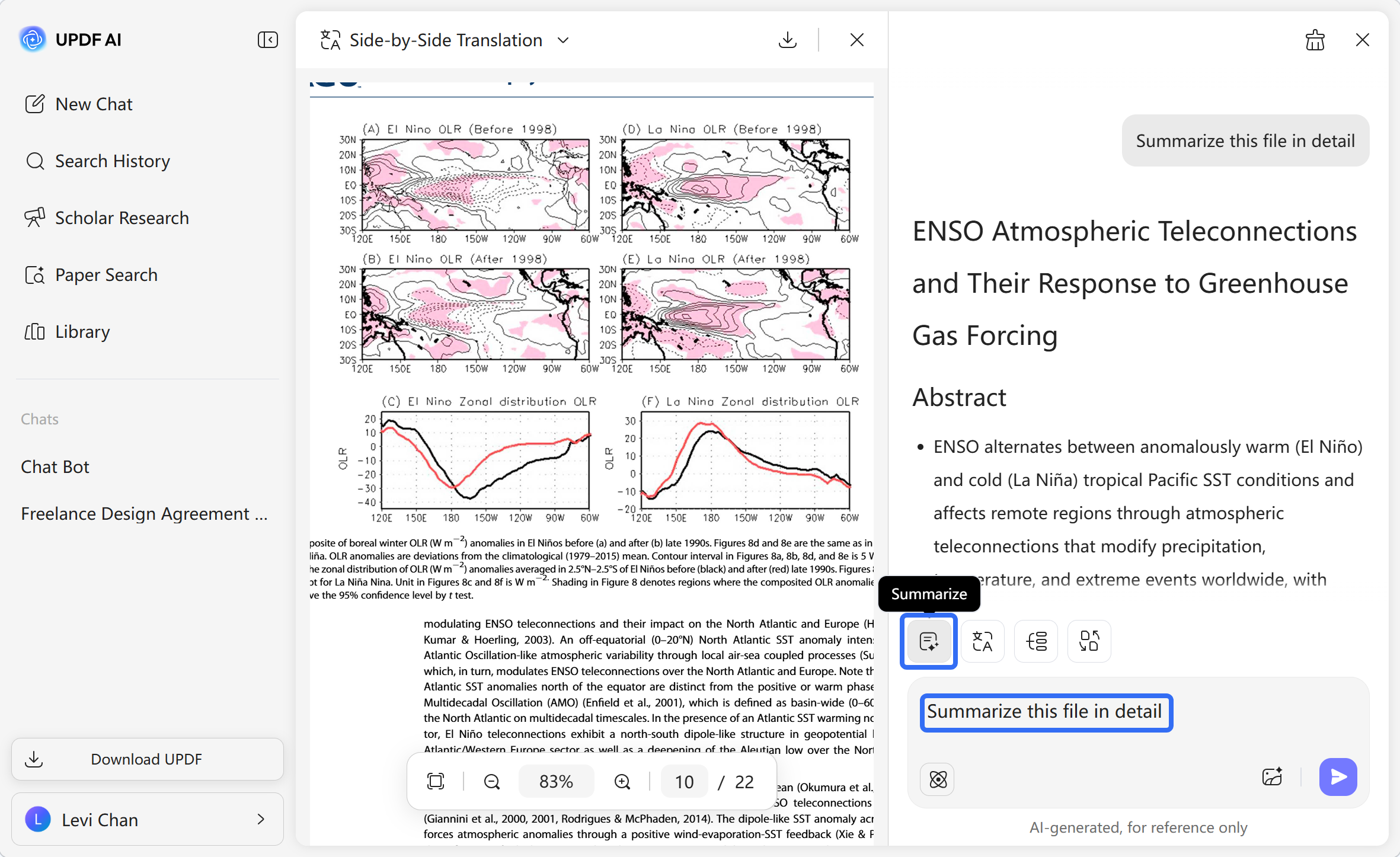
Upload Your Technical Document: Start by uploading the file, image or pasting text you want to summarize—whether it's a manual, specification sheet, research paper, or technical report.
-
Select Your Preferred AI Model: ChatGPT-5 is selected by default for fast, balanced summaries. You can switch to DeepSeek-R1 at any time by clicking “DeepThink” for more detailed, scenario-aware analysis.
-
Enter Prompt: Type a clear instruction like “Summarize this file in detail” or ask a specific technical question.
-
Define Scope and Receive Structured Summary: After entering your prompt, click "Summarize" and choose a page range to summarize. Within seconds, you will receive a structured summary.

Why Choose Technical Document Summarizer AI?
Profession-Oriented Technical Summarization
UPDF AI delivers summaries built for real-world technical use. It doesn’t just shorten text—it recognizes and extracts key formulas, parameters, procedures, and contextual relationships, turning dense documents across fields into structured checklists that support informed decisions.

Cross-Language Technical Clarity
Break down language barriers without losing technical accuracy. Upload documents in any major language and get precise summaries in your preferred language—keeping terminology, units, and specifications intact for global teams and international standards.

An Interactive Knowledge Partner—Not Just a Summarizer
Go beyond static summaries. Our AI doesn’t just extract information—it grasps context and relationships within your technical content, helping you validate approaches, prepare for reviews, and accelerate development cycles. Turn any document into a dialogue, and make every insight actionable.

UPDF Technical Document Summarizer
vs. Other AI Summarizers
UPDF AI Technical Document
Summarizer
Other AI Summarizers
Free


Chat with PDF Directly
Multi-Language Supported
Limited
Ad-free Experience
AI Models
ChatGPT-5 & DeepSeek R1
Single AI‑Model
Language Supported
100+
Less than 10
Platform Supported
Online, Windows, Mac, Android, iOS
Online or Limited
FAQs about UPDF Technical Document Summarizer AI
Q1. Can UPDF Technical Document Summarizer AI process multiple files at once?
Q2. Is it possible to summarize a document in image format with UPDF Technical Document Summarizer?
Q3. How does UPDF Technical Document Summarizer protect my privacy when summarizing files?
Q4. Can I control the length of the summary or focus the AI on a specific section of a document?
Other Popular UPDF AI Tools