UPDF
UPDF
 UPDF for Windows
 UPDF for Mac
 UPDF for iPhone/iPad
 UPDF for Android
 Nomostar
 UPDF AI Online
 UPDF Sign
 IvyCraft
 Edit PDF
 Annotate PDF
 Create PDF
 PDF Form
 Edit links
 Convert PDF
 OCR
OCR PDF to Word
 PDF to Image
 PDF to Excel
 Organize PDF
 Merge PDF
 Split PDF
 Crop PDF
 Rotate PDF
 Protect PDF
 Sign PDF
 Redact PDF
 Sanitize PDF
 Remove Security
 Read PDF
 UPDF Cloud
 Compress PDF
 Print PDF
 Batch Process
 About UPDF AI
 UPDF AI Solutions
 AI User Guide
 FAQ about UPDF AI
 Summarize PDF
 Translate PDF
 Chat with PDF
 Chat with AI
 Chat with image
 PDF to Mind Map
 Explain PDF
 PDF AI Tools
 Image AI Tools
 AI Chat Tools
 AI Writing Tools
 AI Study Tools
 AI Working Tools
 Other AI Tools
 AI Bookmark Generation
 AI Bookmark Summary
 AI Watermark Generation
 AI Background Generation
 AI Sticker Generation
 AI Stamp Generation
 AI Editing Suite
 UPDF Copilot
 AI Page Management
 AI Semantic Search
 PDF to Word
 PDF to Excel
 PDF to PowerPoint
 Enterprise Solution
 Enterprise Sign
 Enterprise AI
 Enterprise Plan
 Enterprise User Guide
 Enterprise Webinar
 Banking
 Healthcare
 Insurance
 Legal
Legal Manufacturing
 Government
 Researchers & PhDs
 Solopreneurs & Freelancers
 Lawyers & Legal Professionals
 Real Estate Agents & Brokers
 Education Solution
 Customer Stories
 User Guide
 UPDF Tricks
 FAQs
FAQs UPDF Reviews
 Download Center
 Blog
Blog Newsroom
 Tech Spec
 Updates
 UPDF vs. Adobe Acrobat
 UPDF vs. Foxit
 UPDF vs. PDF Expert

 UPDF AI
AI Resume PDF Reader/Summarizer
UPDF AI applies intelligent resume parsing to analyze PDF/image resumes and generate concise, well-organized summaries in just a few minutes.
Powered by
 GPT-5 |
 DeepSeek R1
5000+ Reviews
 4.8
4.8
Use UPDF AI Resume PDF Reader Anywhere:


 Desktop & mobile app

4M+ Users, 5M+ Resume PDF Reader, Trusted by Leading Medias:






How to Use UPDF AI to Resume PDF Reader Online for Free ?
-
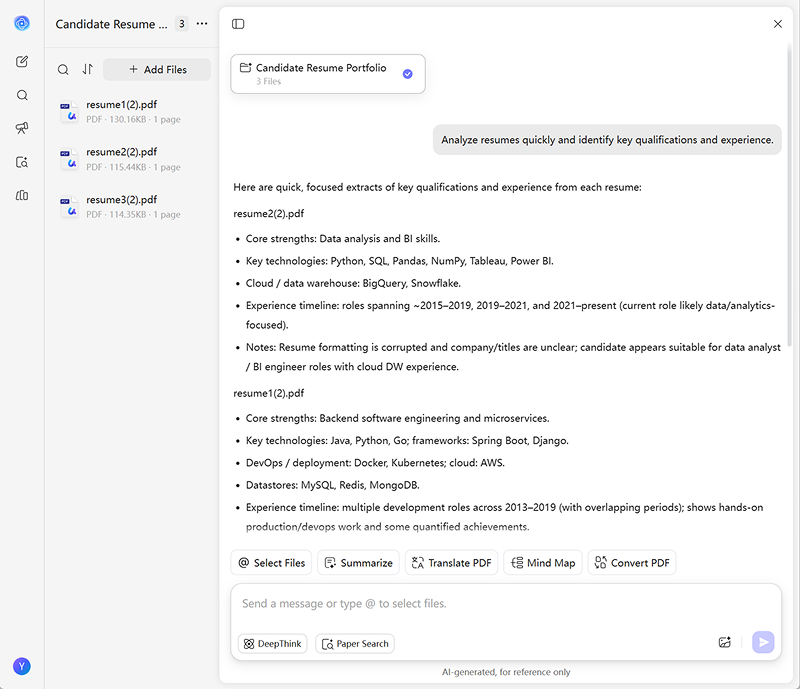
Upload Resumes
Upload one or multiple resumes to UPDF AI, then enter the prompt:"Analyze resumes quickly and identify key qualifications and experience." -
Choose the Model
By default, UPDF AI uses ChatGPT-5. For more in-depth analysis, switch to DeepThink Mode in the bottom left corner. -
Analyze Resumes
Click Send, and UPDF AI’s AI Resume PDF Reader/Summarizer will provide clear, structured insights from each resume. -
Evaluate and Filter Candidates
After analysis, you can filter candidates based on your hiring criteria, such as work experience, skill match, or education level. UPDF AI can score or rank candidates and provide filtered results. -
Example Prompt:
"From these resumes, select candidates with at least 3 years of experience who are proficient in Python and Excel, and rank them by skill match."

Why Choose UPDF AI as Your Resume PDF Reader?
Bulk Resume Processing
Recruiters and HR professionals often receive a high volume of job applications, making resume screening a time-consuming and tedious task when done manually. With the right AI resume parser, this process becomes effortless. UPDF AI can process multiple resumes at once, helping you analyze large document batches quickly and saving hours of repetitive work.

Improve Candidate Quality
By understanding context rather than relying solely on keywords, UPDF AI helps uncover hidden talent—candidates with strong potential who may not use perfectly optimized wording but still have valuable skills and experience.

Reduce Bias and Enhance Compliance
Consistent resume parsing and structured data extraction help minimize human error and unconscious bias, especially when anonymous resume parsing is enabled. This leads to fairer hiring decisions and improved compliance throughout the recruitment process.

OCR-Based CV Parsing
UPDF AI comes with a built-in OCR engine that can recognize and extract data from images and scanned documents. Even paper-based or scanned resumes can be processed with the same speed and accuracy as digital files, ensuring no candidate is overlooked.

UPDF AI Resume PDF Reader
vs. Other AI Tools
UPDF AI Resume PDF Reader
Other AI Tools
PDF Analysis
Comprehensive
Basic
AI Learning Speed
Fast
Slow
Free to Try
 (100 questions)

Resume Parsing
Structured
Unstructured
Bulk Handling
Limited
AI Model Options
ChatGPT-5 & DeepSeek R1
Limited to one AI model
Language Supported
100+
Only 4
Platform Supported
Online, Windows, Mac, Android, iOS
Online
FAQs About Using UPDF AI Resume PDF Reader
Q1. Is your resume information secure?
Q2. What technologies are used in AI-powered resume parsing?
Q3. Can I process multiple PDF files at once with UPDF AI?
Q4. Can an AI resume parser handle scanned resumes?
Other Popular UPDF AI Tools