UPDF
UPDF
 UPDF for Windows
 UPDF for Mac
 UPDF for iPhone/iPad
 UPDF for Android
 Nomostar
 UPDF AI Online
 UPDF Sign
 IvyCraft
 Edit PDF
 Annotate PDF
 Create PDF
 PDF Form
 Edit links
 Convert PDF
 OCR
OCR PDF to Word
 PDF to Image
 PDF to Excel
 Organize PDF
 Merge PDF
 Split PDF
 Crop PDF
 Rotate PDF
 Protect PDF
 Sign PDF
 Redact PDF
 Sanitize PDF
 Remove Security
 Read PDF
 UPDF Cloud
 Compress PDF
 Print PDF
 Batch Process
 About UPDF AI
 UPDF AI Solutions
 AI User Guide
 FAQ about UPDF AI
 Summarize PDF
 Translate PDF
 Chat with PDF
 Chat with AI
 Chat with image
 PDF to Mind Map
 Explain PDF
 PDF AI Tools
 Image AI Tools
 AI Chat Tools
 AI Writing Tools
 AI Study Tools
 AI Working Tools
 Other AI Tools
 AI Bookmark Generation
 AI Bookmark Summary
 AI Watermark Generation
 AI Background Generation
 AI Sticker Generation
 AI Stamp Generation
 AI Editing Suite
 UPDF Copilot
 AI Page Management
 AI Semantic Search
 PDF to Word
 PDF to Excel
 PDF to PowerPoint
 Enterprise Solution
 Enterprise Sign
 Enterprise AI
 Enterprise Plan
 Enterprise User Guide
 Enterprise Webinar
 Banking
 Healthcare
 Insurance
 Legal
Legal Manufacturing
 Government
 Researchers & PhDs
 Solopreneurs & Freelancers
 Lawyers & Legal Professionals
 Real Estate Agents & Brokers
 Education Solution
 Customer Stories
 User Guide
 UPDF Tricks
 FAQs
FAQs UPDF Reviews
 Download Center
 Blog
Blog Newsroom
 Tech Spec
 Updates
 UPDF vs. Adobe Acrobat
 UPDF vs. Foxit
 UPDF vs. PDF Expert

Convert PDF to PowerPointAI-Powered
Convert single or multiple PDF files to PowerPoint with precise formatting using AI.
 100% Free
Secure & Trusted
4.8/5 (2389 Votes)
7M+ Files Uploaded
 Your file is securely handled and deleted after processing.
 By using this function, you agree to our terms of service.
4M+ Users, 10M+ Files Converted, Trusted by Leading Medias:






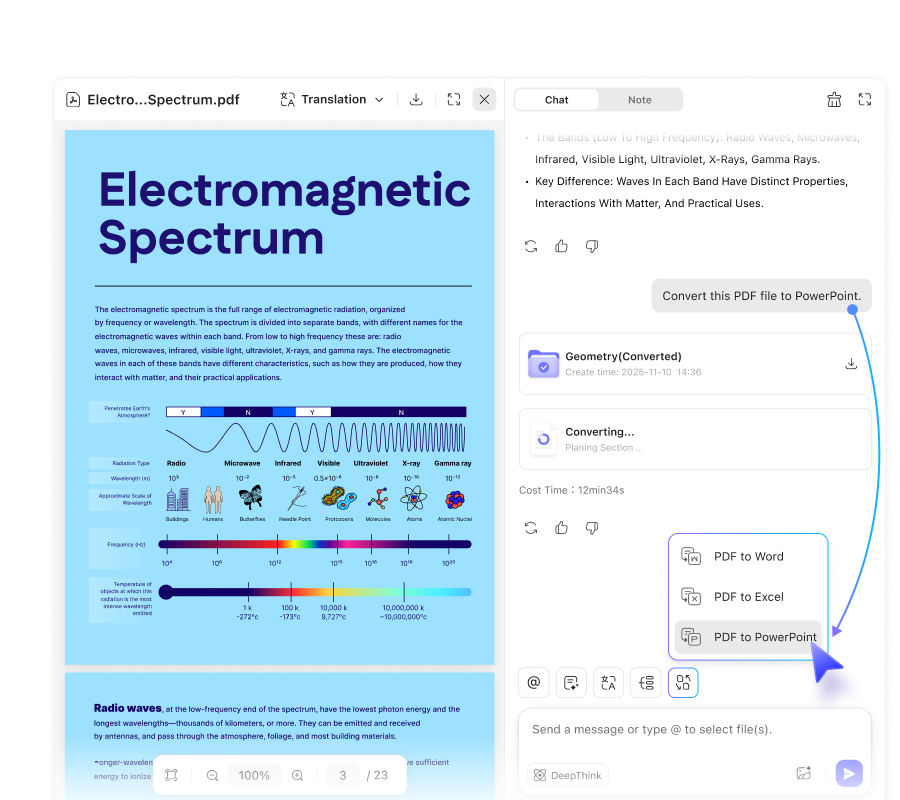
How to Convert PDF to PPT Using AI?
-
Click the “Upload File” button to open your file browser, then select the PDF files you wish to convert and upload them to the UPDF PDF to PPT converter.
-
Once your PDF file is uploaded, click the “Convert to PPT” button to begin converting it into a PowerPoint presentation.
-
In just a few seconds, your converted PowerPoint file will be ready. Click the download button to save it to your computer.

Why Choose UPDF Online AI
PDF to PPT Converter?

AI Powered
UPDF AI PDF to PPT Converter, powered by ChatGPT and DeepSeek, converts PDFs to PPT and offers advanced AI features.

Safe and Reliable
SSL-secured and trusted by over 2 million users, UPDF safely handles your files without any issues.

Easy and Fast
With a user-friendly interface and smooth workflow, UPDF is easy for beginners and works quickly thanks to its stable server.

Without Lossing Quality
UPDF preserves all images and text from the PDF after conversion, keeping the layout intact for presentations.

Batch PDF to PPT
Multiple PDF files can be uploaded and converted simultaneously, saving you time and effort.

Accurate OCR Processing
Built-in OCR allows scanned PDFs to be converted into editable PowerPoint files, individually or in batches accurately.

No Account Required
In the free version, no email is needed; sign in only when upgrading to Pro for unlimited features.

More Than PDF to PPT
Besides PDF to PPT, it also supports PDF to Word, batch PDF to Word, PDF to Excel, AI features, and more.

Anywhere and Anytime
UPDF Online PDF to PPT Converter runs in your browser, allowing access anytime, anywhere, on any device.
Why Recommend
Downloading UPDF
for PDF to PPT?
UPDF
Offline Converter
Download Now
UPDF Online Converter
Convert PDF NowFile Size Limitation
No Limit
Free: 10MB/PDF | Paid: 100MB/PDF
PDF Page Limit
No Limit
Free: 100 Pages/PDF | Paid: 300 Pages/PDF
Speed
2s
About 30s (Based on file size)
Offline Processing


Files Processed
Work on Local Device
Upload File to Server
Batch Process
No Limit
Up to 100 PDFs
OCR Supported
PDF to Other Formats
Word, Excel, PPT, PNG, JPEG, TIFF, GIF, BMP. CSV, RTF, TXT, XML, HTML
Word, Excel, PPT
Other Formats to PDF
Other PDF Features
Edit PDF, Organize PDF, Annotate PDF, PDF Form, Compare PDF, etc.
Platform Supported
Windows, Mac, Android, iOS
Online
FAQs About Converting PDF to PPT
1. Does the UPDF Online PDF to PowerPoint converter have any file size restrictions?
2. What types of PDFs can be converted with UPDF Online PDF to PPT Converter?
3. How many languages does UPDF Online PDF to PPT Converter support for OCR?
4. Can I edit PDFs before converting to PPT with UPDF Online PDF to PPT Converter?
Other Popular UPDF AI Tools