UPDF
UPDF
 UPDF for Windows
 UPDF for Mac
 UPDF for iPhone/iPad
 UPDF for Android
 Nomostar
 UPDF AI Online
 UPDF Sign
 IvyCraft
 Edit PDF
 Annotate PDF
 Create PDF
 PDF Form
 Edit links
 Convert PDF
 OCR
OCR PDF to Word
 PDF to Image
 PDF to Excel
 Organize PDF
 Merge PDF
 Split PDF
 Crop PDF
 Rotate PDF
 Protect PDF
 Sign PDF
 Redact PDF
 Sanitize PDF
 Remove Security
 Read PDF
 UPDF Cloud
 Compress PDF
 Print PDF
 Batch Process
 About UPDF AI
 UPDF AI Solutions
 AI User Guide
 FAQ about UPDF AI
 Summarize PDF
 Translate PDF
 Chat with PDF
 Chat with AI
 Chat with image
 PDF to Mind Map
 Explain PDF
 PDF AI Tools
 Image AI Tools
 AI Chat Tools
 AI Writing Tools
 AI Study Tools
 AI Working Tools
 Other AI Tools
 AI Bookmark Generation
 AI Bookmark Summary
 AI Watermark Generation
 AI Background Generation
 AI Sticker Generation
 AI Stamp Generation
 AI Editing Suite
 UPDF Copilot
 AI Page Management
 AI Semantic Search
 PDF to Word
 PDF to Excel
 PDF to PowerPoint
 Enterprise Solution
 Enterprise Sign
 Enterprise AI
 Enterprise Plan
 Enterprise User Guide
 Enterprise Webinar
 IT
IT Education
 Construction
 Financial Service
 Healthcare
 Insurance
 Legal
Legal Manufacturing
 Government
 Researchers & PhDs
 Solopreneurs & Freelancers
 Lawyers & Legal Professionals
 Real Estate Agents & Brokers
 Education Solution
 Customer Stories
 User Guide
 UPDF Tricks
 FAQs
FAQs UPDF Reviews
 Download Center
 Blog
Blog Newsroom
 Tech Spec
 Updates
 UPDF vs. Adobe Acrobat
 UPDF vs. Foxit
 UPDF vs. PDF Expert

 UPDF AI
Analyze Research Paper Free Online
Let AI read and digest research papers for you — in just 30 seconds. Upload or search any paper, and get a smart summary for every paper, systematic literature review for all your research papers, and authentic citation info.
Powered by
 GPT-5 |
 DeepSeek R1
5000+ Reviews
 4.8
4.8
UPDF AI available on


 Desktop & mobile app

4M+ Users, 4.6M+ Research Paper Analyses Created, Trusted by Leading Medias:






How to Analyze Research Papers Online for Free?
-
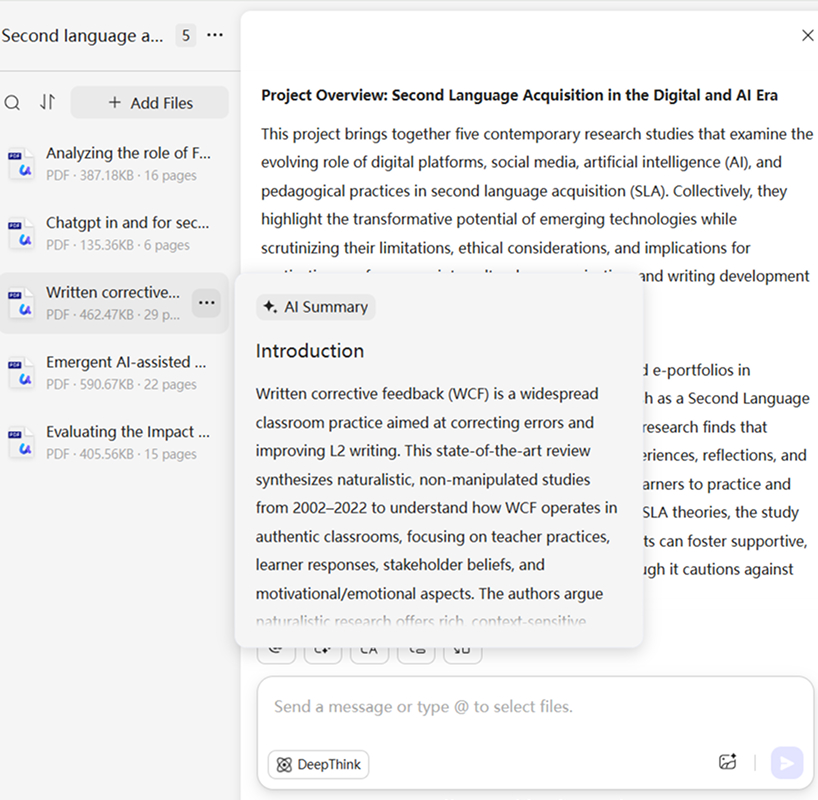
Search or upload all your research papers as a project with UPDF AI. If you have found the paper you are looking for, click the “Add to Chat” button to create a project. UPDF AI will generate a systematic literature review for all the papers you intend to analyze in this project.
-
Start the conversion with the project you just created. UPDF AI will then instantly analyze all research papers, generate summaries for each paper, and create a structured literature review with citations for all the research papers in the project.
-
You can ask UPDF AI to explain specific content in your research papers, use tools like “Summarize (by page),” “Translate,” “Mind Map,” or type a prompt and click “DeepThink” for deeper insights.

Where Does UPDF AI Excel in Analyzing Research Papers?
Cross-Paper Comparison for Faster Literature Reviews
UPDF AI empowers you to conduct systematic reviews across multiple PDFs seamlessly, unlike other tools that only summarize one paper. It automatically identifies key insights across your research materials—including similarities and differences in methodologies, conflicting or aligned findings, emerging trends, and critical gaps in the literature. It helps you uncover connections and deeper insights across all your research papers.

Generating Citations and Reference Notes
UPDF AI automatically extracts key academic details—such as authors, publication dates, keywords, and all cited works within the paper—so users can quickly build accurate bibliographies, organize research materials, and streamline their literature review process without manually searching through the document.

Rich Tools to Take Your Research Understanding Further
Thanks to its built-in productivity tools, you can translate a specific page or view side-by-side translations for the entire paper, generate mind map, choose specific pages to summarize, and even upload figures or charts and ask the AI questions about the visual content—not just the text.

Why Use UPDF AI to Analyze Research Paper?
Designed for All Research Readers
UPDF AI is ideal for anyone who needs to understand academic papers quickly. Whether you're studying, researching, teaching, or working in a technical field, it delivers fast summaries, clear explanations, and organized insights from even the most complex studies.
Your Chats and Papers, Always Saved
UPDF AI saves your full chat history for each paper and securely stores all your opened files, so you can always return to your previous questions and documents without losing any progress.
Works for Every Discipline
UPDF AI can analyze papers across all disciplines and difficulty levels—from humanities to engineering to medical research—making it a versatile tool for any type of academic work.
UPDF AI vs. Other AI tools
UPDF AI
Other AI Tools
Cross-paper comparison for literature reviews


Analyzes text and images (charts, formulas, figures)
Limited. Mostly analyzes text only
Side-by-side translation & page-level translation
Built-in tools to search papers for analysis
Usually depends manual uploads.
Accurate extraction of citations & reference details
Ad-free, distraction-free UI
FAQs for Analyzing Research Paper Using UPDF AI
1. Can I use UPDF AI to analyze research papers without ads?
2. How many research paper can I upload?
3. What file formats can I upload for my research paper?
4. If the research paper uses a different language than my usual one, what language will UPDF AI use for its responses?
Other Popular UPDF AI Tools