 UPDF
 UPDF for Windows
 UPDF for Mac
 UPDF for iPhone/iPad
 UPDF for Android
 Nomostar
 UPDF AI Online
 UPDF Sign
 IvyCraft
 Edit PDF
 Annotate PDF
 Create PDF
 PDF Form
 Edit links
 Convert PDF
 OCR
 PDF to Word
 PDF to Image
 PDF to Excel
 Organize PDF
 Merge PDF
 Split PDF
 Crop PDF
 Rotate PDF
 Protect PDF
 Sign PDF
 Redact PDF
 Sanitize PDF
 Remove Security
 Read PDF
 UPDF Cloud
 Compress PDF
 Print PDF
 Batch Process

 About UPDF AI
 UPDF AI Solutions
 AI User Guide
 FAQ about UPDF AI
 Summarize PDF
 Translate PDF
 Chat with PDF
 Chat with AI
 Chat with image
 PDF to Mind Map
 Explain PDF
 PDF AI Tools
 Image AI Tools
 AI Chat Tools
 AI Writing Tools
 AI Study Tools
 AI Working Tools
 Other AI Tools
 AI Bookmark Generation
 AI Bookmark Summary
 AI Watermark Generation
 AI Background Generation
 AI Sticker Generation
 AI Stamp Generation
 AI Editing Suite
 UPDF Copilot
 AI Page Management
 AI Semantic Search
 PDF to Word
 PDF to Excel
 PDF to PowerPoint
 Enterprise Solution
 Enterprise Sign
 Enterprise AI
 Enterprise Plan
 Enterprise User Guide
 Enterprise Webinar
 IT
 Education
 Construction
 Financial Service
 Healthcare
 Insurance
 Legal
 Manufacturing
 Government
 Researchers & PhDs
 Solopreneurs & Freelancers
 Lawyers & Legal Professionals
 Real Estate Agents & Brokers
 Education Solution
 Customer Stories
 User Guide
 UPDF Tricks
 FAQs
 UPDF Reviews
 Download Center
 Blog
 Newsroom
 Tech Spec
 Updates
 UPDF vs. Adobe Acrobat
 UPDF vs. Foxit
 UPDF vs. PDF Expert


As of November 10, 2026, no official Nitro PDF Black Friday 2026 deal has been announced. Nitro Standard and Classic remain at regular prices, with a 14-day free trial available. Standard costs US$180 yearly per user, while Windows-only Classic costs US$270 for 3 years.
Meanwhile, UPDF 3.0 offers an active Black Friday sale with discounts reaching 48% off. UPDF Pro costs US$54.99 yearly or US$84.99 lifetime, unlike Nitro Classic's 3-year license term. This guide covers Nitro's current deal status, trusted discount sources, and UPDF's available offers.
If you need a PDF editor now, UPDF is a capable Nitro alternative for editing, OCR, conversion, forms, protection, and signatures. Download it free and try it with your own files without entering a credit card.
Windows • macOS • iOS • Android 100% secure
Part 1. Is the Nitro PDF Black Friday 2026 Deal Live?
Nitro has not officially announced its 2026 Black Friday promotion as of November 10, 2026. Its regular plans remain listed without any confirmed holiday discounts. The table below shows Nitro's current pricing, license options, and sale status:
| Item | Current Status |
|---|---|
| Nitro PDF 2026 Black Friday Deal | Not officially announced |
| Nitro PDF Standard | US$15/month/user, billed annually at US$180 |
| Nitro PDF Classic | US$270 for a 3-year Windows license |
| Free Trial | 14 days, no credit card required |
| Last Checked | November 10, 2026 |
Nitro's official product information lists Standard as an annual subscription for Windows, Mac, and iOS. Classic follows a different model, with a single payment covering 3 years of Windows desktop use. Unlike a lifetime license, Classic has a fixed 3-year term.
There is also no confirmed Nitro PDF Cyber Monday offer for 2026. Nitro has not published an official sale date or discount percentage, so online claims about upcoming savings should remain unverified until Nitro announces its terms.
Part 2. Where to Check for a Nitro PDF Deal Now
Finding a genuine Nitro PDF discount starts with checking reliable sources. Nitro's official store provides current prices, while authorized resellers can offer quotes for business purchases. TechRadar and PCWorld are also useful for comparing reported prices. See the table below to review what each source offers and what buyers should check:
| Source | What It Can Confirm | Conditions to Check |
|---|---|---|
| Nitro Official Store | Current prices, official discounts, and sale offers | Subscription terms, license duration, and supported platforms |
| Nitro Authorized Resellers | Business quotes and volume pricing | Minimum seats, contract length, and eligibility |
| TechRadar and PCWorld | Pricing information from published reviews | Publication dates and accuracy of reported prices |
Nitro Official Store
Nitro's official pricing page is the best place to check for current offers. As of November 10, 2026, it lists the following regular US prices:
- Nitro PDF Standard: US$15/month/user, billed annually at US$180. It supports Windows, Mac, and iOS, with AI tools and batch OCR included.
- Nitro PDF Classic: US$270 per license for 3 years of Windows desktop use, paid upfront.
- Nitro PDF Plus: Pricing is available through Nitro's sales team upon request.
- Free Trial: 14 days of access to full features without a credit card.
These are regular prices, not confirmed Black Friday discounts. Sales tax is calculated at checkout, and online purchases support up to 20 subscription licenses. Businesses needing more licenses can contact Nitro's sales team for a quote.
Nitro Authorized Resellers for Business Purchases
Businesses purchasing multiple Nitro licenses can also contact authorized resellers. Nitro's official partner directory lists SHI, Insight, and CDW as authorized partners. As of November 10, 2026, SHI listed Nitro PDF Standard at US$121/license/year for orders of 500–999 licenses. However, this price requires at least 500 seats, making it a volume-license rate rather than an individual discount.
Businesses looking for another option can explore UPDF Enterprise Pricing. Its yearly plan costs US$79/year/user, while its lifetime plan costs US$129/user as a one-time payment. Volume discounts begin at 5 seats, with lifetime pricing reaching US$103/user for orders of 20–30 seats.
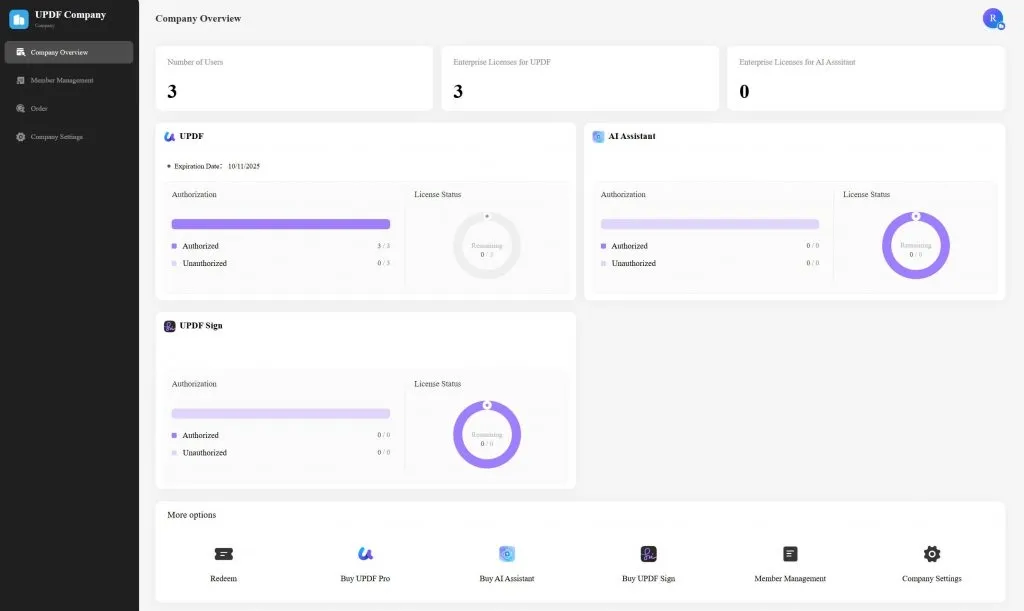
UPDF also provides a centralized dashboard where administrators can add or remove members and assign or revoke licenses. Each licensed user can access UPDF on Windows, macOS, iOS, and Android, with support for 1 desktop and 2 mobile devices.
Trusted Deal Trackers
Besides Nitro's official store, trusted technology reviews can help readers compare prices and check for possible discounts. The TechRadar Nitro PDF review, published on October 28, 2026, lists Standard at US$15/month/user, billed annually, and Classic at US$270.
Similarly, PCWorld's Nitro PDF review, dated April 30, 2026, reports Standard at US$180/year/user. Neither review mentioned a confirmed Black Friday promotion when checked on November 10, 2026. These sources are useful for comparing prices, but buyers should confirm any discount through Nitro's official store.
Part 3. Nitro PDF Black Friday Deals from the Past Three Years
Looking at previous Black Friday sales can help buyers understand potential savings. However, reliable US records of Nitro's discounts from 2023 to 2025 are limited. Several coupon websites mention past promotions, but the original offers and their terms cannot be verified.
No official Nitro archive or reliable report confirms the discount percentages reported for those years. Therefore, these figures should not be treated as genuine historical deals. For now, buyers can use Nitro's regular prices of US$180/year/user for Standard and US$270 for Classic as a reference when evaluating future offers.
Part 4. Should You Wait for the Nitro PDF Black Friday Sale?
Waiting for Nitro's Black Friday sale makes sense if you already use its software or business tools. However, Nitro has not confirmed any 2026 promotion, and reliable records of past discounts are limited. Even if a Nitro PDF Pro Black Friday deal appears, the savings will depend on the eligible plan and license terms. Here is what different buyers should consider:
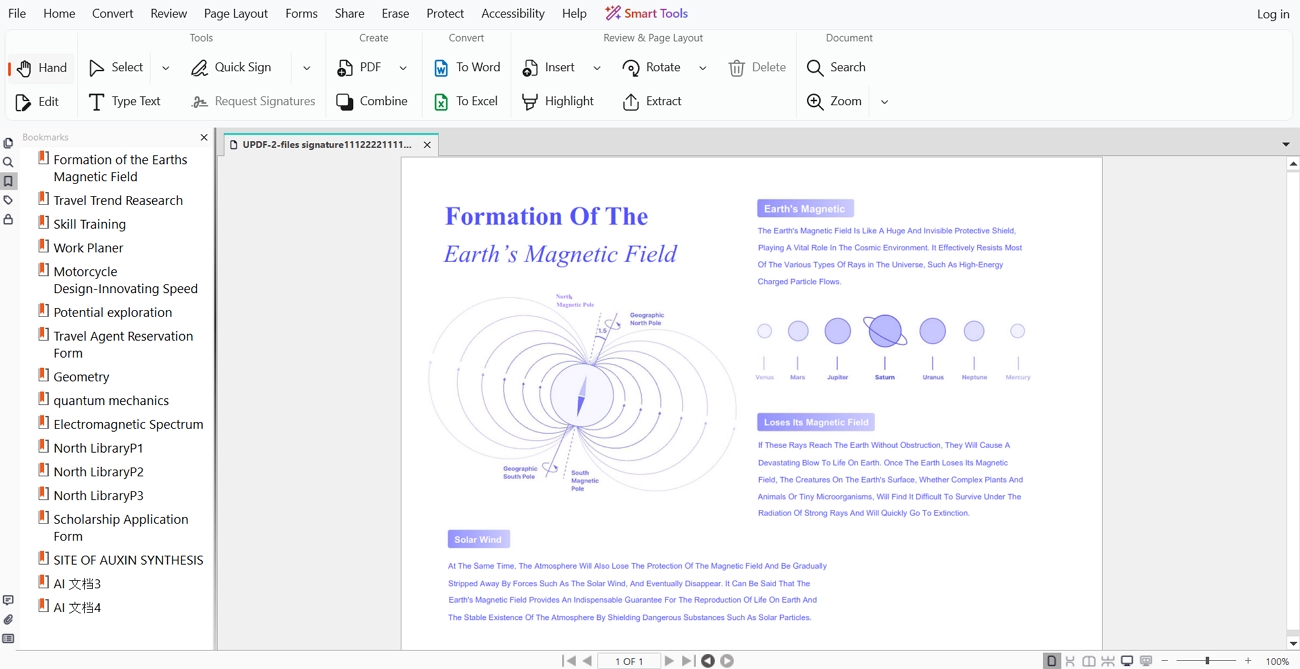
- Existing Nitro Users: If your team depends on Nitro's tools and workflows, waiting for an official discount may be worthwhile.
- Business Buyers: Request quotes from authorized resellers and compare minimum seat requirements, contract terms, and long-term costs before purchasing.
- Everyday PDF Users: If you mainly need PDF editing, OCR, conversion, batch processing, forms, protection, or signatures, other PDF editors can meet these needs without waiting for Nitro.
For those who need a PDF editor right away, UPDF 3.0 offers another option. Its 2026 Black Friday promotion is already available, making it worth exploring before deciding whether to wait.
Part 5. UPDF 3.0 Black Friday Deal: A Nitro Alternative Available Now
Instead of waiting for an unconfirmed Nitro PDF coupon, you can explore the active UPDF 3.0 Black Friday deal. The promotion launched alongside UPDF 3.0 on November 3, 2026, offering discounts of up to 48% on the Pro and AI bundle. UPDF Pro alone costs US$54.99 for the 1st year and renews at US$64.99/year.
You can also download UPDF and try its features without entering credit card details. However, the free version adds watermarks to saved PDFs. While UPDF and Nitro support many similar PDF tasks, their AI features, signing options, and licensing terms differ.
Want to see how UPDF handles your everyday PDF workflow? Download it free and test the tools below with your own documents before choosing a plan.
Windows • macOS • iOS • Android 100% secure
One Workflow from Document Review to Final Signature
UPDF's Request Sign feature helps manage agreements through Windows and Mac apps, from review to final signatures. Here is how the process works:
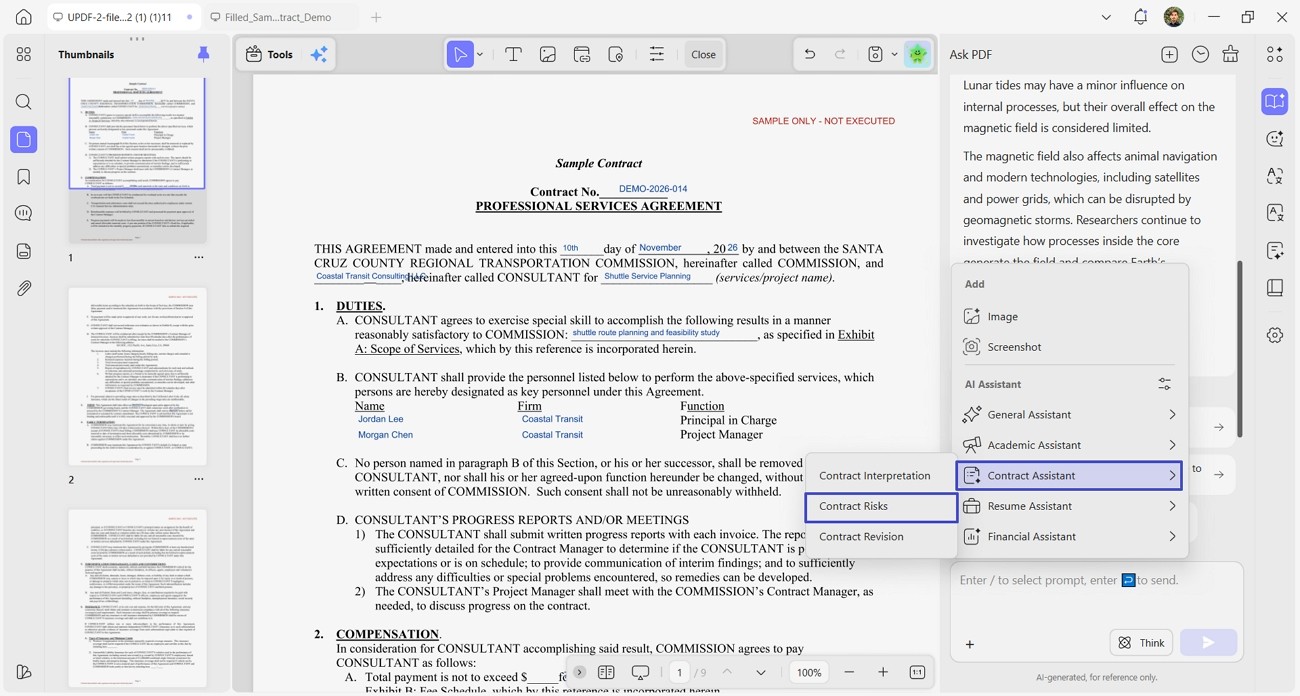
Understand: Use Contract Risks to identify clauses that may need closer attention before signing. Review flagged issues carefully to understand possible risks within the original PDF document.
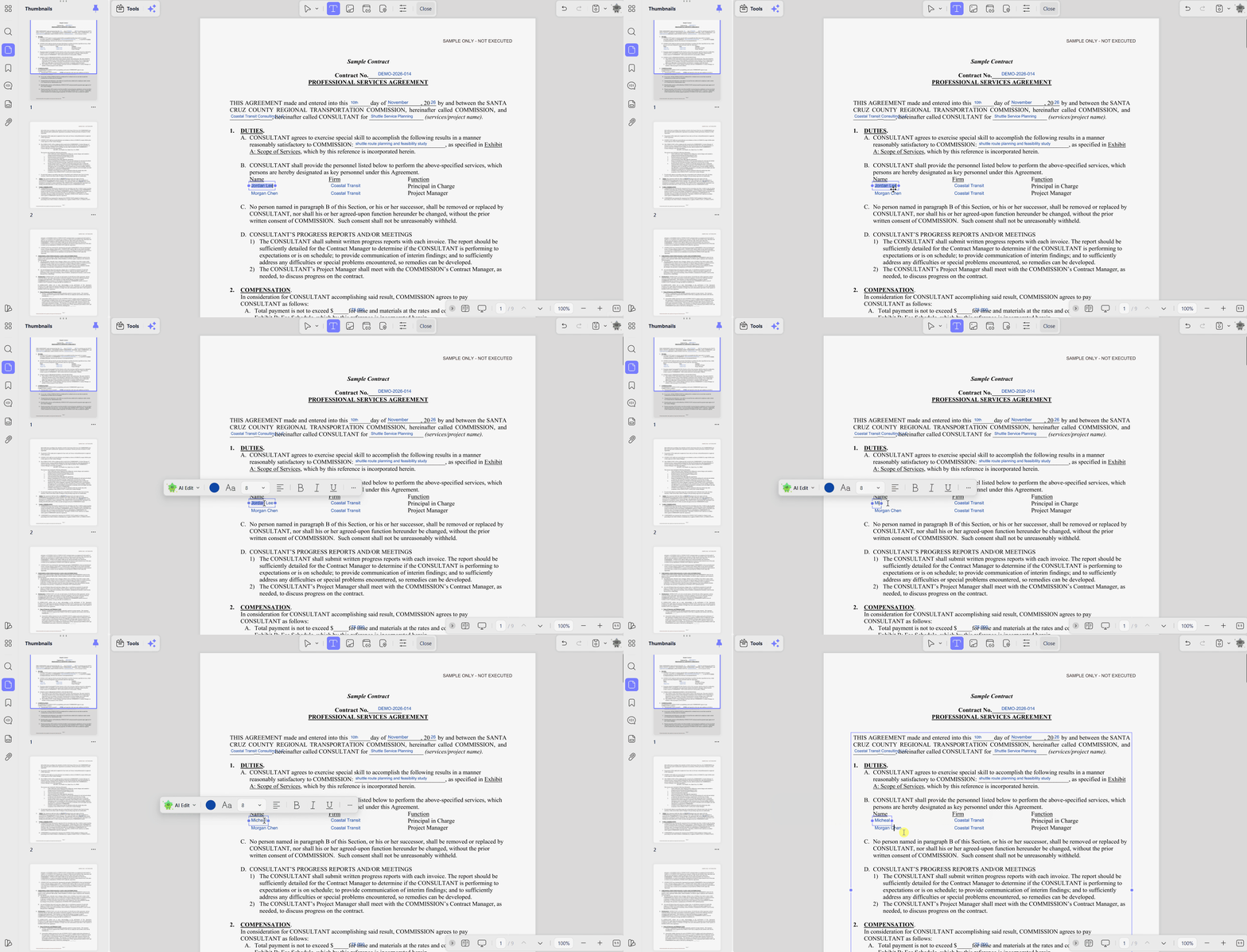
Edit and Organize: Correct document wording and rearrange pages to improve the overall contract structure. Apply OCR to scanned pages so their text becomes searchable and editable afterward.
Protect or Redact: Remove sensitive details like account numbers before sharing documents with other people. You can also apply password protection to prevent unauthorized access to confidential files.
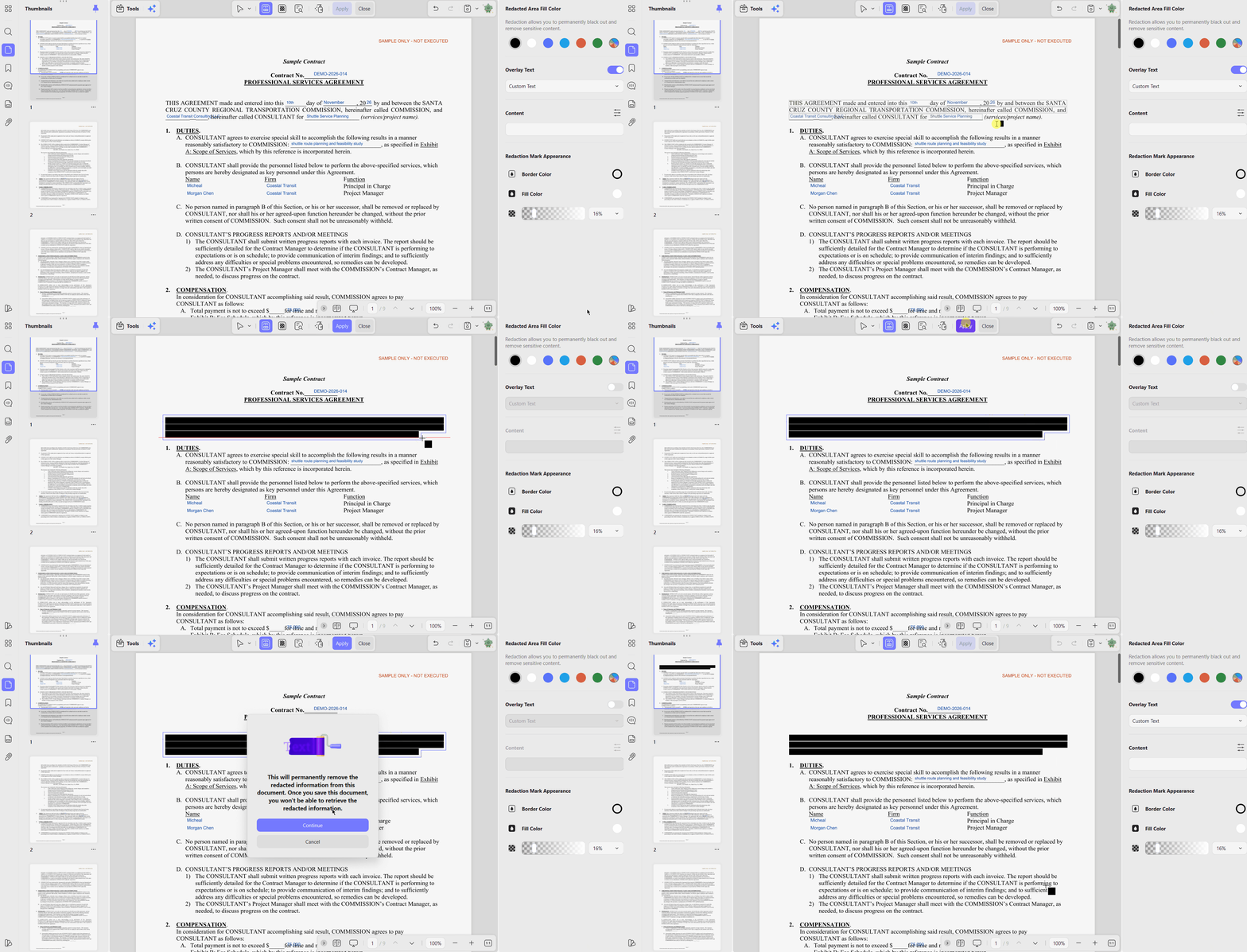
Send: Add Signature, Initial, and Date fields where recipients need to provide information. Set the signing order so each recipient receives the agreement at their turn.
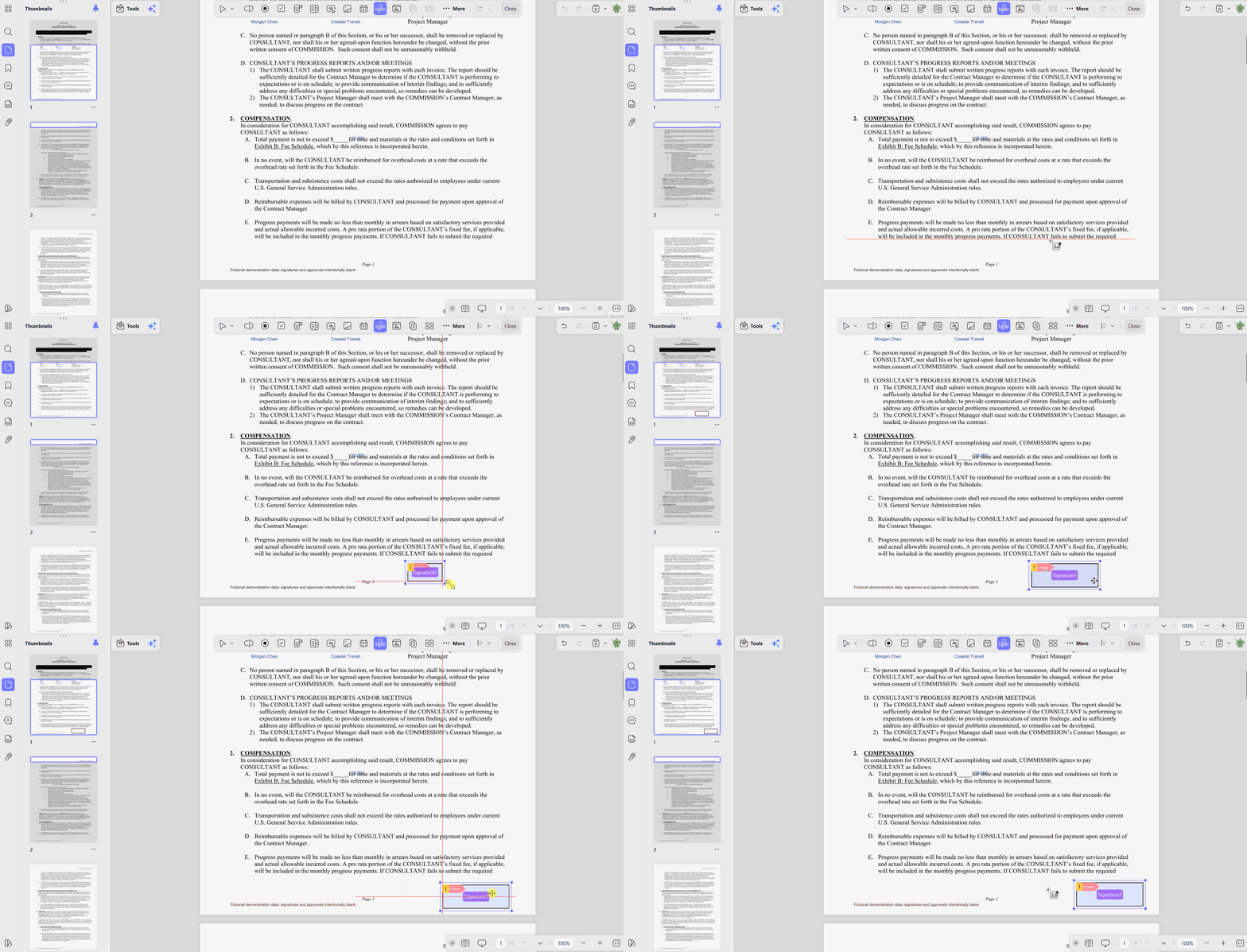
Track: Check signing progress to see which recipients have viewed or signed agreements. Send reminders to anyone still waiting to complete their required signature fields online.
Manage: Download completed agreements and keep copies available for future reference when needed. Find previously signed documents by checking their status within the agreement management area.
Important: Always verify AI findings against the original PDF, especially for contracts and financial reports.
Scenario Assistants and Customizable Quick Tasks
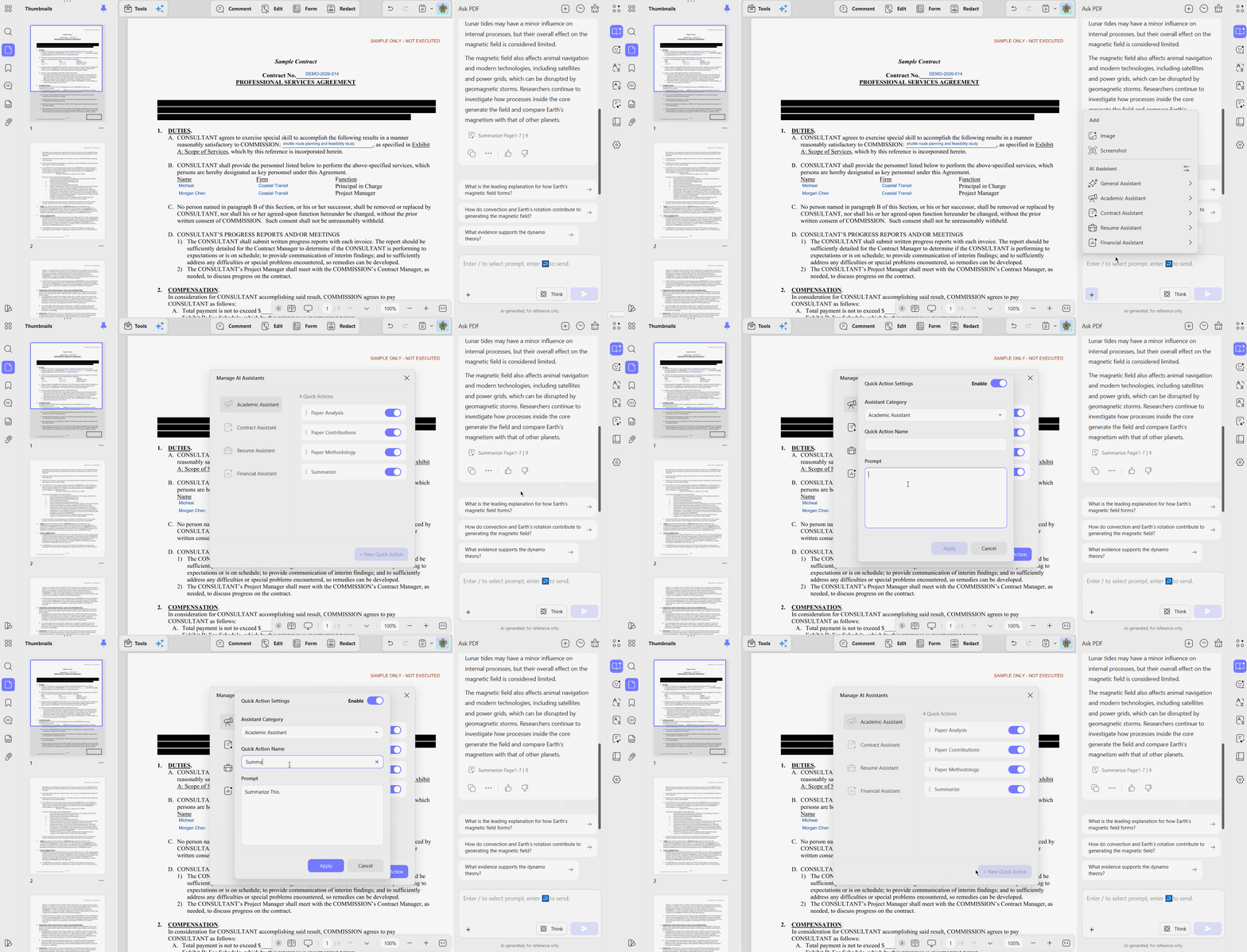
Contract Risks, the first step in that workflow, belongs to one of four new scenario assistants in UPDF AI. The Academic, Contract, Resume, and Financial assistants join the existing Summarize, Translate, and Mind Map tools.
Under “Manage AI Assistants,” you can save a prompt as a named quick action in a chosen category, then edit, delete, reorder, enable, or disable it. A contract team could save one that lists every payment obligation and due date.
A Customizable Toolbar
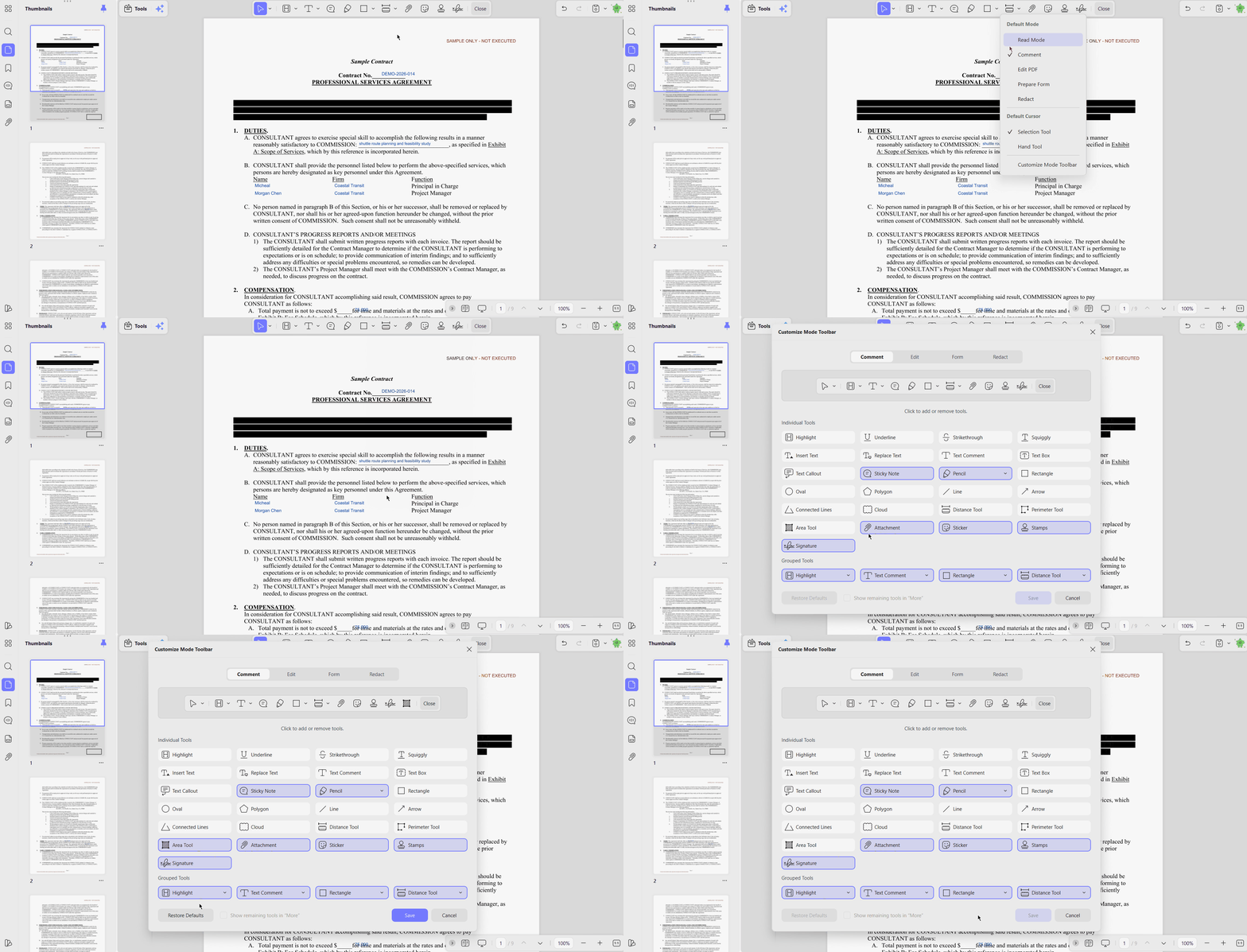
Beyond AI, the UPDF 3.0 release notes list toolbar customization, and the Windows guide shows separate layouts for Comment, Edit, Form, and Redact modes. Right-clicking the top toolbar opens “Customize Mode Toolbar,” where frequent tools stay visible and rarely used ones can be hidden.
Grouping related commands in one drop-down saves time spent hunting through menus, and “Restore Defaults” returns the original layout.
Part 6. UPDF vs. Nitro PDF at a Glance
Choosing between UPDF 3.0 and Nitro PDF comes down to pricing, features, and licensing options. While the Nitro PDF Pro Black Friday deal remains unconfirmed, UPDF already has an active promotion. Look at the table below to see how both PDF editors compare:
| Category | UPDF 3.0 | Nitro PDF |
|---|---|---|
| 2026 Black Friday Status | Active sale with up to 48% off | No officially confirmed deal |
| Core PDF Tools | Editing, annotation, OCR, conversion, batch processing, forms, protection, and signing | Editing, conversion, batch OCR, annotation, protection, and signing |
| Upfront Purchase Option | US$84.99 lifetime license during the sale | US$270 Classic license valid for 3 years |
| Supported Platforms | Windows, macOS, iOS, and Android | Windows, Mac, and iOS for Standard; Windows only for Classic |
| Scenario Assistants | 4 AI assistants with customizable quick actions | AI summaries and data extraction in Standard and Plus; unavailable in Classic |
| Toolbar Customization | Customizable layouts for different work modes | Quick Access Toolbar and custom ribbon tab on Windows |
| Enterprise Management | Dashboard for managing members and assigning licenses | Nitro Admin portal in Standard; SSO and domain control in Plus |
The complete UPDF vs. Nitro PDF comparison goes further, with a feature-by-feature breakdown of both editors.
Part 7. Final Verdict
If you prefer Nitro, monitor its official store for a confirmed Nitro PDF Black Friday deal. Authorized resellers may also announce discounts, so compare their offers before making any purchase decisions.
Meanwhile, UPDF 3.0 offers an active Black Friday promotion with flexible plans across multiple platforms. Download UPDF, test its features using your own documents, and review the available individual plans before deciding.
Windows • macOS • iOS • Android 100% secure
FAQs
Is Nitro PDF on sale for Black Friday 2026?
Nitro PDF had no confirmed Black Friday sale as of November 10, 2026. Check Nitro's official store for newly announced promotions before relying on third-party discount claims.
How much does Nitro PDF normally cost?
Nitro PDF Standard costs US$15/month/user, billed annually at US$180, while Classic costs US$270 for 3 years. Nitro PDF Plus requires a custom sales quote.
Does Nitro offer a lifetime license?
Nitro's official US pricing page currently lists no lifetime or perpetual plan. Nitro PDF Classic is a one-time purchase that covers 3 years of Windows desktop use.
Is Nitro PDF Classic a perpetual license?
No. Nitro PDF Classic costs US$270 for a fixed 3-year Windows license, so it is not perpetual ownership.
Where can I find a legitimate Nitro PDF discount?
Check Nitro's official store or authorized partners such as SHI, Insight, and CDW. Independent technology reviews can help cross-check prices, but they do not sell Nitro licenses.
Are Nitro coupon websites trustworthy?
Coupon aggregators may display outdated or unverifiable codes. Confirm any coupon at Nitro checkout and avoid unauthorized sellers advertising suspicious lifetime keys.
Can businesses get a Nitro volume discount?
Yes. Nitro handles business orders above 20 subscription licenses through its sales team. Authorized reseller pricing varies and may require a large minimum seat count.
Is UPDF a good alternative to Nitro PDF?
UPDF supports editing, OCR, conversion, forms, document protection, and signing, making it a practical Nitro alternative. Download it free to test the workflow with your own documents.
Does UPDF offer enterprise and lifetime plans?
Yes. UPDF offers individual and enterprise lifetime options as one-time purchases, alongside yearly plans. Review the current plan details before purchasing.





 Enid Brown

 Enola Davis
 Enya Moore
