UPDF
UPDF
 UPDF for Windows
 UPDF for Mac
 UPDF for iPhone/iPad
 UPDF for Android
 Nomostar
 UPDF AI Online
 UPDF Sign
 IvyCraft
 Edit PDF
 Annotate PDF
 Create PDF
 PDF Form
 Edit links
 Convert PDF
 OCR
OCR PDF to Word
 PDF to Image
 PDF to Excel
 Organize PDF
 Merge PDF
 Split PDF
 Crop PDF
 Rotate PDF
 Protect PDF
 Sign PDF
 Redact PDF
 Sanitize PDF
 Remove Security
 Read PDF
 UPDF Cloud
 Compress PDF
 Print PDF
 Batch Process
 About UPDF AI
 UPDF AI Solutions
 AI User Guide
 FAQ about UPDF AI
 Summarize PDF
 Translate PDF
 Chat with PDF
 Chat with AI
 Chat with image
 PDF to Mind Map
 Explain PDF
 PDF AI Tools
 Image AI Tools
 AI Chat Tools
 AI Writing Tools
 AI Study Tools
 AI Working Tools
 Other AI Tools
 AI Bookmark Generation
 AI Bookmark Summary
 AI Watermark Generation
 AI Background Generation
 AI Sticker Generation
 AI Stamp Generation
 AI Editing Suite
 UPDF Copilot
 AI Page Management
 AI Semantic Search
 PDF to Word
 PDF to Excel
 PDF to PowerPoint
 Enterprise Solution
 Enterprise Sign
 Enterprise AI
 Enterprise Plan
 Enterprise User Guide
 Enterprise Webinar
 Banking
 Healthcare
 Insurance
 Legal
Legal Manufacturing
 Government
 Researchers & PhDs
 Solopreneurs & Freelancers
 Lawyers & Legal Professionals
 Real Estate Agents & Brokers
 Education Solution
 Customer Stories
 User Guide
 UPDF Tricks
 FAQs
FAQs UPDF Reviews
 Download Center
 Blog
Blog Newsroom
 Tech Spec
 Updates
 UPDF vs. Adobe Acrobat
 UPDF vs. Foxit
 UPDF vs. PDF Expert

When making a travel journal, wedding invitation card, or fun PDF project, normal clip-art stamps can be boring. Instead of using them, you may want custom vintage postage stamp designs that look old-fashioned, creative, and match your style perfectly. But many people don’t know how to create their own postage stamps.
Don’t worry, in this article, I will tell you how to design your own postage stamps using third-party tools like UPDF AI Stamp Creator. With this software, you can design stamp pictures for digital projects, printable art, invitations, and much more. Keep reading to learn how to make beautiful custom postage stamp designs in an easy way.
Windows • macOS • iOS • Android 100% secure
Part 1. Two Very Different Things People Mean by "Postage Stamp Design"
In this section, I will explain the two different meanings behind “Postage Stamp Design” and help you understand which one is right for you. I will divide them into two groups.
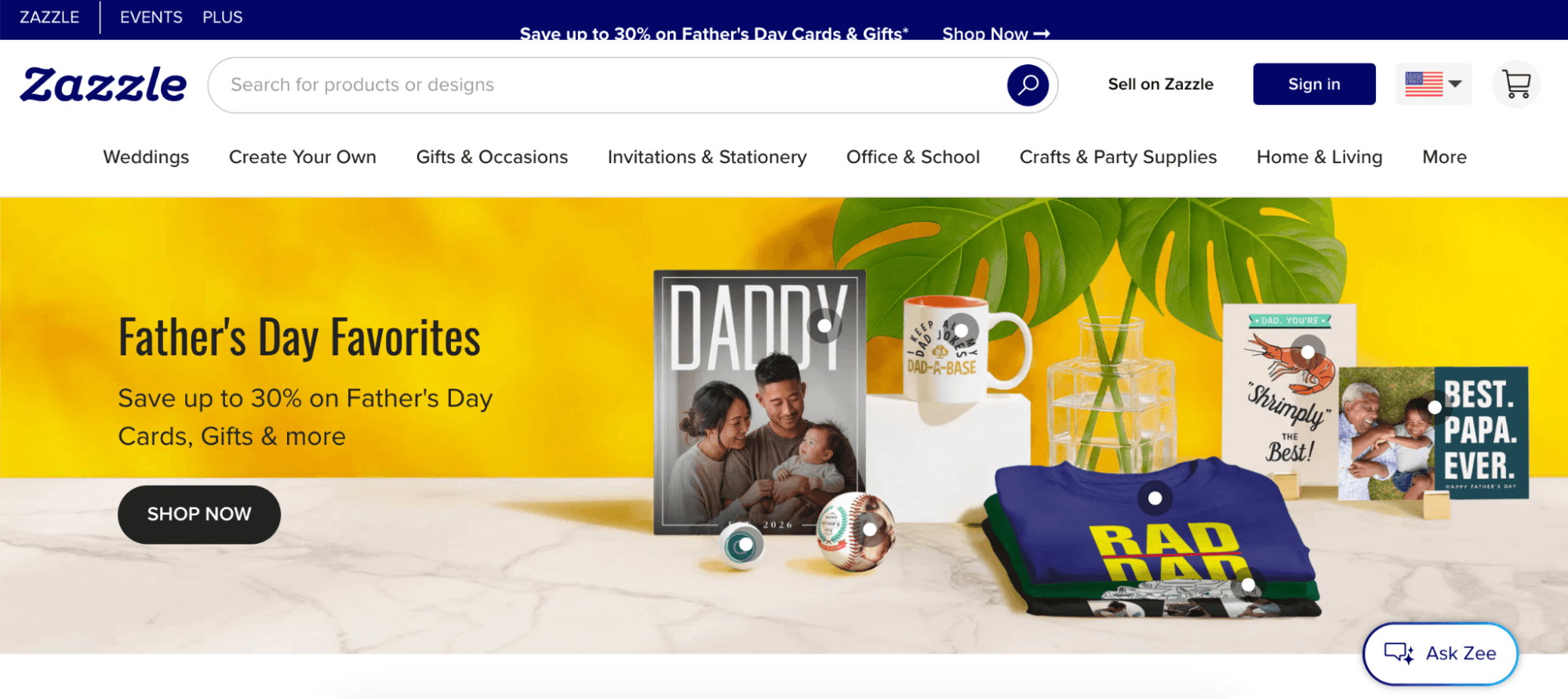
The first group includes people who want real mailing stamps, also known as physical postage stamps. For this, you upload a photo, pay around $2 or more per stamp, and use them to actually mail letters. Websites like Zazzle, Stamps.com, or PhotoStamps mainly focus on printing official or custom mailing products.
On the other hand, if you want something more creative, such as decorative stamp artwork, you can design vintage-style postage stamps for travel journals, scrapbooks, wedding invitations, branding projects, digital planners, or PDFs. Instead of mailing letters, you use third-party apps to create beautiful stamp images that match your theme.
This article is for the second group of people who want to design the stamp artwork itself, not just order physical stamps. Once you create a high-quality PNG stamp design, you can still print it later if needed, which we will discuss in Part 4.
Part 2. What I Tried First — and Where It Fell Short
Before finding the right tool, I tried several ways to create a postage stamp design, but most of them did not work for me. Many online stamp tools only offered simple templates that looked more like business seals or office stamps instead of creative vintage postage stamps.
Apart from that, I tested various AI image generators and bought their premium packages, but getting an actual stamp look was surprisingly difficult. There were many issues in the final version, including missing borders, low quality stamps, strange layouts, and more. On top of that, many results were watermarked or needed a lot of editing before they were ready to use in a PDF or digital project.
That is when I accidentally came across UPDF AI Stamp Creator while already editing my PDF in UPDF. I have previously used this tool for editing PDFs, converting PDFs into popular formats like Word, Excel, Image, creating blank PDFs, and more.
The mark should be easy to notice without distracting from the document itself. The example below shows the workflow for editing PDF content in UPDF.
Part 3. Designing with UPDF's AI Stamp Creator
If you want to create custom postage AI stamps, then you should definitely use UPDF AI Stamp Creator. Instead of giving me boring office-style stamps or random AI images, this tool helped me create decorative postage stamps for my projects. With this tool, you can create watermark-free decorative stamp images from text prompts.
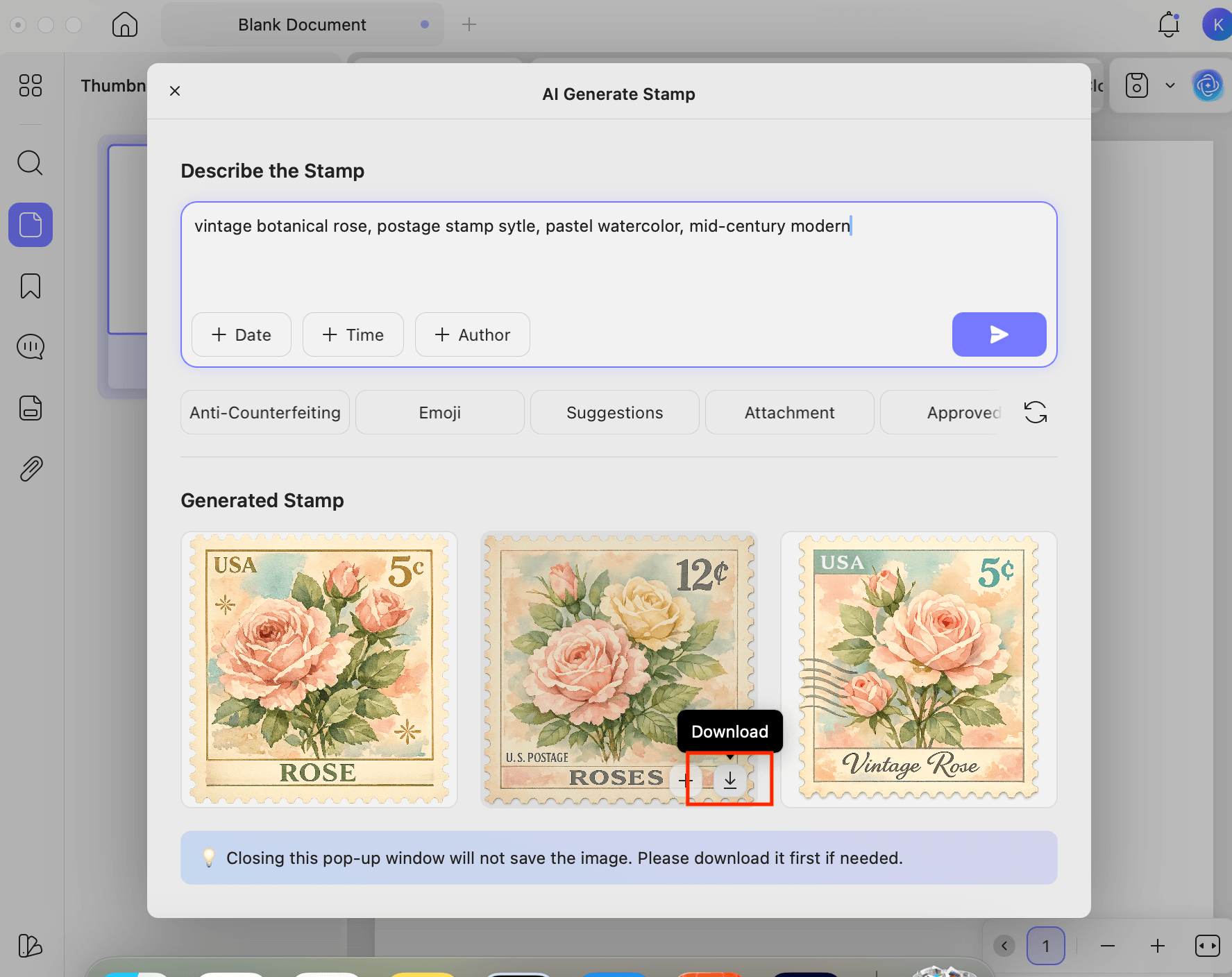
To use this software, all you have to do is type a text prompt describing the kind of stamp you want. For example, you can ask for a “vintage Paris postage stamp with soft pastel colors,” or a “floral wedding stamp design.’’ Within a few seconds, you will get three different PNG stamps available on the screen.
Another useful feature of this software is that the generated PNG images can be directly added to PDFs. Do you want to know more about this tool? Continue reading below, I have discussed how to create personalized postage stamps using UPDF AI Stamp Creator.
Windows • macOS • iOS • Android 100% secure
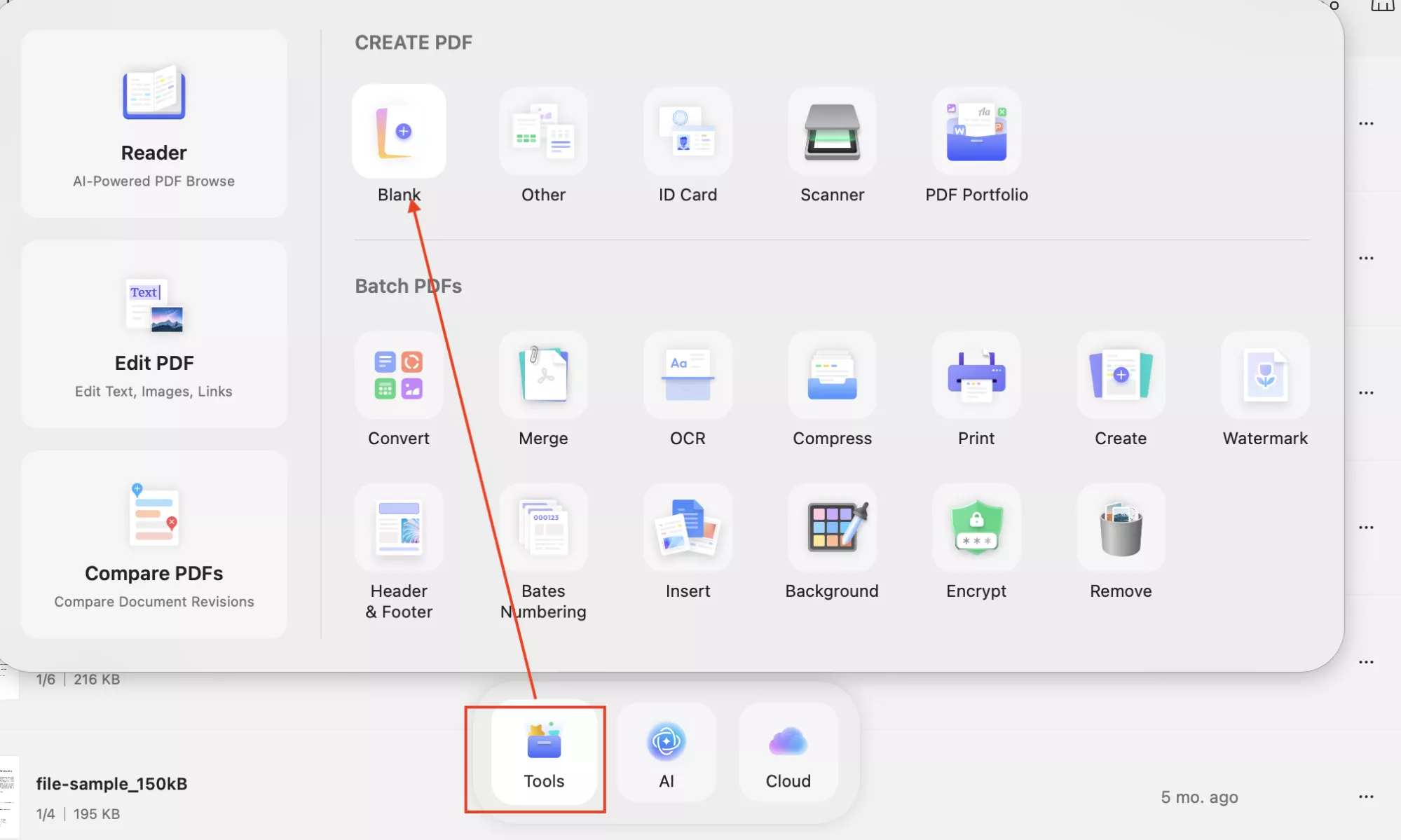
- Launch UPDF on your device and click “Tools” > “Blank” to create a blank PDF
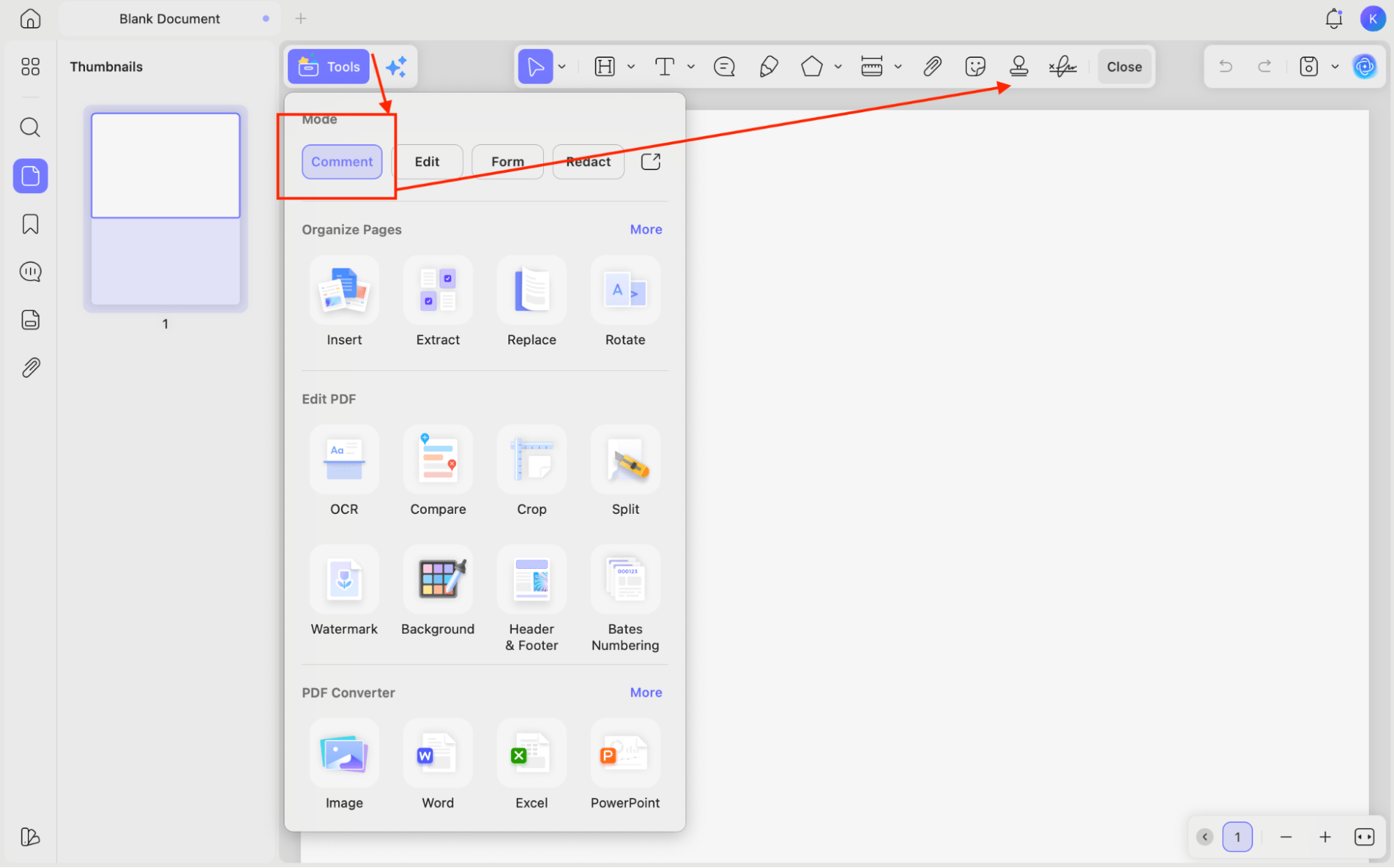
- Now, click “Tools” and choose the “Comments” option to open Stamps.
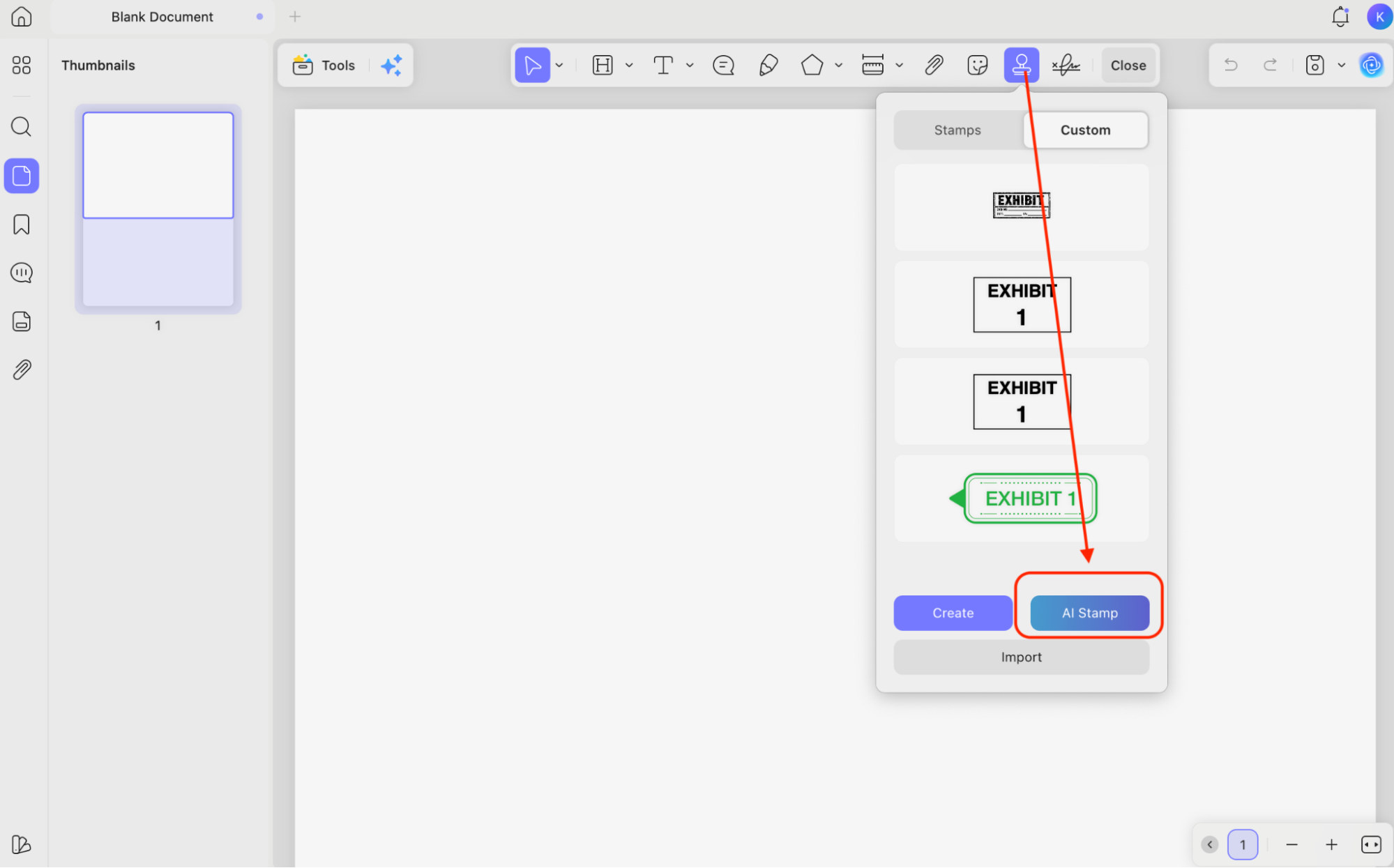
- Choose “Stamps” from the top menu and click the “AI Stamp” option.
- Once you are on the AI Generator Stamps screen, enter your prompt to describe the stamp and click the “Send” icon.
- Soon, three different stamps will appear on your screen. Choose your favorite one and click the “Download” icon.
UPDF Pricing:
When it comes to pricing, UPDF also offers a free plan where new users can get 100 AI credits, which can be used for generating stamp designs and trying different prompts. Apart from that, you can also use the premium version which offers several AI features, including the AI Assistant plan. It costs around $49.99 per year and includes unlimited AI use. For more information, you can check the details here: UPDF Pricing Plans Page.
4 Best Prompt Writing Tips for Postage Stamp Designs
If you don’t know how to create the best postage stamp designs, don’t worry, below I have mentioned how to write the correct prompts for creating the best stamp designs.
- Specify the Visual Subject: Don’t forget to describe your main subjects, such as “Mount Fuji at sunrise,” “vintage botanical rose,” or “1920s biplane.
- Add Stamp-Specific Language: After you have described your subject, then add stamp-specific language like “postage stamp style,” “perforated border,” “denomination printed in corner,” or “engraving illustration style.
- Add Color Mood: Now, add mood using colors like “muted earth tones,” “deep navy and gold,” or “pastel watercolor.
- Mention Era or Style if Relevant: Finally, mention an era or style if required. You can use the following styles, “Victorian,” “mid-century modern,” or “retro travel poster style’’ to create the best postage stamp designs.
Part 4. What to Do with Your Stamp Design
Once your postage stamp design is ready, there are several creative ways to use it. Below, we have discussed three different ways of using stamp designs. Let’s discuss them one by one.
1. Directly Inside your PDF:
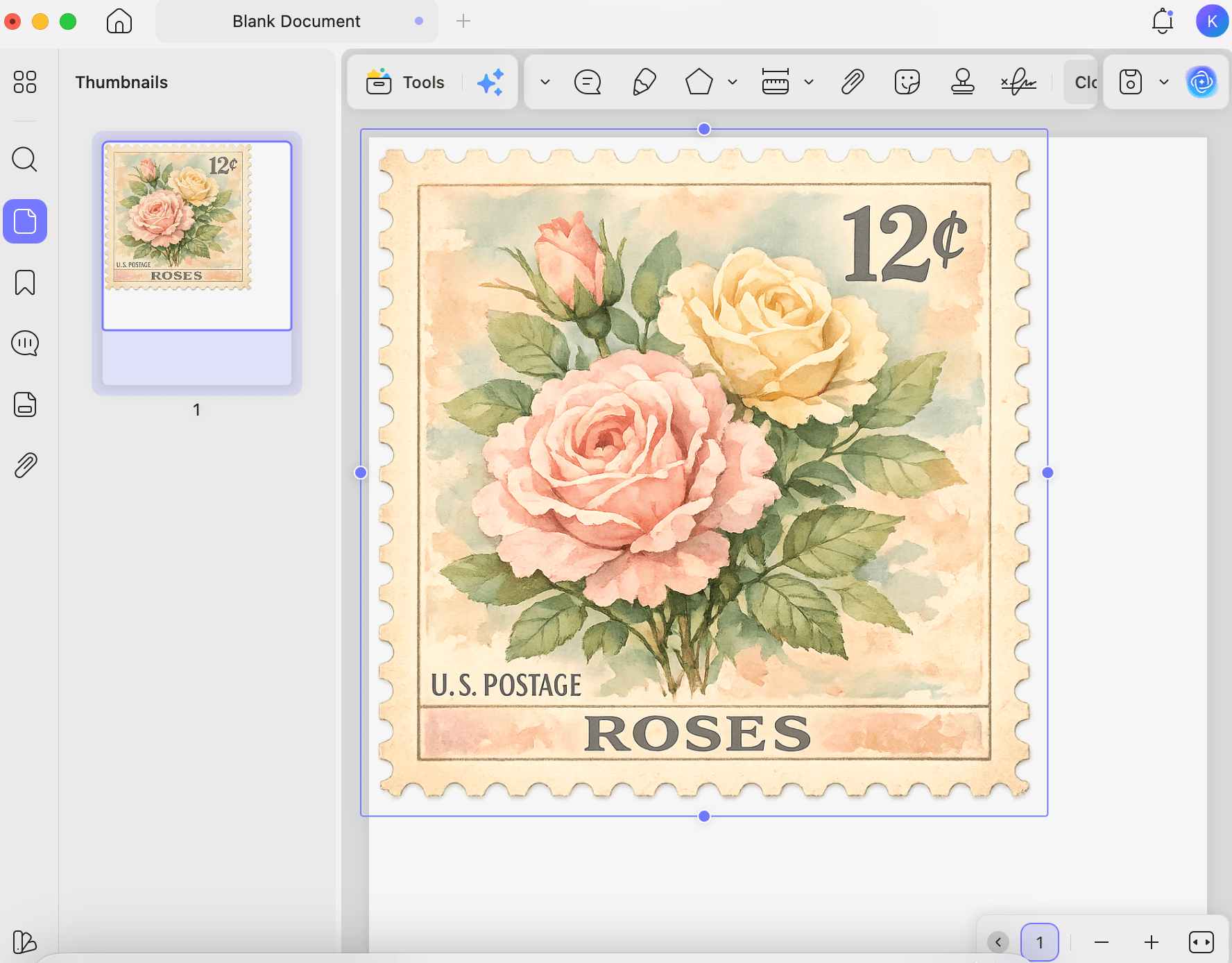
The easiest way to use the stamp design is to directly use it inside your PDF project. Since the stamp is already in UPDF , you can easily add it to any page without switching apps or exporting files first. This method works best for travel journals, wedding invitation layouts, scrapbook pages, planners, memory books, or themed PDF designs.
2. Export Stamp as PNG
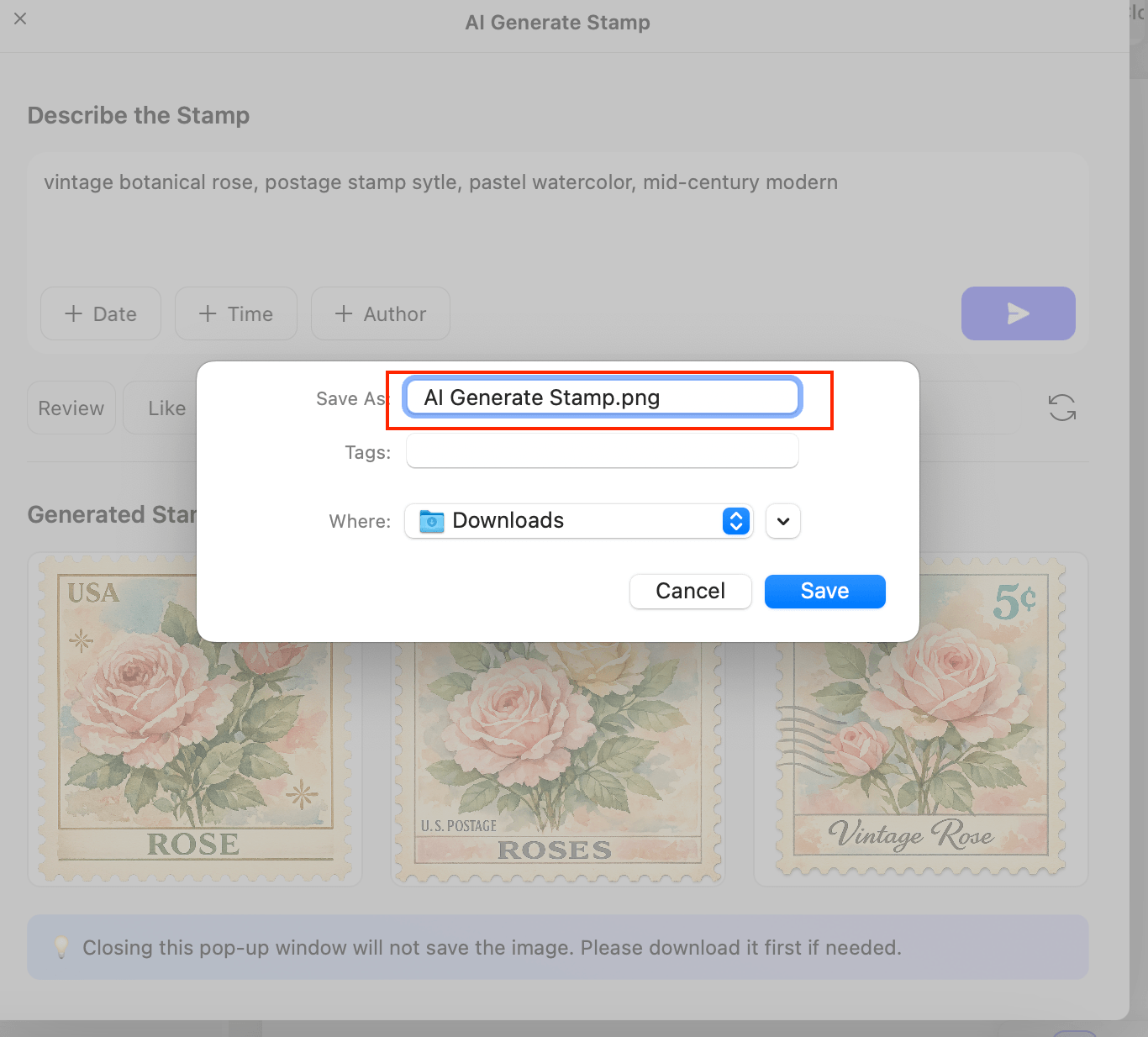
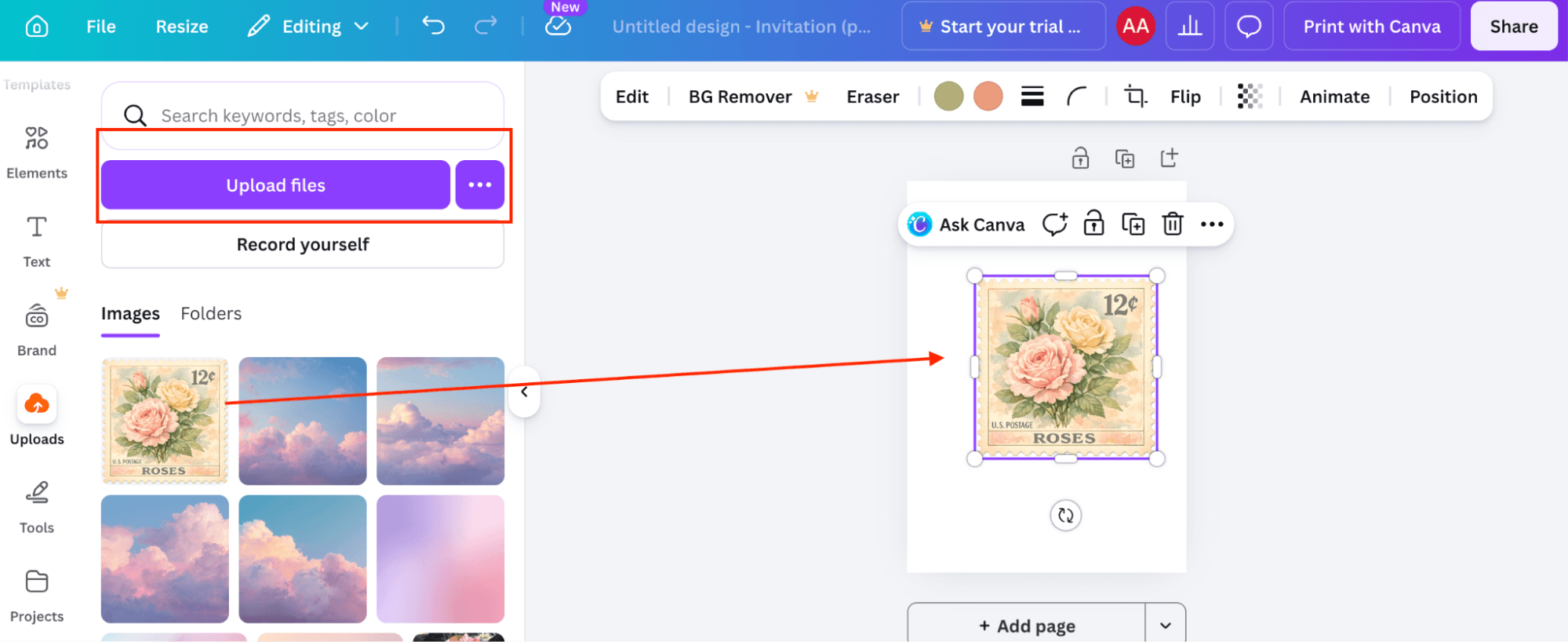
You can also export your stamp as a PNG and further design it on other platforms like Canva, Adobe Photoshop, and more. Additionally, you can add it to print layouts for greeting cards, stationery, digital art, scrapbook projects, or social media designs.
Here is how you can easily add stamps to your Canva platform.
3. Turn it into a Real Mailable Stamp:
Apart from using your design inside a PDF or exporting it as a PNG, you can also turn it into a real mailable stamp. Yes, that’s possible. Services like Zazzle and Stamps.com allow you to upload custom artwork and create personalized postage stamps. However, there are some legal guidelines to keep in mind, such as you cannot upload copyrighted content, offensive imagery, or designs that violate their platform policies.
Part 5. FAQs
1. Can I Use a Custom Postage Stamp Design for Actual Mailing?
Yes, but you must use authentic websites like Zazzle or Stamps.com that are allowed to make real mailing stamps. Just drawing or creating a stamp picture by yourself does not mean you can use it to mail letters.
2. What File Format do Stamp Printing Services Require?
Most stamp printing websites accept high-quality PNG or JPG file formats. However, you should use PNG as it keeps the image sharp and supports transparent backgrounds, which is best for decorative stamp artwork, such as wedding invitation cards.
3. Is There a Difference Between a Postage Stamp and a Decorative Stamp for Crafts?
Yes, there is a huge difference between these two stamps. For example, a real postage stamp is officially used for mailing letters and packages. On the other hand, a decorative stamp is used for creative projects like scrapbooks, travel journals, invitations, and so on.
Conclusion
Creating your own postage stamp design requires a lot of editing skills and time, but not anymore. With the help of AI tools like UPDF AI Stamp Creator, you can design your own postage stamp in less than a minute. You can get three different PNG stamp designs and adjust them according to your requirements. The best part is that everything works inside the same tool, where you can also use the design in your PDF projects. You can also edit PDF files, Annotate & Markup PDF, Organize PDF files, and more. Download UPDF for free and start designing your own personalized postage stamps today!
Windows • macOS • iOS • Android 100% secure





 Lizzy Lozano
 Engelbert White