 UPDF
 UPDF for Windows
 UPDF for Mac
 UPDF for iPhone/iPad
 UPDF for Android
 Nomostar
 UPDF AI Online
 UPDF Sign
 IvyCraft
 Edit PDF
 Annotate PDF
 Create PDF
 PDF Form
 Edit links
 Convert PDF
 OCR
 PDF to Word
 PDF to Image
 PDF to Excel
 Organize PDF
 Merge PDF
 Split PDF
 Crop PDF
 Rotate PDF
 Protect PDF
 Sign PDF
 Redact PDF
 Sanitize PDF
 Remove Security
 Read PDF
 UPDF Cloud
 Compress PDF
 Print PDF
 Batch Process
 About UPDF AI
 UPDF AI Solutions
 AI User Guide
 FAQ about UPDF AI
 Summarize PDF
 Translate PDF
 Chat with PDF
 Chat with AI
 Chat with image
 PDF to Mind Map
 Explain PDF
 PDF AI Tools
 Image AI Tools
 AI Chat Tools
 AI Writing Tools
 AI Study Tools
 AI Working Tools
 Other AI Tools
 AI Bookmark Generation
 AI Bookmark Summary
 AI Watermark Generation
 AI Background Generation
 AI Sticker Generation
 AI Stamp Generation
 AI Editing Suite
 UPDF Copilot
 AI Page Management
 AI Semantic Search
 PDF to Word
 PDF to Excel
 PDF to PowerPoint
 Enterprise Solution
 Enterprise Sign
 Enterprise AI
 Enterprise Plan
 Enterprise User Guide
 Enterprise Webinar
 IT
 Education
 Construction
 Financial Service
 Healthcare
 Insurance
 Legal
 Manufacturing
 Government
 Researchers & PhDs
 Solopreneurs & Freelancers
 Lawyers & Legal Professionals
 Real Estate Agents & Brokers
 Education Solution
 Customer Stories
 User Guide
 UPDF Tricks
 FAQs
 UPDF Reviews
 Download Center
 Blog
 Newsroom
 Tech Spec
 Updates
 UPDF vs. Adobe Acrobat
 UPDF vs. Foxit
 UPDF vs. PDF Expert

Looking for a safe place to download a free eBook? The best choice depends on whether you want a permanent EPUB or PDF file, a time-limited library loan, or a public-domain classic. This guide compares 10 free eBook download sites by format, registration requirement, access type, and copyright risk.
After downloading a PDF eBook from a source you trust, UPDF helps you read comfortably, annotate passages, make scanned pages searchable with OCR, generate bookmarks, summarize chapters, and find ideas with AI Semantic Search on Windows, macOS, iOS, and Android. Download it below to try these reading tools, or jump to Part 2 for details.
Windows • macOS • iOS • Android 100% secure
Part 1: 10 Best Free eBook Download Sites
Whether you want public-domain classics, contemporary fiction, or academic resources, several dedicated platforms offer free eBook downloads in PDF and other formats. Below are the 10 best free eBook download sites available in 2026, along with what makes each one worth your time — and where each falls short.
Use this quick comparison to choose a source before reviewing each site in detail.
| Site | Best for | Main formats | Account | Access and safety |
|---|---|---|---|---|
| Open Library | Library borrowing | PDF/EPUB varies | Needed to borrow | Legal, often time-limited loans |
| ManyBooks | Classics and indie titles | EPUB/PDF and others | Usually needed to download | Legal catalog; free and paid titles |
| Project Gutenberg | Public-domain classics | EPUB/HTML/text/Kindle | No | Legal public-domain downloads |
| Library Genesis | Academic discovery | PDF/EPUB and others | No | Copyright risk; verify before downloading |
| Feedbooks | Public-domain titles | EPUB | Varies | Legal; not every title is free |
| Free-eBooks.net | Indie books | PDF/EPUB | Yes | Legal; free-download limits apply |
| OceanofPDF | Popular titles | PDF/EPUB | No | High copyright risk; not recommended |
| PDF Books World | Formatted classics | No | Legal public-domain books | |
| eBooks.com | Retailer free section | PDF/EPUB/online | Varies | Legal; DRM and format vary |
| Standard Ebooks | Polished classics | EPUB/Web/Kobo | No | Legal public-domain editions |
1. Open Library
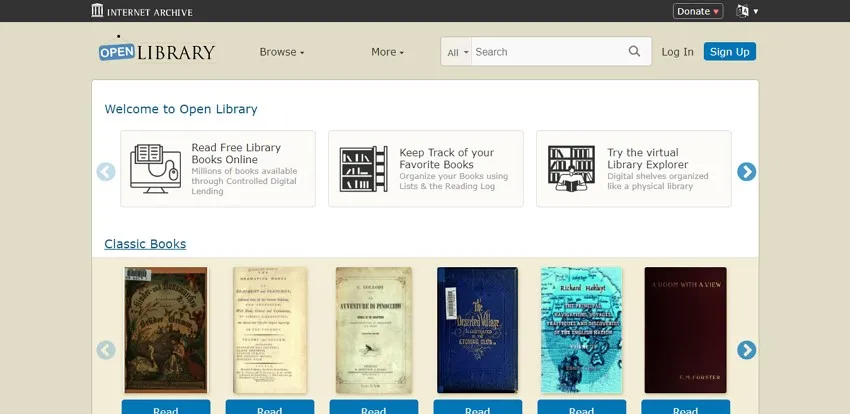
Open Library, a project of the Internet Archive, is a searchable catalog with millions of book records. Some public-domain titles can be downloaded, while many modern books are available only as time-limited digital loans. Browsing is open, but borrowing normally requires a free account, and the available PDF or EPUB options vary by title.
Pros:
- You can browse through the website by subject, authors, or title to quickly find the book you want.
- Books on Open Library are available in multiple file formats.
Cons:
- Most books have a 1-hour timer on them, and they're not ebooks—you're reading scanned book pages. You definitely can't send the files to a Kindle, and probably not to any e-ink reader. You usually can't even download the file but have to read it in your browser. - jefrye
2. ManyBooks
ManyBooks hosts a catalog of over 50,000 free eBooks spanning genres including romance, mystery, science fiction, historical fiction, and more. Creating a free account unlocks downloads in multiple formats — PDF, EPUB, MOBI, and others — making it one of the more format-flexible free eBook download sites available.

Pros:
- The site offers a variety of categories to make your selection process easier.
- ManyBooks also contains a discussion forum for readers to actively engage in their curious desires.
Cons:
- Not all the books available on ManyBooks are free of cost.
3. Project Gutenberg
Project Gutenberg is the oldest digital library in the world, founded in 1971 by Michael Hart. It offers more than 79,000 free eBooks, primarily public-domain works, with no fees or registration required. Its most common options include EPUB, HTML, plain text, and Kindle-friendly files; PDF is not available for every title.

Pros:
- You do not need any fee or registration to access this online library.
- Project Gutenberg offers a "Top 100" list which helps bring overlooked books into the limelight.
Cons:
- Most of the books on this eBook website are in English only, and since the library focuses on public-domain works, recently published bestsellers are not available.
4. Library Genesis
Library Genesis is a shadow-library index known for academic books, papers, and general eBooks in several formats. Availability is broad, but many files may be shared without the copyright holder's permission. Laws differ by country, so check the copyright status and use a lawful source whenever possible; do not assume that a downloadable file is authorized.

⚠️ Important legal note:
Pros:
- You can significantly refine your search options by title, authors, languages, publishers, years, etc.
- You can add bookmarks while reading an eBook online on Library Genesis.
Cons:
- Library Genesis is a shadow library so that you can face legal trouble and piracy issues.
💡 Pro Tip: Many files on LibGen or Open Library are "Image-only" PDFs (scans). You can't search or highlight text in them. Use UPDF's OCR feature to convert these scans into searchable text in seconds.
5. Feedbooks
Feedbooks combines a commercial eBook store with a public-domain catalog. It is most useful for discovering professionally formatted classics, but not every book on the site is free. Check the price and license on the individual title page before downloading.

⚠️ Important note:
Pros:
- Feedbooks offers a "Selections" section to bring you the must-reads of every month.
- The site also contains books that have been previously banned from publications and libraries.
Cons:
- The Original Books section (independently published titles) skews toward paid content; free titles in that section are limited.
6. Free-eBooks.net
Free-eBooks.net covers fiction, business, self-help, health, poetry, and other categories. A free account provides limited downloads, while paid membership expands access. Because plan limits and available formats can change, check the current download options shown for the title you want.

Pros:
- Free-eBooks conducts weekly author interviews for better insights into the books.
- The website also contains a dedicated collection of audiobooks and podcasts.
Cons:
- The free plan is quite restrictive, allowing only one download per month.
7. OceanofPDF
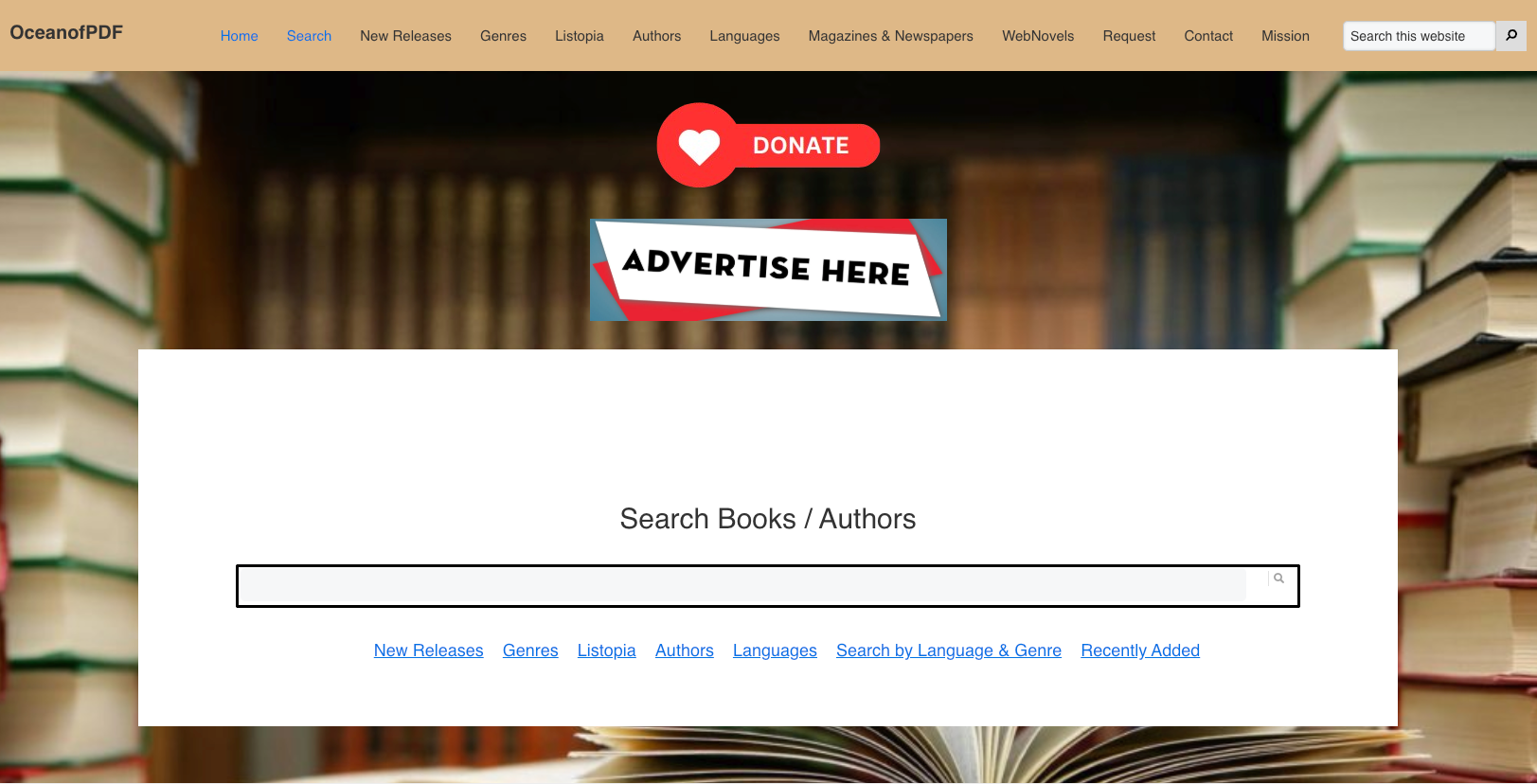
OceanofPDF offers many popular books in PDF and EPUB without requiring an account. However, the site has faced copyright concerns, and the availability of a title does not prove that its distribution is authorized. For current commercial books, use a library, publisher, author, or licensed retailer instead.
⚠️ Important legal note:
Pros:
- No sign-up or account required — download immediately.
- Supports both PDF and EPUB formats for compatibility with most devices and readers
Cons:
- Most content is copyrighted material shared without authorization, carrying legal risk for users.
8. PDF Books World
PDF Books World focuses exclusively on public-domain literature formatted as high-quality, reader-friendly PDFs — with clean font sizes, proper formatting, and embedded hyperlinks for easy navigation to footnotes, references, and illustrations. Books are searchable by genre, author, and title, and the site highlights popular and newly added titles on its homepage.

Pros:
- Most books on the site contain hyperlinks for quick jumps to references, footnotes, illustrations, etc.
- The books offer a strain-free experience owing to their easy-to-read font size and type.
Cons:
- Books on the website are only available in PDF file format.
- Access to unlimited downloads requires a paid annual subscription ($25/year) that auto-renews unless manually canceled via PayPal.
9. eBooks.com
eBooks.com is primarily a commercial eBook retailer, but it maintains a dedicated free section featuring thousands of titles — including some popular and classic works — available in PDF, EPUB, and an online reader format. Books are searchable by category, title, author, or subject, and the clean interface makes navigation straightforward.

Pros:
- The site offers multiple file formats, including PDF, EPUB, and Online Reader.
- A robust search tool allows for easy navigation and finding your desired book.
Cons:
- Most books are available as scanned images instead of text.
10. Standard eBooks
Standard eBooks is a volunteer-driven project that produces meticulously formatted, typography-optimized editions of public-domain books — a significant step up from the raw, often poorly formatted files found on other free eBook sites. Every title is carefully proofread, styled with modern typographic standards, and offered in both EPUB and a web-reading format at no cost and with no account required.

Pros:
- Although a volunteer-driven project, Standard eBooks contains books that are well-designed and well-formatted before republishing.
- You can find the word count, reading score, and a synopsis for each book page.
Cons:
- Most of the eBooks are limited to public-domain works (typically pre-1928 in the US), so modern bestsellers and recently published titles are not available. The library is also smaller than platforms like Project Gutenberg, with a focus on quality over quantity.
Part 2: The Best App to Read Free PDF eBooks — UPDF
Downloaded a long PDF eBook or a scanned classic? UPDF 3.0 turns it into a practical reading workspace: adjust the page view and theme, annotate important passages, run OCR on image-only pages, create AI bookmarks and chapter summaries, search by meaning, or ask questions about the book without moving the file between separate tools.
Windows • macOS • iOS • Android 100% secure
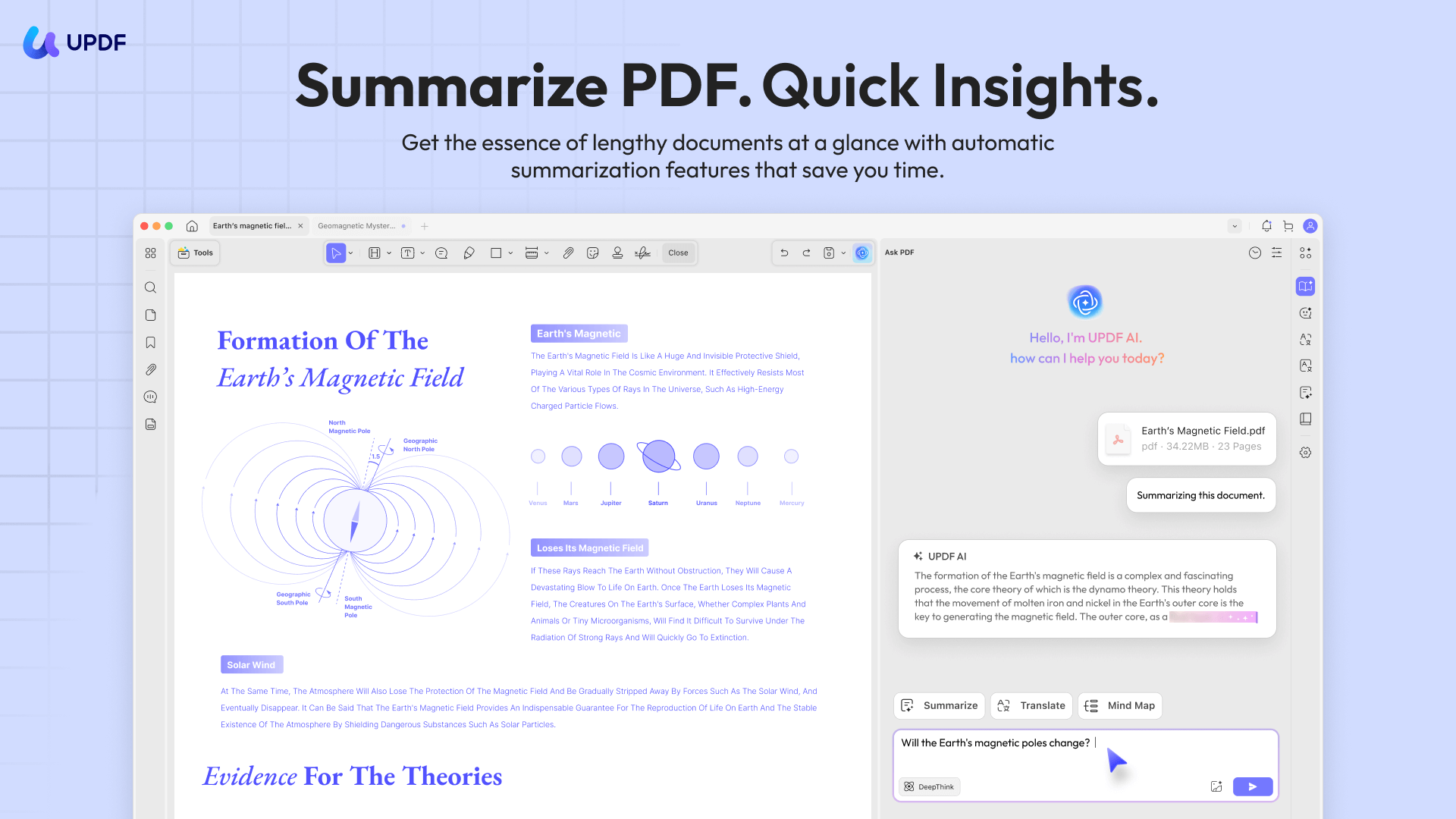
Why UPDF works well for PDF eBooks
- Comfortable reading: Use single-page, two-page, scrolling, and two-page scrolling layouts. Dark mode and reading themes make long sessions easier on the eyes.
- Active reading and notes: Highlight or underline passages, add comments and sticky notes, and export annotations for revision. See the complete guide to annotating a PDF.
- Scanned-book OCR: Older books are often image-only PDFs. UPDF's PDF OCR recognizes text in 38 languages and creates a searchable document, so you can find, select, and study the content.
- Platform-aware read aloud: On iPhone and iPad, UPDF can read a PDF aloud while highlighting the current sentence. Feature availability differs by platform, so the article does not assume every device offers identical controls.

AI tools for navigating long books
- AI Bookmark Generator: The AI Bookmark Agent analyzes a long PDF and creates a hierarchical outline when the book has no useful table of contents.
- Bookmark Summary: Preview the main idea of a chapter or bookmarked section before deciding where to read in depth.
- Semantic Search: The AI Semantic Search Agent finds relevant passages by meaning, even when you cannot remember the exact wording.
- Chat with PDF: Ask for a chapter summary, explanation, translation, or answer grounded in the uploaded book. UPDF Copilot can also point you to the right tool when you need to make a scan searchable or organize a long document.
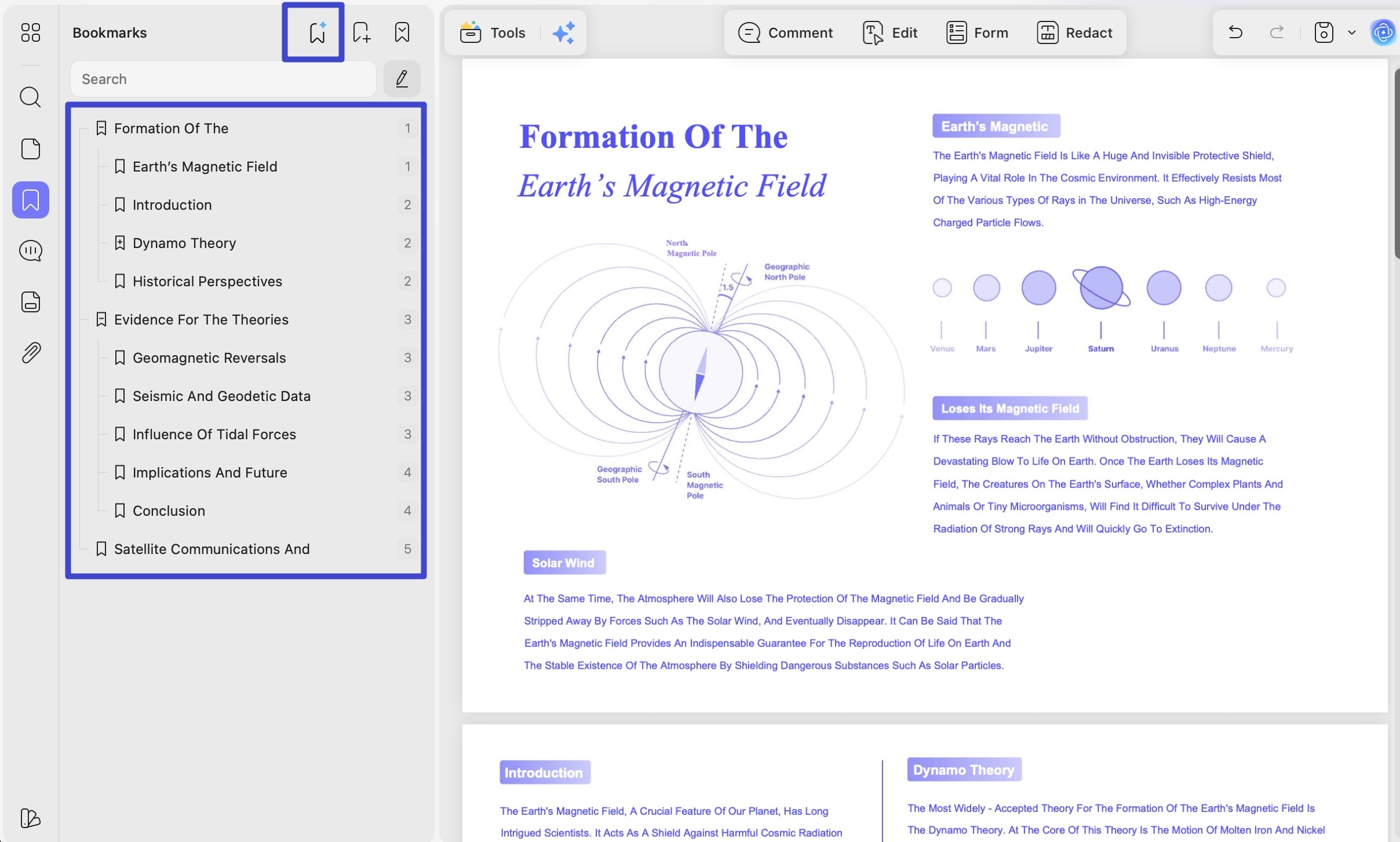
These tools reflect UPDF 3.0's connected workflow: a downloaded PDF can move from first open to searchable, organized, summarized, and fully annotated in one app on Windows, macOS, iOS, or Android. UPDF focuses on PDF rather than EPUB, so choose the PDF download when a site offers both formats.
Windows • macOS • iOS • Android 100% secure
🛍️ Explore UPDF 3.0 plans during the limited-time Black Friday sale—eligible plans are up to 48% off and include a lifetime PDF Password Remover for Windows.
Part 3: What is an eBook and How Does it Work?
An eBook (electronic book) is a digital version of a printed book readable on smartphones, tablets, computers, and dedicated e-reader devices. Unlike physical books, eBooks can contain interactive elements including hyperlinks, images, embedded audio, and adjustable fonts. They come in a variety of formats — most commonly PDF, EPUB, and MOBI — each optimized for different reading environments.
The sites above may offer PDF, EPUB, HTML, or e-reader formats. UPDF is designed primarily for PDF documents and does not natively open EPUB files. When a site offers both, choose PDF to preserve the original page layout and use UPDF's reading, annotation, OCR, and AI tools. For a broader walkthrough, see how to read a PDF.
Windows • macOS • iOS • Android 100% secure
For a more e-ink reading experience, dedicated devices like the Amazon Kindle or Kobo download books primarily in MOBI or EPUB format. These devices are lightweight, back-lit, and designed to mimic the look and feel of a printed page — ideal for leisure reading but lacking the annotation and AI features of a desktop PDF reader.
Part 4: What are the Advantages and Disadvantages of eBooks?
Contrary to the traditional printed paper, eBooks have made it easier to access and possess a large number of books in a limited space. But this isn't the only advantage of eBooks. Let's look at what other merits and demerits digital books have to offer.
Advantages of eBooks
1. Portability
One of the most practical benefits of eBooks is portability. An entire library of hundreds of titles can fit on a smartphone or laptop, making it possible to read anywhere — on a commute, while traveling, or during a lunch break — without carrying any physical weight.
2. Less Storage
A typical eBook in PDF or EPUB format takes up just a few megabytes — meaning a standard smartphone can hold thousands of books in the same space a single physical novel would occupy on a shelf.
3. Environment Friendly
Producing a printed book requires paper, ink, manufacturing, and shipping — all of which carry a carbon footprint. eBooks eliminate these steps entirely, making them a significantly more sustainable reading option.
4. Feature-Laden
Digital eBook readers offer features that physical books cannot match: adjustable font size, dark mode for reading in low light, built-in search, text highlighting, and — in tools like UPDF — AI-powered features like chapter summarization and semantic search.
Windows • macOS • iOS • Android 100% secure
5. Budget-Friendly
eBooks consistently cost less than their print equivalents since they carry no manufacturing, printing, or shipping costs. And as the sites in this guide show, thousands of titles are available completely free — particularly public-domain classics.
Disadvantages of eBooks
1. Health Issues
Extended screen reading can contribute to digital eye strain (tired, dry, or irritated eyes), headaches, and poor posture. Reading apps that offer dark mode, warm color themes, and adjustable brightness — like UPDF's reading themes — can help reduce these effects during long sessions.
2. Piracy
The digital nature of eBooks makes them easy to copy and distribute without authorization, which is a persistent challenge for authors and publishers.
Conclusion
Where can I legally download free eBooks?
Project Gutenberg and Standard Ebooks are strong choices for public-domain books. Open Library also provides lawful digital borrowing for eligible titles. Always check the title’s license and copyright status in your country.
Which sites let me download free EPUB books without registration?
Project Gutenberg and Standard Ebooks generally let you download public-domain EPUB files without creating an account. Availability and formats can vary by title.
What is the difference between downloading and borrowing an eBook?
A download is usually a file you can keep under the provider’s license. A borrowed eBook is a time-limited loan that may require an account and can expire or become unavailable when the loan ends.
Can UPDF open EPUB files?
No. UPDF is designed primarily for PDF documents and does not natively open EPUB files. If a site offers both formats, choose PDF for reading, annotation, OCR, and AI-assisted study in UPDF.
Free eBooks have removed virtually every barrier between curious readers and the books they want — no cost, no shelf space, no shipping wait. Whether you start with Project Gutenberg's timeless classics, explore Standard eBooks' beautifully formatted editions, or browse ManyBooks' genre-diverse catalog, there is a free eBook download site on this list for every kind of reader.
If you download a PDF eBook, try UPDF to read, annotate, search, and organize it in one workspace. You can also compare dedicated eBook reader options or explore free PDF reader tools before choosing your setup.
Windows • macOS • iOS • Android 100% secure







 Lizzy Lozano
 Enola Miller
