UPDF
UPDF
 UPDF for Windows
 UPDF for Mac
 UPDF for iPhone/iPad
 UPDF for Android
 Nomostar
 UPDF AI Online
 UPDF Sign
 IvyCraft
 Edit PDF
 Annotate PDF
 Create PDF
 PDF Form
 Edit links
 Convert PDF
 OCR
OCR PDF to Word
 PDF to Image
 PDF to Excel
 Organize PDF
 Merge PDF
 Split PDF
 Crop PDF
 Rotate PDF
 Protect PDF
 Sign PDF
 Redact PDF
 Sanitize PDF
 Remove Security
 Read PDF
 UPDF Cloud
 Compress PDF
 Print PDF
 Batch Process
 About UPDF AI
 UPDF AI Solutions
 AI User Guide
 FAQ about UPDF AI
 Summarize PDF
 Translate PDF
 Chat with PDF
 Chat with AI
 Chat with image
 PDF to Mind Map
 Explain PDF
 PDF AI Tools
 Image AI Tools
 AI Chat Tools
 AI Writing Tools
 AI Study Tools
 AI Working Tools
 Other AI Tools
 AI Bookmark Generation
 AI Bookmark Summary
 AI Watermark Generation
 AI Background Generation
 AI Sticker Generation
 AI Stamp Generation
 AI Editing Suite
 UPDF Copilot
 AI Page Management
 AI Semantic Search
 PDF to Word
 PDF to Excel
 PDF to PowerPoint
 Enterprise Solution
 Enterprise Sign
 Enterprise AI
 Enterprise Plan
 Enterprise User Guide
 Enterprise Webinar
 IT
IT Education
 Construction
 Financial Service
 Healthcare
 Insurance
 Legal
Legal Manufacturing
 Government
 Researchers & PhDs
 Solopreneurs & Freelancers
 Lawyers & Legal Professionals
 Real Estate Agents & Brokers
 Education Solution
 Customer Stories
 User Guide
 UPDF Tricks
 FAQs
FAQs UPDF Reviews
 Download Center
 Blog
Blog Newsroom
 Tech Spec
 Updates
 UPDF vs. Adobe Acrobat
 UPDF vs. Foxit
 UPDF vs. PDF Expert

Yes, Adobe still sells a one-time purchase option — Acrobat Classic. But it is not a lifetime license. It is a 3-year prepaid desktop license: you pay once, use it offline for 36 months, and when the term ends, access stops unless you buy again or switch to a subscription. It includes quarterly security updates and bug fixes, but no new features, no AI, no web or mobile access.
The practical question is not “can I buy Acrobat once?” but “does a 3-year desktop-only term match how I use PDFs?” This guide gives the exact 2026 prices for Acrobat Classic and Adobe subscriptions, what the Classic term excludes, and when a true perpetual license from an alternative is the more rational one-time purchase.
Part 1. Is Adobe Acrobat Available for One-Time Purchase?
Adobe Acrobat is not available as a true perpetual/lifetime license anymore. What Adobe calls a one-time purchase is Acrobat Classic, a 3-year term license: one upfront payment, 36 months of desktop access, non-renewing, no auto-renewal, no subscription.
Classic is not a stripped-down “lite” version — it includes the core Acrobat Pro 2020 desktop feature set plus interface and accessibility improvements. But it is desktop-only and excludes:
- New feature updates after the version you buy (only quarterly security patches and bug fixes)
- AI Assistant (Acrobat AI is not included in Classic)
- Web and mobile access, cloud services, and online sharing for review
So the accurate one-line answer is: Adobe sells a one-time payment, but it buys three years of desktop use — not a lifetime license.
Instead of struggling with Adobe subscription trap, why not opt for a better Acrobat alternative. UPDF is another powerful PDF tool that offers a one-time purchase, with similar, even more powerful features than Adobe Acrobat.
Check out the UPDF pricing page to explore its affordable plans. To learn more about UPDF, read Part 3. Or, you can download it for a free trial.
Windows • macOS • iOS • Android 100% secure
Part 2. When Did Adobe Become Subscription Only?
Adobe stopped selling traditional perpetual Acrobat licenses after Acrobat 2020; the last perpetual sales through volume programs ended in 2024–2025. Acrobat Classic is the replacement, but as a 3-year term, not an indefinite license.
2026 Adobe Acrobat subscription pricing (US list, individual annual plans):
| Plan | Monthly (annual billing) | Annual total |
|---|---|---|
| Acrobat Standard | $14.99/month | ~$179.88/year |
| Acrobat Pro | $19.99/month | ~$239.88/year |
| Acrobat Studio (Pro + AI) | $24.99/month | ~$299.88/year |
Teams: Standard ~$16.99/user/month; Pro ~$23.99/user/month.
Acrobat Classic one-time price (3-year term):
- Acrobat Standard 2024 (Classic): ~$358.80 one-time for 3 years
- Acrobat Pro 2024 (Classic): ~$538.80 one-time for 3 years
That works out to roughly $120–$180 per year for Classic — not cheaper than a subscription on a per-year basis, and with fewer features. The advantage is offline desktop use and no recurring billing, not lower total cost.

Part 3. How Do I Get a PDF Editor with a One-Time Purchase?
IIf your definition of “one-time purchase” means permanent ownership with no expiry date, Adobe no longer sells that for Acrobat. The closest true perpetual option from a major alternative is UPDF, whose lifetime license is $49.99 one-time and covers Windows, Mac, iOS, and Android. Its AI assistant is a separate add-on (7-day trial, then $79/year if kept).
| Acrobat Classic | UPDF Lifetime | |
|---|---|---|
| Payment model | One-time, 3-year term | One-time, perpetual |
| Expires | Yes, after 36 months | No |
| Platforms | Desktop only (Win/Mac) | Win / Mac / iOS / Android |
| Feature updates | Security patches only; no new features | Lifetime updates included |
| AI | Not included | Separate add-on ($79/year after trial) |
| One-time price | ~$358–$539 (3 years) | $49.99 (perpetual) |
UPDF is the rational one-time purchase if you need cross-platform access, ongoing feature updates, and no expiry date. Acrobat Classic is the rational choice if you specifically need Adobe’s desktop PDF engine, offline use, and can accept a 3-year term without new features.
Windows • macOS • iOS • Android 100% secure
A feature list is easier to evaluate when you can see the tool working on a document. The demonstration below gives some context for editing PDF content in UPDF.
Check UPDF Pricing Plans Now >>
- True perpetual license: One payment, no expiry. Acrobat Classic expires after 36 months.
- Cross-platform: Windows, Mac, iOS, and Android on one license. Classic is desktop-only.
- OCR and broad conversion: OCR scanned PDFs and convert to Word, Excel, images, and specialized formats. Classic’s core editing is strong, but OCR/conversion are not its differentiator.
- Lifetime feature updates: New core PDF features are included over time; Classic receives security patches but no new features.
- AI as an optional add-on: 7-day trial, then $49.99/year if kept. Classic has no AI option at all.
Windows • macOS • iOS • Android 100% secure
All these features make UPDF a more powerful PDF editor than Adobe Acrobat, particularly with its advanced AI capabilities. The comparison table below highlights the differences between UPDF and Adobe Acrobat, helping you make an informed decision.
| Pricing, Systems, and Features | Adobe Acrobat Standard DC | Adobe Acrobat Pro DC | UPDF | |
| 2026 Pricing | US$155.88/year AI Assistant for Acrobat: US$59.88/Year | US$239.88/year AI Assistant for Acrobat: US$59.88/Year | US$39.99/Year US$69.99/Perpetual AI Assistant for UPDF: US$79/Year One license can work on Windows, Mac, Android, iOS and Online | |
| Work on systems | Windows only | Windows, Mac, iOS, Android, Online | Windows, Mac, iOS, Android, Online (AI Only) | |
| Read PDF | Open and read PDFs | |||
| Add and manage bookmarks | ||||
| Search text in PDFs | ||||
| Display a PDF as a slideshow | ||||
| Compare PDF | ||||
| Annotate PDF | Highlight/Strikethrough/Underline | |||
| Text Comment/Text Box/Text Callout/Sticky Note | ||||
| Shapes/Pencils/Stamps/Signatures | ||||
| Manage the annotation list | ||||
| Squiggly line | ||||
| Stickers | ||||
| Edit PDF | Add text to PDFs | |||
| Edit existing text in PDFs | ||||
| Add, delete, extract, rotate, crop, and replace images | ||||
| Add and edit links, watermarks, background, header & footer | ||||
| Add rich text by dragging and dropping | ||||
| OCR | Turn scanned documents into searchable and editable PDFs | |||
| Convert PDF | Convert PDF to Word, Excel, PPT, Text, RTF, HTML, XML, and Images (PNG, JPEG, TIFF) | |||
| Save PDF as PDF/A | ||||
| Convert PDF to CSV | ||||
| Convert PDF to BMP | ||||
| Convert PDF to GIF | ||||
| Organize PDF | Insert, Replace, Extract, Rotate, Split, Remove | |||
| Crop pages | ||||
| Encrypt and Share | Add a Password to Protect PDFs | |||
| Redact sensitive information | ||||
| Send a PDF by Email as an attachment | ||||
| Share PDF via a link | ||||
| Create PDF | Create a blank PDF | |||
| Create a PDF from Capture | ||||
| Create PDF from other file formats | ||||
| Print PDFs | Print PDFs | |||
| Fill and Sign | Fill out Forms | |||
| Create PDF Forms | ||||
| Edit PDF Forms | ||||
| Sign Digitally | ||||
| Sign electronically | ||||
| Other Features | Optimize PDF - Reduce File Size | |||
| Combine files into one PDF | ||||
| AI Assistant | Summarize PDF | |||
| Translate PDF | ||||
| Explain PDF | ||||
| Chat with PDF | ||||
| Chat with Image | ||||
| Free Prompts | 0 | 0 | 100 |
UPDF offers a one-time purchase plan that costs {{price.en.individuals.lifetime_annual}}, while Adobe Acrobat's yearly plan costs $239.88/year. This is a clear price difference of over 3 times, but the former is for life, and the latter is for one year.
Want to get UPDF for life? Here are the steps to get a one-time purchase:
- Go to the UPDF pricing page.
- Click "Buy Now" next to the UPDF Pro perpetual plan.
- Complete the purchase.
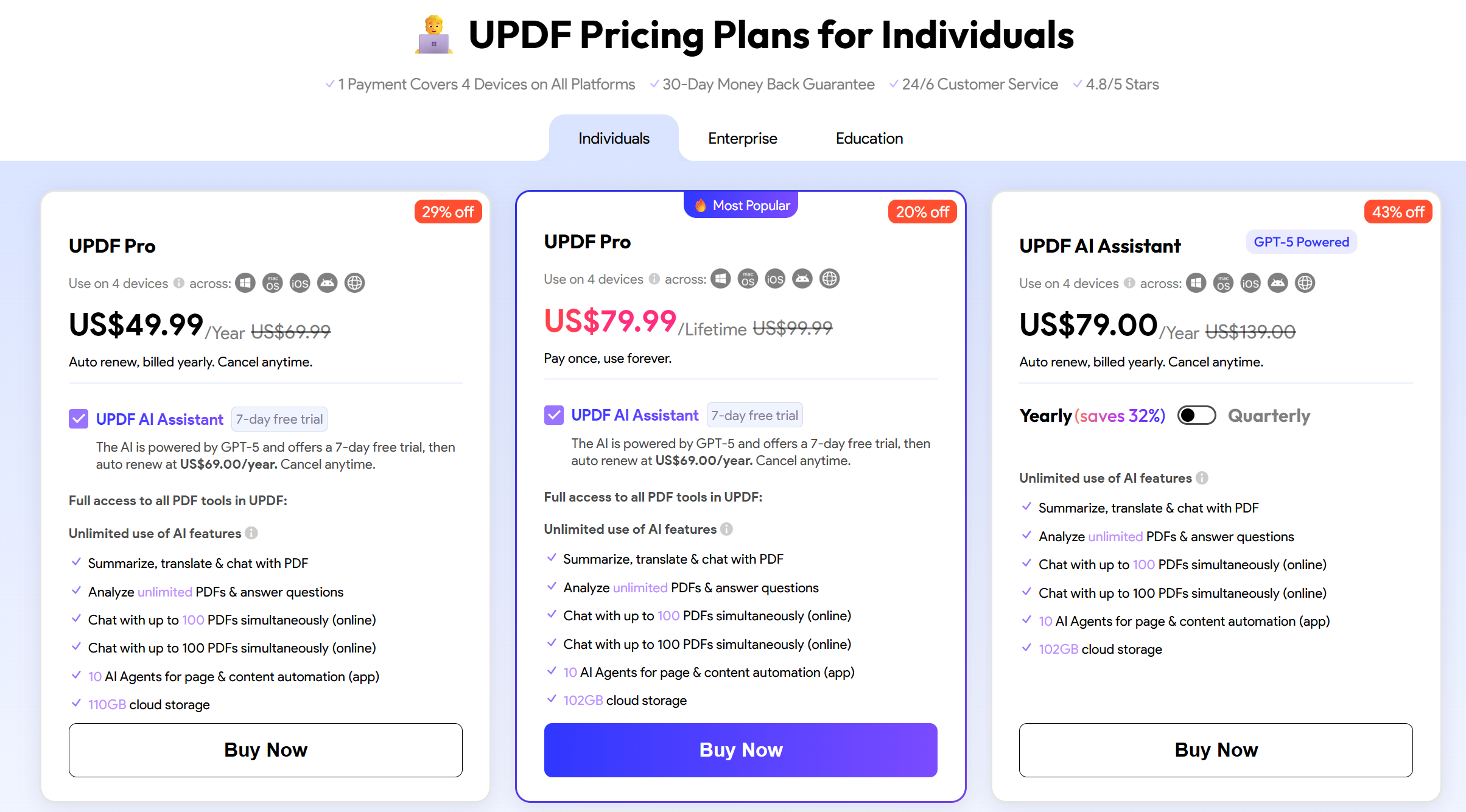
Once the subscription is made, you get UPDF for life with access to all its future updates.
So, isn't it the best alternative to Adobe Acrobat Pro for Mac one-time purchase? If you are still doubtful about choosing between UPDF and Adobe Acrobat, read this article to learn in detail the differences between UPDF and Adobe Acrobat.
Frequently Asked Questions
Can I still buy Adobe Acrobat as a one-time purchase in 2026?
Yes, but only Acrobat Classic — a 3-year prepaid desktop license, not a lifetime license. After 36 months, access stops unless you buy again or subscribe.
Is Acrobat Classic a lifetime license?
No. It is a 3-year term, non-renewing, paid upfront. “One-time purchase” in Adobe’s current lineup means one payment for three years, not permanent ownership.
Does Acrobat Classic include AI, web, or mobile access?
No. Classic is desktop-only and excludes AI Assistant, web access, mobile apps, and cloud services for paid features.
Does Acrobat Classic get new features?
No. It receives quarterly security patches and bug fixes only; new features and AI tools are not included.
What is a true perpetual alternative to Acrobat Classic?
UPDF Lifetime at $79.99 one-time, covering Windows, Mac, iOS, and Android, with lifetime core feature updates. Its AI assistant is a separate add-on ($79/year after a 7-day trial).
Conclusion
Adobe does sell a one-time purchase — Acrobat Classic — but it is a 3-year desktop term, not a lifetime license. It costs roughly $358–$539 upfront, excludes AI and new features, and expires after 36 months.
If you specifically need Adobe’s desktop PDF engine and offline use, Classic is the only one-time Adobe path. If you want permanent ownership, cross-platform access, and ongoing updates in a one-time payment, UPDF Lifetime at $79.99 is the true perpetual alternative.
The decision hinges on one question: do you need Adobe’s engine, or do you need a license that does not expire?
Windows • macOS • iOS • Android 100% secure




 Thanakorn Srisuwan
 Enola Davis
 Enrica Taylor
 Enola Miller