 UPDF
UPDF
 UPDF for Windows
 UPDF for Mac
 UPDF for iPhone/iPad
 UPDF for Android
 Nomostar
 UPDF AI Online
 UPDF Sign
 IvyCraft
 Edit PDF
 Annotate PDF
 Create PDF
 PDF Form
 Edit links
 Convert PDF
 OCR
OCR PDF to Word
 PDF to Image
 PDF to Excel
 Organize PDF
 Merge PDF
 Split PDF
 Crop PDF
 Rotate PDF
 Protect PDF
 Sign PDF
 Redact PDF
 Sanitize PDF
 Remove Security
 Read PDF
 UPDF Cloud
 Compress PDF
 Print PDF
 Batch Process
 About UPDF AI
 UPDF AI Solutions
 AI User Guide
 FAQ about UPDF AI
 Summarize PDF
 Translate PDF
 Chat with PDF
 Chat with AI
 Chat with image
 PDF to Mind Map
 Explain PDF
 PDF AI Tools
 Image AI Tools
 AI Chat Tools
 AI Writing Tools
 AI Study Tools
 AI Working Tools
 Other AI Tools
 AI Bookmark Generation
 AI Bookmark Summary
 AI Watermark Generation
 AI Background Generation
 AI Sticker Generation
 AI Stamp Generation
 AI Editing Suite
 UPDF Copilot
 AI Page Management
 AI Semantic Search
 PDF to Word
 PDF to Excel
 PDF to PowerPoint
 Enterprise Solution
 Enterprise Sign
 Enterprise AI
 Enterprise Plan
 Enterprise User Guide
 Enterprise Webinar
 IT
IT Education
 Construction
 Financial Service
 Healthcare
 Insurance
 Legal
Legal Manufacturing
 Government
 Researchers & PhDs
 Solopreneurs & Freelancers
 Lawyers & Legal Professionals
 Real Estate Agents & Brokers
 Education Solution
 Customer Stories
 User Guide
 UPDF Tricks
 FAQs
FAQs UPDF Reviews
 Download Center
 Blog
Blog Newsroom
 Tech Spec
 Updates
 UPDF vs. Adobe Acrobat
 UPDF vs. Foxit
 UPDF vs. PDF Expert

Opening a dense financial audit report or an invoice template and attempting to convert it into Word or Excel frequently results in a layout disaster: grid lines vanish, paragraph wrapping overlaps, and standard fonts compress into corrupted symbols. Most generic conversion utilities process PDFs as flat graphical layers, executing basic vector text-scraping rather than parsing the document as fluid semantic data and structured tabular matrices.
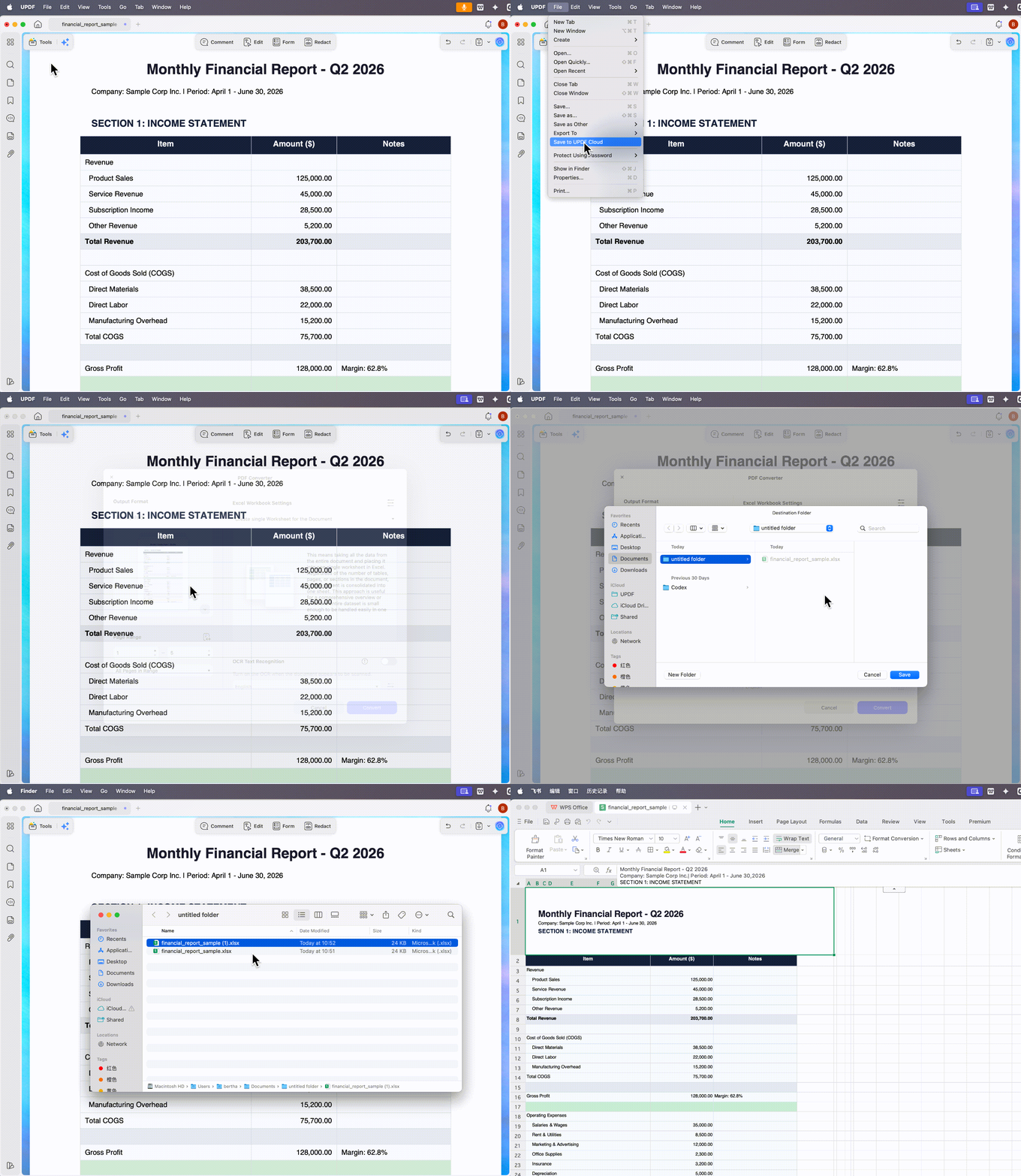
Finding a truly reliable utility requires skipping empty marketing promises like "user-friendly interface" and looking directly at physical execution boundaries—such as whether the tool possesses a native semantic layout reconstruction engine and what hard file-size caps it enforces. Before diving into the deep evaluation, watch this 3-second real-world workflow from the UPDF engineering group to see how a professional layout engine preserves pixel-level structure during high-fidelity format extraction:
Windows • macOS • iOS • Android 100% secure
For font problems after conversion, tools like the UPDF PDF font changer help repair text layers.
💡 Wait—Are You Looking for Something Else?
1. Instant Workflow Routing Matrix
Many readers just want a quick way to pick the right conversion path. This section explains which option fits bulk tables, light text, or high‑DPI design files. So, look at the table below to map each common PDF situation to a safe recommended workflow:
| User Intent | Typical File | Recommended Path | Approx. Volume Limit | Key Note |
| Bulk Tabular Data → Excel | 100+ page reports | Local UPDF batch convert to Excel | Hundreds of pages or many files | Best for keeping table rows and columns intact |
| Light Text → Word | Short contracts, letters | UPDF single or small‑batch PDF to Word | Dozens of pages per file | Preserves real paragraphs for safe editing |
| High‑DPI Designs → Images/Print | Posters, catalogs | Local UPDF PDF to images at 300 DPI | Large, image‑heavy PDFs | Keeps print‑ready resolution and colors |
2. 3 Best PDF Converters Evaluated: Layout Accuracy & File Limits Compared
Picking the best free PDF converters actually matters for real work. Many people just want contracts, reports, or designs to stay intact when they edit or share them. Now, we will explore how different tools can either protect that structure or quietly break it:
1. UPDF — Layout-Focused Free Converter
UPDF is a PDF converter built to keep layouts, tables, and visuals stable while editing. UPDF fits this article's goal because it handles complex reports, slides, and images without obvious distortion. You can send PDFs into many editable formats, including web and lightweight text outputs, in a few clicks. For code-heavy or legacy documents, UPDF also offers precise HTML and RTF conversion workflows when needed.
Key Features
- Multi‑Format Conversion: Turn PDFs into Word, Excel, PowerPoint, images, text, XML, and more in one place.
- PDF To HTML Workflow: Offers a built‑in PDF to HTML converter for clean, responsive pages.
- PDF To RTF Workflow: Use the PDF to RTF converter to get lightweight, widely compatible text files.
- Batch-Friendly Design: Convert multiple PDFs together so recurring tasks are faster and less manual.
Real-World Results From Testing UPDF
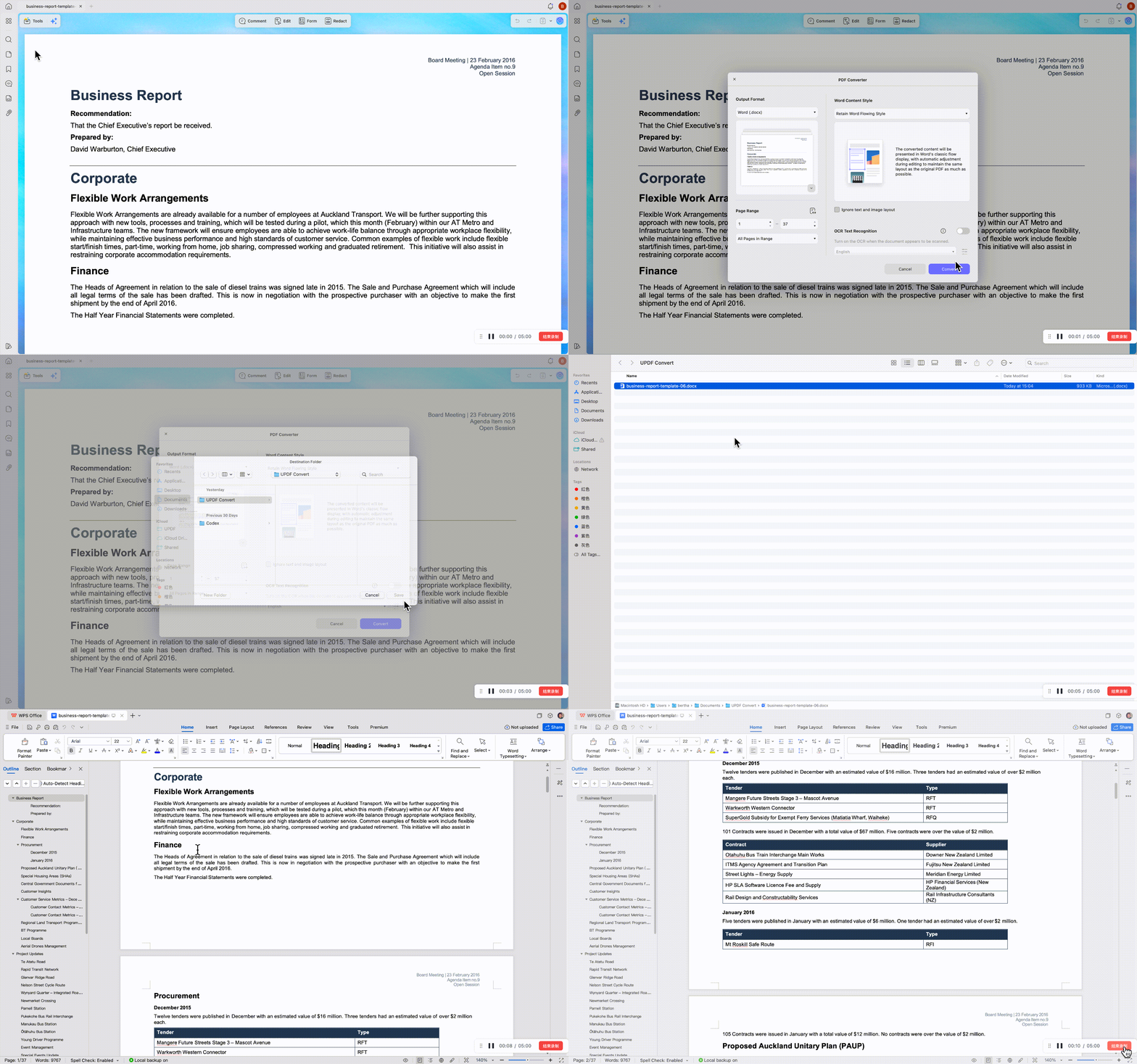
I tested UPDF against a few common free converters, and the "invisible soft returns" problem was obvious. Other tools turned each line into hard breaks or floating text boxes, so tiny word edits wrecked whole paragraphs. With UPDF, the converted Word files behaved like normal documents, with smooth, continuous paragraph wrapping during editing.
Other than that, I saw a similar gap on images: some web tools quietly down-sampled my 300 DPI, CMYK-heavy PDFs to soft 72 DPI exports. UPDF kept my print files at full 300 DPI and preserved color profiles while still feeling fast. In batch tests, I could queue hundreds of mixed, complex PDFs, and UPDF's local engine processed them reliably without choking.
User Rating
2. iLovePDF - The High-Traffic Web Standard
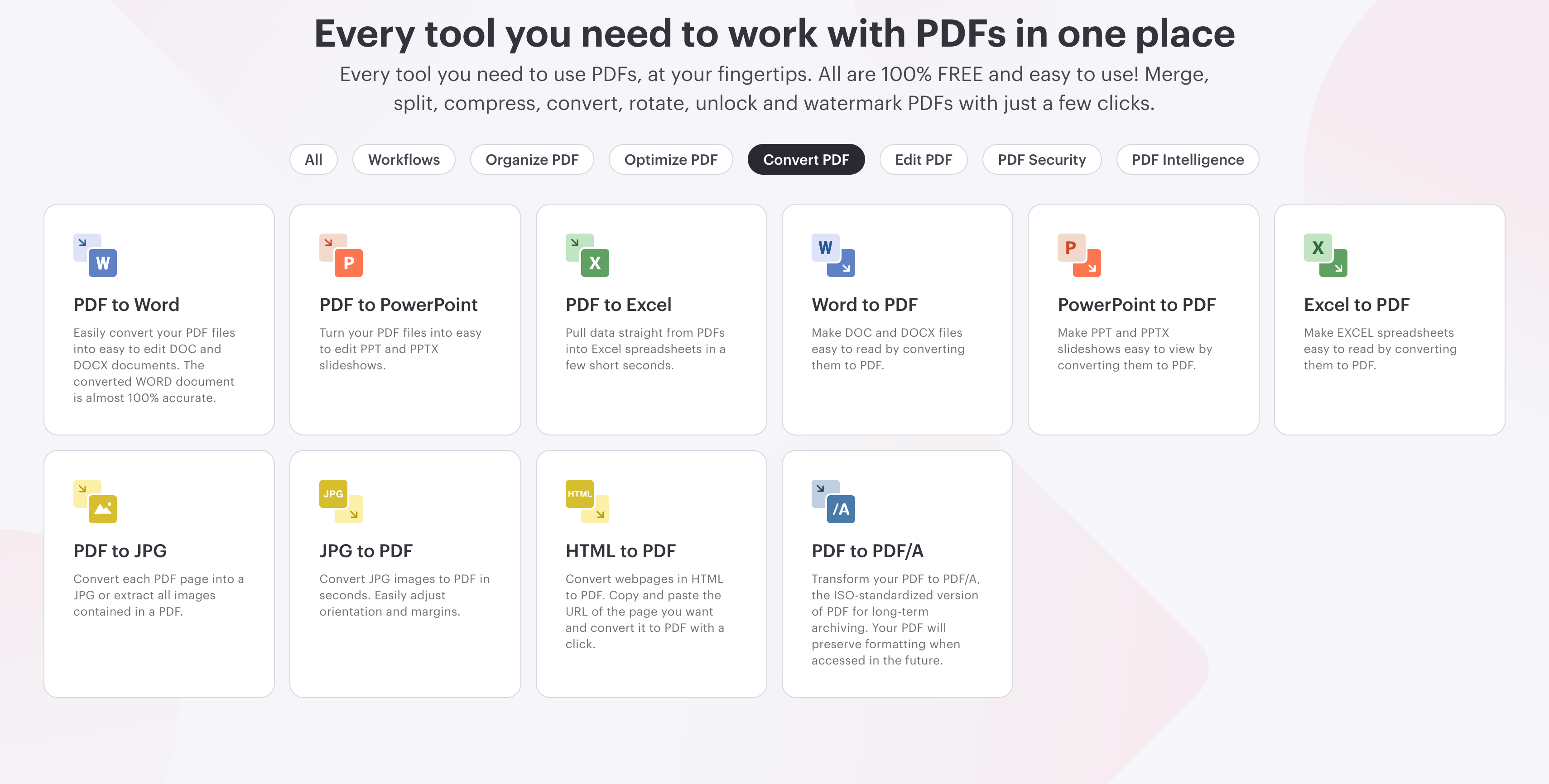
iLovePDF is a modern, high-traffic browser utility with a low-friction, ad-supported user experience. It heavily dominates the casual document conversion space because it requires no upfront account setup or credit card commitments for standard tasks. However, evaluating its server-side infrastructure under professional workloads reveals severe technical limitations for enterprise users.
While the platform processes simple linear text paths with acceptable speed, it quietly executes aggressive down-sampling protocols to minimize cloud bandwidth. Uploading high-fidelity, 300 DPI graphics or CMYK elements results in a soft, compressed 72 DPI output unviable for print. Furthermore, the free tier enforces a strict 3-file batch ceiling, while its coordinate-capturing engine frequently fractures continuous text into isolated, floating text boxes that collapse during minor word edits.
User Ratings
- G2: 4.6/5 (Over 100+ reviews)
- Trustpilot: 4.9/5 (High-volume consumer tier)
3. DocuPub/Neevia — Legacy Single‑File Web Tools
DocuPub and Neevia are older Web‑1.0 converters with very simple, text‑only upload pages. They mainly survive in small academic niches that still prefer bare‑bones, low‑script interfaces. However, they enforce a strict 10MB to 24MB physical upload size ceiling on files.
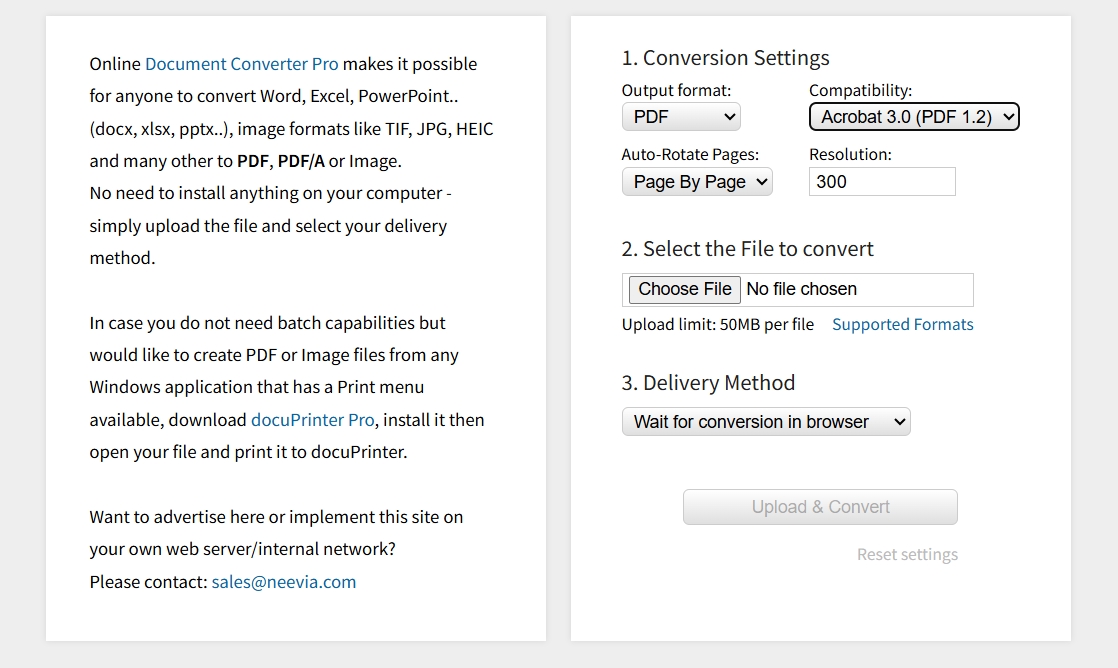
Large, media‑heavy, or multi‑page scans often drop sessions, throw server errors, and fracture table layouts. Developers sometimes try open source PDF converters, but complex dependencies, no batch engine, and PDF/A font issues risk long‑term "tofu" archives.
User Ratings
- N/A, as these legacy tools lack enough recent reviews on major platforms.
3. Hard-Data Decision Matrix (Capability vs Constraint Comparison)
Comparing the best free PDF converters on structure accuracy, image quality, volume handling, and privacy. Check out the table below to see clear limits and strengths at a glance:
| Dimension | UPDF Desktop | iLovePDF | DocuPub/Neevia |
| Tabular Fidelity | ~99% grids preserved | ~75% (Complex rows wrap weirdly) | ~60% tables break |
| DPI/Resolution Caps | 300 DPI local default | Down-samples to 72 DPI (Web optimization) | Down-samples to ~72 DPI |
| Bulk Volume Limits | 100+ files per batch | 1 files per task (Free tier), 10 files per task (Paid version) | 1 file, ≤24 MB |
| Access Terms | 2 free tasks/day, no watermarks | Free web access (No credit card needed) | Free, ad‑supported web |
| GDPR/Privacy | Local processing, no upload | Processed on cloud servers (Temporary storage) | Files stored on third‑party servers |
Frequently Asked Questions
Can I convert a heavily scanned PDF to an editable Word document entirely for free?
No. Fully free options are limited because scanned PDFs need OCR, which tools like UPDF and similar provide. Most basic web converters treat scans as pictures, so you just get blank pages or fixed image blocks.
Why do characters look like unreadable symbols or garbled text after conversion?
Garbled characters often appear when fonts aren't embedded correctly, or encodings confuse the conversion engine. Better tools map each character locally, aligning fonts and spacing so the text stays readable and consistent.
Is it safe to upload confidential audits or agreements to free online PDF converters?
Often not, because files travel to unknown third‑party servers that might log, store, or inspect content. For sensitive documents under rules like GDPR, it's safer to convert locally with trusted offline software.
Final Words
Ultimately, the PDF stack you choose should match your file sizes, layout complexity, and tolerance for even tiny typography shifts. Once you are ready to move from casual experimenting to a setup you can rely on every day, follow these two paths:
Download UPDF to see how it handles font stability and layout preservation on your own documents.
Windows • macOS • iOS • Android 100% secure
[Deploy UPDF for Your Enterprise] – Skip the lengthy sales calls. Head directly to our Enterprise Pricing Plans to instantly equip your team with centralized licensing, a dedicated Admin Console, and a flawless, high-volume document conversion infrastructure.



 Lizzy Lozano


 Enola Miller
 Hitesh Kumar