UPDF
UPDF
 UPDF for Windows
 UPDF for Mac
 UPDF for iPhone/iPad
 UPDF for Android
 Nomostar
 UPDF AI Online
 UPDF Sign
 IvyCraft
 Edit PDF
 Annotate PDF
 Create PDF
 PDF Form
 Edit links
 Convert PDF
 OCR
OCR PDF to Word
 PDF to Image
 PDF to Excel
 Organize PDF
 Merge PDF
 Split PDF
 Crop PDF
 Rotate PDF
 Protect PDF
 Sign PDF
 Redact PDF
 Sanitize PDF
 Remove Security
 Read PDF
 UPDF Cloud
 Compress PDF
 Print PDF
 Batch Process
 About UPDF AI
 UPDF AI Solutions
 AI User Guide
 FAQ about UPDF AI
 Summarize PDF
 Translate PDF
 Chat with PDF
 Chat with AI
 Chat with image
 PDF to Mind Map
 Explain PDF
 PDF AI Tools
 Image AI Tools
 AI Chat Tools
 AI Writing Tools
 AI Study Tools
 AI Working Tools
 Other AI Tools
 AI Bookmark Generation
 AI Bookmark Summary
 AI Watermark Generation
 AI Background Generation
 AI Sticker Generation
 AI Stamp Generation
 AI Editing Suite
 UPDF Copilot
 AI Page Management
 AI Semantic Search
 PDF to Word
 PDF to Excel
 PDF to PowerPoint
 Enterprise Solution
 Enterprise Sign
 Enterprise AI
 Enterprise Plan
 Enterprise User Guide
 Enterprise Webinar
 IT
IT Education
 Construction
 Financial Service
 Healthcare
 Insurance
 Legal
Legal Manufacturing
 Government
 Researchers & PhDs
 Solopreneurs & Freelancers
 Lawyers & Legal Professionals
 Real Estate Agents & Brokers
 Education Solution
 Customer Stories
 User Guide
 UPDF Tricks
 FAQs
FAQs UPDF Reviews
 Download Center
 Blog
Blog Newsroom
 Tech Spec
 Updates
 UPDF vs. Adobe Acrobat
 UPDF vs. Foxit
 UPDF vs. PDF Expert

PDF files preserve formatting perfectly, yet editing one often feels like writing on flattened cardboard instead. You probably searched for a PDF to RTF converter because you need editable text, not another locked document. An RTF file opens across many word processors without forcing you into costly software subscriptions. Discussions in Reddit's r/PDFgear community show many users facing the same frustrating conversion challenge every day.
If you only want to update the wording, learning how to edit a PDF usually saves unnecessary conversion time. That approach keeps the original format intact while avoiding another file type during simple revisions. Still, you may need an RTF file when older software or a publishing platform only accepts that format. This guide reviews four practical converters, so you can choose one without testing every option yourself.
Part 1. Core Scenarios: Who Needs a PDF to RTF Converter Most?
The right PDF to RTF converter depends on what you plan to do afterward. Review the scenarios below before exploring each tool in detail.
| Target Audience/Persona | Why Convert PDF to RTF? | PDF Pain Point | Recommended Solution |
| Students & Office Workers | Make quick edits or prepare homework notes without Microsoft Office. | PDF text is difficult to copy, revise, or rearrange. | Jump to UPDF |
| Occasional Home Users | Convert a simple document without installing desktop software. | Basic PDFs don't justify paying for advanced conversion tools. | Jump to Drawboard PDF Online |
| Content Editors & Publishers | Move editable text into a CMS or publishing program. | Many platforms accept RTF but cannot import PDF content directly. | Jump to CloudConvert |
| Legal & Administrative Staff | Rebuild contracts while keeping headings, bold text, and basic layout order. | Complex PDF structures are difficult to copy without losing hierarchy. | Jump to Adobe Acrobat Pro |
| Developers & AI Researchers | Extract document text for NLP models, databases, or search indexes. | Direct PDF extraction often creates broken spacing, symbols, and parsing errors. | Jump to UPDF Desktop Converter |
Part 2. Deep-Dive Review: The 4 Best PDF to RTF Converters
Not every PDF to RTF converter delivers the same results. Compare the four tools below to see which one best fits your documents and workflow.
1. UPDF (Best All-in-One Desktop & Batch Converter)
Best for:
If you need a reliable, high-fidelity solution that operates without web limits or privacy risks, UPDF stands out as the top-performing desktop converter. Unlike web-based tools that upload your files to cloud servers, UPDF performs all conversions 100% locally on your Windows or Mac machine, ensuring complete data security for confidential contracts, financial records, and legal briefs.
Hands-on Test Performance:
In our hands-on evaluation, we put UPDF through a stress test using a complex, multi-page PDF document featuring custom fonts, double-column text blocks, and structured data tables. Standard web tools often smash multi-column layouts into garbled text lines or strip away border alignments. UPDF, however, retained the exact paragraph spacing, preserved custom typography without font substitution, and perfectly converted structured tables into editable elements inside the resulting .rtf file.
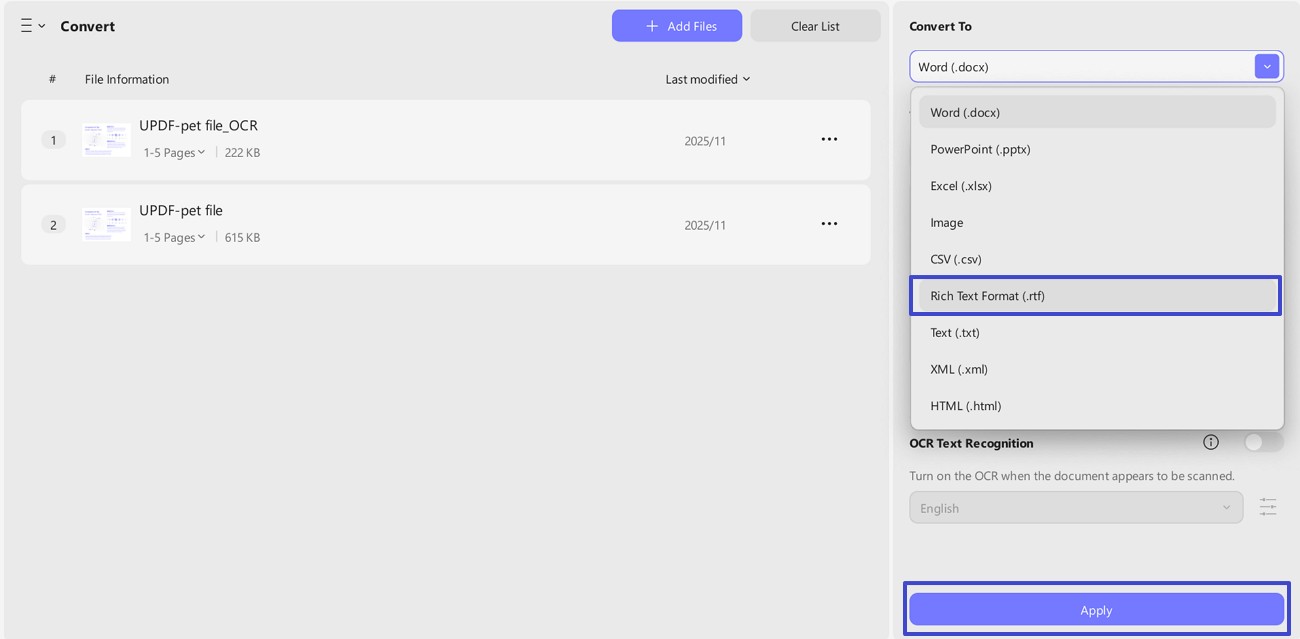
For users seeking alternative workflow tutorials, UPDF makes it seamless—you can learn how to export PDF to RTF
or explore native steps to convert PDF to rich text layouts without losing structural fidelity.
Premium users can drag and drop hundreds of PDFs for background batch conversion instead of processing files individually. The free account supports two conversions per day, which works well when you only need a few documents for occasional editing or testing.
Beyond Conversion: Why UPDF is More Than Just a Converter
Windows • macOS • iOS • Android 100% secure
2. Adobe Acrobat Pro (The Traditional Enterprise Option)
Best for:
Acrobat's Export PDF tool has supported RTF output for years and includes OCR for scanned pages during the same export, useful if your source document isn't pure text. It's the most established name on this list, and its RTF output is generally reliable with standard business documents.
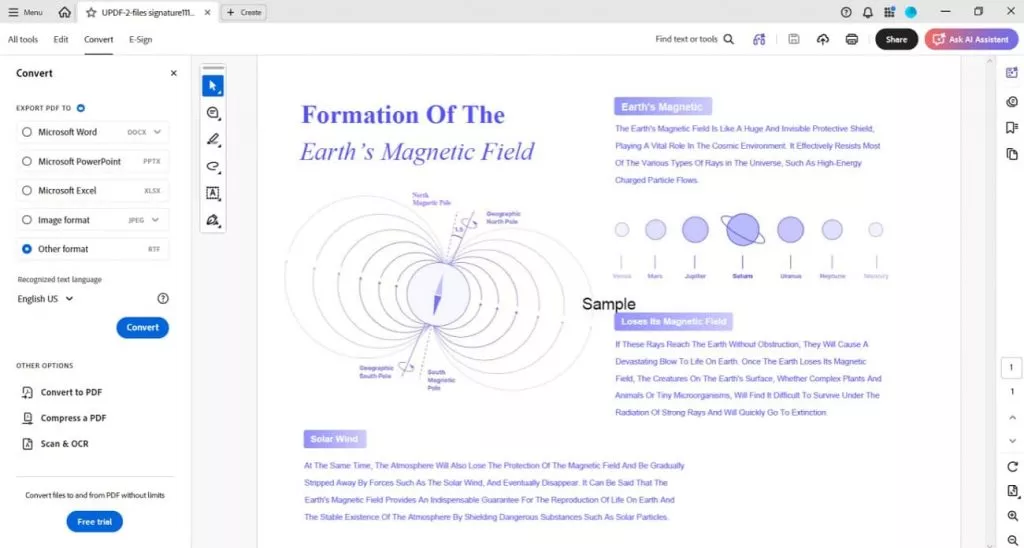
The main drawback is the cost, since Acrobat Pro costs nearly $20 per month with annual billing. Monthly billing is more expensive, and the software may also strain older computers during larger conversions. That expense makes sense when your company already provides access through its Creative Cloud plan. However, it feels excessive when you only need to convert a few files occasionally.
3. CloudConvert (Best Online Alternative)
Best for:
CloudConvert works as a browser-based PDF to RTF converter and supports more than 200 file formats. That range suits you when document conversion extends beyond RTF files alone. Its free tier also covers limited daily use for occasional, non-commercial tasks.
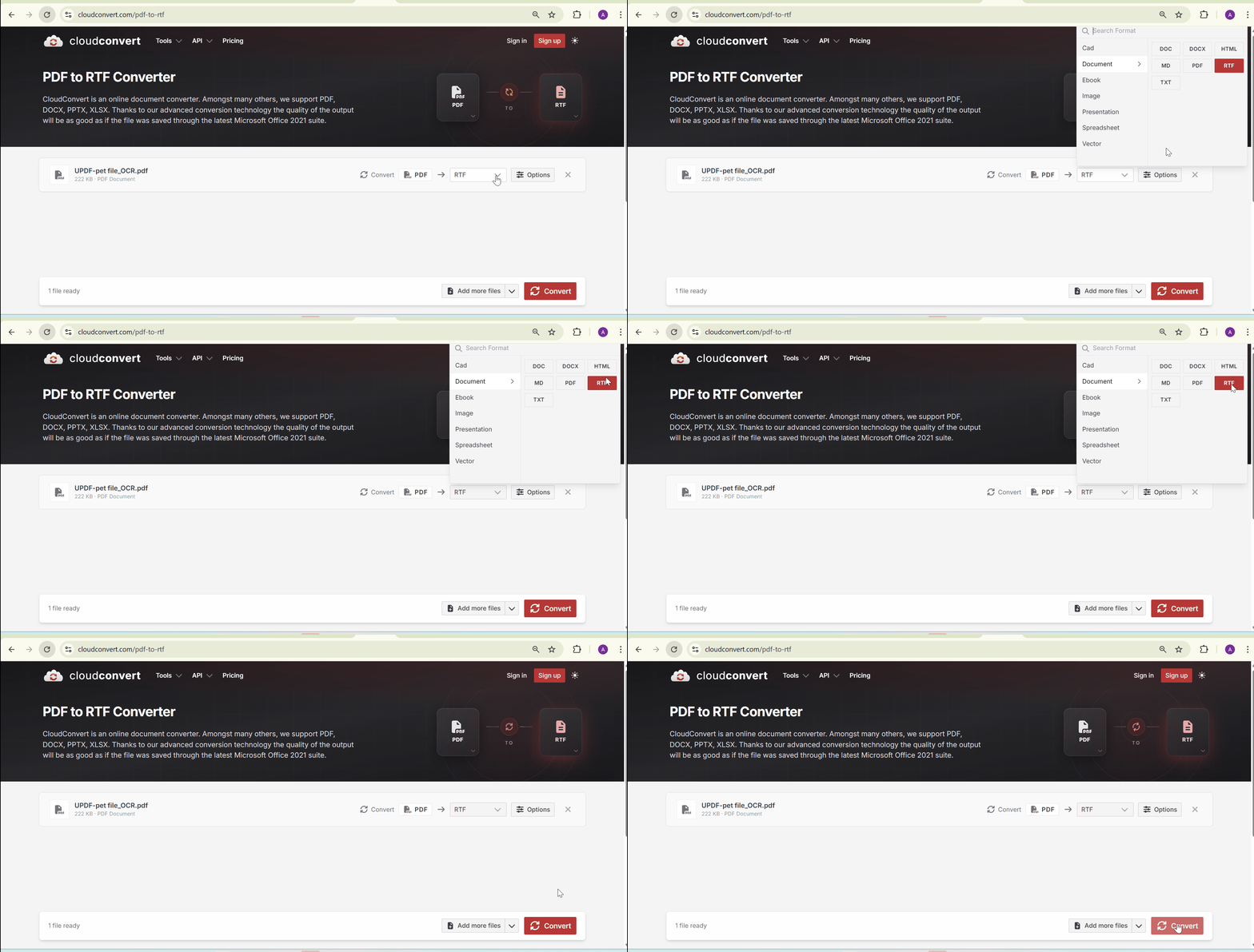
The service requires you to upload each document before conversion begins. This trade-off works for public brochures or templates containing no confidential information. Sensitive contracts, financial records, and client documents remain safer with a local desktop converter.
4. Drawboard PDF Online (The Basic Web Tool)
Best for:
Our test showed that Drawboard kept basic paragraphs readable, but complex elements changed noticeably. Several table borders broke, bullet spacing shifted, and the non-standard font was replaced. The same file also took longer to convert and download than CloudConvert.
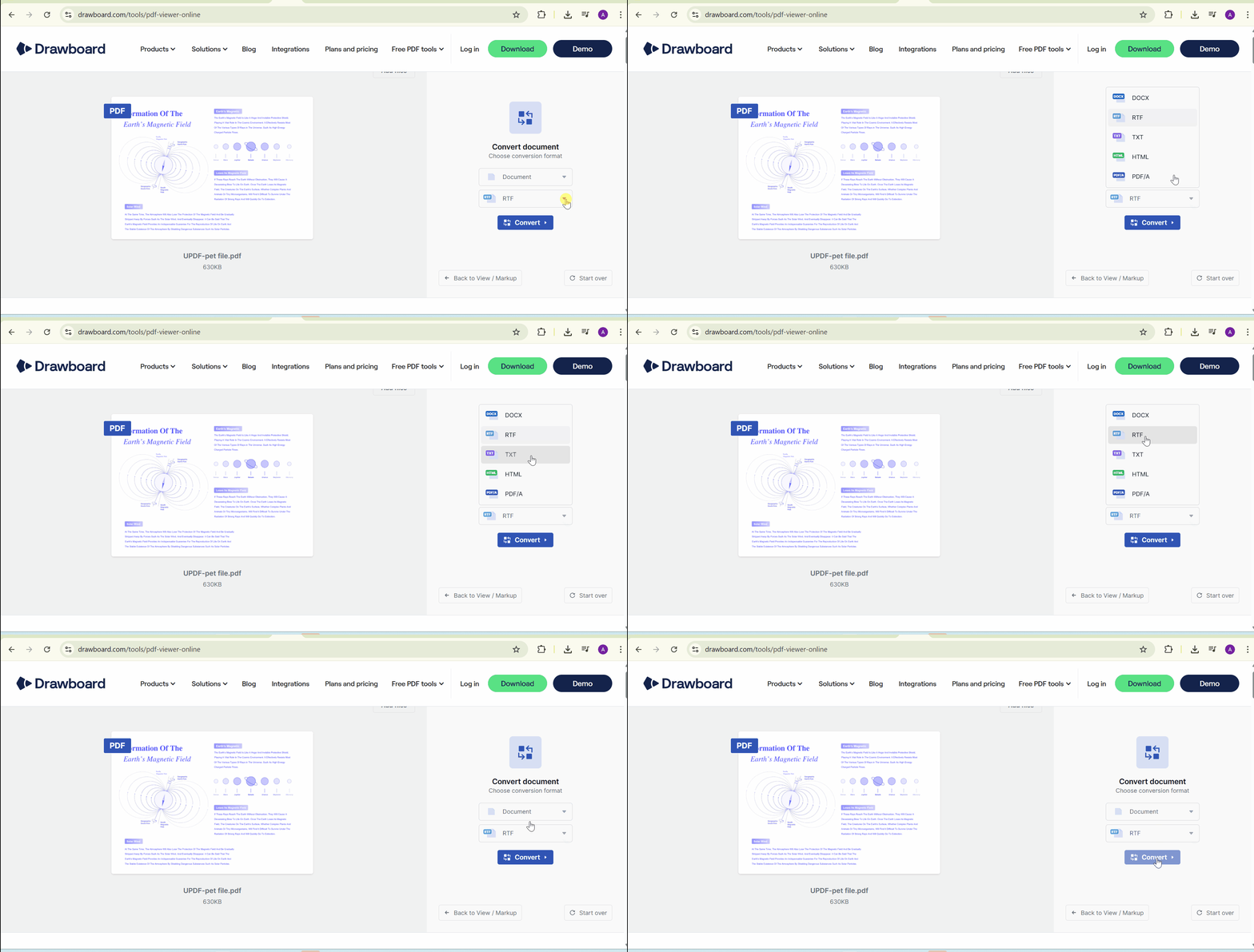
Its weak formatting retention makes Drawboard unsuitable for detailed business or publishing documents. Since files pass through an online service, you should avoid uploading contracts, financial records, or other sensitive material.
Part 3. Advanced Features: Going Beyond PDF-to-RTF Conversion
A PDF to RTF converter offers more value when it also supports reverse document workflows. UPDF gives you several ways to turn rich text back into a polished PDF.
- Batch PDF to RTF Creation: You can convert one PDF file into an RTF or process several files together. UPDF helps streamline multiple conversions without processing each file separately.
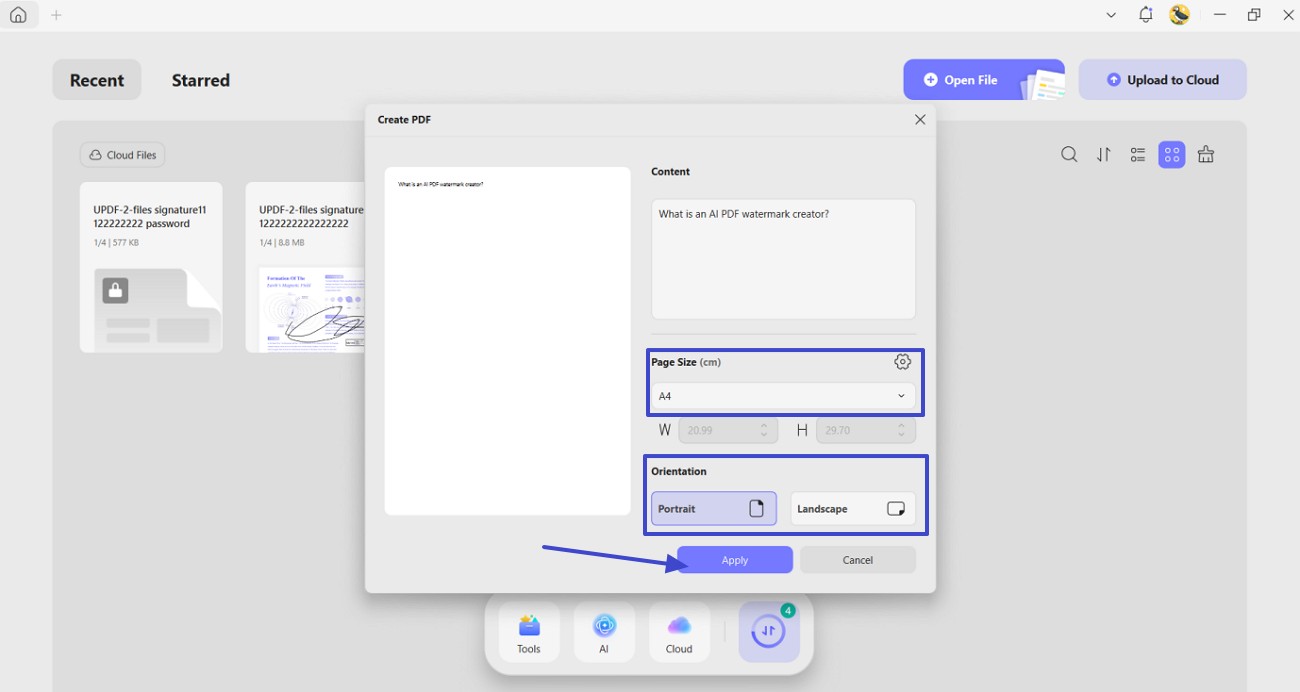
- Rich Text Clipboard Creation: You can copy formatted text from a website or application directly to your clipboard. UPDF then turns that rich text into a new PDF without an intermediate file.
Moreover, additional conversion resources give you several ways to finish the reverse workflow. You can follow the rich text format to PDF converter guide for the desktop workflow. The rich text format to PDF converter online tool and free PDF converter hub provide more format options.
Frequently Asked Questions
What is the main difference between RTF and PDF?
RTF supports straightforward editing and basic formatting across many word-processing applications. PDF keeps the page layout consistent, making the document harder to change.
Can I convert scanned PDF pages into an editable RTF file?
A basic converter usually places scanned pages inside RTF files as images. For editable text, choose a tool with optical character recognition, such as UPDF. It reads image-based words and turns them into editable rich-text content.
Will online PDF to RTF converters leak my document data?
Trusted online converters protect uploads with encrypted connections during file transfers. However, uploaded documents may still remain temporarily stored or cached online. Use an offline converter for contracts, financial files, or confidential records.
Conclusion
To conclude, selecting the right PDF to RTF converter comes down to your documents, workflow, and privacy requirements. Browser-based tools handle occasional files, while desktop software better preserves formatting and keeps sensitive data under your control. If you expect reliable results without unnecessary limitations, UPDF is worth trying. For basic editing process, UPDF offers a complete suite of editing tools to get you the right results.
Windows • macOS • iOS • Android 100% secure




 Engelbert White
 Enid Brown