 UPDF
 UPDF for Windows
 UPDF for Mac
 UPDF for iPhone/iPad
 UPDF for Android
 Nomostar
 UPDF AI Online
 UPDF Sign
 IvyCraft
 Edit PDF
 Annotate PDF
 Create PDF
 PDF Form
 Edit links
 Convert PDF
 OCR
 PDF to Word
 PDF to Image
 PDF to Excel
 Organize PDF
 Merge PDF
 Split PDF
 Crop PDF
 Rotate PDF
 Protect PDF
 Sign PDF
 Redact PDF
 Sanitize PDF
 Remove Security
 Read PDF
 UPDF Cloud
 Compress PDF
 Print PDF
 Batch Process

 About UPDF AI
 UPDF AI Solutions
 AI User Guide
 FAQ about UPDF AI
 Summarize PDF
 Translate PDF
 Chat with PDF
 Chat with AI
 Chat with image
 PDF to Mind Map
 Explain PDF
 PDF AI Tools
 Image AI Tools
 AI Chat Tools
 AI Writing Tools
 AI Study Tools
 AI Working Tools
 Other AI Tools
 AI Bookmark Generation
 AI Bookmark Summary
 AI Watermark Generation
 AI Background Generation
 AI Sticker Generation
 AI Stamp Generation
 AI Editing Suite
 UPDF Copilot
 AI Page Management
 AI Semantic Search
 PDF to Word
 PDF to Excel
 PDF to PowerPoint
 Enterprise Solution
 Enterprise Sign
 Enterprise AI
 Enterprise Plan
 Enterprise User Guide
 Enterprise Webinar
 IT
 Education
 Construction
 Financial Service
 Healthcare
 Insurance
 Legal
 Manufacturing
 Government
 Researchers & PhDs
 Solopreneurs & Freelancers
 Lawyers & Legal Professionals
 Real Estate Agents & Brokers
 Education Solution
 Customer Stories
 User Guide
 UPDF Tricks
 FAQs
 UPDF Reviews
 Download Center
 Blog
 Newsroom
 Tech Spec
 Updates
 UPDF vs. Adobe Acrobat
 UPDF vs. Foxit
 UPDF vs. PDF Expert


Quick Answer
Convertio is one of the most popular online file converters — 300+ formats, Google Drive integration, and a free tier that covers the occasional small file. But its limits have quietly changed: the free plan now runs on a daily credit system, and its paid plans are priced per conversion credits, not per month of access.
In this Convertio review, we test the tool hands-on, break down the current free limits and 2026 pricing (including the OCR billing catch), and show you when a local tool like UPDF is the better choice for PDF work.
Additionally, you’ll learn about a powerful alternative to PDF tasks, UPDF, that offers better features at a competitive price.
You can download UPDF via the button below to give it a test.
Windows • macOS • iOS • Android 100% secure
Let’s begin by exploring what Convertio is and how it works.
Part 1. What is Convertio?
Convertio is a versatile, cloud-based file conversion platform. It lets you convert documents, images, videos, audio, ebooks, archives, and fonts without installing anything — upload a file, pick an output format, convert, download. You can also pull files directly from Google Drive or Dropbox and save results back to them.
Features of Convertio
Convertio offers many features to ensure quick and user-friendly file conversion. Below are its key features.
- Supports Over 300 Formats
Convertio allows conversions between more than 25,600 combinations of 300+ file formats, offering unique flexibility.
- Fast and Easy Conversion
Users can upload files, select the desired output format, and initiate conversion. Most conversions take in 1–2 minutes.
- Cloud-Based Processing
All conversions occur in the cloud, ensuring your device’s storage and processing power remain unaffected.
- Customizable Settings
Convertio provides advanced customization options for many file types. Users can adjust video quality, aspect ratio, codecs, and more.
- High-Security Standards
Uploaded files are deleted instantly. Converted files are removed after 24 hours. Your data stays safe.
- Cross-Device Compatibility
Convertio is a browser-based tool that can be used on all platforms without requiring software downloads.
- API for Developers
The API of Convertio can be used by applications that require file conversion tools as provided by developers.
If a user requires a fast and straightforward online conversion of files then Convertio is an application they need due to its features.
Most-Used Convertio Format Categories — and Their Limits
Convertio's real strength is breadth. Here's what people actually use it for, grouped by category:
Documents: PDF to Word, Word to PDF, PDF to Excel, PDF to PowerPoint, TXT, RTF, ODT. Conversion quality is good for standard layouts; complex tables and multi-column designs sometimes need cleanup afterward. If PDF conversion is your main job, a dedicated PDF converter keeps formatting intact more reliably — see how UPDF handles PDF to Word conversion.
Ebooks: EPUB, MOBI, AZW3, FB2 — one of the few free tools that handles Kindle formats.
Images: JPG, PNG, WebP, TIFF, HEIC, SVG, and 200+ more, with optional resizing, compression, and quality settings. Free tier handles files up to 1 GB; image batches are where the daily credit limit bites first.
Video and audio: MP4, MOV, AVI, MKV, MP3, WAV, FLAC, with codec, resolution, and bitrate controls — real depth for a free converter.
CAD and specialty: DWG, DXF, and other niche pairs most converters ignore.
Archives and fonts: ZIP-based formats and font conversion (OTF, TTF, WOFF).
Scans: a separate OCR tool recognizes text in scanned PDFs and images. Note the catch from Part 2 — OCR has its own limits and billing.
Batch conversions: paid plans convert multiple files concurrently (50–100 depending on the plan), but every file still spends from your monthly credit pool — batch is faster, not free-er.
Part 2. Is Convertio 100% Free?
Convertio offers free file conversion, but on a credit system rather than an unlimited free plan. Based on Convertio's current official documentation, the free tier includes:
Maximum file size: 1 GB per file (raised from the old 100 MB limit).
Conversion credits: 10 credits per 24 hours. Each conversion spends at least one credit; larger or longer conversions can spend more.
Concurrent conversions: up to 10 running at once, still capped by your daily credits.
If you exceed these limits, you're prompted to upgrade. For the occasional file, this is generous; for daily work, 10 credits disappears fast.
OCR limits: the free OCR tier recognizes up to 10 pages in total.
Important catch: OCR is billed separately — a file-conversion premium plan does not cover OCR usage, and vice versa. If you mainly need OCR, budget for the OCR packages specifically.
Pricing Plans for Convertio
Convertio's paid plans are now priced around monthly conversion credits. Current pricing (verify at convertio.co/pricing — it changes):
| Plan | Monthly | Annual (billed yearly) | File size | Credits per month | Concurrent |
|---|---|---|---|---|---|
| Light | $11.99 | $6.99 | 1 GB | 1,000 | 50 |
| Basic | $22.99 | $13.99 | 3 GB | 3,000 | 100 |
| Unlimited | $44.99 | $25.99 | 10 GB | 10,000 | Unlimited |
| Custom | from $54 | from $32.42 | 20 GB | up to 1M | Unlimited |
All plans include: no ads, unlimited conversion minutes per day and per file. Annual billing saves up to 40%, and subscriptions can be cancelled anytime from the member area.
Note the model: you're buying a monthly quota of credits, so heavy users can burn through even the Unlimited plan's 10,000 credits and need Custom pricing — for continuous high-volume conversion, a local tool with no meter is often cheaper.
Now, let’s see if Convertio is safe to use.
Part 3. Is Convertio Safe?
Convertio is a secure platform that prioritizes the safety and privacy of its users’ data. It performs strong security measures to protect your files and personal information. Here’s how Convertio ensures user safety.
- File Handling and Deletion
Convertio deletes input files immediately after conversion finishes, and converted files are stored for 24 hours before automatic deletion — or you can delete them manually at any time from "My Files." Transfers are protected with TLS, and its infrastructure runs on ISO 27001-certified datacenters under GDPR compliance. You don't need an account to convert for free.
One honest caveat: none of this changes the fact that your files travel to and from Convertio's servers on every job. For public or everyday files that's a reasonable trade for the convenience. For confidential contracts, financial records, or client documents, a local tool that never uploads anything is the safer architecture — more on that in Part 6.
You can delete them manually by selecting “My Files” and clicking the “X” icon next to the file name.

- Encrypted Communication
Convertio employs TLS security encryption while transferring data from your device to its servers or conversion hosts. This ensures your files cannot be accessed without authorisation while being uploaded, processed, or downloaded.
- Certified Datacenters
Convertio relies on ISO 27001-certified cloud providers and data centres. This certification confirms the convertio safety to the highest information security standards.
- Privacy and GDPR Compliance
Convertio complies with the General Data Protection Regulation (GDPR). It does not collect or share personal information with third parties.
- Anonymous Usage
You can use Convertio for free without creating an account. No personal information is required unless you exceed free-tier limits and choose to subscribe to a premium plan.
Now, let’s learn how to use Convertio easily with these simple steps.
Part 4. How to Use Convertio?
Convertio makes file conversion simple and efficient. You can convert documents, images, and videos in just a few clicks. Follow the below easy steps to use Convertio with ease.
Steps to Use Convertio
Here’s a quick guide to help you perform file conversions with Convertio.
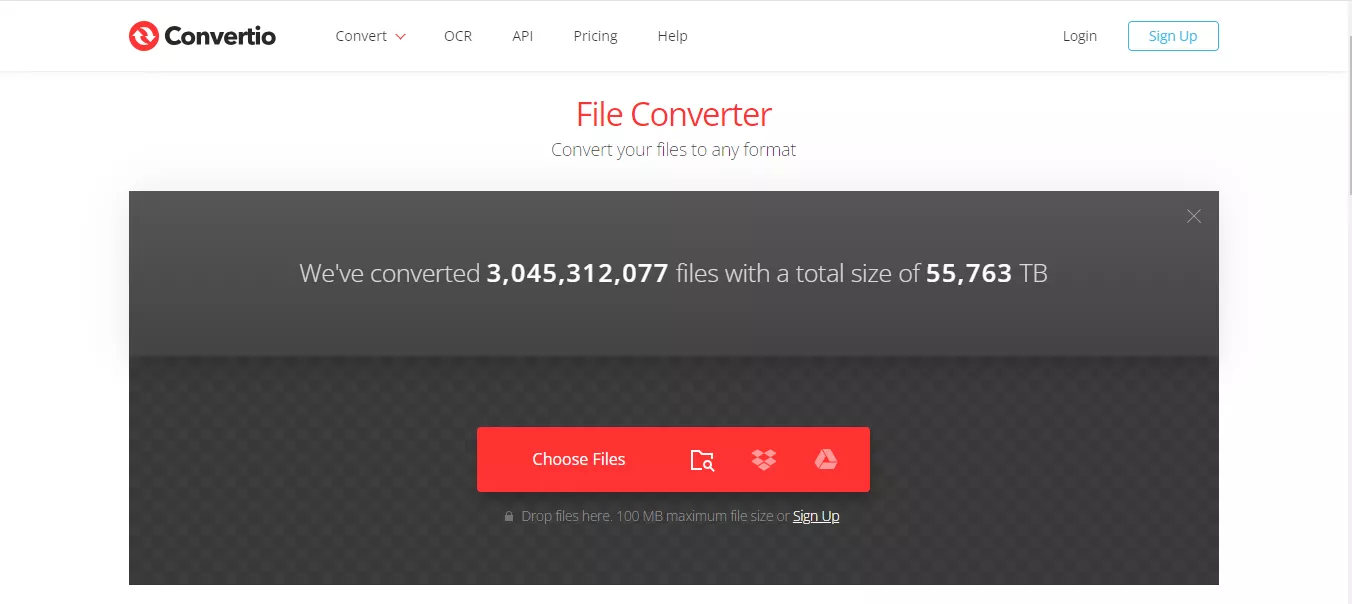
Step 1. Visit the official website of Convertio.
Step 2. Click the big red button to upload your file. You can drag and drop files for convenience.
Step 3. Choose the desired output format from the dropdown menu next to your file name.

Step 4. Press the “Convert” button and wait for the process to complete.
Step 5. Once the file is ready, click the “Download” button to save it to your device.
One practical tip from our testing: pull the source file straight from Google Drive or Dropbox using the icons next to "Choose Files" — it skips the download-and-reupload step entirely, and the converted file can go straight back to the cloud.
Let’s explore the downsides of using Convertio for your file conversions.
Part 5. Cons of Using Convertio
Convertio reviews highlighted some drawbacks that may affect your user experience. Here are some cons associated with using Convertio.
- Credit-based limits. The free tier gives you 10 credits per 24 hours, and paid plans are monthly credit pools. One bad day of work — a folder of scans, a batch of images — can drain a plan you paid for. The meter is always running.
- Internet dependency. Everything is server-side: slow or unstable connections mean stalled uploads, and large files on slow networks take longer to upload than to convert.
- Speed on large files. Even with a stable connection, big video or archive conversions queue behind other users unless you're on a high-priority plan.
- No refunds and no offline mode. Convertio's refund policy is effectively "test with the free version first" — payments are generally non-refundable. And because it's a website, there's no offline conversion and no desktop app to fall back on.
- PDF dead-end. Convertio converts PDFs but can't edit, annotate, fill, or sign them. The moment your task is "change this paragraph, then convert," you're in the wrong tool.
Awareness of these limitations can help users decide when considering Convertio for their file conversion needs.
And for those who want to find a better tool for PDF tasks? You can use UPDF which offers better service for PDF conversion and other PDF related tasks.
Part 6. Online Conversion vs. Local Processing: Which Does Your Task Need?
Convertio and a local PDF tool aren't really enemies — they win in different scenarios. Match the tool to the job:
Convertio (online) is the right call when: • It's a one-off conversion of a small-to-medium file • You need a rare format pair (Kindle ebooks, CAD, obscure archives) • Your files already live in Google Drive or Dropbox • You're on a device where you can't install software • The file is non-sensitive and you have a working connection
A local tool like UPDF is the right call when: • The file is confidential — contracts, financials, client documents — and you'd rather it never touch a third-party server • You convert PDFs regularly and a daily/monthly credit meter would constantly interrupt you • You need to edit, annotate, or sign the PDF before or after converting • You're working with scans that need OCR and then editing — Convertio's OCR doesn't lead anywhere except a searchable PDF • You're offline, on a plane, or on an unreliable connection • The same conversion job repeats weekly — local processing has no per-file cost
If more than two items on the second list sound like you, that's the signal to stop renting conversions and own the tool.
Part 7. The Best Alternative for PDF Converter and OCR
For PDF specifically, the comparison tips further toward local software. Convertio converts PDFs — UPDF works with them:
Convert without the meter. UPDF converts PDF to Word, Excel, PowerPoint, CSV, HTML, text, RTF, images, and more, one file or in true batch, with formatting preserved — no daily credits, no monthly pool, no upload.
OCR that leads somewhere. UPDF's AI-powered OCR turns scanned PDFs and images into editable, searchable documents, and you can edit the result in the same app. Convertio's OCR produces a searchable PDF — then you're on your own.
Edit before you convert. Fix a typo, update a number, redact a paragraph, add a signature, then convert — all in one session.
Completely offline. Files are processed on your device. Nothing is uploaded, nothing is metered, and it works without internet.
| Item | Convertio | UPDF |
|---|---|---|
| Scope | All file types (300+ formats) | PDF-focused: convert, edit, OCR, sign, annotate |
| Free tier | 10 credits/24h, 1 GB files, cloud-only | Real free version: convert and edit, no meter |
| Paid model | Monthly credit pools from $11.99/mo | Low annual/one-time price, unlimited use |
| Batch | Concurrent conversion, spends credits | True batch, unlimited, offline |
| OCR | 10 free pages; separately billed | Built-in, included, editable output |
| Editing | None | Full text, image, link, page editing |
| Offline use | No | Yes, all platforms (Win/Mac/iOS/Android) |
| Privacy | Files uploaded to cloud, deleted after | Local processing, nothing uploaded |
| Rare formats (ebooks, CAD, video) | Excellent | PDF formats only |
If your work is mostly PDFs, try UPDF free — convert, OCR, and edit without a meter.
Windows • macOS • iOS • Android 100% secure
Why UPDF Stands Out as the Best PDF Converter and OCR
UPDF is the ideal alternative for file conversion and OCR for several reasons.
- Accurate and Reliable OCR
Its AI-powered OCR delivers near-perfect text recognition, making scanned documents editable.
- Affordable Pricing
Unlike many tools, UPDF offers premium features at a competitive price. You can check and upgrade here.
- User-Friendly Design
Its simple and clean interface ensures anyone can use it without a learning curve.
- All-in-One Solution
UPDF combines editing, conversion, annotation, and OCR in one tool, eliminating the need for multiple apps.
- Speed and Efficiency
It processes tasks quickly without compromising quality, making it ideal for professionals.
- Consistent Updates
Regular updates ensure you always have the latest features and improvements.
Let’s explore some of the key features that UPDF provides to its users.
Key Features of UPDF
Discover the top features of UPDF below that make it stand out.
- Intuitive Editing Tools
UPDF allows users to easily edit text, images, and pages within PDF documents.
- Effortless Conversion
Convert PDFs to Word, Excel, PowerPoint, and more formats without losing quality.
- AI-Powered OCR
UPDF’s OCR tool accurately recognizes text in scanned documents and images.
- Secure Document Handling
UPDF keeps your data safe with advanced encryption and permission settings.
- Cross-Platform Compatibility
UPDF works on Windows, Mac, iOS, and Android, ensuring seamless access across all devices.
- Batch Processing
Save time by editing, converting, or applying changes to multiple files simultaneously.
We cannot cover all its features here, so you can watch the video below or read this review article to learn more.
FAQs About Convertio
Is Convertio free?
Yes, with limits. The free tier gives you 10 conversion credits per 24 hours, files up to 1 GB, and up to 10 concurrent conversions, all without an account. The free OCR tier is limited to 10 pages total.
What is a Convertio conversion credit?
A credit is a unit of conversion usage. Each conversion spends at least one credit depending on file size and duration; larger conversions cost more. Free users get 10 credits per 24 hours. Paid plans are monthly credit pools (1,000–10,000+).
What is the file size limit on Convertio?
1 GB per file on the free tier (older documentation referenced 100 MB — the limit was raised). Paid plans go up to 20 GB depending on the plan.
Is Convertio good for PDF to Word conversion?
It works for simple layouts, but formatting on complex documents often needs cleanup, and there's no way to edit the PDF first. For reliable PDF to Word conversion — or to edit before converting — a dedicated PDF tool like UPDF keeps formatting intact.
What are the best Convertio alternatives?
For general file conversion: CloudConvert (daily minute allowance) and Zamzar (2 free conversions/day). For PDF work: UPDF converts, edits, OCRs, and signs offline with no credit meter — the closest like-for-like upgrade if PDFs are your main use case.
Does Convertio work offline?
No. Convertio is a cloud service — every conversion requires uploading your file and an active internet connection.
Final Words
Convertio earns its popularity: the format coverage is real, the free tier is usable for occasional files, and the cloud integrations are genuinely convenient. Just go in knowing the shape of the limits — daily credits, cloud-only processing, separately billed OCR, and a refund policy that amounts to "try before you buy."
If your conversions are mostly PDFs, or if you regularly hit the credit ceiling, the math changes. UPDF converts PDFs to and from all the office formats, OCRs your scans into editable documents, lets you edit before converting, and does all of it offline with no meter — for less than a few months of Convertio's mid-tier plan. Download UPDF free and see whether the local approach fits your workflow.
Windows • macOS • iOS • Android 100% secure



 Lizzy Lozano
 Enola Miller

 Delia Meyer

 Enola Davis

 Engelbert White