 UPDF
UPDF
 UPDF for Windows
 UPDF for Mac
 UPDF for iPhone/iPad
 UPDF for Android
 Nomostar
 UPDF AI Online
 UPDF Sign
 IvyCraft
 Edit PDF
 Annotate PDF
 Create PDF
 PDF Form
 Edit links
 Convert PDF
 OCR
OCR PDF to Word
 PDF to Image
 PDF to Excel
 Organize PDF
 Merge PDF
 Split PDF
 Crop PDF
 Rotate PDF
 Protect PDF
 Sign PDF
 Redact PDF
 Sanitize PDF
 Remove Security
 Read PDF
 UPDF Cloud
 Compress PDF
 Print PDF
 Batch Process
 About UPDF AI
 UPDF AI Solutions
 AI User Guide
 FAQ about UPDF AI
 Summarize PDF
 Translate PDF
 Chat with PDF
 Chat with AI
 Chat with image
 PDF to Mind Map
 Explain PDF
 PDF AI Tools
 Image AI Tools
 AI Chat Tools
 AI Writing Tools
 AI Study Tools
 AI Working Tools
 Other AI Tools
 AI Bookmark Generation
 AI Bookmark Summary
 AI Watermark Generation
 AI Background Generation
 AI Sticker Generation
 AI Stamp Generation
 AI Editing Suite
 UPDF Copilot
 AI Page Management
 AI Semantic Search
 PDF to Word
 PDF to Excel
 PDF to PowerPoint
 Enterprise Solution
 Enterprise Sign
 Enterprise AI
 Enterprise Plan
 Enterprise User Guide
 Enterprise Webinar
 IT
IT Education
 Construction
 Financial Service
 Healthcare
 Insurance
 Legal
Legal Manufacturing
 Government
 Researchers & PhDs
 Solopreneurs & Freelancers
 Lawyers & Legal Professionals
 Real Estate Agents & Brokers
 Education Solution
 Customer Stories
 User Guide
 UPDF Tricks
 FAQs
FAQs UPDF Reviews
 Download Center
 Blog
Blog Newsroom
 Tech Spec
 Updates
 UPDF vs. Adobe Acrobat
 UPDF vs. Foxit
 UPDF vs. PDF Expert

Considering the growing use of PDF in professional space, everyone needs a PDF editing tool. These tools help edit, annotate, convert, organize, and perform other common PDF-related tasks.
Adobe Acrobat is considered the most trusted name in PDF editing tools. It is reputed for its comprehensive features that effectively fulfill the needs of individuals and businesses.
Interestingly, Adobe Acrobat has an online version that helps make edits online without installing any software. Therefore, this guide will review Adobe PDF Editor Online, discussing its capabilities, how-to steps, shortcomings, and a better alternative, i.e., UPDF, interested users can click the button below to give it a try for free.
Windows • macOS • iOS • Android 100% secure
Part 1. What is Adobe PDF Editor Online?
Adobe PDF Editor Online is a web-based tool that allows you to edit PDF documents directly from your favorite browser without installing the software. It supports various languages to facilitate users across different regions.
1. Features of Adobe PDF Editor Online
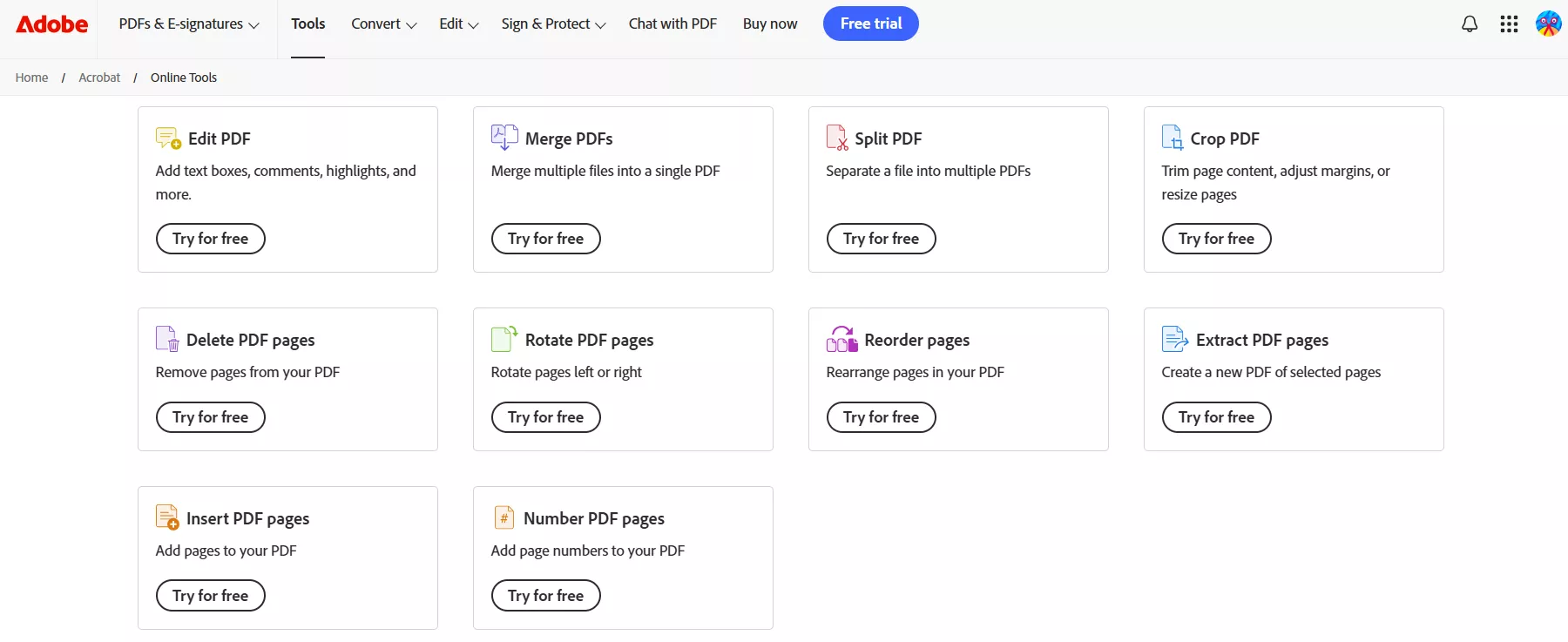
Adobe Online Editor is designed to help users on the go and fulfill their PDF editing needs right away.
Below are the list of key features you can access with Adobe Acrobat edit PDF online:
- Edit & Annotate PDF: Add text boxes and sticky notes, highlight, strikethrough, underline, or draw on your PDF.
- Convert PDF: Convert PDF to/from Word, Excel, image, and PowerPoint.
- OCR: Extract text from scanned PDFs.
- Compress PDF: Shrink the PDF file size.
- Combine PDFs: Merge multiple PDFs into a single file.
- Chat with PDF: Access to Acrobat AI Assistant to ask PDF questions.
- Organize Pages: Insert, extract, reorder, delete, rotate, crop, and split PDF pages.
- Protect PDF: Password-protect PDFs.
- Fill & Sign: Complete and sign a form online.
2. Is Adobe PDF Editor Online Free?
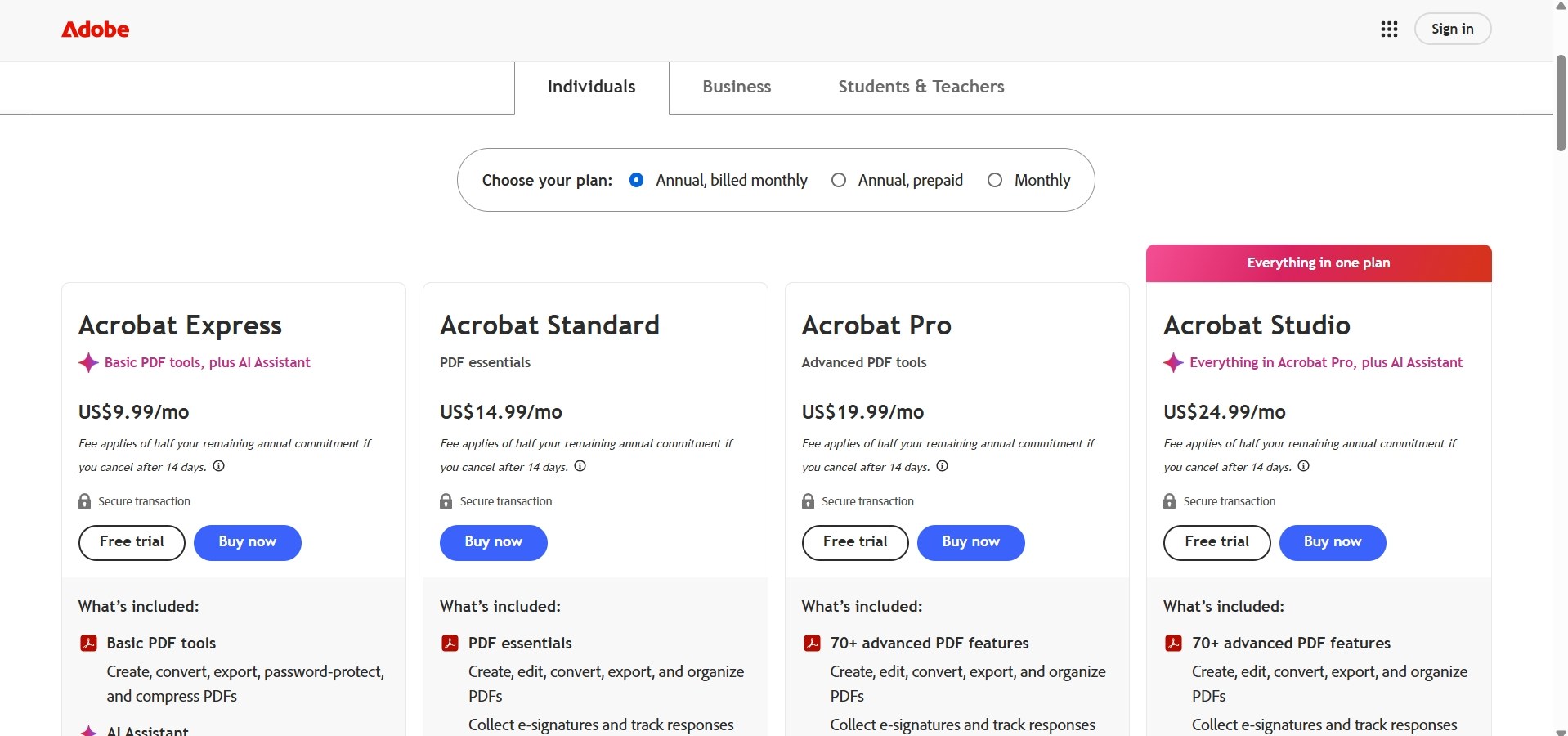
Adobe PDF Editor Online is not entirely free. It offers a limited version at no cost with access to basic features. For advanced features, you need a subscription to Adobe Acrobat Pro.
The features you can access with Adobe PDF Editor Online free version include:
- Insert text boxes, sticky notes, and highlights to annotate PDFs.
- Fill out forms.
- Convert PDF (limited times).
- Sign PDFs electronically.
- Cloud file storage.
For advanced features, Acrobat Pro costs US$19.99 per month with an annual commitment, equivalent to US$239.88 per year. Adobe also offers a no-commitment monthly plan for US$29.99 per month.
3. How to Edit PDF with Adobe PDF Editor Online?
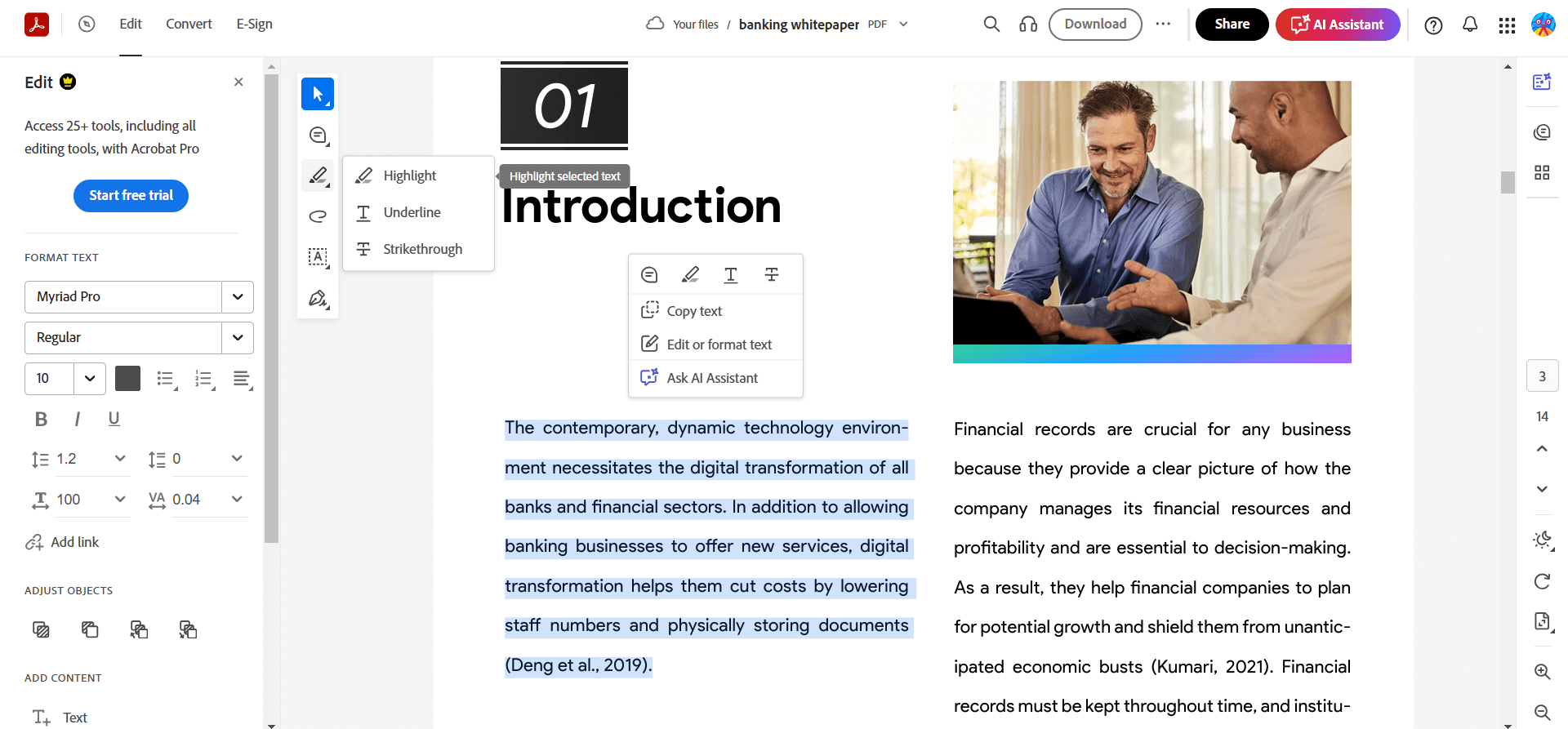
- Open the Adobe PDF Editor Online website.
- Click "Select a file" to upload the PDF and sign in.
- Use the toolbar to add text boxes, sticky notes, highlights, and other annotations.
- Once done, click the "Download" button to save the edited PDF.
Part 2. Pros and Cons of Adobe PDF Editor Online
Adobe PDF Editor Online seems like a handy tool for performing basic PDF editing and conversion. We tested it and found both advantages and disadvantages.
Some of the major pros and cons of Adobe online editor we found are as follows:
Pros:
- Intuitive interface with easy access to editing/annotation options from the toolbar
- High-quality PDF conversion
- Established PDF provider with documented online file-handling and privacy policies.
- Handy AI assistant to chat with PDFs
- Synchronize with the desktop and mobile app
Cons:
- Compared to other online tools, Adobe requires registering and setting up an account before using it
- The annotation-focused online editor is free, but many advanced features and higher usage limits require a paid subscription. Acrobat's paid plans may cost more than some competing PDF editors.
- Advanced features require a paid subscription. Acrobat Pro costs US$19.99 per month with an annual commitment, or US$29.99 on a flexible month-to-month plan.
- Different web pages to access different features
- Some complex, malformed, encrypted, or unusually formatted PDFs may fail to upload or render correctly.
Part 3. The Best Alternative to Adobe PDF Editor Online: UPDF
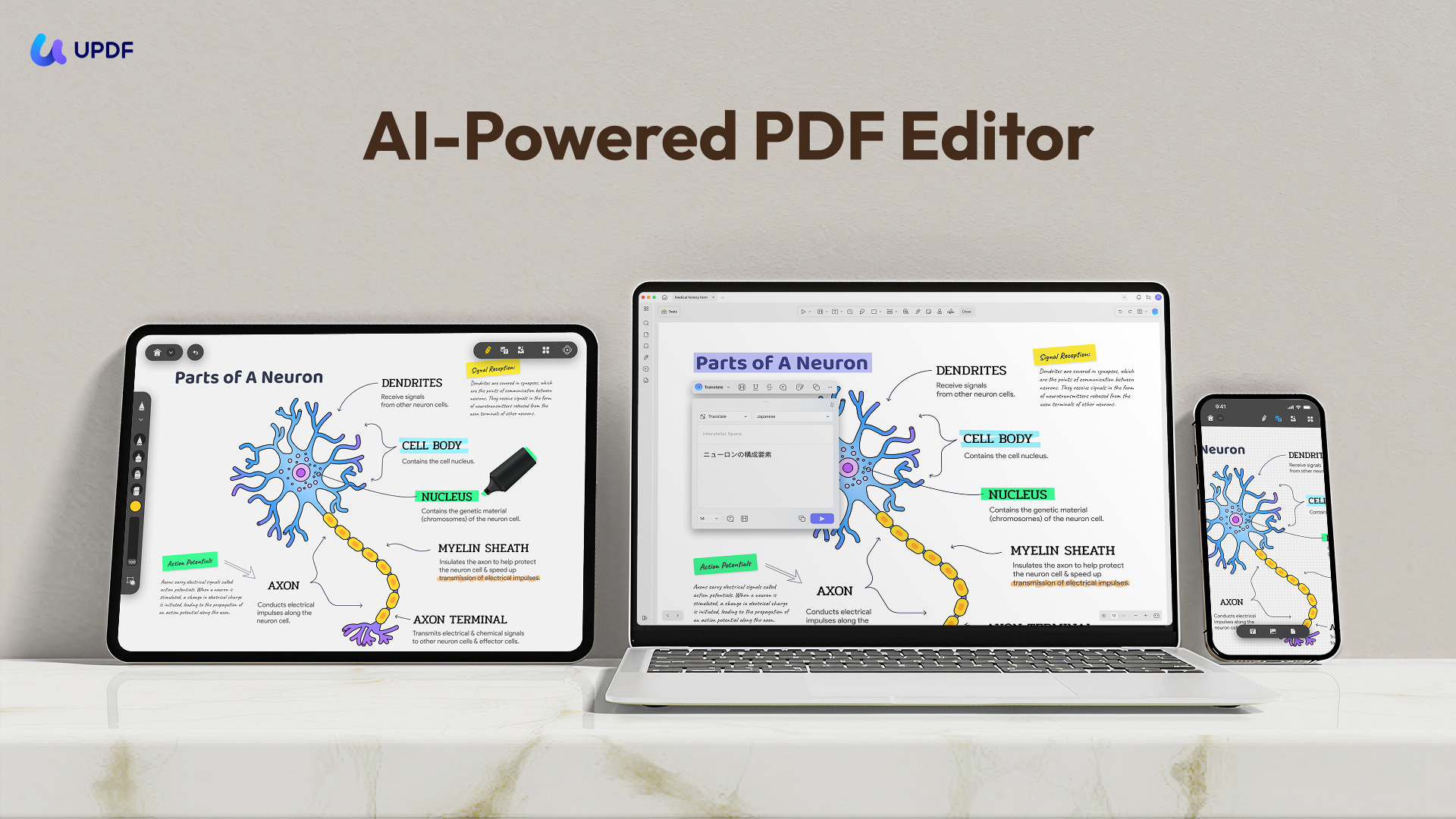
UPDF is a cross-platform PDF application for Windows, macOS, iOS, and Android. Compared with Adobe's free online PDF editor, it provides a more unified workspace for editing existing PDF text, images, links, pages, and other document elements. Acrobat on the web also supports advanced text and image editing for eligible users, so the more meaningful differences are workflow, platform coverage, plan requirements, and price.
Key capabilities available in UPDF include:
- Edit PDF text, images, links, backgrounds, headers/footers, and more.
- Annotate PDF with 13+ options, including adding stickers.
- Convert PDF to/from Word, image, Excel, PPT, RTF, HTML, CSV, etc.
- Perform OCR to extract text in 38 languages.
- Powerful AI assistant to summarize/translate/explain, generate mind maps, chat with images, and more.
- Protect PDF with open or permission password.
- Sign PDF electronically and digitally.
Feel impressed? Download UPDF and try it out to see how its modern interface and advanced features can assist you.
Windows • macOS • iOS • Android 100% secure
Also Read: UPDF vs. Adobe Acrobat >>
Why We Recommend UPDF
UPDF has the upper hand over Adobe PDF Editor Online in four key areas, as follows:
1. Obvious Price Advantage
UPDF Pro currently costs US$49.99 per year or US$79.99 for a lifetime license. In comparison, Adobe Acrobat Pro costs US$239.88 per year under its annual plan. Based on these listed prices, UPDF's annual plan costs approximately 79% less and saves users about US$189.89 per year. Adobe's annual price is nearly 4.8 times the price of UPDF's annual plan. Please note that UPDF AI Assistant is available as a separate subscription or add-on and is not included in the standard UPDF Pro price.
2. AI Function
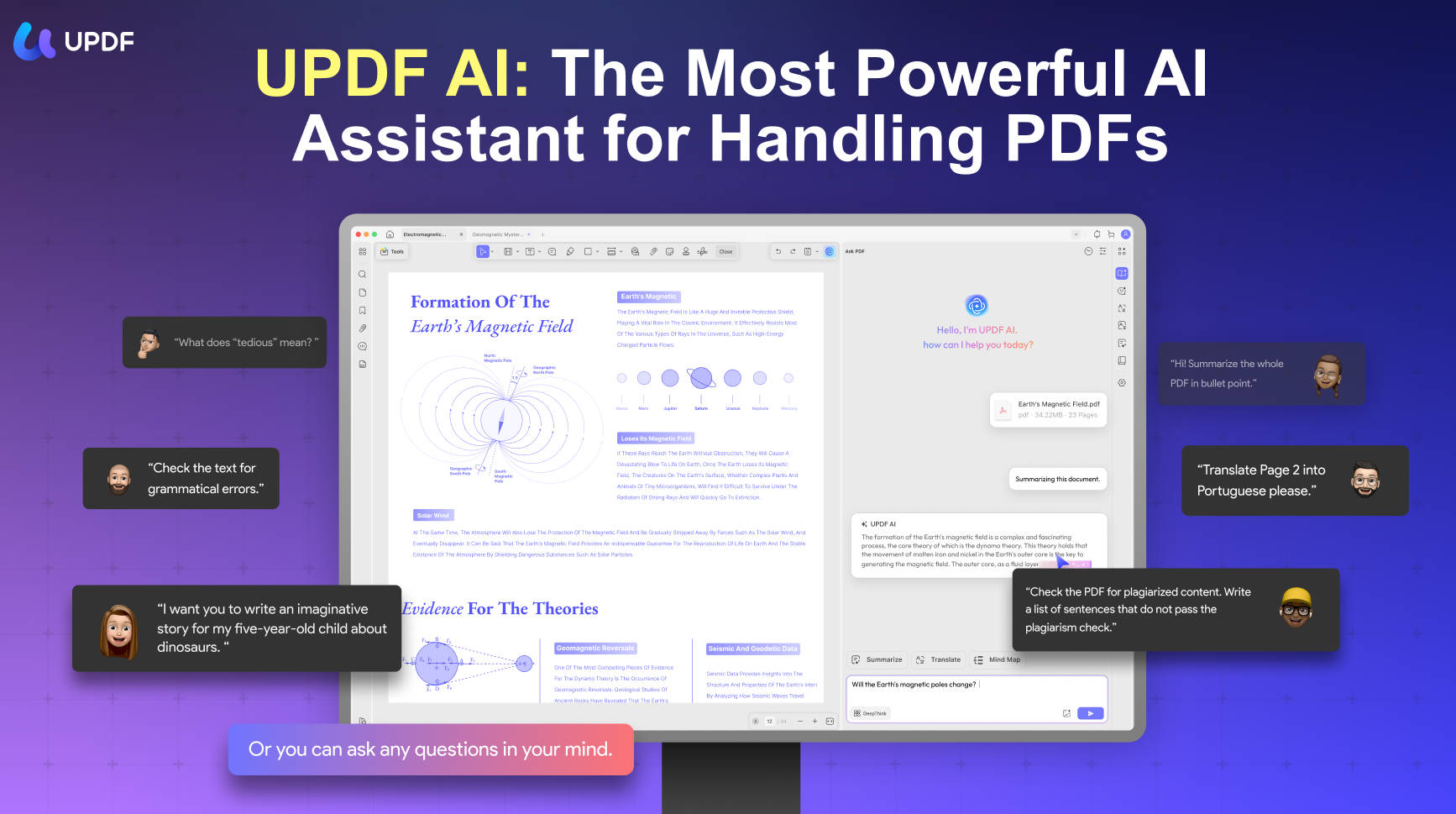
UPDF's AI features are more comprehensive and mature than Adobe. UPDF AI assistant can:
- Summarize PDF by page or content.
- Translate PDF entirely or by page or content.
- Convert PDF to mind map for visual understanding.
- Chat with images.
3. Simple User Interface
UPDF offers an easy-to-use interface with a gentler learning curve. All the features are easily accessible from one place instead of opening different web pages.
4. Extensive Features
The features offered by online tools are not as extensive as those provided by UPDF. With UPDF, you are able to edit existing text/images in PDF, convert PDF into more formats, sign digitally, and access more advanced PDF features.
Check out the following video to learn about Adobe Acrobat Alternative.
FAQs
Q1: Is it safe to upload confidential PDFs to an online editor?
Online PDF tools process files through remote servers, so users should review the provider's privacy, retention, and security policies before uploading confidential documents. For highly sensitive files, an offline desktop editor may offer a more suitable workflow.
Q2:Does Adobe's online PDF editor work on mobile browsers?
Adobe's free online editing experience may differ between desktop and mobile browsers. For more consistent mobile editing, users can consider the Acrobat mobile app or a cross-platform alternative such as UPDF. Check the current product requirements before uploading a document.
Q3:Why does Adobe's online editor reject some PDF files?
Upload or rendering failures may be caused by encryption, file corruption, unsupported security settings, complex forms, unusual fonts, or oversized documents. Removing restrictions or repairing the PDF may help, provided you have permission to modify the file.
Conclusion
Adobe's free online PDF editor is a convenient choice for adding text boxes, comments, highlights, drawings, form entries, and signatures without installing software. Adobe also provides more advanced editing through Acrobat on the web and its paid plans, but feature availability, usage limits, and pricing depend on the selected plan.
UPDF is better suited to users who want a unified cross-platform application for editing existing PDF content, managing pages, converting files, running OCR, and accessing optional AI tools. Its annual and lifetime purchase options may also provide better value for some users. Before choosing, compare the latest prices, AI plan limits, cloud-processing requirements, and the specific PDF tasks you perform most often.
If you prefer an installed PDF editor with a unified interface, download UPDF and test it with your own documents before upgrading.
Windows • macOS • iOS • Android 100% secure





 Enola Miller

 Delia Meyer
 Grace Curry
 Enid Brown