UPDF
UPDF
 UPDF for Windows
 UPDF for Mac
 UPDF for iPhone/iPad
 UPDF for Android
 Nomostar
 UPDF AI Online
 UPDF Sign
 IvyCraft
 Edit PDF
 Annotate PDF
 Create PDF
 PDF Form
 Edit links
 Convert PDF
 OCR
OCR PDF to Word
 PDF to Image
 PDF to Excel
 Organize PDF
 Merge PDF
 Split PDF
 Crop PDF
 Rotate PDF
 Protect PDF
 Sign PDF
 Redact PDF
 Sanitize PDF
 Remove Security
 Read PDF
 UPDF Cloud
 Compress PDF
 Print PDF
 Batch Process
 About UPDF AI
 UPDF AI Solutions
 AI User Guide
 FAQ about UPDF AI
 Summarize PDF
 Translate PDF
 Chat with PDF
 Chat with AI
 Chat with image
 PDF to Mind Map
 Explain PDF
 PDF AI Tools
 Image AI Tools
 AI Chat Tools
 AI Writing Tools
 AI Study Tools
 AI Working Tools
 Other AI Tools
 AI Bookmark Generation
 AI Bookmark Summary
 AI Watermark Generation
 AI Background Generation
 AI Sticker Generation
 AI Stamp Generation
 AI Editing Suite
 UPDF Copilot
 AI Page Management
 AI Semantic Search
 PDF to Word
 PDF to Excel
 PDF to PowerPoint
 Enterprise Solution
 Enterprise Sign
 Enterprise AI
 Enterprise Plan
 Enterprise User Guide
 Enterprise Webinar
 IT
IT Education
 Construction
 Financial Service
 Healthcare
 Insurance
 Legal
Legal Manufacturing
 Government
 Researchers & PhDs
 Solopreneurs & Freelancers
 Lawyers & Legal Professionals
 Real Estate Agents & Brokers
 Education Solution
 Customer Stories
 User Guide
 UPDF Tricks
 FAQs
FAQs UPDF Reviews
 Download Center
 Blog
Blog Newsroom
 Tech Spec
 Updates
 UPDF vs. Adobe Acrobat
 UPDF vs. Foxit
 UPDF vs. PDF Expert

Quick Answer
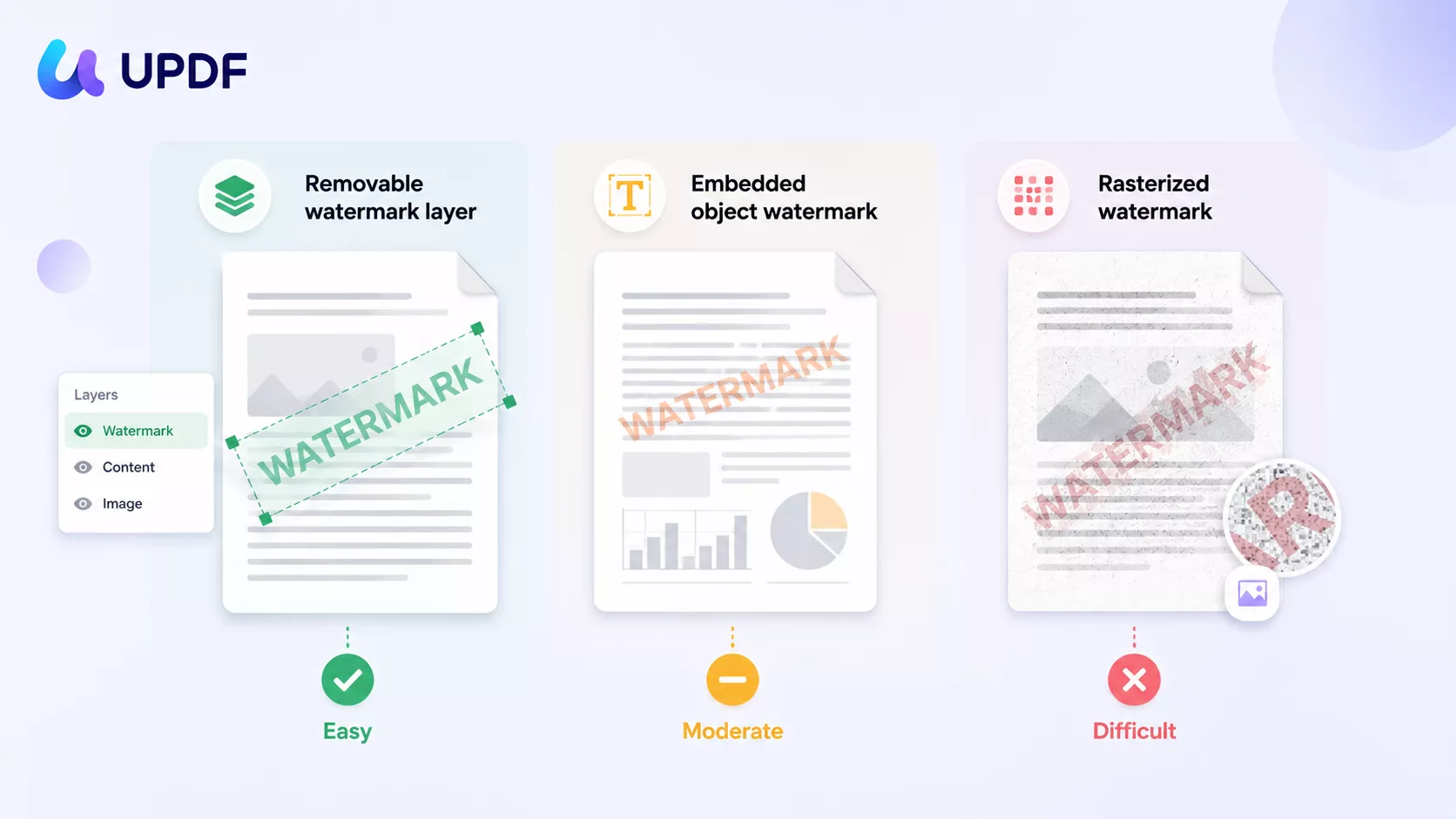
The reason so many "remove watermark" tutorials fail is that they assume every watermark is the same object. It isn't. A watermark added through a PDF tool's Watermark menu sits on its own removable layer; a watermark that someone dropped in as ordinary text or an image, or one burned into a scanned image, behaves completely differently and ignores the Remove button entirely. Pick the wrong tool for the wrong watermark type and you'll spend an hour clicking something that was never going to move.
This guide compares 6 offline and online PDF watermark removers — UPDF, Adobe Acrobat, Foxit, Nitro, pdfFiller, and Soda PDF — and tests each on the three watermark types that actually matter, with pricing, free-trial limits, batch support, local-vs-cloud processing, and platform coverage. Part 1 explains the watermark types so you can match the tool to the file before you waste time.
| If you want… | Pick | Why |
|---|---|---|
| One affordable, cross-device tool that processes files locally | UPDF | $49.99/yr or $79.99 one-time; Win/Mac/iOS/Android; no upload; removes watermarks on mobile too |
| The most feature-complete option and budget isn't a concern | Adobe Acrobat | Deepest editing + OCR, but $239.88/yr, no perpetual license, and the trial needs a card |
| Several removal methods and Linux support | Foxit | Remove, crop, or cover a watermark; runs on Linux; perpetual license still sold |
| A Windows tool strong on batch and conversion | Nitro | Solid batch + conversion — but no true perpetual license now (Classic is Windows-only, 3-year) |
| A quick, install-free job on a non-sensitive text watermark | pdfFiller | Works in any browser, trial needs no card — but your file goes to the cloud |
| To just hide a watermark sitting in a blank margin | Soda PDF | Cover-up only (not true removal); fine as a last resort |
Only remove watermarks from PDFs you own or are authorized to edit. Removing a watermark from a copyrighted or licensed document you don't have rights to can violate copyright or licensing terms.
Part 1. First, Identify Your Watermark Type (This Decides Everything)
Before choosing a tool, you need to know what kind of watermark you're looking at. There are three, and the difference comes down to how the watermark was put into the PDF — which decides how you take it out.
Removable watermark layer. Added through a PDF editor's dedicated Watermark tool, so the PDF treats it as a real watermark with its own identity. This is the easy case: any tool with a true "Remove Watermark" feature deletes it in one click, on every page at once.
Embedded object watermark. Someone didn't use the watermark feature — they used Annotate or Edit to drop a piece of text or an image onto the page as ordinary content that looks like a watermark. Because the PDF doesn't see it as a watermark, the "Remove Watermark" button can't find it. You have to click the text or image as an object in Comment/Annotate or Edit mode and delete it directly.
Rasterized watermark. The whole page (watermark included) has been flattened into a single image — common in scanned documents and exported "secured" PDFs. There is no layer and no object to select. The visible mark is just colored pixels, which is why no PDF tool can "remove" it cleanly. This is the hard case, and Part 4 covers it specifically.
Quick test — find your type in 10 seconds:
- Try Watermark → Remove. If it disappears → removable watermark layer.
- If not, switch to Edit or Comment mode and try to click the mark — if a selection box appears around it → embedded object watermark; delete it there.
- If nothing selects and the whole page acts like one flat picture → rasterized; use the Part 4 methods.
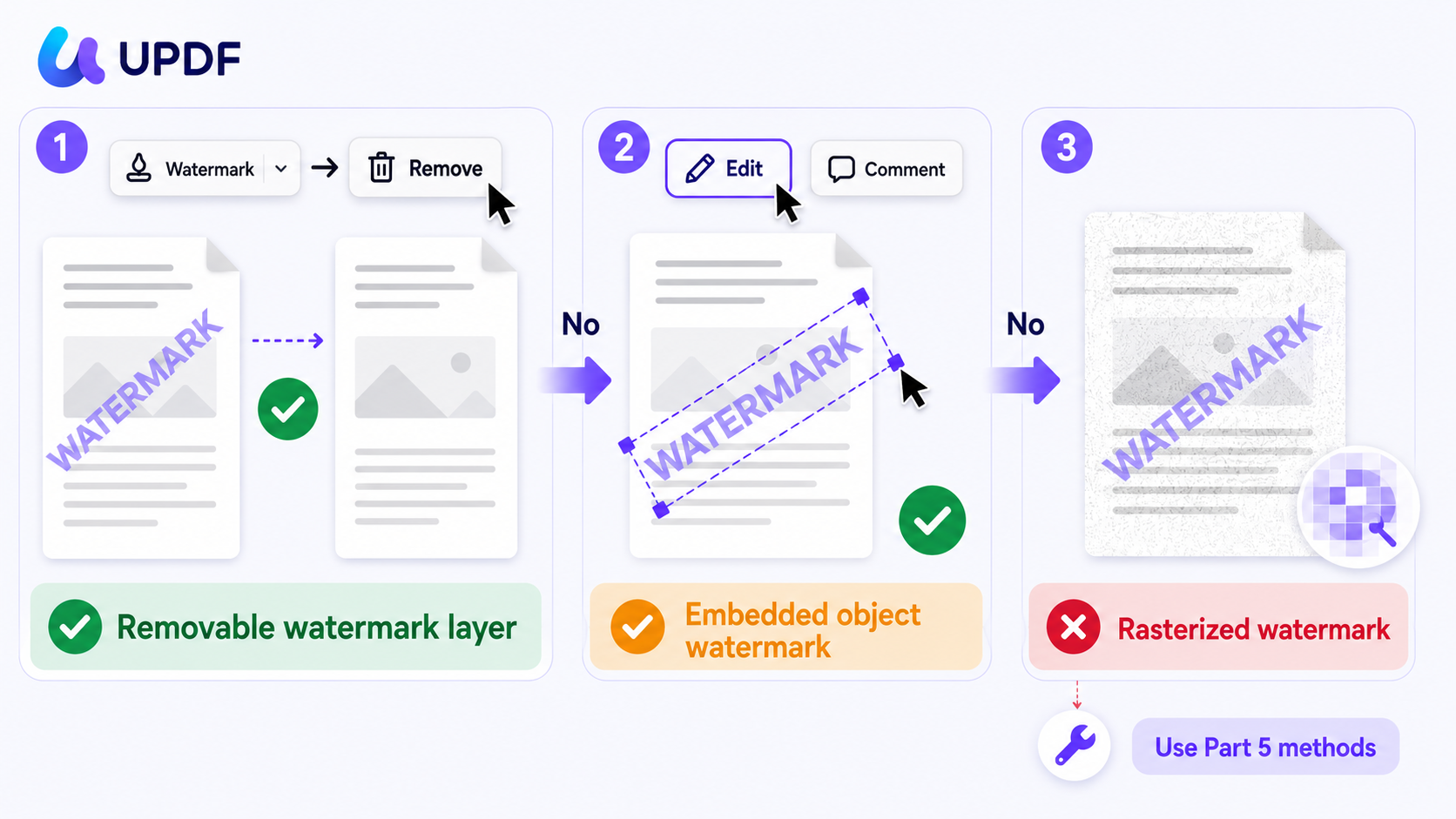
In one line: layer = the PDF tags it as a watermark, embedded = it's just content that looks like one, rasterized = it's now a photo of the page. The first two delete inside a PDF editor; the third needs rebuilding or inpainting.
🔒 One more check before you start — is the PDF restricted?
Part 2. Top 6 PDF Watermark Removers Compared
Each tool below is rated on the watermark types it handles, batch support, where your file is processed (local vs. uploaded), free-trial limits, platform coverage, and current pricing.
1. UPDF — Best Overall for Layer & Embedded-Object Watermarks, Across All Devices
UPDF removes a watermark layer through a dedicated Remove Watermark feature: open the file, go to Tools → Watermark → Remove, confirm, and save.
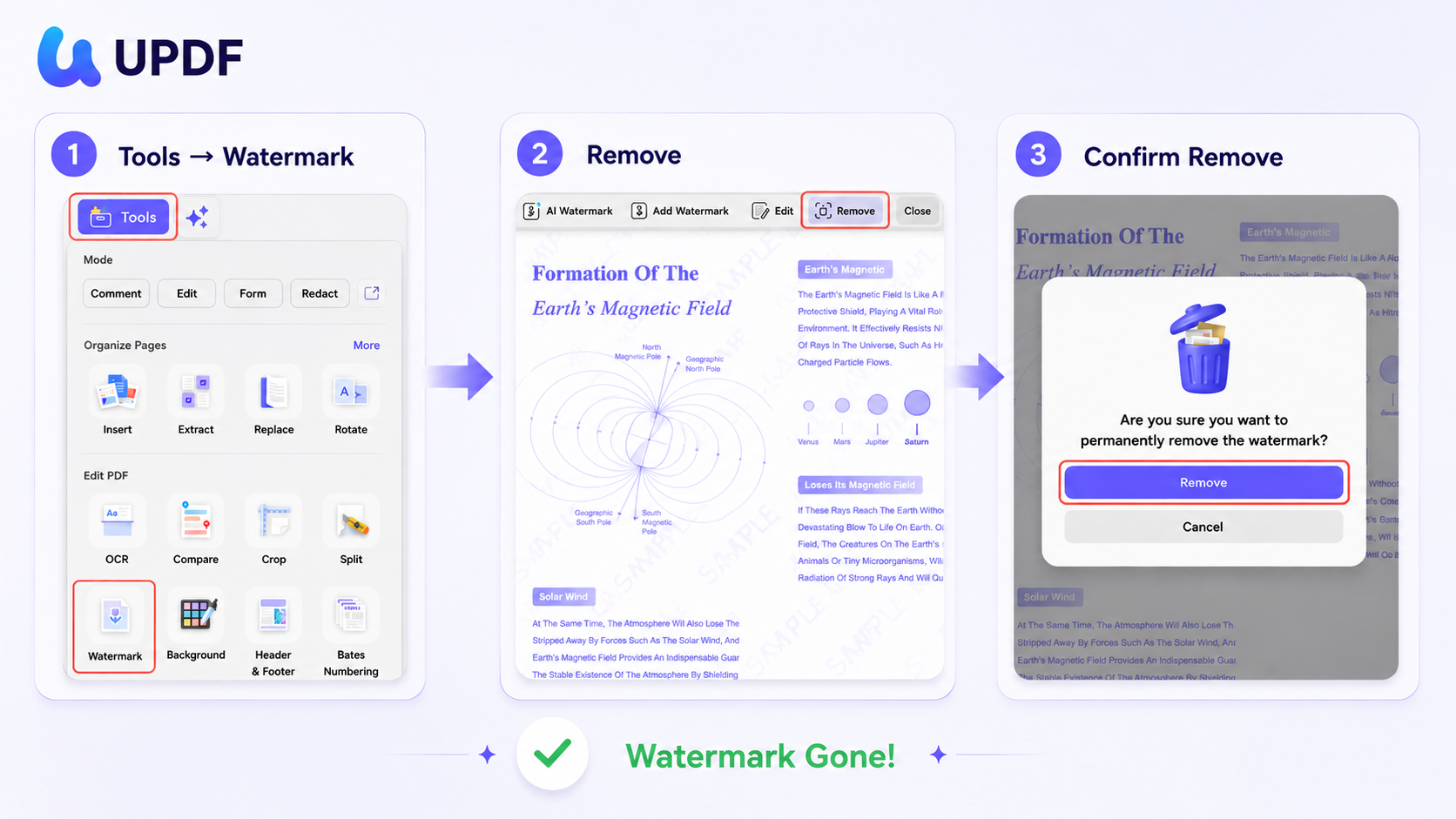
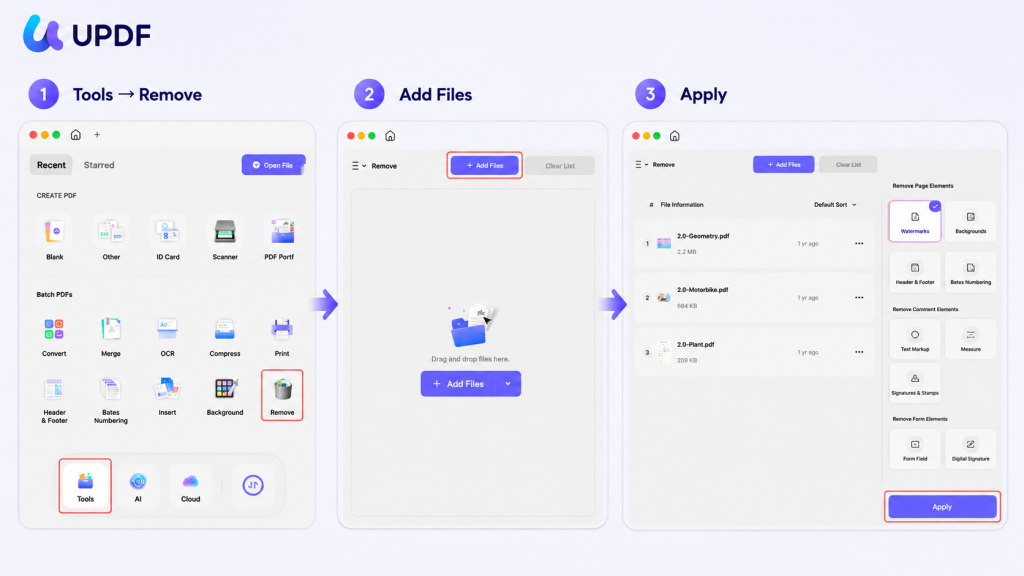
To clear a whole folder of these at once, use Tools → Remove and tick Watermarks under Remove Page Elements to Apply.
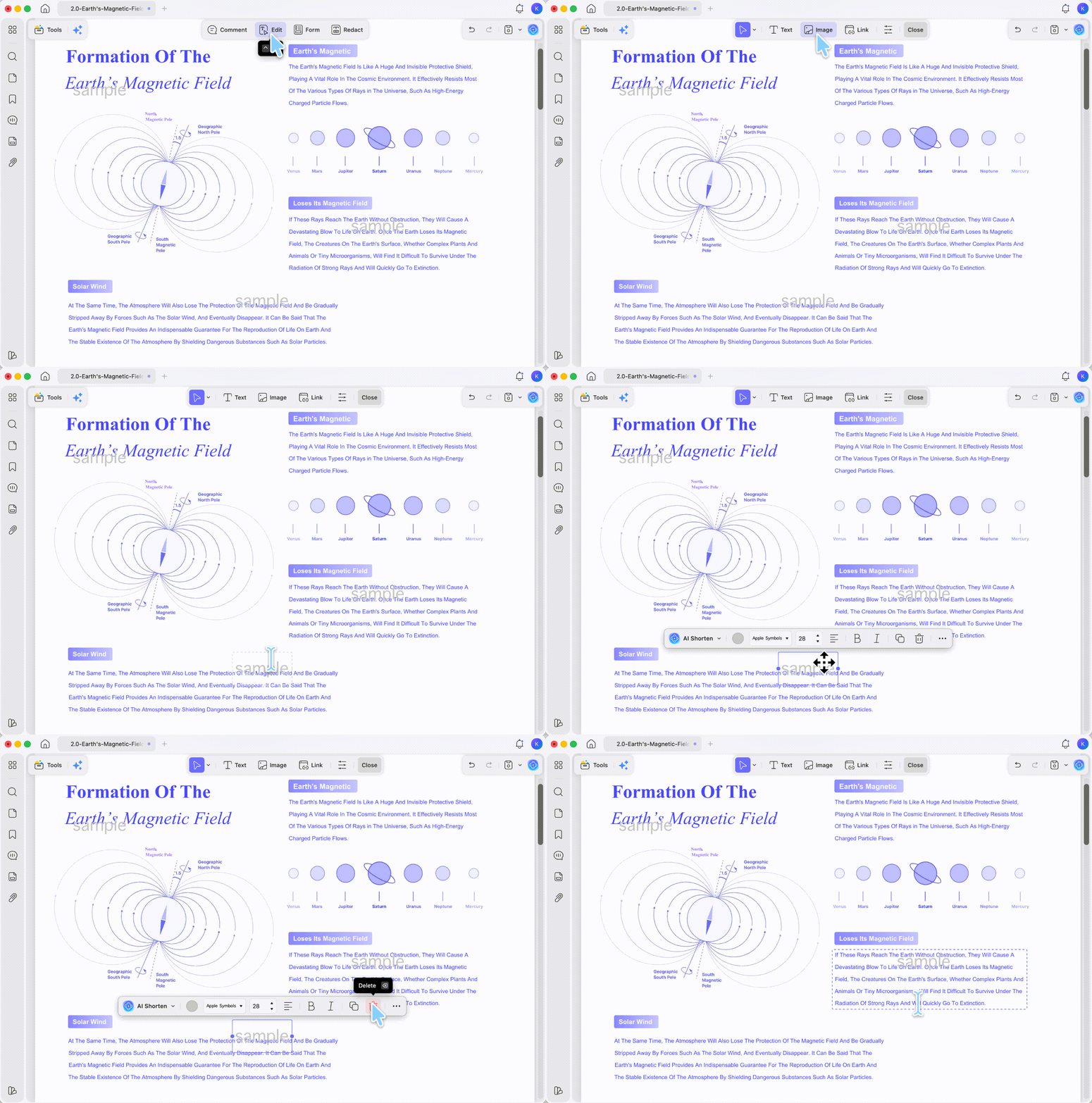
Embedded object watermarks are different — the PDF treats them as ordinary content, so the Remove button skips them; switch to Edit (or Comment) mode and delete each one as an object instead (the batch tool can't reach these).
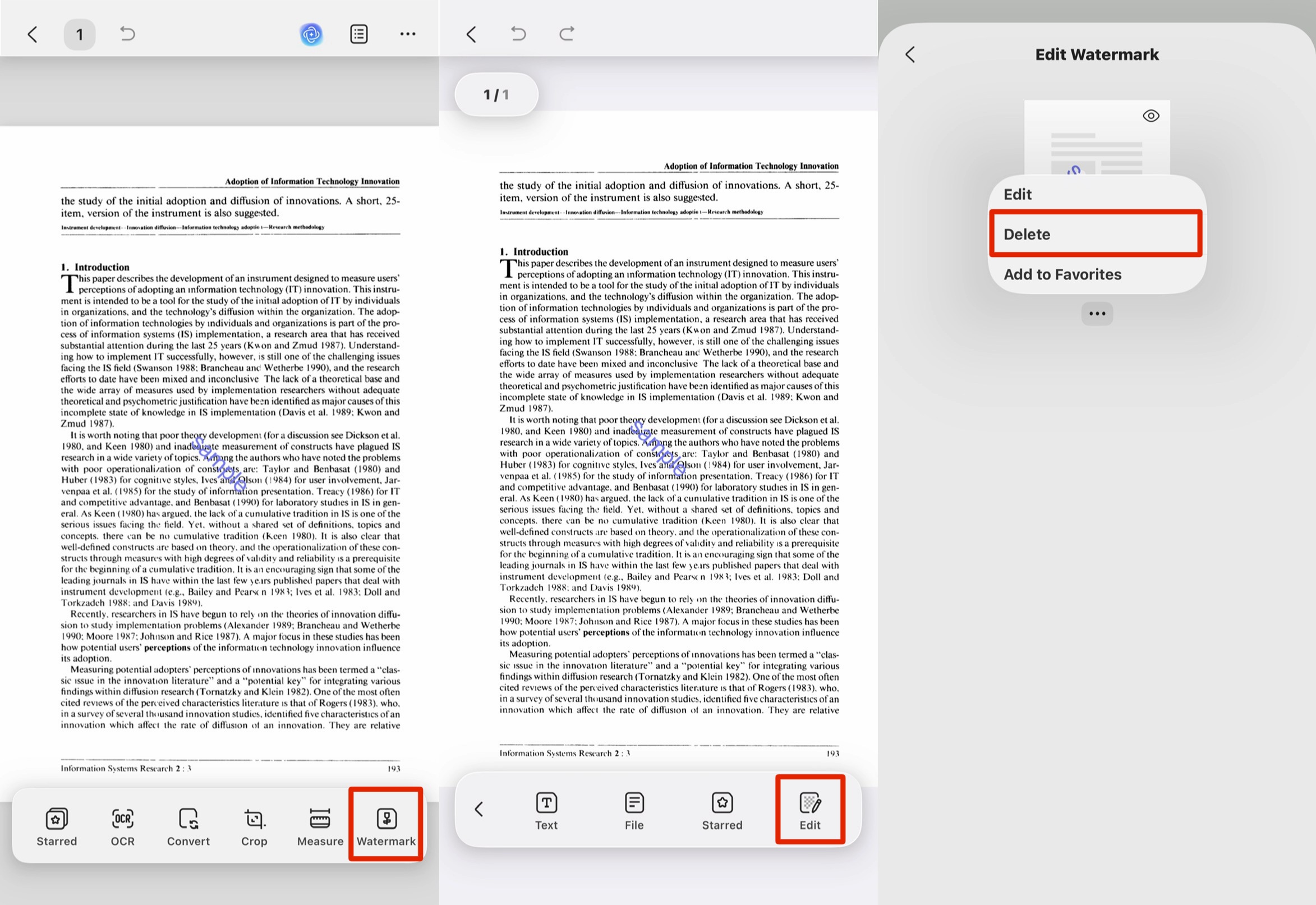
You can also remove watermarks on mobile: in the UPDF iOS/Android app, open the file and use Tools → Watermark → three-dot icon → Delete for a watermark layer, or tap Edit in the bottom toolbar to delete an embedded object watermark — useful when the file lands in your inbox and you're away from a desktop.
The cloud-based tools below (pdfFiller, Soda) also work from a phone, but they do it by uploading your file to a server; on this list, UPDF is the one that removes watermarks on mobile while processing the file locally on your device — which matters for contracts, invoices, and ID scans. Adobe, Foxit, and Nitro keep true watermark removal on desktop.
Key features beyond watermark removal:
- Full PDF editing — text, images, links — see the PDF Editor workflow
- OCR PDF (38+ languages) to handle scanned/rasterized files
- UPDF AI to summarize, translate, explain, and rewrite PDFs, plus 10 AI Agents
- Batch processing, 2-way conversion, form filling, UPDF Cloud
Pros:
- One-click removal of a watermark layer; object-delete for embedded watermarks
- Batch removal of watermark layers across a whole folder at once
- Removes watermarks on desktop and mobile — and on mobile it processes locally, not via upload (rare on this list)
- 100% local processing — no upload
- One license covers Windows, Mac, iOS, and Android
Cons:
- Cannot "remove" a rasterized/scanned watermark cleanly (no tool can — see Part 4; UPDF's OCR + edit path is one of the workarounds)
- Free version applies a trial watermark on export until you upgrad
Free trial: Install and test for free with no payment info required; the free tier lets you remove and preview, but exported files carry a UPDF trial watermark until you upgrade.
Pricing: Pro $49.99/year or $79.99 one-time (lifetime), both unlocking watermark-free export and all PDF tools, with a 7-day unlimited-AI trial; a standalone AI Assistant plan is $79/year.
Platforms: Windows, Mac, iOS, Android.
Customer rating: 4.5 on G2.
Download UPDF for free to try removing a watermark on your own file — installation is free, and Pro features are available when you need watermark-free export or batch processing.
Windows • macOS • iOS • Android 100% secure
2. Adobe Acrobat Pro — Clean Removal, Premium Price, No Lifetime Option
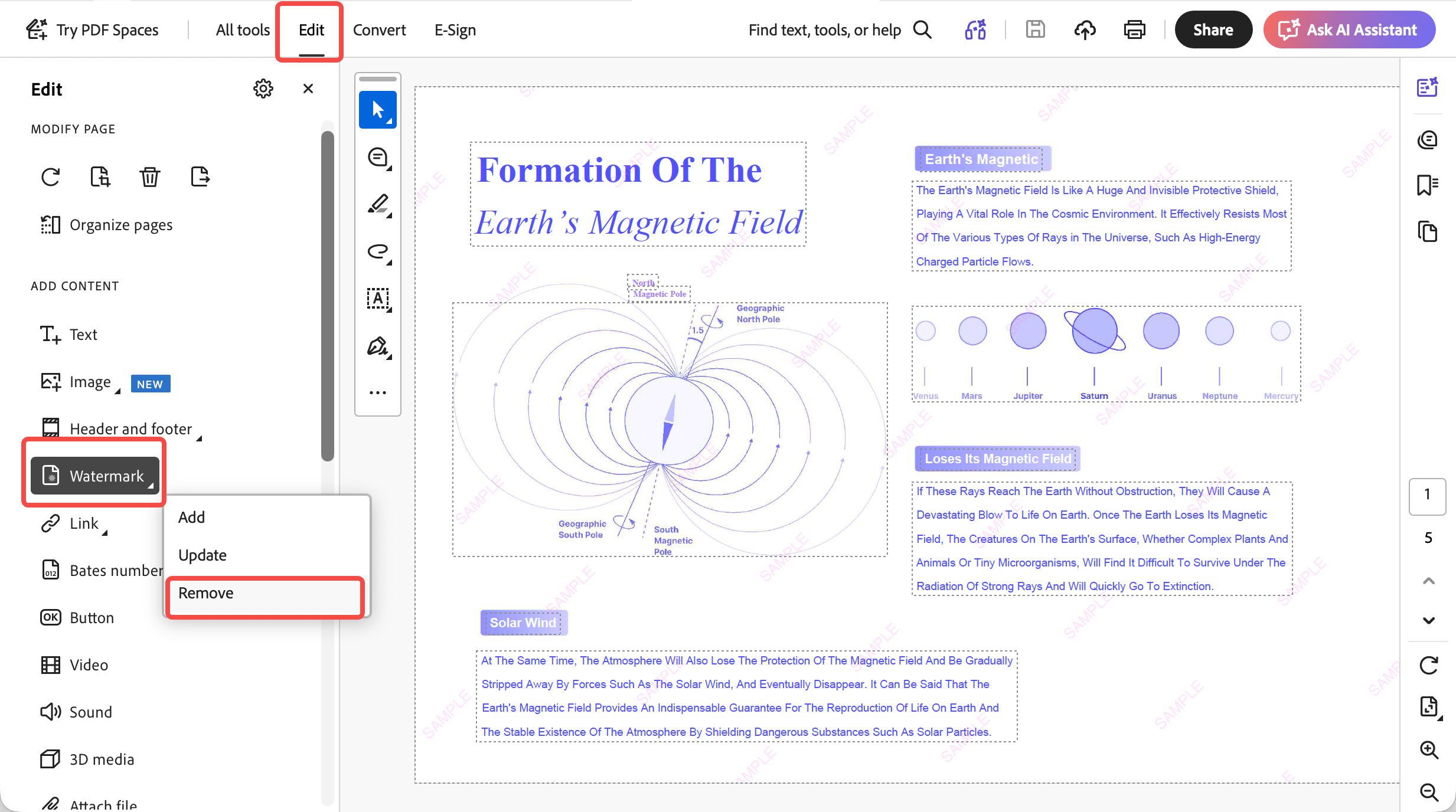
Adobe Acrobat Pro removes annotation-layer watermarks reliably through its Edit → Watermark → Remove path, and its OCR is strong for tackling scanned files. It's the most feature-complete option, but also the most expensive, and Adobe no longer sells a perpetual license — it's subscription-only.
Key features: PDF editing and creation, conversion, document comparison, form creation, OCR, e-signature.
Pros:
- Clean, reliable removal of layer-based watermarks
- Industry-standard OCR and editing depth
- Cross-platform (web, Windows, Mac, iOS, Android)
Cons:
- Most expensive on this list at $239.88/year (no one-time license)
- 7-day free trial requires a credit card up front and auto-renews if not cancelled
Free trial: 7 days, full features, credit card required, auto-renews.
Pricing: $19.99/mo on annual billing ($239.88/year), or $29.99/mo month-to-month.
Platforms: Web, Windows, Mac, iOS, Android.
Customer rating: 4.5 on G2.
3. Foxit PDF Editor — Multiple Removal Methods, Mid-Range Price
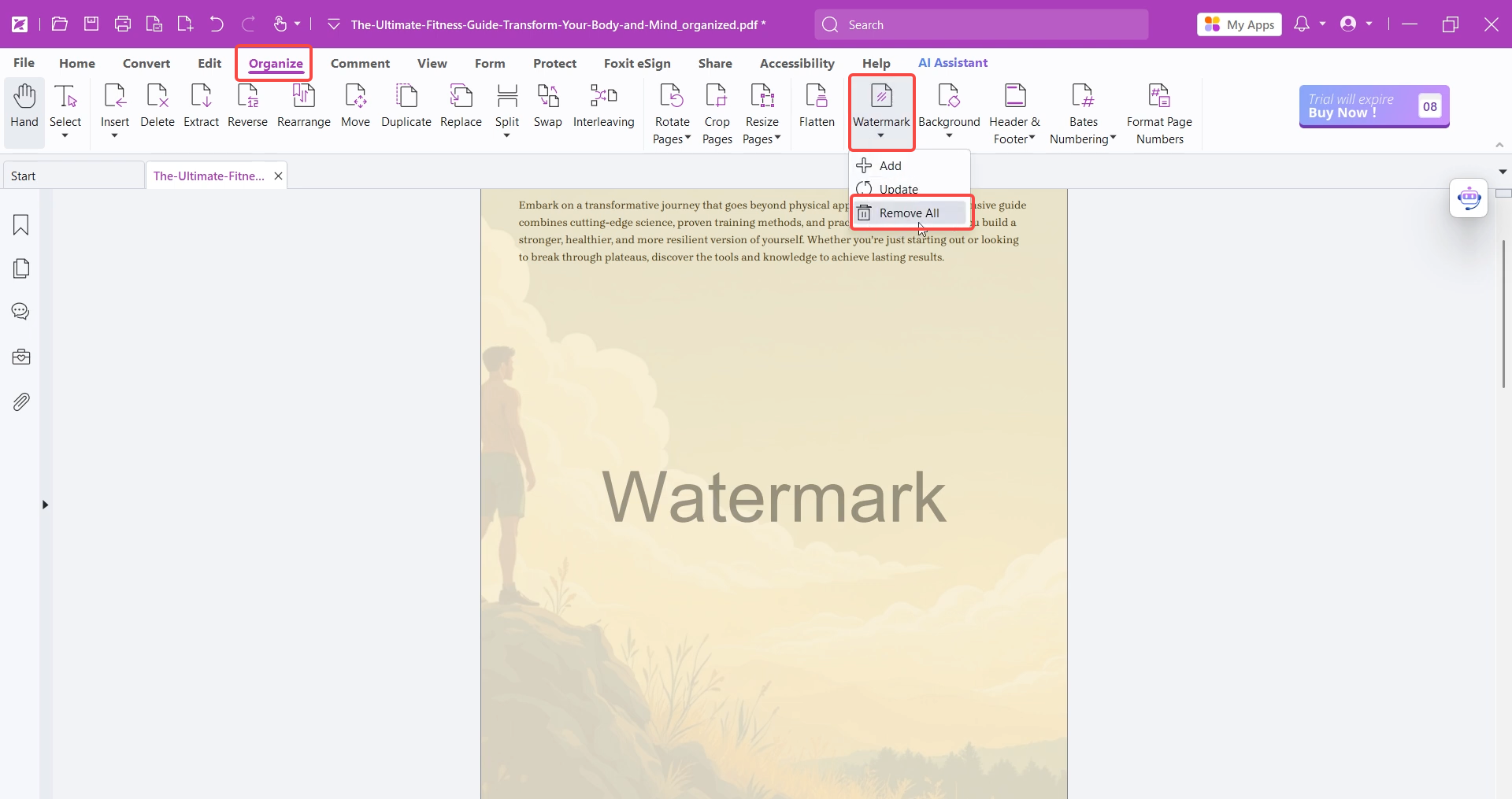
Foxit gives you three angles on a watermark — remove the watermark layer, crop it out, or cover it — which makes it flexible for vector watermarks sitting in a margin. OCR and editing are solid. It's cheaper than Adobe but pricier than UPDF, and the cleanest features sit in the higher tier.
Pros:
- Removes image, text, and layer watermarks
- Three removal approaches (remove / crop / cover) for awkward placements
- Reasonable interface; free Reader tier for viewing
Cons:
- Editor plan runs $129.99/year (Editor+ $159.99/year) — watermark removal alone is costly
- OCR results can be inconsistent on complex scans
Key features: edit text/images/links, OCR, protect PDF, organize pages, comment, create and convert.
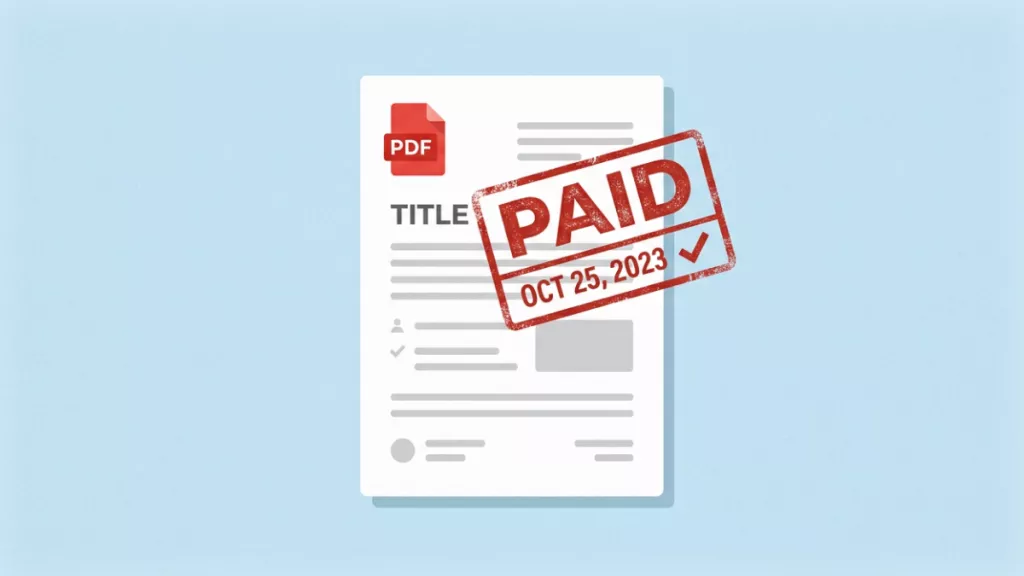
A consistent watermark helps the document communicate its purpose or status. The demonstration below gives some context for editing PDF content in UPDF.
Free trial: 14-day full-feature trial (Editor+).
Pricing: PDF Editor $129.99/year, PDF Editor+ $159.99/year.
Platforms: Windows, Mac, iOS, Android, Linux.
Customer rating: 4.6 on G2.
4. Nitro PDF Pro — Capable, but the Perpetual License Is Ending
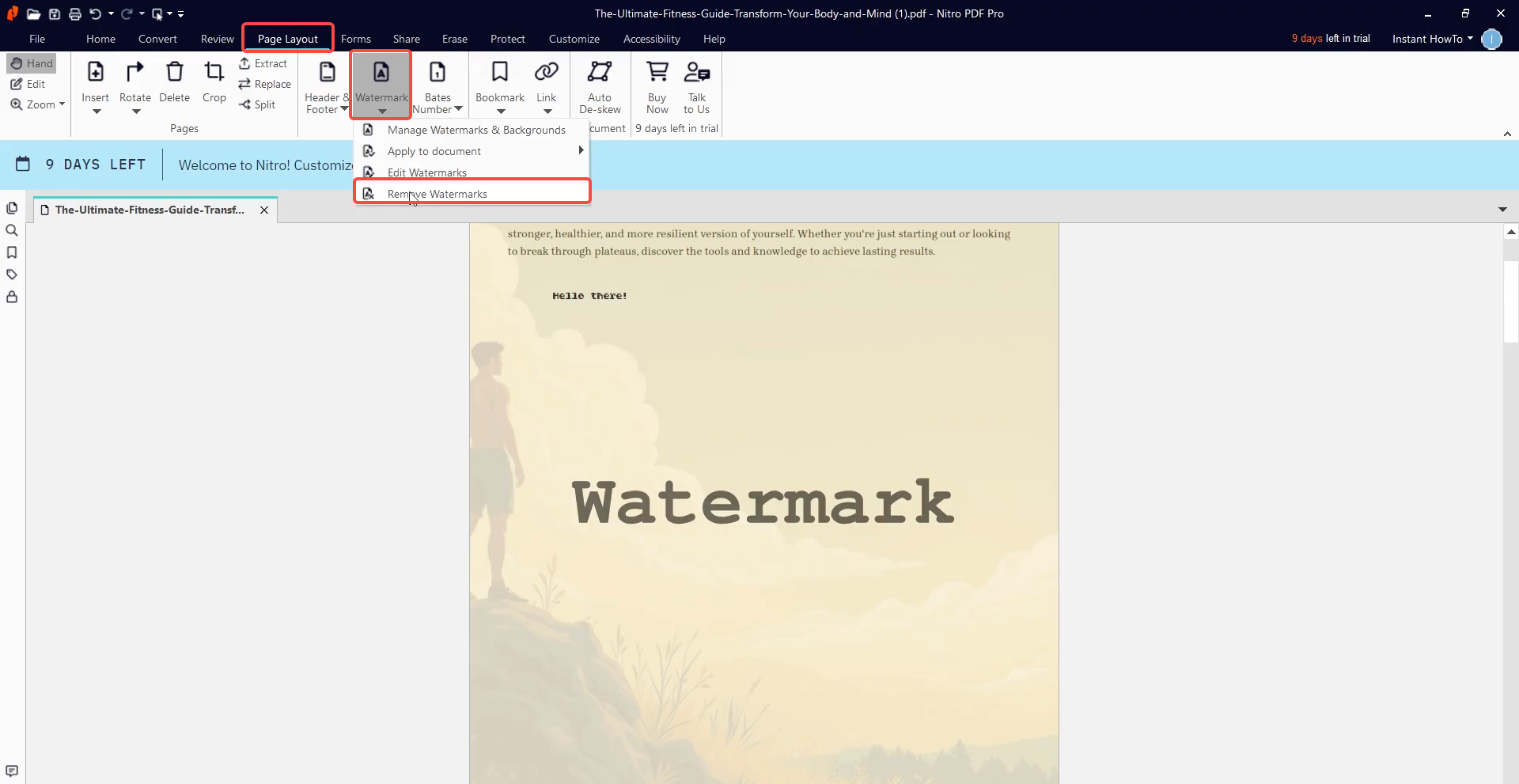
Nitro is increasingly positioned around subscription plans, and its current “Nitro PDF Classic” is not a lifetime license. Nitro’s official pricing page describes Classic as a Windows-only, one-time payment for a three-year license. Separately, Nitro staff have confirmed in the community forum that Nitro Pro 12 or older serial numbers will be deactivated because those legacy versions are no longer supported.
Key features: create/edit/combine PDFs, convert, digital signatures, redaction, OCR, forms, batch processing.
Pros:
- Reliable watermark removal that preserves layout
- Strong batch processing and conversion
- Redaction and signing built in
Cons:
- Nitro Pro 12 or older serial numbers will be deactivated
- Runs slower than lighter editors; interface feels dense
- OCR quality trails Adobe
Free trial: 14 days, no permanent free plan.
Pricing (2026): Nitro PDF Standard ~$180/year; Nitro PDF Classic one-time (3-year) ~$270.
Platforms: Windows, Mac, iOS.
Customer rating: 4.4 on G2.
5. pdfFiller — Online, Text Watermarks Only, No Longer Free
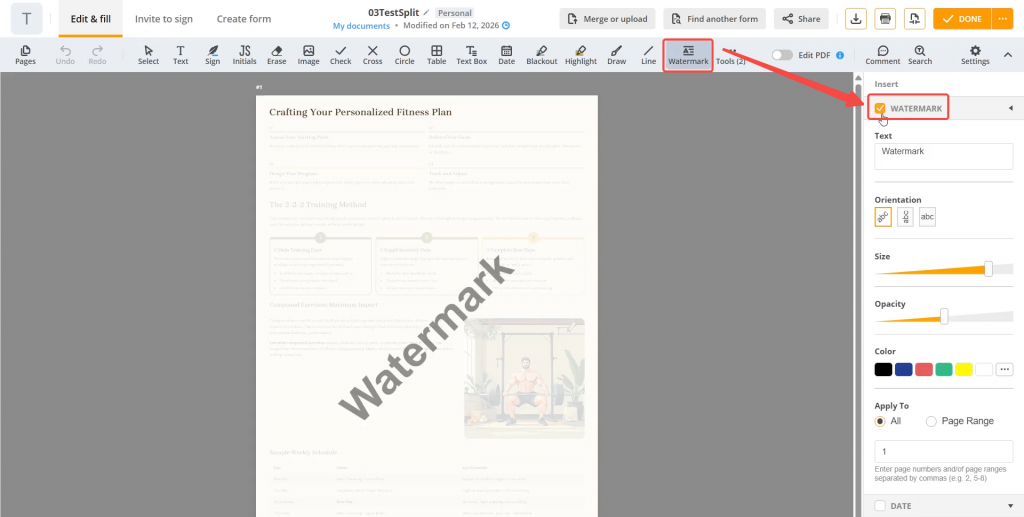
pdfFiller is a cloud editor that can remove text watermarks when it recognizes them as text, and only when the watermark doesn't overlap real content. It's browser-based, so there's nothing to install, but your file is uploaded to airSlate's servers — a consideration for confidential documents.
Key features: PDF editing and annotation, form creation/filling, conversion and merge, add watermarks/bates/page numbers.
Pros:
- No installation; works from any browser
- Decent for simple text-watermark removal on forms
Cons:
- pdfFiller’s standard upload limit is up to 100 MB per PDF
- Since it is browser/cloud-based, upload and processing speed can depend on file size and connection quality
Free trial: 30 days, paid subscriptions auto-renew unless cancelled.
Pricing: Basic ~$8/month; Plus ~$12/month; Premium ~ $15/month. e-signatures need the Premium tier.
Platforms: Web, Windows, Mac, iOS, Android.
Customer rating: 4.6 on G2.
6. Soda PDF — Online, No True Removal; Cover-Only Workaround
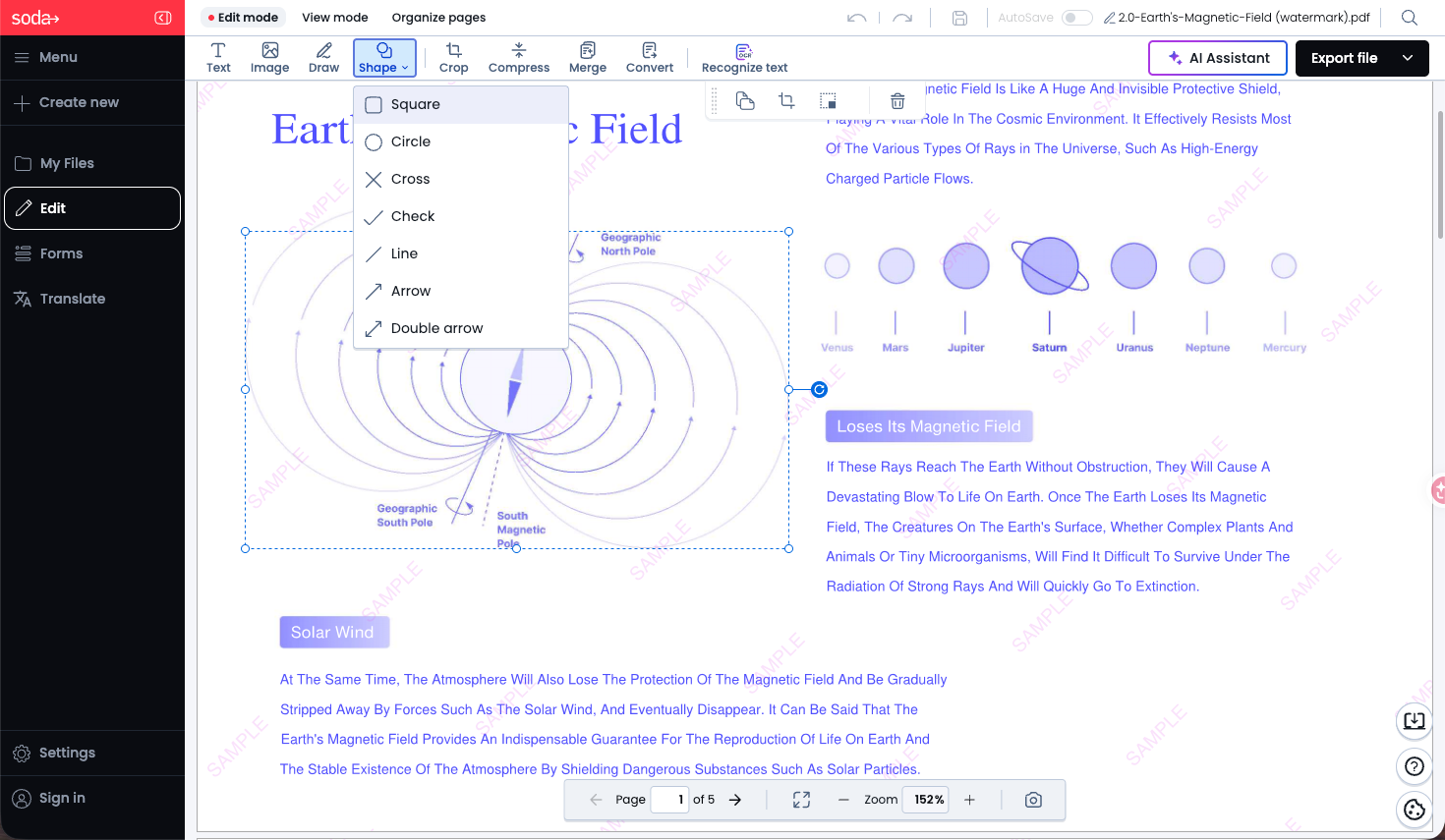
Soda PDF doesn't actually remove watermarks. Instead, Soda’s practical workaround is to cover/whiteout the area, which only works cleanly when the watermark sits over blank space. If it overlaps real text or graphics, the result can look fragile and may damage visible content, so it is better treated as a last-resort workaround rather than a primary watermark-removal tool.
Key features: convert from/to PDF, compress, merge, OCR, sign, protect.
Pros:
- Works in-browser; desktop version available
- Fine for hiding a watermark in an empty margin
Cons:
- No real watermark-removal feature
- Fails wherever the watermark overlaps content
- Lacks batch processing
- Subscription required to export.
Free trial: Limited free use, then paid.
Pricing: subscription from ~$12.5/month to $59.16/year.
Platforms: Web, Windows, Mac, iOS, Android.
Customer rating: 4.4 on G2.
Also read: How to Remove Watermark from PDF Online
Part 3. Decision Table — Which Remover for Which Watermark
| Capability / Tool | UPDF | Adobe | Foxit | Nitro | pdfFiller | Soda |
|---|---|---|---|---|---|---|
| Removable watermark layer | ✓ | ✓ | ✓ | ✓ | ✓ | ✕ cover only |
| Embedded object watermark | ✓ | ✓ | ✓ | ✓ | ✕ | △ cover only |
| Rasterized/scanned watermark | △ OCR rebuild | △ OCR rebuild | △ OCR rebuild | △ OCR rebuild | △ OCR rebuild | △ OCR rebuild |
| Batch removal (layer watermarks) | ✓ | ✓ | ✓ | ✕ | ✕ | ✕ |
| Mobile removal (iOS/Android) | ✓ local | ✕ | ✕ | ✕ | △ via cloud upload | △ via cloud upload |
| Local vs. cloud | Local + optional cloud | Local/cloud | Local + Web/cloud depending plan | Local + Nitro Workspace cloud | Cloud upload | Windows local + browser cloud |
| Free trial needs card? | No card | Card required | No card (14-day) | No card (14-day) | No card | — |
| Pricing | $49.99/yr or $79.99 lifetime | $239.88/yr | $129.99/yr | ~$180/yr | ~$96/yr | ~$48/yr |
| Platforms | Win/Mac/iOS/Android | Web/Win/Mac/iOS/Android | PDF Editor: Win/Mac/Web; Editor+: Win/Mac/iOS/Android/Web | Win/Mac/iOS; Classic Windows only | Web/Win/Mac/iOS/Android | Windows desktop + browser on Mac/Linux/iOS/Android |
| G2 rating | 4.5 | 4.5 | 4.6 | 4.3 | 4.6 | 4.4 |
Who each tool is for: UPDF for individuals and small teams who want one affordable, cross-device, local tool for annotation and vector watermarks. Adobe for enterprises already in Creative Cloud who don't mind the price. Foxit for users wanting multiple removal methods and Linux support. Nitro for Windows teams — but factor in the perpetual-license sunset. pdfFiller only for quick text-watermark jobs on non-confidential forms. Soda only when you just need to cover a mark in a blank margin.
Part 4. The Hard Case — Removing a Rasterized (Scanned) Watermark
If the watermark is baked into a scanned image, no "Remove Watermark" button will touch it, because there's no layer to remove — only pixels. You have four realistic routes, from best to most effortful:
1. Go back to the source (best). Ask the document's author for the un-watermarked original, or an earlier version saved before it was flattened. This is the only method that gives a perfect result with zero quality loss — always try it first.
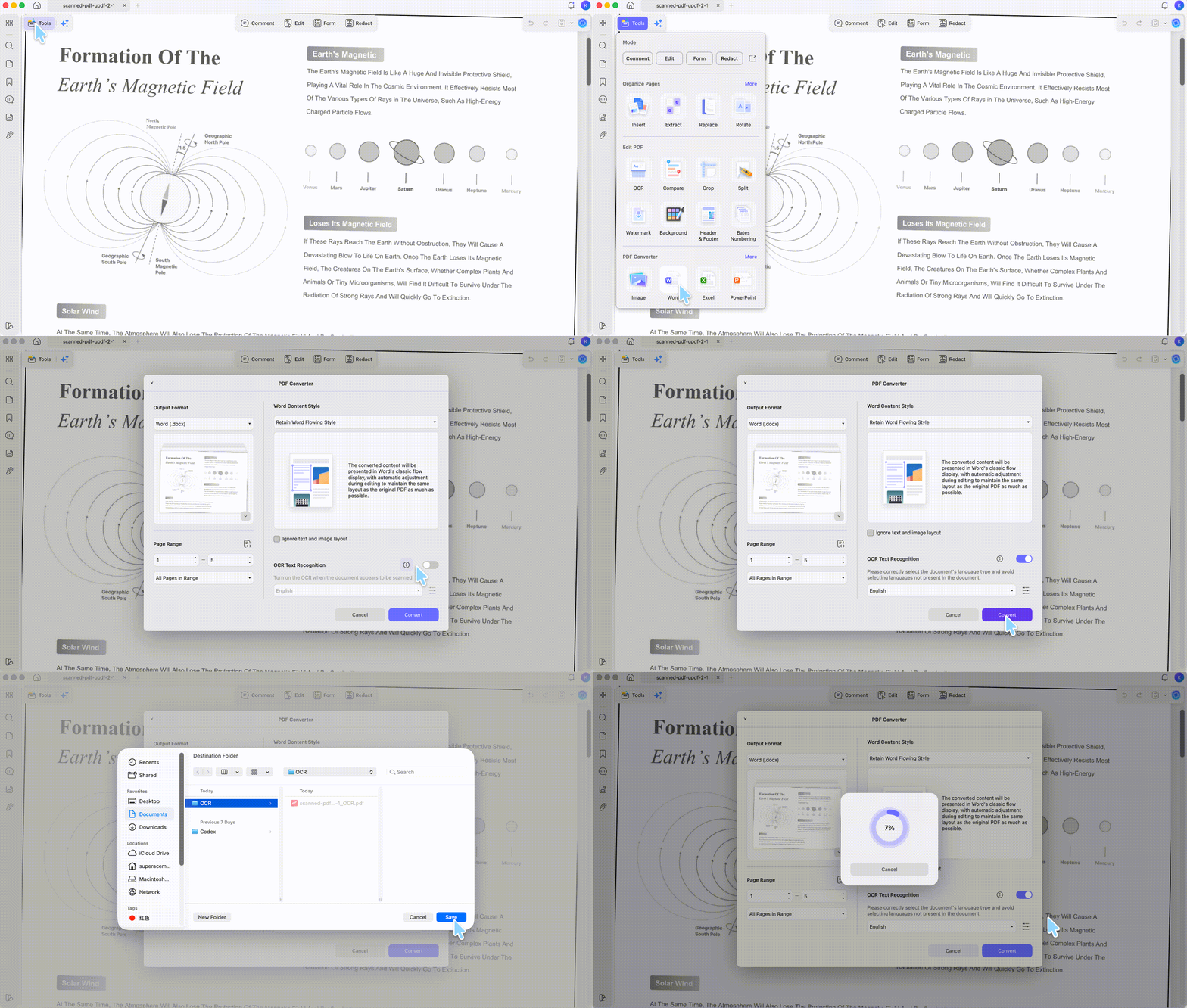
2. OCR-and-rebuild. Run OCR on the PDF to recover the underlying text, export to Word, delete the watermark text there, then regenerate a clean PDF. This works well when the watermark is text sitting over text. UPDF's OCR (38+ languages) recognizes the page; note UPDF processes up to 300 pages per file, so split longer documents, OCR each part, then merge. After export, fix the watermark in the editable copy and re-save as PDF.
3. White-shape cover-up. In UPDF's Edit mode, draw a white rectangle over the watermark to hide it visually. Fast and works in UPDF, Foxit, or Soda — but it only works where the watermark sits over blank space; over text or images it covers the real content too. It also doesn't truly delete the mark, so it's unsuitable for documents that will be re-processed or printed at high resolution.
4. AI inpainting / content-aware fill. Export the PDF pages as images, then erase the watermark region with a content-aware tool — Adobe Photoshop's Content-Aware Fill, or a dedicated AI watermark-erasing tool — and reassemble the cleaned images into a PDF. This is the most powerful option for watermarks sitting over content (where a white box would destroy the content), because the AI reconstructs what was behind the mark. It's also the most time-consuming and can soften image quality, so reserve it for cases where routes 1–3 don't apply. Photoshop is the most established choice here because its content-aware engine is mature and widely benchmarked; standalone AI erasers vary in quality, so test on one page before committing a whole document.
Rasterized watermark removal is never lossless except via route 1. If the document is legal, financial, or official, getting the clean source is far safer than reconstructing pixels.
Part 5. FAQs
1. Why won't the "Remove Watermark" button work on my file?
The watermark either wasn't added as a watermark, or it's been rasterized into a scan. The Remove button only finds true watermark layers. Test it: switch to Edit or Comment mode and try to click the mark — if it selects as an object, it was inserted as content (delete it there); if nothing selects and the page acts like one picture, it's rasterized (use the Part 4 methods).
2. Why does my PDF say editing is restricted?
The file has a permissions (owner) password blocking edits. Remove that restriction first — only on files you're authorized to edit — then the Watermark and Edit tools become available.
3. Are free online watermark removers safe for confidential files?
They upload your document to a third-party server, so avoid them for contracts, invoices, IDs, or anything sensitive. A local desktop tool that processes the file on your own machine keeps the document off external servers.
4. Can a PDF watermark remover clear a trial watermark added by the export app?
A trial watermark is tied to the app that generated that exported copy. For a clean deliverable, return to the original file and export under the appropriate license or ask the file owner for an authorized clean copy. Check the new PDF before sending it.
Conclusion
The watermark you're fighting decides the tool: a watermark layer comes off in one click, an embedded object watermark gets deleted in Edit mode, and a rasterized watermark needs the source file, OCR-and-rebuild, or AI inpainting — there's no single button for all three. Across both watermark layers and embedded objects, on desktop and mobile, with local processing and the lowest price on this list, UPDF handles the everyday cases cleanly, and its OCR plus the PDF Editor workflow give you a path even on the hard scanned ones.
Download UPDF for free to try removing a watermark on your file — installation is free, and Pro features are available when you need watermark-free export or batch processing.
Windows • macOS • iOS • Android 100% secure
Test conditions (June 2026). All findings below come from hands-on testing in June 2026 with the versions listed. Software updates may change behavior, menus, or pricing after this date.
| Tool | Version tested |
|---|---|
| UPDF | v2.5.4 |
| Adobe Acrobat | v2026.001.21662 |
| Foxit PDF Editor | v2026.1.1.70276 |
| Soda PDF (Online) | v15.0.1.164899 |
| Nitro PDF Pro | v26.1.1 |








 Lizzy Lozano
 Enrica Taylor

 Engelbert White