 UPDF
UPDF
 UPDF for Windows
 UPDF for Mac
 UPDF for iPhone/iPad
 UPDF for Android
 Nomostar
 UPDF AI Online
 UPDF Sign
 IvyCraft
 Edit PDF
 Annotate PDF
 Create PDF
 PDF Form
 Edit links
 Convert PDF
 OCR
OCR PDF to Word
 PDF to Image
 PDF to Excel
 Organize PDF
 Merge PDF
 Split PDF
 Crop PDF
 Rotate PDF
 Protect PDF
 Sign PDF
 Redact PDF
 Sanitize PDF
 Remove Security
 Read PDF
 UPDF Cloud
 Compress PDF
 Print PDF
 Batch Process
 About UPDF AI
 UPDF AI Solutions
 AI User Guide
 FAQ about UPDF AI
 Summarize PDF
 Translate PDF
 Chat with PDF
 Chat with AI
 Chat with image
 PDF to Mind Map
 Explain PDF
 PDF AI Tools
 Image AI Tools
 AI Chat Tools
 AI Writing Tools
 AI Study Tools
 AI Working Tools
 Other AI Tools
 AI Bookmark Generation
 AI Bookmark Summary
 AI Watermark Generation
 AI Background Generation
 AI Sticker Generation
 AI Stamp Generation
 AI Editing Suite
 UPDF Copilot
 AI Page Management
 AI Semantic Search
 PDF to Word
 PDF to Excel
 PDF to PowerPoint
 Enterprise Solution
 Enterprise Sign
 Enterprise AI
 Enterprise Plan
 Enterprise User Guide
 Enterprise Webinar
 Banking
 Healthcare
 Insurance
 Legal
Legal Manufacturing
 Government
 Researchers & PhDs
 Solopreneurs & Freelancers
 Lawyers & Legal Professionals
 Real Estate Agents & Brokers
 Education Solution
 Customer Stories
 User Guide
 UPDF Tricks
 FAQs
FAQs UPDF Reviews
 Download Center
 Blog
Blog Newsroom
 Tech Spec
 Updates
 UPDF vs. Adobe Acrobat
 UPDF vs. Foxit
 UPDF vs. PDF Expert

Quick answer: UPDF is a practical manga PDF reader when your collection is saved as PDF. It supports smooth page navigation, zoom, single- and two-page views, annotations, cross-device file access, OCR, and AI-assisted translation. It is not a dedicated CBZ/CBR library app, so it is best for readers who already have manga in PDF format.
A good manga PDF reader should make detailed artwork easy to inspect without complicating the reading experience. This guide explains which features matter, how UPDF handles manga PDFs on Windows, Mac, iOS, and Android, and where a dedicated comic reader may still be the better choice.
If your manga is already in PDF format, download UPDF below and test it with one volume before moving your full collection.
Windows • macOS • iOS • Android 100% secure
Part 1. What to Look for in a Manga PDF Reader
Before choosing an app, check whether it can handle the way you actually read and store manga:
- Large image-based PDFs: Detailed pages need responsive zooming and navigation, especially on mobile devices.
- Scanned or untranslated text: OCR and screenshot-based translation can reduce the need to switch between several apps.
- Page presentation: Single-page and two-page views help readers choose between close inspection and spread-style reading. A dedicated comic reader may still be preferable if you need CBZ/CBR library management or right-to-left page progression.
Part 2. Read Manga PDFs with UPDF
UPDF is best for readers whose manga is stored as PDF. It runs on Windows, Mac, iOS, and Android, and combines PDF viewing with annotation, OCR, AI tools, and cloud-based file access. Basic PDF reading is free; if you need premium OCR, AI, or full editing features without watermark, check the current UPDF pricing before upgrading. For general reading controls, see this guide on how to read a PDF.
Windows • macOS • iOS • Android 100% secure
Key UPDF Features for Manga PDFs
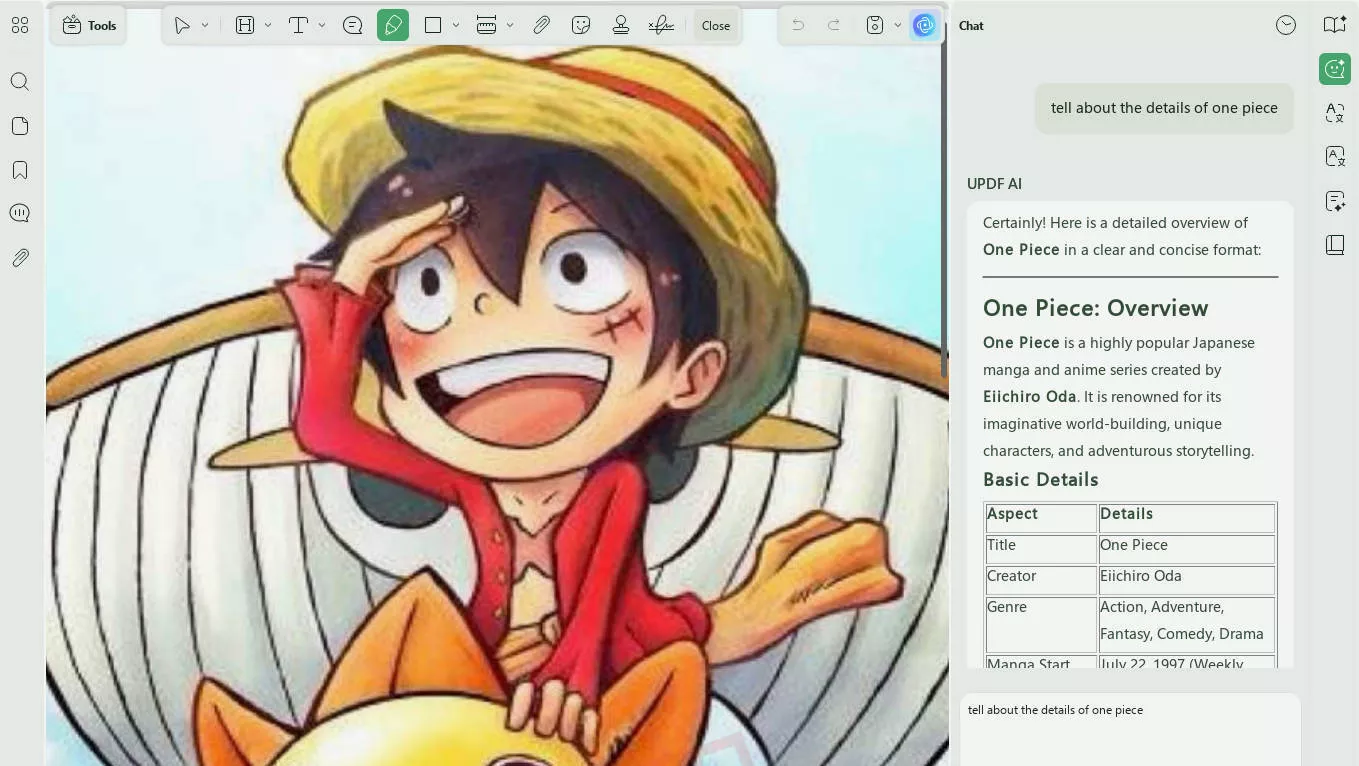
1. OCR and AI-Assisted Translation
UPDF AI can help translate selectable text, while screenshot-based prompts are useful for text embedded in artwork. For image-only pages, OCR may first be needed to create selectable text.
- Translation: Translate selectable text or capture a panel area and ask UPDF AI to translate the text shown in the image.
- Summaries: Ask UPDF AI to summarize recognized text from a chapter or volume; results depend on the quality and completeness of the source text.
2. Flexible PDF Page Views
UPDF provides practical controls for viewing illustrated PDF pages:
- Single- and Two-Page Views: Switch between one page for close reading and two pages for spread-style viewing. Learn more about viewing a PDF side by side.
- Display Options: Adjust the page layout, zoom level, and viewing background to suit the document and your screen.
- Navigation: Move through pages, use thumbnails, and zoom in on artwork; performance still depends on file size, image complexity, device memory, and storage speed.
3. Advanced OCR for "Raw" Collectors
Many manga PDFs are essentially high-res images. UPDF's AI-powered OCR (Optical Character Recognition) converts these images into searchable and selectable text. This allows you to:
- Search for specific quotes.
- Highlight and take notes on key plot points.
- Translate text directly from the art.
4. Seamless Manga Cloud Sync
Upload manga PDFs to UPDF Cloud to access the same files from supported desktop and mobile devices. Save changes before switching devices so that your latest annotations and document edits are available.
5. Optional Creative Tools for Manga Projects
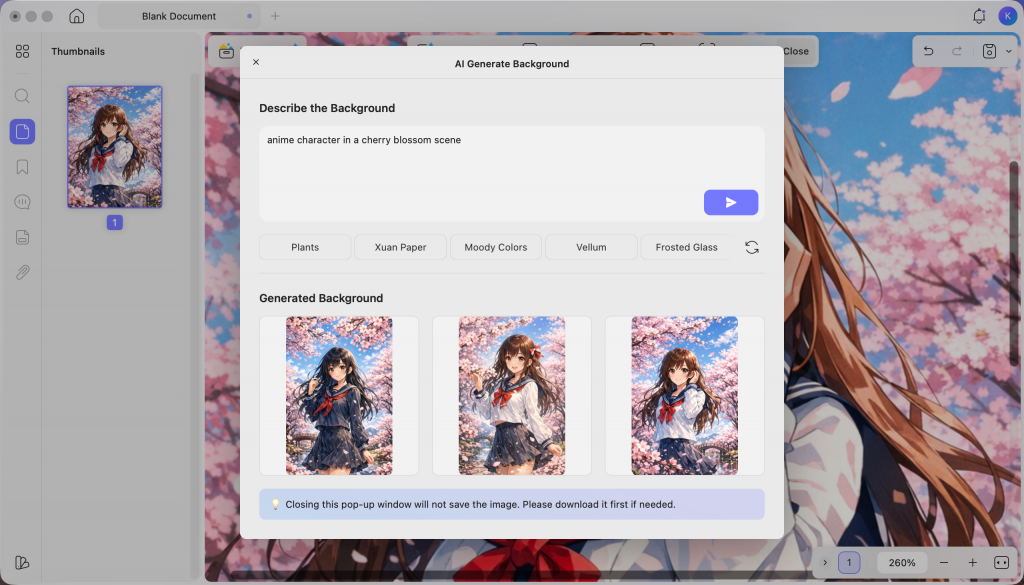
If you also create manga-inspired artwork, reading journals, covers, or social posts, UPDF offers two prompt-based AI tools for making matching visual assets:
- AI Background Agent: Enter a custom prompt to generate manga-style backgrounds that match the setting, mood, or visual style you describe.
- AI Sticker Agent: Describe the manga-related sticker you want, such as an expression, symbol, speech effect, or decorative element, and generate options from your instructions.
Beyond these, UPDF also offers some other features that make it the ideal manga PDF reader:
- Easy PDF Viewing: You can read your manga PDFs with smooth scrolling and page transitions.
- Zoom In & Zoom Out: You can easily zoom in on intricate artwork to examine the details.
- Annotation Tools: You can also take notes, highlight essential panels, add comments, and use stickers to personalize your PDF mangas.
Basic PDF reading is available for free. Watermarks or usage limits may apply when you save files after using certain editing or premium features, so check the current plan details before exporting modified documents.
Bonus Tips: How can We Translate Japanese Manga to English?
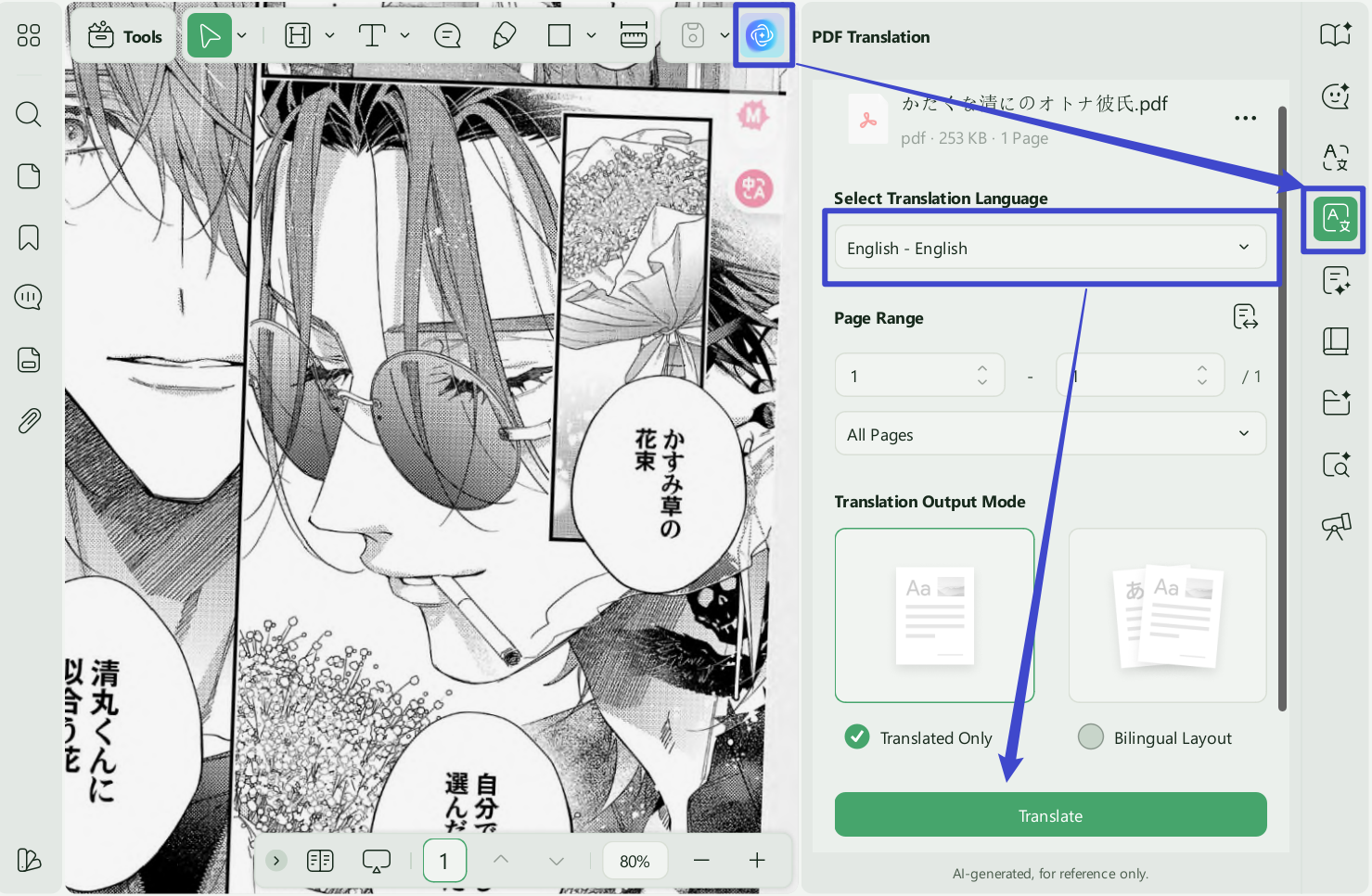
For untranslated manga, UPDF AI can work with selectable PDF text or a captured area of an image-based page. The second option is often more practical for speech bubbles that OCR does not recognize cleanly.
- Open the manga PDF in UPDF. Use PDF Translation for recognized document text, or open Ask PDF/Chat and use the screenshot tool to capture the panel or speech bubble you want translated.
Windows • macOS • iOS • Android 100% secure
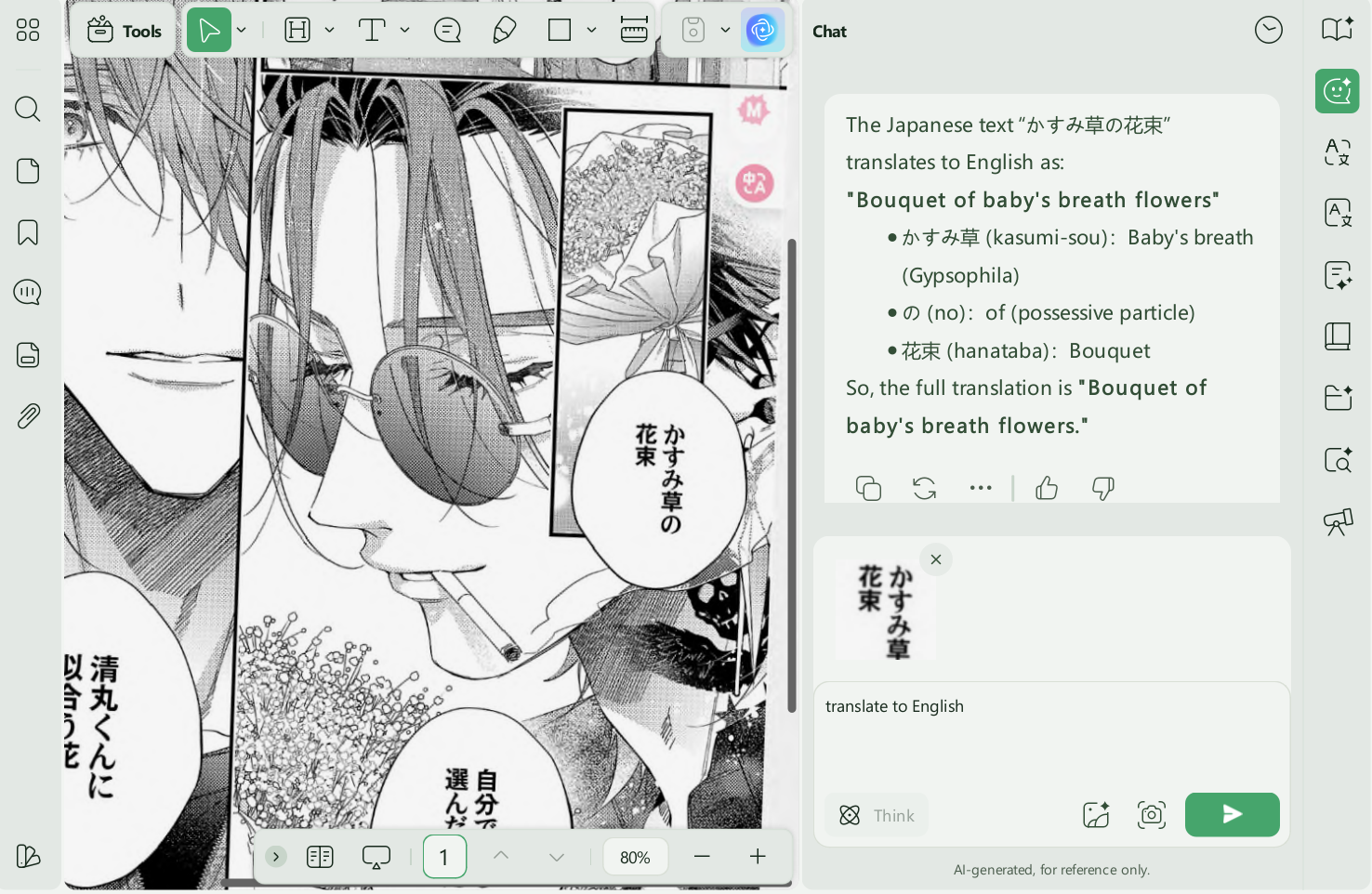
- If some parts of the file are not translated, simply go to the "Chat" feature from the right-side menu list, click the "Screenshot" icon at the bottom, take a screenshot, enter a translation prompt, and send it to UPDF AI. It will then translate the text within the image.
>> Read more about the Best Japanese Manga Translator >>
Want to see how UPDF works with manga PDFs before trying it yourself? Watch the short video below for a practical look at how to open, read, and work with manga PDFs using UPDF.
Now let's compare UPDF with competitors and see why it's better.
Part 3. UPDF vs. Other Manga Readers
UPDF focuses on PDF reading and document tools, while ComicScreen and Manga Viewer are designed more specifically for comic libraries. The best choice depends on your file format and whether you need PDF features such as OCR, annotations, AI assistance, and cross-platform editing. App availability, pricing, and ratings can change, so verify them in the relevant app store before installing.
| Software | UPDF | PDF Reader: Document Reader | ComicScreen (Manga Focused) | Manga Viewer (Manga Focused) |
| Platform Supported | Windows, macOS, iOS, Android | iOS | Android | iOS |
| Free Version | Free with small watermarks. | Free with ads | Free with ads | Free with ads |
| Paid Option | Optional upgrade for premium PDF features; check the current UPDF pricing page. | Pricing and in-app purchases may change. Check the current App Store or Google Play listing. | ||
| AI Integration | √ | x | x | x |
| Dark Mode | √ | √ | x | √ |
| Change the Page Views | √ | √ | √ | √ |
| Cloud | √ | x | x | √ |
| Take Notes | √ | Basic annotation | x | x |
Final Words
The right manga reader depends first on the file format. A dedicated comic app is usually better for CBZ/CBR libraries and specialized reading direction, while UPDF is a stronger fit for manga saved as PDF when you also need zoom, page-view controls, notes, OCR, translation assistance, and access across major platforms.
Download UPDF and test it with one manga PDF to see whether its reading, annotation, and AI-assisted tools match your workflow.
Windows • macOS • iOS • Android 100% secure




 Lizzy Lozano
 Enola Miller


 Enrica Taylor