 UPDF
UPDF
 UPDF for Windows
 UPDF for Mac
 UPDF for iPhone/iPad
 UPDF for Android
 Nomostar
 UPDF AI Online
 UPDF Sign
 IvyCraft
 Edit PDF
 Annotate PDF
 Create PDF
 PDF Form
 Edit links
 Convert PDF
 OCR
OCR PDF to Word
 PDF to Image
 PDF to Excel
 Organize PDF
 Merge PDF
 Split PDF
 Crop PDF
 Rotate PDF
 Protect PDF
 Sign PDF
 Redact PDF
 Sanitize PDF
 Remove Security
 Read PDF
 UPDF Cloud
 Compress PDF
 Print PDF
 Batch Process
 About UPDF AI
 UPDF AI Solutions
 AI User Guide
 FAQ about UPDF AI
 Summarize PDF
 Translate PDF
 Chat with PDF
 Chat with AI
 Chat with image
 PDF to Mind Map
 Explain PDF
 PDF AI Tools
 Image AI Tools
 AI Chat Tools
 AI Writing Tools
 AI Study Tools
 AI Working Tools
 Other AI Tools
 AI Bookmark Generation
 AI Bookmark Summary
 AI Watermark Generation
 AI Background Generation
 AI Sticker Generation
 AI Stamp Generation
 AI Editing Suite
 UPDF Copilot
 AI Page Management
 AI Semantic Search
 PDF to Word
 PDF to Excel
 PDF to PowerPoint
 Enterprise Solution
 Enterprise Sign
 Enterprise AI
 Enterprise Plan
 Enterprise User Guide
 Enterprise Webinar
 IT
IT Education
 Construction
 Financial Service
 Healthcare
 Insurance
 Legal
Legal Manufacturing
 Government
 Researchers & PhDs
 Solopreneurs & Freelancers
 Lawyers & Legal Professionals
 Real Estate Agents & Brokers
 Education Solution
 Customer Stories
 User Guide
 UPDF Tricks
 FAQs
FAQs UPDF Reviews
 Download Center
 Blog
Blog Newsroom
 Tech Spec
 Updates
 UPDF vs. Adobe Acrobat
 UPDF vs. Foxit
 UPDF vs. PDF Expert

DocFly PDF Editor is a browser-based service for adding content to PDFs, completing forms, signing documents, and converting files. It can be convenient when you need an occasional PDF task without installing software.
Before choosing it, check two things: whether its editing method fits your document and how many finished files you need to export. Adding text over a page is different from directly rewriting an existing paragraph, while free access does not mean unlimited downloads.
This DocFly PDF Editor review explains its tools, export allowance, subscription prices, and practical limitations. It also shows when UPDF may be worth comparing for direct content editing, scanned documents, and recurring PDF work.
Windows • macOS • iOS • Android 100% secure
Part 1. What is DocFly PDF Editor?
DocFly PDF Editor provides online tools for document conversion, forms, signatures, annotations, and page management. Its workflow is centered on uploading a file, choosing an operation, and exporting the result.
It may suit tasks such as completing an application, adding a signature, or assembling supporting pages. For substantial document revisions, examine how the editor handles existing content before committing to the workflow.
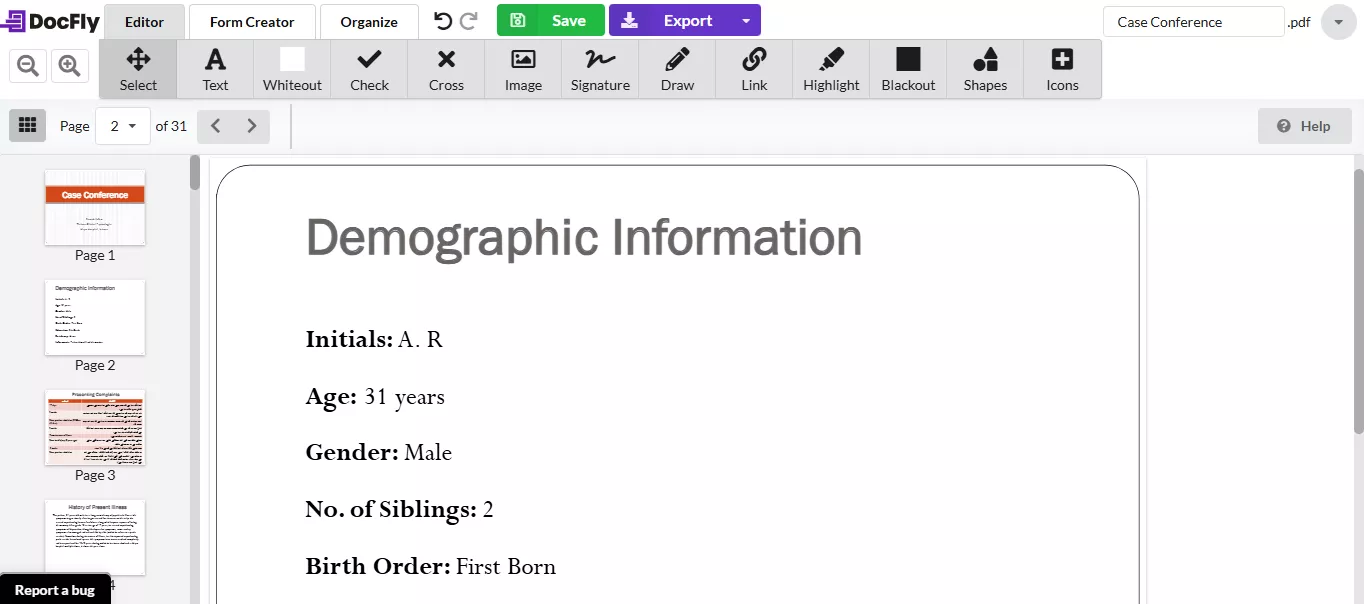
Here's what DocFly PDF Editor has to offer:
- Create & Convert PDFs:
DocFly lists tools for turning Word, Excel, PowerPoint, and supported image files into PDFs. Its documented output tools include PDF to Word, JPG, and PNG.
Conversion is an option when you need another file format, but review the result before continuing. Tables, columns, images, and unusual fonts may need attention after any conversion workflow.
Do not assume that support in one direction means support in the reverse direction. For example, Excel-to-PDF support does not establish PDF-to-Excel support.
- Review & Edit PDFs
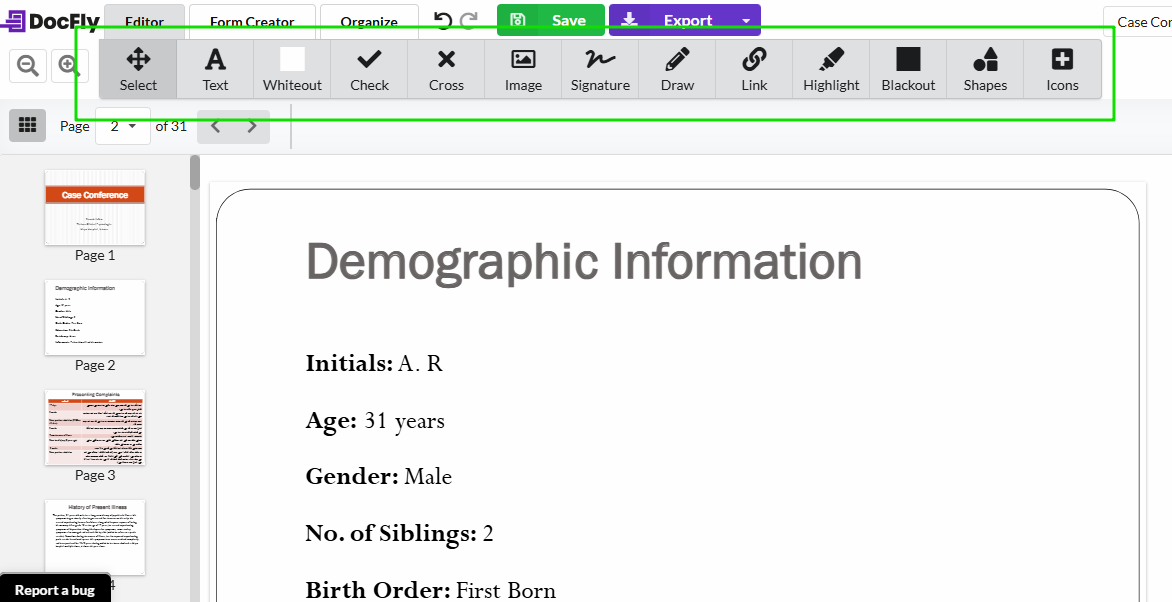
DocFly’s documented editing tools include adding text and images, highlighting, and placing shapes or signatures.
For a small addition, such as a reference number in a blank area, this workflow may be sufficient. For rewriting existing content, check whether you are editing the original object or placing replacement content over it.
That distinction matters when text must remain consistent with surrounding fonts, spacing, and line breaks.
- Save & Protect PDFs
Protect your files with passwords to keep private information safe. DocFly lists password tools for controlling access to PDF files.
Treat whiteout and blackout tools separately from verified redaction. A visual cover alone does not demonstrate that underlying information has been permanently removed. For confidential material, use a redaction workflow that removes the content and verify the final document.
- Fill, Sign, and Create PDF Forms
DocFly offers tools for completing forms and adding signatures. Its current form creator also describes adding interactive fields to an existing PDF or starting from a blank page.
Use a completed sample to check the result. Reopen the exported form, confirm that its fields work, and ensure the signature appears where intended.
This means the older statement that DocFly cannot start a document from a blank page should be removed.
With DocFly, you can add text fields, check box fields, dropdowns, lists, and more fields to create fillable PDF forms.
- Organize PDF
You caDocFly’s page tools include merging, splitting, rotating, deleting, extracting, and rearranging pages.
After processing, check the page count, order, and orientation. When assembling an application or report, confirm that no supporting page has been omitted or duplicated.
Now that you know the basics of DocFly PDF Editor, let's move on to how to use it to edit your PDFs.
Part 2. How to Use DocFly PDF Editor
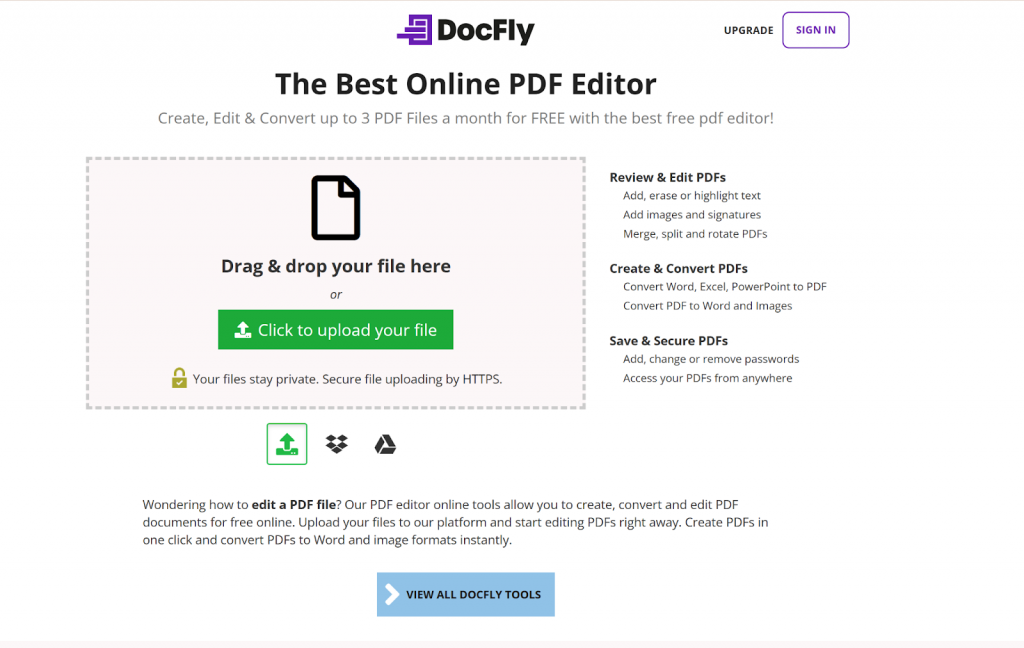
Step 1. After opening the official website, Click on “Click to upload your file” to upload a file.
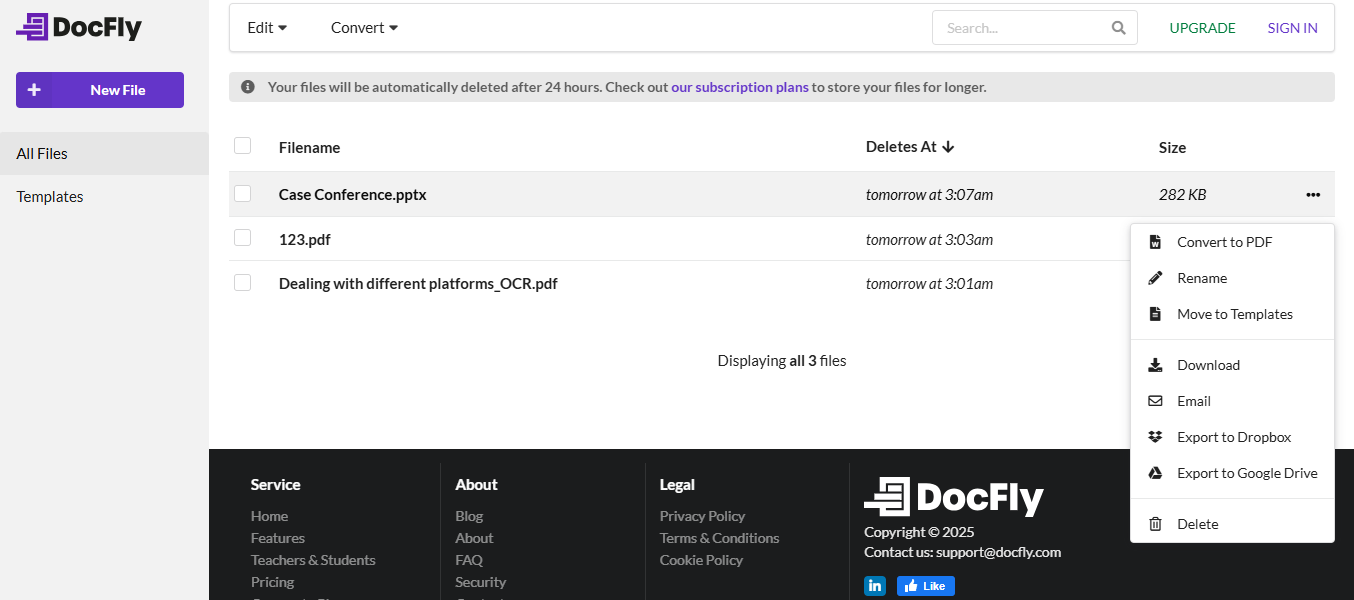
Step 2. DocFly will show all the uploaded files. If it’s not a PDF file, click the Three-Dots icon on the right side and convert it to PDF.
Step 3. Double-click on the file to open the converted PDF. You can now edit, annotate, organize, sign, etc..
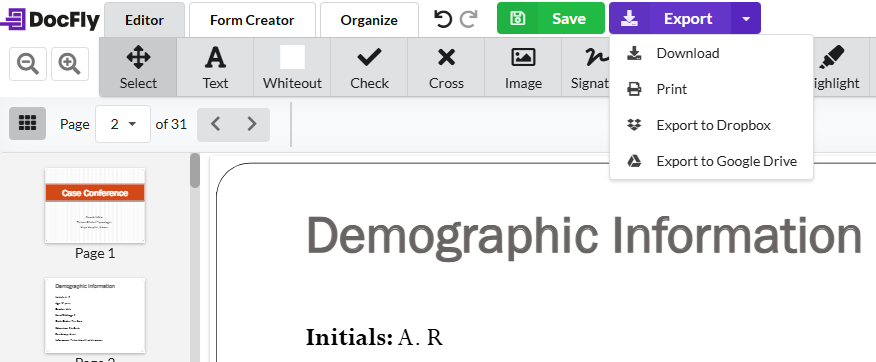
Step 4. After editing, click on “Save.” You can save it locally to Dropbox or Google Drive. Click the “Export” button and select your preferred option from the dropdown.
Now, whenever we discuss any online tool, one question always comes to mind. “Is it safe to use the DocFly PDF editor online?” Let's see!
Part 3. Is DocFly PDF Editor Safe?
DocFly is serious about your file security. They have several layers of protection for your data.
Here's a closer look at their approach:
- Your documents are housed securely on Amazon's servers located in Ireland. They are renowned for their stringent security protocols.
- Only authorized personnel can access the systems where your files are stored.
- Whether in transit or at rest, your files are encrypted. It provides an extra level of protection throughout their lifecycle.
- DocFly follows significant data protection laws, including GDPR and CCPA. It means your information is handled according to the most rigorous legal standards.
- When you delete a file, it's permanently wiped from their servers.
So, DocFly PDF editor can guard your PDF in all aspects. You don't need to worry about this aspect.
Now, let's take a look at its pricing.
Part 4. Is DocFly PDF Editor free?
DocFly does give a free version. However, it’s far from an unlimited resource. You’re capped at creating, editing, or converting just three PDFs per month. This free version is fine for occasional one-time use but impractical for anyone managing PDFs regularly.
To unlock its full potential, a paid subscription becomes a necessity. It comes in two pricing tiers: Monthly and Annual. Let’s dissect the options:
| Features | Monthly Plan | Annual Plan |
| Price | $7.99 per month | $3.99 per month (billed as $47.88/year) |
| In-browser PDF editor | ✓ | ✓ |
| Form creator and filler | ✓ | ✓ |
| File conversion tools | ✓ | ✓ |
| 10GB cloud storage | ✓ | ✓ |
| Priority support | ✓ | ✓ |
| Unlimited exports | ✓ | ✓ |
Both plans give the same benefits. However, the annual plan is far more cost-saving than its monthly counterpart. However, one thing is sure: DocFly's free tier is just a stepping stone. For power users, an upgrade is inescapable.
Now, let's see the opposite side of the coin.
Part 5. DocFly Limitations to Check Before Subscribing
While DocFly does the job for most basic PDF tasks, many weaknesses exist. Let's dive into the most common pain points:
- Existing Content Editing
DocFly’s documented replacement method uses covering and adding content. If you need to rewrite paragraphs or make precise object changes, test that workflow carefully before choosing it.
- Scanned Documents and OCR
A scanned page can accept added text or annotations without its original words becoming editable. The official feature documentation reviewed here does not clearly establish built-in OCR support. Confirm this directly if scanned documents are central to your work.
- Free Exports
The monthly output allowance can matter more than the number of tools available. Estimate the finished files you need rather than counting only editing sessions.
- Internet Access
The browser service depends on connectivity. Assess upload and processing requirements against your working environment.
- Conversion Results
Check your actual file type and layout. Avoid assuming that every document will convert identically, and keep the source file for comparison.
- Subscription Cost
Compare the recurring cost with the tasks you expect to complete. The right value depends on usage and results, rather than a general claim that the price is expensive.
These drawbacks highlight why users are looking for alternatives. That's why we show you UPDF.
If your document requires rewriting existing text, adjusting images, or recognizing scanned content, compare that task in UPDF.
Download UPDF and test a copy of a typical document. Inspect the saved output before selecting a paid plan. Free-version limitations and separate AI conditions should be checked against your intended use.
Windows • macOS • iOS • Android 100% secure
Part 6. When Is UPDF Worth Considering as a DocFly Alternative?
UPDF is worth comparing when you need a desktop workflow for direct content editing, annotation, OCR, conversion, and page management.
On Windows, its tools cover text and image changes, link editing, forms, and other document tasks. Check the relevant platform before assuming the same capabilities are available in every version.
For example, revising a proposal may involve rewriting a paragraph, replacing a logo, reviewing comments, and checking a scanned attachment. Compare the whole task using the same sample document.
Choose based on the accuracy of the output, the effort required, and the plan that includes your tools. Check current UPDF pricing instead of relying on an old promotional amount.
Windows • macOS • iOS • Android 100% secure
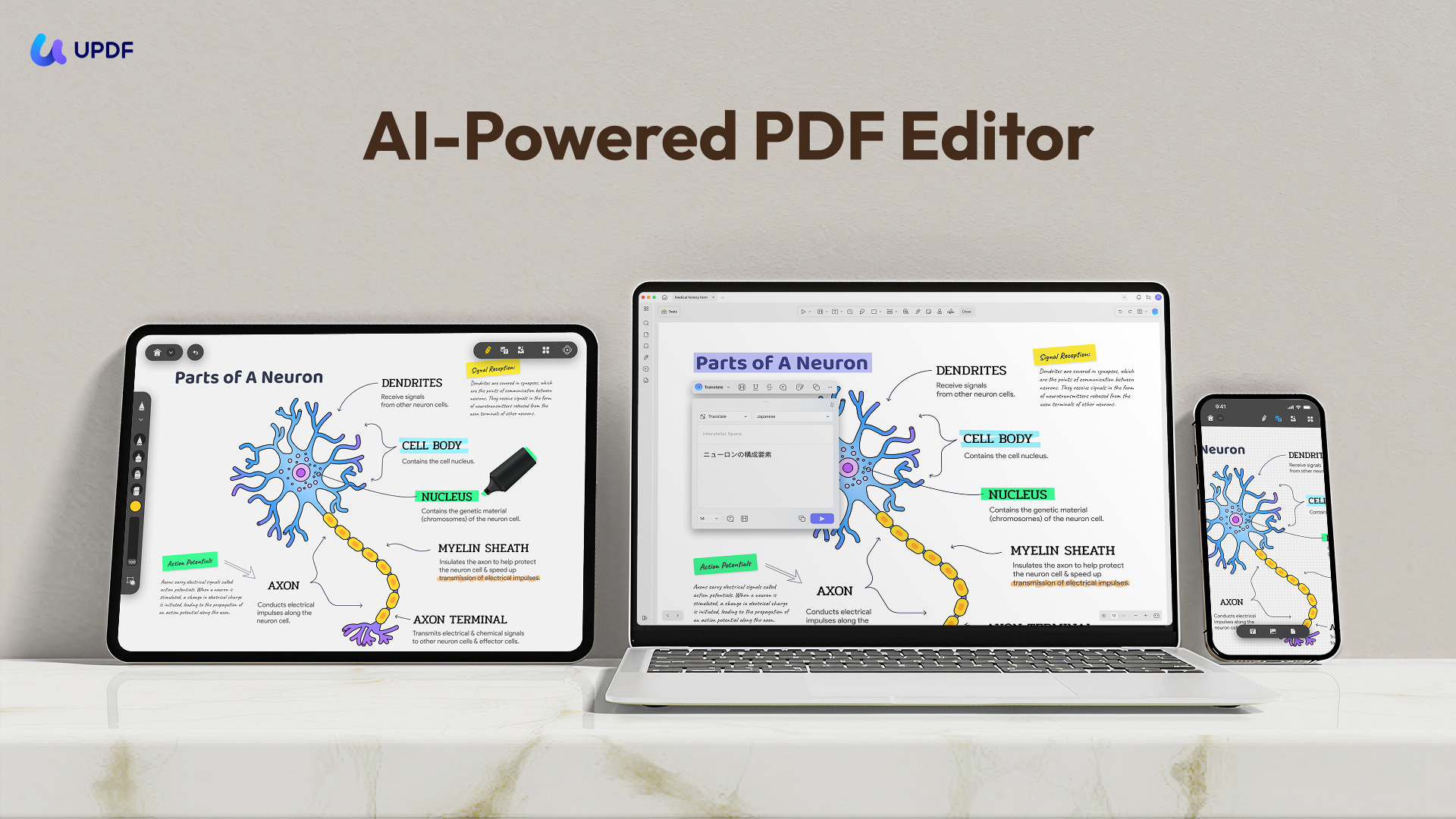
Want to know why UPDF is better than DocFly? Here are the detailed reasons.
Why Choose UPDF?
The features make UPDF different.
- Effortless Editing
Change text, images, and pages using a set of precision tools.
- Flexible Conversions
Take your PDFs into Word, Excel, PowerPoint, and other formats. UPDF performs these conversions without disturbing the original layout.
- Advanced OCR
Transform scanned files into fully editable, fully searchable documents in seconds.
- Seamless Collaboration
Highlight and annotate PDFs. You can also add sticky notes or comments and collaborate in real-time.
- World-Class Security
Lock down your PDFs with password protection and access controls for added security.
Quick Comparison
| Features | DocFly | UPDF |
| Edit PDF texts, images, and links. | × | ✓ |
| OCR | × | ✓ |
| PDF Translation | × | ✓ |
| Share the file with a link or QR code. | × | ✓ |
| AI Assistant | × | ✓ |
| Create a blank PDF | × | ✓ |
| Redaction | × | ✓ |
| Price | US$43/Year | $49.99/Year |
If you want to know more about UPDF, check out this video tutorial.
Or read this review article.
FAQs About DocFly PDF Editor
Is DocFly free to download edited PDFs?
Its free tier provides three monthly export credits. The allowance covers output actions such as downloading, printing, emailing, or saving to cloud storage.
Can DocFly directly rewrite existing PDF paragraphs?
Its documented approach includes covering content and adding replacements. Test your document if you need direct paragraph editing rather than visual replacement.
Does DocFly include OCR?
The official feature pages reviewed for this article do not clearly document built-in OCR. Confirm availability before subscribing for scanned-document work.
Can I create a blank PDF in DocFly?
The current form creator provides a blank-page option for building a form from scratch.
Does DocFly renew automatically?
Its monthly and annual plans are recurring subscriptions. Review the current cancellation and refund conditions before purchasing.
Conclusion
DocFly PDF Editor provides simple features for performing tasks on DocFly can suit occasional browser-based tasks such as adding content, completing forms, signing documents, and managing pages. Its free export allowance makes the expected output volume an important part of the decision.
For substantial content revisions or scanned-document work, compare the exact workflow before subscribing. UPDF is worth testing when you want a desktop editor with direct editing and OCR tools.
Use the same document, review the saved files, and choose the option that meets your requirements at an acceptable cost.
Windows • macOS • iOS • Android 100% secure






 Enid Brown
 Engelbert White

 Enola Miller