UPDF
UPDF
 UPDF for Windows
 UPDF for Mac
 UPDF for iPhone/iPad
 UPDF for Android
 Nomostar
 UPDF AI Online
 UPDF Sign
 IvyCraft
 Edit PDF
 Annotate PDF
 Create PDF
 PDF Form
 Edit links
 Convert PDF
 OCR
OCR PDF to Word
 PDF to Image
 PDF to Excel
 Organize PDF
 Merge PDF
 Split PDF
 Crop PDF
 Rotate PDF
 Protect PDF
 Sign PDF
 Redact PDF
 Sanitize PDF
 Remove Security
 Read PDF
 UPDF Cloud
 Compress PDF
 Print PDF
 Batch Process
 About UPDF AI
 UPDF AI Solutions
 AI User Guide
 FAQ about UPDF AI
 Summarize PDF
 Translate PDF
 Chat with PDF
 Chat with AI
 Chat with image
 PDF to Mind Map
 Explain PDF
 PDF AI Tools
 Image AI Tools
 AI Chat Tools
 AI Writing Tools
 AI Study Tools
 AI Working Tools
 Other AI Tools
 AI Bookmark Generation
 AI Bookmark Summary
 AI Watermark Generation
 AI Background Generation
 AI Sticker Generation
 AI Stamp Generation
 AI Editing Suite
 UPDF Copilot
 AI Page Management
 AI Semantic Search
 PDF to Word
 PDF to Excel
 PDF to PowerPoint
 Enterprise Solution
 Enterprise Sign
 Enterprise AI
 Enterprise Plan
 Enterprise User Guide
 Enterprise Webinar
 IT
IT Education
 Construction
 Financial Service
 Healthcare
 Insurance
 Legal
Legal Manufacturing
 Government
 Researchers & PhDs
 Solopreneurs & Freelancers
 Lawyers & Legal Professionals
 Real Estate Agents & Brokers
 Education Solution
 Customer Stories
 User Guide
 UPDF Tricks
 FAQs
FAQs UPDF Reviews
 Download Center
 Blog
Blog Newsroom
 Tech Spec
 Updates
 UPDF vs. Adobe Acrobat
 UPDF vs. Foxit
 UPDF vs. PDF Expert

Quick answer:
The one detail most guides skip: an FDF file is only the answers, not the form. You cannot open an FDF on its own and get a PDF — you need a compatible blank PDF form with matching field names, then import the FDF into it. Below covers that import (Windows and Mac), how to export FDF in the first place, how FDF differs from XFDF and CSV, and what to do when the imported data lands in the wrong fields.
Part 1: What Is an FDF File, and Can You "Convert" It to PDF?
FDF (Forms Data Format) is a small text file that stores only the values typed into a PDF form — nothing about the form's layout, fonts, or images. Because it holds data and not the document, a 500 KB filled PDF form can be reduced to an FDF of well under 1 KB. Teams use FDF to upload form responses to a server or pass answers between applications without shipping the whole file each time.
So "converting FDF to PDF" is really importing: you take a blank PDF form with matching field names, load the FDF into it, and the fields fill back in. The FDF is keyed to that specific form's field names — without the matching blank PDF, there is nothing for the data to attach to. As long as you have both the FDF and its original PDF, a PDF editor such as UPDF can rebuild the filled form and let you save it as a normal PDF.
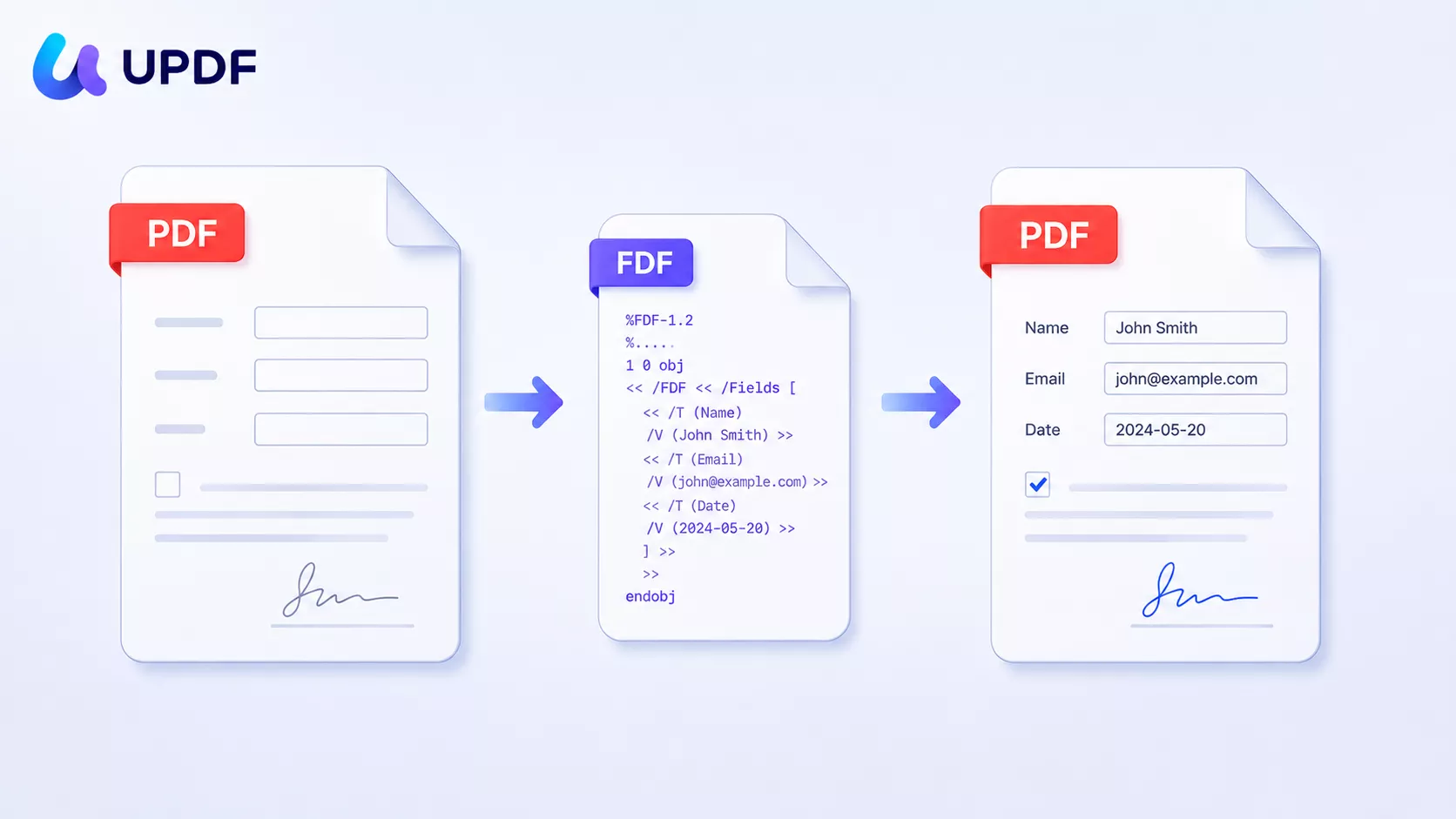
If you also need to build or restructure the form itself, that belongs to the wider PDF form workflows — creating fields, filling, signing, and managing responses end to end.
Part 2: How to Import FDF Into a PDF (Windows & Mac)
These steps assume you already have the blank PDF form and its matching FDF file. If you still need to create the form, see how to create a fillable PDF form; to produce the FDF, see Part 3 below.
Step 1. Open the blank PDF form in UPDF. If you don't have UPDF yet, download UPDF for free and install it in under a minute, then open the form.
Windows • macOS • iOS • Android 100% secure
Step 2. Open the Form menu at the top of the page and select Form mode.
Step 3. Go to ... More and select Import Data.
Step 4. UPDF warns that the action can't be undone (it overwrites current field values). Click Continue, then choose the FDF file. UPDF reads the FDF and drops each value into its matching field.

Step 5. Go to Save → Save As Other to save the filled form under a new name, keeping your blank template intact.
Best for:
- rebuilding a filled form when a colleague or system sent you back only the FDF data.
Not for:
- an FDF whose field names don't match the PDF you're importing into — the data won't land, which is the exact failure the Edge Cases section below addresses.
Platform note: FDF import/export is a desktop feature. UPDF for iOS and Android can fill and sign forms, but importing or exporting FDF data files is handled on the Windows and Mac apps.
Part 3: How to Export FDF From a PDF
Exporting is the reverse: you fill out a form and pull the answers out as a compact FDF for sharing or archiving.
Step 1. Open the blank form in UPDF. It opens in Reader mode by default — leave it there.
Step 2. Click each field and fill it in until the form is complete.
Step 3. Enter Form mode in Tools.
Step 4. Open the top Tools menu and choose Export Data.
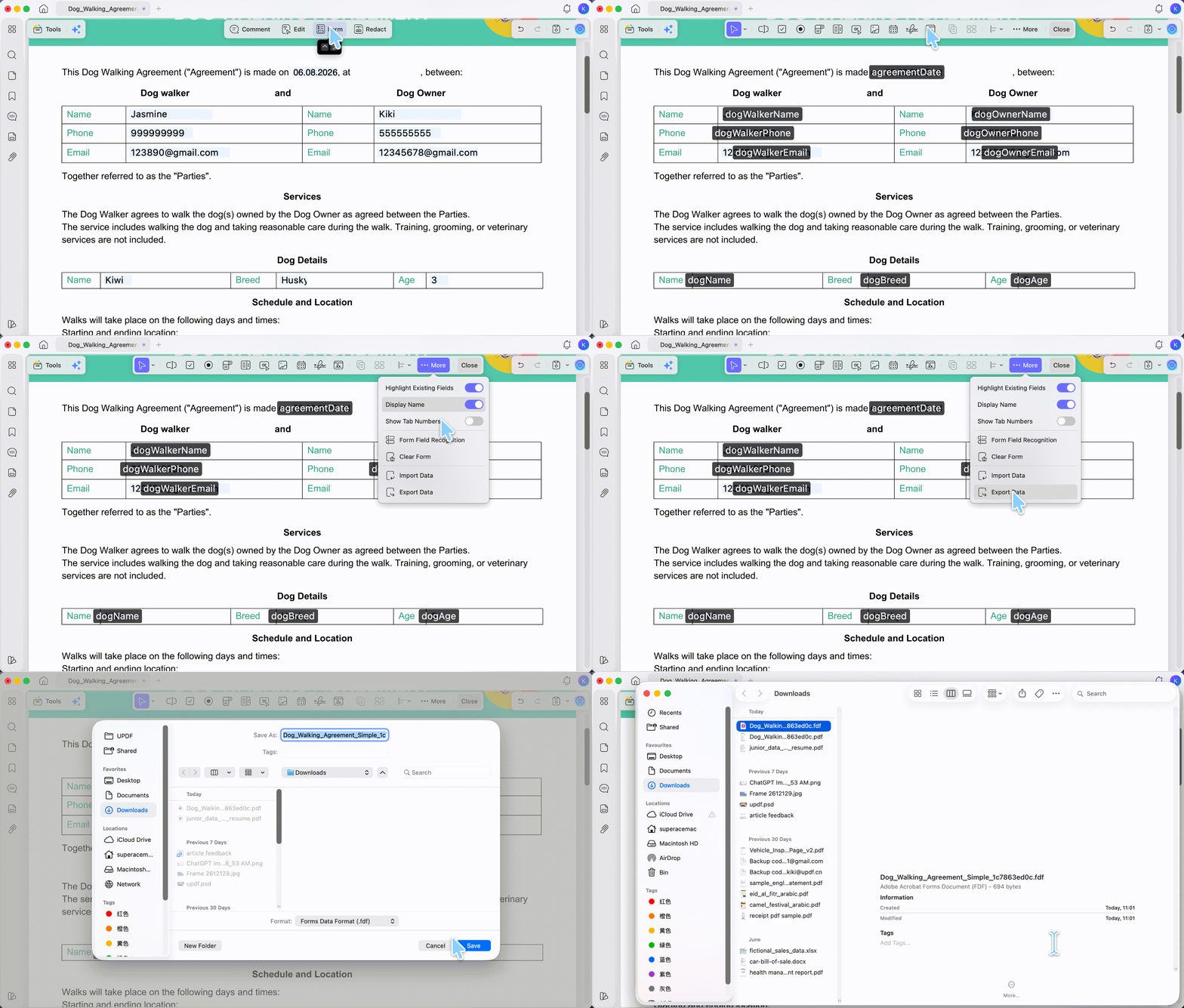
Step 5. Name the file and pick a save location.
If your goal is analysis rather than re-import — totals, filtering, comparing many submissions — export to a spreadsheet instead. UPDF can export PDF form data to Excel, which is easier to work with than raw FDF.
Part 4: FDF vs XFDF vs CSV — Which Data Format Do You Need?
These three formats all strip a form down to its data, but they are not interchangeable, and picking the wrong one is the most common reason a "convert" step fails downstream.
- FDF — the classic Adobe form-data format. Best for round-tripping data back into the same PDF form. Think of it as a set of house keys: useless on its own, but it opens one specific door (the original form).
- XFDF — the XML version of FDF. Same job, but XML-structured, so it travels better between different systems and is easier for other software to parse. If a workflow specifically asks for XFDF, see how to convert PDF to XFDF and back.
- CSV — a spreadsheet table, not a form overlay. Best when you want to read and analyze responses in Excel, not push them back into a PDF.
Summary: FDF and XFDF go back into a form; CSV goes into a spreadsheet. UPDF's Import Data and Export Data work with the .fdf format; when you need rows and columns for analysis, use UPDF's PDF-to-Excel conversion instead.
| Format | What it stores | Best for | Not for |
|---|---|---|---|
| FDF | Form field values only | Re-importing into the original PDF form | Opening on its own; spreadsheet analysis |
| XFDF | Same data, in XML | Passing form data between different systems | Users who just need a quick re-import (FDF is simpler) |
| CSV | A flat table of values | Analyzing/comparing responses in Excel | Refilling a PDF form (it carries no field mapping) |
Part 5: Edge Cases — When the Import Doesn't Work
Most FDF import problems trace back to a mismatch between the data file and the form, not to the software.
- "I imported the FDF but no fields filled in." The FDF was almost certainly created from a different version of the form. FDF matches data to fields by exact field name — rename a field, rebuild the form, or use a similar-but-not-identical PDF, and the values have nowhere to land. Import into the exact blank PDF the FDF came from.
- "Some fields filled, others stayed empty." Partial matches happen when a form was edited after the FDF was exported (a field added, removed, or renamed). Compare the two field sets, or re-export a fresh FDF from the current form.
- "I only have the FDF, not the original PDF." There is no way to reconstruct the form from data alone — the layout was never stored in the FDF. Track down the blank PDF template; without it, the FDF can't become a filled PDF.
- "Import Data is greyed out." Import and export only work on interactive forms with real fields. A flat PDF (a scan, or a form that's just printed text) has no fields to fill. Add form fields first, or start from a genuinely fillable PDF.
FAQ
1. Can I open an FDF file directly as a PDF?
No. An FDF holds field values, not the page layout. Import it into a compatible blank PDF form with matching field names, then save the filled PDF.
2. Why is my imported data going into the wrong fields?
The field names in the FDF may differ from those in the PDF. Use a form with corresponding field names, then check the imported values before saving.
3. Can I get PDF form data into Excel instead of FDF?
Yes — export the responses to a spreadsheet. UPDF's PDF-to-Excel conversion turns form data into rows and columns for analysis.
Conclusion
Converting FDF to PDF comes down to one idea: an FDF is only the answers, so you import it back into the blank form it came from, then save. UPDF handles both directions — Import Data to rebuild a filled form, Export Data to pull answers out as a compact FDF — on Windows and Mac, and routes cleanly to Excel export when you need analysis instead of a re-import.
Download UPDF for free to try importing your FDF into its form — installation is free, and Pro features are available when you need watermark-free export or advanced tools.
Windows • macOS • iOS • Android 100% secure





 Enid Brown
 Hitesh Kumar

 Lizzy Lozano