 UPDF
UPDF
 UPDF for Windows
 UPDF for Mac
 UPDF for iPhone/iPad
 UPDF for Android
 Nomostar
 UPDF AI Online
 UPDF Sign
 IvyCraft
 Edit PDF
 Annotate PDF
 Create PDF
 PDF Form
 Edit links
 Convert PDF
 OCR
OCR PDF to Word
 PDF to Image
 PDF to Excel
 Organize PDF
 Merge PDF
 Split PDF
 Crop PDF
 Rotate PDF
 Protect PDF
 Sign PDF
 Redact PDF
 Sanitize PDF
 Remove Security
 Read PDF
 UPDF Cloud
 Compress PDF
 Print PDF
 Batch Process
 About UPDF AI
 UPDF AI Solutions
 AI User Guide
 FAQ about UPDF AI
 Summarize PDF
 Translate PDF
 Chat with PDF
 Chat with AI
 Chat with image
 PDF to Mind Map
 Explain PDF
 PDF AI Tools
 Image AI Tools
 AI Chat Tools
 AI Writing Tools
 AI Study Tools
 AI Working Tools
 Other AI Tools
 AI Bookmark Generation
 AI Bookmark Summary
 AI Watermark Generation
 AI Background Generation
 AI Sticker Generation
 AI Stamp Generation
 AI Editing Suite
 UPDF Copilot
 AI Page Management
 AI Semantic Search
 PDF to Word
 PDF to Excel
 PDF to PowerPoint
 Enterprise Solution
 Enterprise Sign
 Enterprise AI
 Enterprise Plan
 Enterprise User Guide
 Enterprise Webinar
 IT
IT Education
 Construction
 Financial Service
 Healthcare
 Insurance
 Legal
Legal Manufacturing
 Government
 Researchers & PhDs
 Solopreneurs & Freelancers
 Lawyers & Legal Professionals
 Real Estate Agents & Brokers
 Education Solution
 Customer Stories
 User Guide
 UPDF Tricks
 FAQs
FAQs UPDF Reviews
 Download Center
 Blog
Blog Newsroom
 Tech Spec
 Updates
 UPDF vs. Adobe Acrobat
 UPDF vs. Foxit
 UPDF vs. PDF Expert

Quick answer:
The deciding question is not which product has the longer feature list. It is whether your source begins as a web page or a PDF. Cubox turns articles, snippets, and newsletters into a searchable reading library. UPDF opens the contract, report, scanned handout, or form and lets you work on the document itself.
This review uses Cubox's current product, help, Premium, and legal pages and UPDF's current product and pricing pages, checked in July 2026. Store ratings are intentionally excluded because ratings vary by country, platform, and date.
Part 1. Should You Choose Cubox or UPDF?
| Your real task | Better fit | Why |
|---|---|---|
| Save articles, newsletters, and web snippets for later | Cubox | Cubox parses web content, stores snapshots, supports highlights, and organizes a long-term reading library. |
| Search old highlights and group web research with folders or tags | Cubox | Nested folders, hierarchical tags, smart lists, full-text search, and integrations support a personal knowledge workflow. |
| Edit text, images, links, or pages inside a PDF | UPDF | UPDF works on the PDF itself instead of treating the file as a saved reading item. |
| Make a scanned PDF searchable or editable | UPDF | UPDF provides OCR modes for adding or rebuilding a text layer. |
| Convert, redact, sign, protect, compare, or fill a PDF | UPDF | These are document-processing jobs, not read-it-later jobs. |
| Collect web research, then prepare the downloaded PDFs | Use both | Cubox can manage the source library while UPDF handles the resulting PDF files. |
The shortest verdict is therefore:
- Cubox is the better web-reading library.
- UPDF is the better PDF workspace.
- Neither product completely replaces the other when your research mixes websites and documents.
Cubox vs UPDF: What's the Difference in One Line?
Cubox is a reading inbox; UPDF is a document workshop. Cubox captures web content so you can return to the source, search it, and reuse its highlights. UPDF opens a PDF so you can change the document through editing, OCR, conversion, forms, signatures, or page tools. Think of Cubox as a shelf for articles and UPDF as a workbench for files: one preserves and organizes reading, while the other changes the document itself.
Part 2. How We Compared Cubox and UPDF
We checked five practical decision points instead of relying on vague labels such as "easy to use":
| Criterion | What was checked | Why it matters |
|---|---|---|
| Content scope | What each product can ingest and work on | A web archive and a PDF editor solve different problems. |
| Reading and annotation | Reader styling, highlights, notes, search, and navigation | These features determine whether saved material can be revisited effectively. |
| AI purpose | What the AI analyzes and what output it produces | Article insight is not the same workflow as PDF analysis and editing. |
| Document operations | OCR, conversion, editing, forms, page tools, and protection | These are the boundary between reading a source and changing a document. |
| Access, pricing, and data handling | Platforms, device rules, trial terms, uploads, and export | A good workflow still fails if access or data assumptions are wrong. |
Part 3. Cubox Review: Strongest for a Web Reading Library
Best for:
- researchers, writers, newsletter readers, and knowledge workers who repeatedly save web sources and need to find the important passage months later.
Skip if:
- your day starts with PDF contracts, scanned forms, textbooks, or reports that need OCR, editing, conversion, page management, or protection. Cubox can organize the web research around those files, but it does not give you text or page controls inside them.
What Cubox Does Well
Cubox is an AI-assisted read-it-later and personal knowledge service. Its current guide identifies three core content types:
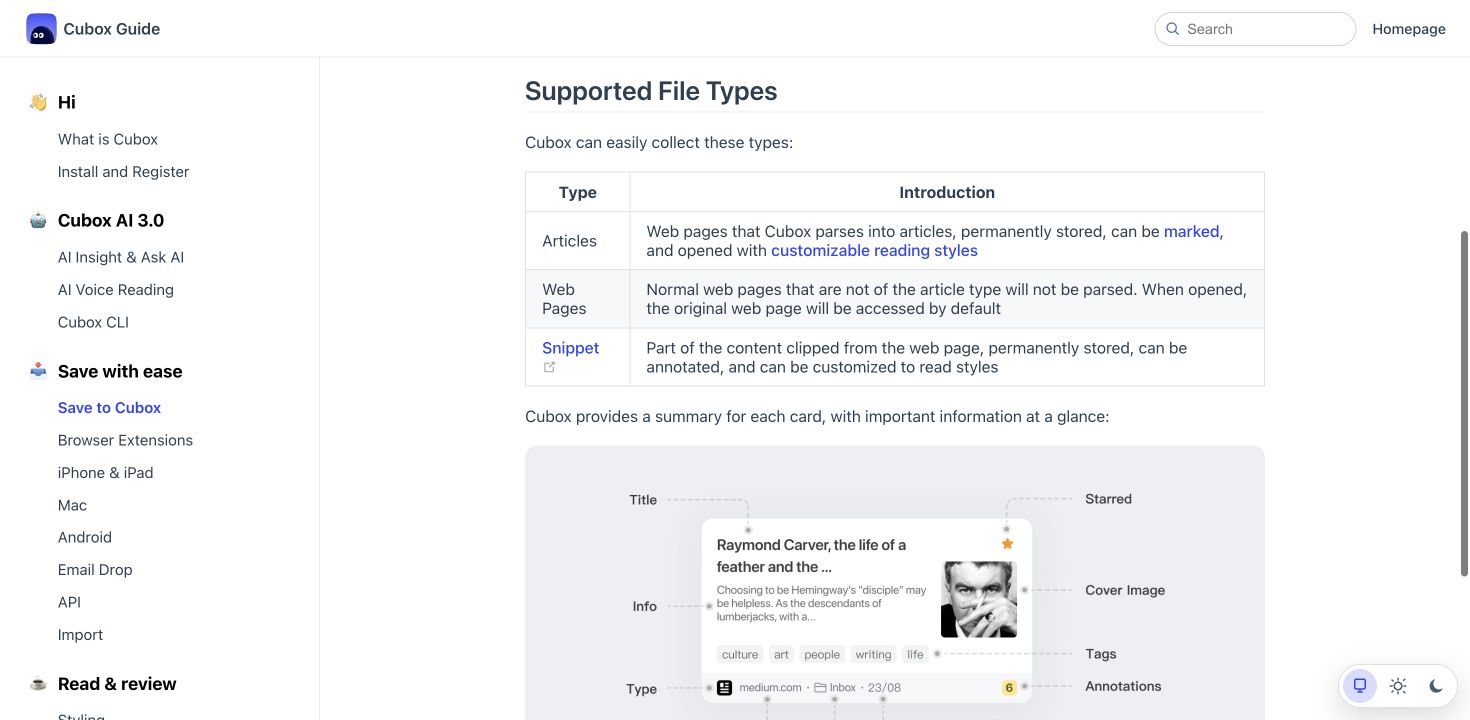
- Articles: web pages parsed into a customizable reader and stored for later use.
- Web pages: pages that open as the original website when Cubox does not parse them as articles.
- Snippets: selected portions of web content that can be stored and annotated.
This web-first model gives Cubox several genuine strengths:
- Browser extensions can save pages, clip selected passages, add highlights, and surface related saved material in search results.
- Article snapshots help preserve a reference when the live webpage later changes or disappears.
- Highlights, notes, folders, tags, smart lists, and quick search turn saved links into a retrievable library.
- Email Drop can turn newsletters and forwarded email text into readable items.
- Obsidian, Notion, and Readwise integrations, plus export and API options, help move reading output into a wider knowledge system.
- The Cubox CLI can expose saved knowledge to command-line and agent-based workflows.
A long-term Cubox user described deep links, offline reading, searchable highlights, and fast sync as the reasons Cubox remained a strong personal fit. The same user also identified export structure as a weakness, which is covered later in this review. That balance is more useful than treating Cubox as either flawless or unusable.
Cubox AI Is More Than Summarization
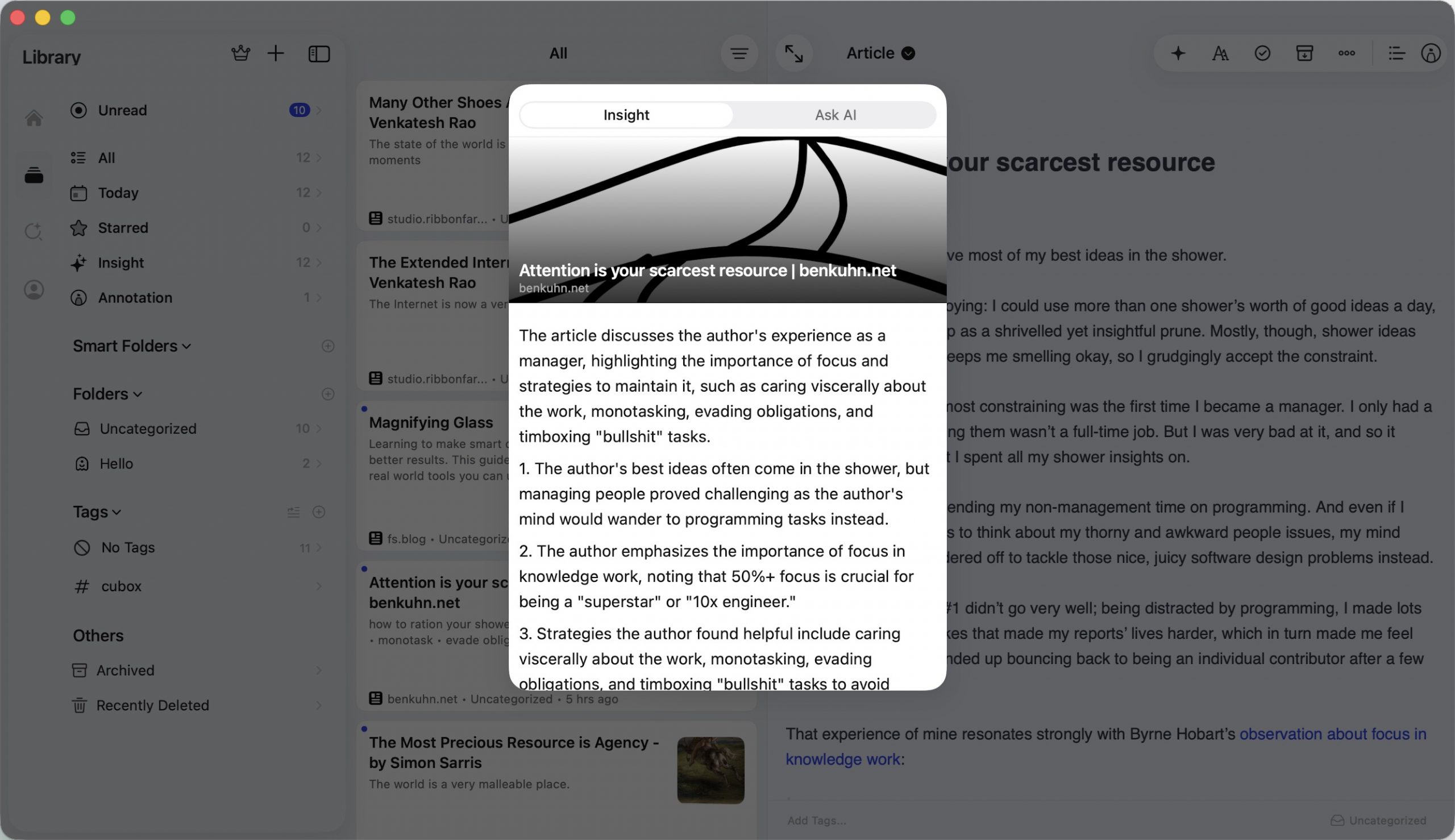
Cubox AI should not be described as limited to "Summarize" and "Explain." The current Cubox AI guide documents:
- Quick Read for an article abstract;
- Key Questions for the main points in question-and-answer form;
- Ghost Highlight for automatically extracted passages;
- Ask AI for follow-up questions, notes, summaries, translation, research, and learning;
- Optional automatic insight when saved content or a newsletter enters the library.
Cubox also offers AI voice reading through cloud-synthesized speech and monthly usage credits. These capabilities make Cubox useful when the goal is to understand and revisit web reading, but Cubox AI does not turn Cubox into a full PDF editor.
Where Cubox Reaches Its Boundary
Cubox's boundary becomes clear when the source is a document file rather than a web page.
Cubox lists articles, web pages, and snippets as the supported core types. More decisively, Cubox states that support for temporary file storage and preview ended in April 2026. Cubox should therefore not be treated as a current preview tool for PDF, Word, Excel, or PowerPoint files.
Cubox can export supported collections or annotations as TXT, Markdown, HTML, or PDF, but exporting content as a PDF is not the same as opening and editing an existing PDF. Cubox also does not replace OCR, PDF conversion, redaction, form creation, or page organization.
The fair limitation is therefore not that Cubox is "bad with documents." The limitation is that document processing is outside Cubox's primary job.
Part 4. UPDF Review: Strongest for Working on the PDF Itself
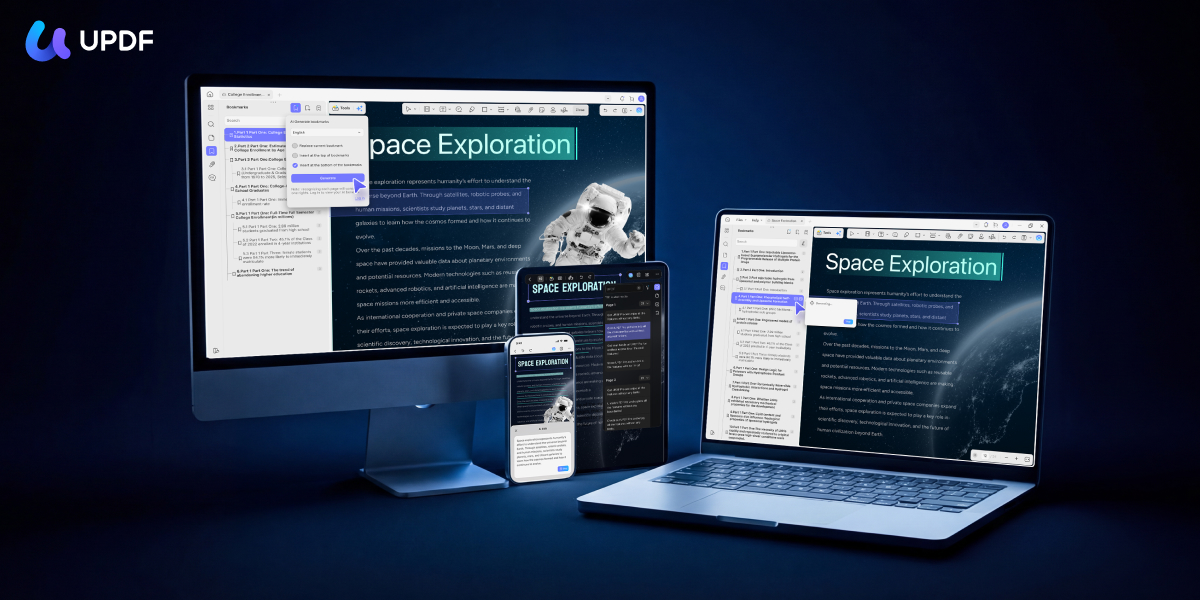
Best for:
- people who receive, create, scan, revise, convert, annotate, sign, compare, or protect PDF documents on desktop or mobile.
Skip if:
- you expect browser clipping, saved-page snapshots, nested reading folders, and knowledge-management integrations to build a permanent article library. UPDF can open PDFs, but it does not turn saved websites into a searchable reading inbox.
UPDF picks up where Cubox stops: it opens the file itself. It can read and annotate a PDF, then continue into editing, OCR, conversion, forms, signatures, protection, and page work.
Windows • macOS • iOS • Android 100% secure
PDF Reading and Annotation
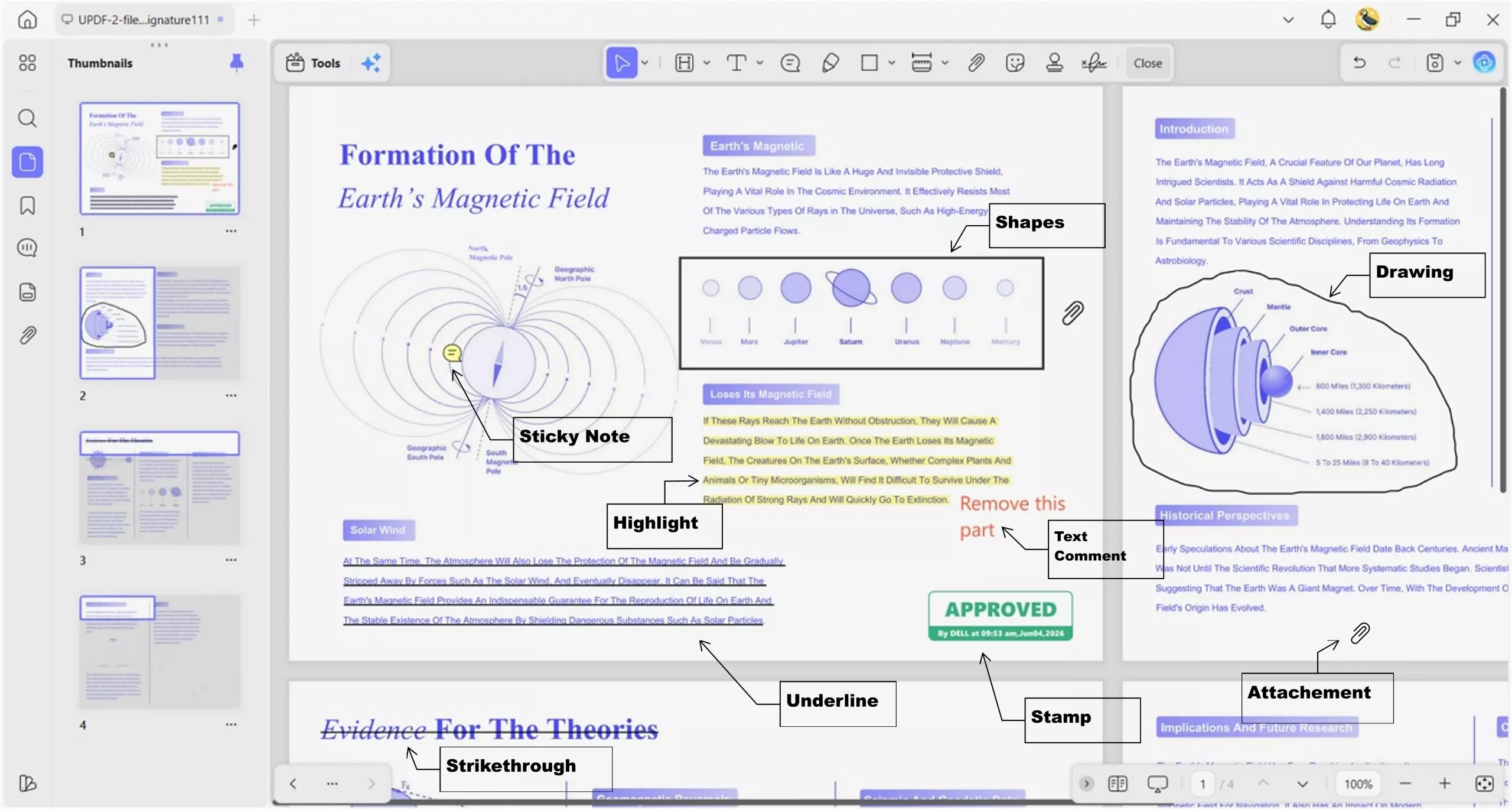
UPDF provides page navigation, light and dark viewing modes, slideshow viewing, bookmarks, highlights, underlines, strikeouts, drawing tools, notes, stamps, and stickers. Readers comparing annotation products can use the separate guide to the best PDF highlighters for a broader selection view.
PDF Editing and Page Work
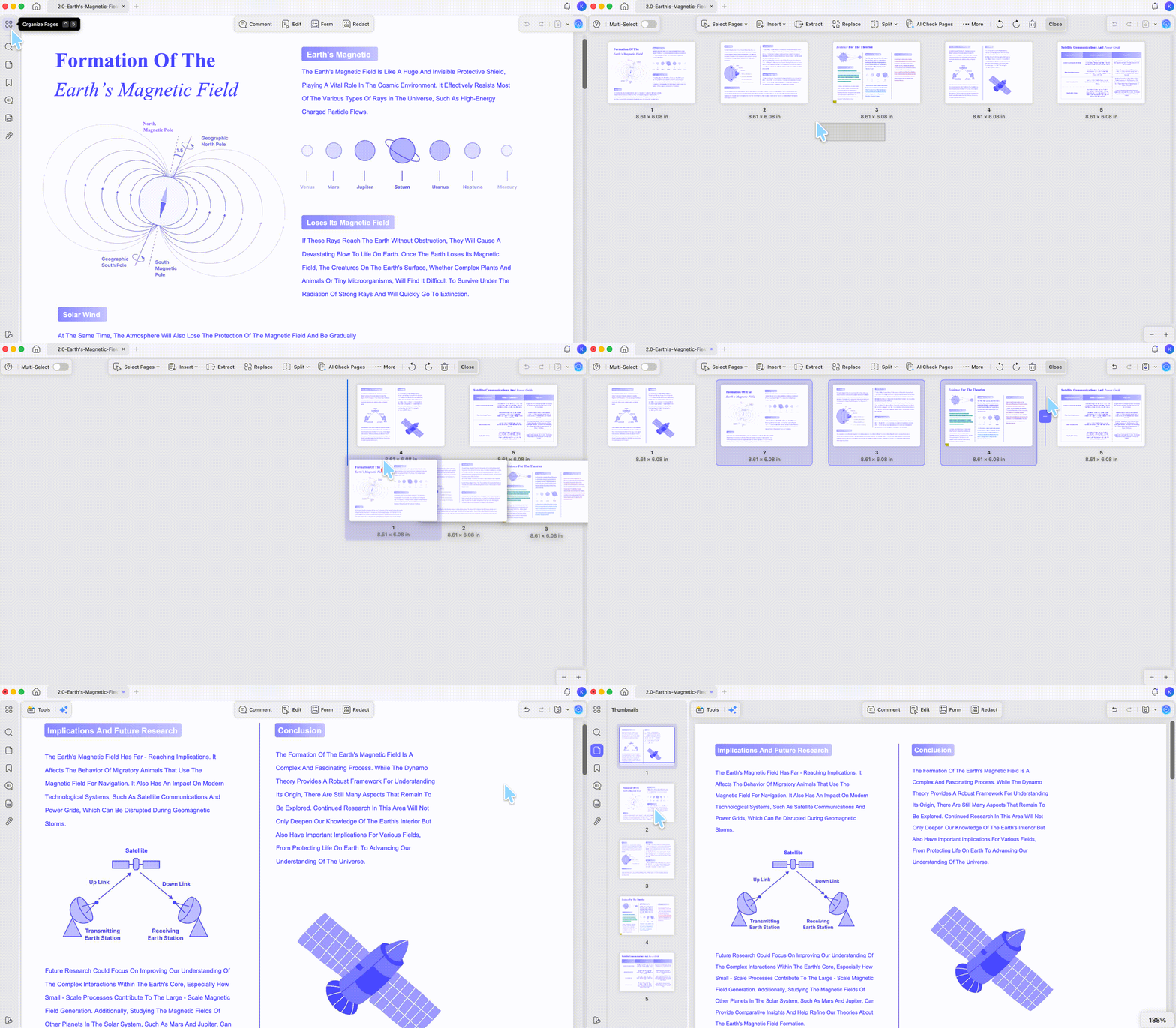
UPDF can edit existing PDF text, images, and links. UPDF can also add, remove, rotate, crop, extract, split, replace, and reorder pages. These operations matter when the source is a contract, application form, class handout, invoice, or report rather than a web article.
If the specific problem is changing existing words rather than collecting research, the edit words in a PDF guide covers that execution workflow without turning this comparison into a tutorial.
OCR and Conversion
UPDF OCR supports 38+ languages and can produce editable, text-and-picture, or searchable-only output. OCR is available on Windows and on supported Apple-silicon Mac builds downloaded from the official UPDF website; platform availability should not be inferred from the general cross-platform license.
UPDF can convert PDFs to formats including Word, Excel, PowerPoint, images, text, HTML, and XML. For image-only scans, the make a PDF editable guide explains when OCR must create a text layer before search or editing can work.
UPDF AI
UPDF AI can summarize, explain, translate, and answer questions about PDFs and images. UPDF AI can also produce mind maps and work with multiple PDFs in online collections. Full-document and page translation currently supports 26+ listed languages, while manual chat translation has wider language flexibility.
If your source is already a PDF, UPDF can move from reading to editing without rebuilding the workflow in a second document utility.
Download UPDF for free to try reading, annotating, and editing a PDF on your device — installation is free, and Pro removes the trial watermark from exported files.
Windows • macOS • iOS • Android 100% secure
Part 5. Cubox vs UPDF: Feature and Platform Comparison
Core Workflow Comparison
| Capability | Cubox | UPDF | Main limitation to remember |
|---|---|---|---|
| Save and parse web articles | ✔ | ✘ No dedicated read-it-later library | Cubox parsing quality still depends on the source page. |
| Browser clipping and web highlights | ✔ | ✘ | UPDF focuses on documents rather than live webpages. |
| Nested reading folders, tags, and smart lists | ✔ | Limited document folders and cloud organization | UPDF is not a personal web knowledge base. |
| Read and annotate existing PDFs | Not the current core workflow | ✔ | Cubox ended temporary file-preview support in April 2026. |
| Edit PDF text, images, and links | ✘ | ✔ | Some exported UPDF files carry a trial watermark on the free tier. |
| OCR scanned PDFs | ✘ No document OCR workflow | ✔ 38+ languages | Mac OCR requires an Apple chip and the official website build. |
| Convert PDFs to Office, image, and text formats | ✘ | ✔ | Conversion quality still depends on the source layout and text layer. |
| PDF forms, redaction, passwords, and page tools | ✘ | ✔ | Advanced PDF work is outside Cubox's scope. |
| AI for saved articles | ✔ | Not a web-library workflow | Cubox AI usage is metered and plan-dependent. |
| AI for PDFs and images | ✘ Not a full PDF workflow | ✔ | UPDF AI uploads the selected document for cloud analysis. |
| Export reading notes | TXT, Markdown, HTML, PDF | PDF comments and document outputs | Cubox database migration may not preserve every library field. |
Desktop Access
| Desktop access | Cubox | UPDF |
|---|---|---|
| Windows | Web app, PWA, and browser-extension workflow documented | Native Windows app |
| Mac | Mac collection tools plus web/PWA/browser access | Native Mac app |
| Browser | Full web app and extensions | UPDF AI and selected online tools |
| Offline emphasis | Saved reading and snapshots, subject to content availability | Core PDF reading and editing can be performed locally |
Cubox's Premium FAQ broadly lists Windows as supported, but its installation guide specifically directs desktop users to the web app, PWA, and browser extensions. Describing Cubox simply as a native Windows application would hide that distinction.
Mobile Access
| Mobile capability | Cubox | UPDF |
|---|---|---|
| iPhone and iPad app | ✔ | ✔ |
| Android app | ✔ | ✔ |
| System share-sheet collection | ✔ | ✘ Opens or imports documents rather than building a web-reading inbox |
| Web article library | ✔ | ✘ No dedicated equivalent |
| PDF editing and page organization | ✘ Not the core mobile workflow | ✔ |
| Mobile PDF OCR | ✘ No document OCR workflow | ✔ |
When the job is an actual PDF, the native PDF workflow removes the need to force a read-it-later service into a document-editor role.
Download UPDF for free to test PDF annotation, OCR, or editing with one of your own files — installation is free, and Pro removes the trial watermark from exported files.
Windows • macOS • iOS • Android 100% secure
Part 6. Cubox and UPDF Pricing in 2026
Prices were checked against official pages in July 2026. Regional taxes, app-store billing, and later price changes can alter the checkout total.
| Plan | Current listed price | What the price is for |
|---|---|---|
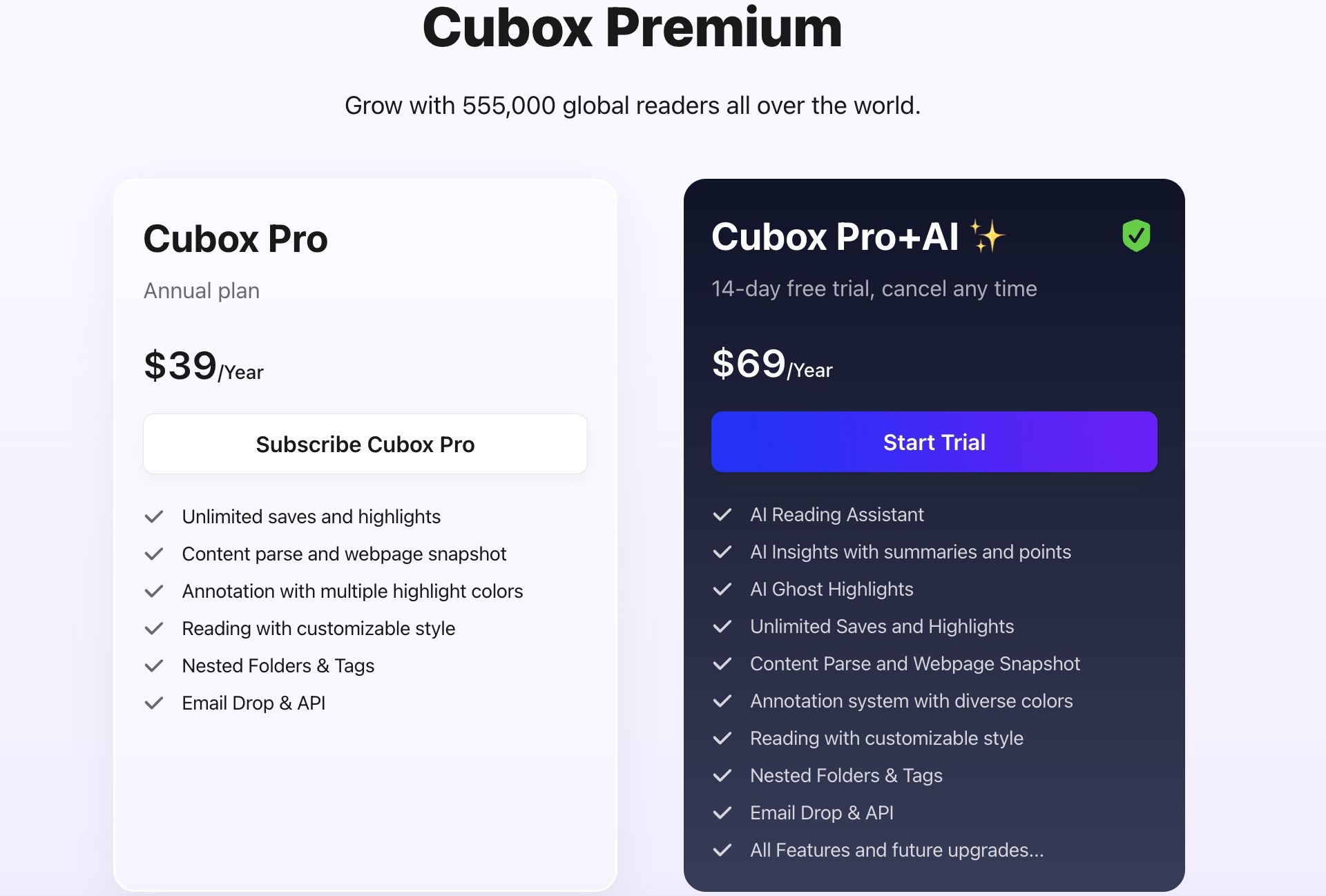
| Cubox Pro | US$39/year | Unlimited saves and highlights plus Cubox's non-AI Premium features; the Premium FAQ also mentions limited AI trials. |
| Cubox Pro+AI | US$69/year | Pro features plus automatic AI Insight and Ask AI. |
| UPDF Pro Annual | US$49.99/year | Core PDF tools across the licensed desktop and mobile devices. |
| UPDF Pro Lifetime | US$79.99 one time | Lifetime access to the core PDF tools; AI is a separate service. |
| UPDF AI Assistant | US$79/year | Unlimited paid AI usage under the current listed AI plan. |
Cubox's 14-day Pro+AI trial is not a no-card trial. The Cubox Premium FAQ says a payment method must be linked and the subscription automatically charges after the trial unless it is canceled in time.
Cubox says one paid membership works across its supported platforms without a logged-in device limit. UPDF uses a different license shape: one individual account covers up to four devices—two desktops and two mobile devices—and UPDF AI can also be accessed online.
Pricing alone should not decide this comparison. Paying less for Cubox does not add PDF editing, and paying for UPDF does not create a browser-based read-it-later library.
Part 7. Data and Privacy Boundaries
Both products include optional cloud-dependent features, but the data flows are different.
Cubox stores saved content, parsed articles, snapshots, annotations, and account data as part of its synchronized reading service. Its privacy policy states that the browser extension may transmit visited URLs to restore saved and annotation status, with SHA-256 processing and controls for the relevant extension features. The same policy says registration, membership, and account-activity information may be shared with an email marketing provider and Google Analytics for the stated purposes. It also describes a three-month security-retention window after account deletion, subject to listed exceptions.
UPDF can perform core local document operations on files stored on the device. UPDF Cloud, link sharing, third-party cloud connections, and UPDF AI introduce separate upload or synchronization flows. The UPDF privacy policy specifically says files used with UPDF AI are uploaded to UPDF Cloud for analysis.
For a confidential contract or medical form, the meaningful question is not "Which brand is private?" The meaningful question is "Am I using the local workflow or a cloud/AI workflow?" Review that boundary before enabling AI, cloud sync, public links, or browser-history features.
Part 8. Edge Cases That Change the Decision
"I refreshed a badly parsed article, and my old highlights disappeared."
Cubox's reader guide warns that choosing a new article parse clears the original annotations. If a source page was captured badly, export or back up important highlights before refreshing the parse. This is a mechanism-based edge case derived from Cubox's current official warning.
"I exported my Cubox library, but the saved order did not survive."
A long-term user reported that a full bookmark-style export preserved folders and tags but omitted the saved date, so importing into another service did not reproduce the original order. Treat this as a user-reported migration risk rather than a universal promise about every export format. Review a sample export before committing a large library. Read the user report.
"The article saved, but the X/Twitter content still did not read correctly."
A U.S. App Store reviewer reported poor X/Twitter compatibility, and the Cubox developer replied that the team was working on handling that content better. The report dates from 2024, so it should not be generalized to every current page, but it illustrates a lasting constraint of read-it-later services: parsing depends on the source site's behavior. See the App Store review and developer response.
Part 9. FAQs
1. Can Cubox import bookmarks from another service?
Yes, through HTML import. Cubox's import guide lists Safari, Chrome, Edge, Firefox, Pinboard, Pocket, and Instapaper among the supported sources. Special bookmark formats can still fail, so keep the original export until the imported library is checked.
2. Does Cubox delete my data when Premium expires?
Not when membership alone expires. Cubox says the account returns to the basic version and existing content remains, although saving and Premium features may be restricted when the basic quota is exceeded. Cubox separately warns that inactive non-member accounts can be notified after more than a year and later deleted.
3. Can Cubox review highlights on Apple Watch?
Yes, through Watch Review. Cubox can show a full highlight on Apple Watch, provide a shortcut that opens the related article on the paired iPhone, and add review reminders to supported watch faces. See the official Apple Watch Review guide.
Conclusion
Cubox is the stronger choice when the source is a webpage and the goal is to save, parse, annotate, organize, and rediscover reading. UPDF is the stronger choice when the source is a PDF and the goal extends beyond reading into OCR, editing, conversion, forms, signatures, protection, or page management.
Choose the workflow before choosing the product. A web reading library and a PDF workspace can overlap, but one should not be presented as a complete replacement for the other.
Download UPDF for free to try reading, annotating, OCR, or editing on your file — installation is free, and Pro removes the trial watermark from exported files.
Windows • macOS • iOS • Android 100% secure


 Enid Brown
 Engelbert White
 Enola Miller
 Enrica Taylor