 UPDF
UPDF
 UPDF for Windows
 UPDF for Mac
 UPDF for iPhone/iPad
 UPDF for Android
 Nomostar
 UPDF AI Online
 UPDF Sign
 IvyCraft
 Edit PDF
 Annotate PDF
 Create PDF
 PDF Form
 Edit links
 Convert PDF
 OCR
OCR PDF to Word
 PDF to Image
 PDF to Excel
 Organize PDF
 Merge PDF
 Split PDF
 Crop PDF
 Rotate PDF
 Protect PDF
 Sign PDF
 Redact PDF
 Sanitize PDF
 Remove Security
 Read PDF
 UPDF Cloud
 Compress PDF
 Print PDF
 Batch Process
 About UPDF AI
 UPDF AI Solutions
 AI User Guide
 FAQ about UPDF AI
 Summarize PDF
 Translate PDF
 Chat with PDF
 Chat with AI
 Chat with image
 PDF to Mind Map
 Explain PDF
 PDF AI Tools
 Image AI Tools
 AI Chat Tools
 AI Writing Tools
 AI Study Tools
 AI Working Tools
 Other AI Tools
 AI Bookmark Generation
 AI Bookmark Summary
 AI Watermark Generation
 AI Background Generation
 AI Sticker Generation
 AI Stamp Generation
 AI Editing Suite
 UPDF Copilot
 AI Page Management
 AI Semantic Search
 PDF to Word
 PDF to Excel
 PDF to PowerPoint
 Enterprise Solution
 Enterprise Sign
 Enterprise AI
 Enterprise Plan
 Enterprise User Guide
 Enterprise Webinar
 Banking
 Healthcare
 Insurance
 Legal
Legal Manufacturing
 Government
 Education Solution
 Customer Stories
 User Guide
 UPDF Tricks
 FAQs
FAQs UPDF Reviews
 Download Center
 Blog
Blog Newsroom
 Tech Spec
 Updates
 UPDF vs. Adobe Acrobat
 UPDF vs. Foxit
 UPDF vs. PDF Expert

You landed here because a document needs its white margins trimmed or an oversized scan needs reframing. Or do you want a quick comparison of the best free PDF cropper 2026 options before committing to a subscription? All three goals are answered below. But before you upload anything, there is one technical reality many skip, and it will matter for half the use cases on this page.
⚠️Why do 90% of free web utilities create a massive data privacy liability?
The best online PDF crop tool 2026 depends on what kind of crop you actually need, such as managing a book layout, cleaning up a scanned archive, removing the scanner shadow from a one-page contract, etc. This guide covers every tier of the market.
Misrouted here? If you arrived looking to change document file extensions using legacy conversion services like DocuPub or Neevia rather than re-adjusting page margins, skip directly to our comprehensive breakdown of the Best Free PDF Converters in 2026.
2026 PDF Cropper Pricing & Feature Matrix
Before we get deep into the specs, let's do a quick PDF cropping tools pricing comparison and understand what are the top PDF cropping apps and how do their pricing models compare.
| Tool | Pricing | Precision Level | Batch Support | Best For | Data Security |
| UPDF | $49.99/yr or $79.99 Lifetime | Professional page-level controls | All pages, page ranges, odd/even pages | Large documents, scanned books, secure workflows | Local processing |
| Adobe Acrobat Pro | $19.99/mo | Commercial print-grade page-box controls | Full document support | Publishing and print production | Local processing |
| iLovePDF Cropper | Free / $7/mo Premium | Basic-to-intermediate visual cropping | Current page or all pages | Quick online edits | Cloud processing (SSL, deletion policy) |
| Adobe Acrobat Online | Free tier / Pro upgrade | Basic browser-based cropping | Page-range support | Adobe ecosystem users | Adobe Cloud processing |
| iPhone Files App | Free | Basic manual cropping | No batch support | Occasional mobile edits | On-device processing |
Bonus Tip: For full document workflow control, involving bulk rearranging, rotating, and splitting, the structural foundation is covered in our PDF Organizer guide.
Tier 1 – Industrial Throughput: Best Desktop PDF Cropping Software
When discussing the best professional PDF cropping software 2026, we will first focus on desktop-based tools for their enhanced security.
#1 UPDF — Advanced Geometric Control & Secure Hard-Cropping
Best for:
When exploring a PDF cropping tool with best reviews, the native client engine stands apart from browser-based alternatives because it provides deeper control of the document structure.
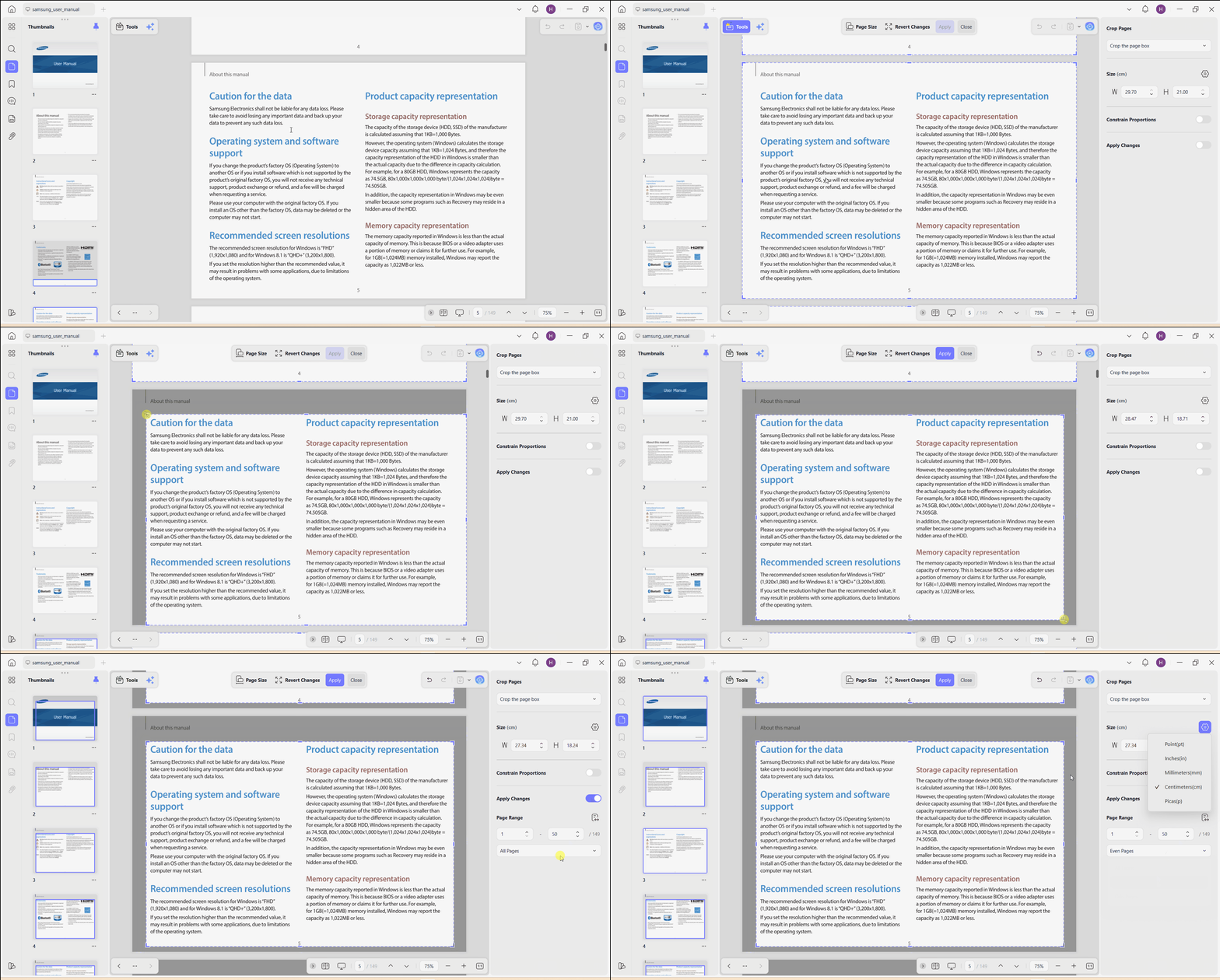
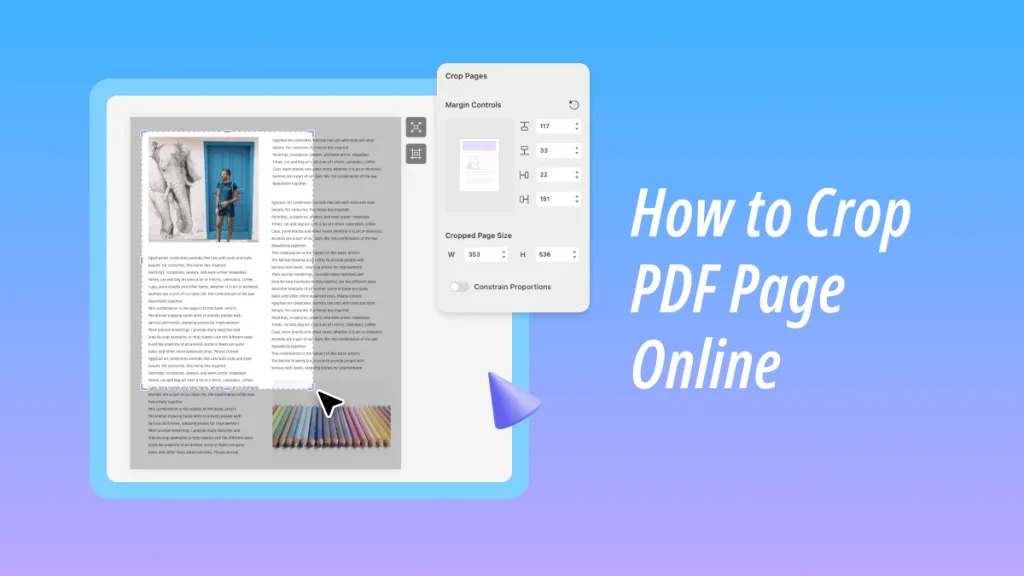
UPDF executes irreversible "Hard-Cropping" directly on the code layer to protect redacted text. Users can drag the mouse to select the crop area or input precise mathematical parameters in a dedicated layout panel and apply them across large page ranges. They can select points, picas, millimeters, centimeters, or inches exactly as a print designer would specify measurements. This closes the gap between professional prepress work and consumer PDF editing.
The core technical elements of UPDF include:
- Mouse Dragger: Intuitive mouse dragger to select the crop area and apply the effect to all or selected pages.
- Precision Units Metric Selector: Enter values in pts, picas, mm, cm, or inches rather than approximate cursor positioning.
- Constrain Proportions Toggle: Locks all four margins to equal values and prevents accidental geometric distortion when resizing.
- Crop the Page Box: Adjusts the formal PDF page boundary, not just the visual display layer.
- Remove White Margins: Automatically detects and trims scanner white-space around content without manual measurement.
- Apply to All Pages / Odd / Even Page Targeting: Immediately balances asymmetric book-binding margins across all pages that would require page-by-page manual work in online tools.
Windows • macOS • iOS • Android 100% secure
Beyond operating as a top PDF crop software, UPDF also serves as a complete PDF workspace with editing, annotation, OCR, conversion, and page organization tools integrated into a single application. Reddit user appreciated that with words: "I would like to say a million thanks to the developers of UPDF. It has all the features I need and more for a fraction of what it PDF Expert and Adobe charge."
Need to Crop a PDF Page? Here's How! (Free & Simple)]
Watch this quick 10-second workspace demonstration to see how UPDF desktop engine synchronizes geometric canvas crops across a hundreds-of-pages-long archive simultaneously:
#2 Adobe Acrobat Pro — The Heavyweight Production Benchmark
Best for:
Adobe Acrobat Pro is among the best professional PDF cropping software 2026 for designers and prepress professionals who need control over the full suite of PDF page boxes that govern commercial print output.
Acrobat Pro exposes four distinct crop boundary types that no other tool in this comparison covers in full:
- CropBox (the visible screen area)
- TrimBox (the final page size after physical cutting)
- BleedBox (the area extending 3–5mm beyond the TrimBox to accommodate ink spread during printing)
- ArtBox (the safety zone for useful content)
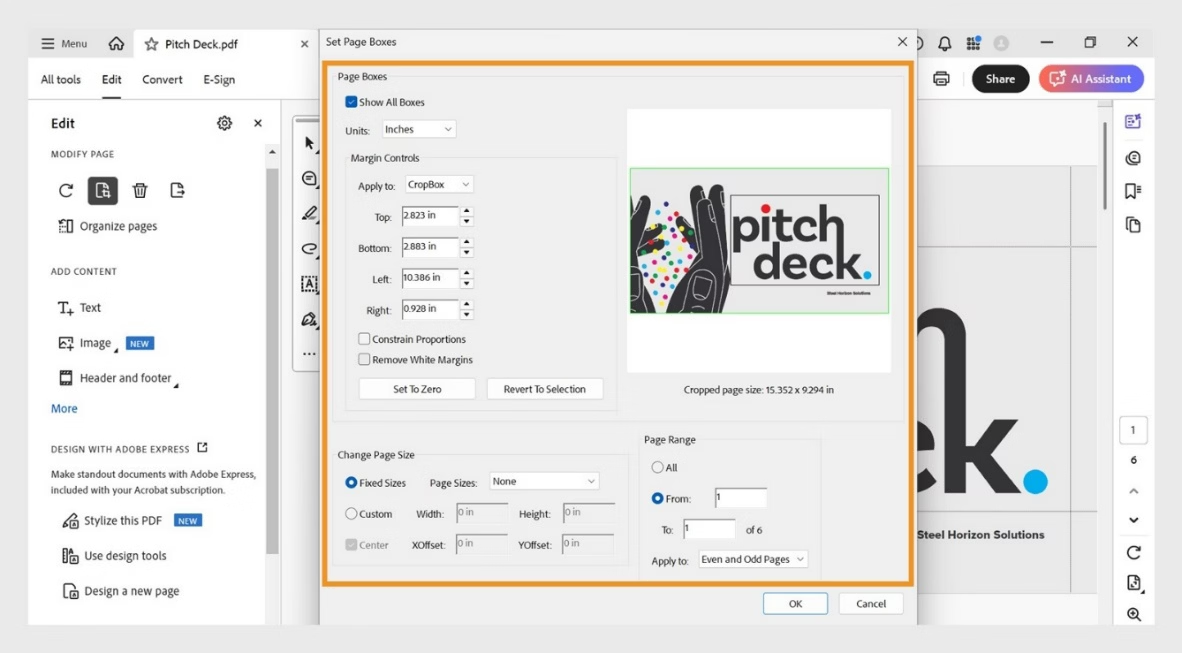
Setting these boxes is crucial for a book/magazine or commercial poster meant for a printing press. However, there are two main concerns with using Adobe Acrobat Pro.
First, its high local RAM usage can degrade performance when working with large PDFs on older hardware. Second, its $19.99/month billed annually ($239.88/year) subscription pricing may be difficult to justify for users who only need occasional margin adjustments or basic PDF cropping.
If you encounter misaligned documents that break your batch margins, use a dedicated PDF Manager step to standardize your workspace files first.
Tier 2 – Instant Browser-Based Access: Best Online PDF Cropper Utilities
There are now many browser-based PDF croppers that offer zero-installation, zero-cost access for single non-confidential documents. The following are the top two picks:
#3 iLovePDF Cropper
Best for:
Among the best-rated PDF crop service online tools, iLovePDF Cropper is an ideal option for zero-cost and single-use for non-confidential margin changes. It does not require an account for basic use and offers an intuitive drag-and-drop interface with fast cloud processing for most standard file sizes.
All you have to do is upload, drag the crop bounding box to the desired area, select the batch margin matching if you want, and download. Its interface is praised for simplicity, and it handles most standard PDF sizes without issue.
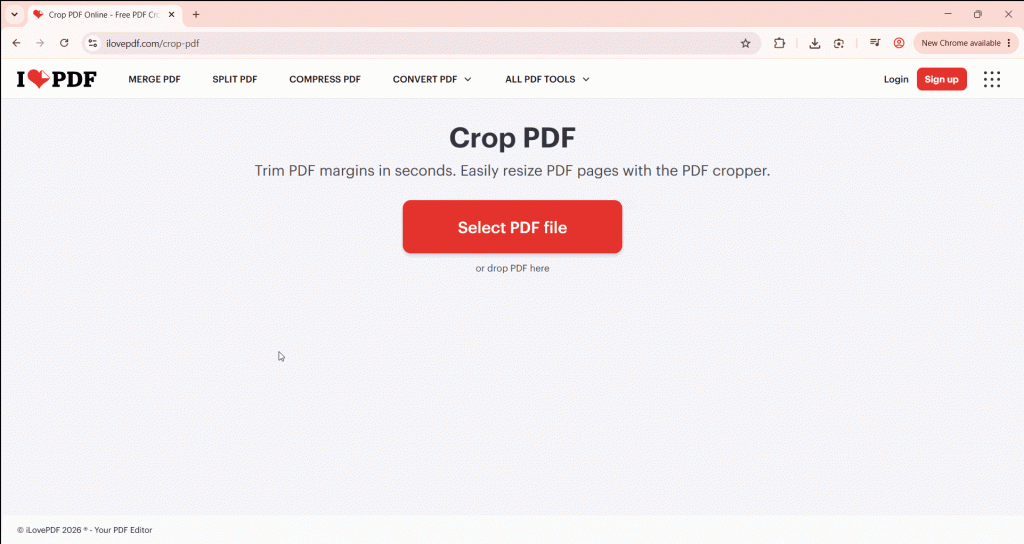
Many users consider iLovePDF Cropper the best answer for what are the latest web based tools for crop PDF with pricing information. However, it also comes with a few limits. It can only apply the crop effect to a single page or all pages. There isn't the option to select a specific page range. It also lacks the advanced page-box controls found in professional desktop software.
Secondly, iLovePDF uploads files to its cloud (SSL) and claims 24-hour deletion. However, sending confidential documents to remote servers carries risk. Besides that, its free plan is ad-supported with size and daily caps.
For users who just want to fix document spacing for a clean presentation, read our focused PDF Margin Editor walkthrough instead.
#4 Adobe Acrobat Online Cropper
Best for:
Adobe Acrobat Online Cropper is another contender for the best rated PDF crop service title. It brings the credibility of Adobe's processing standards to the browser interface. The interface is familiar to anyone who has used Adobe products before, and the processing quality is reliable. You can drag the border handles to resize pages and apply the effect to all or selective page range.
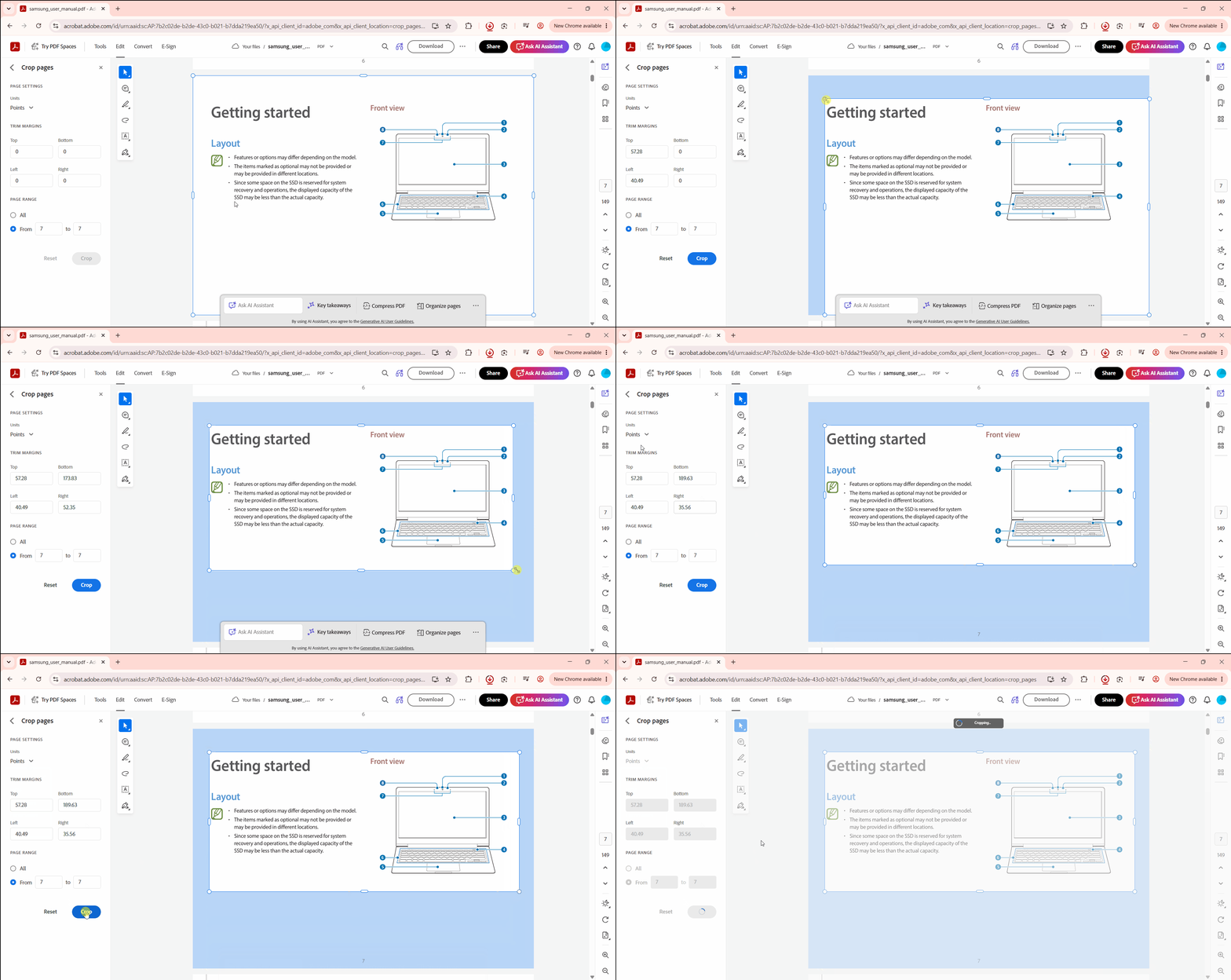
This best PDF crop software requires users to log in with an Adobe account to download completed files. Beyond login, the free tier applies tight feature restrictions that surface fast in real use. The tool also keeps directing users toward an Acrobat Pro subscription at $19.99/month.
Tier 3 – On-The-Go Adaptability: Best Mobile PDF Cropping Methods
Mobile PDF cropping has improved over the years, but the gap between on-device convenience and professional precision remains real. The two options below cover the most common mobile scenarios.
#5 iPhone Built-in Files App Workflow
Best for:
iPhone's Files app is a free mobile option for users looking to crop files on iOS without downloading third-party applications. However, the workflow is a bit tedious.
You have to open a document in Files, go to the page you want to crop, tap the Crop icon, and drag the border to resize the page. It does not support bulk page updates, so you have to do it repeatedly for all the pages you want to crop. That's why the Files PDF cropping experience is only handy if you need a simple 1-2 page cropping because specialized apps are a better alternative here.
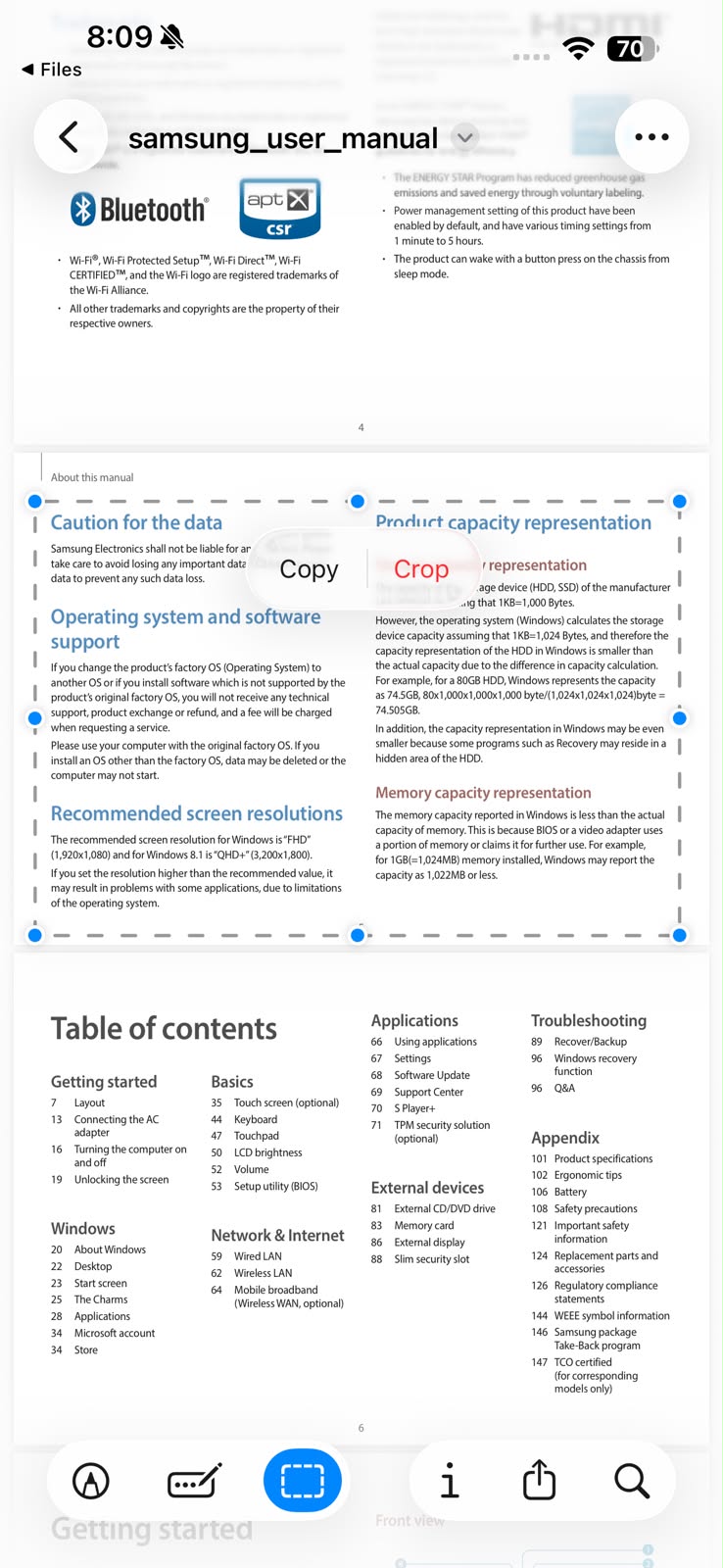
#6 UPDF for iOS
Best for:
When users need to process PDFs on iPhone regularly and need more than the Files app workaround, UPDF for iOS provides a native mobile cropping interface that offers a desktop-like experience.
UPDF for iOS offers adjustable crop handles with a page range selector. You can set the page margin with the help of the dragger and then apply it to all or selective pages with one click. Secondly, it performs hard-crop execution, not a visual CropBox overlay.
Windows • macOS • iOS • Android 100% secure
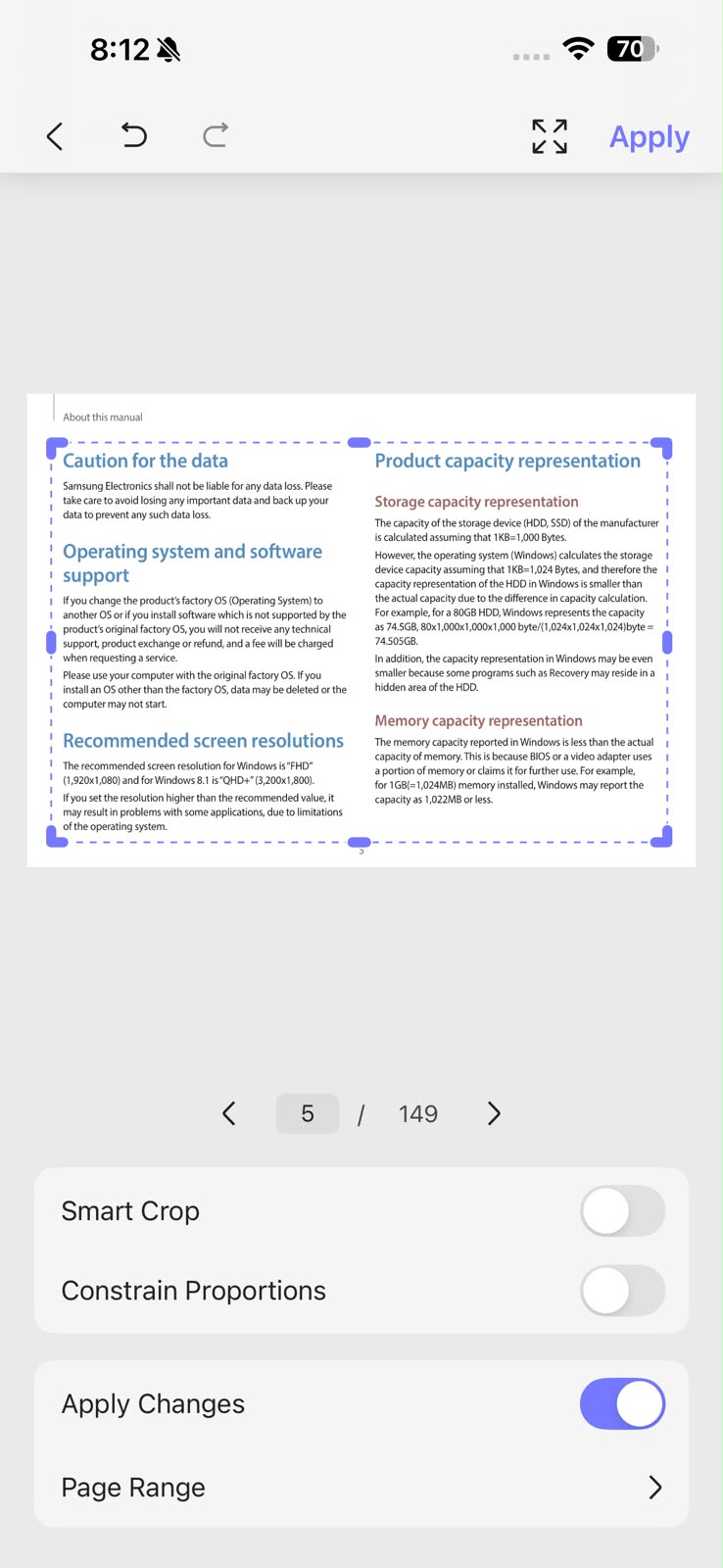
Check this full guide on how to crop PDF on iPhone using UPDF for iOS.
FAQs
Can data cropped out of a PDF with free online tools be recovered?
Yes, most online tools only mask the visual viewbox without erasing original data. The background information remains in the file properties, which is recoverable. Secure documents require desktop software to permanently remove and delete cropped code pixels.
Is there a way to crop all pages in a PDF simultaneously for free?
Yes, specialized PDF organizers provide batch commands to unify your canvas size. Basic browser utilities cannot run these automated scripts across multiple pages due to web processing limits.
How can I change the measurement units used by a PDF cropper?
Open your cropper's advanced layout panel to toggle between inches, centimeters, millimeters, points, or picas. If your current software lacks this option, you are just using a basic annotation overlay.
Stop Masking Data. Start Deleting It.
Free online tools only hide content. Choose the best free PDF cropper 2026 that matches your workload.
| For Individuals & Professionals | For IT Administrators & Compliance Teams |
| * Permanently destroy hidden margin data at the code layer * Input point-perfect values in mm, cm, pts, or picas for prepress-grade precision * Batch-crop hundreds of pages in one pass with Odd/Even page targeting Download UPDF for Secure Desktop Cropping → | * Block employees from uploading sensitive files to unvetted cloud crop servers * Enforce a single audited, on-premise processing standard across every seat * Meet data residency and document security requirements without policy exceptions Deploy Corporate Admin Console Assets → |




 Enola Miller
 Lizzy Lozano
 Delia Meyer
 Enola Davis