UPDF
UPDF
 UPDF for Windows
 UPDF for Mac
 UPDF for iPhone/iPad
 UPDF for Android
 Nomostar
 UPDF AI Online
 UPDF Sign
 IvyCraft
 Edit PDF
 Annotate PDF
 Create PDF
 PDF Form
 Edit links
 Convert PDF
 OCR
OCR PDF to Word
 PDF to Image
 PDF to Excel
 Organize PDF
 Merge PDF
 Split PDF
 Crop PDF
 Rotate PDF
 Protect PDF
 Sign PDF
 Redact PDF
 Sanitize PDF
 Remove Security
 Read PDF
 UPDF Cloud
 Compress PDF
 Print PDF
 Batch Process
 About UPDF AI
 UPDF AI Solutions
 AI User Guide
 FAQ about UPDF AI
 Summarize PDF
 Translate PDF
 Chat with PDF
 Chat with AI
 Chat with image
 PDF to Mind Map
 Explain PDF
 PDF AI Tools
 Image AI Tools
 AI Chat Tools
 AI Writing Tools
 AI Study Tools
 AI Working Tools
 Other AI Tools
 AI Bookmark Generation
 AI Bookmark Summary
 AI Watermark Generation
 AI Background Generation
 AI Sticker Generation
 AI Stamp Generation
 AI Editing Suite
 UPDF Copilot
 AI Page Management
 AI Semantic Search
 PDF to Word
 PDF to Excel
 PDF to PowerPoint
 Enterprise Solution
 Enterprise Sign
 Enterprise AI
 Enterprise Plan
 Enterprise User Guide
 Enterprise Webinar
 IT
IT Education
 Construction
 Financial Service
 Healthcare
 Insurance
 Legal
Legal Manufacturing
 Government
 Researchers & PhDs
 Solopreneurs & Freelancers
 Lawyers & Legal Professionals
 Real Estate Agents & Brokers
 Education Solution
 Customer Stories
 User Guide
 UPDF Tricks
 FAQs
FAQs UPDF Reviews
 Download Center
 Blog
Blog Newsroom
 Tech Spec
 Updates
 UPDF vs. Adobe Acrobat
 UPDF vs. Foxit
 UPDF vs. PDF Expert

Quick answer: If your manga is saved as PDF, UPDF is a practical reader for Windows, Mac, iOS, and Android. It provides zoom, thumbnails, single- and two-page layouts, annotations, cloud file access, OCR, and AI-assisted translation. Choose a dedicated comic reader instead if your library is mainly CBZ/CBR or you require right-to-left page progression and comic-library management.
A good manga PDF reader should make detailed artwork easy to inspect without complicating navigation. This guide explains which features matter, how UPDF handles manga PDFs on desktop and mobile, how to translate image-based speech bubbles, and when a dedicated comic reader is the better choice.
This guide is for manga PDFs you own or are authorized to use. It does not recommend downloading copyrighted manga from unauthorized sources.
If your manga is already in PDF format, download UPDF below and test it with one volume before moving your full collection.
Windows • macOS • iOS • Android 100% secure
Part 1. What to Look for in a Manga PDF Reader
Before choosing an app, check whether it can handle the way you actually read and store manga:
- File format: Confirm whether your collection is PDF, CBZ, or CBR. UPDF is designed for PDF files; dedicated comic readers are generally better for CBZ/CBR libraries.
- Large scanned pages: Detailed artwork needs responsive zoom, thumbnails, and stable navigation, particularly on phones and tablets.
- Page presentation: Single-page view is useful for close inspection, while a two-page layout better recreates a spread on a larger screen.
- Reading direction: If automatic right-to-left page progression is essential, confirm that the app provides a dedicated manga mode before installing it.
- Scanned or untranslated text: OCR and screenshot-based translation can help with image-only speech bubbles, although recognition quality depends on the scan and lettering.
- Notes and device access: Annotations and cloud file access are useful for language study, reviews, and switching between desktop and mobile.
Part 2. Read Manga PDFs with UPDF
UPDF is a strong fit for readers whose manga is stored as PDF. It runs on Windows, Mac, iOS, and Android and combines free PDF reading with annotations, OCR, AI tools, and cloud file access. Reading a PDF is free; OCR, AI, and advanced editing are available according to the applicable plan. Check the current UPDF pricing only if you need those additional tools. For the basic controls, see how to read a PDF in UPDF.
Windows • macOS • iOS • Android 100% secure
Key UPDF Features for Manga PDFs
1. OCR and AI-Assisted Translation
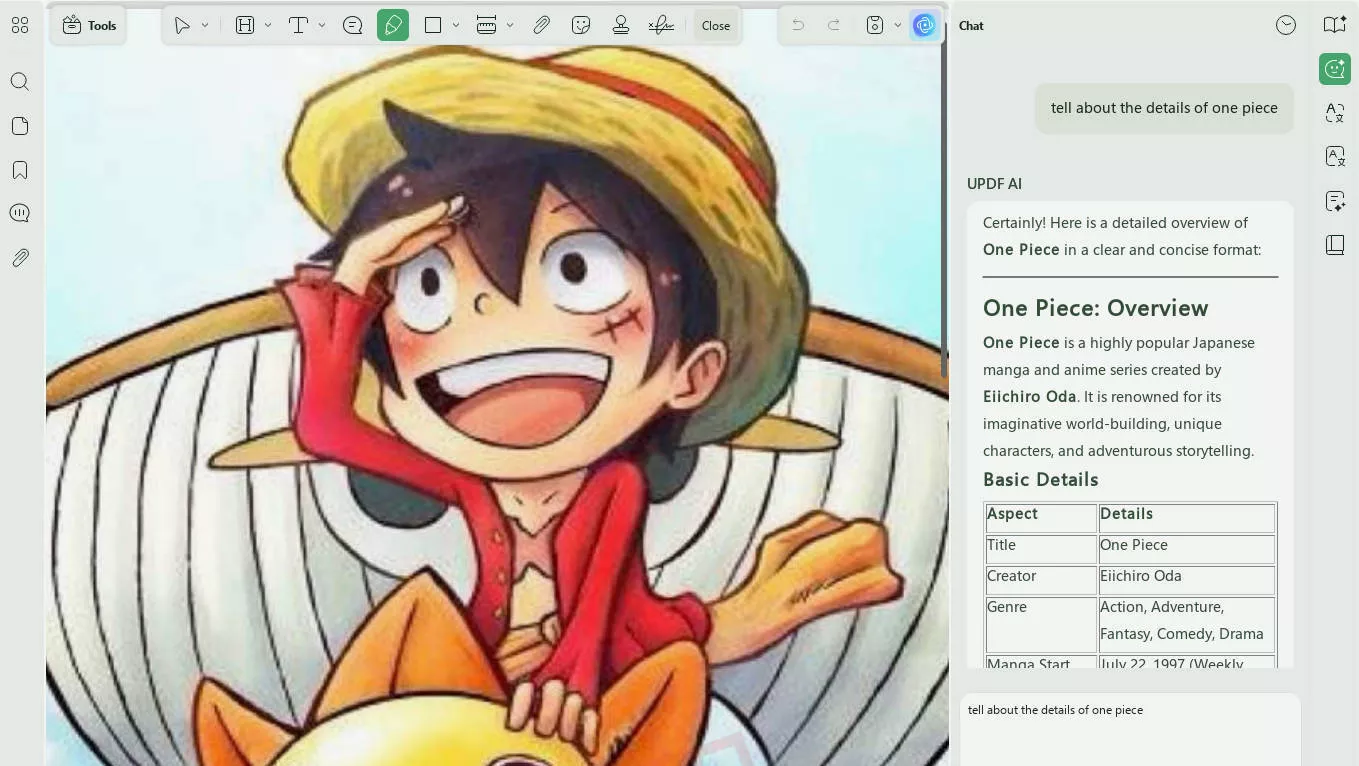
UPDF AI can help translate selectable text, while screenshot-based prompts are useful for text embedded in artwork. For image-only pages, OCR may first be needed to create selectable text.
- Translation: Translate selectable text or capture a panel area and ask UPDF AI to translate the text shown in the image.
- Summaries: Ask UPDF AI to summarize recognized text from a chapter or volume; results depend on the quality and completeness of the source text.
2. Flexible PDF Page Views
UPDF provides practical controls for viewing illustrated PDF pages:
- Single- and Two-Page Views: Switch between one page for close reading and two pages for spread-style viewing. Learn more about viewing a PDF side by side.
- Display Options: Adjust the page layout, zoom level, and viewing background to suit the document and your screen.
- Reading Direction Limit: UPDF can show single pages or two-page spreads, but it is not a dedicated manga library app and does not provide automatic right-to-left comic progression. Choose a specialized comic reader if RTL navigation is essential.
- Navigation: Move through pages, use thumbnails, and zoom in on artwork; performance still depends on file size, image complexity, device memory, and storage speed.
3. Advanced OCR for "Raw" Collectors
Many manga PDFs are essentially high-res images. UPDF's AI-powered OCR (Optical Character Recognition) converts these images into searchable and selectable text. This allows you to:
- Search for specific quotes.
- Highlight and take notes on key plot points.
- Translate text directly from the art.
4. Seamless Manga Cloud Sync
Upload manga PDFs to UPDF Cloud to access the same files from supported desktop and mobile devices. Save changes before switching devices so that your latest annotations and document edits are available.
5. Optional Creative Tools for Manga Projects
For readers who also create manga-inspired journals, covers, or social posts, two optional AI Agents can generate matching visual assets from a written prompt:
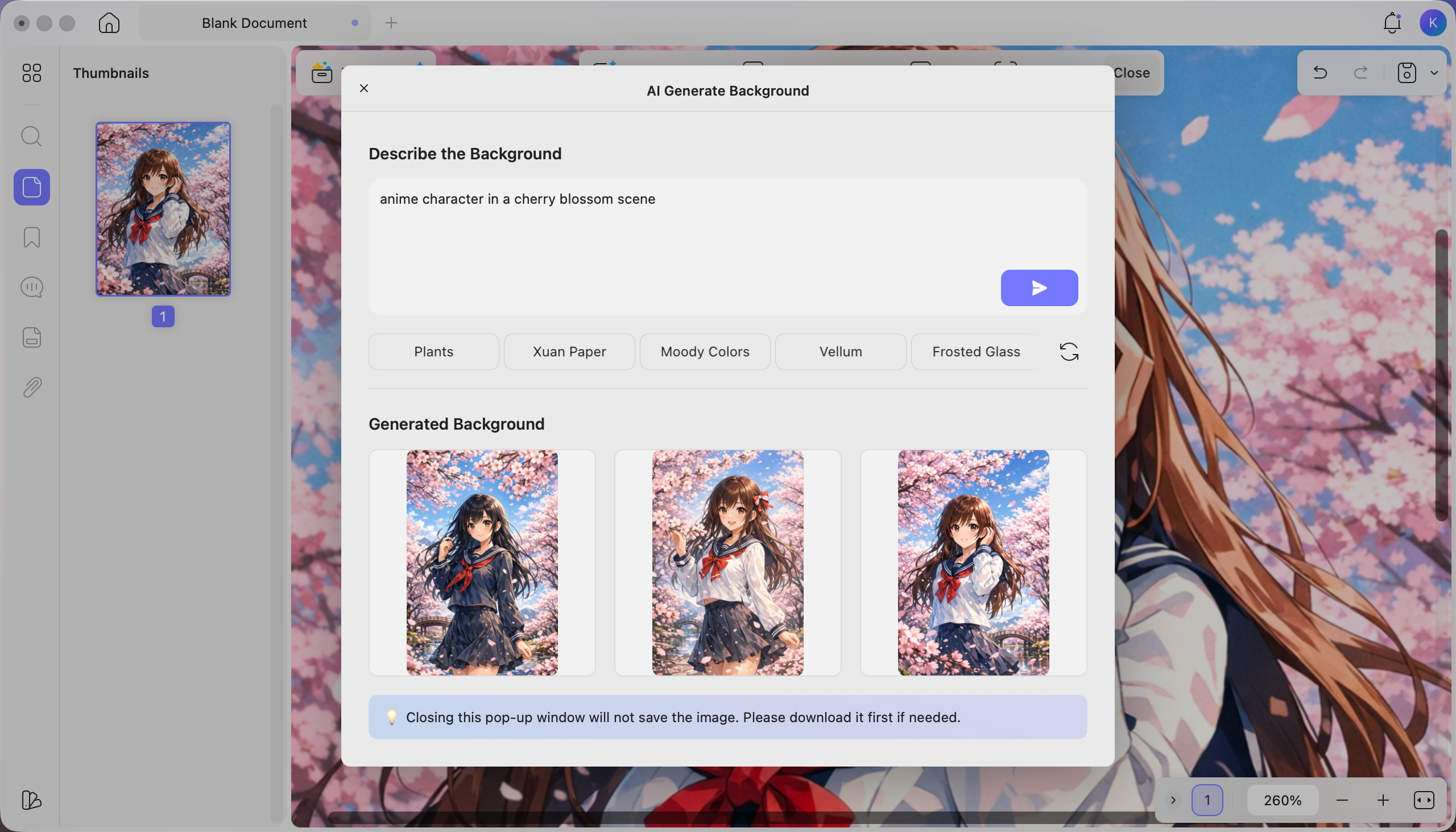
- AI Background Agent: Enter a custom prompt to generate manga-style backgrounds that match the setting, mood, or visual style you describe.
- AI Sticker Agent: Describe the manga-related sticker you want, such as an expression, symbol, speech effect, or decorative element, and generate options from your instructions.
You can download UPDF and read manga PDFs for free. If you later need OCR, AI translation, or advanced editing, review the relevant plan before using those additional tools.
Bonus Tips: How can We Translate Japanese Manga to English?
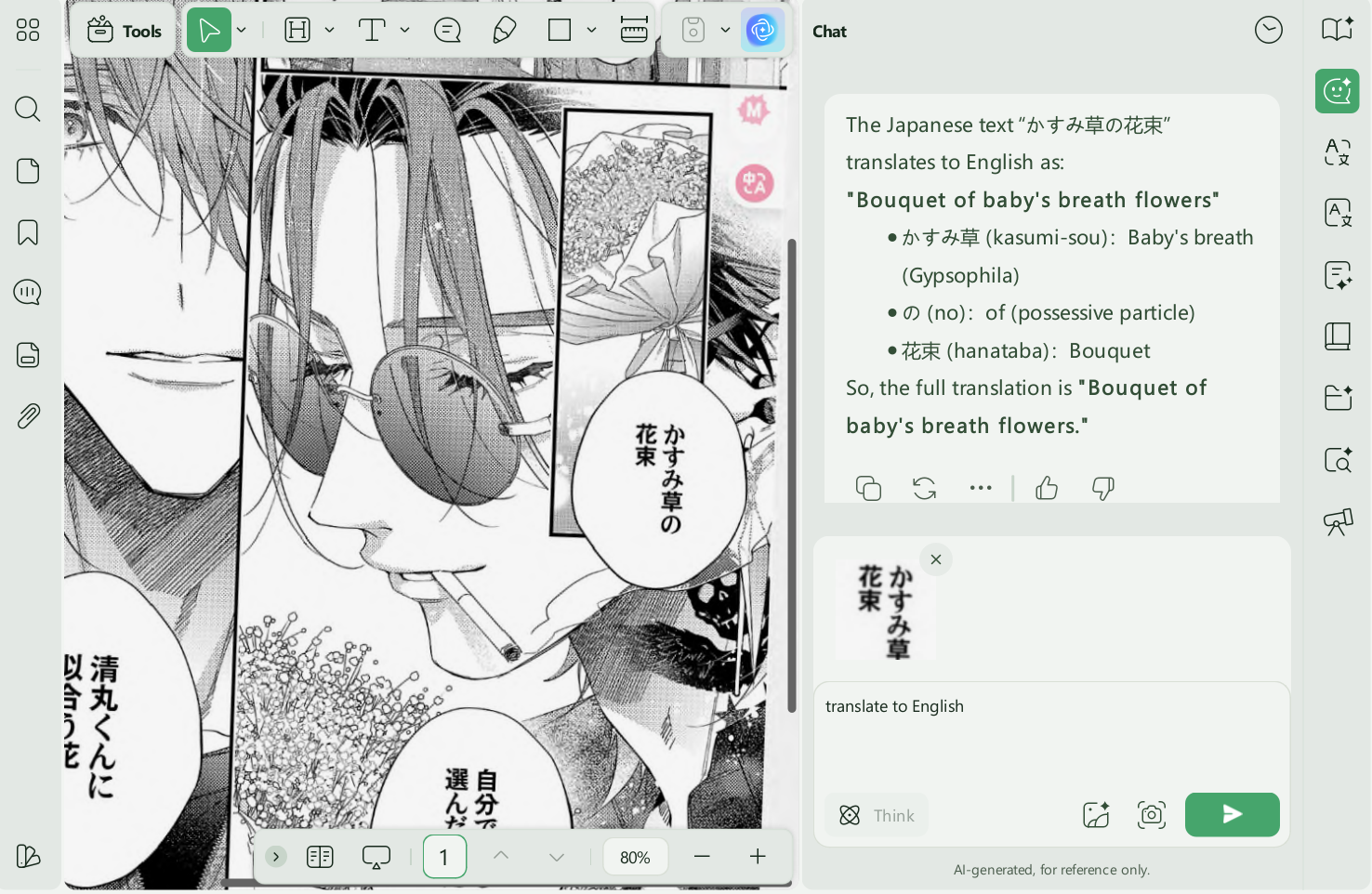
For untranslated manga, UPDF AI can work with selectable PDF text or a captured area of an image-based page. The second option is often more practical for speech bubbles that OCR does not recognize cleanly.
- Open the manga PDF in UPDF. Use PDF Translation for recognized document text, or open Ask PDF/Chat and use the screenshot tool to capture the panel or speech bubble you want translated.
Windows • macOS • iOS • Android 100% secure
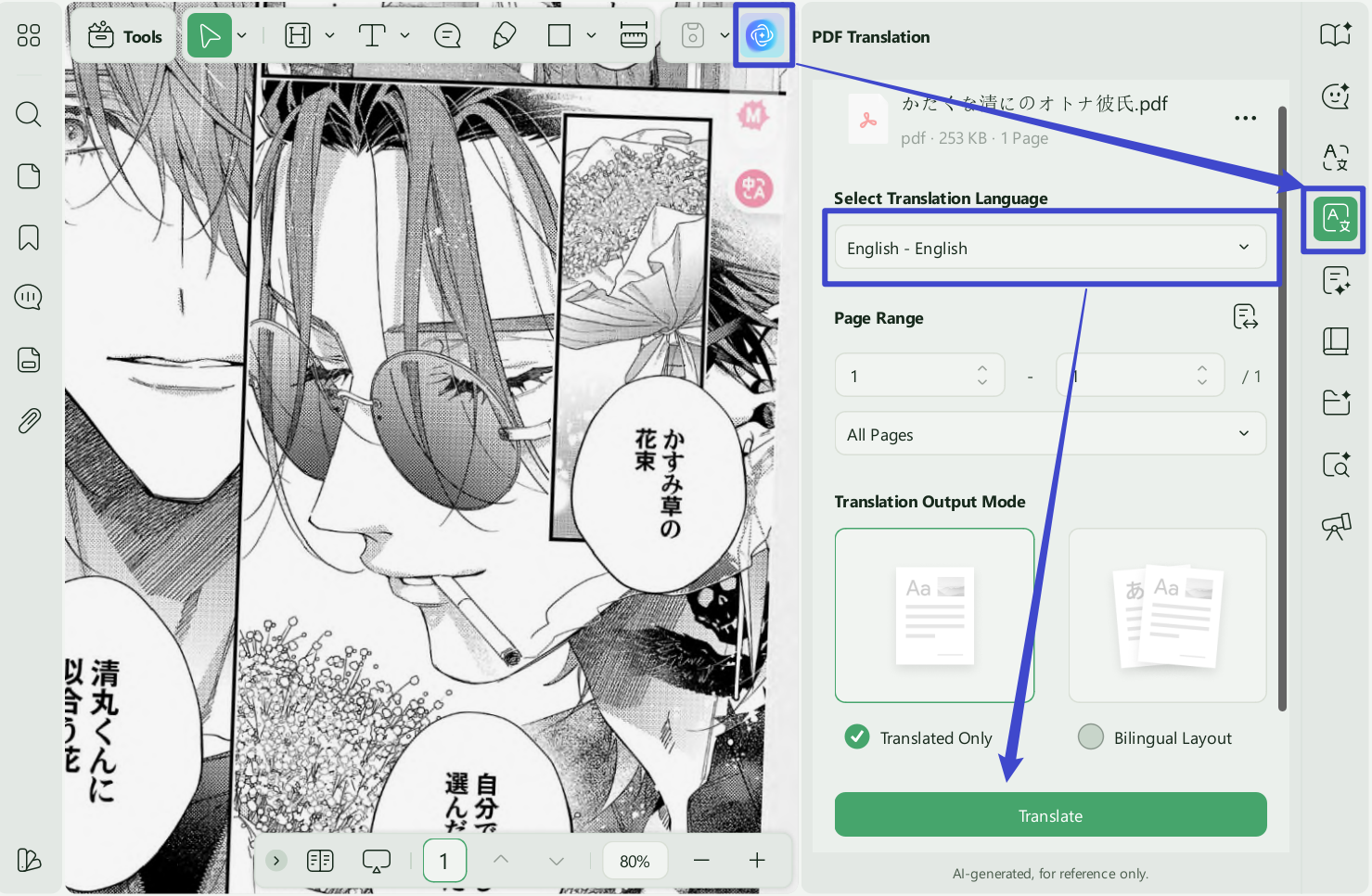
- If some parts of the file are not translated, simply go to the "Chat" feature from the right-side menu list, click the "Screenshot" icon at the bottom, take a screenshot, enter a translation prompt, and send it to UPDF AI. It will then translate the text within the image.
>> Read more about the Best Japanese Manga Translator >>
Want to see how UPDF works with manga PDFs before trying it yourself? Watch the short video below for a practical look at how to open, read, and work with manga PDFs using UPDF.
The comparison below helps you choose by file format and reading workflow rather than treating one app as the best option for every manga library.
Part 3. UPDF vs. Other Manga Readers
UPDF focuses on manga stored as PDF and is a practical fit when you also need annotations, OCR, AI-assisted translation, or access across desktop and mobile. ComicScreen and Manga Viewer are more specialized choices for comic-library workflows. App availability and in-app purchases can change, so verify the current store listing before installing.
| What to Compare | UPDF | ComicScreen | Manga Viewer |
|---|---|---|---|
| Best for | Manga saved as PDF, especially when you need notes, OCR, or translation assistance | Android comic-library reading | iOS CBZ/CBR library reading |
| Platforms | Windows, macOS, iOS, Android | Android | iOS |
| PDF tools | Reading, page views, annotations, OCR, AI assistance, cloud access | Primarily comic reading; confirm current PDF features in Google Play | Primarily comic reading; confirm current PDF features in the App Store |
| CBZ/CBR library | Not a dedicated CBZ/CBR library app | Designed for comic archives | Designed for CBZ/CBR files |
| Free use | Free PDF reading | Check the current Google Play listing | Check the current App Store listing |
FAQs About Manga PDF Readers
Can UPDF open CBZ or CBR manga files?
UPDF is designed for PDF documents and does not serve as a dedicated CBZ/CBR library reader. If your manga is in CBZ or CBR format, use a compatible comic reader or convert an authorized copy to PDF before opening it in UPDF.
Can I read manga PDFs on iPhone and Android?
Yes. UPDF is available on iOS and Android, so you can open manga saved as PDF, zoom into panels, navigate pages, and access files stored in UPDF Cloud on supported devices.
How can I translate a scanned manga PDF?
For a scanned manga page, capture the relevant panel or speech bubble with the screenshot option in UPDF AI and request a translation. You can also apply OCR first when you need searchable or selectable text across the PDF. Results depend on scan quality and stylized lettering.
Is UPDF free for reading manga PDFs?
Yes. You can download UPDF and read PDF files for free. OCR, AI translation, and advanced editing are separate capabilities that follow their applicable plan terms.
Final Words
The right manga reader depends first on the file format. A dedicated comic app is usually better for CBZ/CBR libraries and specialized reading direction, while UPDF is a stronger fit for manga saved as PDF when you also need zoom, page-view controls, notes, OCR, translation assistance, and access across major platforms.
Download UPDF and test it with one manga PDF to see whether its reading, annotation, and AI-assisted tools match your workflow.
Windows • macOS • iOS • Android 100% secure








 Delia Meyer
 Enrica Taylor