 UPDF
 UPDF for Windows
 UPDF for Mac
 UPDF for iPhone/iPad
 UPDF for Android
 Nomostar
 UPDF AI Online
 UPDF Sign
 IvyCraft
 Edit PDF
 Annotate PDF
 Create PDF
 PDF Form
 Edit links
 Convert PDF
 OCR
 PDF to Word
 PDF to Image
 PDF to Excel
 Organize PDF
 Merge PDF
 Split PDF
 Crop PDF
 Rotate PDF
 Protect PDF
 Sign PDF
 Redact PDF
 Sanitize PDF
 Remove Security
 Read PDF
 UPDF Cloud
 Compress PDF
 Print PDF
 Batch Process

 About UPDF AI
 UPDF AI Solutions
 AI User Guide
 FAQ about UPDF AI
 Summarize PDF
 Translate PDF
 Chat with PDF
 Chat with AI
 Chat with image
 PDF to Mind Map
 Explain PDF
 PDF AI Tools
 Image AI Tools
 AI Chat Tools
 AI Writing Tools
 AI Study Tools
 AI Working Tools
 Other AI Tools
 AI Bookmark Generation
 AI Bookmark Summary
 AI Watermark Generation
 AI Background Generation
 AI Sticker Generation
 AI Stamp Generation
 AI Editing Suite
 UPDF Copilot
 AI Page Management
 AI Semantic Search
 PDF to Word
 PDF to Excel
 PDF to PowerPoint
 Enterprise Solution
 Enterprise Sign
 Enterprise AI
 Enterprise Plan
 Enterprise User Guide
 Enterprise Webinar
 IT
 Education
 Construction
 Financial Service
 Healthcare
 Insurance
 Legal
 Manufacturing
 Government
 Researchers & PhDs
 Solopreneurs & Freelancers
 Lawyers & Legal Professionals
 Real Estate Agents & Brokers
 Education Solution
 Customer Stories
 User Guide
 UPDF Tricks
 FAQs
 UPDF Reviews
 Download Center
 Blog
 Newsroom
 Tech Spec
 Updates
 UPDF vs. Adobe Acrobat
 UPDF vs. Foxit
 UPDF vs. PDF Expert


Quick answer:
Choose UPDF for editing and batch conversion, Acrobat Pro for comparing revisions and redacting PDFs, or PDF Expert if you also work on an iPhone or iPad. Nitro PDF Pro is a good fit for creating fillable forms. Apple Preview covers free markup, signing, and merging.
The best Soda PDF alternative for your Mac depends on the job. If you regularly edit PDFs and convert a folder of files to Word, look for a desktop editor with batch conversion. If you only need to sign a form or combine two PDFs, the Preview app you already have may be enough.
Top 5 Soda PDF Alternatives for Mac
1. UPDF for Mac — For Editing and Batch Conversion
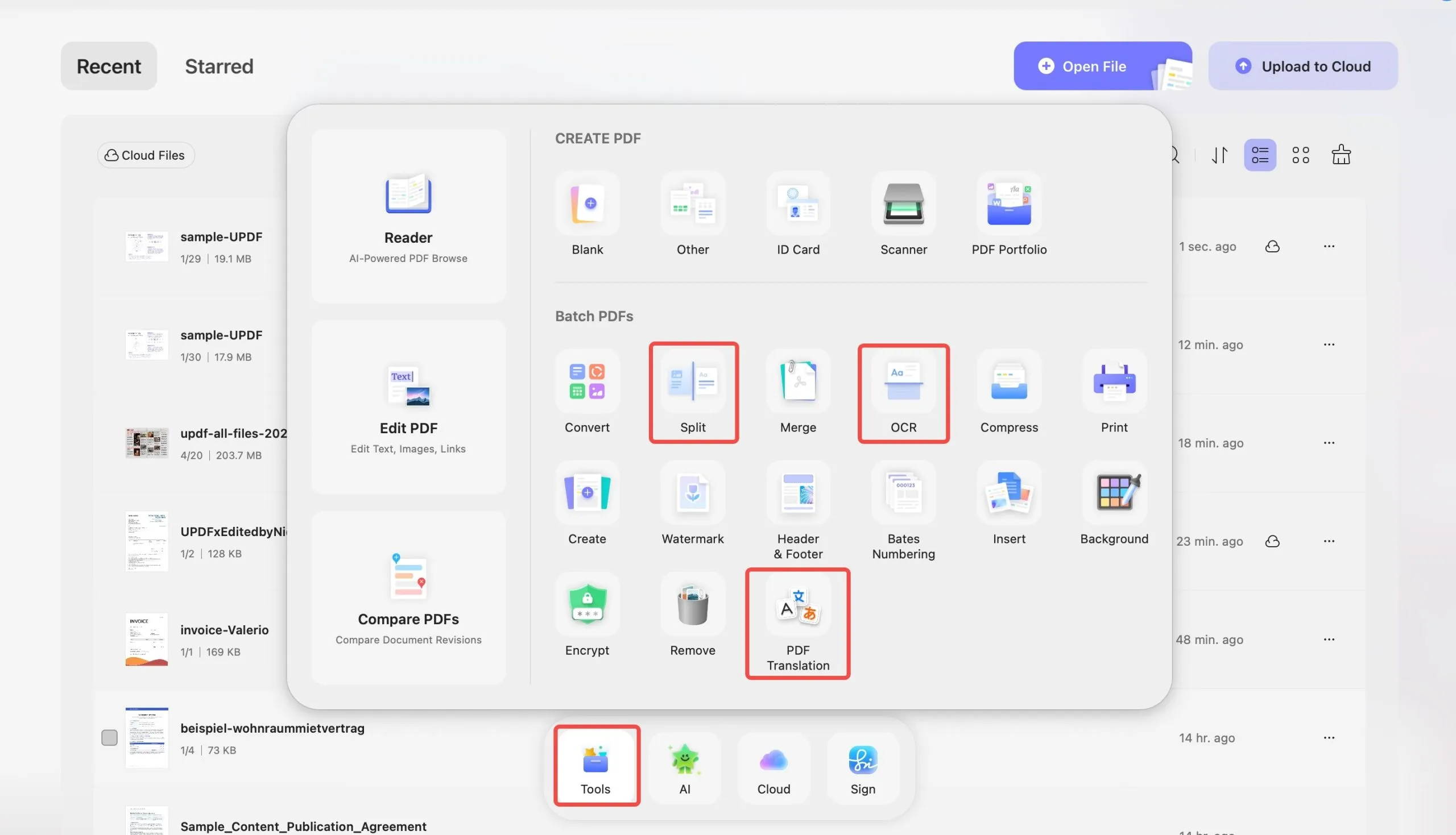
UPDF for Mac lets you edit existing PDF text on Mac, edit images, add comments, create and fill forms, and convert multiple PDFs in one batch. Batch export formats include Word, Excel, PowerPoint, TXT, HTML, and XML. PDF/A is available as a separate save option. If you are converting tables or multi-column pages, check the exported layout before sharing it.
Windows • macOS • iOS • Android 100% secure
Best for
- Editing PDFs and converting multiple files in the same Mac app.
Skip if
- OCR is essential and you use an Intel Mac or the Mac App Store build. Mac OCR requires an Apple silicon Mac and the version downloaded from the UPDF website.
Free access and price — The free version allows up to five OCR uses, two conversions per day, and two files per batch. Saving PDFs generally adds a trial watermark. PDF/A, PDF/X, and PDF/E exports share the daily conversion limit and save without the trial watermark. UPDF lists Pro at US$64.99 per year or US$94.99 as a one-time purchase. Check the current checkout price before buying.
Try UPDF on a copy of your document, or see how to convert PDFs on Mac.
2. Adobe Acrobat Pro for Mac — For Comparing and Redacting PDFs
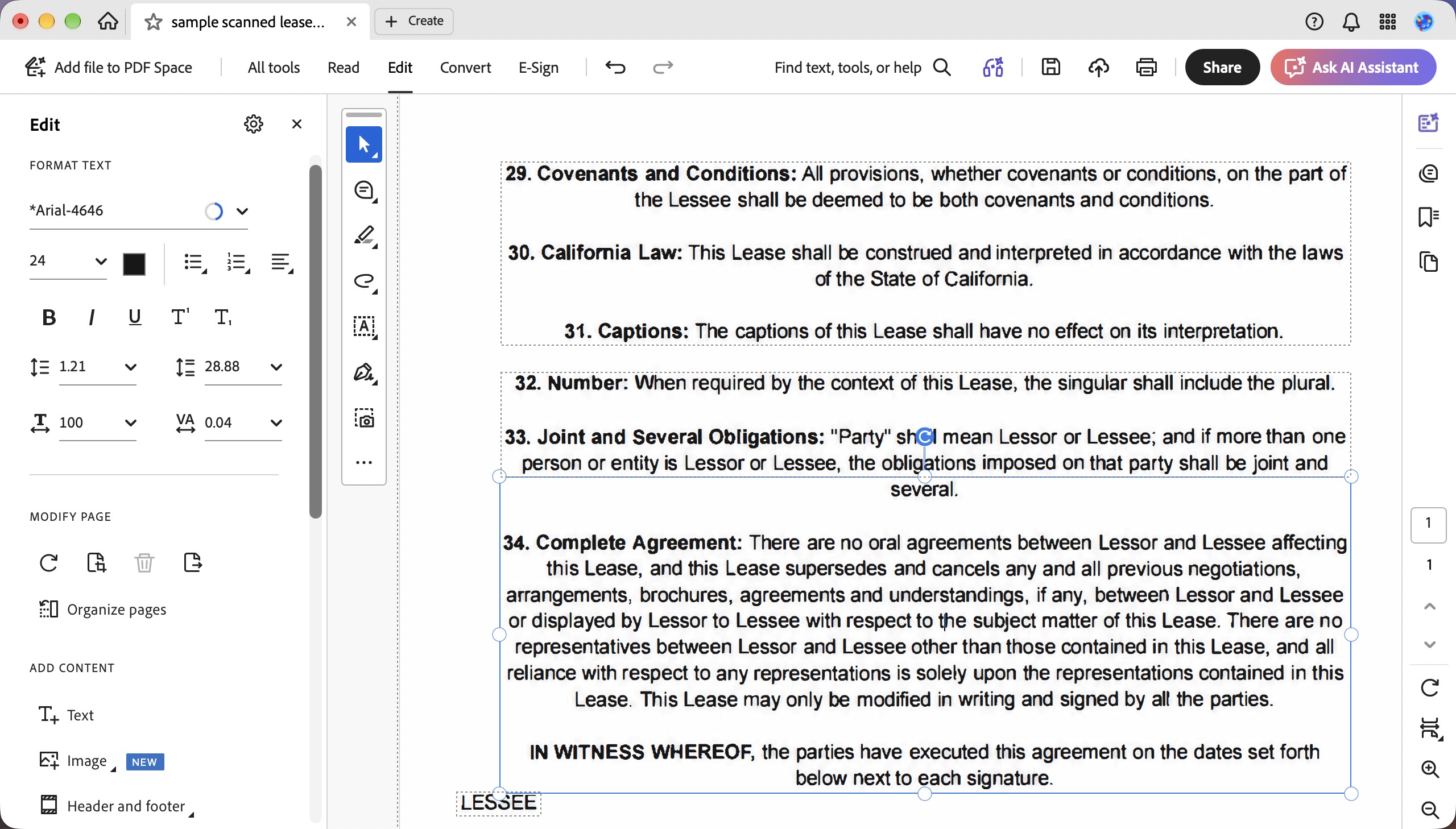
Adobe Acrobat Pro for Mac can edit PDF content, recognize text in scans, and export PDFs to Office formats, HTML, and XML. Compare Files shows what changed between two versions of a PDF. The free Acrobat Reader is suited to viewing, commenting on, and filling PDFs.
Best for
- Reviewing document revisions, working with scans, and redacting sensitive content.
Skip if
- Your work is limited to adding comments, filling forms, or signing an occasional PDF.
Price — The U.S. individual plan is US$19.99 per month with an annual commitment, or US$239.88 prepaid for the year. The month-to-month plan is US$29.99.
3. PDF Expert for Mac — For Editing Across Apple Devices
PDF Expert is a desktop PDF editor for Mac. It can edit existing text, images, and links, recognize text in scans, and convert PDFs to Word, Excel, and PowerPoint. Readdle’s yearly plan also covers its iPhone and iPad apps.

Best for
- Editing PDFs on a Mac and using the same product on an iPhone or iPad.
Skip if
- You need a Windows version or expect the Mac Lifetime purchase to cover iPhone and iPad.
Price — The pricing page lists the yearly plan at US$79.99 and the Mac-only Lifetime purchase at US$139.99.
4. Nitro PDF Pro for Mac — For Creating Fillable Forms
Nitro PDF Pro for Mac can detect form fields and checkboxes in a static PDF and turn them into fillable fields. You can also add fields manually and adjust their tab order. The Mac app supports text editing, OCR, and Word export.

Best for
- Turning existing PDF templates into reusable fillable forms.
Skip if
- You plan to buy Nitro PDF Classic for your Mac. Classic is a Windows-only, three-year license.
Price — Nitro PDF Standard is an annual subscription with access to the Mac app. See Nitro’s pricing page for the current rate.
5. Apple Preview — For Free Markup, Signing, and Merging
Preview comes with macOS. It can annotate PDFs, fill in forms, add a signature, combine documents, and rearrange pages.
Best for
- Marking up a document, signing a form, or combining PDFs without installing another app.
Skip if
- You need to rewrite existing PDF text, create interactive form fields, or export a PDF to Word.
Price — Included with macOS.
Part 2. Compare Soda PDF Alternatives for Mac
| Mac app | Best for | What to check before choosing |
|---|---|---|
| UPDF | Editing PDFs and converting files in batches | Mac OCR requires Apple silicon and the website build |
| Adobe Acrobat Pro | Comparing revisions and redacting documents | US$19.99/month requires an annual commitment |
| PDF Expert | Editing across Mac, iPhone, and iPad | Lifetime purchase covers Mac only |
| Nitro PDF Pro | Creating fillable fields from existing PDF forms | Choose a plan with Mac access. Classic is Windows-only |
| Apple Preview | Free markup, signing, and merging | Use a PDF editor to rewrite existing text or export to Word |
If you’re testing a desktop app for batch conversion, try a folder with both a text-based PDF and a scan. Check the exported files before committing to a plan. For a broader comparison, see our guide to PDF editors for Mac.
Part 3. FAQs About Soda PDF on Mac
1. Do I need Chrome to use Soda PDF Online on a Mac?
No. Soda PDF Online works in supported browsers such as Safari and Chrome. The optional Soda PDF browser extension is for Google Chrome.
2. Can I make a Soda PDF alternative my default PDF app on Mac?
Yes. In Finder, select a PDF and open Get Info. Choose the installed app under Open with, then select Change All to use it for PDFs.
3. Do I have to convert my Soda PDF files before switching apps?
A standard PDF can open directly in another PDF app. For documents with forms, comments, or signatures, check a saved copy in the new app before relying on those features.
Conclusion
Keep Soda PDF Online if you prefer working in a browser. Choose UPDF for editing and batch conversion in a Mac app, Acrobat Pro for comparing revisions and redacting content, or PDF Expert if you also work on an iPhone or iPad. Nitro PDF Pro is a good fit for turning existing templates into fillable forms. For occasional markup, signing, and merging, start with Preview.
If editing and batch conversion are your main tasks, try UPDF with the files you work with most often.
Windows • macOS • iOS • Android 100% secure





 Enola Miller

 Lizzy Lozano

 Enola Davis
 Enid Brown