UPDF
UPDF
 UPDF for Windows
 UPDF for Mac
 UPDF for iPhone/iPad
 UPDF for Android
 Nomostar
 UPDF AI Online
 UPDF Sign
 IvyCraft
 Edit PDF
 Annotate PDF
 Create PDF
 PDF Form
 Edit links
 Convert PDF
 OCR
OCR PDF to Word
 PDF to Image
 PDF to Excel
 Organize PDF
 Merge PDF
 Split PDF
 Crop PDF
 Rotate PDF
 Protect PDF
 Sign PDF
 Redact PDF
 Sanitize PDF
 Remove Security
 Read PDF
 UPDF Cloud
 Compress PDF
 Print PDF
 Batch Process
 About UPDF AI
 UPDF AI Solutions
 AI User Guide
 FAQ about UPDF AI
 Summarize PDF
 Translate PDF
 Chat with PDF
 Chat with AI
 Chat with image
 PDF to Mind Map
 Explain PDF
 PDF AI Tools
 Image AI Tools
 AI Chat Tools
 AI Writing Tools
 AI Study Tools
 AI Working Tools
 Other AI Tools
 AI Bookmark Generation
 AI Bookmark Summary
 AI Watermark Generation
 AI Background Generation
 AI Sticker Generation
 AI Stamp Generation
 AI Editing Suite
 UPDF Copilot
 AI Page Management
 AI Semantic Search
 PDF to Word
 PDF to Excel
 PDF to PowerPoint
 Enterprise Solution
 Enterprise Sign
 Enterprise AI
 Enterprise Plan
 Enterprise User Guide
 Enterprise Webinar
 IT
IT Education
 Construction
 Financial Service
 Healthcare
 Insurance
 Legal
Legal Manufacturing
 Government
 Researchers & PhDs
 Solopreneurs & Freelancers
 Lawyers & Legal Professionals
 Real Estate Agents & Brokers
 Education Solution
 Customer Stories
 User Guide
 UPDF Tricks
 FAQs
FAQs UPDF Reviews
 Download Center
 Blog
Blog Newsroom
 Tech Spec
 Updates
 UPDF vs. Adobe Acrobat
 UPDF vs. Foxit
 UPDF vs. PDF Expert

Yes. Foxit currently offers Foxit PDF Editor 14 as a perpetual, one-time-purchase license. Its published US price is US$209.99 per user, with Windows and macOS versions available.
The main distinction is between paying once for an eligible desktop version and receiving ongoing upgrades or online services. A perpetual license should not be treated as a promise of every future release, unlimited support, or all subscription features.
This guide explains the price, license scope, update considerations, and buying process. It also compares ownership costs and introduces UPDF as another one-time purchase option.
However, it is important to know that this license comes with some limitations that you must be aware of before purchasing it. In this article, we are going to talk about how you can get the Foxit perpetual license, what limitations it comes with, and also share a much better alternative for all your PDF-related tasks. That is UPDF which offers lifetime license and much cheaper than Foxit. You can download UPDF here or check its price here.
Windows • macOS • iOS • Android 100% secure
Part 1: What Does a Foxit Perpetual License Include?
Here arStart by identifying the exact product and license type. Foxit’s perpetual desktop product differs from its continuously updated subscription packages.
Compare the functions you need, the purchased version’s support policy, and your device requirements before choosing.
1. Price and Product Scope
As per the latest version, the price of the Foxit PDF Editor perpetual lFoxit currently lists PDF Editor 14 at US$209.99 per user as a one-time purchase in the US market. Confirm the final regional price, taxes, operating system, and package at checkout.
The product covers core desktop work such as editing, conversion, OCR, forms, and document security. Foxit’s perpetual listing excludes services such as AI Assistant, Workspace, Smart Redact, DMS, and cloud features.
Choose based on the package you need rather than assuming that a perpetual desktop license matches PDF Editor+.
2. Updates, Major Upgrades, and Support
A perpetual license does not automatically include every future major release. Upgrade eligibility can depend on maintenance, upgrade assurance, purchase conditions, and the relevant release date.
Updates within a supported version are different from moving to a new major version. Foxit’s published support policy also limits which older releases receive technical support, fixes, and security patches.
Before buying, ask which maintenance benefits are included and what happens when the purchased version leaves support. Do not assume that bug fixes will continue indefinitely.
The software may remain usable after support ends, but continued use is not the same as continued security maintenance or compatibility assurance.
3. Single-User and Device Conditions
Foxit’s single-use perpetual agreement permits one authorized user to install the product on one computer or virtual machine. This should not be read as permission to activate a personal laptop and desktop under the same single-use license.
If you replace your computer, check the applicable deactivation and transfer procedure. A device transfer is different from adding another active installation.
Organizations should verify their own order and agreement. Multi-user, centrally managed, and deployment arrangements may differ from a single-use purchase.
4. Platform and Service Coverage
Foxit sells perpetual desktop editions for Windows and macOS. Confirm the platform attached to your purchase rather than assuming one license covers both.
Mobile, web, AI, and document-management access should be checked separately. Their availability in a subscription package does not establish that they are included in the perpetual desktop purchase.
If you regularly move between a computer, phone, and browser, compare the complete access requirements before selecting a license.
Continue to the buying steps below, or compare the one-time purchase alternative later in this guide.
Part 2. Foxit Perpetual vs. Subscription: Cost and Suitability
Foxit’s published US annual prices are US$129.99 per user for PDF Editor and US$159.99 for PDF Editor+. The following illustration assumes those annual prices remain unchanged and excludes taxes, promotions, paid upgrades, and optional services.
Tip
Windows • macOS • iOS • Android 100% secure
Foxit PDF Editor 14 perpetual
Initial payment: US$209.99.
Three-year base license outlay: US$209.99.
Five-year base license outlay: US$209.99.
Foxit PDF Editor subscription
One year: US$129.99.
Three years: US$389.97.
Five years: US$649.95.
Foxit PDF Editor+ subscription
One year: US$159.99.
Three years: US$479.97.
Five years: US$799.95.
These figures compare payments, not equivalent feature packages. The perpetual totals assume continued use without buying an upgrade; they do not promise support throughout the illustrated period.
Who Should Choose Each Option?
A perpetual license may suit a stable desktop workflow where the purchased version meets your needs.
A subscription may suit users who prioritize current releases and the services included in their selected package.
Choose by required capabilities and support, then compare total cost.
Not sure how and where to buy the Foxity PDF editor perpetual license? Just follow these steps:
Step 1: Go to the official Foxit website store.
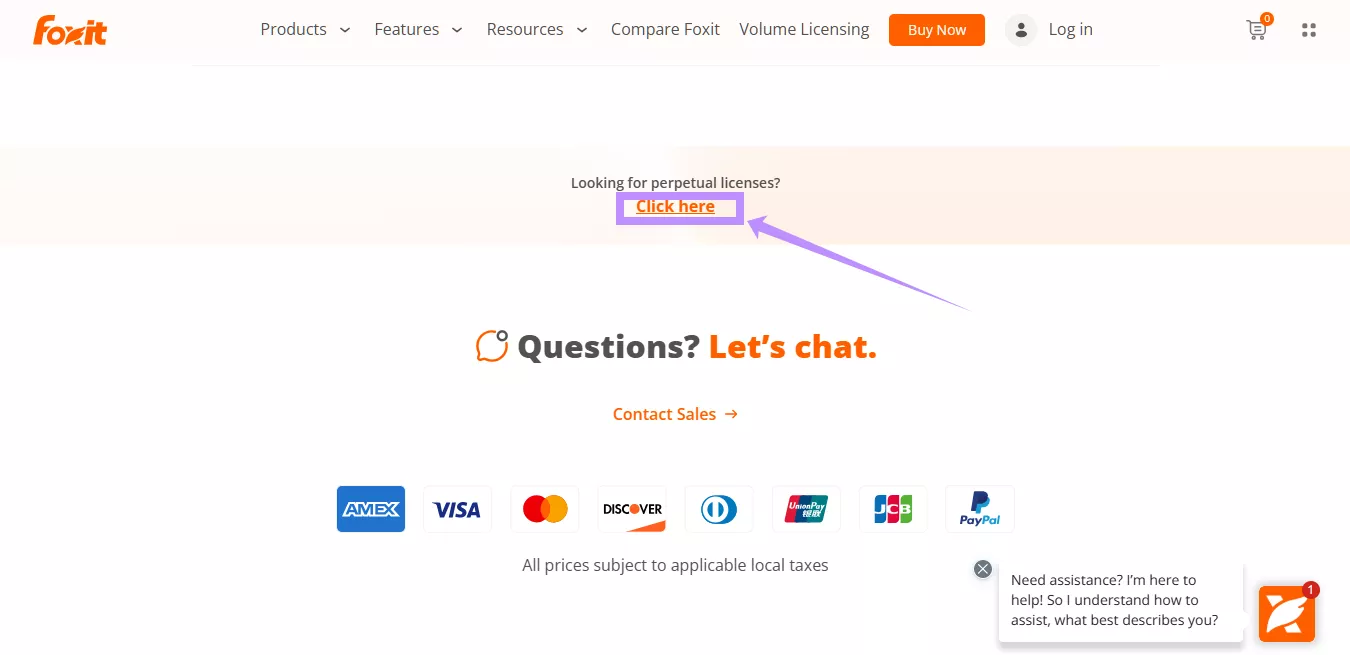
Step 2: Scroll down and locate the “Looking for perpetual licenses? Click Here” option by scrolling down the online store page. Then, to switch to the perpetual license purchase mode, click the "Click Here" button.
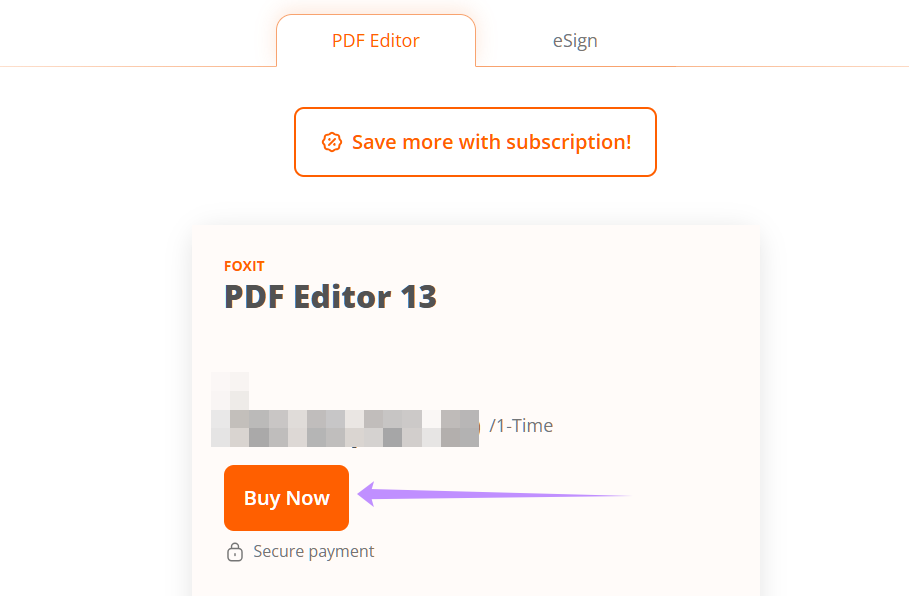
Step 3: Click the 'Buy Now' button under the 'FOXIT PDF Editor' product. From here, you’ll be redirected to the checkout page.
Step 4: At checkout, you can choose to manage your Foxit licenses via the Foxit Admin Console. If not selected, you'll receive an activation code for manual activation.
Retain the invoice, installer information, and activation instructions. Follow the activation method supplied with the order.
If the perpetual option is unavailable in your regional storefront, contact Foxit sales rather than purchasing a different license type unintentionally.
Part 3. UPDF: A One-Time Purchase Alternative to Compare
UPDF is worth considering if you want an individual PDF editor license across desktop and mobile devices.
Its individual Lifetime plan is a one-time payment in $79.99. Current official information describes access on up to 4 devices, desktop and mobile devices, with future UPDF Pro updates and upgrades included.
Keep that core plan separate from UPDF AI Assistant and cloud-service conditions. A Lifetime purchase should not be interpreted as unlimited access to every online service.
The useful comparison is your workflow: the operating systems you use, the tools you require, your device allowance, and what each purchase includes over time.
Test UPDF with your own documents, then check the current Lifetime plan before buying and you can download to test the features.
Windows • macOS • iOS • Android 100% secure
Want to know more about UPDF’s features, you can check the key ones here.
UPDF Key Features
- Read and edit PDFs easily
- Annotate PDF files.
- Convert PDFs to Word, Excel, etc.
- OCR scanned PDF files.
- Fill and create PDF forms
- Batch print, compress, ocr, and more.
Here are only some of its features, you can read this article to learn more about UPDF and its features, and watch this video.
What to Test Before Choosing a Lifetime Plan
- Content Editing
Revise text, replace an image, and check the saved layout.
- Scanned Documents
Try OCR on a representative scan and review the recognized text.
- Conversion
Export a document to the format you use and inspect tables, fonts, and images.
- Review and Page Management
Check the annotation and page tools required for your regular work.
- Platform Fit
Confirm that your required functions are available on each platform you use. Cross-platform account access does not mean every application has identical features.
Use the result of these checks alongside the license terms when comparing one-time purchase options.
Part 4. Frequently Asked Questions About Foxit PDF Editor Lifetime License
Does Foxit still offer a perpetual license?
Yes. The official product and pricing pages currently identify a one-time purchase option. Confirm the exact product and local checkout terms before ordering.
Why do some Foxit pages emphasize subscriptions?
Different pages present different packages. Use the official perpetual option or contact sales if you cannot find it. Page placement alone does not establish the company’s motives.
Does perpetual licensing include all future upgrades?
Do not assume so. Check the maintenance or upgrade entitlement attached to your order and the purchased version’s support policy.
Will the software stop working when support ends?
Foxit’s policy distinguishes continued use from continued support. Evaluate compatibility and security maintenance before relying on an unsupported version.
Can I use one single-use license on two computers?
The single-use agreement specifies one computer or virtual machine for one authorized user. Check transfer conditions when replacing a device.
Is a subscription always better?
No. Compare the required features, support, services, and expected duration of use. The best fit depends on those requirements.
In The End
Foxit offers a perpetual purchase option, but buying once and receiving ongoing upgrades or services are separate benefits.
Before paying, confirm the product version, platform, device rules, maintenance entitlement, and support conditions. Compare a subscription if its current services are important to your work.
If you also want to consider UPDF, review its Individual Lifetime plan and test your regular documents first. Choose the license that covers your workflow and expected use.
Download UPDF now to make working with PDFs simpler!
Windows • macOS • iOS • Android 100% secure






 Enrica Taylor
 Engelbert White
 Enola Davis
 Enola Miller