UPDF
UPDF
 UPDF for Windows
 UPDF for Mac
 UPDF for iPhone/iPad
 UPDF for Android
 Nomostar
 UPDF AI Online
 UPDF Sign
 IvyCraft
 Edit PDF
 Annotate PDF
 Create PDF
 PDF Form
 Edit links
 Convert PDF
 OCR
OCR PDF to Word
 PDF to Image
 PDF to Excel
 Organize PDF
 Merge PDF
 Split PDF
 Crop PDF
 Rotate PDF
 Protect PDF
 Sign PDF
 Redact PDF
 Sanitize PDF
 Remove Security
 Read PDF
 UPDF Cloud
 Compress PDF
 Print PDF
 Batch Process
 About UPDF AI
 UPDF AI Solutions
 AI User Guide
 FAQ about UPDF AI
 Summarize PDF
 Translate PDF
 Chat with PDF
 Chat with AI
 Chat with image
 PDF to Mind Map
 Explain PDF
 PDF AI Tools
 Image AI Tools
 AI Chat Tools
 AI Writing Tools
 AI Study Tools
 AI Working Tools
 Other AI Tools
 AI Bookmark Generation
 AI Bookmark Summary
 AI Watermark Generation
 AI Background Generation
 AI Sticker Generation
 AI Stamp Generation
 AI Editing Suite
 UPDF Copilot
 AI Page Management
 AI Semantic Search
 PDF to Word
 PDF to Excel
 PDF to PowerPoint
 Enterprise Solution
 Enterprise Sign
 Enterprise AI
 Enterprise Plan
 Enterprise User Guide
 Enterprise Webinar
 IT
IT Education
 Construction
 Financial Service
 Healthcare
 Insurance
 Legal
Legal Manufacturing
 Government
 Researchers & PhDs
 Solopreneurs & Freelancers
 Lawyers & Legal Professionals
 Real Estate Agents & Brokers
 Education Solution
 Customer Stories
 User Guide
 UPDF Tricks
 FAQs
FAQs UPDF Reviews
 Download Center
 Blog
Blog Newsroom
 Tech Spec
 Updates
 UPDF vs. Adobe Acrobat
 UPDF vs. Foxit
 UPDF vs. PDF Expert

Quick answer:
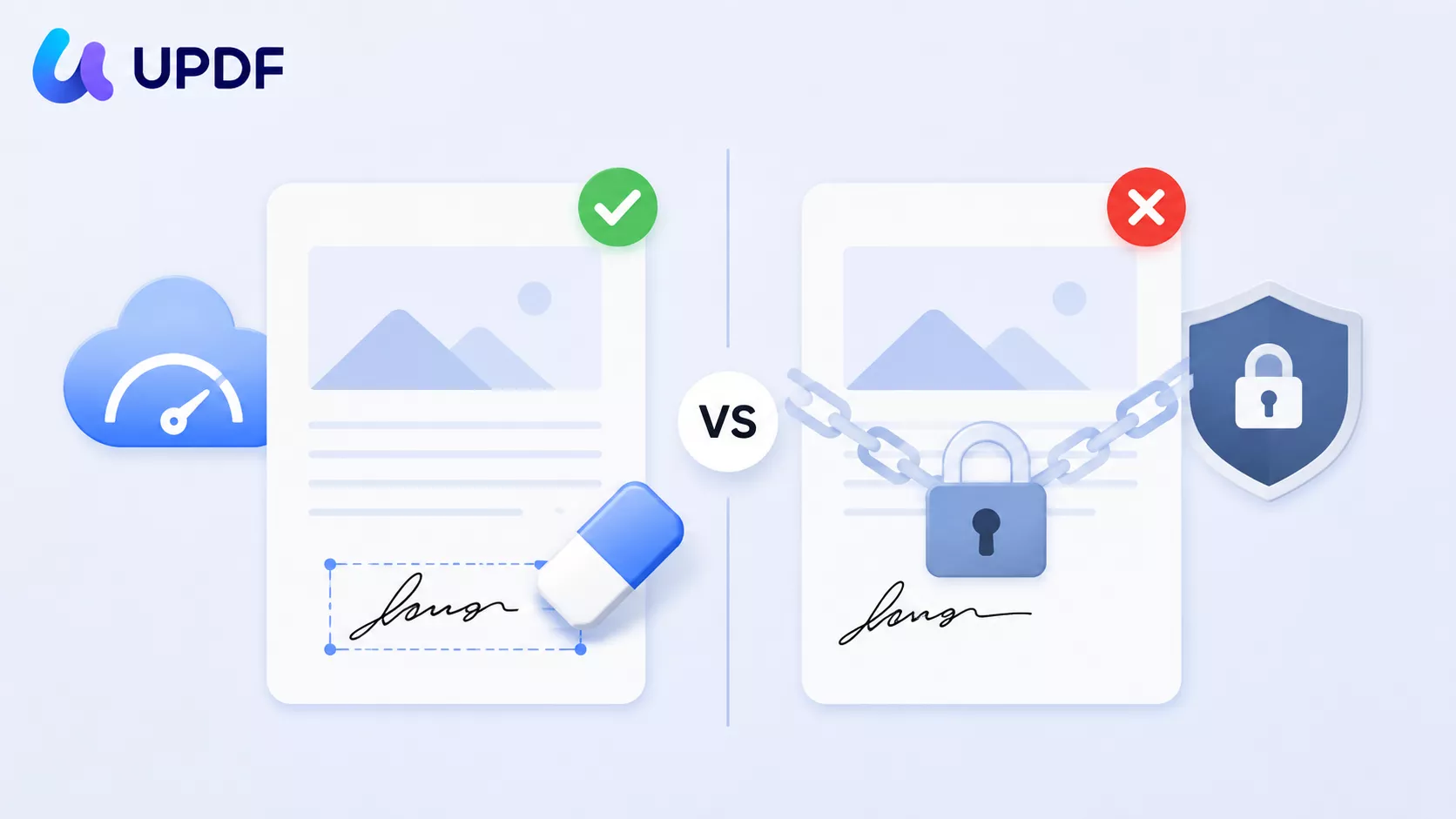
That single distinction is why "remove signature from PDF" is rarely the simple task it looks like. Most people searching this aren't trying to erase a picture — they're trying to unlock a document that went read-only the moment it was signed, roll a signed contract back to an editable state, or strip an old signature off a scan before it goes back through approval. This guide covers both halves: the fast online path when the signature is a removable overlay, and what to do when the file is locked, certified, or protected — the exact moment online erasers fail and cause more problems than they solve.
Part 1: First, Identify Which Signature You're Removing
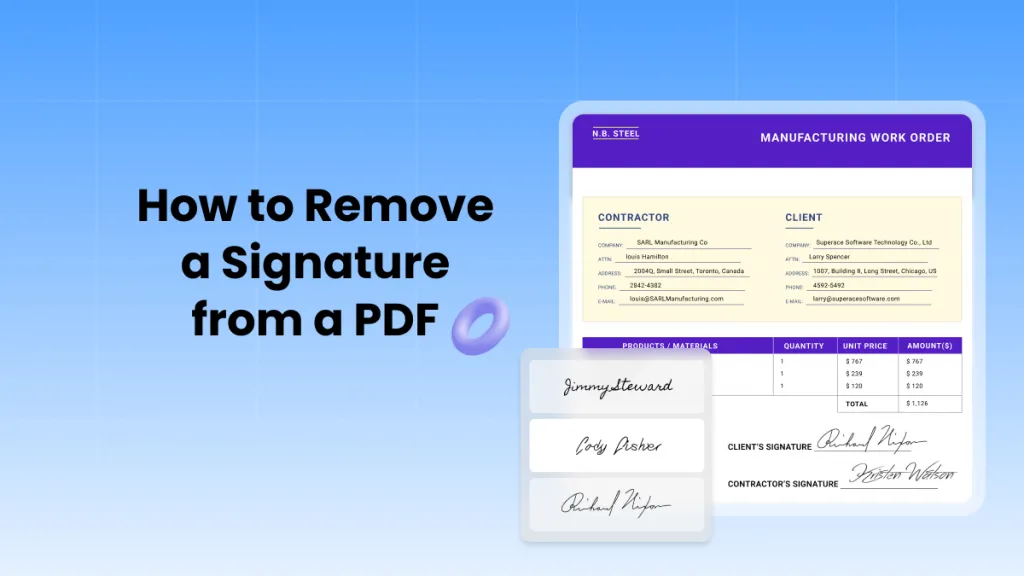
A PDF "signature" can be one of three very different things, and each one behaves differently when you try to delete it. Getting this wrong is the reason most people end up frustrated.
| Signature type | What it actually is | How you remove it |
|---|---|---|
| Overlay signature | A drawn, typed, or image signature | Select and delete it in Edit or Comment mode |
| Digital signature | A certificate-based signature that puts the file into a signed, read-only state | Clear Signature (UPDF for Windows) — if you're the signer and the file isn't certified/locked |
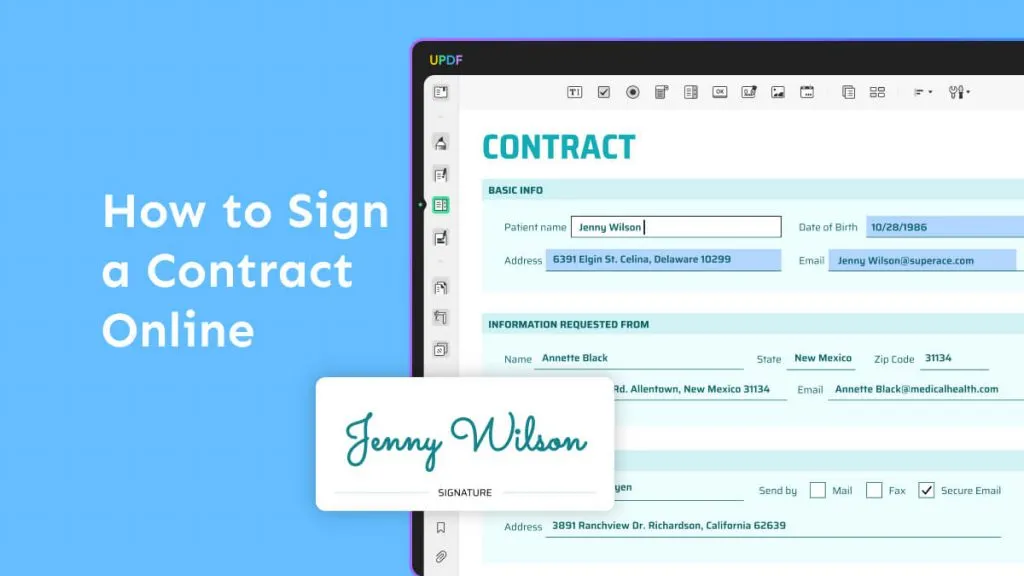
| Form-field signature | A name typed or entered into a signature/text field on a form | Clear Form, or clear the field in Form mode |
Why this matters more than the delete key: a digital signature isn't decoration — it's a lock. It puts the document into a validated, tamper-evident state, and any edit you make afterward invalidates it. So when someone can't "remove a signature," the real problem is usually that the signature was never a removable object in the first place — it was the seal holding the whole file closed. Sort the type first, and the right method becomes obvious.
How to tell at a glance: open the file and click the signature once. If a selection box appears around it, it's an overlay — go to Part 2. If clicking selects a field box on a form, it's a form-field signature. If clicking does nothing but a signature panel or "Signed and all signatures are valid" banner shows at the top, it's a digital signature — go to Part 3.
Overlay vs. digital vs. form-field — the quick version: an overlay signature sits on top of the page like a sticker, so you peel it off by selecting and deleting it. A digital signature is a certificate-based seal — think of a wax stamp on an envelope; break it and everyone can tell, which is why it can't simply be deleted. A form-field signature is a name written into a blank on a form, so you erase it the way you'd clear any field entry. Overlay = an object on the page, digital = a lock on the file, form-field = data in a blank.
Part 2: How to Remove a Signature from a PDF Online
If the signature is a simple overlay — a drawn squiggle, a typed name, or a pasted image of a handwritten signature — you can remove it online in a couple of minutes without installing anything. This is the path most people searching for an online remover actually need.
Smallpdf handles this well because it doesn't just offer one eraser — it gives you a short decision flow (edit → unlock → flatten) that matches the three ways an overlay can be "stuck." Files are processed over an encrypted connection and deleted automatically after about an hour, which matters when the document is a contract or anything personal.
Step 1. Open Smallpdf's Edit PDF tool in your browser and upload the signed PDF (from your device, Google Drive, Dropbox, or OneDrive).
Step 2. Click the signature once. If it highlights as a selectable object, press Delete (or click the trash icon), then download the clean copy. Done.
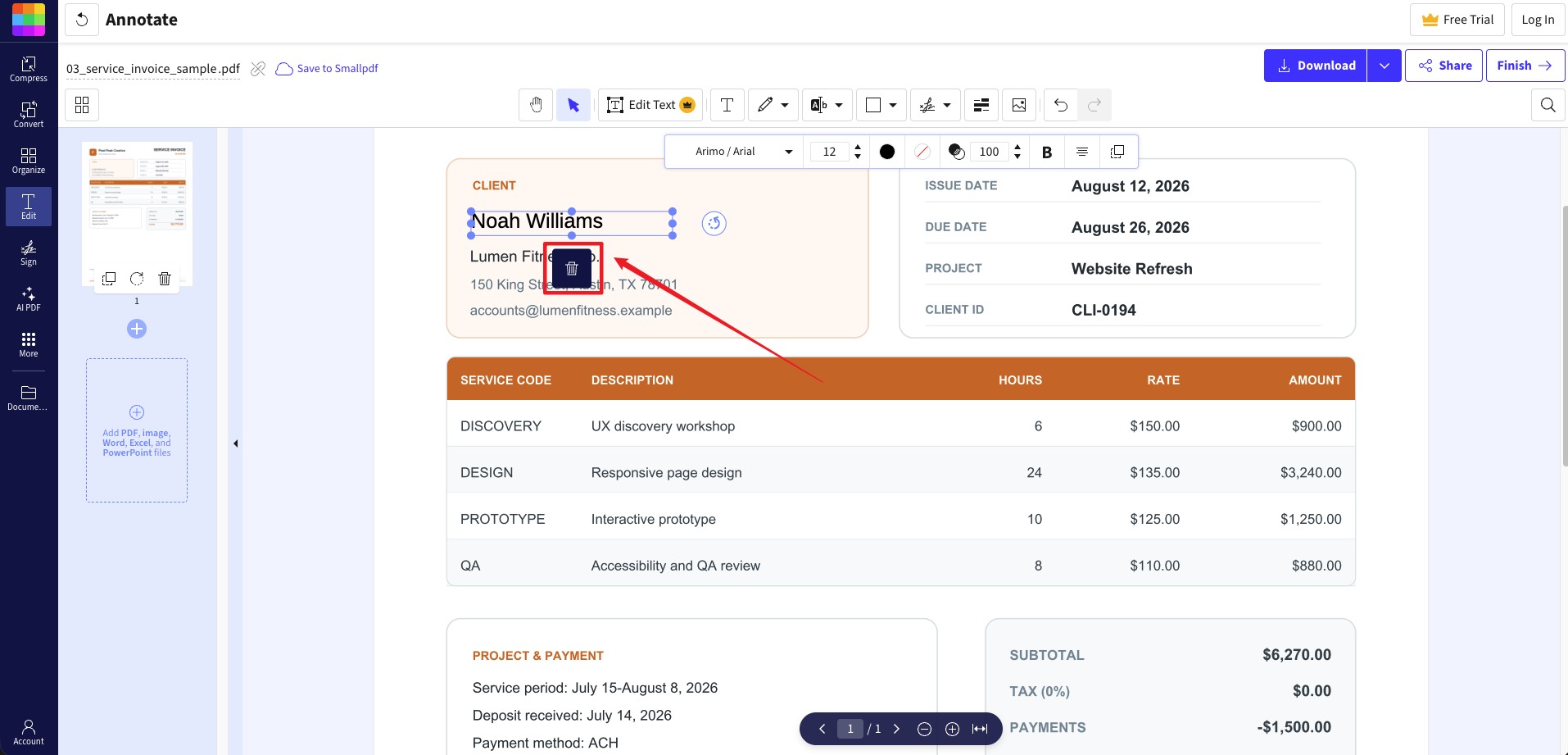
Step 3. If the signature won't highlight because the file blocks editing, run the file through Unlock PDF first (enter the password if prompted — only for files you're authorized to change), then reopen it in Edit PDF and delete the signature.
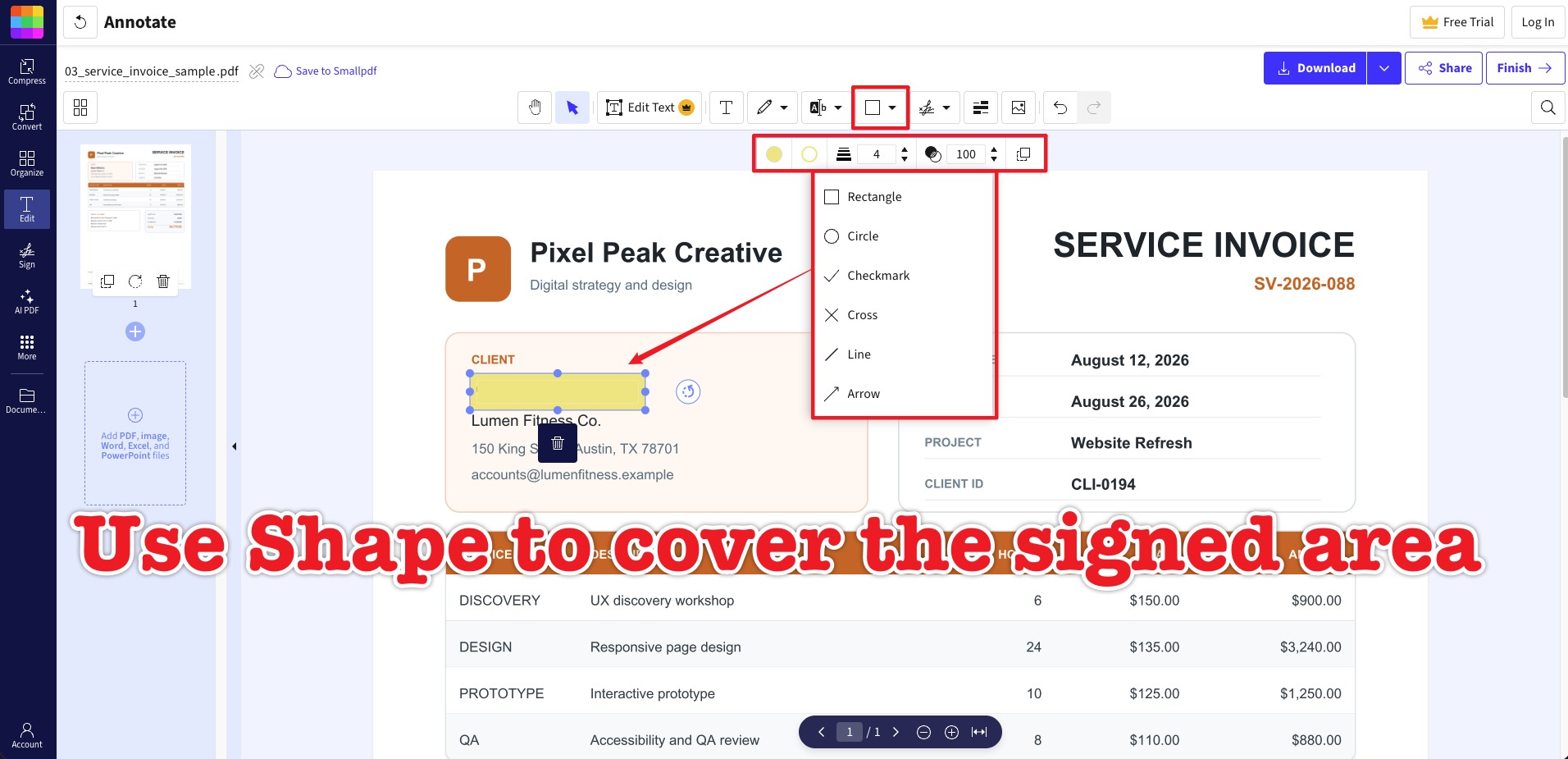
Step 4. If it still won't select — because it's baked into a form field or a single flattened image layer — run Flatten PDF, then reopen the flattened copy in Edit PDF and cover or rebuild the signed area.
Best for:
- overlay signatures you added yourself, quick fixes from any device, and cases where you're already working out of cloud storage.
Not for:
- certified digital signatures (flattening or erasing won't cleanly remove them and can leave the underlying data behind — a real privacy risk if you're about to share the file publicly). For those, Part 3 is the honest answer.
⚠️ A note on erasing vs. removing:
Part 3: How to Remove a Signature Offline When the File Is Locked
Online erasers stop working the moment a signature is a digital field or a certified seal — and that's precisely when contracts, HR templates, and approval documents need handling. This is where a desktop editor like UPDF does what browser tools can't: it distinguishes between clearing a signature you own, deleting an empty field, and working around a lock — all offline, so a sensitive file never leaves your machine.
Remove an Overlay Signature in UPDF
If the signature is a drawn or image overlay, UPDF removes it the same way you'd delete any annotation.
Step 1. Open the document in UPDF — if you don't have it yet, download UPDF for free and install it in under a minute — then open the signed file.
Windows • macOS • iOS • Android 100% secure
Step 2. Click Comment/Edit in the top toolbar, then click the signature to select it. A bounding box appears around it.
Step 3. Press the Del key, click the trash icon, or right-click and choose Delete. To remove several at once, hold Ctrl (Command on Mac) and click each one, then delete them together.
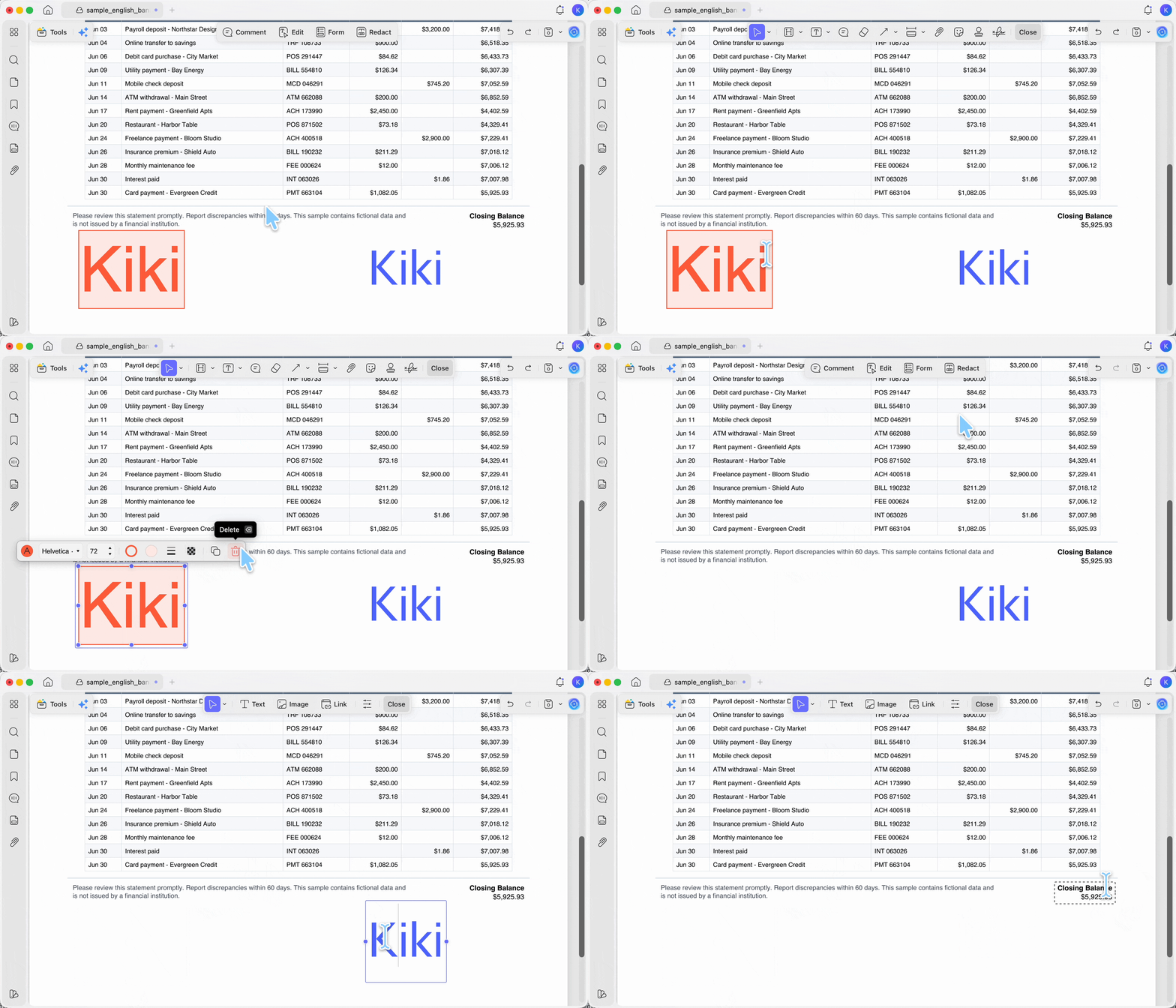
Step 4. Save the file with Save or Save As Other.
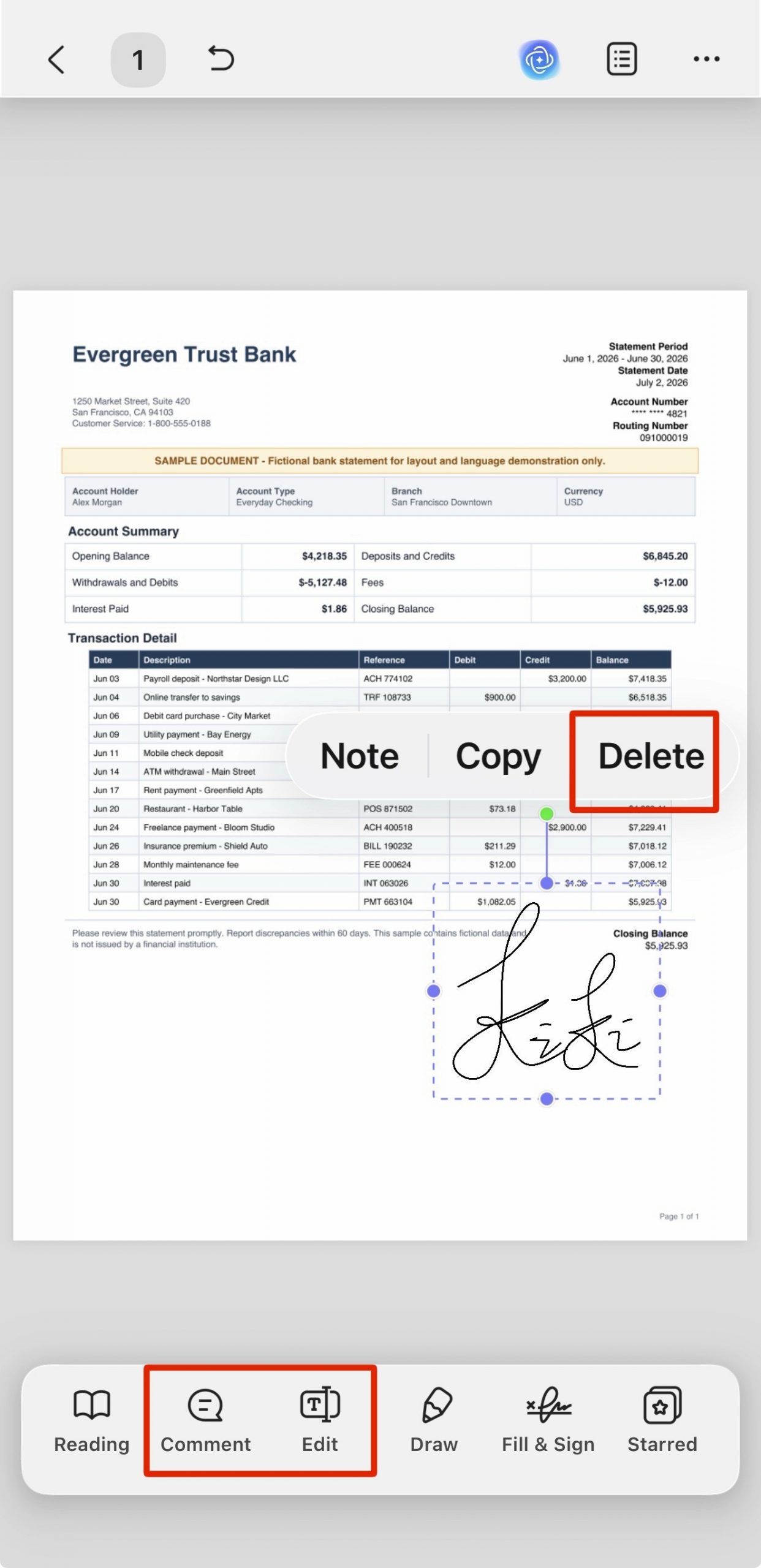
The steps are similar on mobile devices.
Clear a Digital Signature You Applied (Windows)
If you signed a digital signature field and the document isn't locked by anyone else, you can clear it on UPDF for Windows and revert the file to an editable state.
Step 1. Open the PDF, go to the left-side Tools, and switch to Form editing mode — this is where signature fields become editable.
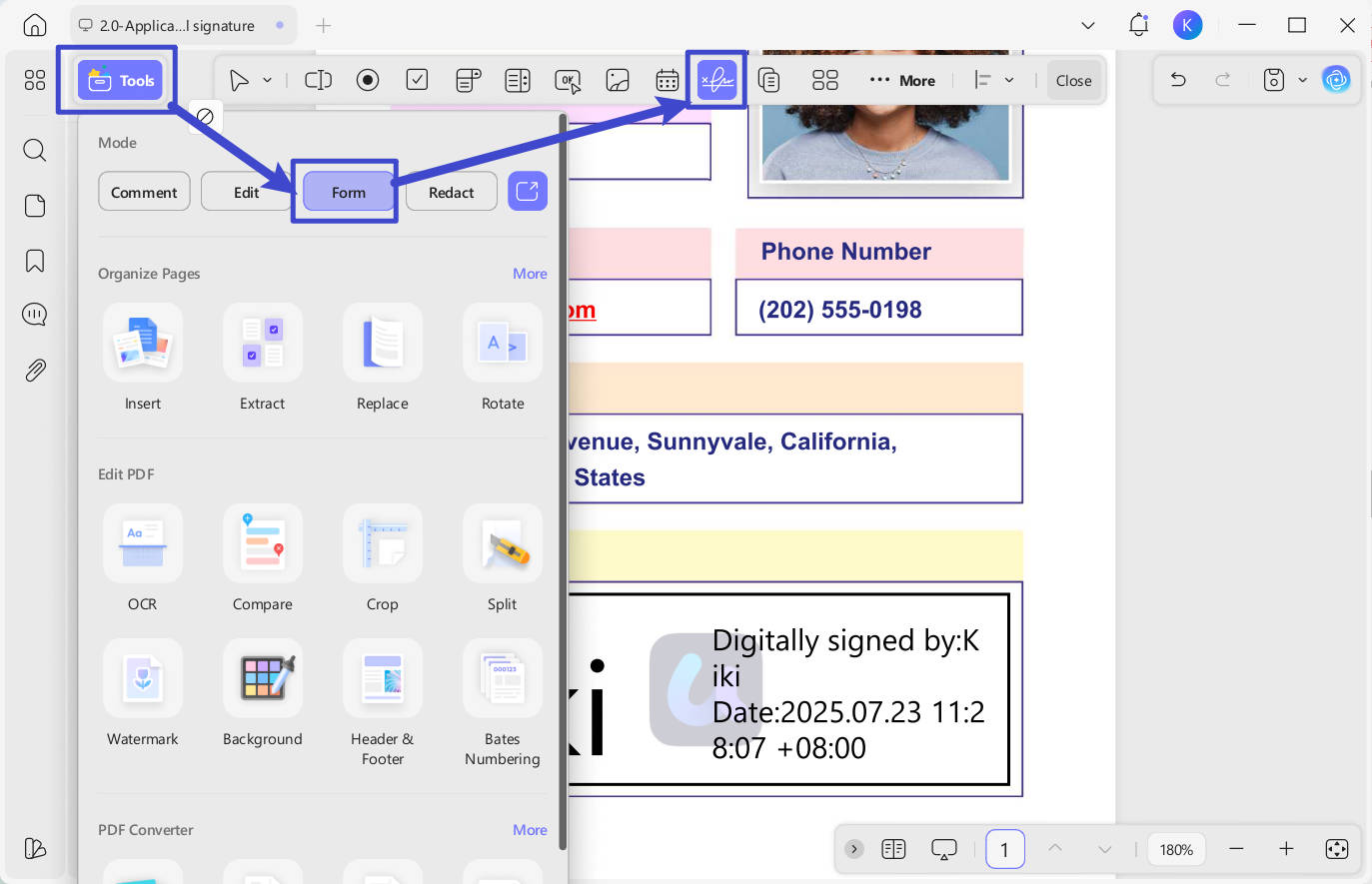
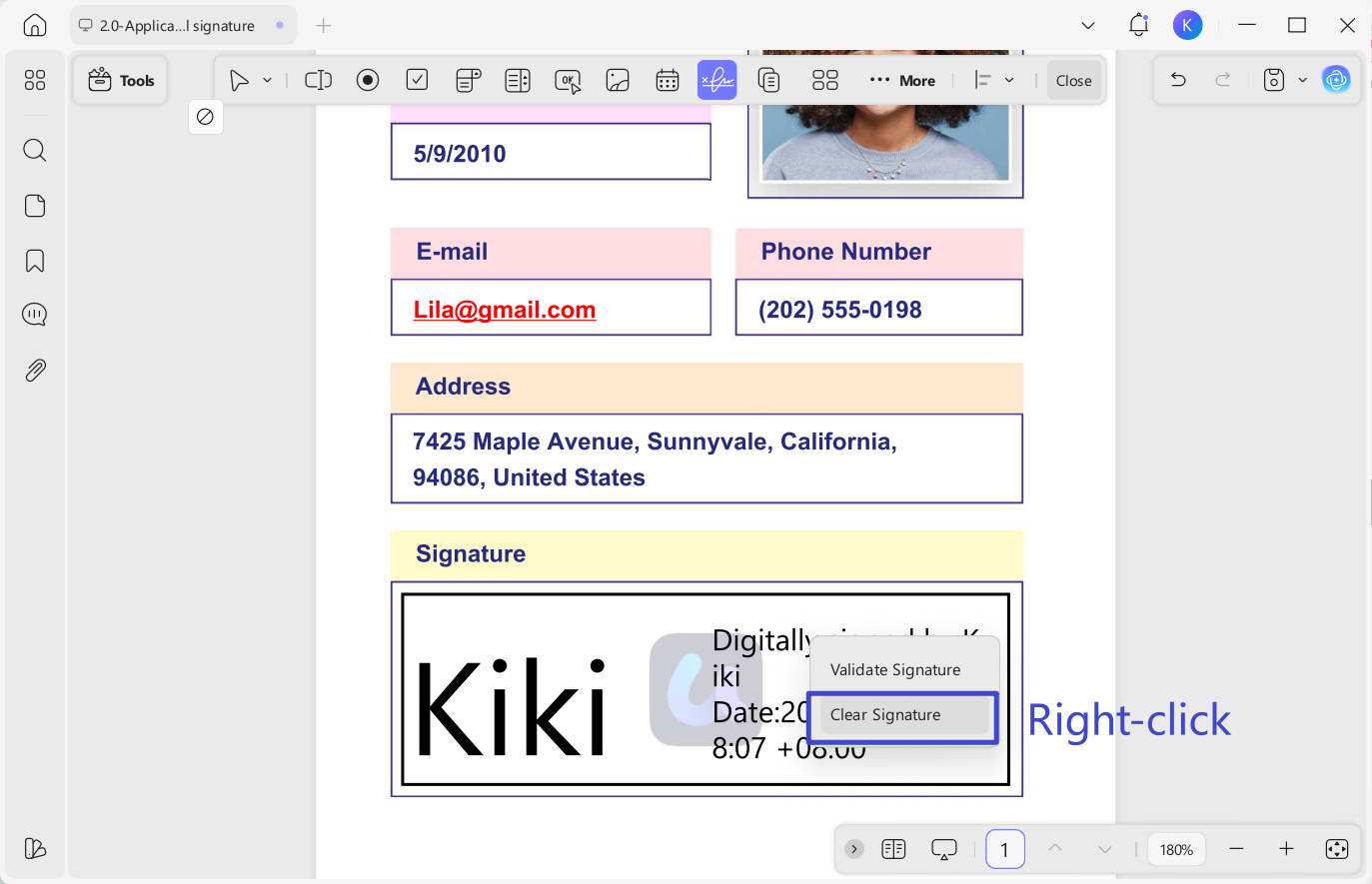
Step 2. Right-click the signature field and choose Clear Signature, then click OK in the dialog. The document leaves its signed, read-only state.
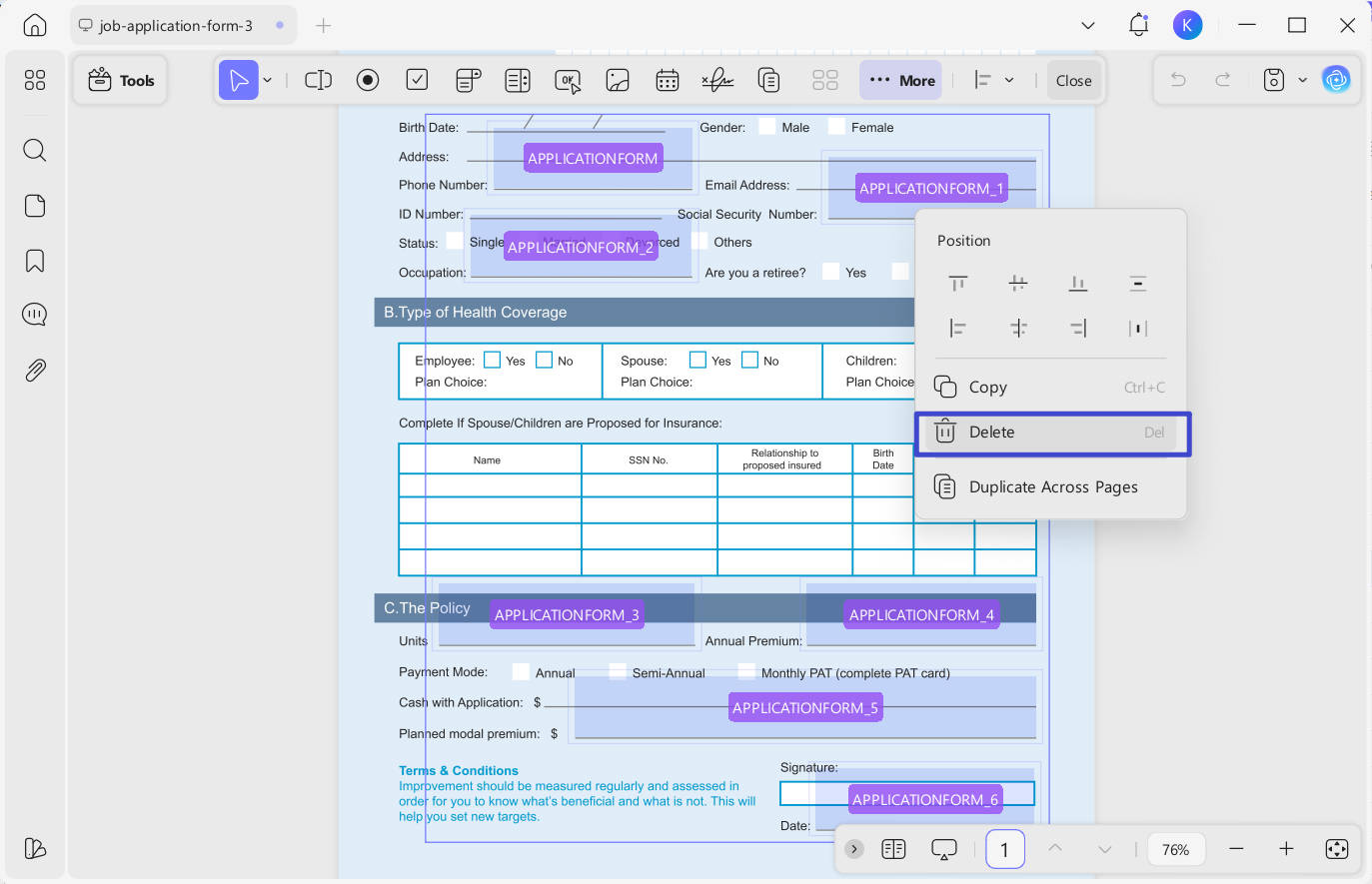
Step 3. To also remove the empty box left behind, stay in Form mode, right-click the field, and choose Delete.
Note:
Best for:
- signed contracts you need to revise on Windows, and reverting a document you signed prematurely.
Not for:
- certified signatures applied by someone else — with those, "Clear Signature" is unavailable regardless of platform because the signer cryptographically locked the content, not because of any app limit. The only clean route there is to request an unsigned copy from whoever holds the original.
Remove a Form-Field Signature (Clear Form)
Sometimes the "signature" is a name typed or entered into a signature or text field on a form — common on onboarding paperwork, quotes, and standard agreements. These are cleared as form data, not deleted as objects.
Step 1. Open the PDF in UPDF and switch to Form mode via the left-side Tools.
Step 2. To clear one field, right-click it and clear its value. To reset the whole form at once, open the ··· (More) menu and choose Clear Form — this wipes every field value in the file to blank in one action.
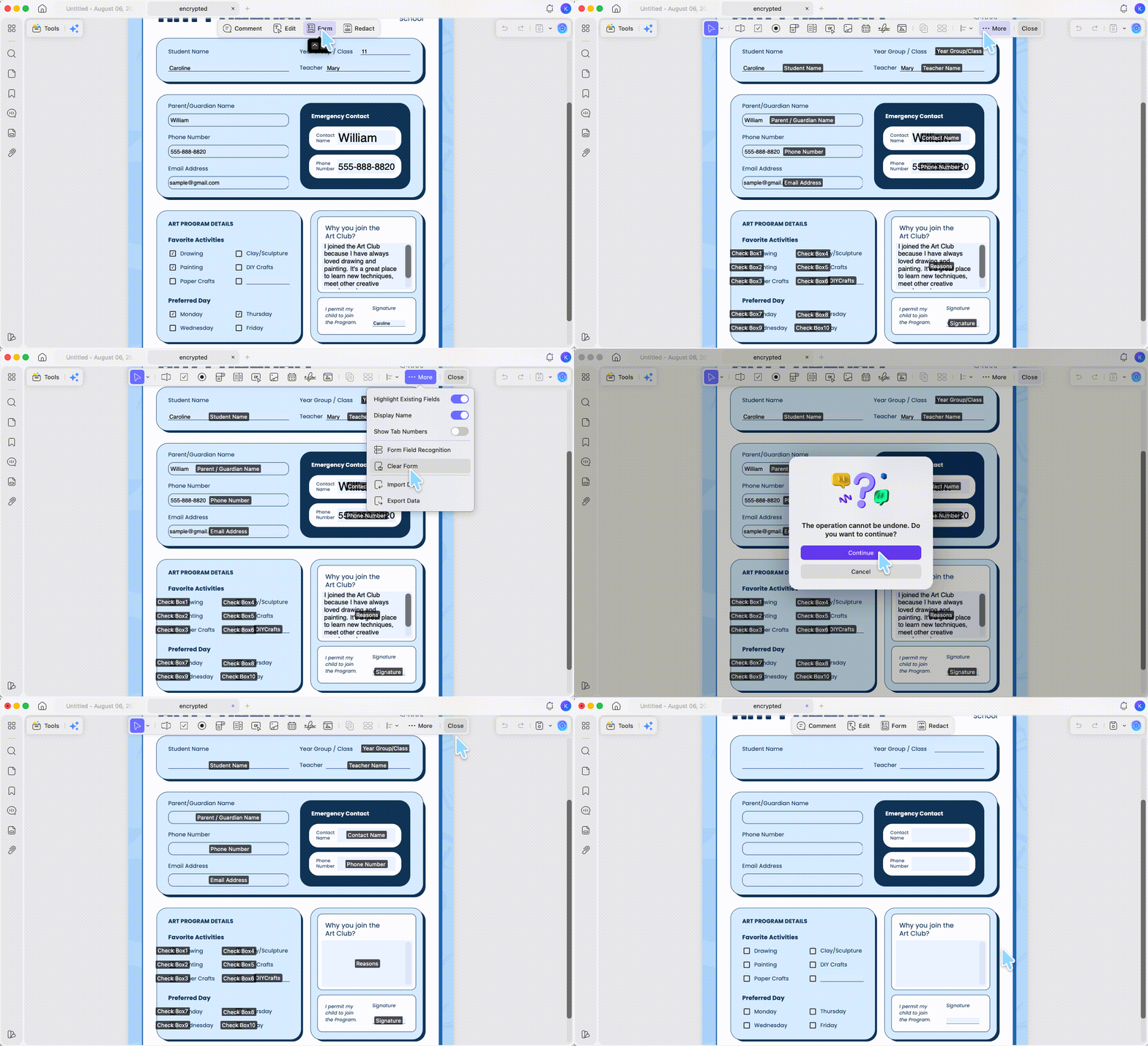
This is also the fastest way to reuse a signed sample as a distributable template: one Clear Form turns a completed copy back into a clean blank. Note that Clear Form clears everything, including any default values — it's all-or-nothing, not selective, so use it when you want a fully blank form rather than to remove a single entry.
Windows • macOS • iOS • Android 100% secure
Part 4: Online vs. Offline — Which Should You Use?
Both approaches remove signatures; they just fit different files and different risk levels. Use this to decide before you upload anything.
| Smallpdf (Online) | UPDF (Offline Desktop) | |
|---|---|---|
| Best signature type | Overlay (drawn, typed, image) | All three — overlay, form-field, and digital (Clear Signature is Windows-only) |
| File stays local? | ✗ — uploaded, auto-deleted ~1 hr | ✓ — nothing leaves your device |
| Digital signatures | ✗ | ✓ Clear on Windows if you're the signer |
| Handles locked/permission files | Unlock tool (with password) | ✓ When you're authorized |
| Reuse as blank template | Manual, field by field | One-click Clear Form |
| Platforms | Any browser | Windows, Mac, iOS, Android |
| Cost | Free tier; paid for heavier use | Free to install; export carries a trial watermark until you upgrade. Pro is US$64.99/year or US$94.99 one-time |
| Best for | Fast overlay removal on any device | Sensitive contracts, digital signatures, template reuse, offline privacy |
The honest rule of thumb: if the signature is a removable overlay and the document isn't confidential, stay online — it's faster. If the file is a contract, contains personal data, carries a digital signature, or needs to become a reusable template, work offline where the file never leaves your machine and you can clear signatures and form fields properly instead of covering them.
UPDF installs free and lets you try overlay removal, clearing a digital signature (Windows), and Clear Form on your own file before deciding anything; export adds a trial watermark until you upgrade, and Pro removes it. Download UPDF for free to try removing a signature on a copy of your file first.
Windows • macOS • iOS • Android 100% secure
Part 5: Edge Cases — When Removal Doesn't Go to Plan
The standard steps cover most files. These are the situations that trip people up, pulled from the questions that actually get asked.
- "It's a scanned contract — the old signature is part of the image." There's no object to select; the signature is pixels. Cover it with a filled shape matching the background (set opacity to 100%), or redact that area if the file will be shared. Don't rely on a white box alone for anything sensitive.
- "I removed it, but the file properties still show it was signed / changed." Some workarounds (like print-to-PDF) produce a new file, not the original — the creation date and history change, and observant recipients can tell. If provenance matters, use an unsigned original instead.
- "I need it gone for privacy before I send it externally." A visible cover-up isn't removal. Delete the signature object outright, or use proper redaction — a handwritten signature is personal data, and a hidden-but-recoverable one defeats the point.
Part 6: FAQs
1. Is it legal to remove a signature from a PDF?
Only remove signatures from documents you own or are authorized to change. Altering a signed agreement you don't control — especially a certified one — can invalidate it and create legal exposure.
2. Does covering a signature with a white box actually remove it?
No. It hides the signature visually but can leave the original data embedded in the file. For privacy, delete the object or redact — don't just cover it.
3. Can I remove a signature from a PDF on my phone?
For overlay signatures, yes — Smallpdf works in a mobile browser, and UPDF has iOS and Android apps. Certified signatures still can't be cleanly removed on any platform.
Conclusion
Removing a signature from a PDF comes down to one question asked first: is it an overlay you can select, a digital (certificate-based) signature, or a name sitting in a form field? Overlays come off online in minutes with a tool like Smallpdf; digital signatures and form-field entries are safer handled offline in UPDF, which removes overlays in Edit/Comment mode, clears a digital signature you applied (on Windows), and resets a whole form to a blank template with Clear Form — all without the file ever leaving your device.
Download UPDF for free to try removing a signature on a copy of your file — installation is free, and Pro features are available when you need watermark-free export or advanced tools.
Windows • macOS • iOS • Android 100% secure





 Lizzy Lozano

 Enrica Taylor