 UPDF
UPDF
 UPDF for Windows
 UPDF for Mac
 UPDF for iPhone/iPad
 UPDF for Android
 Nomostar
 UPDF AI Online
 UPDF Sign
 IvyCraft
 Edit PDF
 Annotate PDF
 Create PDF
 PDF Form
 Edit links
 Convert PDF
 OCR
OCR PDF to Word
 PDF to Image
 PDF to Excel
 Organize PDF
 Merge PDF
 Split PDF
 Crop PDF
 Rotate PDF
 Protect PDF
 Sign PDF
 Redact PDF
 Sanitize PDF
 Remove Security
 Read PDF
 UPDF Cloud
 Compress PDF
 Print PDF
 Batch Process
 About UPDF AI
 UPDF AI Solutions
 AI User Guide
 FAQ about UPDF AI
 Summarize PDF
 Translate PDF
 Chat with PDF
 Chat with AI
 Chat with image
 PDF to Mind Map
 Explain PDF
 PDF AI Tools
 Image AI Tools
 AI Chat Tools
 AI Writing Tools
 AI Study Tools
 AI Working Tools
 Other AI Tools
 AI Bookmark Generation
 AI Bookmark Summary
 AI Watermark Generation
 AI Background Generation
 AI Sticker Generation
 AI Stamp Generation
 AI Editing Suite
 UPDF Copilot
 AI Page Management
 AI Semantic Search
 PDF to Word
 PDF to Excel
 PDF to PowerPoint
 Enterprise Solution
 Enterprise Sign
 Enterprise AI
 Enterprise Plan
 Enterprise User Guide
 Enterprise Webinar
 IT
IT Education
 Construction
 Financial Service
 Healthcare
 Insurance
 Legal
Legal Manufacturing
 Government
 Researchers & PhDs
 Solopreneurs & Freelancers
 Lawyers & Legal Professionals
 Real Estate Agents & Brokers
 Education Solution
 Customer Stories
 User Guide
 UPDF Tricks
 FAQs
FAQs UPDF Reviews
 Download Center
 Blog
Blog Newsroom
 Tech Spec
 Updates
 UPDF vs. Adobe Acrobat
 UPDF vs. Foxit
 UPDF vs. PDF Expert

A binding gutter can swallow the first character of every line and disrupt comfortable reading. Scanned pages may arrive ringed with grey shadows that make otherwise clean documents look untidy. An e-reader can render a report at postage-stamp size, creating essentially the same underlying problem. Each issue is fixed by resizing the page frame without changing the content sitting inside.
Therefore, a PDF margin editor modifies, expands, crops, or removes whitespace around pages in digital documents. Its purpose is to improve readability, correct printing alignment, and create cleaner formatting for e-readers. Choosing among tools depends on file size limits, security requirements, and overall layout complexity instead.
Need to precisely adjust PDF margins, remove white space, or manage document layouts effortlessly? Download UPDF for free today!
Windows • macOS • iOS • Android 100% secure
Quick Comparison Matrix: Choose the Right PDF Margin Editor
These 5 tools offer distinct strengths, making the right PDF margin adjuster choice easier. The table below compares their key capabilities, limitations, pricing, ratings, and ideal uses:
| PDF Margin Editor | Best For | Supported Units & Customization | Free Tier / Limits | Final Recommendation |
| UPDF (Desktop) | Professional editing, batch work, and precise controls | Points, picas, mm, cm, inches; page ranges and margin removal | Unlimited free trial available; cost-effective license | 4.9/5 (Top Pick) |
| Online2PDF | Quick web-based multi-file adjustments | Basic sizing; no proportion constraint | 150 MB per file, 200 MB total, 30 files | 4.2/5 |
| DeftPDF | Simple online single-file resizing | Inches, mm, cm; no custom page ranges | 1 file, 50 MB on the free tier | 3.9/5 |
| Adobe Acrobat Pro | Enterprise pre-press and legacy workflows | Advanced page box and print tools | Expensive recurring subscription | 4.3/5 |
| Foxit PDF Editor | Corporate Windows environments | Standard page layout adjustments | Commercial license required | 4.2/5 |
In-Depth Reviews of the Best PDF Margin Editors
Each PDF margin editor review examines practical controls, capabilities, and everyday limitations. Recommendation scores then balance functionality, pricing, convenience, and real-world usability.
1. UPDF – Best All-in-One PDF Margin Editor & Layout Manager
Best For:
UPDF provides complete margin controls, letting users adjust all 4 page sides independently with precision. Its Crop tool includes a live preview, making margin changes easier and reducing unnecessary guesswork. Now, let's examine the 4 key parameters and understand how each improves margin editing workflows.
- Unit Flexibility: Select points, picas, millimeters, centimeters, or inches for different printing and office workflows.
- Constrain Proportions: Lock all 4 margins together, preventing distortion when adjusting individual page sides manually.
- Page Range Targeting: Apply changes to current, all, odd, even, or custom pages like 1 to 5 easily.
- Remove White Margins: UPDF automatically detects content edges and removes scanner whitespace without manual measurements.
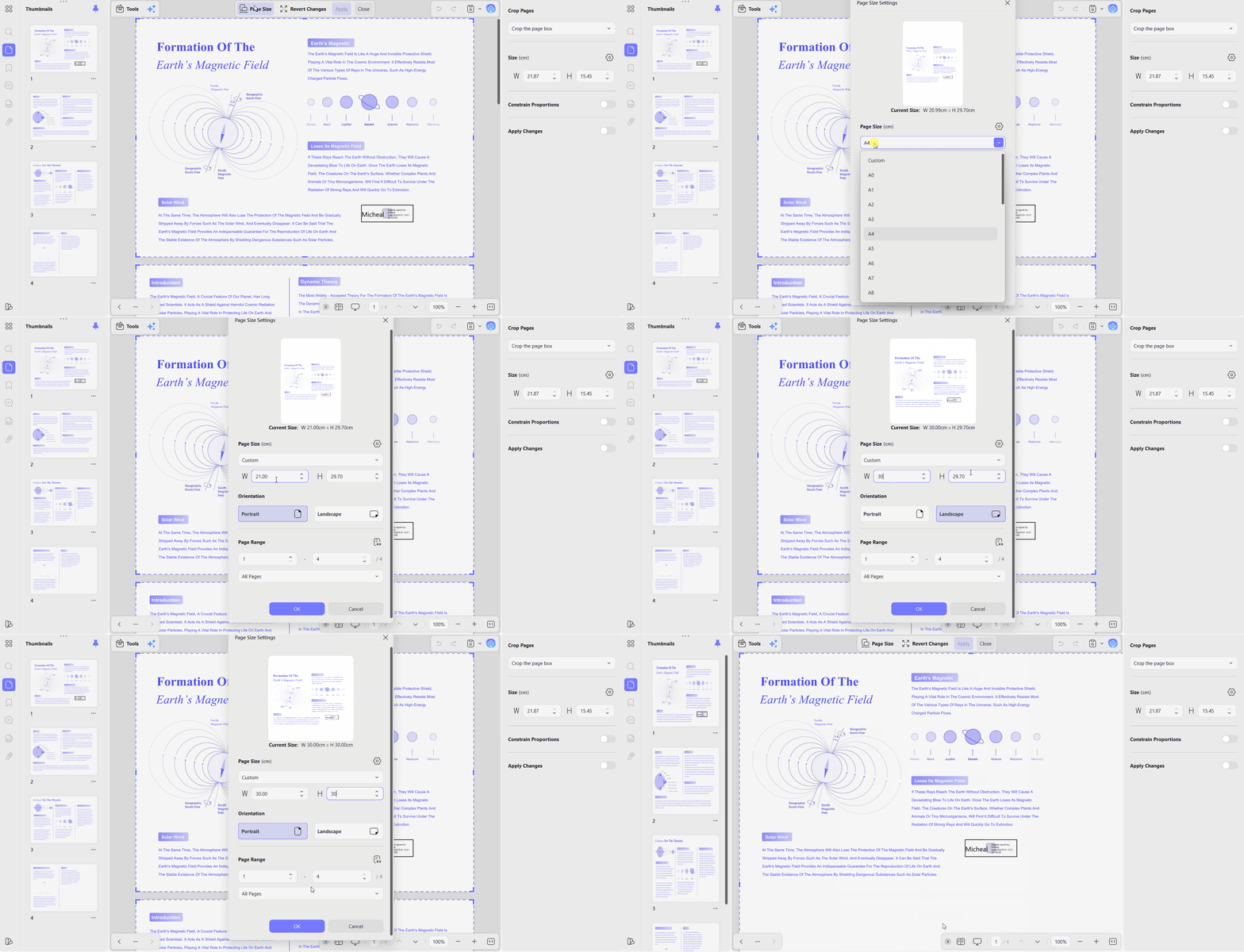
Cropping changes visible page areas but does not permanently remove hidden confidential content underneath. UPDF adjusts the formal page box, unlike browser scripts that change display layers only. For whitespace extraction, see remove margin from PDF for more details and guidance.
Batch merging combines separate files, allowing one margin adjustment before splitting them individually again. These margin tools also connect with UPDF's wider ecosystem for advanced document restructuring. The AI Page Management Agent manages page organization and layouts across longer documents.
Pros:
- Automatic white margin removal with precise page adjustment.
- Custom, odd, even, and all-page range targeting options.
- Works offline, keeping confidential files away from servers.
- One license supports Windows, Mac, iOS, and Android.
Cons:
- Requires installation, unlike the browser-based options below.
User Rating
- G2: 4.5/5
Recommendation Score
- 4.9/5 (Editor's Choice)
2. Online2PDF – Best Free Web-Based Margin Adjuster
Best For:
Online2PDF ranks highly for online margin searches and handles basic page resizing quite well. Batch processing is its strongest feature, letting multiple files move together in one pass. However, two important limitations separate this PDF margins editor from more capable desktop tools.
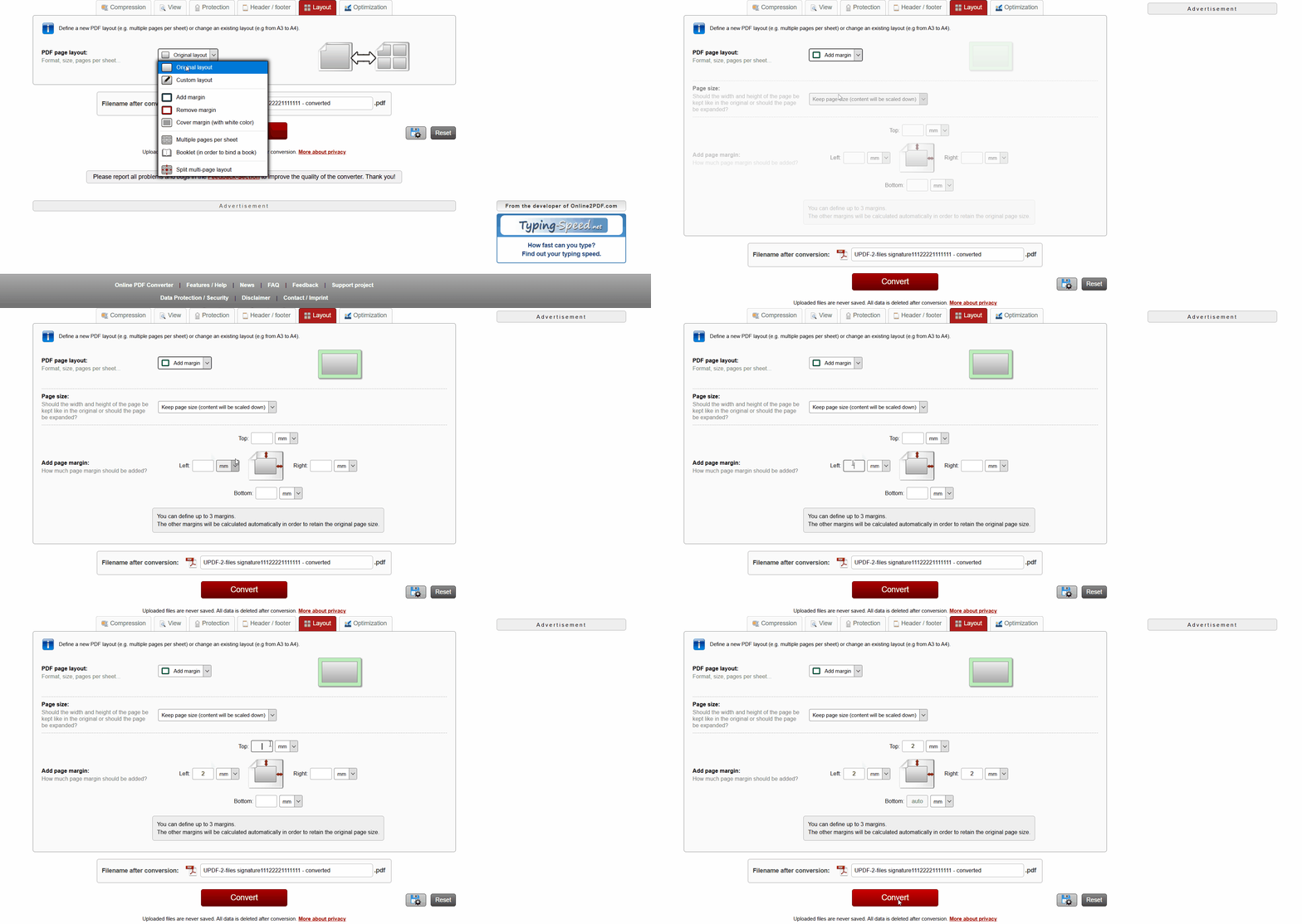
It lacks Constrain Proportions, requiring users to match four margin values manually for symmetry. See our add margin to PDF guide for layout expansion techniques and their parameters.
Pros:
- Free browser access requires no installation or account.
- Batch processing supports up to 30 files simultaneously.
- Dedicated margin page provides flexible layout adjustment options.
Cons:
- No proportion locking makes symmetrical margin adjustments manual.
- Limits files to 150 MB each, 200 MB combined.
- Supports 500 pages, reduced to 100 with OCR.
User Rating
- Trustpilot: 4.4/5
Recommendation Score
- 4.2/5
3. DeftPDF – Best Lightweight Online Resizer
Best For:
This tool offers a clean interface for resizing pages, adding padding, and handling small jobs quickly. Margins stay per side in one panel, making the task easy to manage. However, the PDF margin editor has limited units, excluding points and picas entirely. Selective page range editing is unavailable, so changes apply across the entire document.
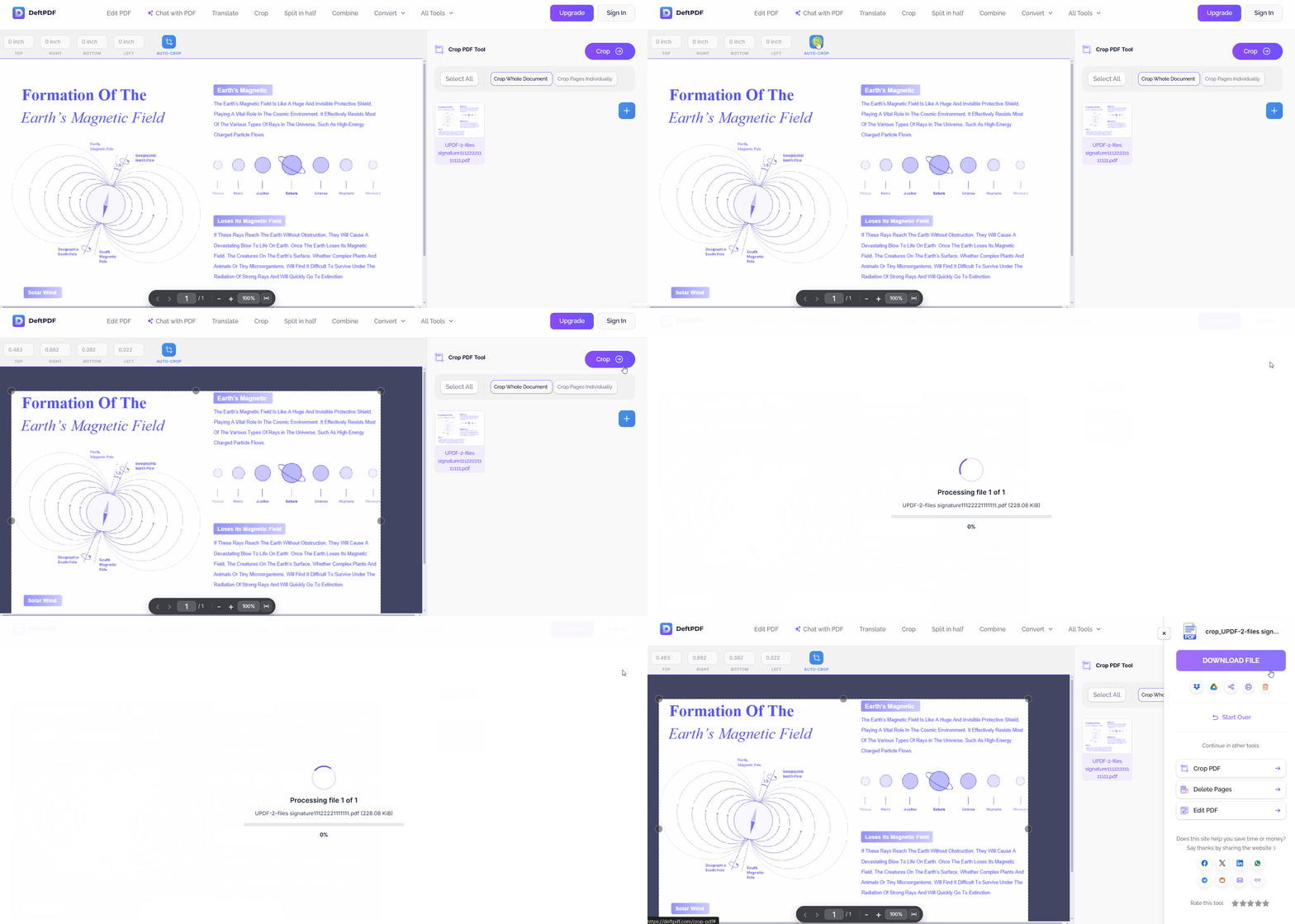
Pros:
- Clean interface requires very little learning for users.
- Fast execution handles small documents efficiently.
- Per-side margin entry keeps controls on one screen.
Cons:
- Free tier limits processing to 1 file, 50 MB.
- Premium supports 10 files with a 4 GB limit.
- Only 3 measurement units, with no points or picas.
User Rating
- G2: 4.6/5
Recommendation Score
- 3.9/5
4. Adobe Acrobat Pro – Best Enterprise-Grade Pre-Press Tool
Best For:
Acrobat Pro provides deeper page geometry controls through its print production and crop pages suites. Its Set Page Boxes tool handles MediaBox, CropBox, BleedBox, TrimBox, and ArtBox individually. These advanced controls benefit commercial printing but exceed what most basic margin editing requires.
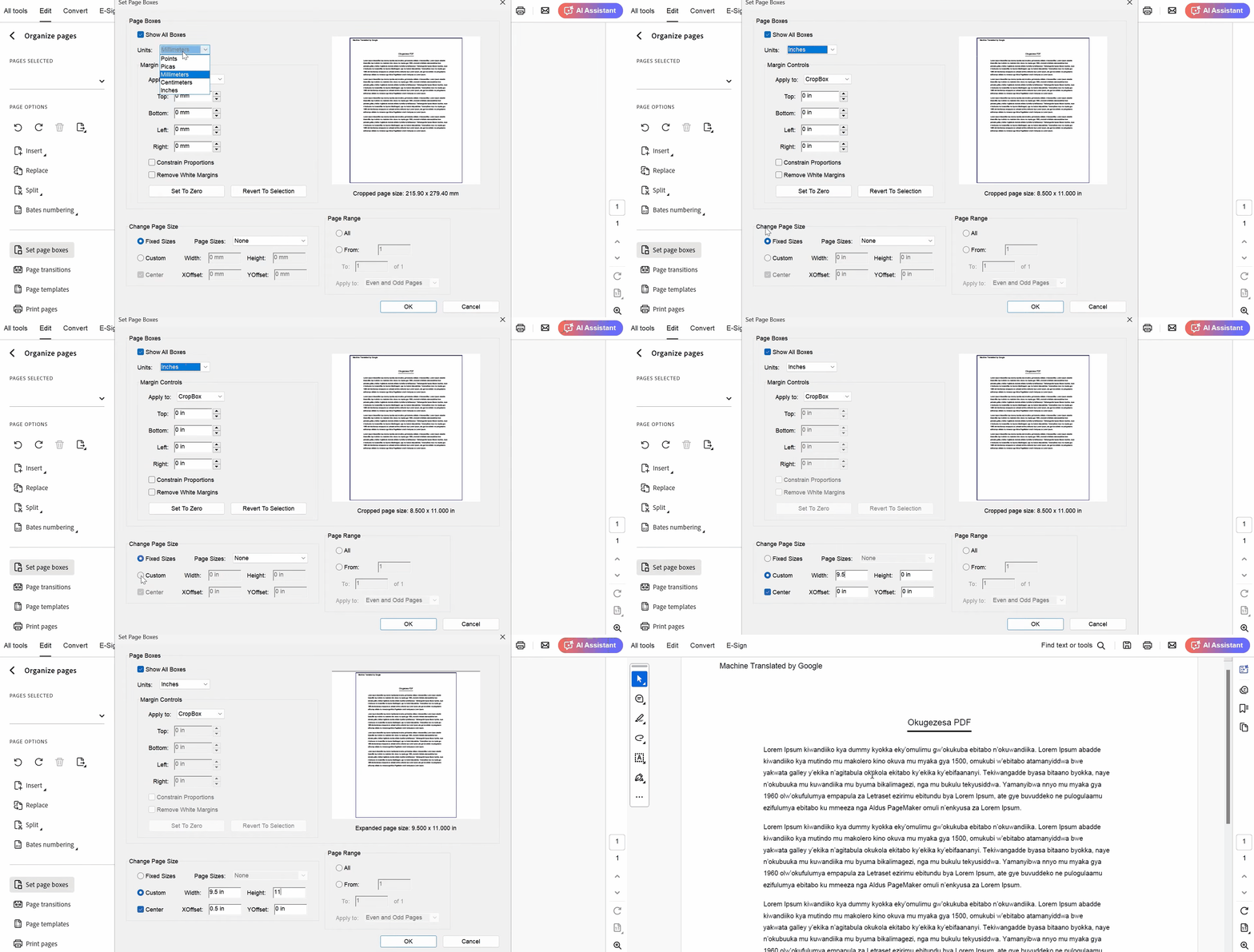
However, simple margin adjustments require navigating nested tool panes, making the process slower than necessary. Its recurring subscription makes lighter alternatives like UPDF more practical, while how to print PDF without margins covers print-specific layout questions.
Pros
- Professional pre-press tools provide advanced page box controls.
- Industry-standard formats support enterprise deployment and workflows.
- Automatic white margin removal complements manual adjustment controls.
Cons
- Expensive US$239.88/yr subscription makes occasional layout work costly.
- Cluttered interface creates a steep learning curve.
- Margin controls require navigating through several menus.
User Rating
- G2: 4.5/5
Recommendation Score
- 4.3/5
5. Foxit PDF Editor – Best Traditional Windows Desktop Alternative
Best For:
Foxit provides document organization and page layout adjustment comparable to Acrobat on Windows. Corporate deployment remains dependable, with mature administration options supporting established business workflows well. However, its PDF margin adjuster feels dated compared with newer editors like UPDF.
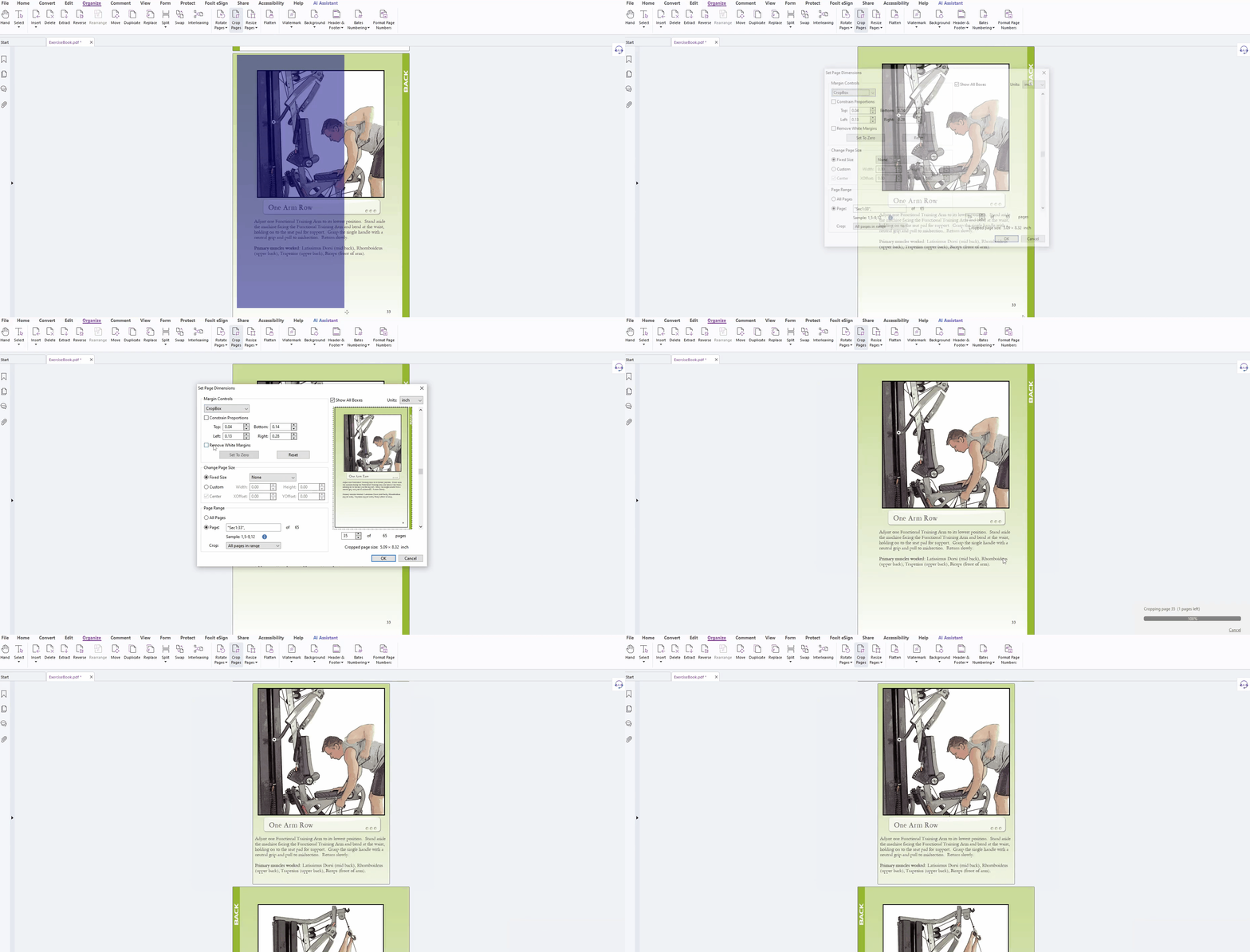
Its adjustment menus lack real-time visual previews and flexible measurement units for users. Finalizing changes often requires several dialog confirmations instead of one simple panel workflow. See our Adobe Acrobat vs UPDF breakdown.
Pros:
- Stable offline performance works across Windows and macOS.
- Solid enterprise deployment and administration options support business environments.
- Broad document organization tools extend beyond margin editing.
Cons:
- Paid commercial license starts around $10.99 per user monthly.
- Dated interface design makes layout tasks less intuitive.
- Less flexible units and no live margin preview.
User Rating
- Trustpilot: 3.1/5
Recommendation Score
- 3.9/5
Across all 5 PDF margin editors, the separation comes down to unit precision, page targeting, and whether your document must be uploaded anywhere.
Want to experience precise margin adjustments, custom units, and advanced page organization without software bloat? Download UPDF now!
Windows • macOS • iOS • Android 100% secure
Frequently Asked Questions
Can you edit margins in a PDF?
Yes, using either specialized desktop software such as UPDF or a browser-based tool. Desktop editors allow precise measurements in points, centimeters, or inches and can apply the change to specific page ranges. Online tools handle basic resizing but rarely offer that level of targeting.
How can I add margins to a PDF page?
Open the document in UPDF and access its page organization or crop tools first. Expanding the page boundaries or canvas creates whitespace for binding gutters or note-taking columns.
How do I reduce margins in a PDF file?
Reducing margins means cropping the page or adjusting the margin parameters inward. In UPDF, each of the four side measurements can be pulled inward independently. The Remove White Margins option instead detects and trims surrounding whitespace automatically to maximize the text area.
Is there a free online tool to edit PDF margins?
Yes, Online2PDF and DeftPDF both adjust margins in a browser at no cost. Both apply firm file size caps ranging from 50 MB to 150 MB. Neither offers proportion locking or custom page range control, so they suit simple documents rather than complex layouts.
Conclusion
To conclude, the right PDF margin editor depends on your security, privacy, and precision requirements. Online tools provide quick fixes for small, non-sensitive documents when files meet their size limits. A dedicated desktop application like UPDF offers five measurement units, page targeting, and white margin removal. Its broader layout management also supports document organization, as explained in our PDF organizer guide.
Ready to take total control of your document layouts? Download UPDF for free or explore advanced features today!
Windows • macOS • iOS • Android 100% secure



 Enola Davis
 Lizzy Lozano
 Enrica Taylor