 UPDF
UPDF
 UPDF for Windows
 UPDF for Mac
 UPDF for iPhone/iPad
 UPDF for Android
 UPDF AI Online
 UPDF Sign
 Edit PDF
 Annotate PDF
 Create PDF
 PDF Form
 Edit links
 Convert PDF
 OCR
OCR PDF to Word
 PDF to Image
 PDF to Excel
 Organize PDF
 Merge PDF
 Split PDF
 Crop PDF
 Rotate PDF
 Protect PDF
 Sign PDF
 Redact PDF
 Sanitize PDF
 Remove Security
 Read PDF
 UPDF Cloud
 Compress PDF
 Print PDF
 Batch Process
 About UPDF AI
 UPDF AI Solutions
 AI User Guide
 FAQ about UPDF AI
 Summarize PDF
 Translate PDF
 Chat with PDF
 Chat with AI
 Chat with image
 PDF to Mind Map
 Explain PDF
 PDF AI Tools
 Image AI Tools
 AI Chat Tools
 AI Writing Tools
 AI Study Tools
 AI Working Tools
 Other AI Tools
 PDF to Word
 PDF to Excel
 PDF to PowerPoint
 Enterprise Solution
 Enterprise Sign
 Enterprise AI
 Enterprise Plan
 Enterprise User Guide
 Enterprise Webinar
 Banking
 Healthcare
 Insurance
 Legal
Legal Manufacturing
 Government
 Education Solution
 Customer Stories
 User Guide
 UPDF Tricks
 FAQs
FAQs UPDF Reviews
 Download Center
 Blog
Blog Newsroom
 Tech Spec
 Updates
 UPDF vs. Adobe Acrobat
 UPDF vs. Foxit
 UPDF vs. PDF Expert

Do you only have A4 documents, but your printer only prints A3 paper? Or you need to enlarge an A4 document to A3 size for presentation or review?
Converting from A4 to A3 is not simply a matter of enlarging the document (doubling the area); it also involves issues such as whether to stretch the content, whether to preserve the original proportions.
So this article will introduce everything from basic print settings to professional PDF editing software (UPDF), and finally, your issues will be easily solved.
Windows • macOS • iOS • Android 100% secure
Part 1. Basic Tips for A4 and A3
- A4:210mm × 297mm
- A3:297mm × 420mm
- Area relationship: One A3 sheet is exactly equal to two A4 sheets placed side by side (with the long sides of the A4 sheets aligned)
Scaling from A4 to A3 linearly results in a scaling factor of approximately 141% (because √2 ≈ 1.414).
Note: If printed at 100%, A4 content will only occupy a small portion of the A3 paper, leaving large blank spaces around the edges.
Part 2. 3 Easy Paths for Converting A4 to A3
If you have a single A4 PDF file of a complex visual or dataset, then you can convert A4 PDF to A3 using different tools. Let's see how to convert A4 to A3 according to your needs.
Method 1: Achieving "Enlarged Printing" via Print Settings (Simplest, No Change to the Original File)
Suitable Scenarios: Temporary printing needs, no need to permanently modify the PDF file.
Steps:
1: Open the PDF, File > Print (Ctrl+P) --- Select printer (physical printer or Adobe PDF virtual printer) --- Paper Size Selection: A3.
2: Page Scaling Selection: "Fit to Printable Area" or "Scale to Paper Size": Automatically enlarges A4 content to fill A3 paper.
3: "Custom Scaling": Manually enter 141% for precise enlargement.
4: Click Print.
Advantages and Disadvantages:
Advantages: Fast, simple, no change to the original file.
Disadvantages: Dependent on print driver; results may vary slightly depending on the printer; if using virtual printing, a new file will be generated.
Method 2: Permanently Enlarge Pages Using UPDF (Preserving the Original File Structure)
Applicable scenario: When you need to generate a permanent new A3-sized PDF file and want the content to fill the entire page.
UPDF is a powerful PDF editor and converter tool that can take your A4 and convert it into A3 paper dimensions: 11.7 x 16.5 inches. All it requires is a few simple clicks to print A4 to A3 while preserving all details. On top of that, UPDF allows you to crop, rotate, and resize individual PDF pages to further enhance the document quality the way you want.
The key features of UPDF are as follows:
- Convert/resize/scale A4 to A3 PDF with simple clicks.
- Crop, resize, and rotate individual PDF pages.
- Shrink oversized pages with one click.
- Customizable printer settings, such as print in grayscale, custom page printing, paper orientation, and much more.
- Convert A4 to other formats as well, including A5, B4, B5, tabloid, letter, etc.
- Batch resize multiple PDFs from A4 to A3.
- One-click detection of inconsistent page sizes in PDF files and one-click repair.
Windows • macOS • iOS • Android 100% secure
Let's now see UPDF in action and list the steps to resize A4 to A3 PDF with it.
Step 1. Download and launch UPDF on your Windows/Mac computer. Click "Open File" from the home screen and select the A4 PDF.
Step 2. Click the narrow next to Save > Print to open the printer settings.
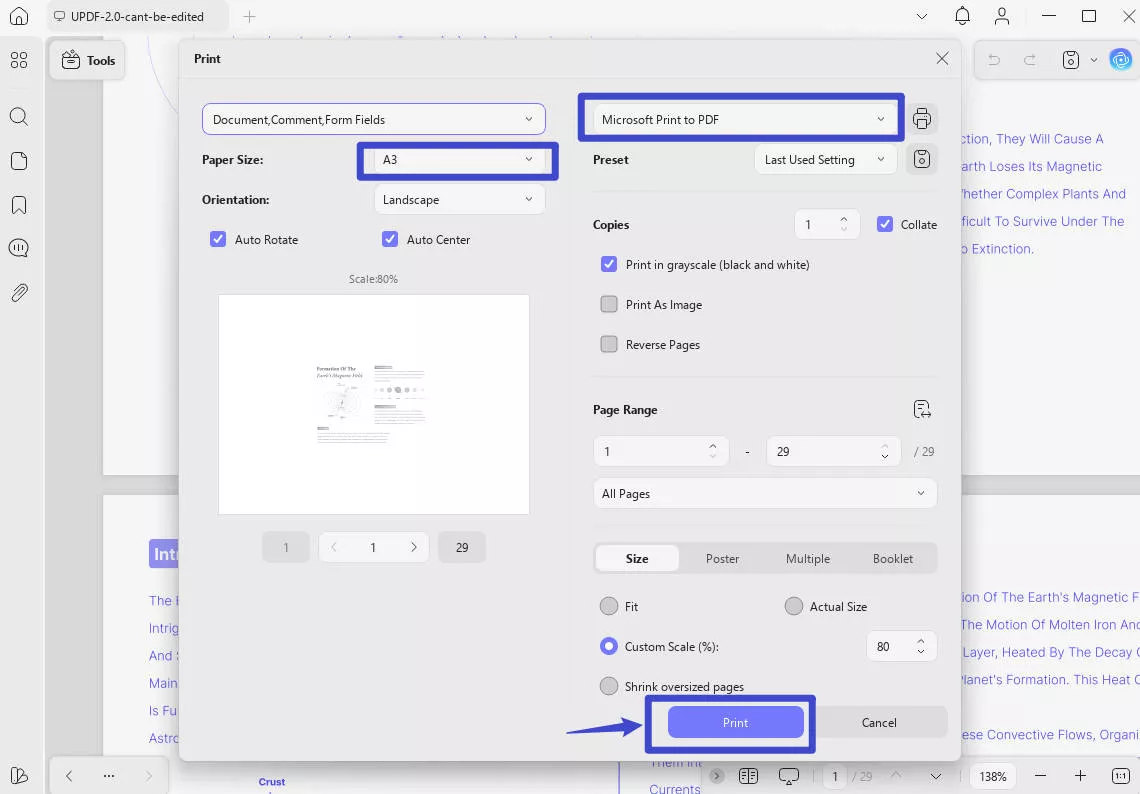
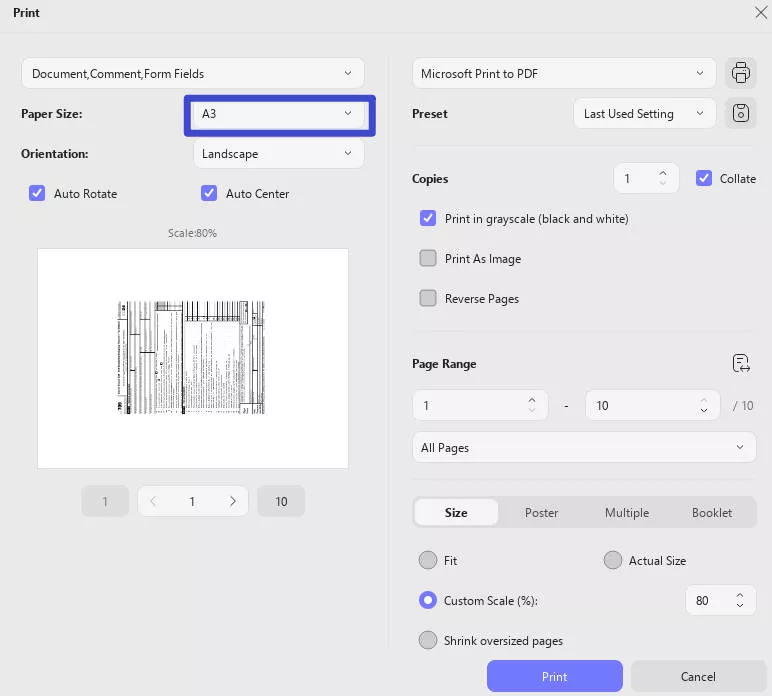
Step 3. Under the "Paper Size" section, select "A3".
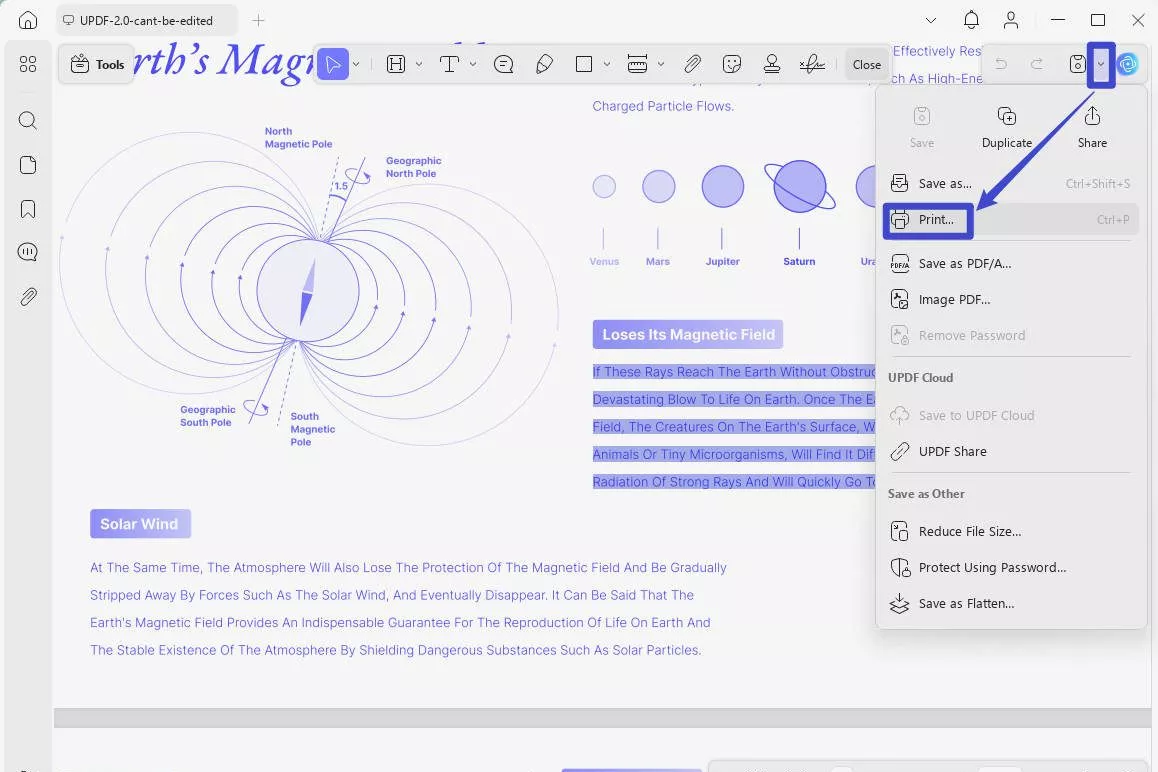
Step 4. Customize other printer settings the way you want, such as orientation, grayscale print, shrink the oversized page, etc. Once done, select "Microsoft Print to PDF" and then click the "Print" button.
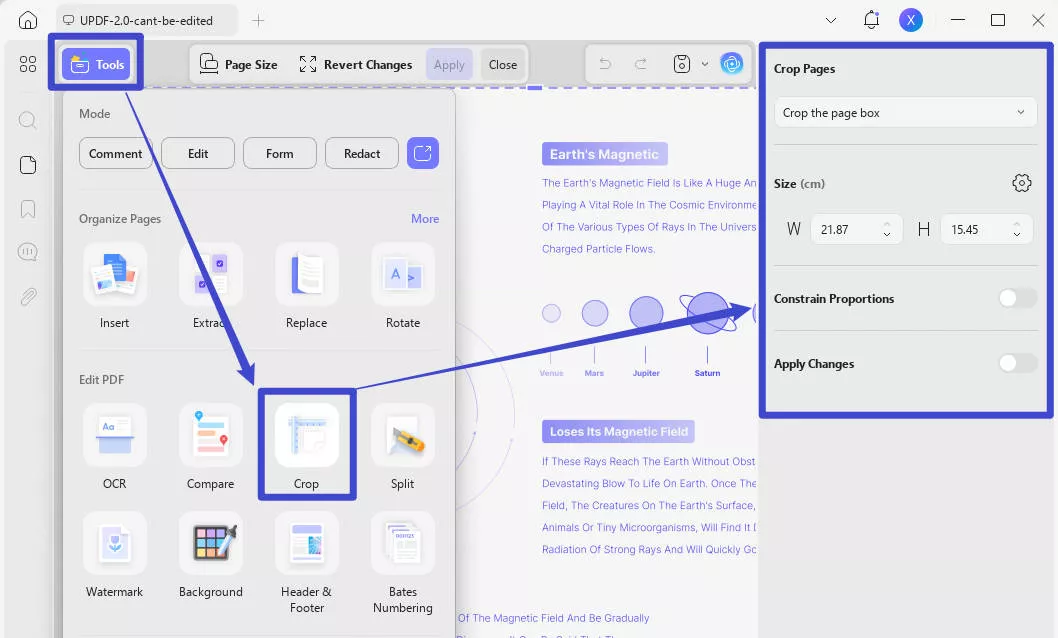
Step 5. To crop or resize selective pages further, click the "Crop" icon in "Tools" from the left sidebar and go to the page you want to resize. Then resize/crop the page the way you want.
That's it! This way, UPDF offers an intuitive approach to convert A4 PDF to A3 effortlessly. Besides resizing a single A4 PDF, you can do the same for multiple PDFs at once with UPDF. The next part talks in detail about it.
Method 3: Convert Two or More A4 Pages into A3
Applicable Scenarios: Sometimes, there is a need to resize multiple A4 PDFs to A3. For instance, you may have several A4-sized drawings of a project that you now want to print in A3 for effective presentation. Here again, UPDF comes into action.
UPDF has a dedicated "Batch Process" feature with which you can resize and print multiple A4 PDFs to A3 at once. All you have to do is select all the A4 PDFs and then set the paper size as A3. The batch process feature even allows you to select the entire folder instead of selecting files one by one.
Windows • macOS • iOS • Android 100% secure
Here are the steps to batch print multiple PDFs (A4 to A3) with UPDF:
Step 1. Launch UPDF and click "Tools" from the main home screen.
Step 2. From the list of batch process activities you can do, select the "Print" option.
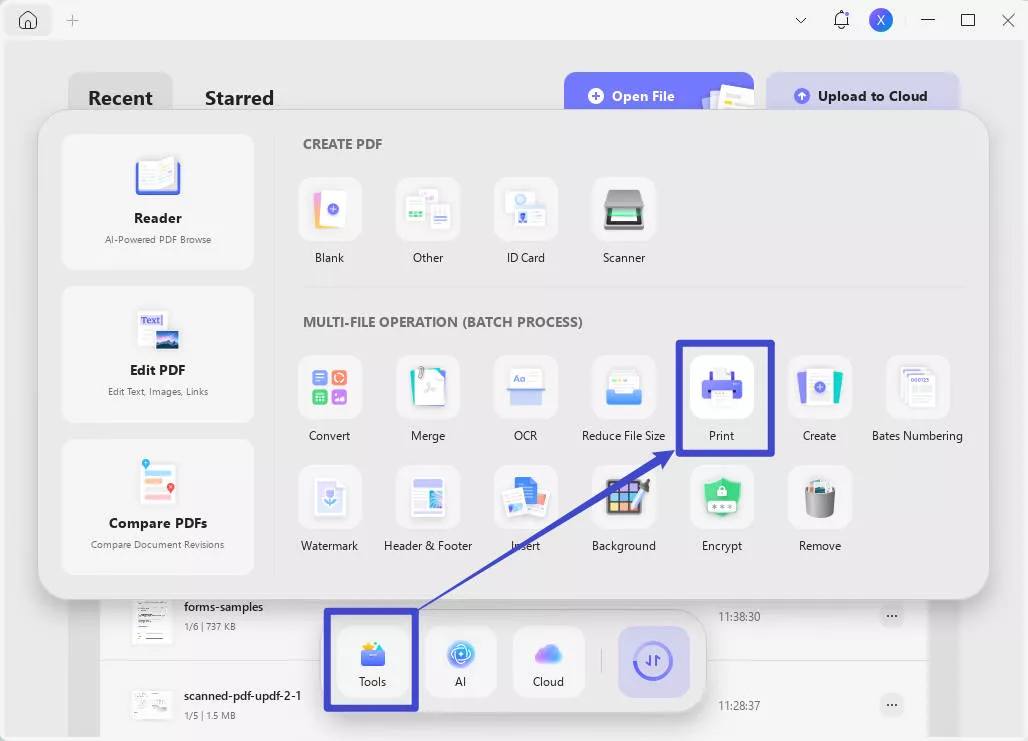
Step 3. Click "Add File" and select the PDFs you want to convert from A4 to A3.
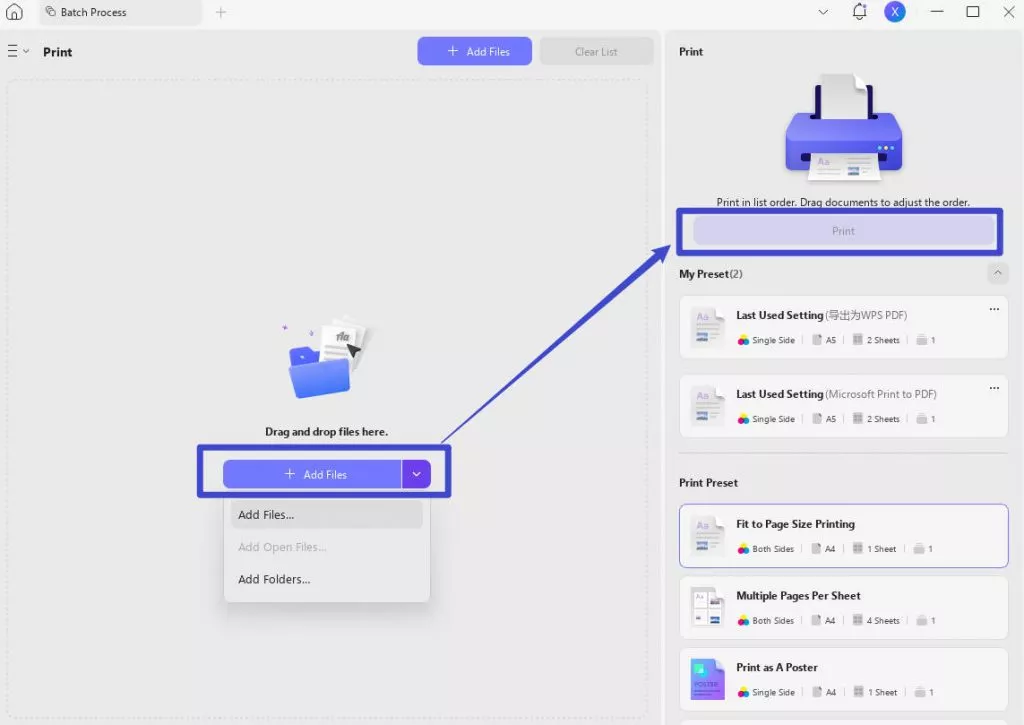
Step 4. Select "A3" in "Page Size". Then click "Print" to print the PDFs.
This way, you can easily print multiple A4 PDFs to A3. Simply put, UPDF is your best companion to convert/resize/scale A4 to A3 for single or multiple PDFs. Therefore, download UPDF and get the A3 formatted documents conveniently.
Part 3. FAQs About A4 to A3
Q1. How can I resize an A4 MS document to print to A3 paper?
You can easily resize your A4 MS document to print to A3 paper, as follows:
- Open the document in MS Word and click Ctrl + P.
- In the print settings window, set the paper size as "A3" and print the document.
Q2. What is the scale for A4 to A3?
The scale for A4 to A3 is as follows:
- A4: An A4 paper measures 210 x 297 millimeters (8.27 x 11.69 inches). It is commonly used for documents, letters, etc.
- A3: An A3 paper measures 297 x 420 millimeters (11.69 x 16.54 inches). It is commonly used for brochures, posters, etc.
In short, A3 is twice the size of A4.
Q3. How many A4 fit into A3?
An A4 paper measures 210 x 297 millimeters (8.27 x 11.69 inches), while an A3 paper measures 297 x 420 millimeters (11.69 x 16.54 inches). When an A3 paper is cut in half, it becomes two A4 paper sheets. Therefore, two A4 papers can fit into one A3 paper.
Q4. How can I resize A3 PDF to A4?
You can easily resize A3 PDF to A4 with UPDF, as follows:
- Open the A3 PDF with UPDF and click Ctrl + P.
- Choose the narrow next to "Save" and select "Print..."
- Set the "Paper Size" as A4, select "Microsoft Print to PDF", and click "Print".
Once done, you will get an A4-sized PDF instantly.
Conclusion
The need to convert A4 to A3 is common whenever the A4 paper fails to demonstrate a detailed picture or lengthy datasets. By resizing A4 PDF to A3, you can effectively increase the size of the pictures, objects (arrows, stripes, squares), and other elements.
For that, UPDF is your ultimate solution to effortlessly converting, scaling, and resizing A4 to A3 PDF documents. Therefore, follow the steps discussed in this guide and leverage UPDF to print A4 to A3 conveniently.
Windows • macOS • iOS • Android 100% secure





 Enya Moore
 Enrica Taylor
 Delia Meyer
 Enola Miller
