 UPDF
 UPDF for Windows
 UPDF for Mac
 UPDF for iPhone/iPad
 UPDF for Android
 Nomostar
 UPDF AI Online
 UPDF Sign
 IvyCraft
 Edit PDF
 Annotate PDF
 Create PDF
 PDF Form
 Edit links
 Convert PDF
 OCR
 PDF to Word
 PDF to Image
 PDF to Excel
 Organize PDF
 Merge PDF
 Split PDF
 Crop PDF
 Rotate PDF
 Protect PDF
 Sign PDF
 Redact PDF
 Sanitize PDF
 Remove Security
 Read PDF
 UPDF Cloud
 Compress PDF
 Print PDF
 Batch Process

 About UPDF AI
 UPDF AI Solutions
 AI User Guide
 FAQ about UPDF AI
 Summarize PDF
 Translate PDF
 Chat with PDF
 Chat with AI
 Chat with image
 PDF to Mind Map
 Explain PDF
 PDF AI Tools
 Image AI Tools
 AI Chat Tools
 AI Writing Tools
 AI Study Tools
 AI Working Tools
 Other AI Tools
 AI Bookmark Generation
 AI Bookmark Summary
 AI Watermark Generation
 AI Background Generation
 AI Sticker Generation
 AI Stamp Generation
 AI Editing Suite
 UPDF Copilot
 AI Page Management
 AI Semantic Search
 PDF to Word
 PDF to Excel
 PDF to PowerPoint
 Enterprise Solution
 Enterprise Sign
 Enterprise AI
 Enterprise Plan
 Enterprise User Guide
 Enterprise Webinar
 IT
 Education
 Construction
 Financial Service
 Healthcare
 Insurance
 Legal
 Manufacturing
 Government
 Researchers & PhDs
 Solopreneurs & Freelancers
 Lawyers & Legal Professionals
 Real Estate Agents & Brokers
 Education Solution
 Customer Stories
 User Guide
 UPDF Tricks
 FAQs
 UPDF Reviews
 Download Center
 Blog
 Newsroom
 Tech Spec
 Updates
 UPDF vs. Adobe Acrobat
 UPDF vs. Foxit
 UPDF vs. PDF Expert


UPDF is a PDF editor for reading, revising, converting, and organizing PDF documents, with OCR, batch processing, and optional AI tools for working with their content. Ulet is an all-in-one office suite that combines document, spreadsheet, presentation, PDF, and Markdown editors in a desktop workspace. Both are developed by Superace and support different parts of document work.
Ulet also edits and converts PDFs, recognizes scanned text, fills forms, and organizes pages. That raises a reasonable question: if one application handles five file types and already includes PDF tools, what does a dedicated PDF editor add? The answer lies in the work you can do with a file after opening, reading, or making a basic correction.
The following sections explain the shared functions, the PDF tasks that give UPDF a distinct role, and the office work Ulet brings together. They also show when a single purchase covers your needs, when the two applications complement each other, and how those differences relate to price.
Part 1. Five Editors and a PDF Toolkit Solve Different Problems
Ulet gives you breadth: you can write a proposal, calculate its costs, build slides, keep Markdown notes, and handle the accompanying PDFs in one application. UPDF adds choices within PDF work: how content is recovered, how scans become usable, how repeated operations run across files, and where you can continue working.
| A familiar function | What you may actually need | Why the distinction matters |
|---|---|---|
| Convert PDF to PowerPoint | Display the original pages, or recover text that can be rewritten | An image of a slide and an editable slide support different next steps. |
| Run OCR | Search a scan, correct its wording, or rebuild text and pictures | Recognizing words is the beginning; the output determines how you can use them. |
| Process PDF files | Finish one document, or apply the same operation to a file list | Repeated setup becomes part of the workload as file volume grows. |
| Edit office documents | Create and maintain DOCX, XLSX, PPTX, and Markdown source files | A PDF editor and a set of native office editors serve different stages of creation. |
Both products cover PDF text editing, annotation, form filling, page organization, and version comparison. The reason to choose UPDF is a further requirement that those shared functions do not settle.
Part 2. What the Additional PDF Capabilities in UPDF Buy You
You Need to Edit a Presentation Recovered From a PDF
Suppose a client sends a presentation as a PDF and asks you to update its headings and figures. You have the final pages, but not the PowerPoint source. Your job is to recover material that can be changed.
Ulet's PDF-to-PowerPoint conversion produces page images. Ulet can edit native slides, but a PDF page imported as an image does not become a collection of editable text boxes. UPDF offers an editable PowerPoint output mode as well as an image-based mode.
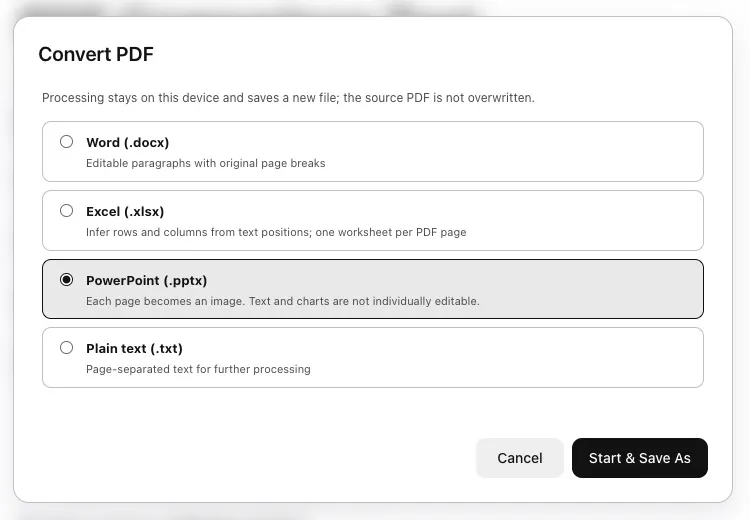
UPDF’s editable conversion can remove part of the work of retyping and reconstructing a presentation. That benefit comes from recovering the PDF’s content as editable objects. It remains relevant even when you already have a slide editor. The PDF conversion options let you choose the output for the next job.
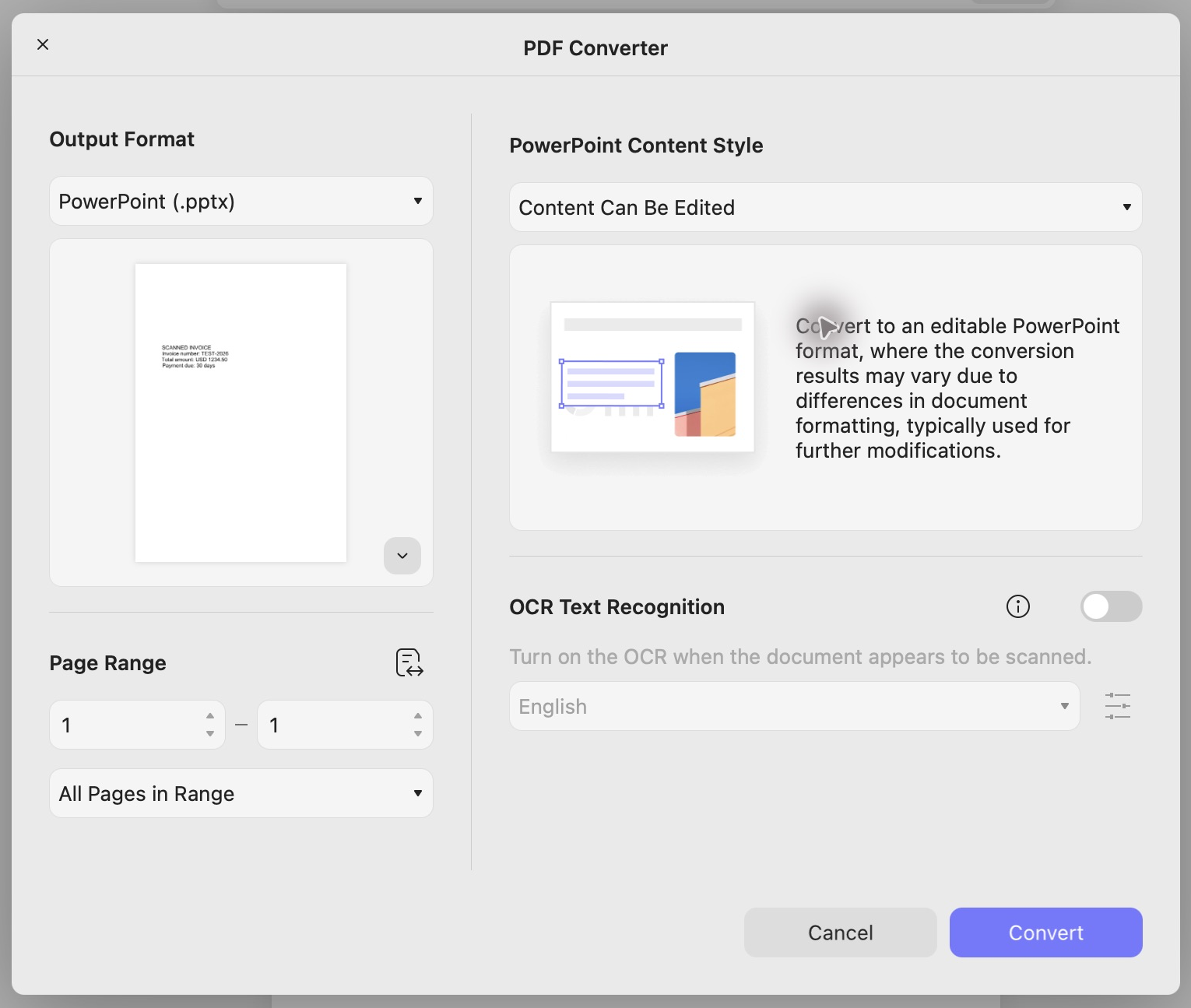
For people who regularly adapt client materials, training decks, or archived presentations, this is a purchase reason tied to the work itself. If you only need to display the pages, Ulet’s image-based output may already complete the task.
Your Scan Needs a Particular Language or Output Mode
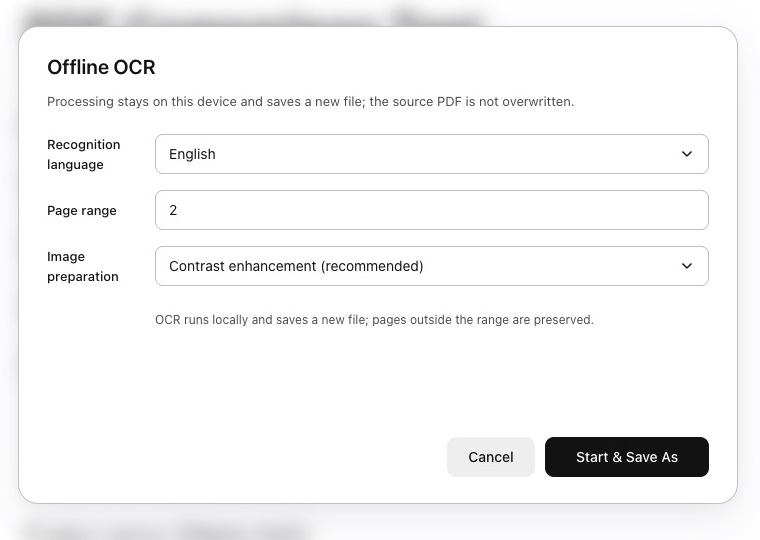
Both applications provide OCR, but their recognition languages and output options differ. Ulet’s offline OCR offers three language settings: English, Simplified Chinese, and Simplified Chinese + English. UPDF supports 38 OCR languages and variants, including English, Simplified and Traditional Chinese, Japanese, Korean, French, German, Spanish, Portuguese, Italian, Russian, Thai, and Vietnamese. It also offers three output modes: Editable PDF, Searchable PDF Only, and Text and Pictures Only. For users handling scans in Japanese, Korean, Traditional Chinese, or languages such as French and German, UPDF’s wider recognition coverage is a concrete reason to choose it.
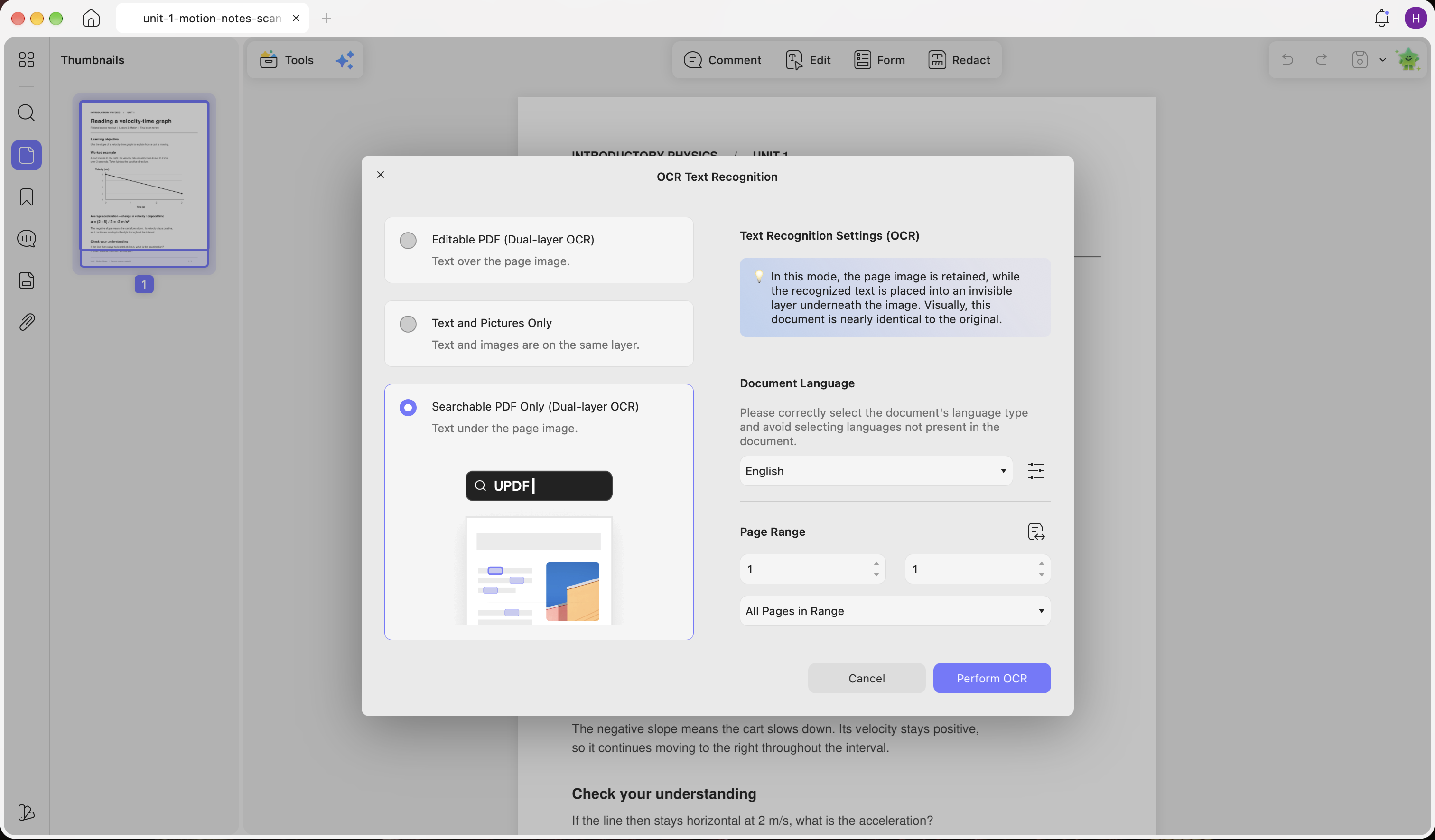
Consider a team receiving scans in different languages. Some files need to become searchable records; others need wording changes before they can be sent out again. UPDF’s language and output choices let the team prepare each scan for that next use. The guide to making a scanned PDF editable explains the editing route.
The value is having a usable result for the next task. If Ulet’s recognition languages and searchable output already meet that requirement, local OCR in Ulet is a useful part of the office suite.
The Same Operation Must Run Across Many Files
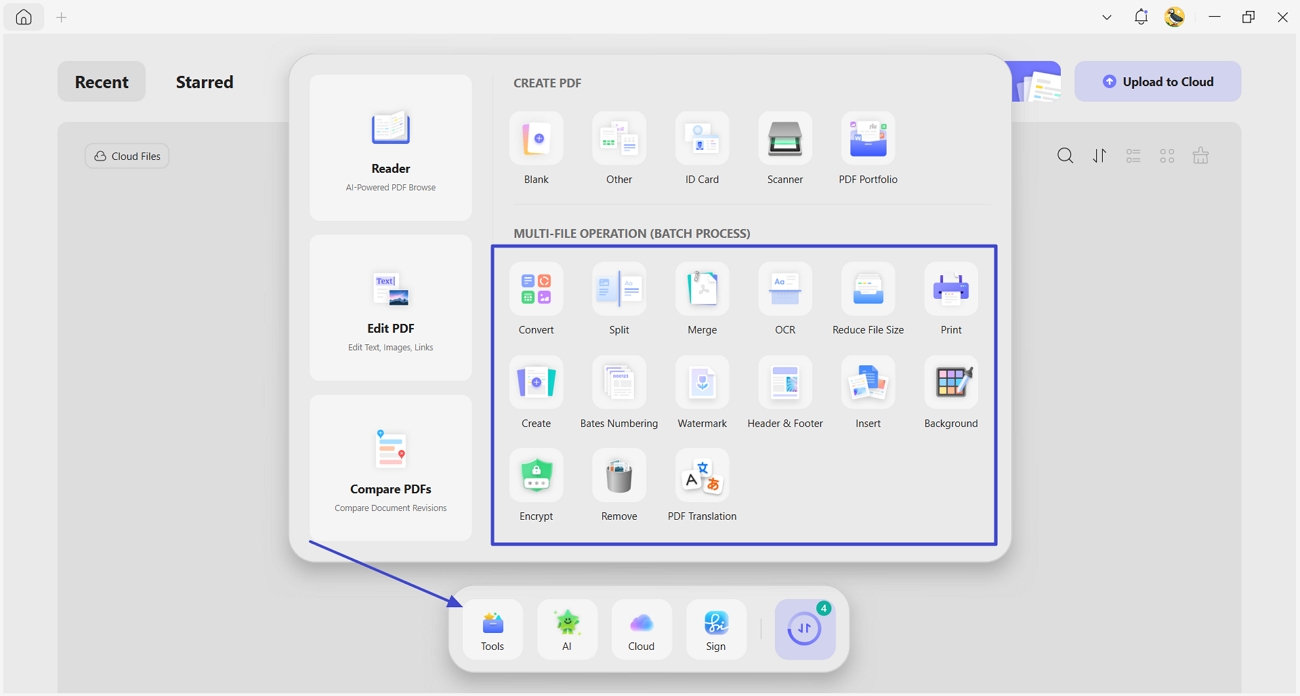
UPDF has a dedicated desktop batch workflow for conversion, OCR, compression, encryption, watermarks, headers and footers, and Bates numbering. You can work with a file list and apply a configured operation across documents. Bates settings also support restarting the numbering per file or continuing the sequence across the list.
An administrator preparing a delivery pack may need continuous numbering across the whole set. A team processing incoming records may need the same conversion or OCR settings applied to multiple files. UPDF’s batch workflow addresses the repeated opening, configuration, and saving involved in that work.
For frequent document processing, the reason to pay is the repeated manual work the workflow can take over. For occasional single-file editing, the same capability contributes less to the purchase decision.
Windows • macOS • iOS • Android 100% secure
Your PDF Work Continues on a Phone or Tablet
UPDF supports Windows, Mac, iOS, and Android, with premium access on up to four devices. Ulet currently provides Windows and Mac applications. If your routine includes reading on a tablet and editing on a computer, supported mobile access adds a capability beyond a desktop-only office workspace.
Your Company Needs to Manage People and Licenses
For a company, buying document software also means deciding who receives access, tracking assigned licenses, and handling staff changes. UPDF Enterprise provides an Enterprise Management Dashboard where administrators can add or remove members, authorize or deauthorize licenses, view license usage, and appoint additional admins.
When an employee leaves or a new colleague joins, the administrator can update authorization from the dashboard. The organization gains a central way to manage its PDF software, alongside the tools employees use on their documents. Ulet currently does not offer an equivalent enterprise administration console.
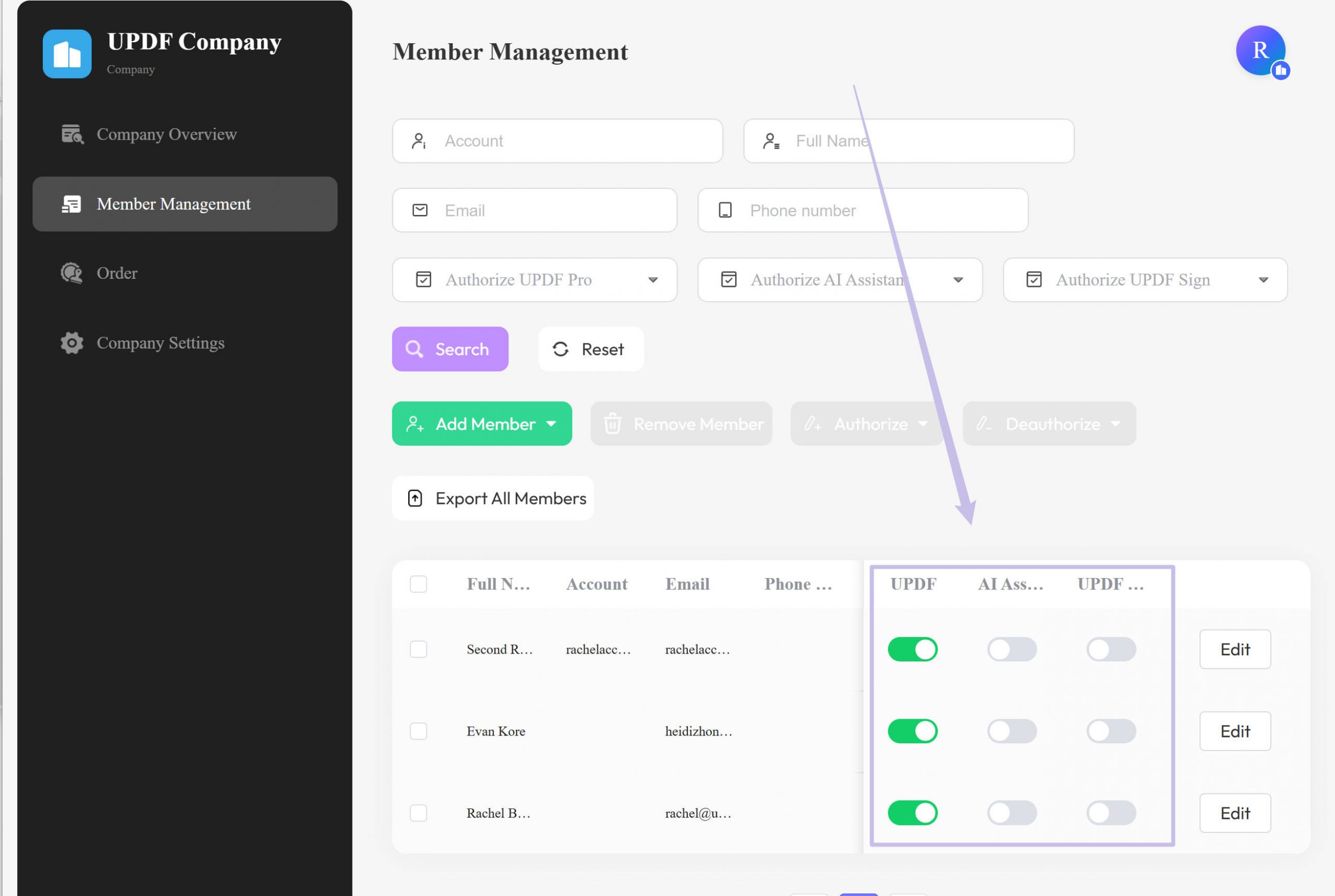
This is an additional reason for a team to choose UPDF Enterprise: centralized member and license management addresses an organizational requirement that a collection of office editors does not cover. These administration tools belong to the Enterprise plan, rather than the individual Pro license.
Use UPDF for the PDF task that calls for these capabilities. Download UPDF for free to explore the workflow, then choose UPDF Pro for ongoing use without trial watermarks on exported files.
Windows • macOS • iOS • Android 100% secure
Part 3. Why Ulet Is a Complete Purchase in Its Own Right
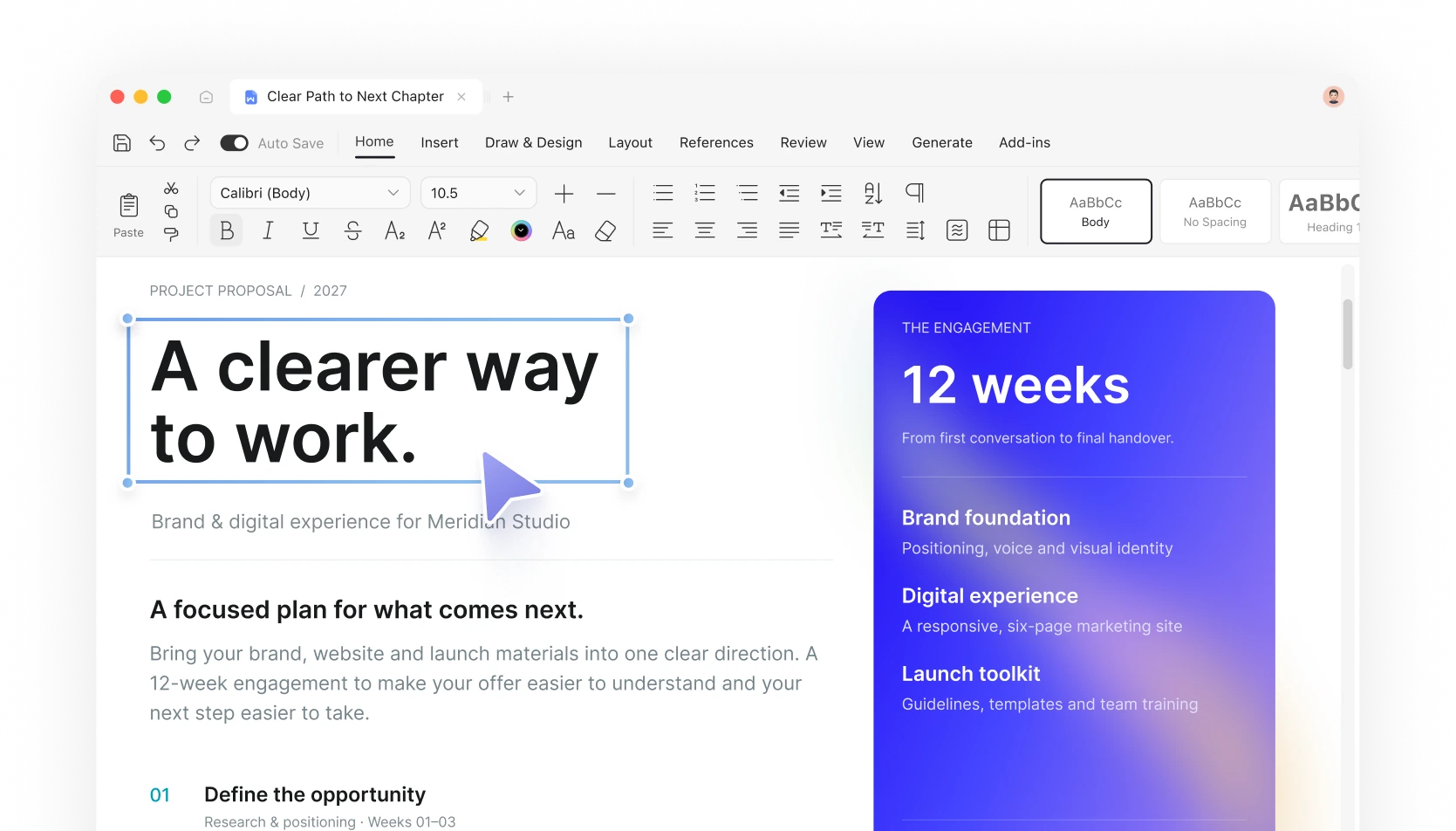
Ulet’s other editors are useful for work a PDF toolkit does not replace: maintaining the source document, changing a spreadsheet formula, restructuring a slide deck, or developing notes into a report. A project can keep all of these files in one tabbed desktop workspace.
| Work to complete | What Ulet provides | Why it is useful |
|---|---|---|
| Write a report, proposal, or letter | Docs with text, styles, tables, images, references, and review tools | Create and revise the source document before PDF delivery. |
| Maintain a budget, quote, or tracker | Sheets with formulas, recalculation, formatting, and data tools | Keep inputs and totals connected as figures change. |
| Build or update a presentation | Slides with editable elements, layouts, charts, transitions, and animations | Work on the actual presentation, rather than only its PDF export. |
| Keep structured notes | Markdown source, visual, and split views, with Word and PDF export | Turn headings, lists, tables, tasks, and code into shareable material. |
| Prepare recurring documents | Templates across the workspace | Begin with an editable structure for familiar tasks. |
| Handle routine PDFs alongside those files | Editing, OCR, conversion, forms, page tools, and version comparison | Keep everyday PDF work in the same application. |
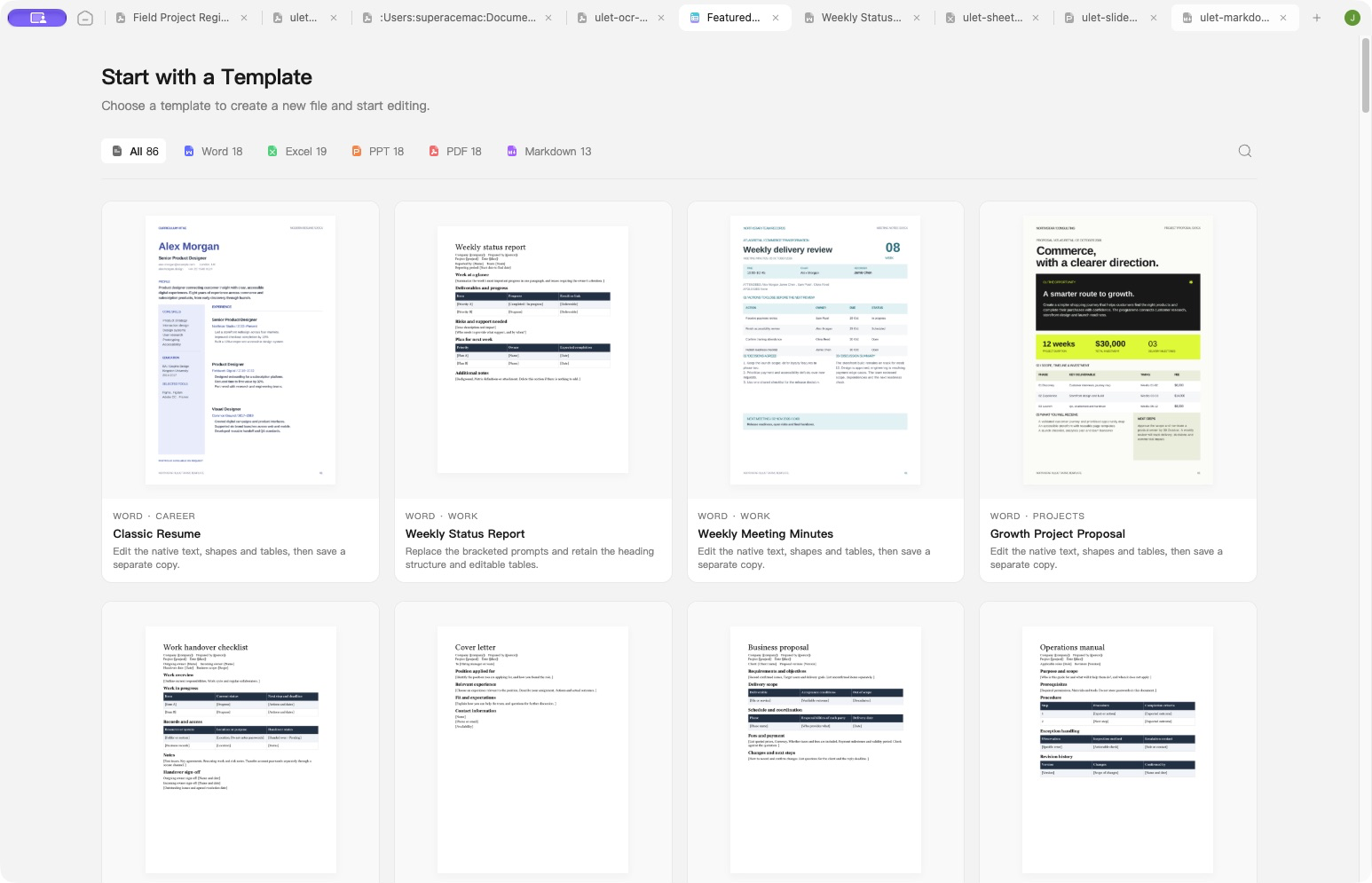
For a freelancer, Ulet can cover a proposal, costing sheet, client presentation, and PDF form. For a student, it can cover a report, calculations, slides, and structured notes. Its buying appeal is the amount of everyday work that one application can take over.
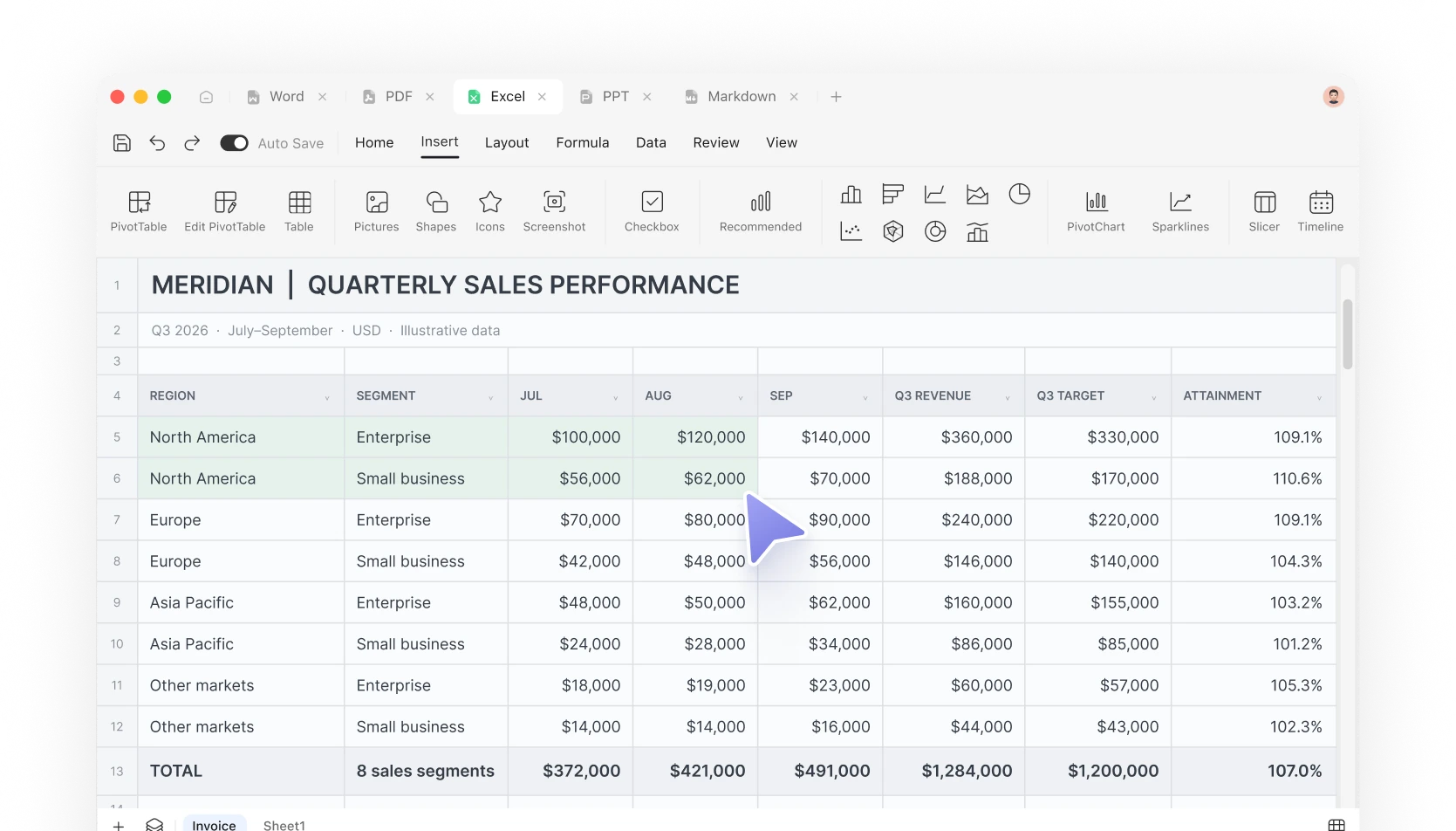
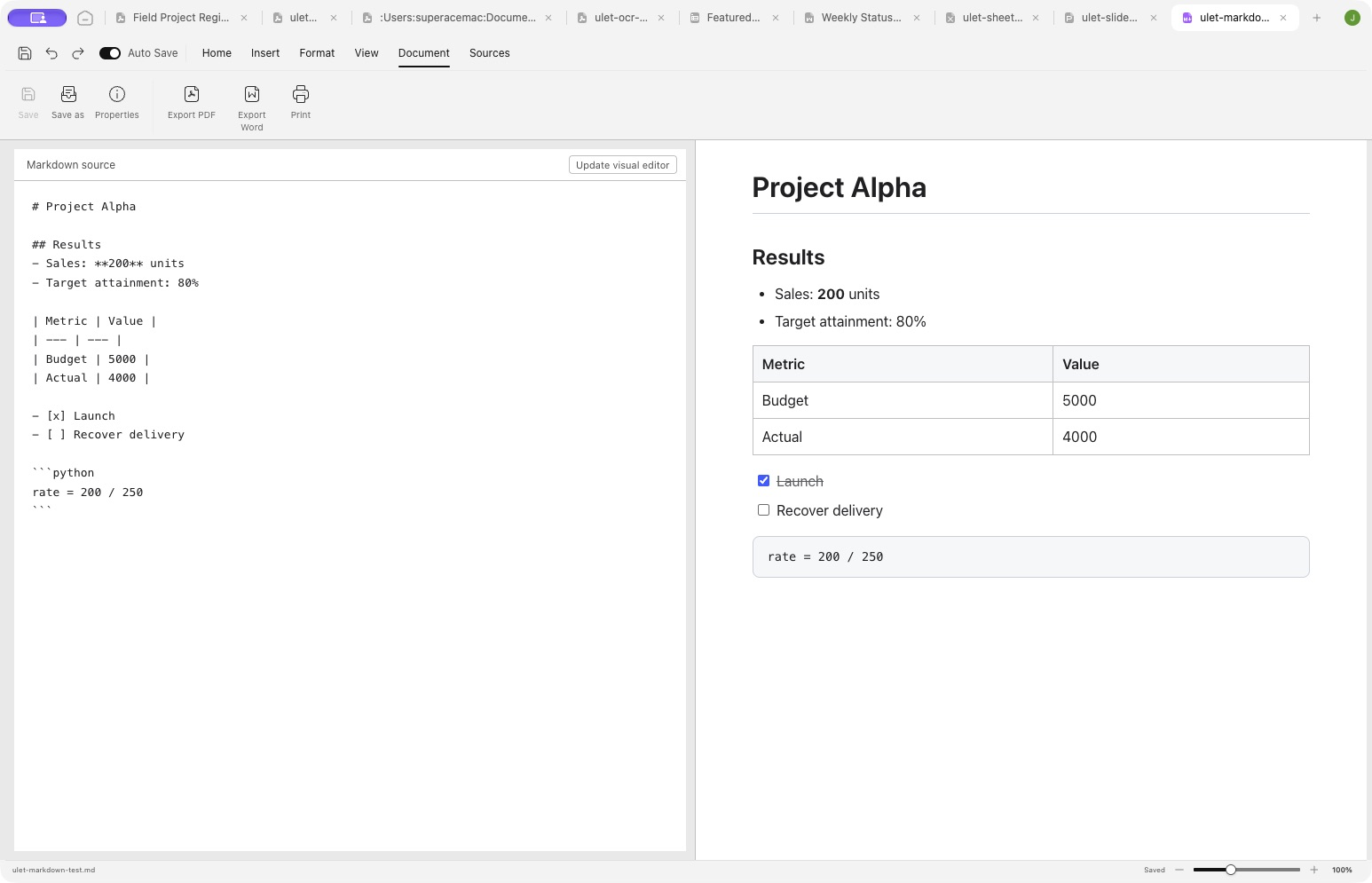
That is why Ulet can be the only application a user needs to buy for this combination of tasks. Someone whose PDF work ends with routine editing and forms may have no remaining PDF requirement for UPDF to fill.
Start with the office work you need to complete. Download Ulet for free to explore the editors, or view Ulet plans for advanced tools, professional templates, and larger-file editing.
Part 4. UPDF AI Adds Document Understanding
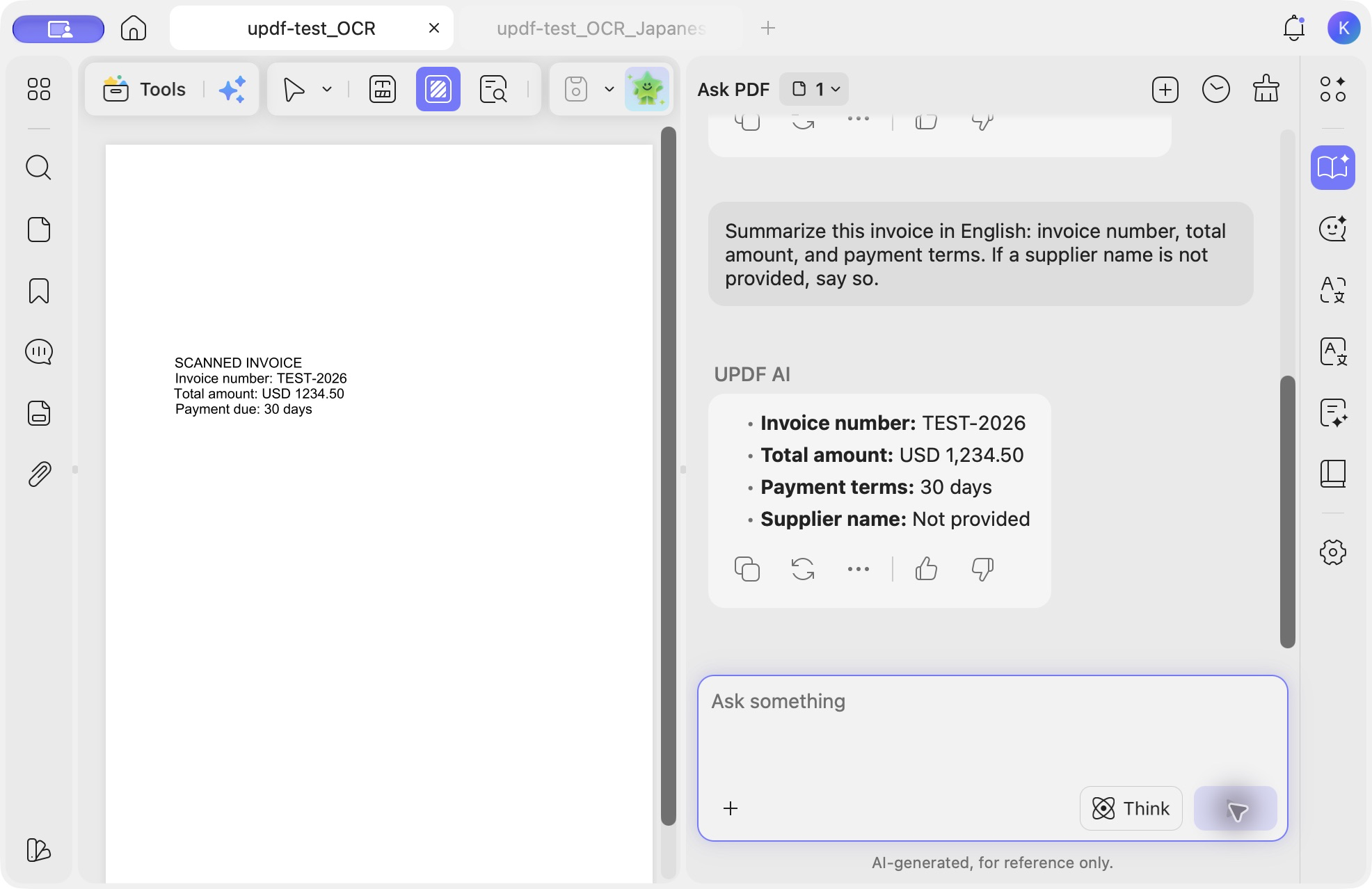
UPDF AI adds document questions, summaries, explanations, translation, and AI Chat. These capabilities are useful for locating a term in a report, extracting information, drafting a summary, or reading a translated PDF alongside its source.
For a researcher reading papers, a student working through source material, or a professional handling documents in another language, these tools can reduce manual searching, extraction, and copying between applications. This is a different benefit from editing a page: it helps the reader understand and use the information inside it.
AI Assistant is an optional subscription alongside UPDF Pro. Choose Pro for the PDF toolkit, and add AI when document questions, summaries, and translation are recurring needs. A Pro lifetime license covers the PDF tools; AI access follows the selected subscription. Ulet’s current plans do not include AI or cloud tools.
Part 5. When to Buy One Application—and When Both Have a Job
Choose the application that completes your main work. Add the second when it handles another recurring task that the first does not complete in the required way.
| Your situation | Purchase that makes sense | Why |
|---|---|---|
| You need office editors and routine PDF tools, with no further PDF requirements | Ulet | It can cover the complete set of everyday tasks in one purchase. |
| Your existing office tools are sufficient, but PDFs need editable recovery, specific OCR outputs, or batch processing | UPDF Pro | The unmet need is PDF processing, not another office suite. |
| Your company needs centralized member and license administration | UPDF Enterprise | Admins can manage access and license allocation as staffing changes. |
| You regularly need PDF questions, summaries, and translation | UPDF with AI Assistant | Document understanding is an additional service you will use. |
| You need office editors and also rely on UPDF’s specific PDF capabilities | Ulet and UPDF | Each application addresses a different recurring requirement. |
| Your existing tools already complete the work | No additional purchase is necessary | A new product is worthwhile when it solves a task you still need to handle. |
A consultant using both has a clear division of work: write the proposal and calculate the budget in Ulet; recover editable slides from a client PDF and number the delivery pack in UPDF. Ulet supplies the creation workspace, while UPDF supplies the PDF processing those materials require. The combination is useful because each application takes responsibility for a different part of the project.
Part 6. How Pricing Relates to These Differences
Ulet’s current prices are introductory launch prices and will change after the launch offer ends.
| Plan | USD price |
|---|---|
| Ulet Yearly — launch offer | $4.99/year |
| Ulet Lifetime — launch offer | $9.99 one time |
| UPDF Pro Yearly — standalone | $64.99/year |
| UPDF Pro Lifetime — standalone | $94.99 one time |
Prices checked November 26, 2026. See the Ulet plans and UPDF plans for current offers and AI payment terms.
Ulet’s launch offer lowers the initial cost of adopting its office workspace. The lasting reason to choose UPDF is the additional PDF work it helps complete.
UPDF’s additional value has three layers. For individual PDF work, Pro adds editable conversion choices, OCR output modes, batch workflows, and supported mobile access. For document understanding, an AI subscription adds PDF questions, summaries, and translation. For company-wide use, Enterprise adds centralized member and license administration, which Ulet currently does not provide.
These are different reasons to pay: completing a PDF task, understanding document content, or managing software across a team. Choose the plan for the layer you need. The standalone Pro prices above cover the individual plan; AI and Enterprise follow their respective plans. Ulet remains valuable for users who want office creation and everyday PDF handling in one desktop application.
Part 7. What This Means If You Already Own UPDF
Seeing familiar PDF tools in a lower-priced office suite can make an earlier UPDF purchase feel harder to judge. There is real overlap, so the answer should come from how you use the applications.
If UPDF is how you recover editable content, prepare scans in the required form, process sets of documents, or continue PDF work on mobile devices, those remain concrete reasons to keep using it. Ulet adds office-file creation without replacing every one of those workflows.
For an existing UPDF lifetime owner, Ulet can add useful writing, spreadsheet, presentation, and note-taking tools. For users whose needs are limited to shared PDF functions, Ulet may cover future work at a lower cost. Annual subscribers can weigh the PDF-specific work they expect to do over the next year. The choice should reflect the work ahead, with a clear view of what each license includes.
Conclusion
Ulet is worth buying for a connected office workspace that also handles everyday PDFs. UPDF is worth buying for the additional PDF outputs and workflows you depend on, with AI available for document understanding. UPDF Enterprise also supports organizations that need centralized license administration. Together, Ulet and the appropriate UPDF plan serve users who need office creation alongside further PDF or team-management capabilities.
Explore Ulet for office creation and everyday PDFs or UPDF for the PDF work that needs additional controls. The useful purchase is the one that lets you finish the work you actually have.
Windows • macOS • iOS • Android 100% secure









 Enola Miller

 Enola Davis

 Lizzy Lozano


 Enrica Taylor