UPDF
UPDF
 UPDF for Windows
 UPDF for Mac
 UPDF for iPhone/iPad
 UPDF for Android
 Nomostar
 UPDF AI Online
 UPDF Sign
 IvyCraft
 Edit PDF
 Annotate PDF
 Create PDF
 PDF Form
 Edit links
 Convert PDF
 OCR
OCR PDF to Word
 PDF to Image
 PDF to Excel
 Organize PDF
 Merge PDF
 Split PDF
 Crop PDF
 Rotate PDF
 Protect PDF
 Sign PDF
 Redact PDF
 Sanitize PDF
 Remove Security
 Read PDF
 UPDF Cloud
 Compress PDF
 Print PDF
 Batch Process
 About UPDF AI
 UPDF AI Solutions
 AI User Guide
 FAQ about UPDF AI
 Summarize PDF
 Translate PDF
 Chat with PDF
 Chat with AI
 Chat with image
 PDF to Mind Map
 Explain PDF
 PDF AI Tools
 Image AI Tools
 AI Chat Tools
 AI Writing Tools
 AI Study Tools
 AI Working Tools
 Other AI Tools
 AI Bookmark Generation
 AI Bookmark Summary
 AI Watermark Generation
 AI Background Generation
 AI Sticker Generation
 AI Stamp Generation
 AI Editing Suite
 UPDF Copilot
 AI Page Management
 AI Semantic Search
 PDF to Word
 PDF to Excel
 PDF to PowerPoint
 Enterprise Solution
 Enterprise Sign
 Enterprise AI
 Enterprise Plan
 Enterprise User Guide
 Enterprise Webinar
 IT
IT Education
 Construction
 Financial Service
 Healthcare
 Insurance
 Legal
Legal Manufacturing
 Government
 Researchers & PhDs
 Solopreneurs & Freelancers
 Lawyers & Legal Professionals
 Real Estate Agents & Brokers
 Education Solution
 Customer Stories
 User Guide
 UPDF Tricks
 FAQs
FAQs UPDF Reviews
 Download Center
 Blog
Blog Newsroom
 Tech Spec
 Updates
 UPDF vs. Adobe Acrobat
 UPDF vs. Foxit
 UPDF vs. PDF Expert

When you are rushing to send a signed contract from your phone, CamScanner turns your camera into a scanner. With just a few taps, you can capture paper files, edit them, and save them as neat PDF files. In this article, you’ll see how CamScanner Android works, what it offers, and where it still feels limited.
If you want deeper editing, AI help, and better value across devices, then try UPDF to upgrade your document workflow today.
Windows • macOS • iOS • Android 100% secure
Part 1. CamScanner Android Overview
This is a mobile app that turns your phone camera into a tool for scanning printed documents quickly and easily. The app CamScanner Android is one of the leading choices in the mobile document scanning space for many users. It first launched in 2011 as a Chinese app and has grown popular across Android and iPhone platforms worldwide.
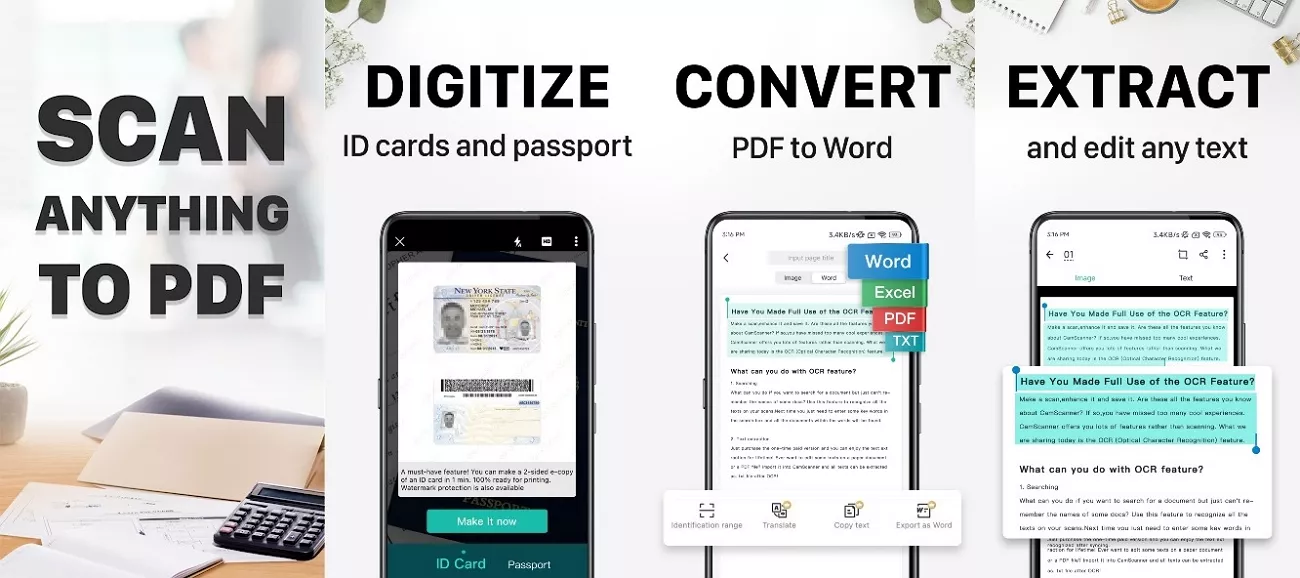
With this, you can digitize paper documents using only your phone’s camera instead of a traditional hardware scanner. People often wonder if it is truly powerful and reliable, or just famous because there are few strong competitors.
Core Functions of CamScanner
Now that you know what CamScanner is, you might be wondering what exactly this app does for you. Let’s quickly look at its key features and how they help you handle your documents better:
1. Mobile Scanner
CamScanner converts the phone camera into a scanner that scans paper documents that you wish to save in digital form. It straightens the pages and saves them as digital files you can keep on your device and share anywhere.
2. OCR
It reads the text in your scanned images or PDFs and changes that content into normal editable text. This makes it quick to search inside your documents and reuse the words without typing each line again.
3. Edit and Convert PDF
With the PDF tools, you can add notes and marks to your documents. It also allows you to switch file formats to turn images into PDFs and export your PDFs to other common document formats.
4. Document Management & Synchronization
These options keep your scans organized in clear folders and categories. Your files can stay updated across different devices to give you access to the same documents wherever you sign in.
5. Security & Collaboration
Security features add protection to sensitive files with options like passwords or restricted access. Sharing tools make it easier to send documents to others so they can view or work with your scans in a controlled way.
CamScanner Pricing
| Plan | Approximate Price | What You Get |
| Free | $0 | Basic scanning, watermarks, ads |
| Premium Monthly | $4.99/month | No ads, no watermarks, full features |
| Premium Yearly | $49.99/year | Same as monthly, cheaper per month |
Part 2. How to Install and Set Up CamScanner on Android
Many users think installing and setting up CamScanner on an Android phone is difficult. In reality, the CamScanner Android download and installation process is simple, starting with downloading the app and granting basic permissions. Once installed, you just sign in, scan your first document, and adjust basic settings to match your needs.
Steps to Use CamScanner on Android
Now, follow the simple steps below to scan documents and manage your files using the CamScanner app:
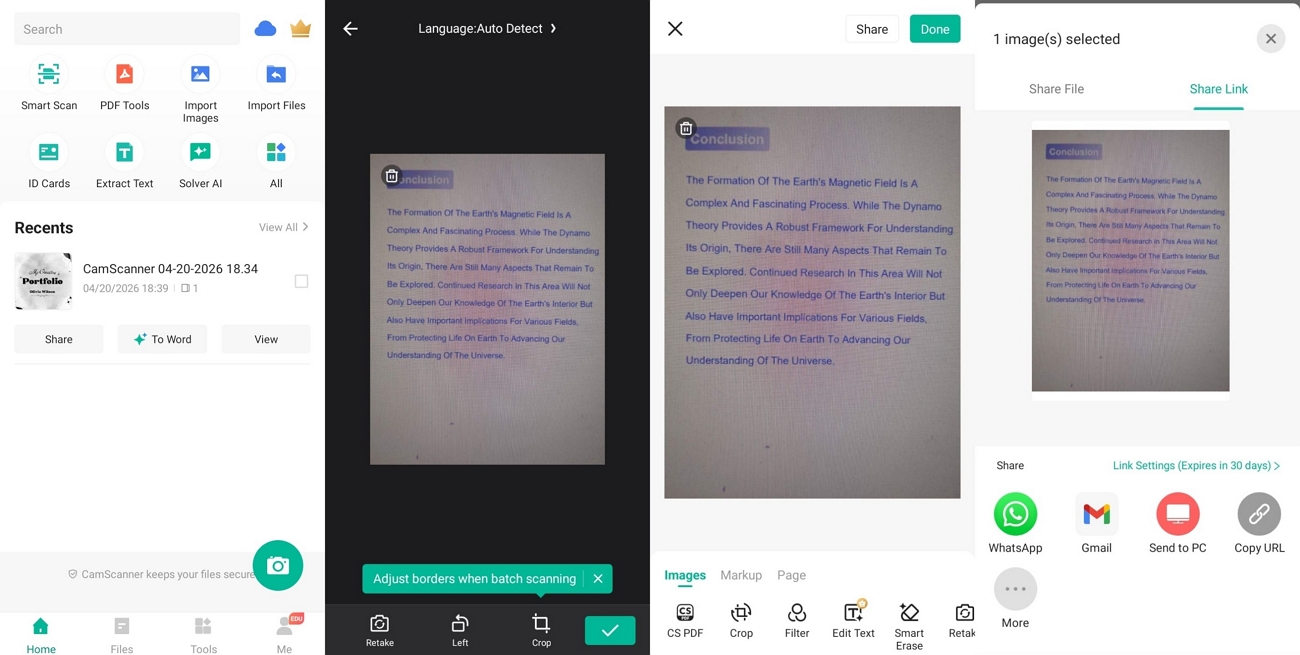
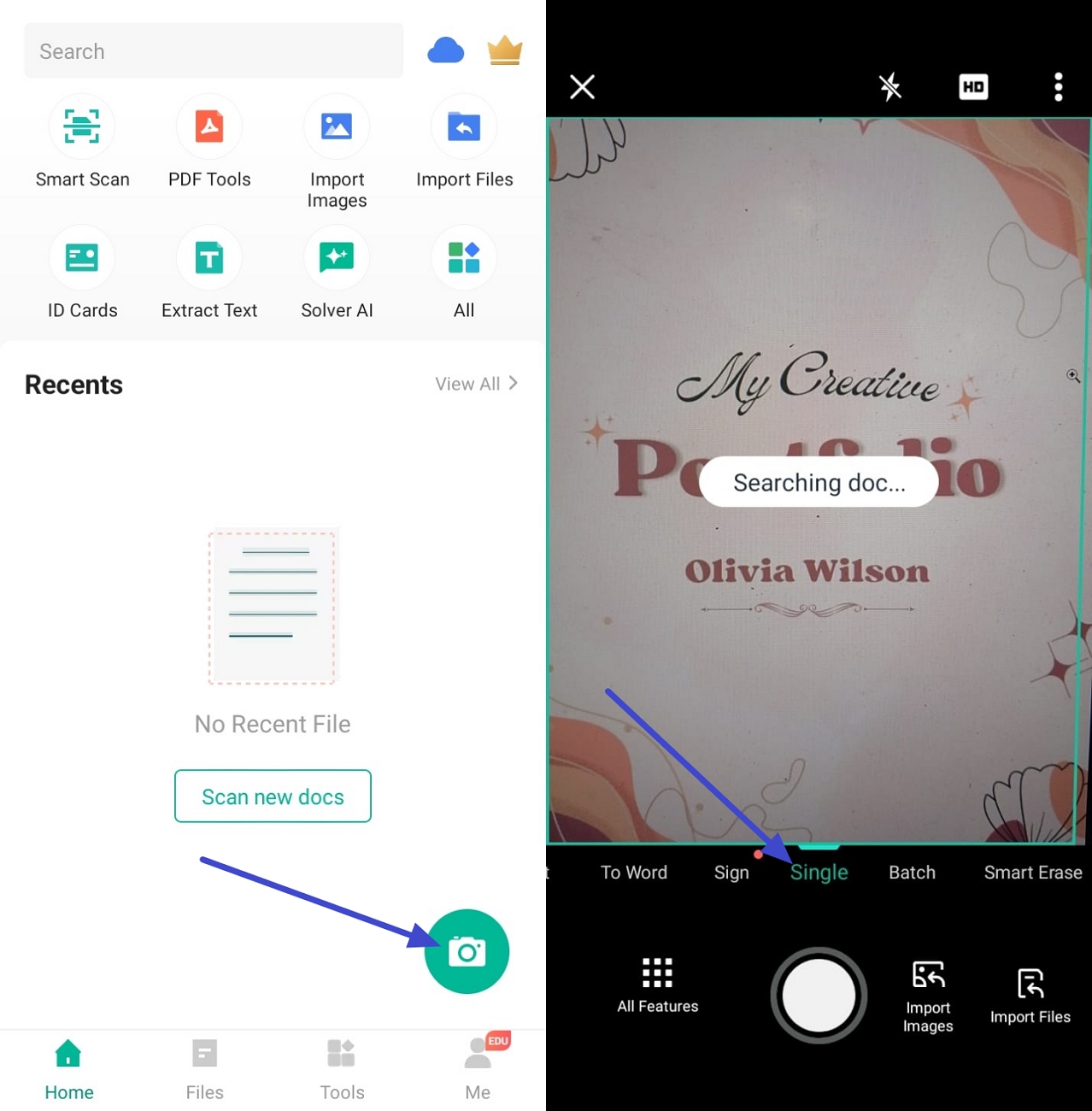
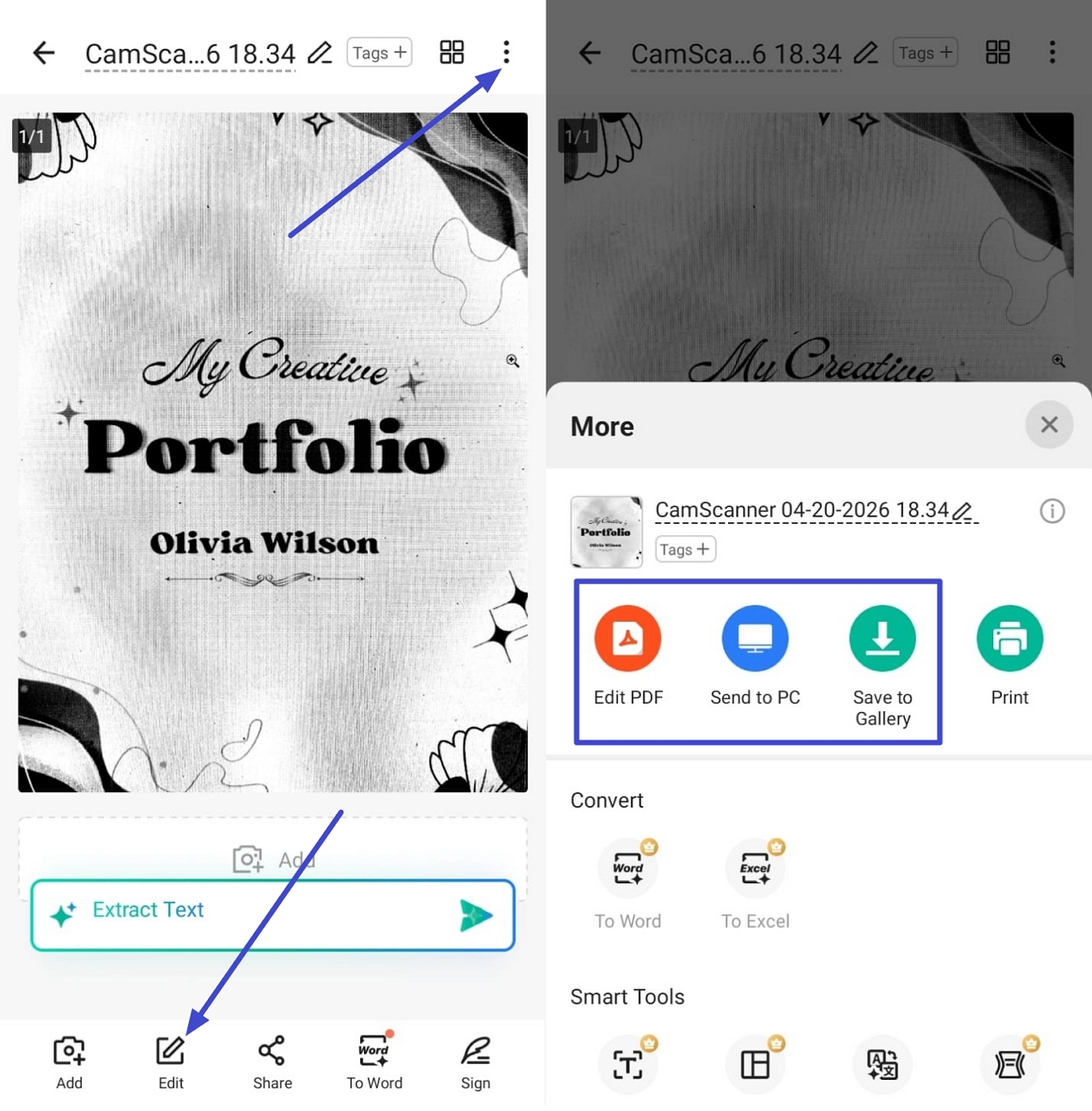
Step 1. Once you open the app, tap on the “Camera” icon in the bottom right corner to open the camera interface. Next, fix your camera on the page you want to scan, and the app will automatically scan the document.
Step 2. Once the document is scanned, use the “Control” to set the orientation and press the “Next” button. Afterward, choose a filter to improve readability and press the “Extract Text” option to perform OCR. After the OCR is done, tap the “Copy” option to copy the text, then tap the “Tick” icon.
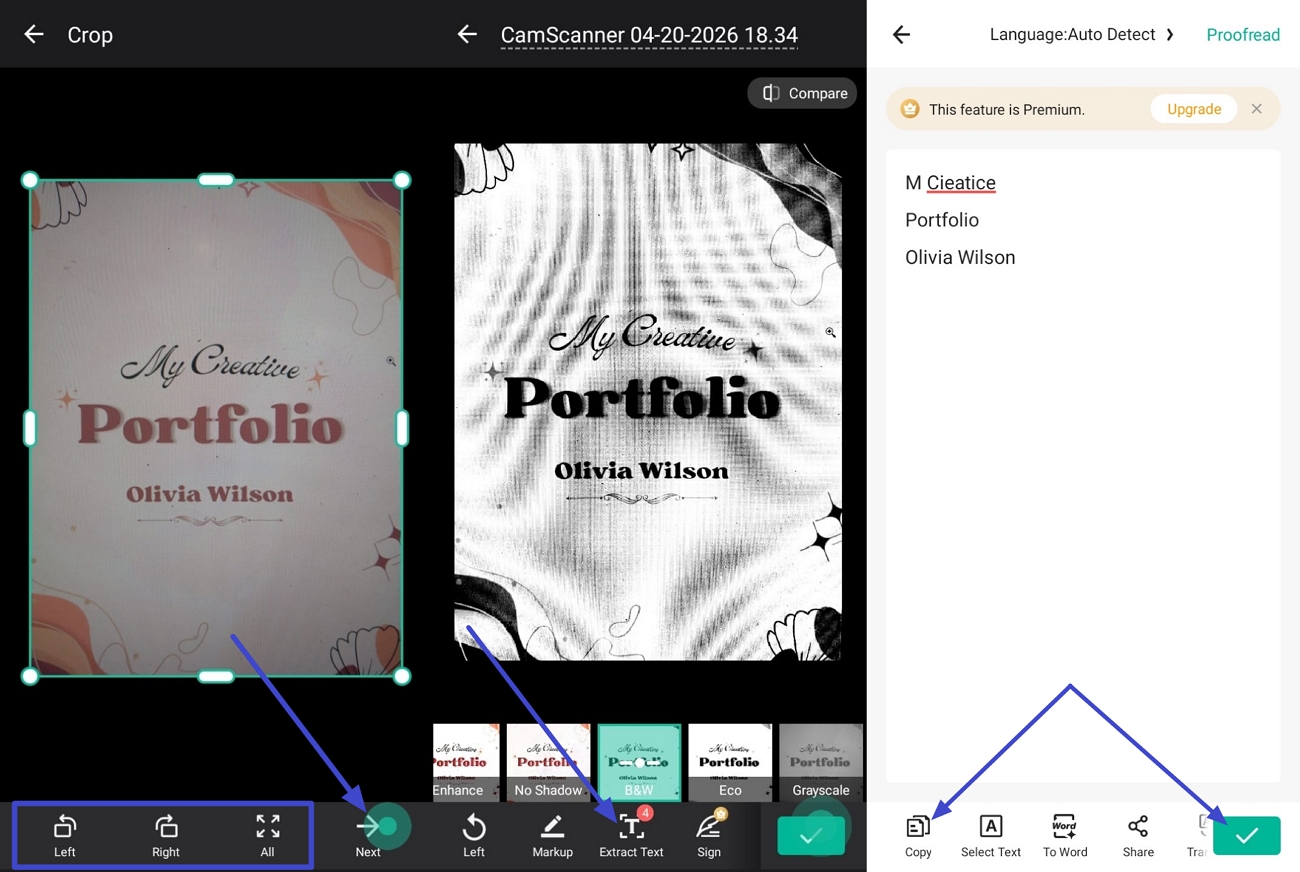
Step 3. Next, tap the “Edit” option to enter the editing screen, and use the tools below to edit the document further. After tapping the “Done” option, press the “Three-Dots” icon and use the “Save to Gallery” option to save it. To further convert it to PDF, use the “Edit PDF” option.
Unique Advantages of CamScanner Android
- CamScanner fixes tilted pages, so documents look straight after scanning.
- You can choose different filters to make the text stronger and clearer.
- It includes basic PDF features to reduce the need for another editor.
- Your scanned files stay up to date and available across all connected devices.
Shortcomings of CamScanner Android
- CamScanner only offers very basic PDF editing tools for users.
- The free version only works fully for 3 short days.
- Its OCR often shows low accuracy on complex or unclear pages.
Many users start searching for a CamScanner Android alternative when they hit limits with editing tools and text accuracy. This is where UPDF comes in as a more powerful, flexible option for serious document work. It offers advanced PDF editing features that let you adjust text, images, and layout directly inside your files.
Part 3. Best Alternative to CamScanner Android
Many readers still wonder if there is a scanner app that handles editing and OCR better than CamScanner. This is where UPDF Android stands out, offering full document control rather than only minor changes on top of scanned pages. It supports layout editing and accurate OCR, making detailed corrections and content reuse smoother. Look at the table below to quickly see how both apps differ:
| Aspect | CamScanner Android | UPDF Android |
| PDF Editing | Limited annotations and simple edits | Direct text and image editing in PDFs |
| OCR Languages | Up to 41 languages supported | 42 languages supported on Android |
| AI Features | AI scan enhancements, basic suggestions | UPDF AI: summarize, translate, explain content |
| PDF Conversion | PDF to common formats, some limits | PDF to Word, Excel, PPT, images, more |
| Cloud and Sync | Multi‑device sync within CamScanner ecosystem | UPDF Cloud with cross‑platform sync |
Core Functions of UPDF
Having compared UPDF with the app CamScanner Android, now we can review UPDF’s main core features, download UPDF to try these powerful features with us!
Windows • macOS • iOS • Android 100% secure
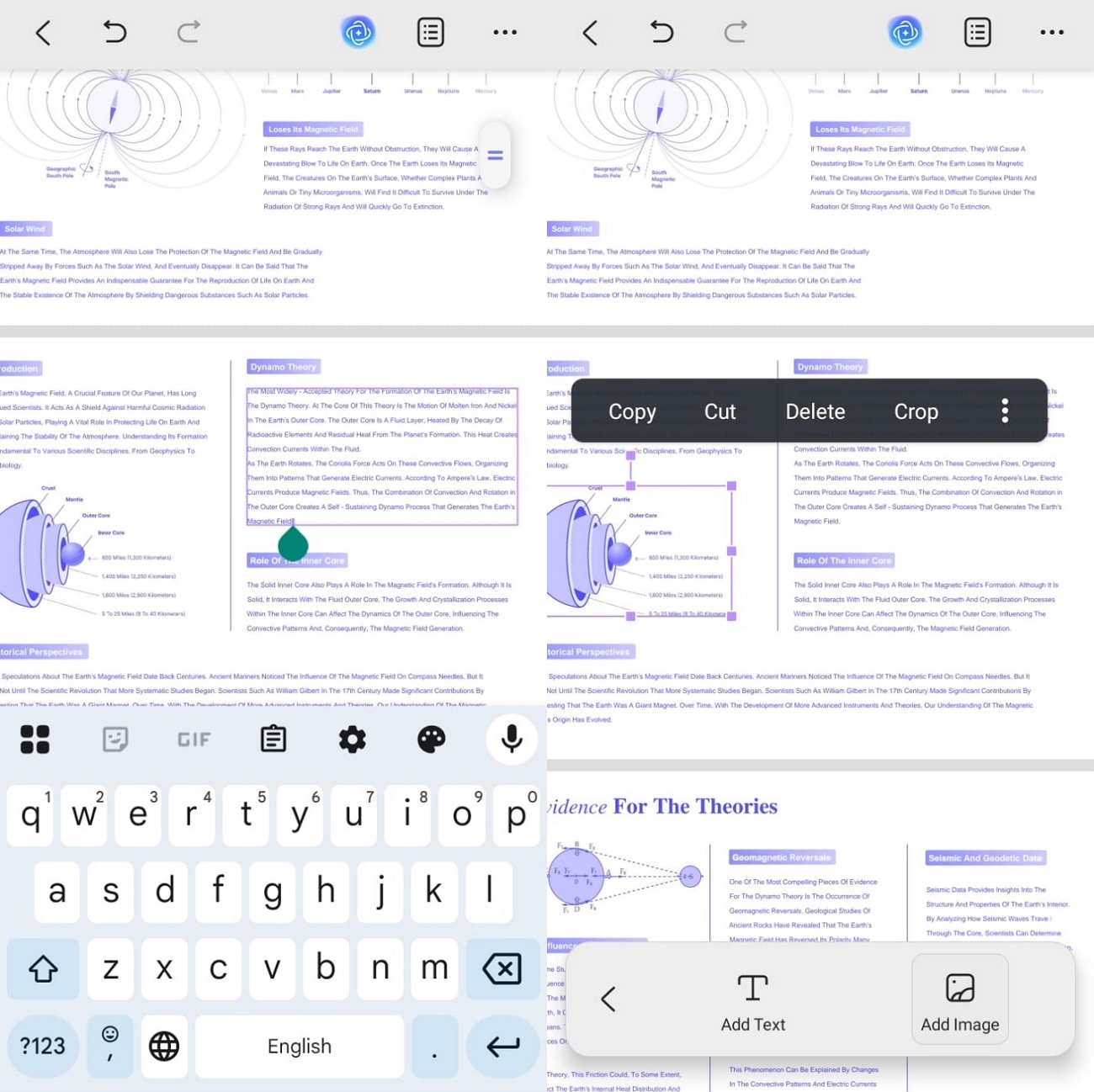
1. PDF Editing
You can deeply edit PDF text and images directly inside your documents. Fonts, colors, and layout settings are easy to change to match your needs.
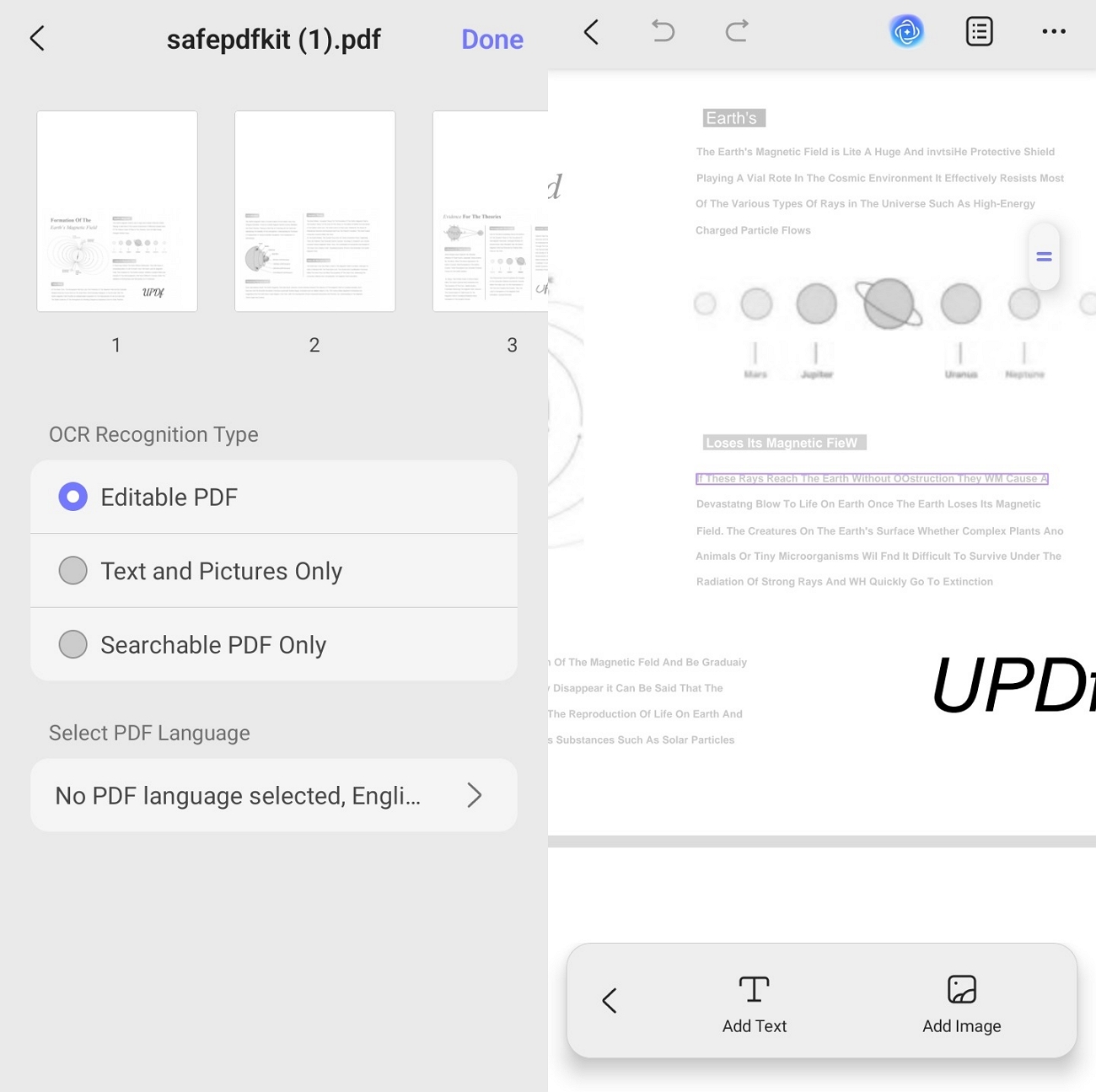
2. OCR PDF
Scanned PDFs can be turned into fully editable and searchable PDF files. This makes fixing mistakes and reusing content from old paper documents much faster.
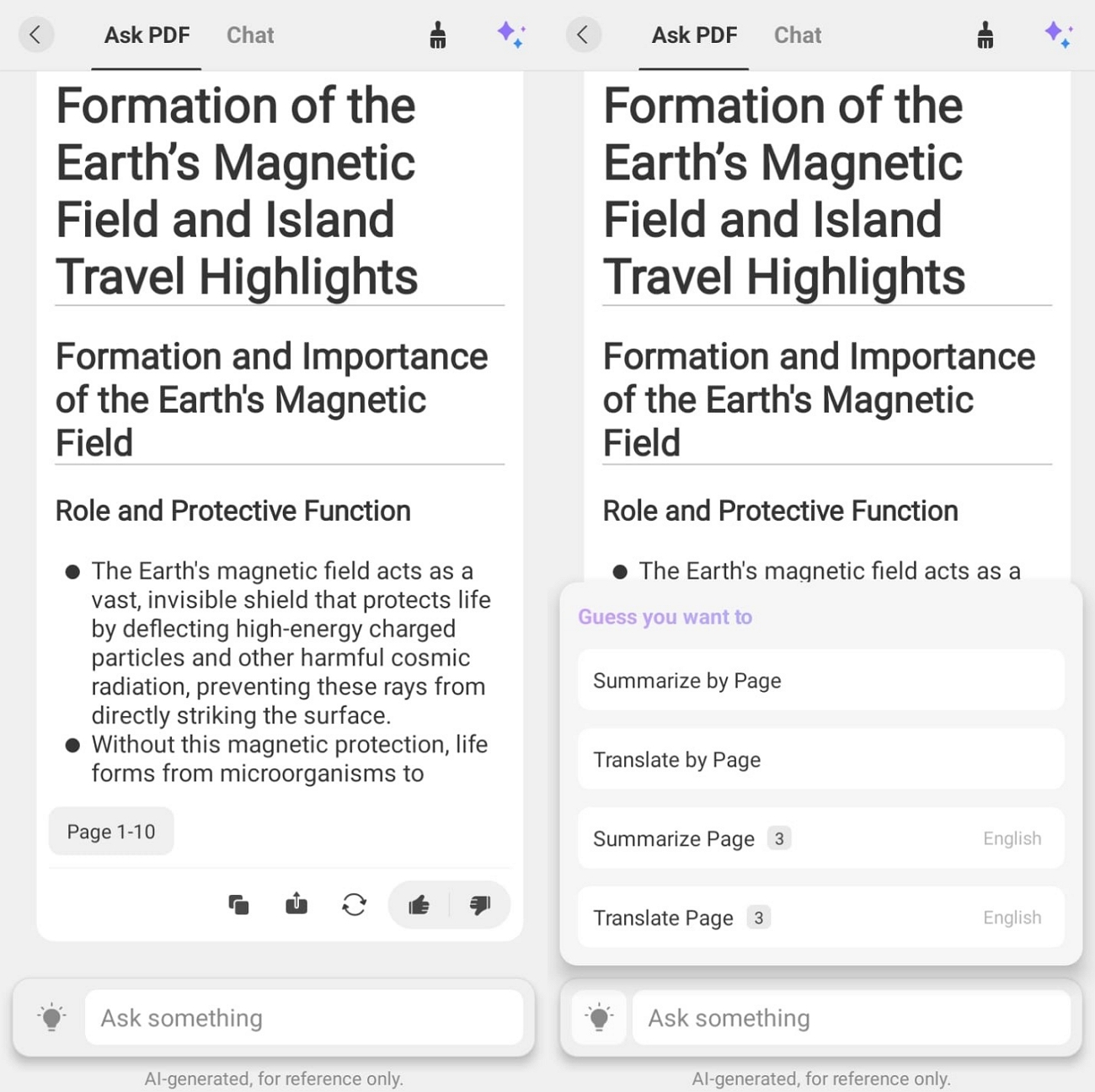
3. UPDF AI
With AI tools, long PDFs are quickly summarized and hard sections explained in plain words. Mind maps are also created to help you understand and organize key ideas visually.
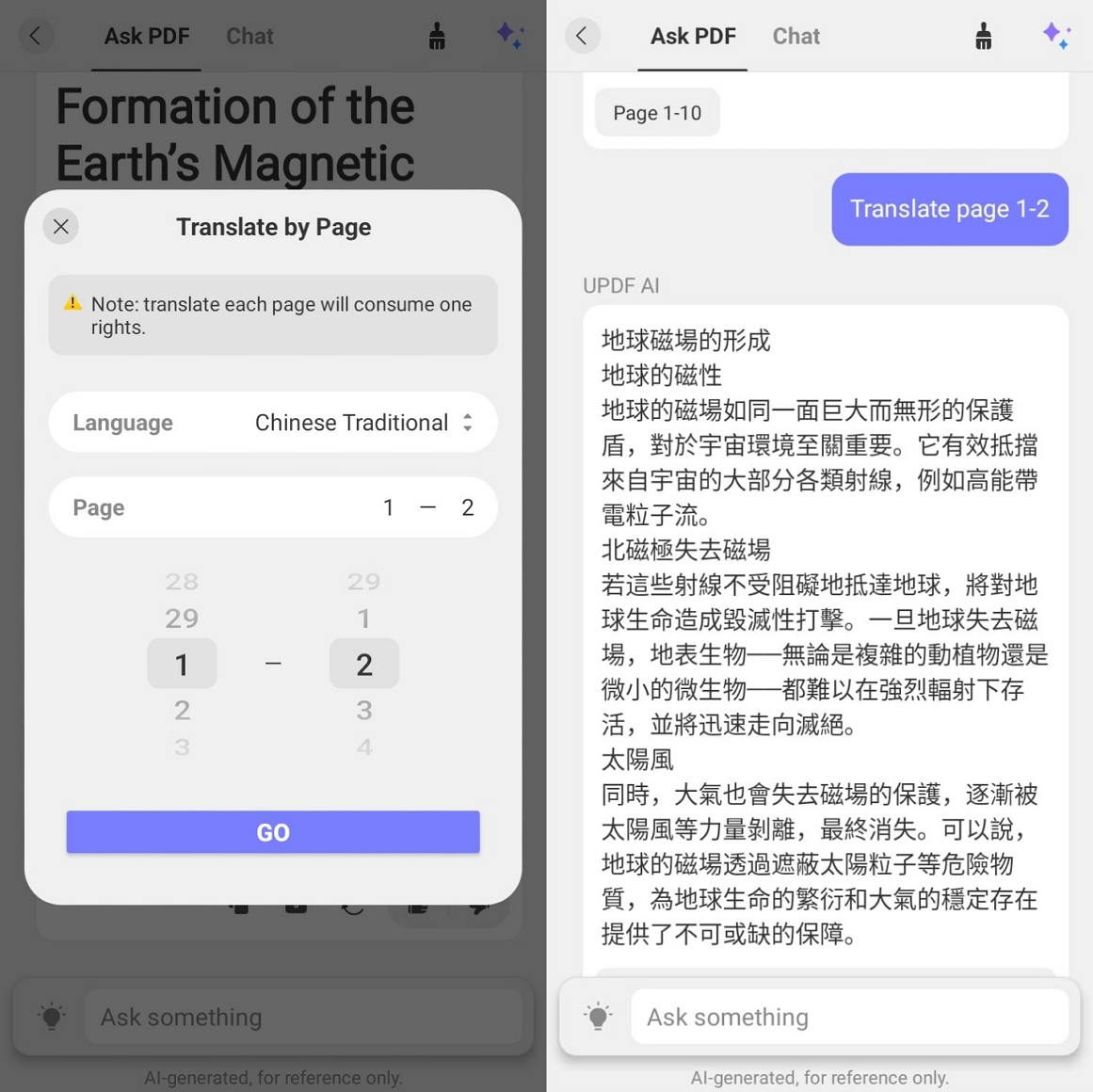
4. Translate PDF
PDF content can be translated into 26 different international languages for readers. That way, the same document works for people who speak other supported languages.
5. 10 AI Agents
UPDF 2.5 introduces 10 AI Agents to streamline your workflow: instantly generate and summarize bookmarks with a single click; customize watermarks, backgrounds, and stamps; automatically detect and batch-fix blank, missing, or inverted pages—including OCR-processed content; utilize AI to edit text for polishing, condensing, or adjusting tone; perform AI Semantic Search to locate specific terms by searching for synonyms, related concepts, or contextual meanings; and leverage UPDF Copilot to execute tasks via voice commands—such as locating specific tools or setting passwords.
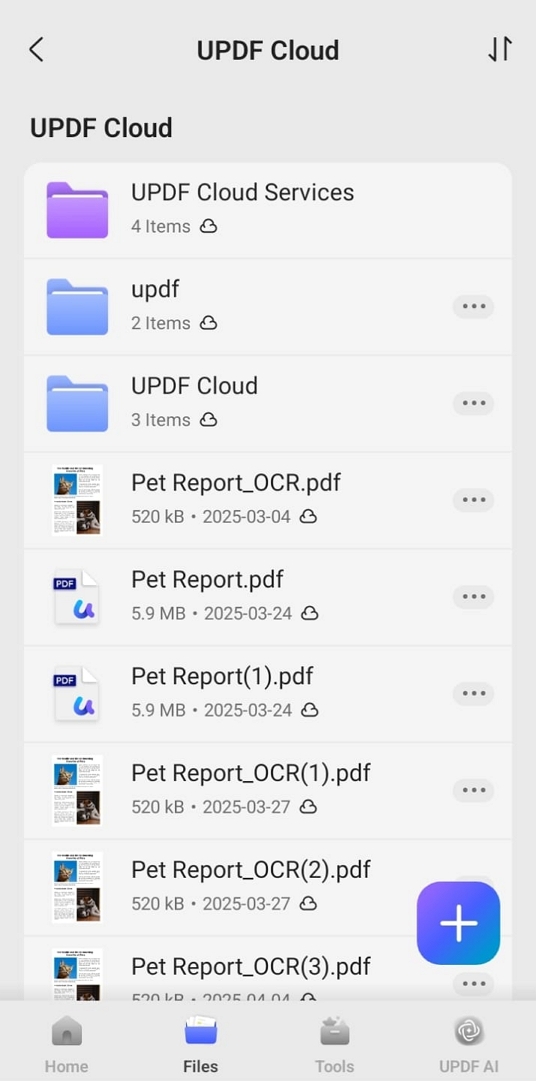
6. UPDF Cloud
Files are saved in the cloud, so you can open them on different devices. Sharing through links makes teamwork and document collaboration smoother and more organized.
UPDF vs. CamScanner Android Pricing Comparison
What it comes to the pricing goes, CamScanner uses a free basic plan, while its Premium yearly subscription is around $49.99 for extra features. UPDF Pro usually costs $49.99/year for full editing and OCR, and there is also a free plan that includes 7 days of free AI features. There is also a UPDF lifetime license for $79.99, which offers better long‑term value than CamScanner’s ongoing subscriptions. Upgrade to UPDF Pro or UPDF AI before May 7th to receive a $10 discount —buy early and enjoy the benefits sooner!
Conclusion
In conclusion, we explored how CamScanner Android works well and where it feels limited for serious work. You also explored how UPDF provides scanning, editing, OCR, AI, and cloud capabilities in a single, stronger toolkit. If you want an easier way to manage, edit, and protect PDFs across devices, you should choose UPDF as your main document app.
Windows • macOS • iOS • Android 100% secure




 Lizzy Lozano
 Enrica Taylor