 UPDF
 UPDF for Windows
 UPDF for Mac
 UPDF for iPhone/iPad
 UPDF for Android
 Nomostar
 UPDF AI Online
 UPDF Sign
 IvyCraft
 Edit PDF
 Annotate PDF
 Create PDF
 PDF Form
 Edit links
 Convert PDF
 OCR
 PDF to Word
 PDF to Image
 PDF to Excel
 Organize PDF
 Merge PDF
 Split PDF
 Crop PDF
 Rotate PDF
 Protect PDF
 Sign PDF
 Redact PDF
 Sanitize PDF
 Remove Security
 Read PDF
 UPDF Cloud
 Compress PDF
 Print PDF
 Batch Process

 About UPDF AI
 UPDF AI Solutions
 AI User Guide
 FAQ about UPDF AI
 Summarize PDF
 Translate PDF
 Chat with PDF
 Chat with AI
 Chat with image
 PDF to Mind Map
 Explain PDF
 PDF AI Tools
 Image AI Tools
 AI Chat Tools
 AI Writing Tools
 AI Study Tools
 AI Working Tools
 Other AI Tools
 AI Bookmark Generation
 AI Bookmark Summary
 AI Watermark Generation
 AI Background Generation
 AI Sticker Generation
 AI Stamp Generation
 AI Editing Suite
 UPDF Copilot
 AI Page Management
 AI Semantic Search
 PDF to Word
 PDF to Excel
 PDF to PowerPoint
 Enterprise Solution
 Enterprise Sign
 Enterprise AI
 Enterprise Plan
 Enterprise User Guide
 Enterprise Webinar
 IT
 Education
 Construction
 Financial Service
 Healthcare
 Insurance
 Legal
 Manufacturing
 Government
 Researchers & PhDs
 Solopreneurs & Freelancers
 Lawyers & Legal Professionals
 Real Estate Agents & Brokers
 Education Solution
 Customer Stories
 User Guide
 UPDF Tricks
 FAQs
 UPDF Reviews
 Download Center
 Blog
 Newsroom
 Tech Spec
 Updates
 UPDF vs. Adobe Acrobat
 UPDF vs. Foxit
 UPDF vs. PDF Expert


Quick Answer
“The contract is stuck again, but nobody can say exactly where.”
It is a familiar scene. A deal is waiting on a signature from someone who is on vacation. Two departments are editing different versions of the same agreement, one named MSA_v4_FINAL_reviewed_JD_CLEAN_v2. The counterparty sent back a scanned PDF, and nobody can search it, comment on it, or confirm which clauses actually changed. For companies that have not bought a six-figure CLM platform, the contract does not live in a system. It lives in an inbox.
This article is not another stage-by-stage tour written for enterprise legal departments. It walks through the eight stages and, at each one, names the specific place where the work actually stalls—and what it takes, at the document layer, to get it moving again.
What Is a Contract Management Workflow?
A contract management workflow is the sequence of steps an agreement passes through from the moment someone needs a contract to the moment it either ends or renews. It is less a straight line than a relay: each stage hands the document to a different person, and each handoff is a chance for the agreement to sit untouched.
Most organizations still run this relay manually. Seventy-one percent rely on manual processes, and the average manual contract takes 3.4 weeks to execute. The table below shows where the time goes.
| Stage | What Happens | Typical Bottleneck |
|---|---|---|
| 1. Request & Intake | Someone asks for a contract | No owner assigned; request sits in email |
| 2. Drafting | Template or blank page | Wrong template; stakeholder input scattered |
| 3. Internal Review | Legal/ business review of terms | Revision cycles; unclear who reviews what |
| 4. Negotiation | Redlines exchanged with counterparty | Version confusion; scanned PDFs |
| 5. Approval | Sign-off by required stakeholders | Sequential routing; one approver disappears |
| 6. Signature | Execution | Manual print-sign-scan; signer delay |
| 7. Storage | Filing and organization | Files scattered across drives and inboxes |
| 8. Renewal & Obligations | Tracking dates, notice windows, obligations | No owner; notice windows missed |
The stages are simple. The delays are not.
The 8 Stages of the Contract Workflow Process
1. Contract Request & Intake
This is where someone raises a hand and says, “We need a contract.” In a mature workflow, the request captures the parties, the deal terms, the deadline, and the owner. In practice, the request is often a Slack message or a forwarded email with the subject line “can you send me an NDA.”
The bottleneck is ownership lag. ContractSafe’s timestamp data shows that the median wait for a first action is just 6 minutes—but the slowest 10% wait 5.7 days or more, and missing the first day makes it more likely than not that the contract will wait over a week. A request without a named owner is not “in progress.” It is invisible.
Tip
How UPDF helps: When the incoming request includes a prior agreement or a template attached as a PDF, UPDF opens it directly for annotation, editing, or comparison against a standard, so the intake conversation starts from the actual document rather than a description of it.
Windows • macOS • iOS • Android 100% secure
2. Drafting (Templates vs. Blank Page)
Drafting should be the easy stage. A template already contains the fallback positions, the approved clauses, and the formatting. Yet drafting still takes 3–5 days on average, because template management and stakeholder input pull the drafter in different directions.
The bottleneck is not writing speed. It is the gap between the template and the deal. Someone has to merge the sales team’s commercial terms into the legal template, and that merge happens across Word files, email threads, and “can you take a look at this” messages.
Tip
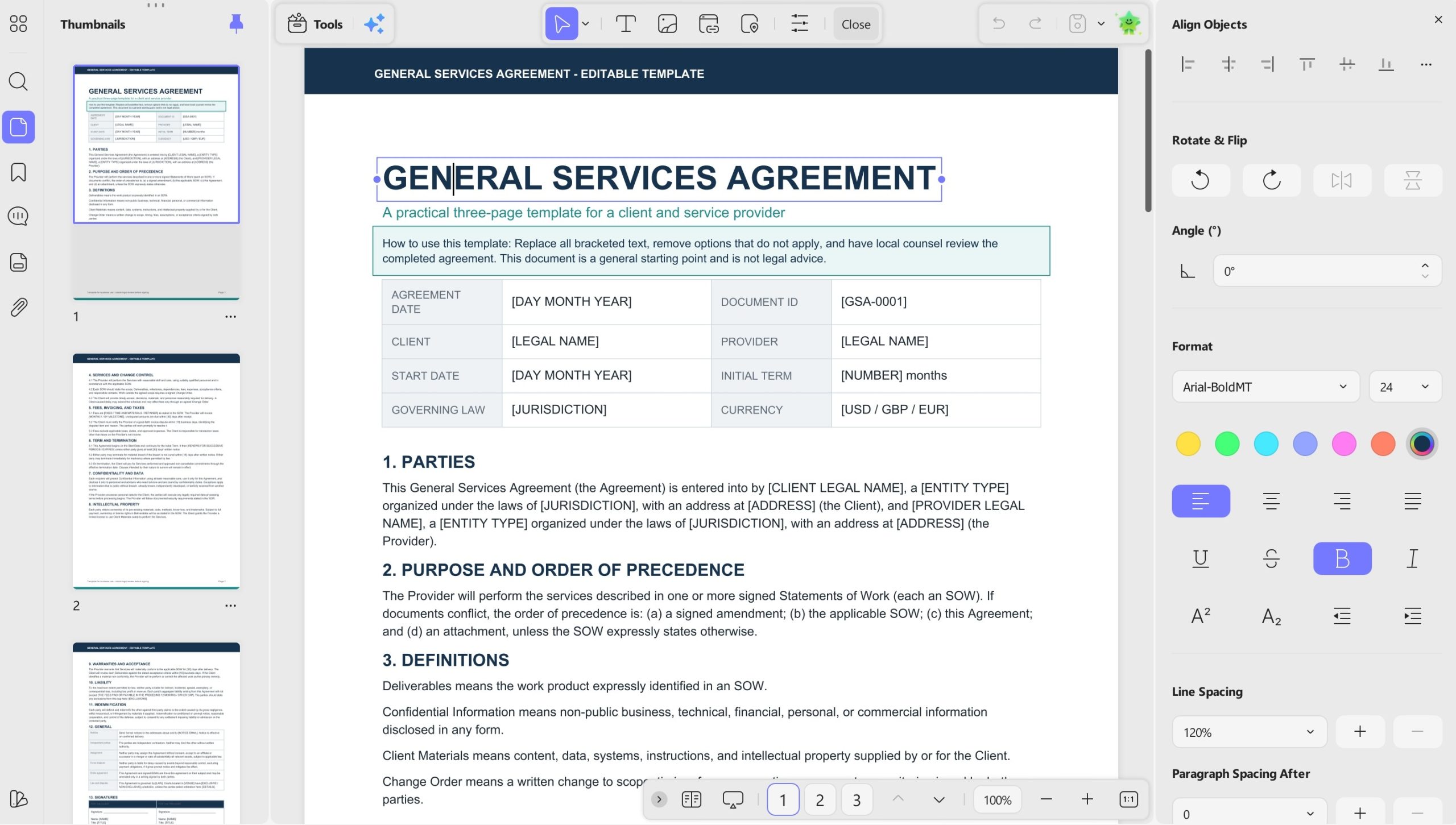
How UPDF helps: When the template or the counterparty’s paper arrives as a PDF, UPDF lets you edit the text directly in the PDF—no round-trip to Word, no reformatting after conversion.
3. Internal Review
Internal review is where legal, finance, security, and the business each inspect the agreement for their own concerns. The review stage alone can consume 5–10 days, and legal review is often the single longest delay in the entire cycle, averaging 18.4 days in stalled B2B negotiations.
The bottleneck is not the reviewing itself. It is that reviewers spend a large share of their time locating the clauses they are supposed to review. A forty-page agreement with cross-references, schedules, and definitions can take longer to navigate than to assess.
Tip
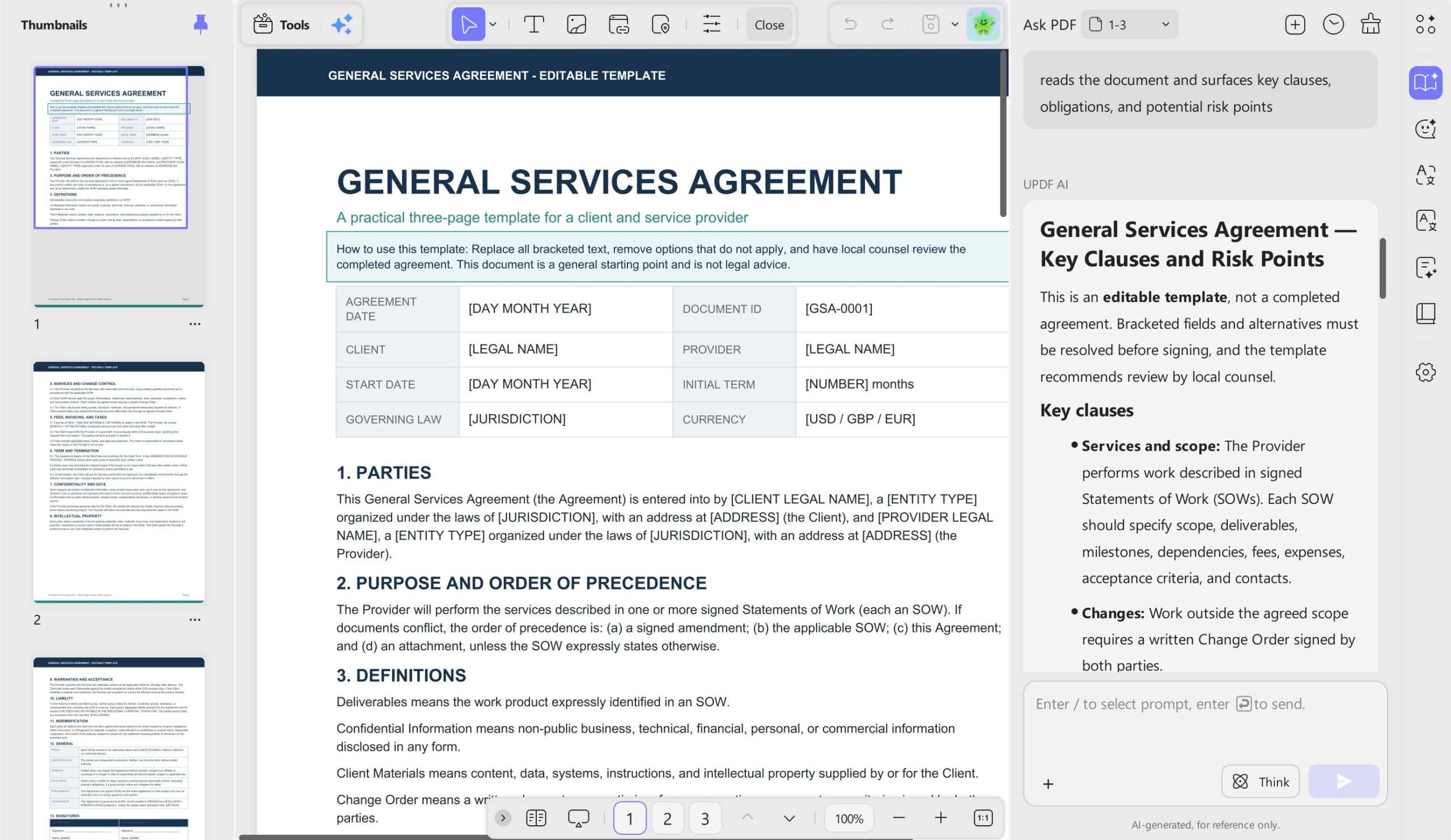
How UPDF helps: UPDF AI’s Contract assistant reads the document and surfaces key clauses, obligations, and potential risk points, turning a page-by-page pass into a targeted review. Reviewers can annotate, highlight, and comment directly on the PDF, so feedback stays attached to the text it refers to.
4. Negotiation & Redlining
Negotiation is the stage where versions multiply. One side sends a redline, the other side accepts some changes and rejects others, and within two rounds there are four files with names that all claim to be final. If either party works from scanned PDFs, the redline is not even editable—someone has to retype the counterparty’s changes before they can be discussed.
The bottleneck is version ambiguity. When the team cannot say with confidence which file is the current draft, every substantive conversation pauses while someone reconciles documents.
Tip
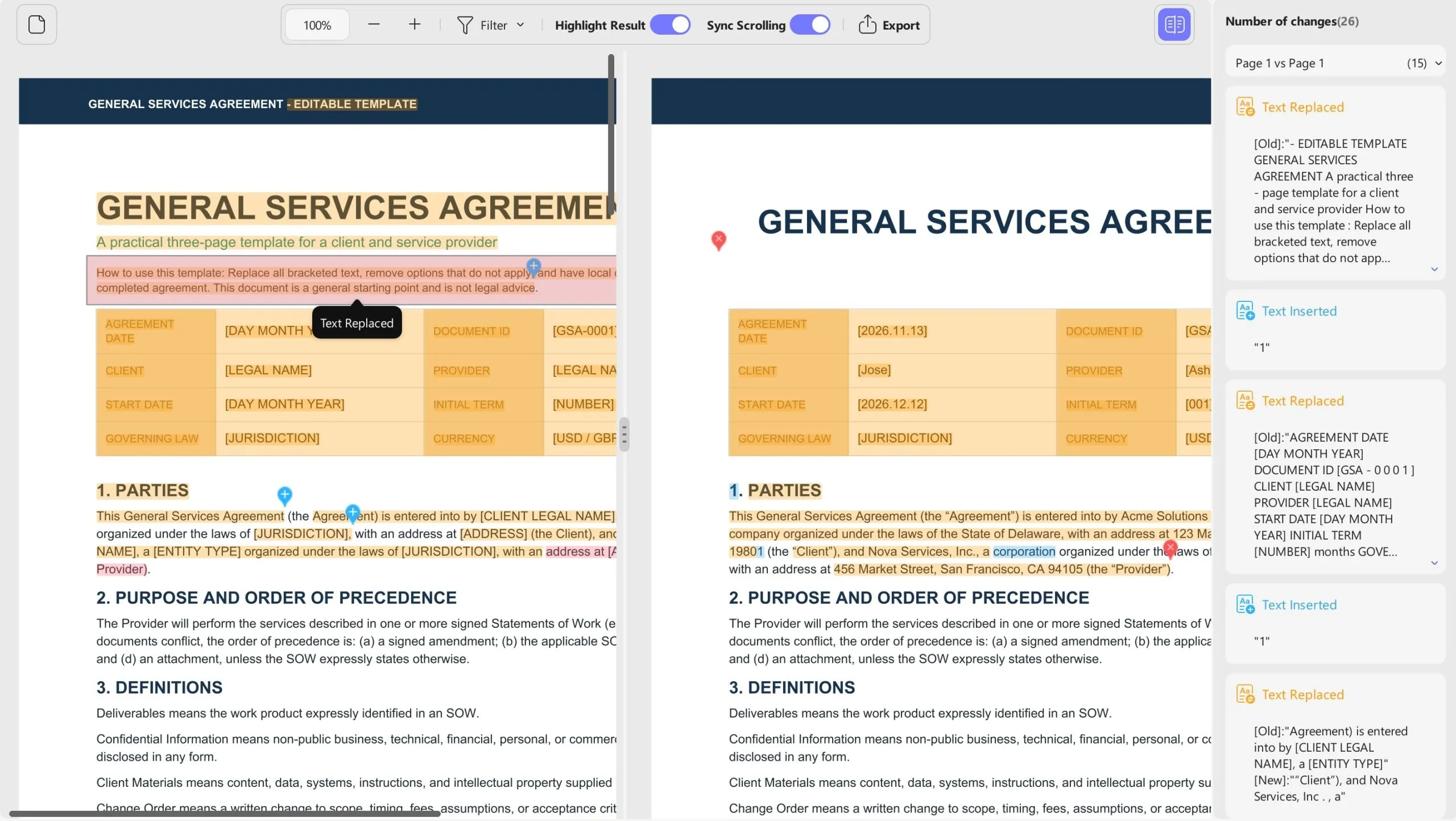
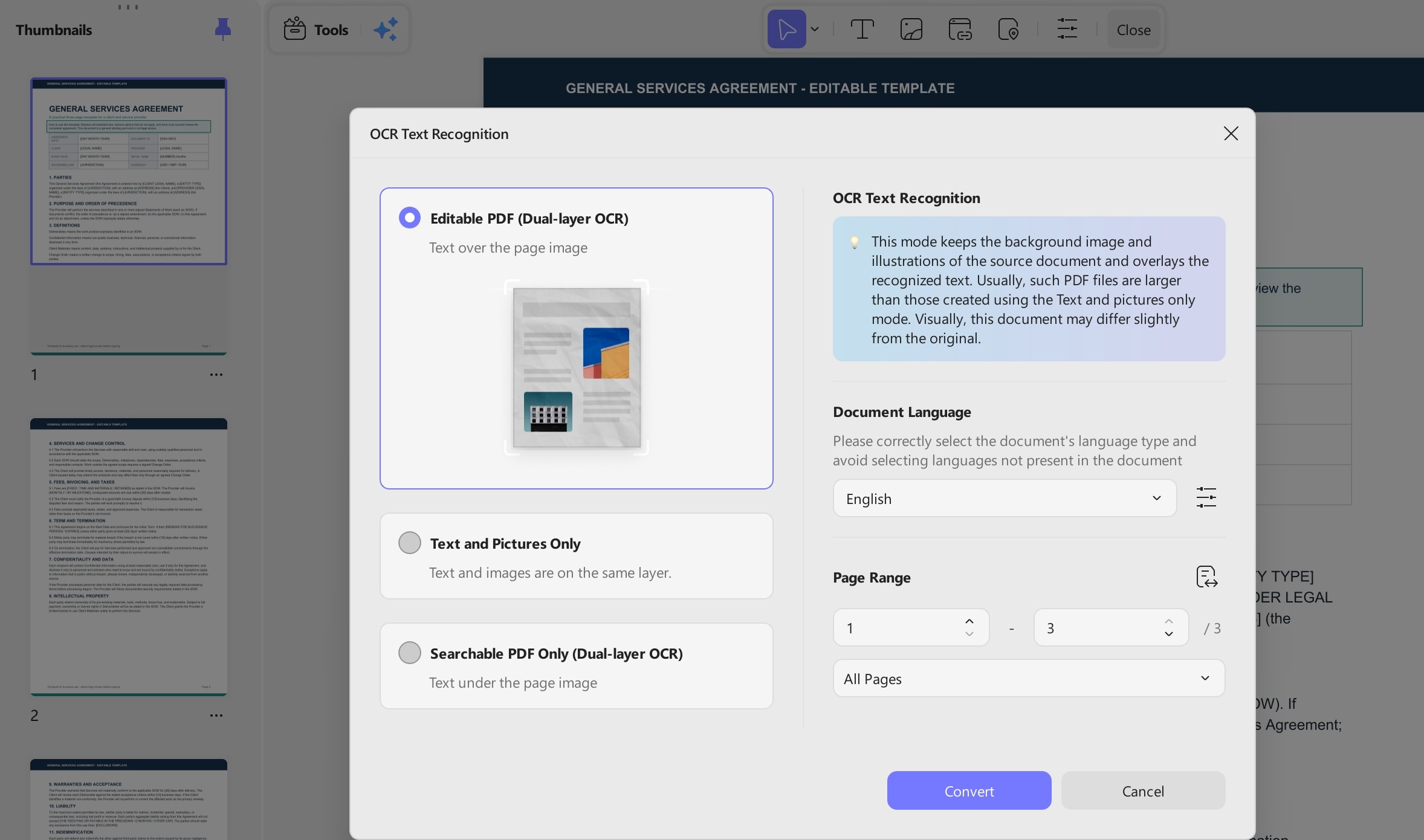
How UPDF helps: UPDF’s Compare PDF highlights additions, deletions, and replacements between drafts, so the material changes are visible without rereading the whole agreement. For scanned counterparty paper, OCR makes the text searchable and editable, and annotations can be sent back as a clean PDF rather than a screenshot or a paragraph in an email.
Windows • macOS • iOS • Android 100% secure
5. Approval Routing
Approval is the stage most likely to be named as the biggest delay. In one survey, 46.67% of respondents cited approvals as the top bottleneck. ContractSafe’s data puts the median approval step at 2.7 days—the longest of any tracked step—and the slowest 10% take 14 days or more.
The bottleneck is not that approvers disagree. It is that the request waits on one person at a time. When approvers are asked sequentially, the slowest approver takes a median of 3.4 days, while everyone else responds in under 2 hours. A two-approver request sent to both people at once is decided in a median of 1.3 days, against 2.2 days when they take turns.
Tip
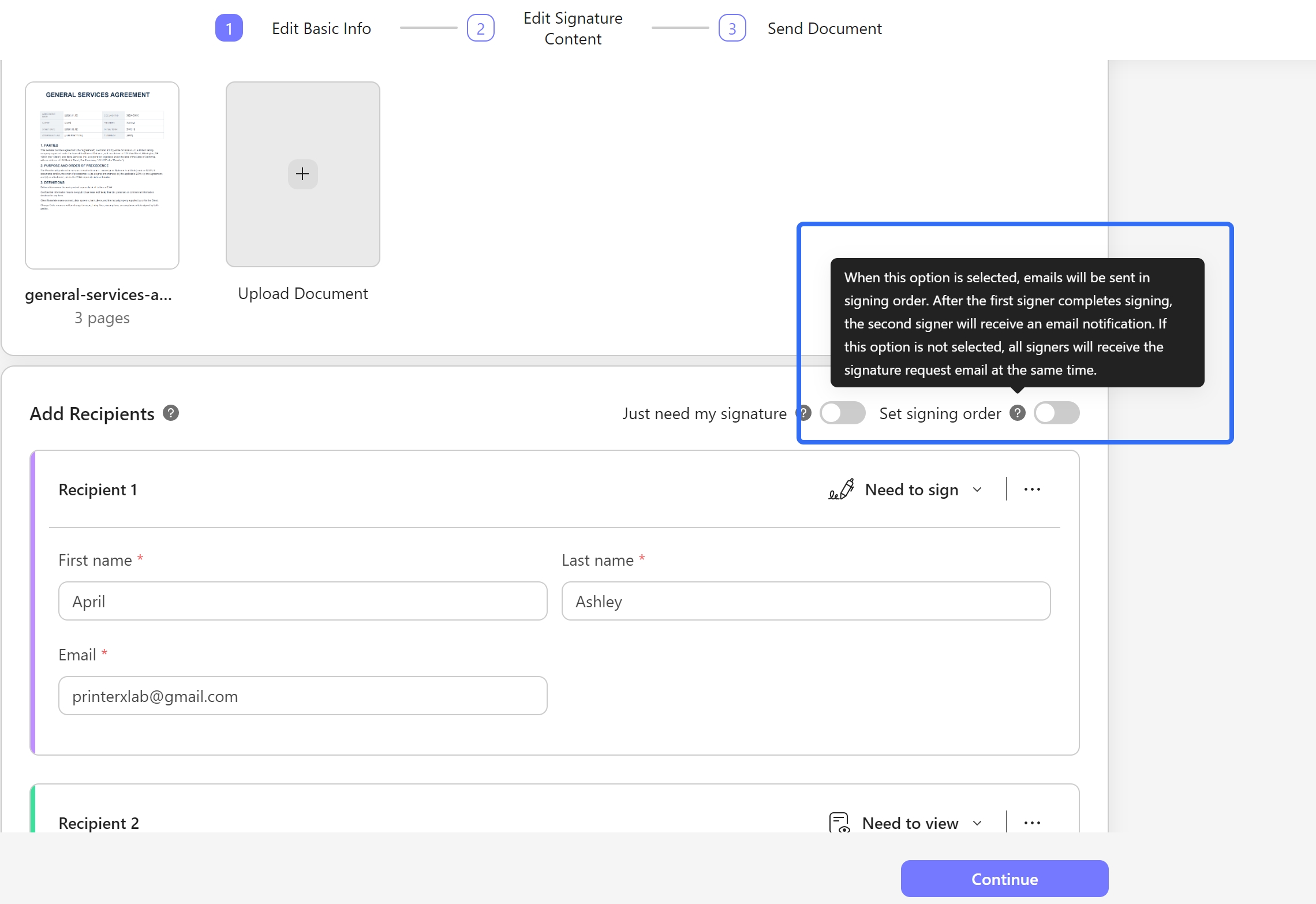
How UPDF helps: UPDF Sign supports parallel signing and approval requests with status tracking, so the document does not sit in one inbox while the rest of the routing waits.
6. Signature
Signature looks like the shortest step. The median signature step is 6.2 hours. But for the contracts that get stuck, signature is where the largest share of time disappears: among the slowest contracts, 44% of the total wait happens after the document has been sent for signature, more than twice the 19% spent in approval.
The bottleneck is the last mile. The signer may be traveling, may not have a printer, or may be waiting for an internal confirmation that has nothing to do with the contract text. If the process still relies on print-sign-scan, the delay is structural, not personal.
Tip
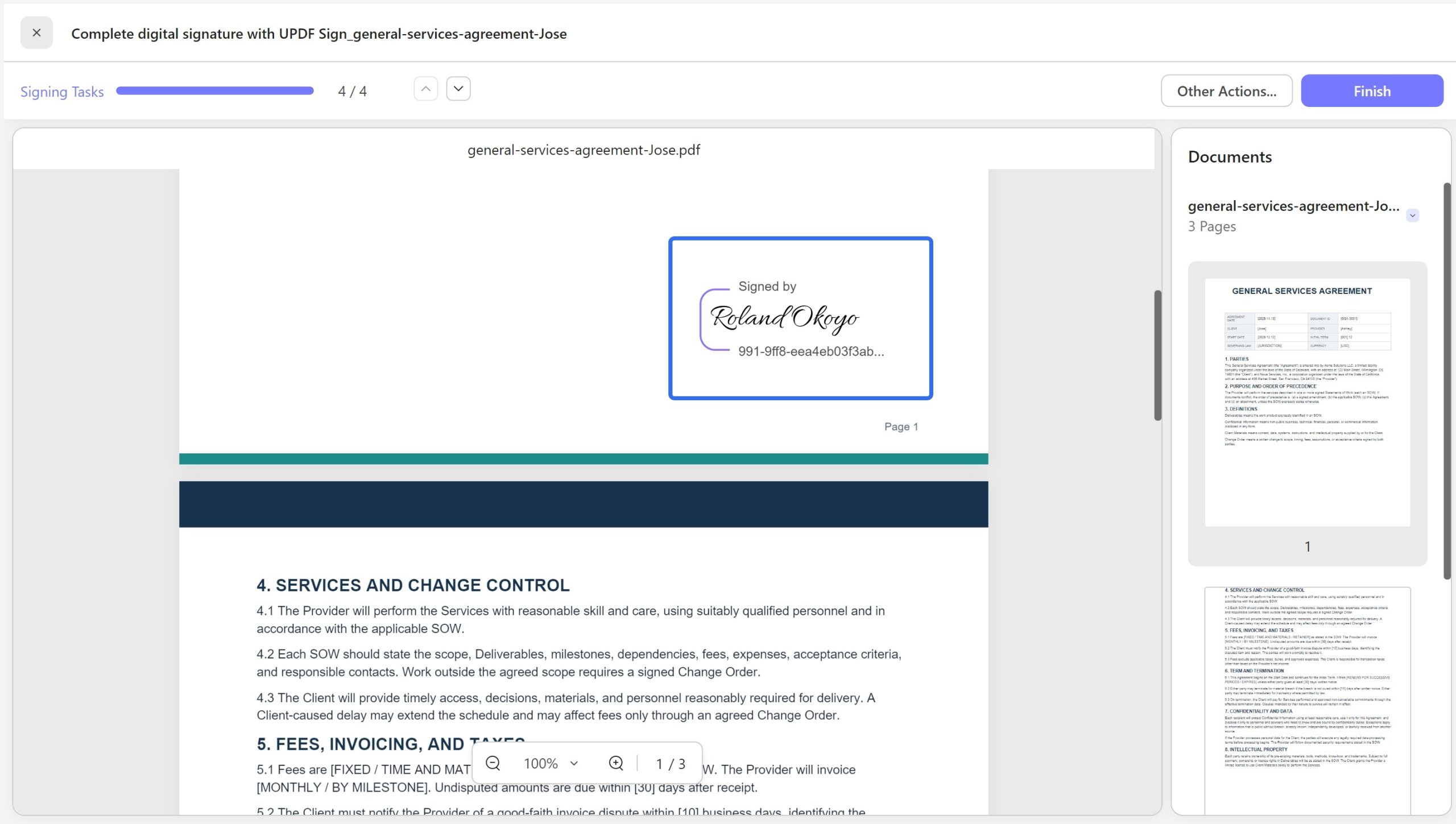
How UPDF helps: UPDF Sign provides legally binding e-signatures with an audit trail, so the final step does not require a printer, a scanner, or a physical handoff.
7. Storage & Organization
Storage is the stage nobody owns. Signed contracts end up in a shared drive, a contract folder, an email archive, and someone’s desktop, often under different names. The result is not just untidiness. It means the next person who needs to check a clause, confirm a term, or respond to an audit has to reconstruct the file’s history from memory and email search.
The bottleneck is retrievability, not storage capacity.
Tip
8. Renewal & Obligation Tracking
Renewal is where contract management stops being about documents and starts being about money. Many contracts auto-renew unless one party gives notice, and the notice window is often buried on page 17. Only 14% of companies have automated renewal tracking, and roughly 69% of software contracts contain auto-renewal clauses with cancellation notice periods of 30 to 90 days. Miss the window, and the organization has effectively signed a new term without a negotiation.
The bottleneck is that renewal is nobody’s full-time job. It is a date on a spreadsheet, a reminder in someone’s calendar, or a memory.
Tip
How UPDF helps: UPDF AI can extract renewal dates, notice periods, payment amounts, and termination clauses from the contract PDF and return them as a structured summary, so the dates that matter are pulled from the text rather than remembered.
Where Contract Workflows Actually Break Down
Most articles on contract workflows list “challenges” in a single sentence. The real breakdowns are specific, recurring, and fixable without a platform migration.
Version control collapses across email and shared drives. When drafts circulate as attachments, teams lose track of the latest version and the negotiation history. The fix is not a new platform; it is a rule: one current file, one comparison step per round, and no substantive comments on a file until it has been compared against the prior version.
One approver stalls the entire sequence. The data is unambiguous: sequential routing turns the slowest person into the bottleneck, and parallel routing cuts decision time roughly in half. The fix is to ask all required approvers at once and to name the one person who is holding the decision.
Scanned counterparty paper is not editable, searchable, or commentable. A scanned PDF cannot be redlined, and manually retyping changes introduces transcription risk. OCR solves the access problem: once the scan is converted to searchable, editable text, the document can enter the same review and comparison workflow as a native PDF.
Renewal windows go unowned. With 92% of spreadsheet-based contract tracking failing and 56% of businesses missing a contract deadline at least monthly, the renewal stage is less a process than a hope. The fix is to treat every executed contract as a set of dates with an owner, not a file in a folder.
Visibility disappears the moment the contract leaves the system. For teams working out of email and shared drives, the honest answer to “where is this contract?” is often “we don’t know”. A shared status field, even a simple one, is more valuable than a sophisticated dashboard that nobody updates.
How to Speed Up Your Workflow Without Buying a CLM Platform
A CLM platform can be the right answer for a large legal department with thousands of contracts and a dedicated operations team. It is rarely the right first answer for a small or mid-sized team that simply needs the document layer to stop wasting time. The following checklist targets the work that happens inside each stage, using tools the team already has or can adopt without a procurement cycle.
1. Make every incoming PDF searchable and editable. Scanned contracts, counterparty paper, and exhibits often arrive as images. OCR converts them into text that can be searched, annotated, compared, and signed. This is the single highest-leverage document-layer fix, because it unlocks every downstream action.
2. Compare before you comment. On every negotiation round, produce a visible comparison between the prior draft and the returned draft. UPDF’s Compare PDF shows additions, deletions, and replacements, so reviewers spend their time on changes rather than on rereading unchanged clauses.
3. Use AI to build the clause map, not to replace the review. UPDF AI’s Contract assistant extracts key terms, obligations, and risk points from a long agreement, giving the reviewer a structured starting point. The reviewer still makes the judgment; the AI removes the navigation cost.
4. Annotate in the document, not in a separate email. Comments that live in an email thread lose their anchor. Comments that live on the PDF stay attached to the clause. UPDF supports highlighting, annotation, and in-document comments, so the feedback trail and the contract trail are the same trail.
5. Redact permanently, not visually. When a contract contains sensitive pricing, personal data, or confidential terms, a black box drawn over the text is not redaction. UPDF’s redaction removes the underlying content, and sanitization removes hidden metadata before sharing.
6. Sign electronically, and route in parallel. E-signature removes the print-sign-scan loop, and parallel routing removes the sequential wait. UPDF Sign supports multiple signers, status tracking, and an audit trail, which is enough for most commercial agreements without a full CLM implementation.
7. Extract renewal dates at execution, not at renewal season. When the contract is signed, run an AI extraction for renewal date, notice period, payment terms, and termination clauses, and put those dates in the owner’s calendar. The cost of doing this once at execution is minutes; the cost of missing a 90-day notice window is an unwanted renewal term.
FAQ
How long should contract approval take?
There is no universal duration. Set service levels by risk and complexity, then track time by stage to distinguish legal review from waits for business, finance, security, or executive approval.
What is the difference between contract review and contract approval?
Review examines the language, obligations, commercial terms, and risks and recommends changes. Approval is the formal decision by an authorized person to accept those terms or exceptions on behalf of the organization. The reviewer and approver may be different people.
Can a small team manage contracts without CLM software?
Yes, when volume and complexity are manageable. Use one repository, clear owners, controlled versions, an approval matrix, a contract register, and calendar reminders. Consider CLM when manual tracking fails or audit and integration needs outgrow this process.
Is a PDF editor a contract management system?
No. A PDF editor improves the document layer—reading, editing, commenting, OCR, protection, organization, and signing. It does not automatically create governance, assign risk owners, route approvals, or manage renewals. Those controls must come from your process, tracker, or CLM platform.
Conclusion
A faster contract workflow starts with visible ownership and one reliable version. Map the stages, define who moves each forward, and capture renewal data before storage. UPDF can reduce PDF friction from scanned intake and review to signature and archiving, while your team retains legal judgment and workflow control.
Download UPDF and streamline the document work behind every contract stage.
Windows • macOS • iOS • Android 100% secure







 Enola Miller
 Enya Moore
 Enrica Taylor

 Engelbert White