UPDF
UPDF
 UPDF for Windows
 UPDF for Mac
 UPDF for iPhone/iPad
 UPDF for Android
 Nomostar
 UPDF AI Online
 UPDF Sign
 IvyCraft
 Edit PDF
 Annotate PDF
 Create PDF
 PDF Form
 Edit links
 Convert PDF
 OCR
OCR PDF to Word
 PDF to Image
 PDF to Excel
 Organize PDF
 Merge PDF
 Split PDF
 Crop PDF
 Rotate PDF
 Protect PDF
 Sign PDF
 Redact PDF
 Sanitize PDF
 Remove Security
 Read PDF
 UPDF Cloud
 Compress PDF
 Print PDF
 Batch Process
 About UPDF AI
 UPDF AI Solutions
 AI User Guide
 FAQ about UPDF AI
 Summarize PDF
 Translate PDF
 Chat with PDF
 Chat with AI
 Chat with image
 PDF to Mind Map
 Explain PDF
 PDF AI Tools
 Image AI Tools
 AI Chat Tools
 AI Writing Tools
 AI Study Tools
 AI Working Tools
 Other AI Tools
 AI Bookmark Generation
 AI Bookmark Summary
 AI Watermark Generation
 AI Background Generation
 AI Sticker Generation
 AI Stamp Generation
 AI Editing Suite
 UPDF Copilot
 AI Page Management
 AI Semantic Search
 PDF to Word
 PDF to Excel
 PDF to PowerPoint
 Enterprise Solution
 Enterprise Sign
 Enterprise AI
 Enterprise Plan
 Enterprise User Guide
 Enterprise Webinar
 Banking
 Healthcare
 Insurance
 Legal
Legal Manufacturing
 Government
 Researchers & PhDs
 Solopreneurs & Freelancers
 Lawyers & Legal Professionals
 Real Estate Agents & Brokers
 Education Solution
 Customer Stories
 User Guide
 UPDF Tricks
 FAQs
FAQs UPDF Reviews
 Download Center
 Blog
Blog Newsroom
 Tech Spec
 Updates
 UPDF vs. Adobe Acrobat
 UPDF vs. Foxit
 UPDF vs. PDF Expert

A thesis is more than a long paper. It's a professional credential that signals to your field that you can identify a real problem and build a sustained argument to defend it under scrutiny. But between developing a logical argument and getting the layout right, most students feel overwhelmed before they have written a single chapter.
Experienced academics say that the real struggle is structural. However, the thesis format is learnable. This guide breaks thesis format into three manageable parts, i.e., your core argument, your paragraph structure, and the final technical formatting standards. Master all three, and the document stops feeling like a mountain and starts feeling like a plan.
Before you start typing, ensure you have a research assistant who can keep up. For example, UPDF can help brainstorm thesis statements, perform deep scholarly research, and organize thesis documents. Download UPDF for free to manage and analyze your research sources with ease.
Windows • macOS • iOS • Android 100% secure
Part 1. Crafting the Core: The Format of a Thesis Statement
What Makes a Strong Thesis Statement? (Arguable, focused, clear)
A thesis statement is a 1-2 sentence claim that your paper will argue and support with evidence. It typically appears at the end of your introduction. It should be specific, arguable, and provable.
That's the foundation. But the important thing to know is what separates a weak thesis from a strong one?
A strong thesis statement takes a clear and specific claim that someone could agree or disagree with. For example, "Social media improves student motivation but harms students' ability to focus during study sessions". This is clear, specific, arguable, and focused.
In contrast, a thesis statement like "Social media affects students" is far too broad. It doesn't take a position and gives the reader no direction on what the paper will actually argue.
Bonus Tips:
The Formula for the Format of a Thesis Statement
The cleanest approach to thesis statement format follows this structure:
[Topic] + [Your Position/Claim] + [Because + Reasons]
The above format of a thesis statement gives three clear reasons for the claim and focuses the essay on specific and real-world arguments. Let's apply this to a common academic topic:
"Remote work has permanently changed organizational culture because it has altered communication norms, shifted performance evaluation methods, and expanded employee autonomy in ways that cannot be reversed."
Notice how this thesis format identifies the topic (remote work) and takes a firm position (permanently changed organizational culture). Afterward, it immediately signals three supporting reasons.
According to Purdue OWL , the thesis statement should be specific and cover only what you will discuss in your paper. It should be supported with specific evidence throughout the body of the work.
Pro Tip: Use UPDF AI Online for Brainstorming
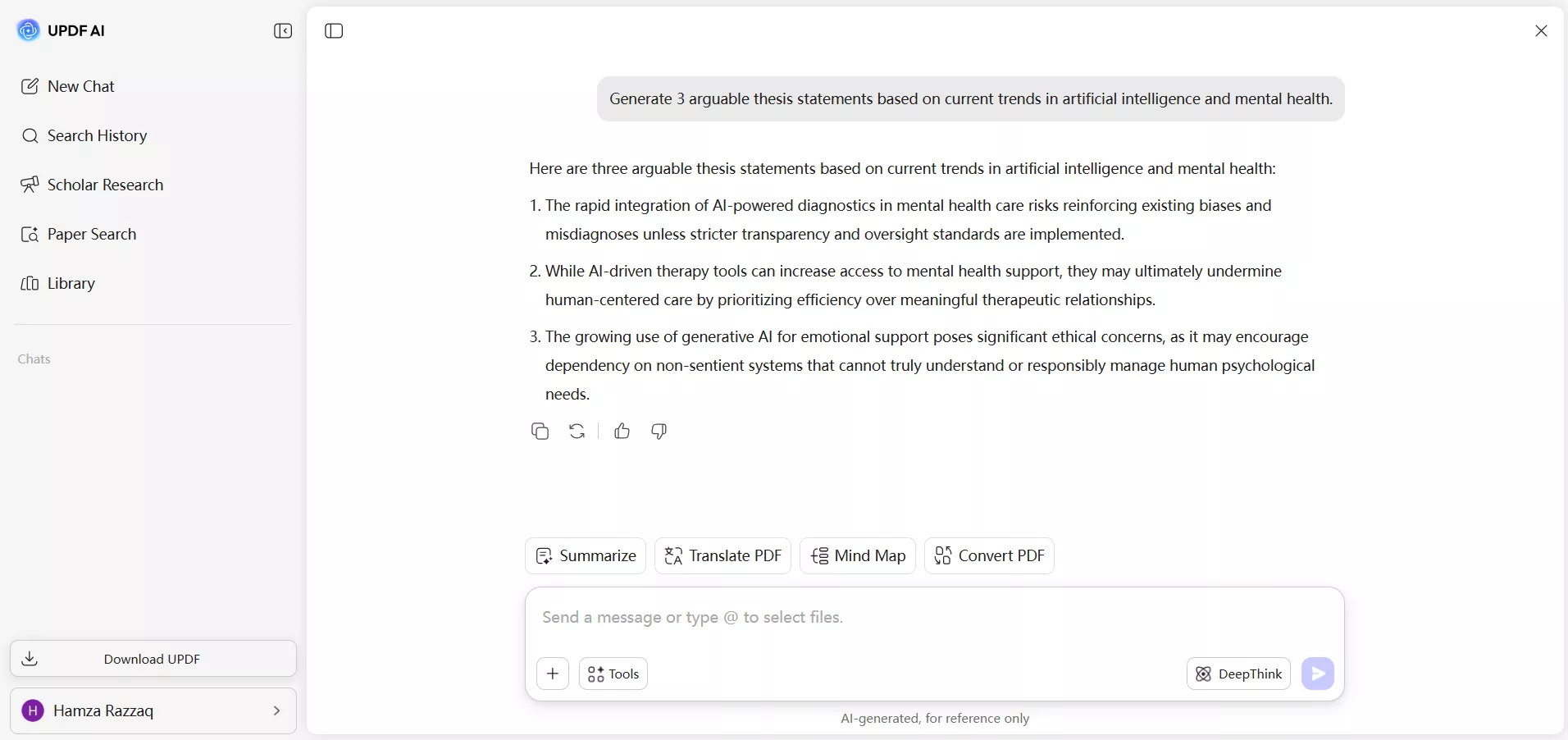
Staring at a blank page is a common obstacle at this stage. However, you can pass that phase with UPDF AI Online's Scholar Research feature. It is a web-based AI research assistant that helps students brainstorm thesis ideas and explore current academic trends.
Input your subject area and ask: "Generate 3 arguable thesis statements based on current trends in [Subject]." UPDF's AI will surface authentic research options you can immediately begin with. So, you can avoid spending an hour crystallizing an idea into a sharp claim and skip straight to the editing phase.
Part 2. Building the Body: Thesis Paragraph Format
The TEEL and MEAL Frameworks
Every body paragraph needs to earn its place when your thesis is locked in. The two most reliable frameworks for thesis paragraph format are TEEL and MEAL.
TEEL stands for:
- Topic Sentence — state the paragraph's main claim
- Explanation — clarify and develop the claim
- Evidence — support with data or quotes
- Link — connect back to the thesis or transition to the next paragraph
MEAL follows a similar logic:
- Main Idea
- Evidence
- Analysis
- Lead-out
The discipline is the same in both frameworks. Every paragraph must make one clear point, back it up with evidence, and explain why it matters to the larger argument. A paragraph shouldn't be part of your thesis if it doesn't pass this test.
Evidence Collection with UPDF AI Online
Finding peer-reviewed evidence for each paragraph used to mean hours of database searching. UPDF AI Online's Scholar Research (Paper Search) mode reduces that manual effort into an automated activity of a few minutes.
When you are stuck in a thesis paragraph format where you need supporting literature, ask: "Find 3 peer-reviewed sources supporting the link between [Factor A] and [Factor B]."
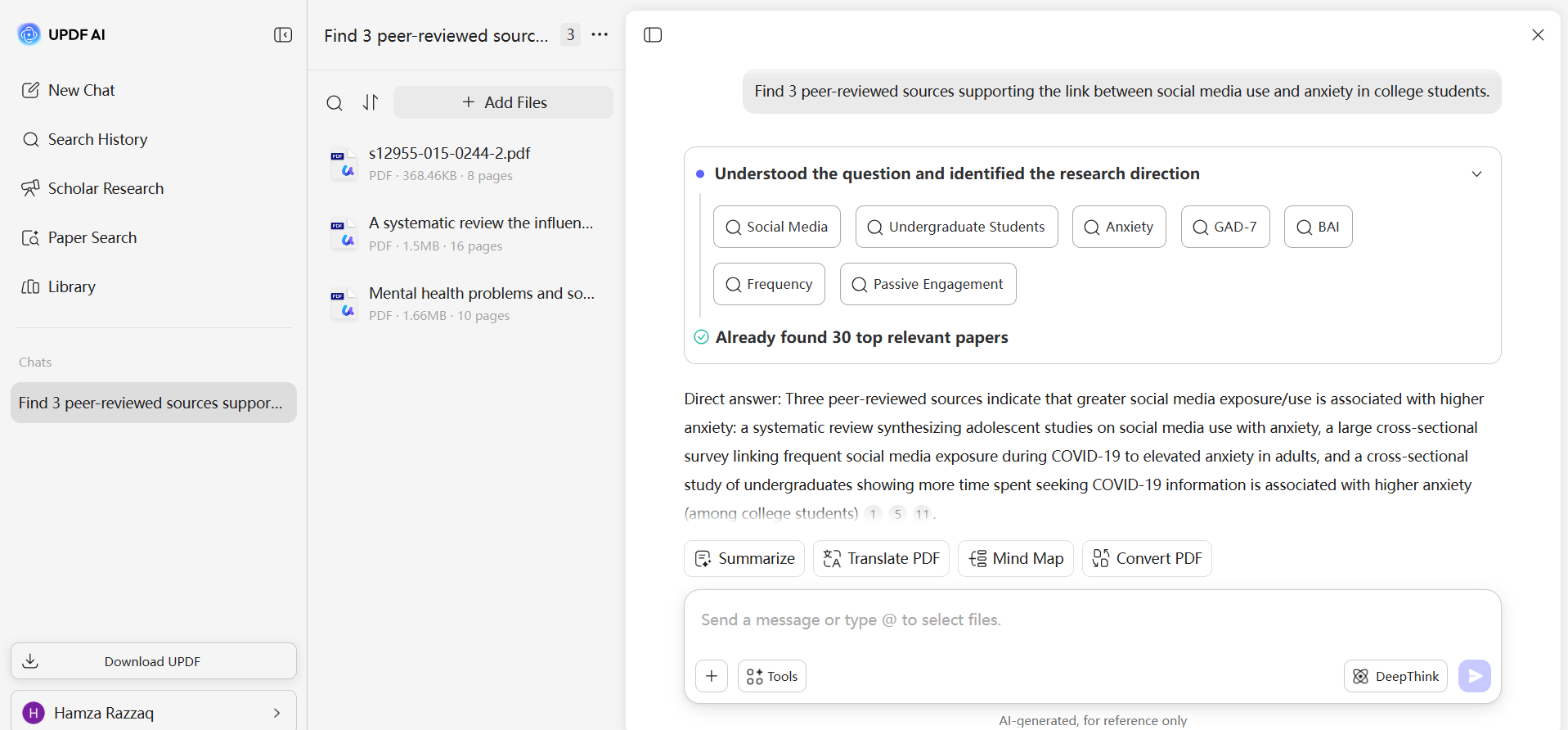
Within seconds, UPDF surfaces relevant papers. Afterward, you can download the PDFs directly and use the Chat with PDF feature to extract specific quotes and statistics for your evidence section. There is no need for manually scanning every page of every document.
Part 3. Polishing to Perfection: Thesis Formatting Standards
Thesis formatting makes students lose marks silently that they have earned through good research. The technical requirements of APA, MLA, and Chicago style are non-negotiable at most institutions. Here's a quick glimpse at the requirements:
APA Style (7th Edition)
- Margins: 1 inch on all sides
- Font: Accessible fonts are prioritized: 11-pt Calibri, 11-pt Arial, 11-pt Georgia, or 12-pt Times New Roman
- Spacing: Double-spaced throughout, including the reference page
- Page Numbers: Appear in the top-right header on every page. Start with "1" on the title page
- Running Head: Not required for student papers unless requested
- Title Page: Must include the paper title (bold and centered), author name, affiliation (department and university), course number/name, instructor, and due date
MLA Style (9th Edition)
- Margins: 1 inch on all sides
- Font: 12-pt Times New Roman (or similar readable font)
- Spacing: Double-spaced throughout, including the Works Cited page
- Page Numbers: Upper-right corner, preceded by your last name (e.g., Smith 4)
- Paragraph Indent: Half an inch for each new paragraph
- First Page Heading: In the upper-left corner, list your name, instructor's name, course, and date (formatted as Day Month Year, e.g., 4 May 2026)
- Title: Centered, standard text (no bold or italics)
Chicago Style (18th Edition)
- Margins: 1 inch on all sides
- Font: 12-pt Times New Roman
- Spacing: Double-spaced body text. Notes and Bibliography entries are single-spaced with a blank line between each entry
- Page Numbers: Top right or bottom center. Must be consistent throughout
- Footnotes: Use a superscript number at the end of the sentence
- Citations: Footnotes rather than in-text author-date references
- Paragraph Indent: Half an inch for each new paragraph
Final Review with UPDF Desktop
Managing a 50-page thesis format in the final stage is a formatting challenge in itself. UPDF Desktop makes that hassle disappear with an intuitive interface and features built for exactly this kind of heavy document work.
Windows • macOS • iOS • Android 100% secure
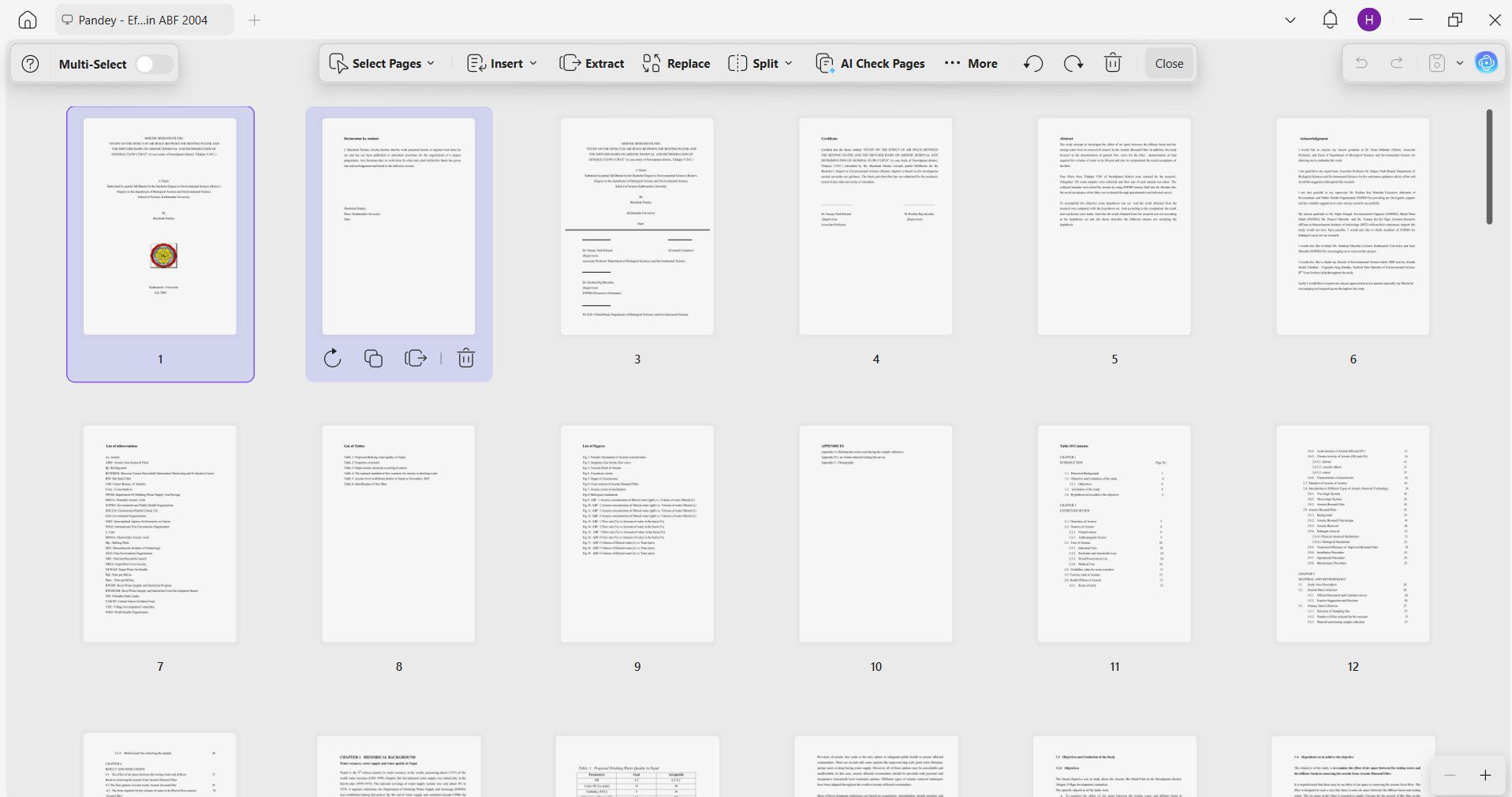
Use UPDF Page Management to verify that your Title Page, Abstract, Table of Contents, body chapters, and References section all appear in the correct sequence. It is common to misplace sections or break page numbering after moving content around during late-stage revisions.
What's more, the AI page checker within UPDF can detect missing, blank, and rotated pages for you, so that you can fix or delete them conveniently.
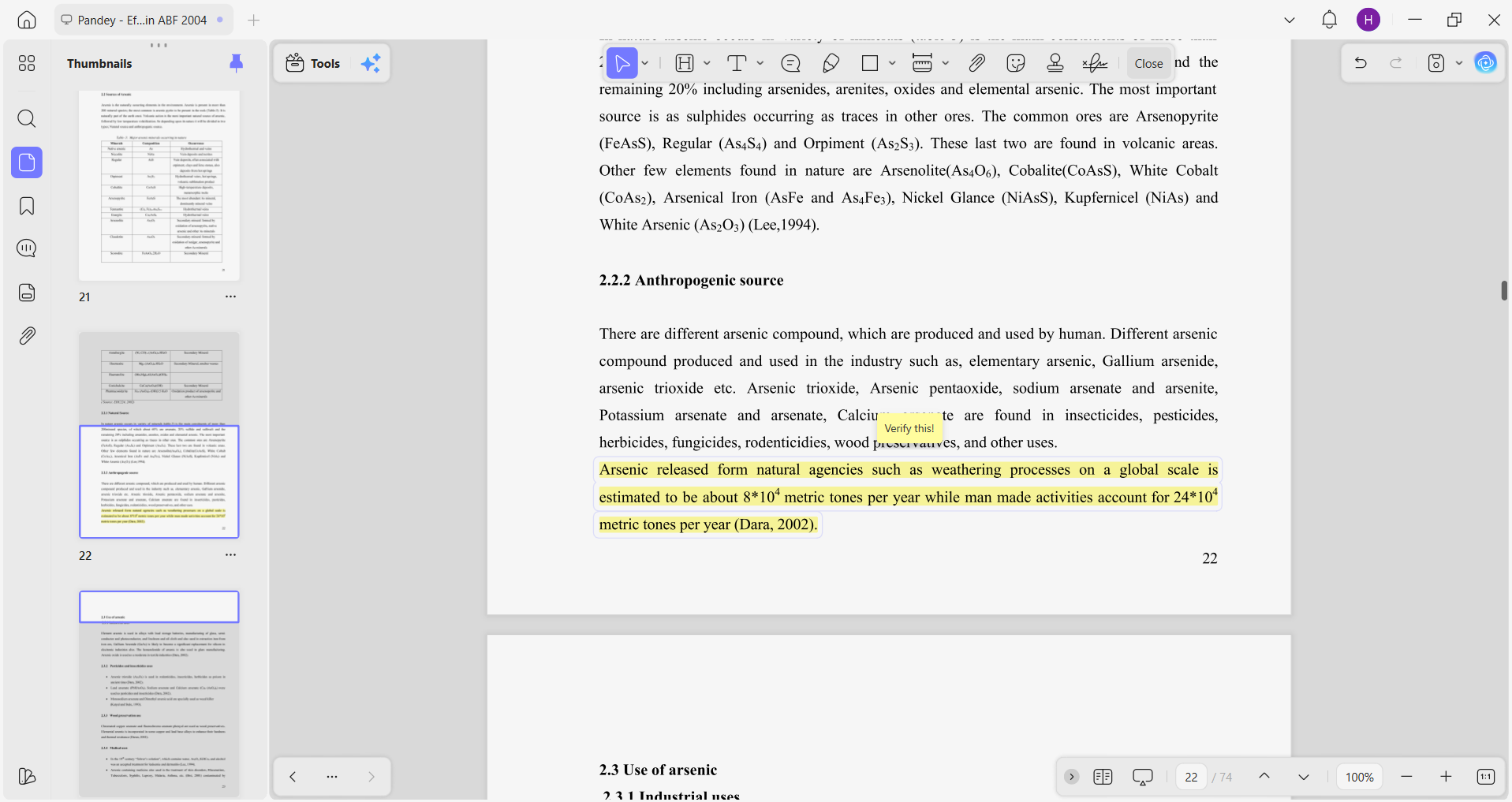
Use UPDF's Annotations tools to leave sticky notes for yourself or your advisor. You can flag sections that require a second look or citations that require verification. This creates a reviewable trail that is easier to manage later on.
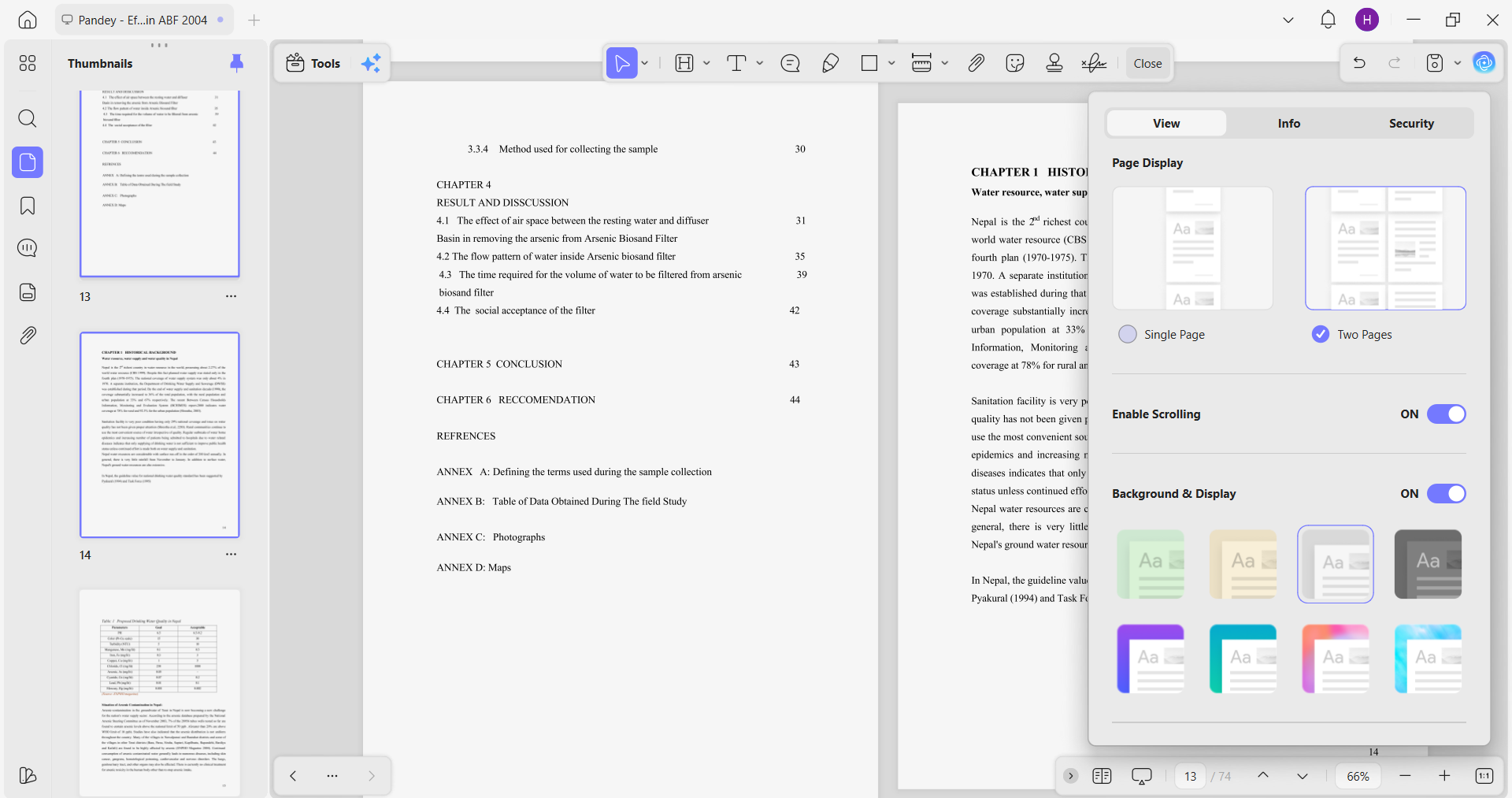
Use UPDF's PDF Reader to do one last read-through of the fully formatted document. You can choose from single/two page scrolling, single/two page view, and light/dark mode for an enhanced experience.
Furthermore, the AI editing assistant let you rewrite and proofread the original content within one click.
Download UPDF and let it help you get through the final thesis format review.
Windows • macOS • iOS • Android 100% secure
Part 4. UPDF vs. UPDF AI Online: Your Academic Power Duo
If you have gotten confused about whether you need UPDF desktop, UPDF AI Online, or both, let's get that cleared. The answer depends on where you are in the writing process. However, you should use both as a coordinated system.
UPDF AI Online is your web-based research and brainstorming partner. Its Scholar Research and Paper Search capabilities are useful during the early or mid-stage of thesis writing. They can help in generating thesis statement ideas, surfacing peer-reviewed literature, extracting key quotes from academic PDFs, and more.
UPDF Desktop (and Mobile App) is your local hub for editing, annotating, organizing, and finalizing the document. After you have content drafted and sources gathered, UPDF Desktop handles the organizational and formatting work.
Compared to Adobe Acrobat, which is often too expensive for students, UPDF provides a smoother, AI-integrated experience at a fraction of the cost.
Part 5. Exclusive Savings: The UPDF Education Discount
We know student budgets are tight. Between the burden of tuition, textbooks, and living costs, paying full price for productivity software is hard to justify.
UPDF understands this, which is why it offers a massive Education Discount for students and educators. You can get professional-grade PDF management and AI research tools at a price that makes sense for a student budget.
Claim Your 50% Education Discount Here →
Get pro-level tools for the cost of a few lattes and finish your thesis format with the kind of confidence that comes from knowing your formatting and sources are all in order.
FAQs
Where should the thesis statement be located?
A thesis statement usually appears at the end of an introductory paragraph. It may fall at the end of the introduction section in longer research documents, after any background context or literature framing.
Can UPDF AI help format my citations?
UPDF AI can assist with identifying sources and extracting relevant information from PDFs. It can even tell if the citation follows the APA, MLA, or Chicago rules. However, the actual formatting of citations still requires your manual input. So, think of UPDF as a virtual assistant that streamlines the citation-building process.
Is UPDF available on Mac and Windows?
Yes. UPDF Desktop is available on Mac and Windows, as well as iOS and Android. You can work on your thesis across devices without losing formatting or annotations.
What are the 5 elements of a thesis?
A thesis consists of five core elements: an Introduction that presents your research problem and thesis statement, a Literature Review that surveys existing scholarship, a Methodology explaining your research approach, a Results section presenting your findings, and a Conclusion that synthesizes the argument and its significance.
Conclusion
A thesis is a professional credential, and it deserves to look like one. When you approach the thesis format as three separate layers (thesis statement, disciplined paragraph structure, and clean technical formatting), the process becomes more manageable. Alongside that, having UPDF as your research and formatting partner at every stage makes the process even shorter. All that's left is doing the work you were always capable of doing.
Windows • macOS • iOS • Android 100% secure









 Lizzy Lozano