 UPDF
UPDF
 UPDF for Windows
 UPDF for Mac
 UPDF for iPhone/iPad
 UPDF for Android
 Nomostar
 UPDF AI Online
 UPDF Sign
 IvyCraft
 Edit PDF
 Annotate PDF
 Create PDF
 PDF Form
 Edit links
 Convert PDF
 OCR
OCR PDF to Word
 PDF to Image
 PDF to Excel
 Organize PDF
 Merge PDF
 Split PDF
 Crop PDF
 Rotate PDF
 Protect PDF
 Sign PDF
 Redact PDF
 Sanitize PDF
 Remove Security
 Read PDF
 UPDF Cloud
 Compress PDF
 Print PDF
 Batch Process
 About UPDF AI
 UPDF AI Solutions
 AI User Guide
 FAQ about UPDF AI
 Summarize PDF
 Translate PDF
 Chat with PDF
 Chat with AI
 Chat with image
 PDF to Mind Map
 Explain PDF
 PDF AI Tools
 Image AI Tools
 AI Chat Tools
 AI Writing Tools
 AI Study Tools
 AI Working Tools
 Other AI Tools
 AI Bookmark Generation
 AI Bookmark Summary
 AI Watermark Generation
 AI Background Generation
 AI Sticker Generation
 AI Stamp Generation
 AI Editing Suite
 UPDF Copilot
 AI Page Management
 AI Semantic Search
 PDF to Word
 PDF to Excel
 PDF to PowerPoint
 Enterprise Solution
 Enterprise Sign
 Enterprise AI
 Enterprise Plan
 Enterprise User Guide
 Enterprise Webinar
 IT
IT Education
 Construction
 Financial Service
 Healthcare
 Insurance
 Legal
Legal Manufacturing
 Government
 Researchers & PhDs
 Solopreneurs & Freelancers
 Lawyers & Legal Professionals
 Real Estate Agents & Brokers
 Education Solution
 Customer Stories
 User Guide
 UPDF Tricks
 FAQs
FAQs UPDF Reviews
 Download Center
 Blog
Blog Newsroom
 Tech Spec
 Updates
 UPDF vs. Adobe Acrobat
 UPDF vs. Foxit
 UPDF vs. PDF Expert

Researchers in labs rely on a clear abstract to help readers see if a study is important. When someone opens a journal or database, they first scan the abstract to judge relevance before reading further. In real academic work, this section becomes your paper's first impression, not just another formal requirement.
For users who ask, "What is a scientific abstract?", it is a short, standalone summary of your study. Before you turn months of experiments into careful lines, you also need strong digital tools like UPDF. Now, we will explain how to write a scientific abstract while using UPDF to manage and annotate research.
- Strong wording in your abstract highlights the unique angle and contribution of your research.
- Readers can follow your purpose and key findings when the structure is clear.
- Using UPDF keeps PDFs, notes, and highlights in one place, supporting a smoother writing workflow.
- Planning your abstract after reviewing results prevents vague claims and unsupported, confusing statements.
Windows • macOS • iOS • Android 100% secure
Part 1. The Anatomy of Excellence: The 5 Parts of a Scientific Abstract
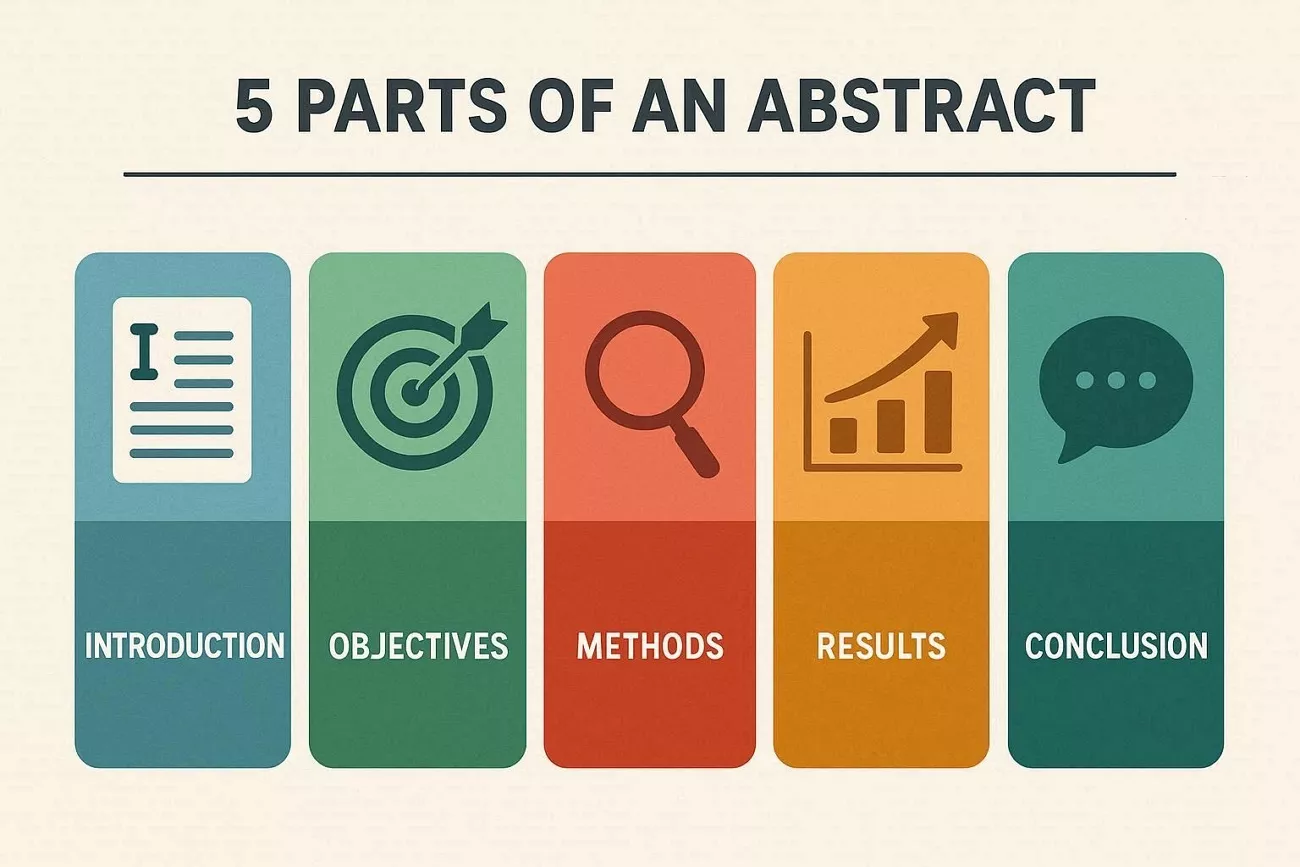
Each strong abstract follows a simple pattern that guides readers through your research in a logical order. Instead of guessing what to include, you can rely on 5 clear parts for every project. Now, discuss what people usually ask when they wonder what belongs in a scientific abstract.
What are The 5 Parts of an Abstract?
Many readers want a simple scientific abstract template that works for different research fields. Each section has a job, helping readers understand your study without reading everything. Let's walk through these sections so you can use them:
- Background/Introduction: This short opening line explains why the study topic matters in the real world. It gives readers quick context, so they understand the situation before seeing your research details.
- Objectives/Aims: Here, you state the main problem your study is trying to solve. Readers should see your goal and what question your research tries to answer.
- Methods: This part briefly explains how you carried out the study using simple, general terms only. Focus on the approach, not every small step or technical detail from your work.
- Results: In this section, you share what you found, like key numbers and clear outcomes. It helps readers see the main evidence that supports your claims without extra storytelling.
- Conclusion/Significance: Here, you can explain what your findings mean in a simple context. Show why these results matter and how they help future research.
The 4 C's of a Strong Abstract
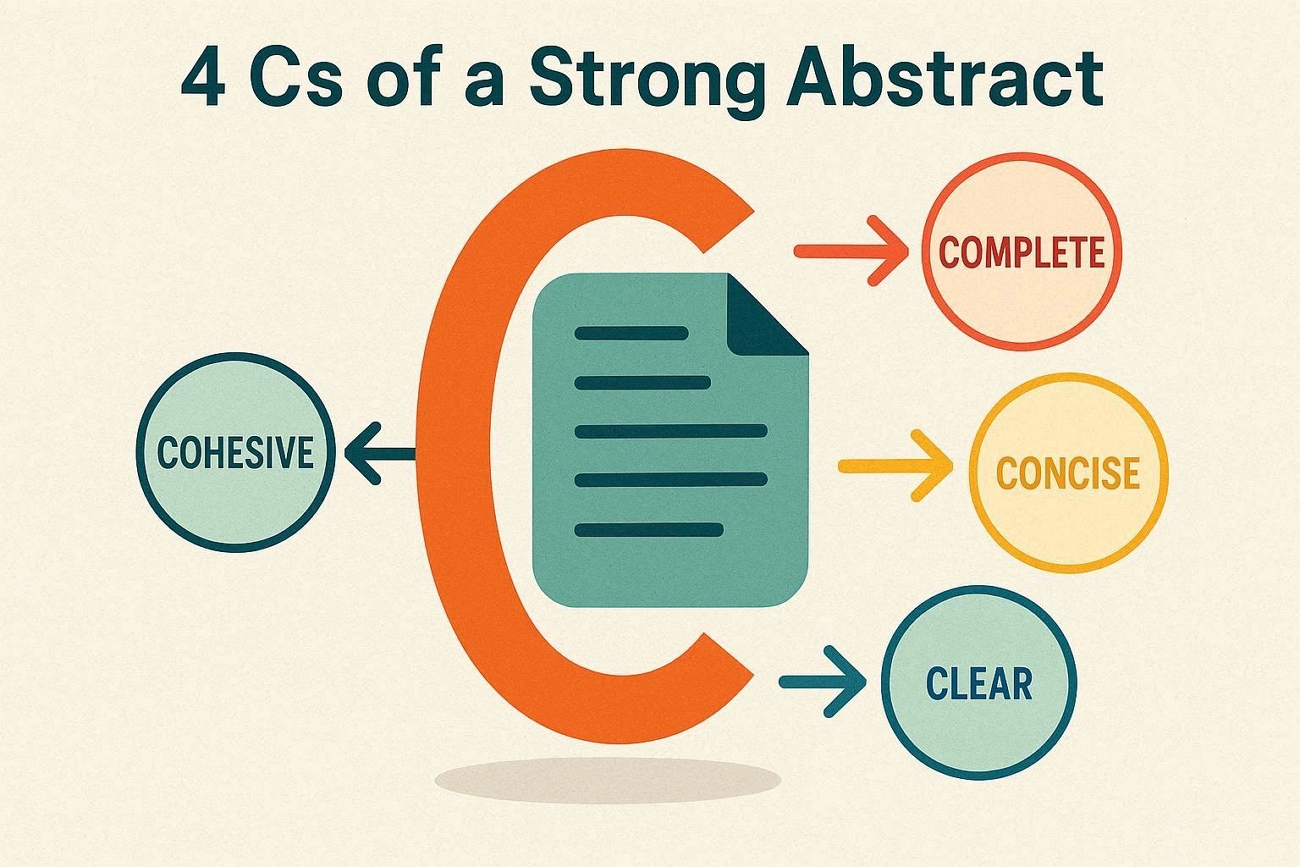
Readers also care about quality, which is why many writers often follow the simple 4 C's rule. These ideas keep your abstract sharp and easy to read when space is limited.
- Complete: Include all key elements and help readers see the full picture of your study.
- Concise: Use mandatory words and ensure every line adds clear value.
- Clear: Choose direct language and make your message easy to understand.
- Cohesive: Connect each sentence and let the abstract read like one unified paragraph.
For more detailed tips on structure and style, explore this official guide on Essential Academic Writing Software. This resource helps you choose helpful apps for drafting, editing, and organizing complex academic projects.
Part 2. The Scholar's Workflow: Using UPDF AI Online for Discovery
When students write "What is a scientific abstract?", many feel confused and stuck. Some struggle to connect their own results with earlier research in their field. Others feel unsure whether their abstract shows why their work truly matters. Look at the pain points below and see which ones match your situation:
- Starting an abstract feels hard, and the first step is not clear.
- Explaining results in short, simple academic language feels very difficult.
- Similar studies and abstracts in the same research area are still not reviewed.
- Whether the findings are new compared with earlier research remains uncertain.
- Information to include or remove in the abstract still causes confusion.
Scenario: Benchmarking Your Abstract
Many students worry that their findings might repeat past work instead of adding something new. They often have not compared their abstract with other papers in the same field. Without this comparison, it is hard to judge how original their ideas and results are.
How UPDF AI Online Helps Benchmark Your Abstract
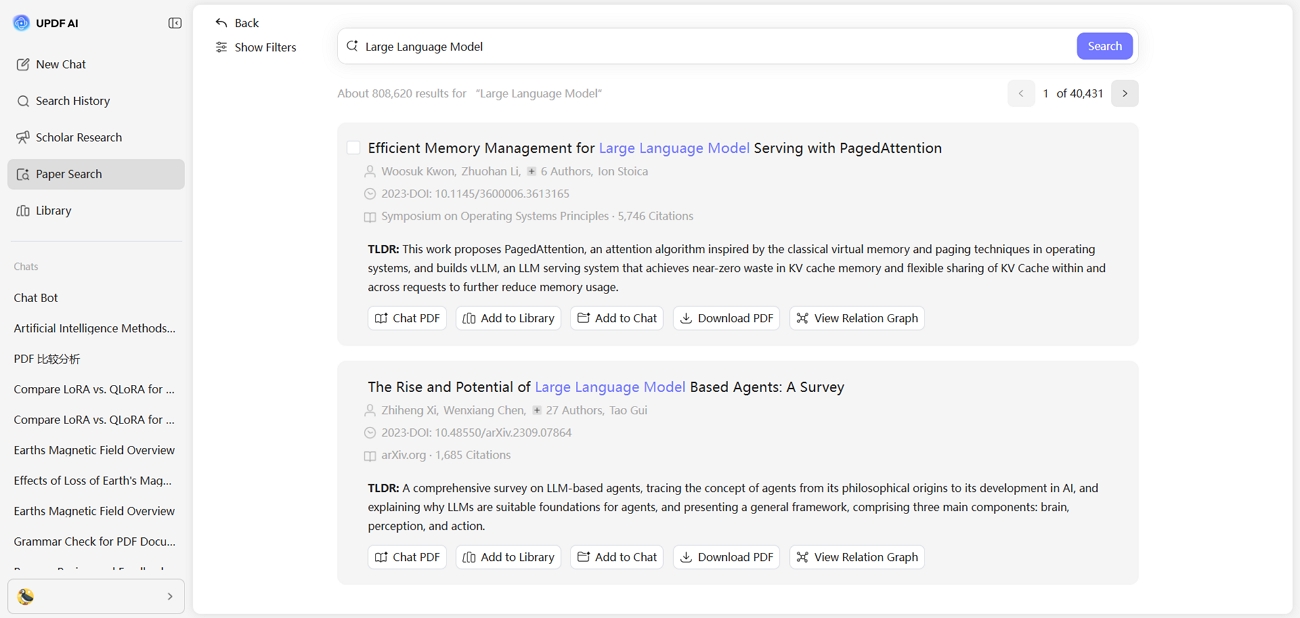
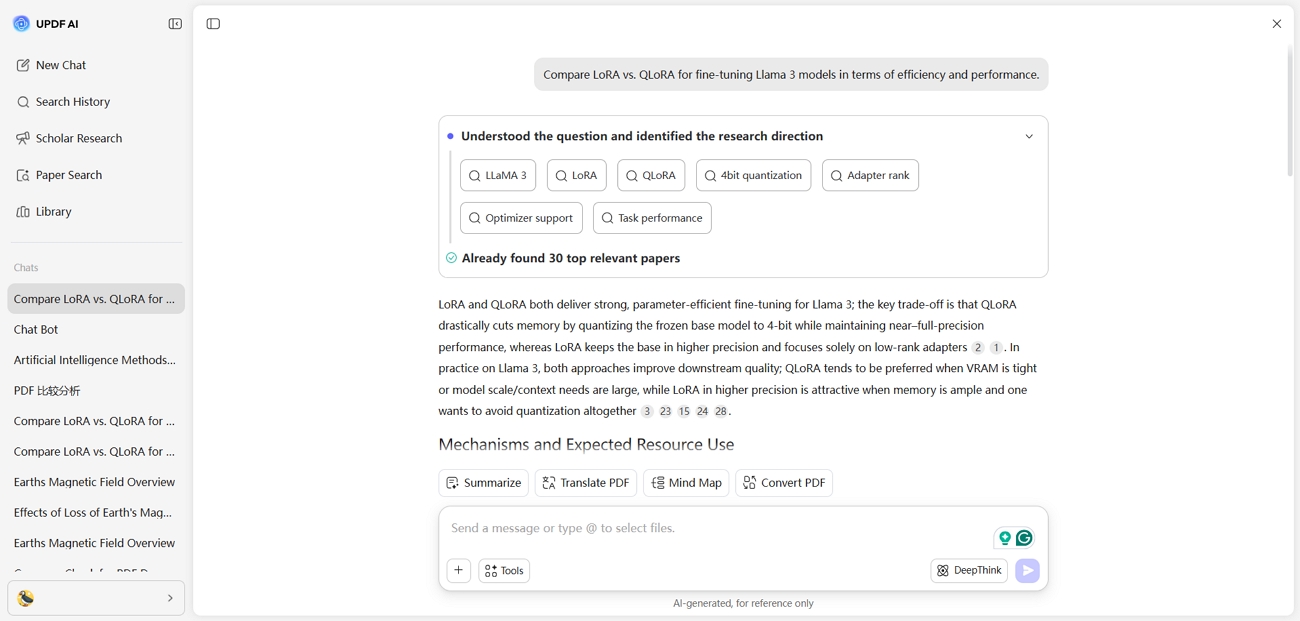
UPDF AI Online's Paper Search feature helps students compare their abstracts with strong papers in seconds. This feature searches millions of scholarly papers and highlights useful abstract examples from leading researchers. Students can watch the following short tutorial video on using Paper Search effectively. Users can notice repeated impact words and common phrasing to strengthen their own abstract wording.
Paper Search offers two helpful modes for research discovery and abstract review in one place. Now, let's explore its two main modes in more detail:
- Keyword Mode: Users type topics or metadata, then filter results by year, relevance, and field.
- AI Mode: Users ask research questions, receive summarized answers, and open cited papers for deeper reading.
UPDF gives students an exclusive education discount of up to 50% on plans. To grab this offer, visit the UPDF Education Portal and complete a quick verification.
Part 3. Refining the Draft: UPDF AI Online vs. UPDF Desktop
Using only one platform can limit how well someone learns how to write a scientific abstract. Two connected tools give flexibility because one supports fast drafting while the other supports careful review. Together, they support both creative planning and precise refinement in one workflow. Now, let's see how each platform helps.
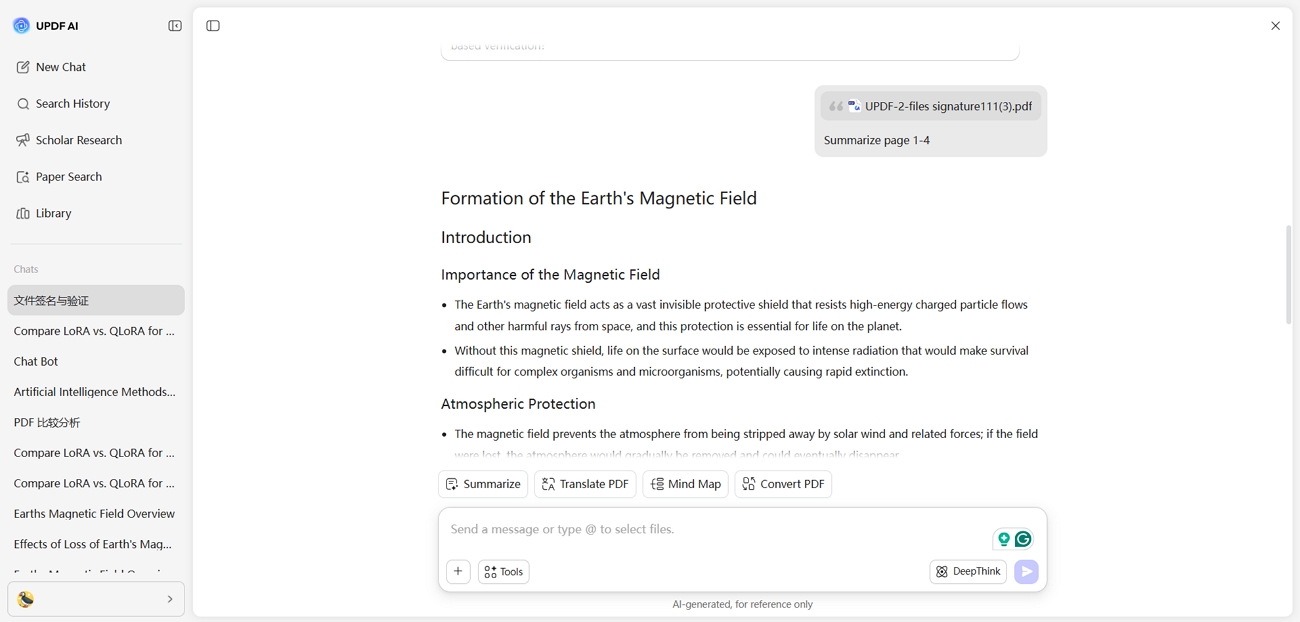
1. UPDF AI Online
During ideation, this platform can condense a 30-page manuscript into a 250-word draft. The summarize feature focuses on core goals, methods, and key findings in clear, simple language. Writers then use that short draft as a base for later detailed editing and refinement.
2. UPDF Desktop App
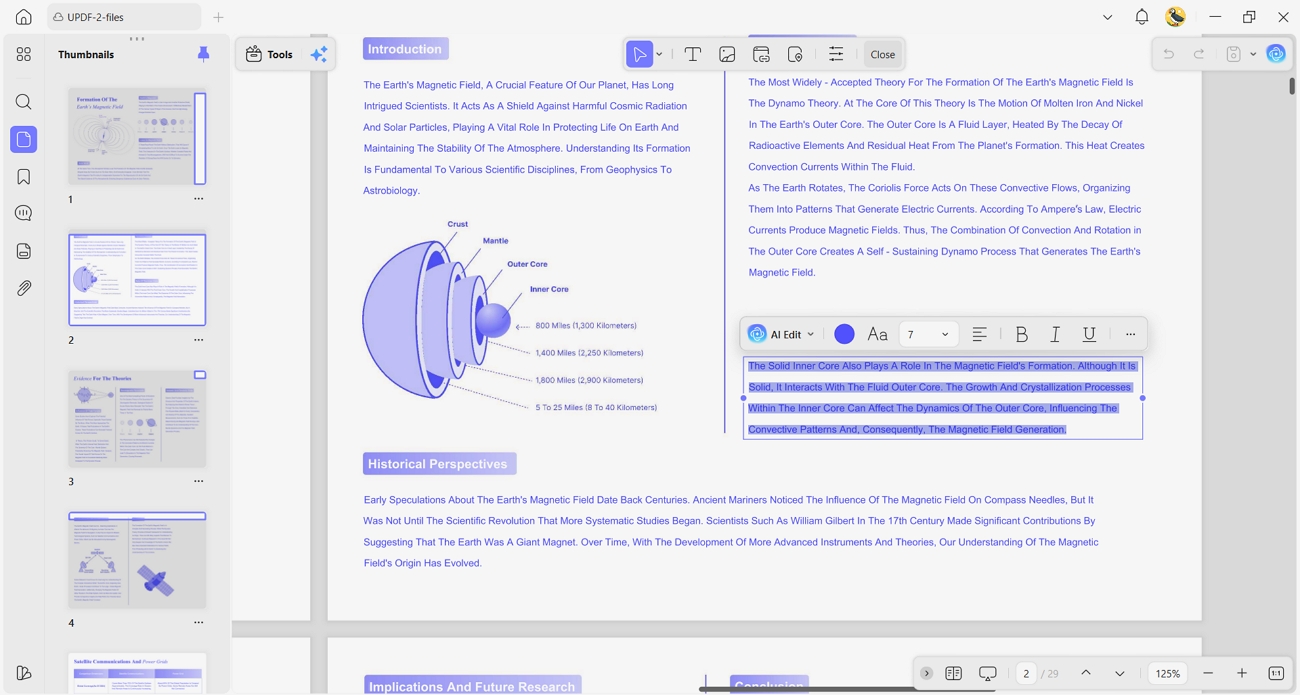
UPDF desktop app supports careful review when the abstract draft already feels complete and stable. It suits slow, focused work, where every number, claim, and sentence needs close attention. Researchers can match their written results with tables and figures to keep everything consistent and accurate. Look at the features below that help during this careful final polishing stage:
Windows • macOS • iOS • Android 100% secure
- Edit PDF: Edit tools let users adjust wording and structure without changing the core research meaning. They help fix formatting issues and align the abstract with journal or conference style requirements.
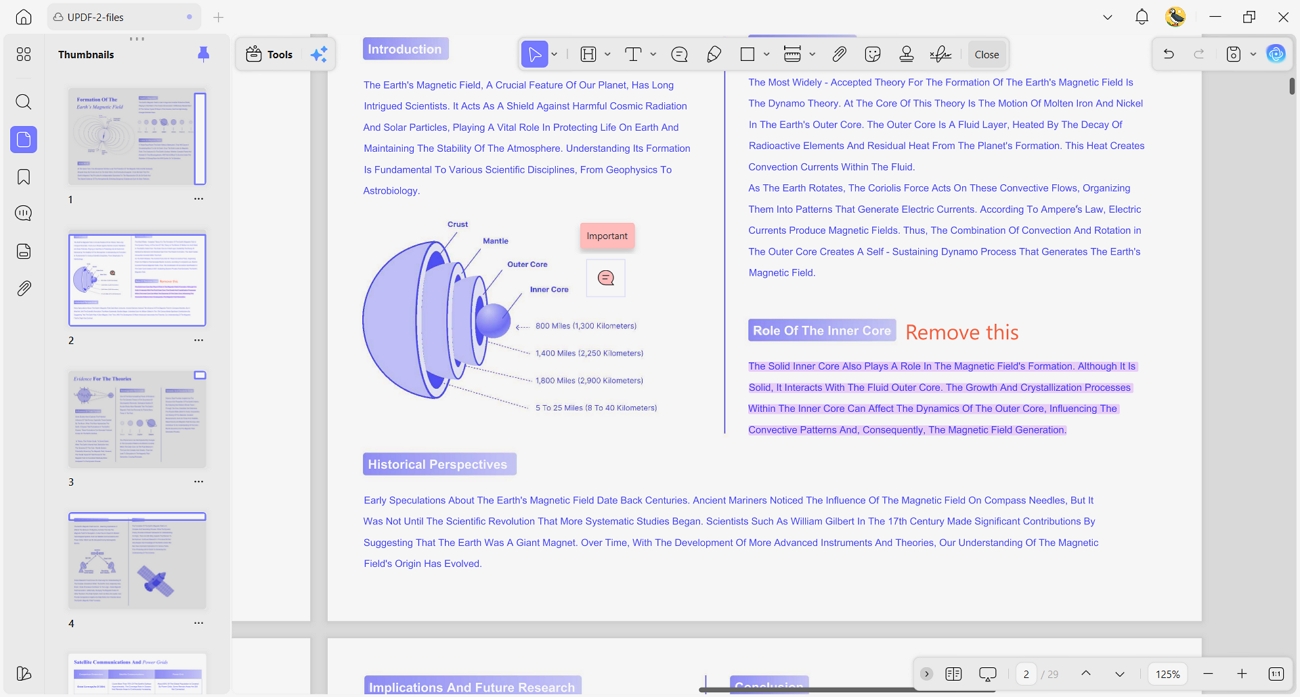
- Annotate PDF: UPDF lets users add comments based on peer feedback and supervisor suggestions clearly. They make it easy to track changes, highlight issues, and plan small improvements before submission.
Integrity Check Reminder:
Part 4. Scientific Abstract Template: A Plug-and-Play Formula
When starting feels confusing, a clear structure can make abstract writing feel less scary. During moments of confusion, a simple scientific abstract template gives direction and builds steady confidence. Under tight deadlines, a ready outline helps attention stay on key ideas rather than formatting details. The components below break an abstract into four simple parts that cover the full research story:
- Motivation: This section explains the problem or question and shows why it matters in real situations.
- Approach: Here, the abstract briefly describes how the study was done, including key methods or data sources.
- Results: In this part, the main findings appear in clear, direct language without unnecessary details.
- Conclusion: Finally, the abstract tells what the findings mean and why they matter for other readers.
Which File Format Protects Research Quality?
PDF/A keeps fonts, layout, and symbols stable, even when universities open files on different systems. Many institutions prefer this format because it reduces display problems and preserves documents for longer periods. To understand this format in more detail, read this short guide on PDF/A.
FAQs: Common Hurdles in Abstract Writing
How long should a scientific abstract be?
Many scientific abstracts are between 150 and 250 words. The exact length can change, as each journal has its own rules. Always read the conference guidelines before following their word limit.
Should I include citations in my abstract?
In most cases, abstracts do not include citations when they mention other studies. Formal citations normally belong in the introduction and background section rather than the abstract text.
Can UPDF AI summarize my scanned lab notes?
Yes, UPDF AI can summarize lab notes when the scan is clear and the text is readable. Users should ensure good scan quality and let the AI create a short summary of key points.
Conclusion
In conclusion, this guide brought together each step needed to understand how to write a scientific abstract. It showed how UPDF tools support idea discovery, drafting, checking integrity, and final polishing for stronger submissions. For a final step, try running one real paper through UPDF AI Online to experience the full workflow.







 Enid Brown


 Lizzy Lozano