 UPDF
UPDF
 UPDF for Windows
 UPDF for Mac
 UPDF for iPhone/iPad
 UPDF for Android
 UPDF AI Online
 UPDF Sign
 Edit PDF
 Annotate PDF
 Create PDF
 PDF Form
 Edit links
 Convert PDF
 OCR
OCR PDF to Word
 PDF to Image
 PDF to Excel
 Organize PDF
 Merge PDF
 Split PDF
 Crop PDF
 Rotate PDF
 Protect PDF
 Sign PDF
 Redact PDF
 Sanitize PDF
 Remove Security
 Read PDF
 UPDF Cloud
 Compress PDF
 Print PDF
 Batch Process
 About UPDF AI
 UPDF AI Solutions
 AI User Guide
 FAQ about UPDF AI
 Summarize PDF
 Translate PDF
 Chat with PDF
 Chat with AI
 Chat with image
 PDF to Mind Map
 Explain PDF
 Scholar Research
 Paper Search
 AI Proofreader
 AI Writer
 AI Homework Helper
 AI Quiz Generator
 AI Math Solver
 PDF to Word
 PDF to Excel
 PDF to PowerPoint
 Enterprise Solution
 Enterprise Sign
 Enterprise AI
 Enterprise Plan
 Enterprise User Guide
 Enterprise Webinar
 Banking
 Healthcare
 Insurance
 Legal
Legal Manufacturing
 Government
 Education Solution
 Customer Stories
 User Guide
 UPDF Tricks
 FAQs
FAQs UPDF Reviews
 Download Center
 Blog
Blog Newsroom
 Tech Spec
 Updates
 UPDF vs. Adobe Acrobat
 UPDF vs. Foxit
 UPDF vs. PDF Expert


It is the era of audiobooks and podcasts, and people are listening to useful content on the go. So, manually reading a PDF document will not only feel outdated but will also be a draining and time-consuming experience, especially if you are used to listening to things instead of reading them. Using a PDF audio reader can solve the problem for you since it will read out loud all the contents of your PDF, so you don't have to read it. This article shares the 5 latest PDF readers for different devices. If you want a powerful and accurate PDF voice reader with advanced features like OCR and text-to-speech, click the button below to try UPDF today and turn your PDFs into an effortless listening experience.
Windows • macOS • iOS • Android 100% secure
Part 1. Is There an App That Will Read PDFs Out Loud? Check Our Top Picks!
Different users use different devices to open and read their PDF documents. So, when looking for PDF voice readers, you must find the software/application that is compatible with the device you use for opening PDFs. Here, we have shortlisted the top 5 options that will work for Windows users, Mac users, Android users, and even iOS users.
1. NO 1. Audio Reader for PDF on PC and Mobile – UPDF
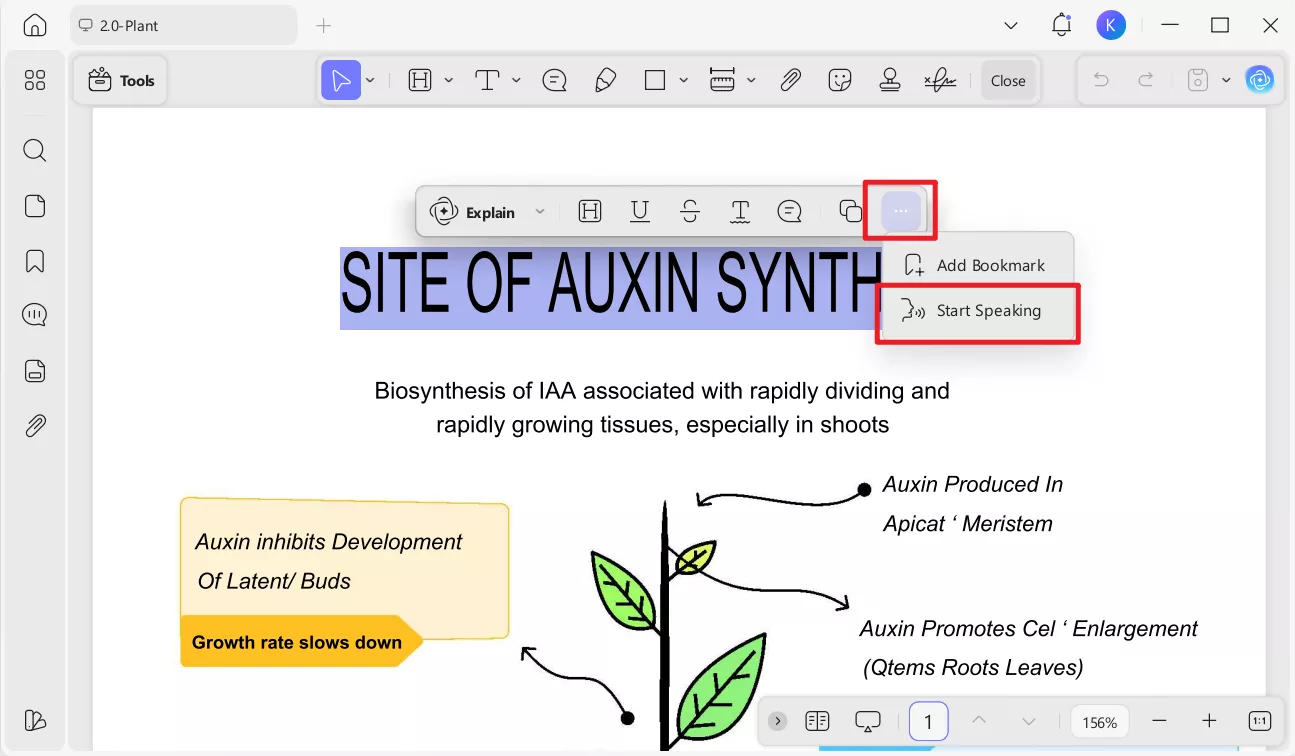
The best PDF voice reader that you can use on any device is UPDF. It is available for both mobile and PC users. UPDF packs several intuitive PDF features, but the start speaking feature is the one we will be focusing on here.
Windows • macOS • iOS • Android 100% secure
When using a PDF voice reader, the most important thing you need is accuracy, and it provides the most accurate conversion of text in PDF to words read aloud. Whether you have a document with small sentences like revision notes or want to read the whole chapter in a book, you can use the start speaking feature in UPDF to read that with higher productivity. While it reads your PDF documents aloud for you, you also get to choose between one and two pages displayed on your screen for better viewing. Hence, keeping track of where it is reading from becomes easier.
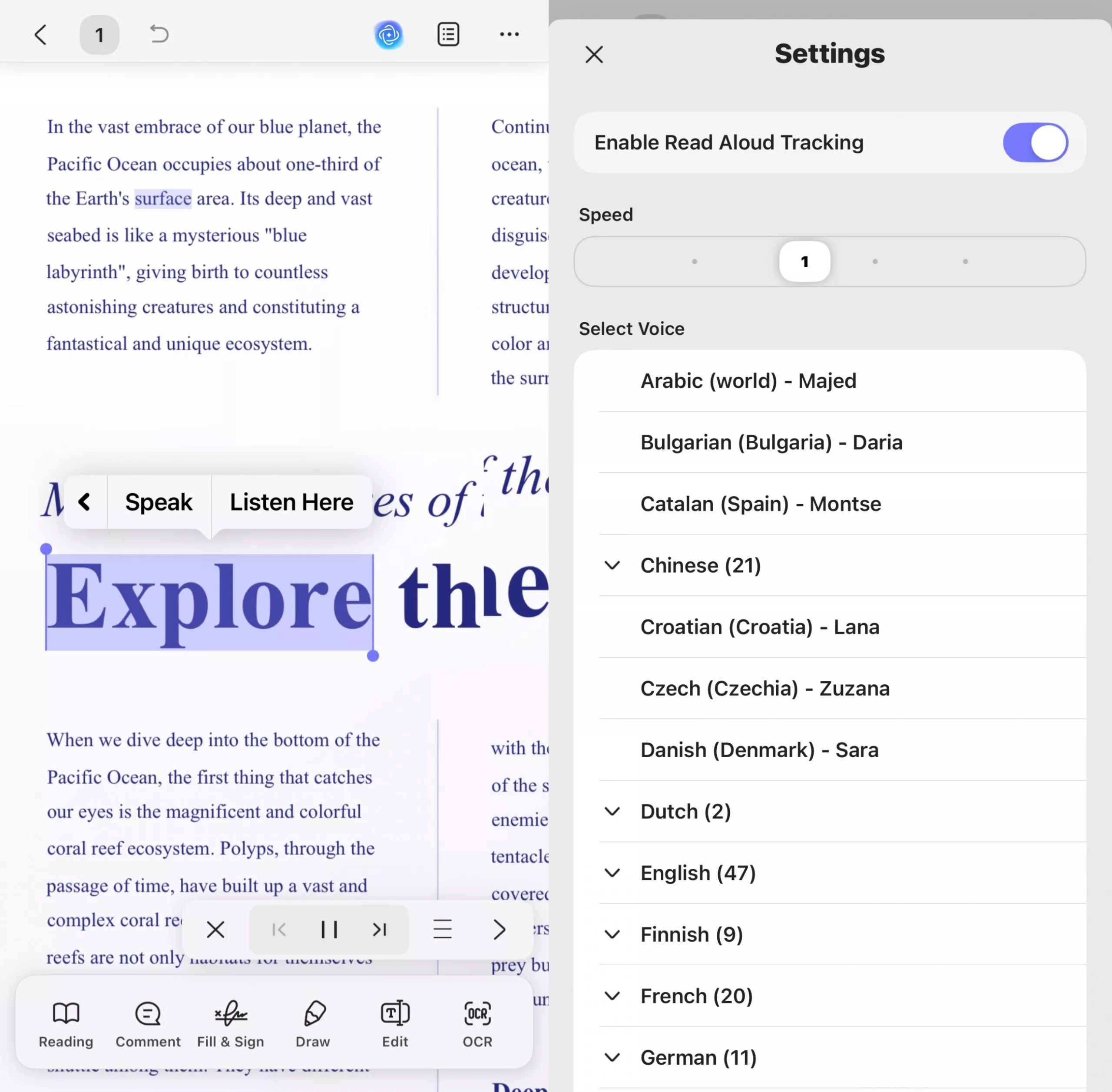
In addition, Full-text read aloud is now supported for easier listening on iOS. Users can enable the "Read Aloud Tracking" feature, adjust the reading speed, and select a preferred voice from a wide range of languages, including various regional accents (e.g., Arabic, Bulgarian, Chinese, English, French, German, etc.). During reading, the corresponding text will be highlighted, making it easier for you to locate the current content being read aloud. You can pause the reading at any time or jump to the previous or next page to continue reading.
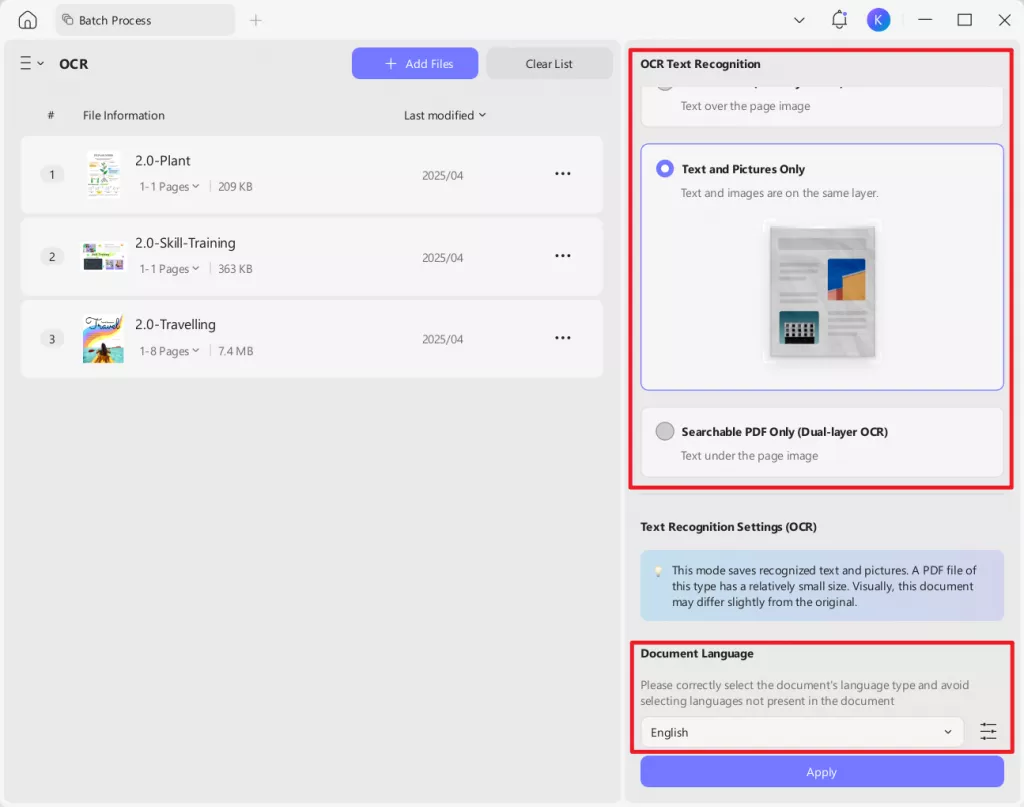
Don't worry if your document is a scanned one; UPDF's OCR feature can help you convert scanned documents into searchable and selectable text. UPDF OCR supports recognition of over 38 languages in scanned documents, covering most of your document needs. If you have multiple scanned documents you want to be read aloud, you can also use UPDF's batch OCR feature to convert them all into editable documents with a single click. UPDF OCR has an accuracy rate of up to 99% and can preserve the original layout of the document to the greatest extent possible. However, to activate this feature, you will need to upgrade to UPDF‘s Pro plan.
Apart from the PDF voice reading features, UPDF packs a punch with the options to organize Pages in PDF and PDF editing. In fact, you can convert other documents to PDF (e.g. PNG, JPG, PPT, Word, Excel) with UPDF and use the start speaking feature on them.
Why Recommend UPDF Here?
- Provides precise conversion of text in PDFs to spoken words for a range of languages, ideal for reading documents with both short and long content.
- Choose between displaying one or two pages at a time for easier tracking of the text being read aloud.
- Supports full-text read aloud and allows tracking of spoken content.
- Adjust reading speed and select from a variety of voices and languages, including regional accents.
- Easy Navigation: Pause reading or jump to the previous or next page anytime.
- UPDF's OCR feature converts scanned documents into searchable and editable text, which can then be read aloud with the text-to-speech feature, offering a seamless experience for both conversion and narration.
- Organize and edit PDF files, and convert other formats (e.g., PNG, JPG, Word, Excel) into PDFs for use with the text-to-speech feature.
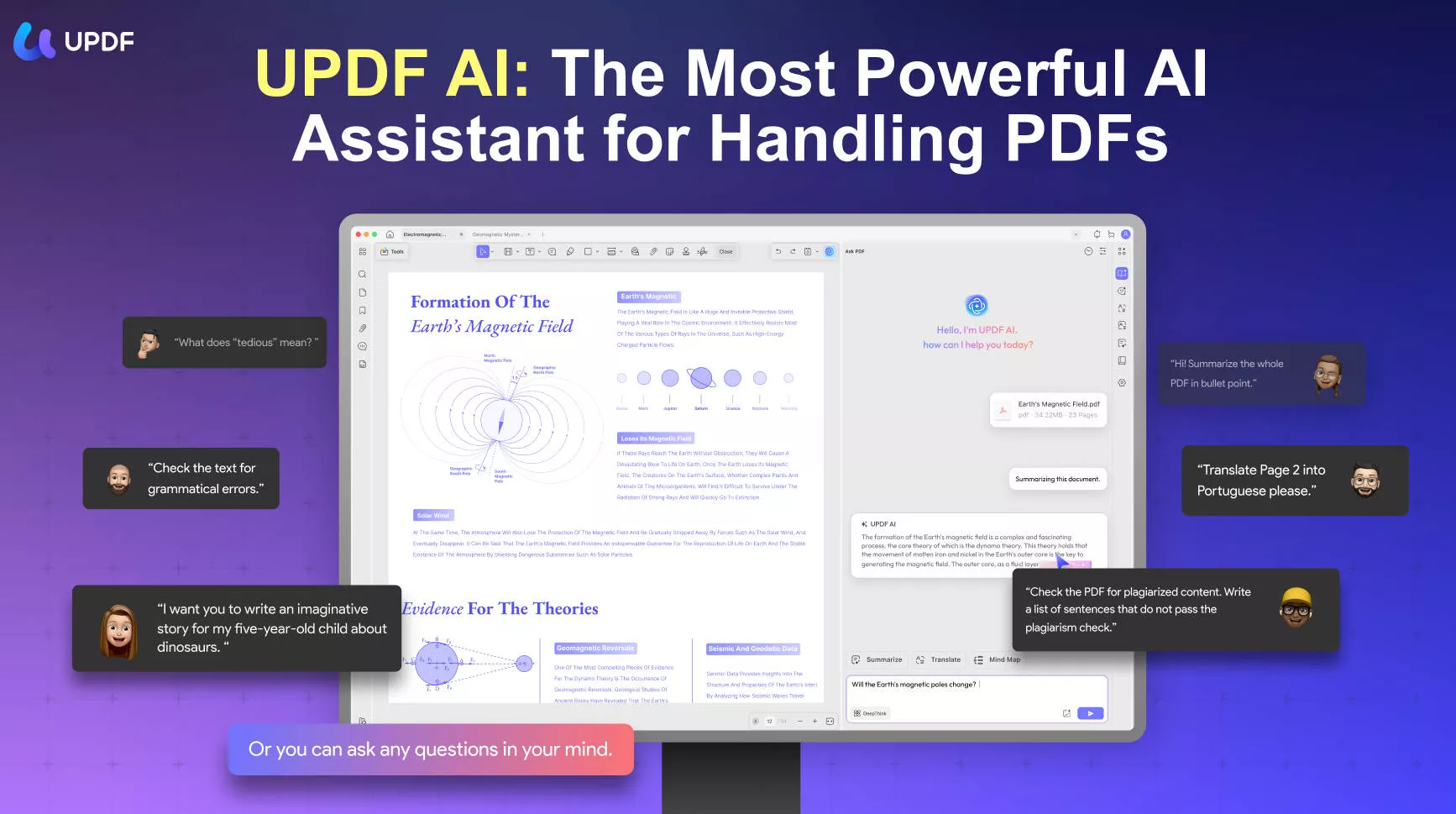
- An AI assistant is built-in, and it helps in translating, explaining, or summarizing content.
Platforms Supported:
- Windows
- Android smartphone and tablet (Read-aloud is not supported)
- iPad and iPhone
- Mac
Price:
The text-to-speech feature is free in UPDF. For more advanced features like editing, annotating, compressing, OCR, etc., you can consider purchasing UPDF’s exclusive plan and get an official 10% discount with the coupon code “ENARTICLE” upon purchasing.
You can download UPDF on your devices today to enjoy all these features with a reliable experience.
Windows • macOS • iOS • Android 100% secure
2. The Most Professional PDF Audio Reader for Windows- Adobe PDF Audio Reader
Adobe PDF Audio Reader is a professional tool that is widely used to convert text to speech. The built-in technology allows users to listen to their PDF documents without having to read them every time. A variety of document formats are supported by the platform, which can easily read out loud, like DOC, PDF, HTML and much more. Thus, all you need to do is upload the document to the platform, select reading speed and start listening to the information.
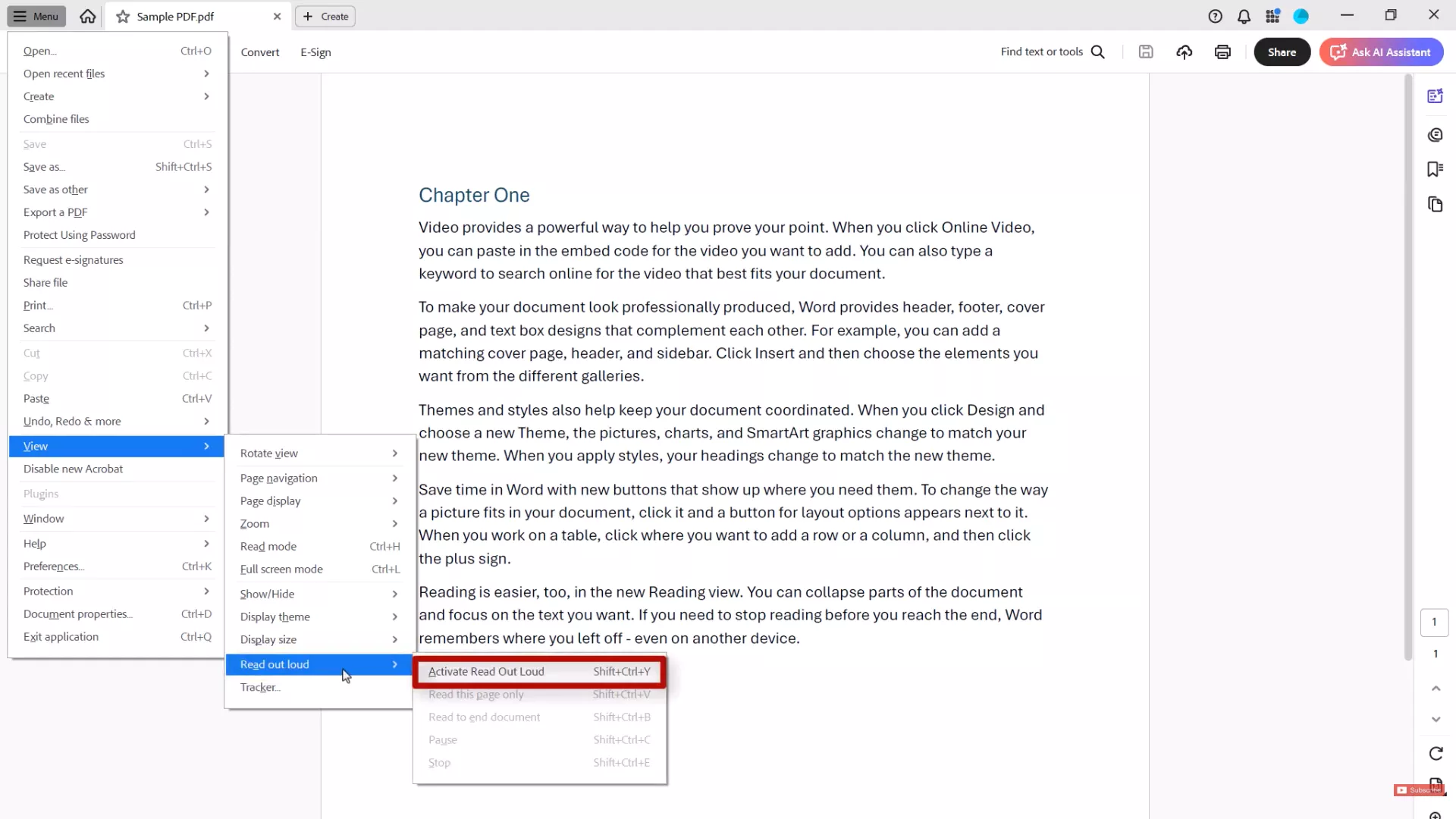
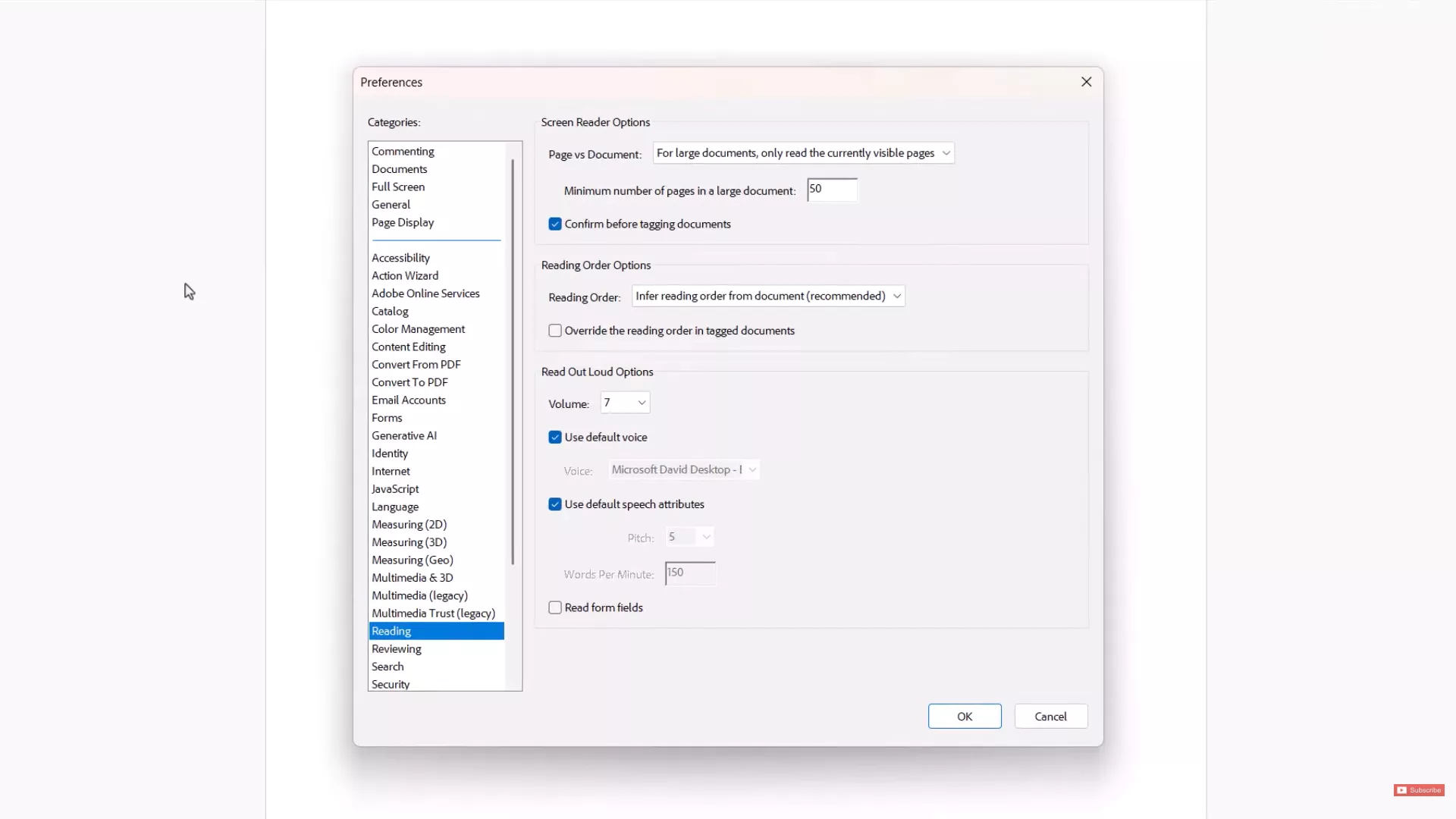
Text-to-speech is a basic feature because it offers various other specifications. Users can easily control reading speed and skip sections where required. They can customize accessibility settings such as choosing whether to read only visible pages in large documents, setting a minimum page count for large documents, and enabling confirmation before tagging documents. They can adjust the reading order in tagged documents, select a default voice for text-to-speech, and fine-tune read-out-loud options, including volume, pitch, and words per minute. Additionally, users can enable or disable the reading of form fields aloud, offering a more personalized and accessible reading experience.
Why Recommend Adobe PDF Audio Reader Here?
- Synchronizes your PDF voice reading work across all devices with the same account
- Users have control over how the content is read and which sections must be skipped
- PDF voice reader works for PDF, Text documents, HTML, and more.
- Reliable tool with reliable performance from offline and online apps
Platforms Supported:
- Windows
- Android smartphone and tablet
- iPad and iPhone
- Mac
Price:
Adobe Acrobat Reader is completely free. If you need the pro version with other PDF related features like editing, converting, OCR, etc, you need to pay US$19.99/month.
3. The Best Audio PDF Reader Online – TTSReader
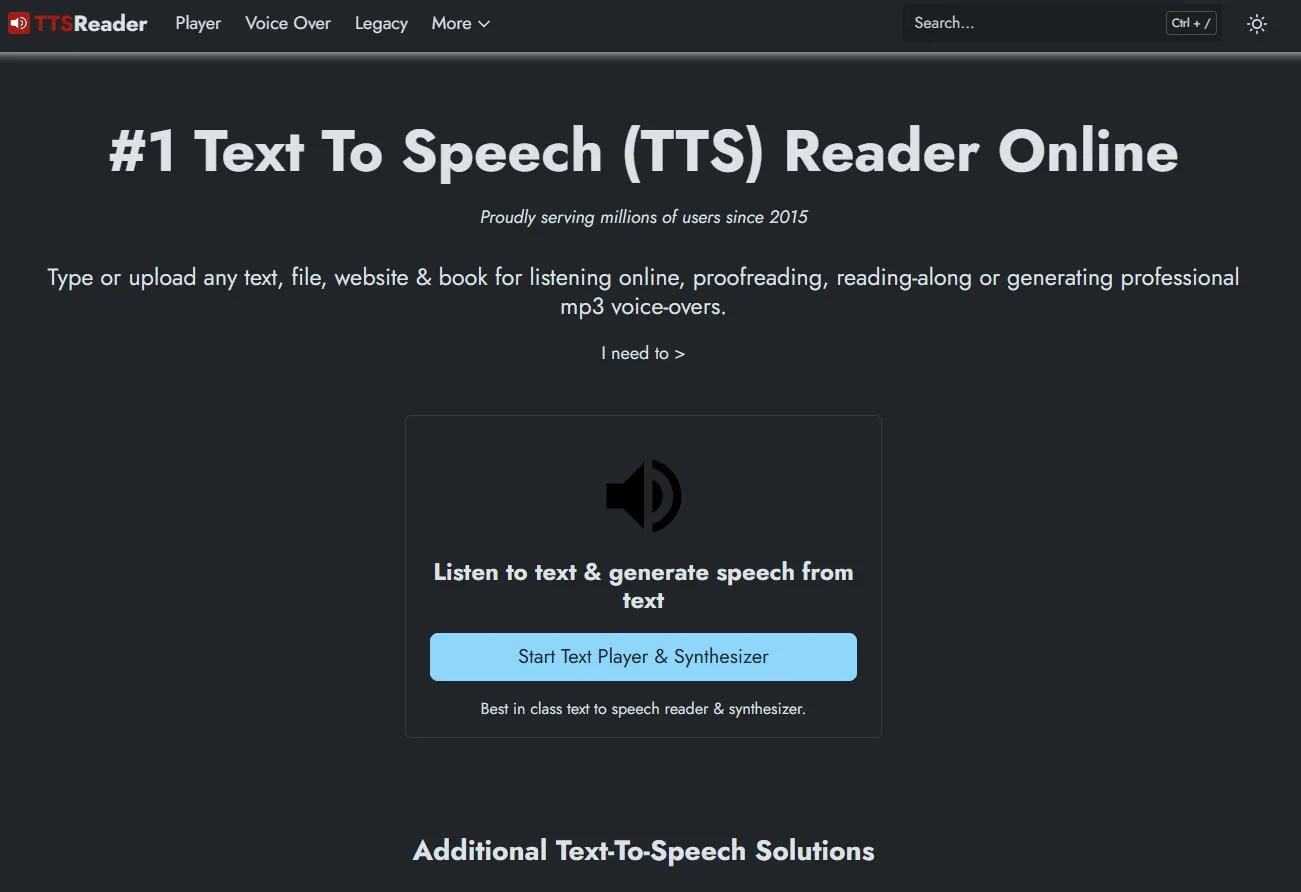
TTSReader is a web app that works on every browser and device. We can use it for reading eBooks, PDF documents and even web pages.
With TTSReader, users can upload their files and start PDF voice reading on them. However, if you want to get a voice reading experience with offline usage, you can download the MP3 audio file for your document as well.
TTSReader allows some customization for voice reading, including different languages, accents, male or female voices, etc. If you frequently use Google Chrome browser and Drive for reading PDF documents online, you can use the Chrome extension for direct integration and easier experience.
Why Recommend TTSReader Here?
- It can read lengthy PDF documents without any maximum page or word count cap.
- Keep track of where you left PDF voice reading for a better experience
- Read out PDF aloud and convert the contents to other content forms.
Platforms Supported:
It is an online application, so it is supported by every device that has a browser with internet connectivity.
Price:
TTSReader is a free PDF audio reader that works online. So, you can use it on any device without any subscription cost.
4. The Best Free PDF Audio Reader for iPhone/iPad - PDF Voice Reader - Docs Aloud
PDF Voice Reader - Docs Aloud application for iPhones and iPads is the perfect choice if you want to get an audio-book experience from your PDF documents on the go. It is an innovative app that instantly transforms documents, web articles, and even scanned pages into clear audio, providing synchronized highlighting to make reading easier. PDF voice reading gets better with this application since you can add bookmarks to different sections of the document to keep reading track.
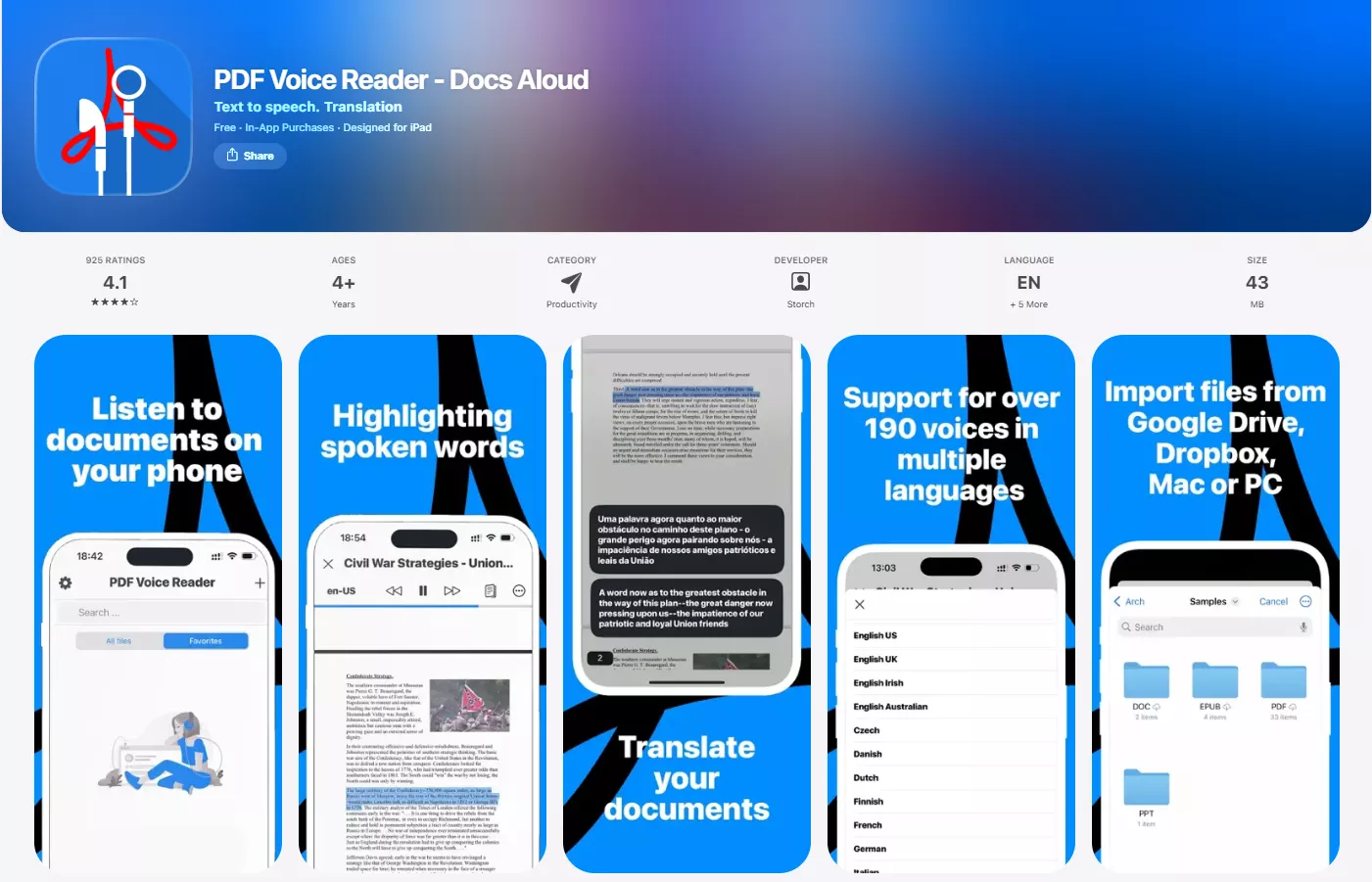
With page thumbnail view, it allows you to start at the page of your choice. Key features include customizable voice and speed settings, background playback for multitasking, and color highlighting for easy tracking of spoken text. The app supports seamless cloud sync with iCloud, Dropbox, Google Drive, and more. It also offers smart tools like bookmarking, text translation, and multiple voice options.
However, based on user reviews on the App Store, some users have reported that the app contains many ads, adding markup is inconvenient, and it is not smooth when reading aloud. Sometimes, it mispronounces words and has a non-human type voice.
Why Recommend PDF Voice Reader Aloud Here?
- Read out the PDF files from both offline and online storage
- PDF voice reader auto shuts if you set the sleep timer
- Dedicated applications for iOS bring an intuitive experience without any glitches when reading PDFs.
Platforms Supported:
It is available on Apple App Store for iPhone and iPad.
Price:
It is free to download and begin, but you need to unlock languages for US$4.99 each, or you can unlock all languages with many other premium features for US$15.99.
5. The Best PDF Audio Reader for Android - NaturalReader - Text to Speech
NaturalReader Text to Speech is one of the best PDF voice reader tools that is available on Android platform. It reads books, PDFs, Word files, PowerPoint, EPUB eBooks, online articles, and even images aloud using over 1,000 AI-powered voices across 100+ languages and dialects. NaturalReader lets users listen anywhere - features MP3 downloads for offline listening and seamless cross-device syncing across mobile, web, and browser extensions.
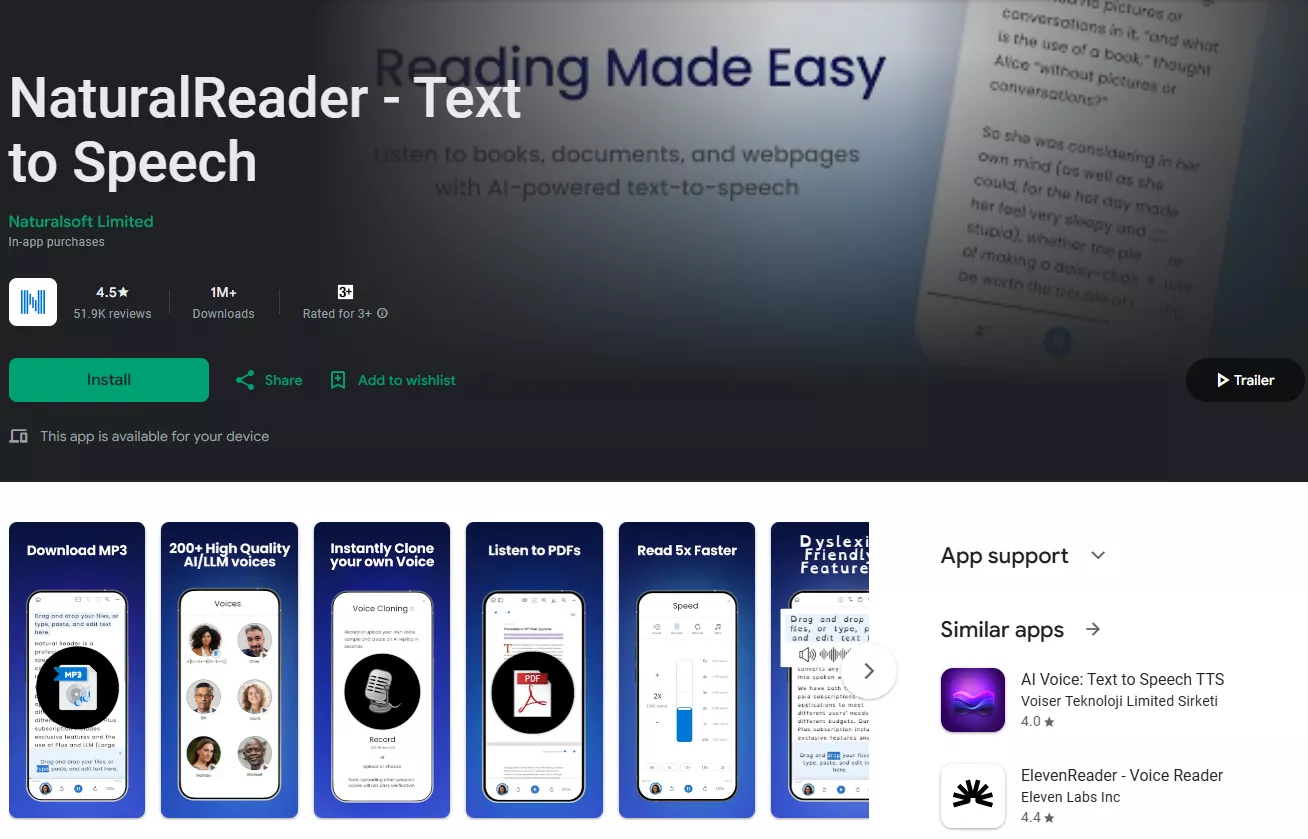
NaturalReader gives you complete control over how the reading sounds since there is a punctuation tweaking option with support for individual work editing. Hence, you can make the PDF voice reading experience more human. Advanced features like AI text filtering, pronunciation editing, dark mode, and human-like “Plus Voices” further enhance clarity and comfort, making NaturalReader a versatile and inclusive reading companion for both personal and professional use.
However, according to Google Play user reviews, the free voices suffer from long pauses between sentences, causing choppy playback and making the app difficult or unusable for continuous listening.
Why Recommend NaturalReader Text to Speech Here?
- Comes with both AI and Non-AI voice options depending on the plan you pick
- The audio reader functionality works with PDF, TXT, Word, PNG, and JPG files
- You can adjust the audio reading supped in terms of multiplier or words per minute
Platforms Supported:
NaturalReader is available for Android devices and iOS devices in the form of an application. However, it also supports usage on every other operating system with web browsing functionality thanks to its online web app.
Price:
The web and Android applications are available for free, but you can unlock the premium functions with premium plans starting at US$59.88 per year.
Part 2. Which PDF Audio Reader Should You Choose?
All the PDF audio readers mentioned above perform well in reading PDFs aloud. However, for a comprehensive PDF tool with a practical PDF speaking feature, we highly recommend UPDF. It encompasses all the necessary features for working with PDF files, such as editing, annotating, converting, AI chatting, and more. Don't miss the opportunity to download it and give it a try!
Windows • macOS • iOS • Android 100% secure
Final Words
A PDF audio reader can have the experience of reading PDF documents very quickly and effortlessly. It is because you now don’t have to manually read every sentence since one of the tools discussed above will do the work for you. However, the most important thing here is picking the right tool. If you go with UPDF, you get the best synchronized experience across all your devices, along with PDF voice reading features and other editing features.
Windows • macOS • iOS • Android 100% secure
Disclaimer



 Enola Miller

 Enola Davis
 Delia Meyer
 Enrica Taylor