 UPDF
 UPDF for Windows
 UPDF for Mac
 UPDF for iPhone/iPad
 UPDF for Android
 Nomostar
 UPDF AI Online
 UPDF Sign
 IvyCraft
 Edit PDF
 Annotate PDF
 Create PDF
 PDF Form
 Edit links
 Convert PDF
 OCR
 PDF to Word
 PDF to Image
 PDF to Excel
 Organize PDF
 Merge PDF
 Split PDF
 Crop PDF
 Rotate PDF
 Protect PDF
 Sign PDF
 Redact PDF
 Sanitize PDF
 Remove Security
 Read PDF
 UPDF Cloud
 Compress PDF
 Print PDF
 Batch Process

 About UPDF AI
 UPDF AI Solutions
 AI User Guide
 FAQ about UPDF AI
 Summarize PDF
 Translate PDF
 Chat with PDF
 Chat with AI
 Chat with image
 PDF to Mind Map
 Explain PDF
 PDF AI Tools
 Image AI Tools
 AI Chat Tools
 AI Writing Tools
 AI Study Tools
 AI Working Tools
 Other AI Tools
 AI Bookmark Generation
 AI Bookmark Summary
 AI Watermark Generation
 AI Background Generation
 AI Sticker Generation
 AI Stamp Generation
 AI Editing Suite
 UPDF Copilot
 AI Page Management
 AI Semantic Search
 PDF to Word
 PDF to Excel
 PDF to PowerPoint
 Enterprise Solution
 Enterprise Sign
 Enterprise AI
 Enterprise Plan
 Enterprise User Guide
 Enterprise Webinar
 IT
 Education
 Construction
 Financial Service
 Healthcare
 Insurance
 Legal
 Manufacturing
 Government
 Researchers & PhDs
 Solopreneurs & Freelancers
 Lawyers & Legal Professionals
 Real Estate Agents & Brokers
 Education Solution
 Customer Stories
 User Guide
 UPDF Tricks
 FAQs
 UPDF Reviews
 Download Center
 Blog
 Newsroom
 Tech Spec
 Updates
 UPDF vs. Adobe Acrobat
 UPDF vs. Foxit
 UPDF vs. PDF Expert


Your syllabus, lecture slides, textbook chapters, notes, and old quizzes may hold everything you need for the final. However, they rarely sit in one organized place, so studying often begins with a hunt through folders and tabs.
A good final exam study guide solves that. It records the exam scope, the major topics, key concepts, terms or formulas, worked examples, likely questions, and the areas where you still make mistakes.
This article provides a free fillable PDF template and shows students how to organize their course materials inside it. Print the template and complete it by hand or use UPDF, a PDF editor, to fill, annotate, edit, and review it on screen. UPDF can also summarize your course PDFs and turn verified material into mind maps, flashcards, and practice questions.
Preview the free final exam study guide template, then download UPDF to fill, annotate, and review your copy on Mac or Windows. You can try it without entering a credit card.
Windows • macOS • iOS • Android 100% secure
Download the Free Final Exam Study Guide Template
The template is a fillable PDF hosted by UPDF. You can preview it online, download it as a PDF, print it for handwriting, or open it in UPDF to complete it digitally. It includes reusable topic pages, so you can repeat them for each subject or exam unit.
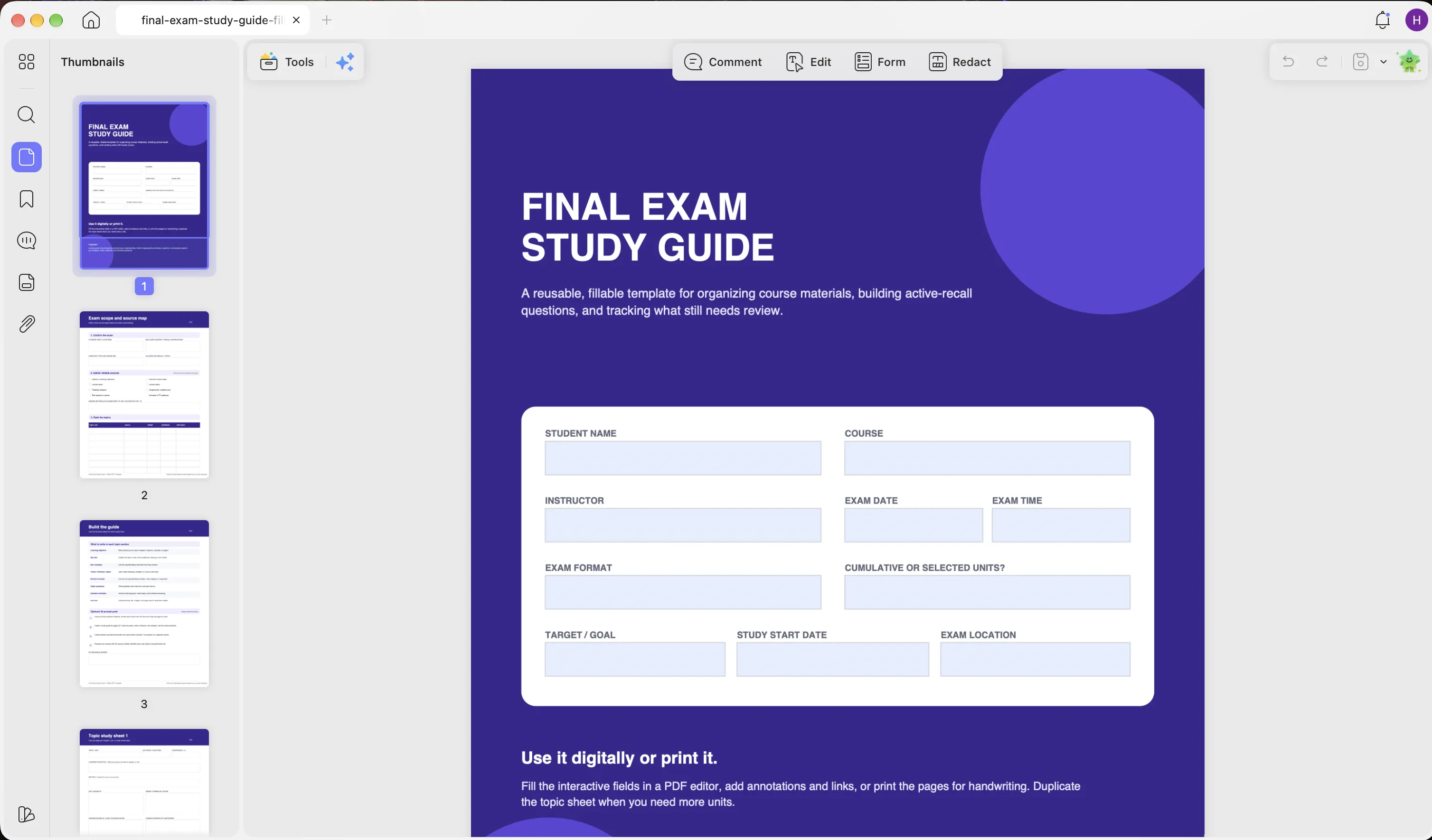
Its main sections are:
- Exam information
- Exam scope and source map
- Topic priority table
- Topic study sheets
- Active-recall questions
- Practice-test mistake log
- Seven-day review plan
- Final-readiness checklist
Open the fillable final exam study guide template to preview or save a copy. To complete it digitally, download UPDF and type directly into the fields.
Windows • macOS • iOS • Android 100% secure
What Should a Final Exam Study Guide Include?
A study guide answers "What do I need to understand, and can I do it on my own?" A study plan answers "When will I work on it?"
| What to include | What belongs in the guide |
|---|---|
| Confirmed scope and format | The units your instructor included, any exclusions, and how the exam awards points. |
| Topic priorities | A source for each topic and an honest confidence rating based on something you tried. |
| Key ideas and terms | A short explanation in your own words. For a formula, say when it applies and what the answer measures. |
| A worked example | Enough reasoning to reproduce the solution with the original covered. |
| Practice questions | Prompts that ask you to do the kind of work the exam requires. Keep a checked answer available separately. |
| Errors to revisit | The step that went wrong and a fresh question that will show whether you fixed it. |
How to Make a Final Exam Study Guide with UPDF
Building a study guide manually can become time-consuming when the relevant information is spread across lecture PDFs, scanned notes, textbook chapters, and old quizzes. UPDF brings these materials into one workspace so students can organize, summarize, verify, and review them more efficiently.
Open the free fillable template in UPDF alongside your syllabus or instructor's review sheet. To make each step easier to follow, the examples below use a sample physics final.
Step 1: Confirm the Exam Scope and Format
Start with your syllabus, your instructor's review sheet, or official course guidance. Confirm these points:
- Whether the exam is cumulative
- Which units and chapters it covers
- How much each question type counts toward the exam score
- Whether notes, formula sheets, or other materials are permitted
- Which learning objectives the instructor emphasized
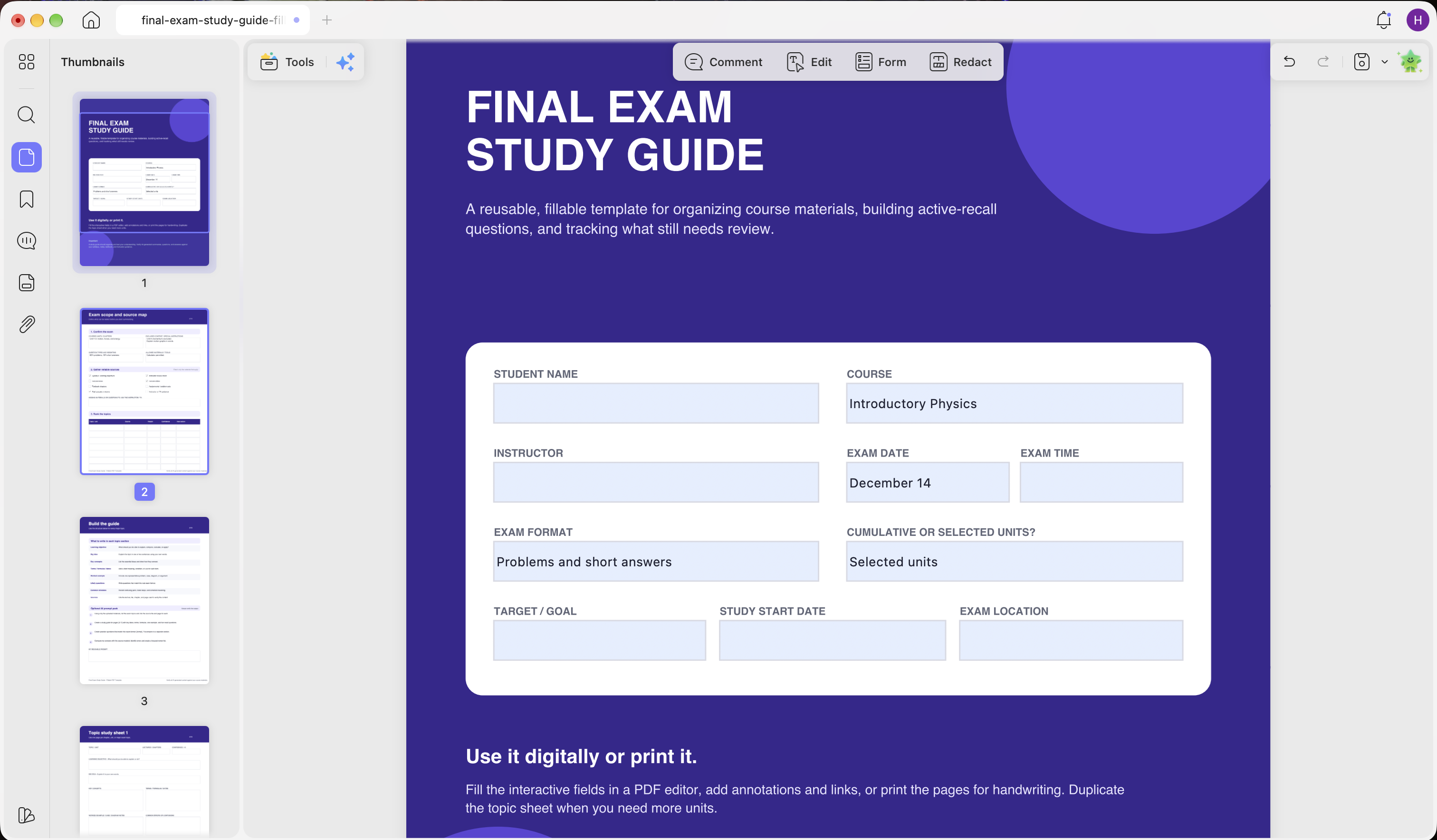
Enter your course and exam date on the cover page of the final exam study template. In the sample physics final, enter "Problems and short answers" under Exam Format and "Selected units" under Cumulative or selected units?
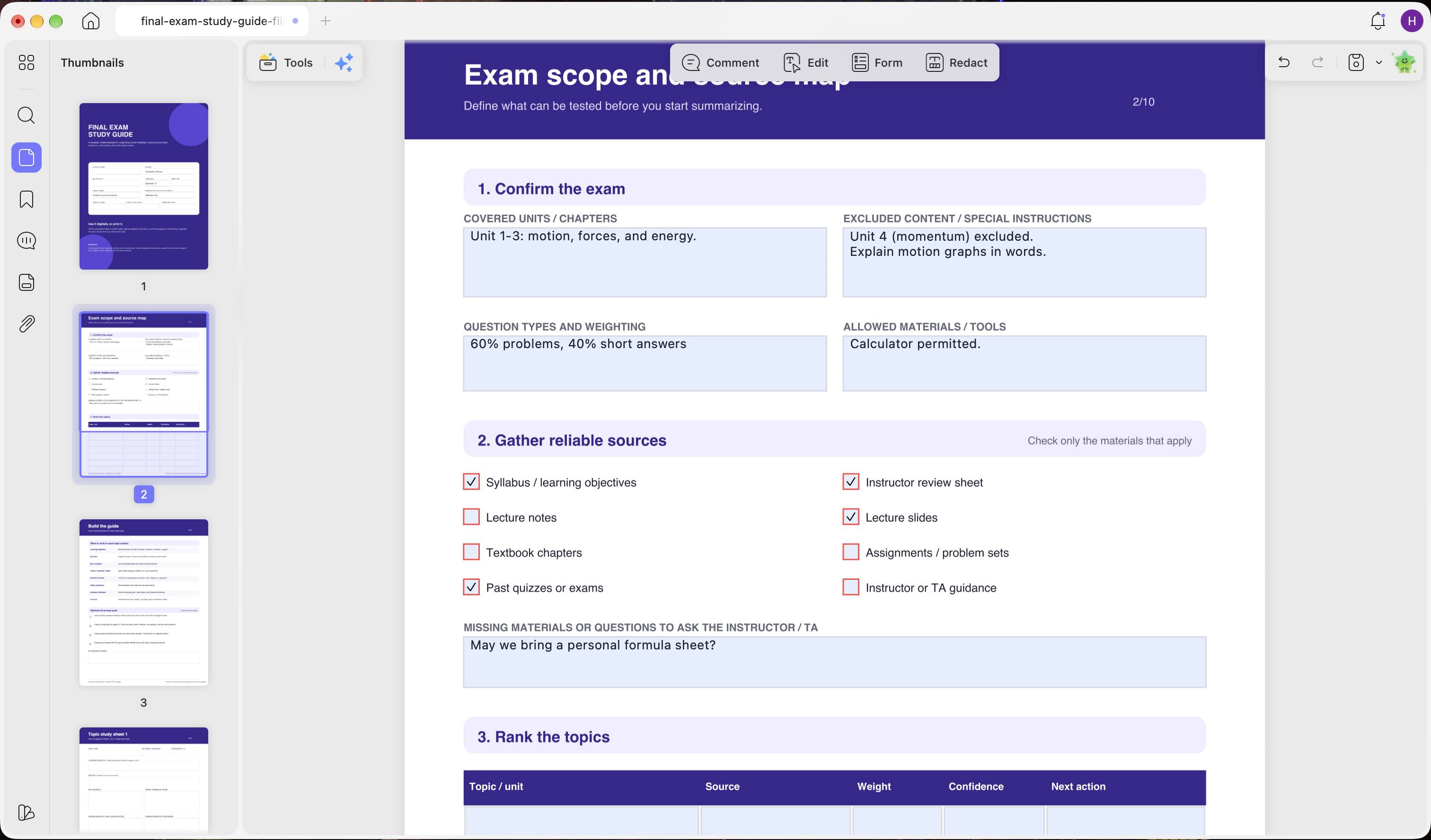
On page 2, Exam scope and source map, record that the final covers Units 1–3 and excludes Unit 4. Enter "60% problems, 40% short answer" under Question types and weighting. Use Excluded content / special instructions for the instructor's emphasis on explaining motion graphs in words. If the rules allow a calculator but say nothing about a personal formula sheet, put that question in the instructor follow-up field.
Step 2: Collect and Organize the Course Materials
Gather only the materials that match the scope you just confirmed. Use Gather reliable sources on page 2 to check off what applies:
- Syllabus and learning objectives
- Lecture slides and class notes
- Assigned textbook chapters
- Assignments and problem sets
- Past quizzes or exams
- Instructor review materials
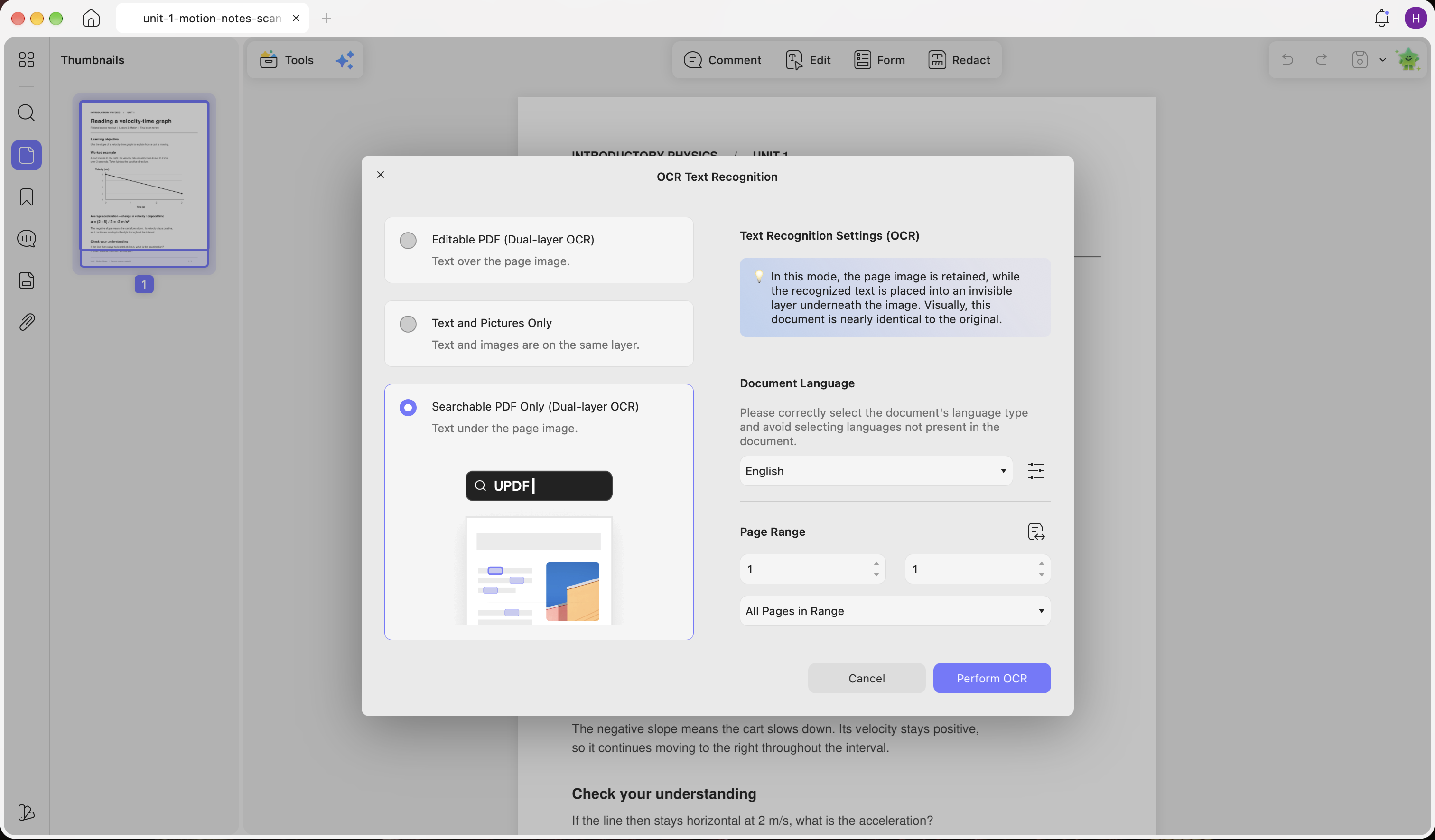
If your handwritten notes or scans cannot be searched, download the UPDF from the official website and open the file in the app. Choose Tools → OCR → Searchable PDF Only, select the document language, and click Convert. UPDF's OCR adds a searchable text layer beneath the original page image. OCR may be less accurate on handwriting, so check important details against the scan, especially formulas and minus signs.
Step 3: Create a Topic List from the Syllabus
Next, upload your syllabus and the course materials that match the confirmed exam scope to UPDF AI, then ask it to organize the topics into a first-pass list. Use this prompt:
“Using only the uploaded syllabus and course materials, create a list of the topics covered on the final exam. For each topic, cite the source file and page number. Do not add information that is not supported by the materials.”
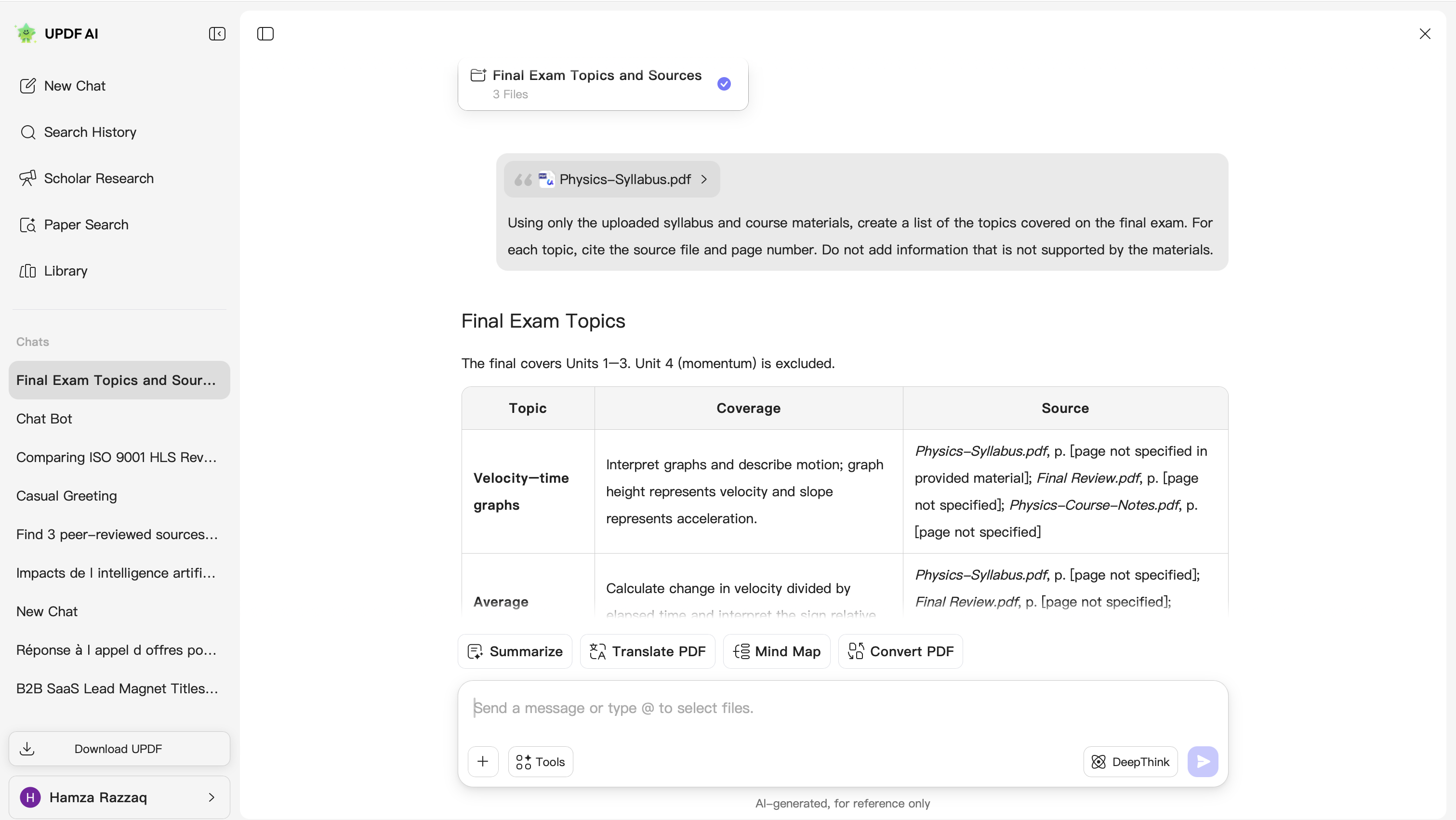
AI cannot know what your instructor will put on the exam. It can only reorganize what appears in the files you give it. Compare its topic list with the syllabus and any review sheet, then add anything it missed.
Copy the verified topics into Rank the topics, the topic priority table on page 2. Give each topic a source and a confidence rating, then choose a specific next action. Enter the official weighting if your instructor provides one. If you estimate a topic's importance yourself, label it as your estimate. For the sample physics final, the details can be:
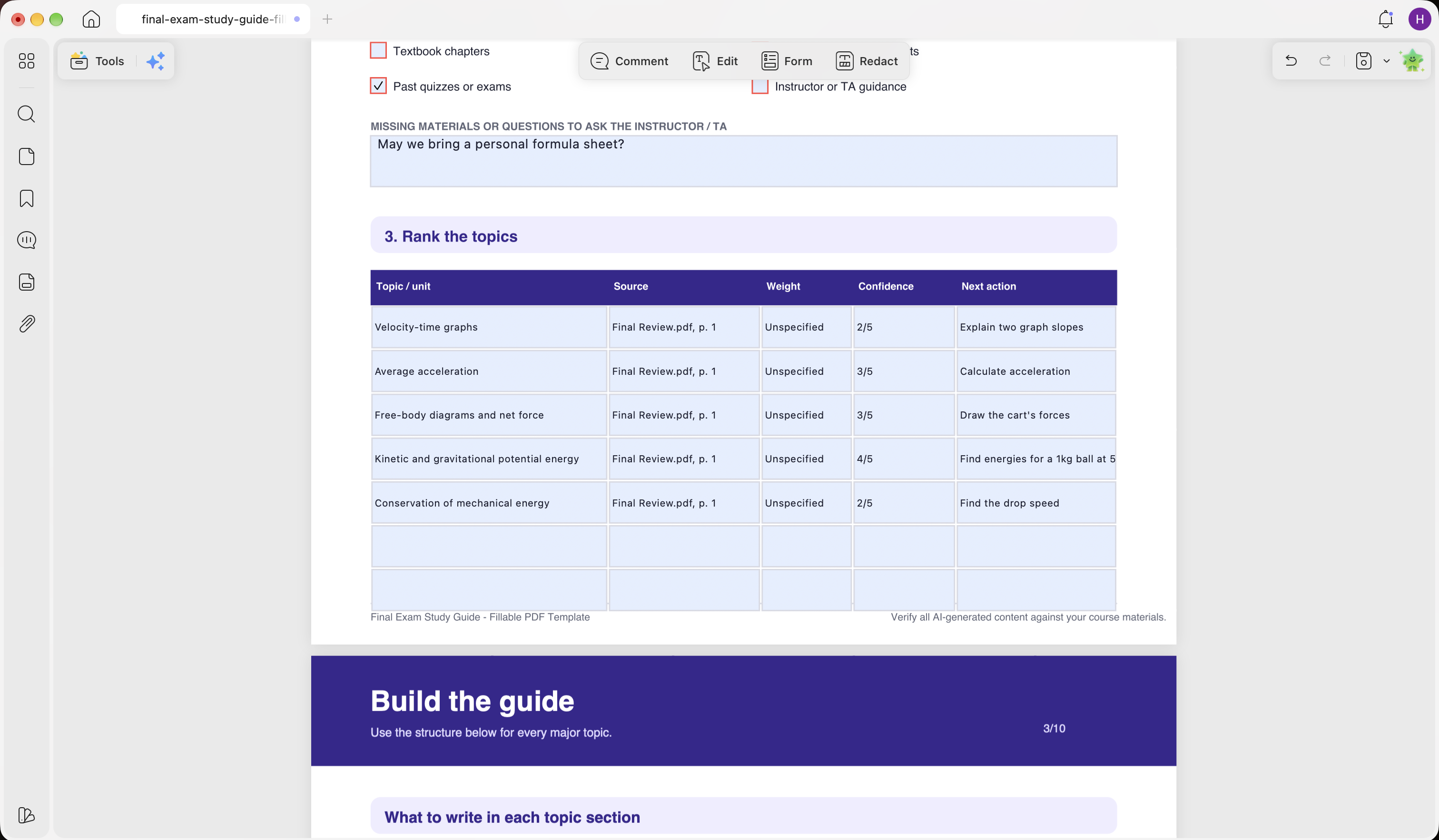
Step 4: Complete One Study Sheet for Each Topic
Each major topic gets its own Topic study sheet on pages 4–7. Fill in these fields:
- Learning objective
- Big idea
- Key concepts
- Terms, formulas, or dates
- Worked example
- Possible exam questions
- Common errors
- Source and page number
- Confidence level
For a first draft, ask UPDF AI:
Create a study guide for pages [X–Y]. Include the big idea, key concepts, important terms or formulas, one worked example, common mistakes, and five active-recall questions.
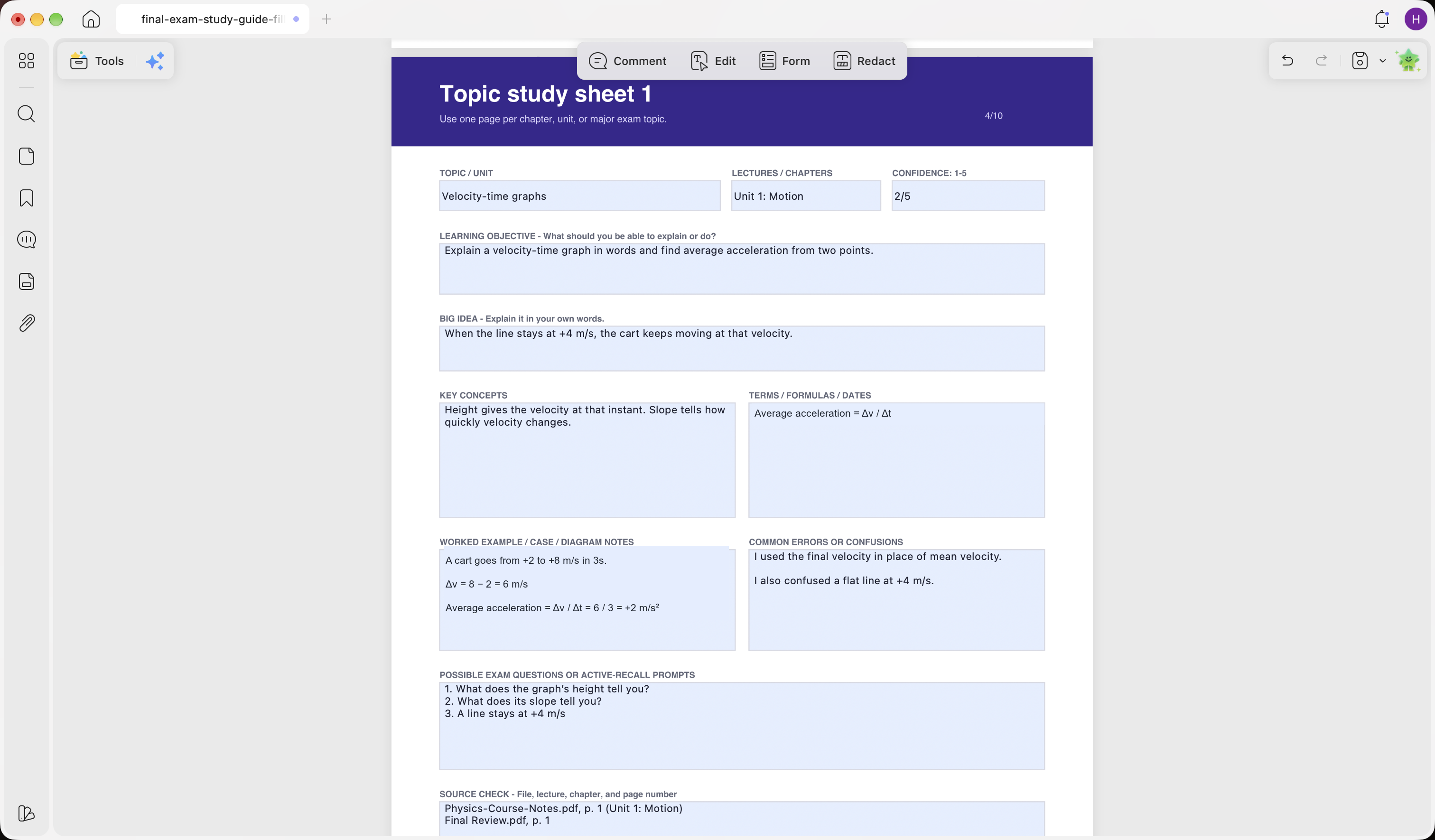
Then enter the results into the sheet. UPDF's AI Study Guide Maker is built for this kind of structured output, and its Study Notes Generator works well for chapter summaries.
The AI draft is a starting point, so work through it before it goes into the sheet:
- Rewrite the Big idea in your own words. Use Key concepts for the ideas that support it.
- Verify formulas, dates, and definitions against your textbook or notes. Work through the example yourself.
- Use the instructor's emphasis to write the Learning objective and choose possible exam questions. Record any step you missed under Common errors or confusions.
- Enter the specific filename and page number under Source check.
Step 5: Turn the Guide into Active-Recall Materials
After you have checked the final exam study guide content, convert it into practice material. You can make flashcards, mind maps, multiple-choice questions, short-answer questions, essay prompts, and full practice tests.
UPDF has tools for several of these. The flashcards generator builds cards from PDFs or images, and the quiz tool builds questions from study material. UPDF AI can also summarize a PDF as a mind map.
For exam-style questions, try this prompt:
“Create 15 exam-style questions from this study guide. Match the following exam format: [insert format]. Put the answers and explanations in a separate section.”
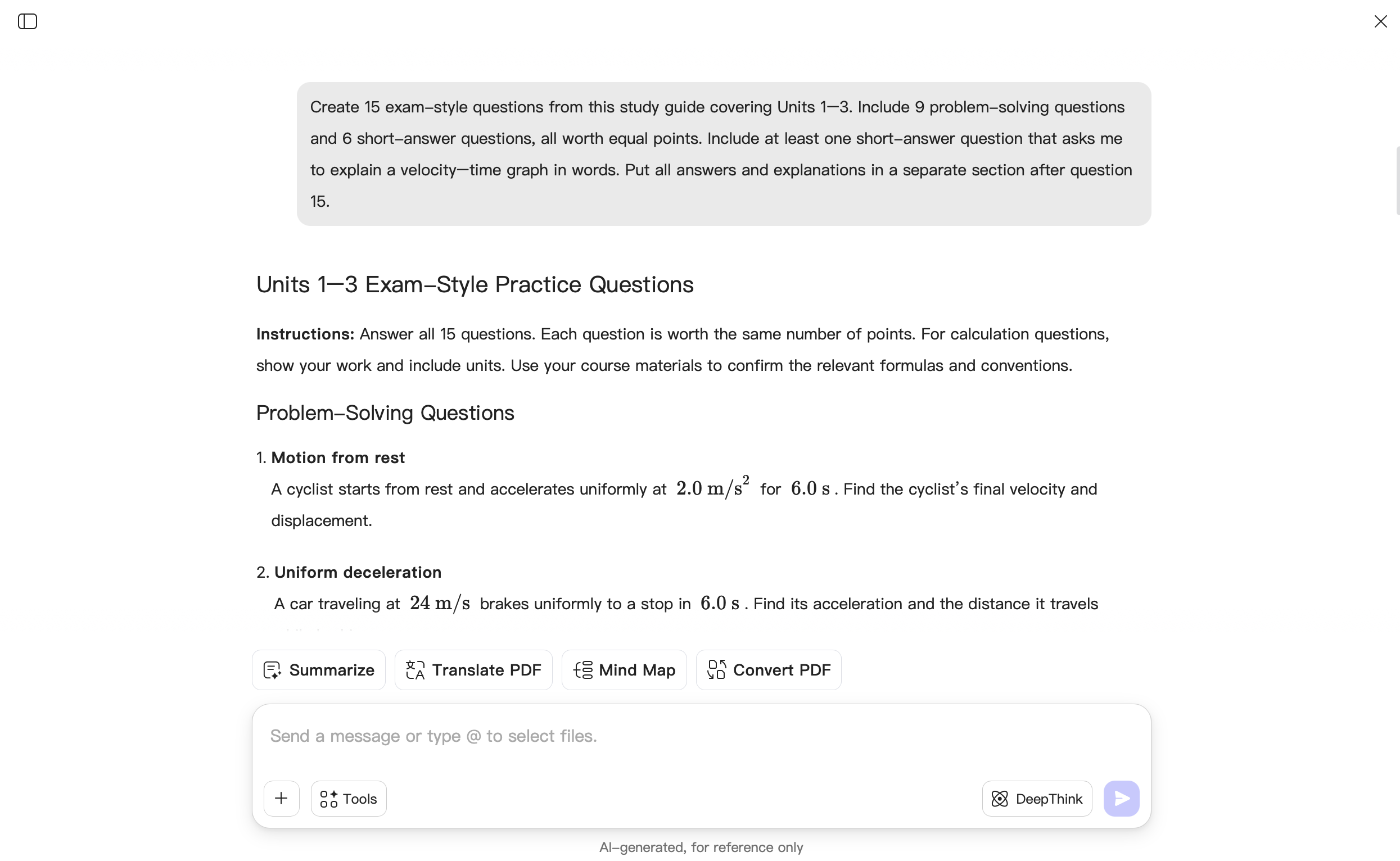
Questions and answers written by AI can contain errors, so check them against your notes before you trust them. Then record them on the Active-Recall Practice page of the template: the question, your answer, the result, and a date to revisit it.
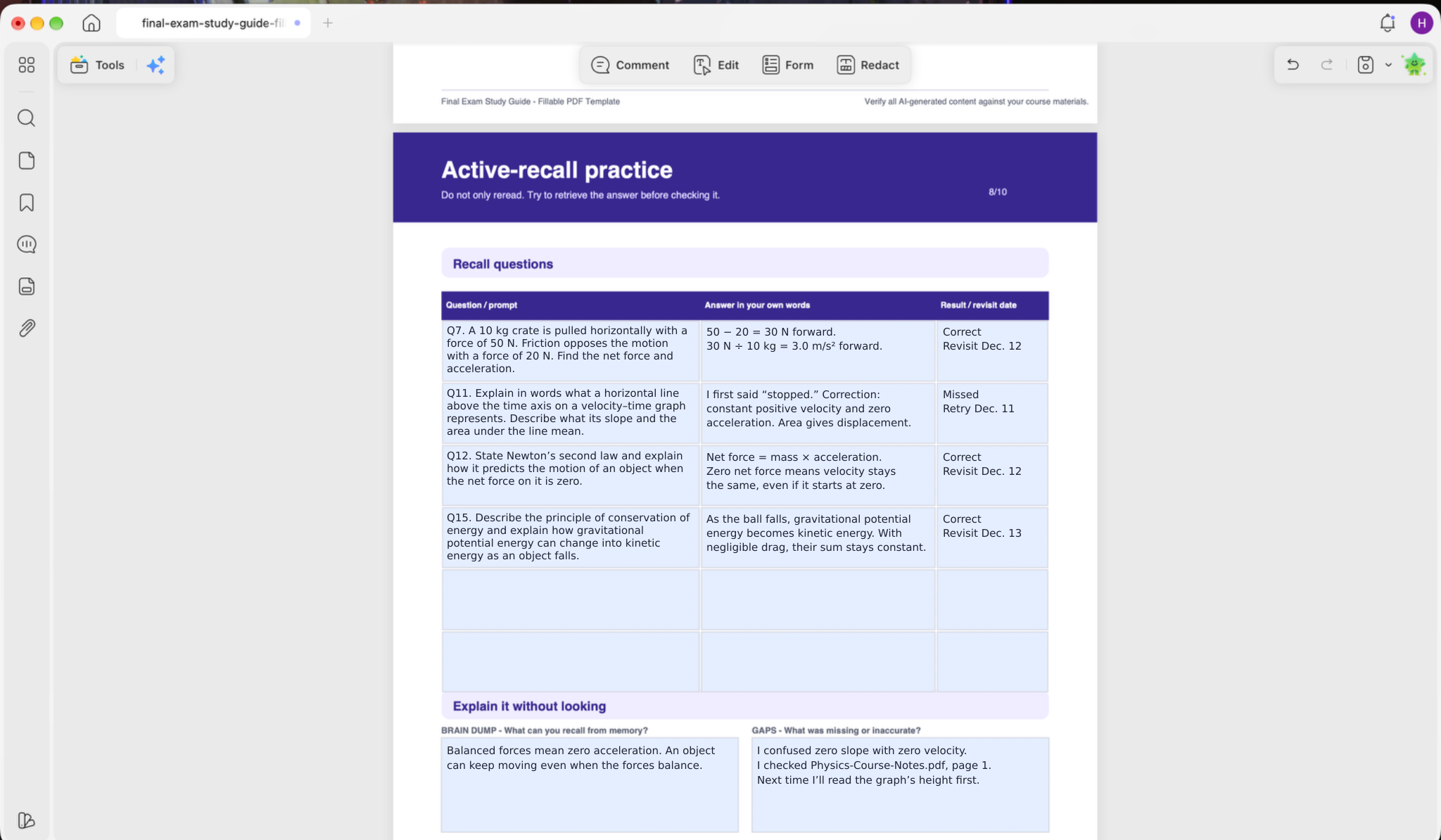
Step 6: Use Mistakes to Update the Study Guide
Answer the practice questions before you look at the solutions. After each session, open the Practice test and mistake log on page 9. Record which question you missed and why your answer was wrong. Write the correct reasoning in the next column, then put the follow-up task and its review date under Next practice action.
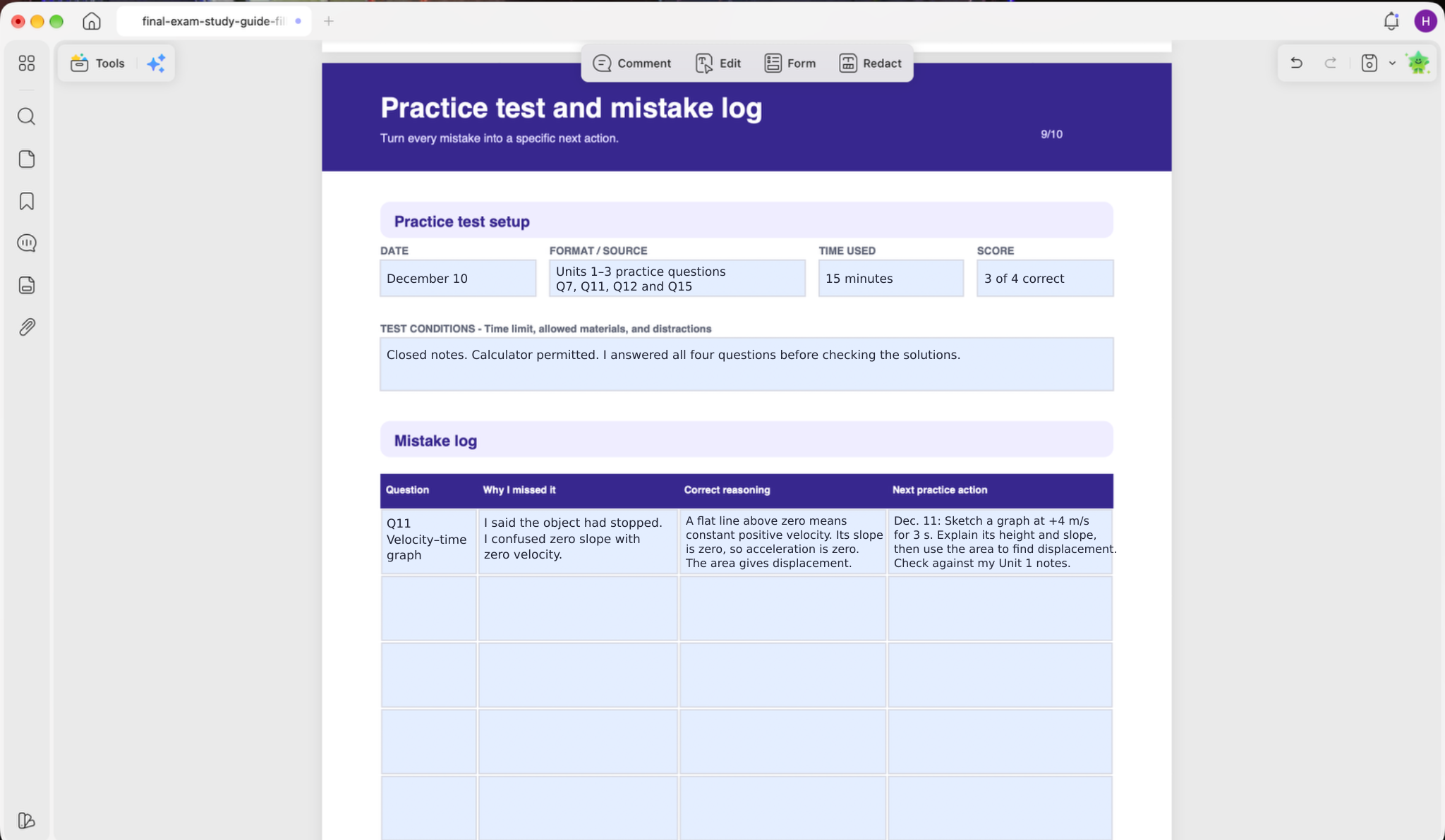
A study guide is not finished after the first draft. Each logged mistake points to a topic sheet that needs more detail or a weak area that needs more time.
How to Adapt the Study Guide to Different Exam Formats
Use the same template, but change how you practice. Start with the question type your instructor uses. If the exam is cumulative or allows notes, the last two rows also apply.
| Exam format or condition | What to practice | Where to record it |
|---|---|---|
| Multiple choice | Compare two easily confused terms. Explain why a plausible wrong answer fails. | Active-recall practice |
| Short answer | Answer a prompt in two or three sentences with your notes closed. | Active-recall practice, under Answer in your own words |
| Essay | Draft a thesis for a practice prompt and outline the evidence you’d use to support it. | Topic study sheet, under Possible exam questions and Worked example / case / diagram notes |
| Problem solving | Work through one example, then change a value and solve it again. Record the step that trips you up. | Topic study sheet and Practice test and mistake log |
| Open-note or formula sheet | Practice finding a reference and applying it under a time limit. If you’re allowed only a formula sheet, practice with that sheet. | Allowed materials / tools on page 2 and Source check on each topic sheet |
| Cumulative | List every unit the instructor includes. Use your confidence ratings to decide which one needs another practice session. | Rank the topics on page 2 |
How to Use the Study Guide During the Final Week
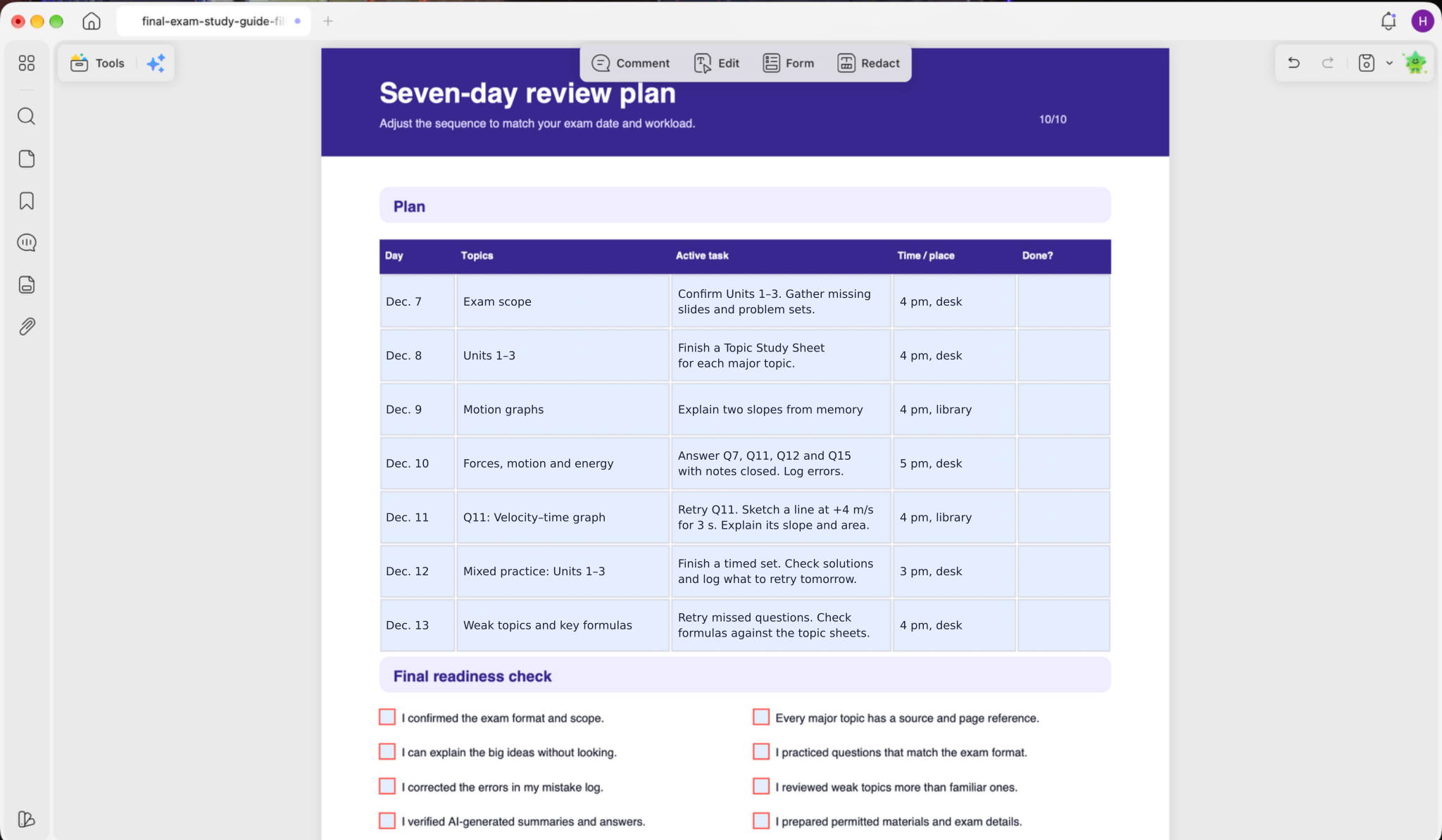
Use the Seven-day review plan on page 10 to give each study session a specific task. For the sample physics final, enter "Motion graphs" under Topics and "Explain two slopes from memory" under Active task. Add a time and place that fits around your other finals.
| Time before the final | How to use your guide |
|---|---|
| Days 7–6 | Check the exam scope and collect any missing materials. Finish a Topic Study Sheet for each major topic. |
| Days 5–4 | Answer active-recall questions with your notes closed. Use flashcards for terms you keep forgetting, or redraw a mind map from memory to check how well you understand the connections. |
| Days 3–2 | Complete a practice set before checking the solutions. Record missed questions in the Mistake Log and schedule a fresh attempt. |
| Day 1 | Retry the questions you missed. Review your weakest topic and any formulas or reference material you will need. |
| Exam day | Use the Final readiness check at the bottom of page 10. Confirm the exam details and gather your permitted materials. Keep this last review brief. |
Adjust the plan to the number of finals you have and how much each exam covers. Let your practice results guide the timing.
Common Final Exam Study Guide Mistakes
- Copying lecture slides word for word. Close the slide and explain the idea as you would to a classmate. If you get stuck, check the part you couldn't explain.
- Turning the guide into a second set of course notes. Keep each topic sheet focused on what you need to know for the final. One worked example may be enough to show how a formula applies.
- Stopping after the summary. Turn the main idea into a question and try answering it with your notes closed.
- Practicing the wrong question type. If the exam asks you to interpret a graph, practice explaining an unfamiliar one. A flashcard asking you to define slope tests a different skill.
- Leaving out source details. Use the Source check field to record the filename and page number so you can find the original explanation later.
- Assuming AI-generated material is accurate. Check summaries and answer keys against your course sources. Recalculate worked examples yourself.
- Giving every topic equal time. A unit you can explain from memory may need only a quick review. Give a weak topic another session, especially if it carries a large share of the marks.
- Rereading without making corrections. When you miss a practice question, add the faulty step to Common errors on the topic sheet. Use the Mistake log to schedule a fresh attempt.
Final Thoughts
A good final exam study guide organizes your notes around what the exam covers. Use it to explain each topic in your own words, then close your notes and test what you can recall. You can preview the fillable PDF online and download a copy to print or complete digitally in UPDF. UPDF can also help you organize course PDFs and draft summaries or mind maps. However, if you use AI to make flashcards or practice questions, check those against your official course materials, just as you would any AI-generated summary.
Ready to build your own guide? Preview the free fillable study guide template, then download UPDF to complete and review it on screen.
Windows • macOS • iOS • Android 100% secure
FAQs
What should be included in a final exam study guide?
Start with the exam scope and question format. Explain the key idea for each major topic and include any terms or formulas you need. Add a worked example with its source page, then leave room for practice questions and mistakes you want to revisit.
How long should a final exam study guide be?
Start with one sheet for each major topic. If a chapter includes different skills that require separate practice, use an additional sheet. You can also note the textbook page numbers for supporting information, so you don't have to copy everything into your study guide.
How early should I make my final exam study guide?
Start when your instructor confirms the exam scope. Aim to finish your topic sheets early enough to take a practice test and retry missed questions a few days later. If you are preparing for a cumulative final, you can start reviewing earlier units even before the final review sheet is available.
Can I use AI to create a study guide from my notes?
Yes. You can use AI to create a study guide from your notes and ask it to include page references for each topic. Always compare the generated content with your textbook and official course materials, and review AI-generated practice answers before relying on them.
How do I make a study guide from multiple PDFs?
Use your syllabus or instructor's review sheet to choose the relevant PDFs. Group them in a UPDF AI Chat Project and ask for an outline organized by topic. If a concept appears in both a lecture and a problem set, use one topic sheet and cite the explanation from one file and the worked example from the other.
Should a final exam study guide include practice questions?
Yes. Match them to what you will have to do on the exam. If you will be asked to interpret a graph, include an unfamiliar graph and explain it with your notes closed. Check your answer afterward and record anything you missed.
What is the difference between a study guide and a study plan?
A study guide holds what you need to learn and the questions you will use to test yourself. A study plan sets aside time for that work. Your guide might contain two motion graphs to interpret. Your plan might say, “Thursday at 4 p.m., explain both graphs from memory.”
Can I print and handwrite on the PDF template?
Yes. You can download the PDF template, print it, and complete it by hand.
Can I fill out the final exam study guide online?
You can preview the template online. Afterward, open it in UPDF and use its form-filling tools to complete the fields digitally.









 Enid Brown

 Engelbert White

 Enrica Taylor