 UPDF
 UPDF for Windows
 UPDF for Mac
 UPDF for iPhone/iPad
 UPDF for Android
 Nomostar
 UPDF AI Online
 UPDF Sign
 IvyCraft
 Edit PDF
 Annotate PDF
 Create PDF
 PDF Form
 Edit links
 Convert PDF
 OCR
 PDF to Word
 PDF to Image
 PDF to Excel
 Organize PDF
 Merge PDF
 Split PDF
 Crop PDF
 Rotate PDF
 Protect PDF
 Sign PDF
 Redact PDF
 Sanitize PDF
 Remove Security
 Read PDF
 UPDF Cloud
 Compress PDF
 Print PDF
 Batch Process

 About UPDF AI
 UPDF AI Solutions
 AI User Guide
 FAQ about UPDF AI
 Summarize PDF
 Translate PDF
 Chat with PDF
 Chat with AI
 Chat with image
 PDF to Mind Map
 Explain PDF
 PDF AI Tools
 Image AI Tools
 AI Chat Tools
 AI Writing Tools
 AI Study Tools
 AI Working Tools
 Other AI Tools
 AI Bookmark Generation
 AI Bookmark Summary
 AI Watermark Generation
 AI Background Generation
 AI Sticker Generation
 AI Stamp Generation
 AI Editing Suite
 UPDF Copilot
 AI Page Management
 AI Semantic Search
 PDF to Word
 PDF to Excel
 PDF to PowerPoint
 Enterprise Solution
 Enterprise Sign
 Enterprise AI
 Enterprise Plan
 Enterprise User Guide
 Enterprise Webinar
 IT
 Education
 Construction
 Financial Service
 Healthcare
 Insurance
 Legal
 Manufacturing
 Government
 Researchers & PhDs
 Solopreneurs & Freelancers
 Lawyers & Legal Professionals
 Real Estate Agents & Brokers
 Education Solution
 Customer Stories
 User Guide
 UPDF Tricks
 FAQs
 UPDF Reviews
 Download Center
 Blog
 Newsroom
 Tech Spec
 Updates
 UPDF vs. Adobe Acrobat
 UPDF vs. Foxit
 UPDF vs. PDF Expert

Quick Answer
At the pharmacy counter, a prescription can look like a row of loops: is that the medicine, dose, or instruction? Guessing is not harmless. A National Academies report estimated that medication errors broadly harm at least 1.5 million people in the United States each year. The figure is not handwriting-specific, but it explains why an AI transcription must never become a dosing decision.
This article covers why doctor handwriting is so hard to read, five ways to decode it online—including the honest status of Google Lens, the PDF-prescription route, and the method that still outperforms every app—and what to do when the reader gets it wrong.
Why Is Doctors' Handwriting So Hard to Read?
Prescriptions compress specialized names, strengths, routes, and frequencies into a small space. Shorthand, joined letters, and symbols may make sense only with clinical context. Google’s prescription-research team described these documents as unstructured and abbreviated, with clues pharmacists use to interpret them.
A near-match can therefore be dangerous: drug names resemble one another, a faint decimal changes a dose, and abbreviations have multiple meanings. Software may still return confident-looking text.
How to Read Doctor Handwriting Online: 5 Methods
1. Use a Dedicated Doctor Prescription Handwriting Reader
Dedicated web tools accept a prescription photo and return possible medicine names, strengths, and instructions. They may outperform generic OCR because they expect medical vocabulary and layouts.
Use the output to prepare a question, not choose a medication. Check whether the service shows uncertainty and read its retention policy. Avoid tools that silently “correct” unclear text into a definite drug name.
2. Try a General OCR or Handwriting-to-Text Tool
A phone scanner or handwriting-to-text app may recover enough characters to discuss a neat note. Photograph the entire page in even light, keep the camera parallel, and crop a second image around the unclear line. Compare text with the original character by character.
Generic OCR is strongest on printed headers, dates, and labels—not compressed cursive or shorthand. Preserve multiple readings as possibilities instead of selecting the one that “looks right.”
Extra tip about Google Lens:
3. Read Prescription PDFs and Scans with UPDF
Medical records often arrive as scanned PDFs. UPDF can keep the document work together, but choose the correct recognition path:
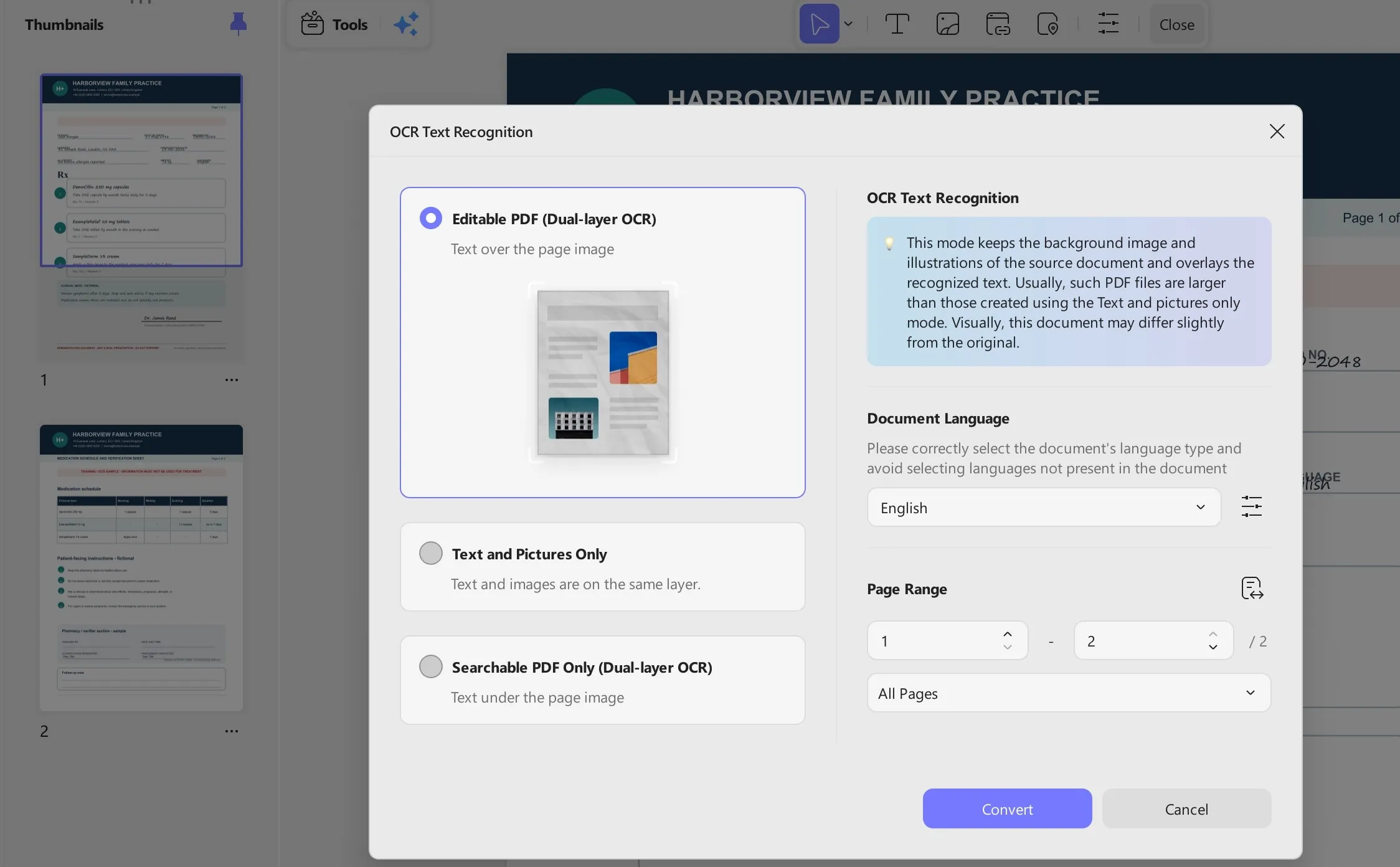
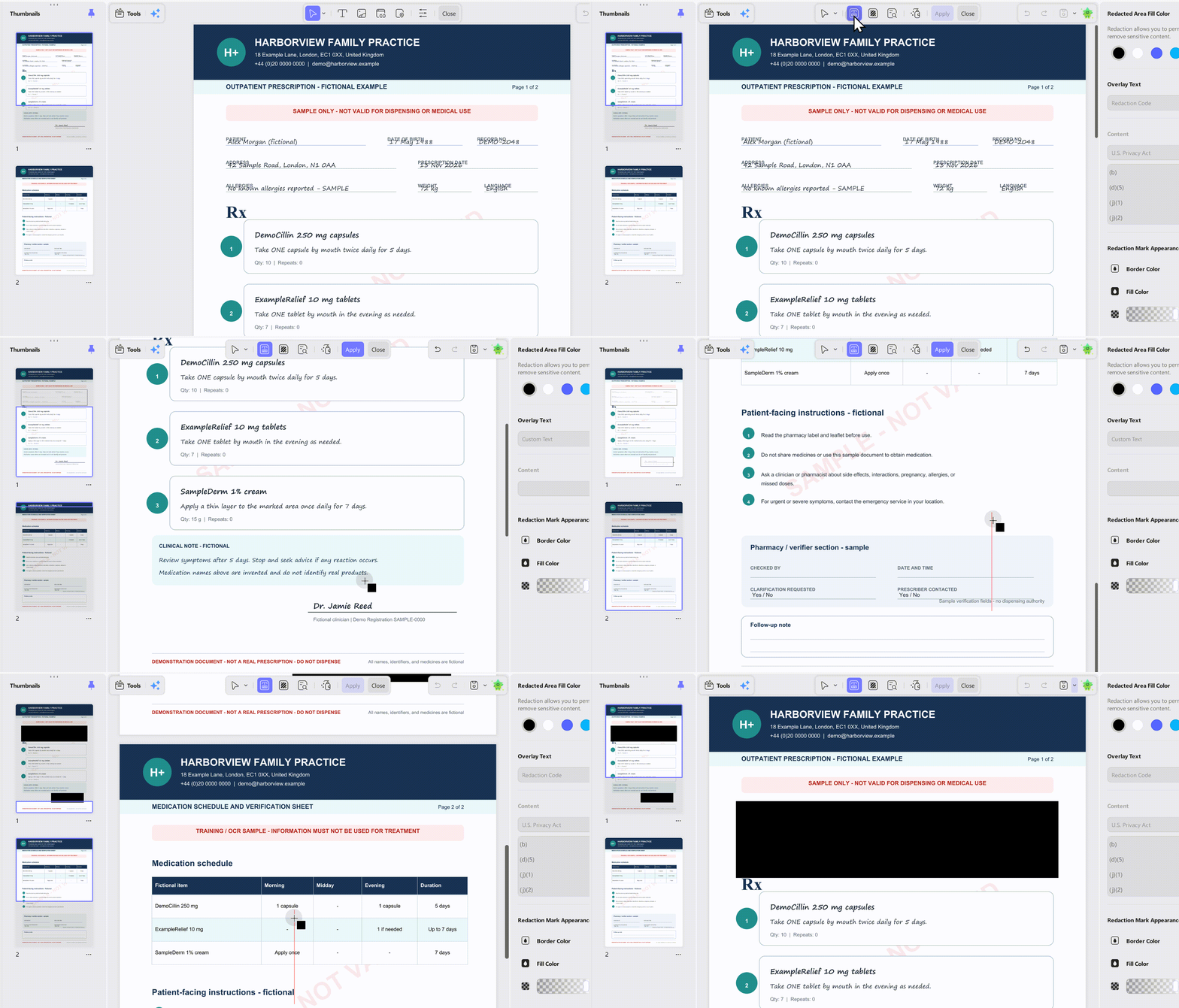
Open a copy of the PDF. If the page contains printed text that cannot be selected, use UPDF's OCR tool to create a searchable text layer. Standard OCR is designed for printed scans, not messy handwriting.
Select only the handwriting you need. For one handwritten region, open UPDF AI, use the screenshot or image input, and prompt: “Transcribe only the visible characters. Preserve line breaks, mark every uncertain word with [?], and do not infer a medicine or dose.”
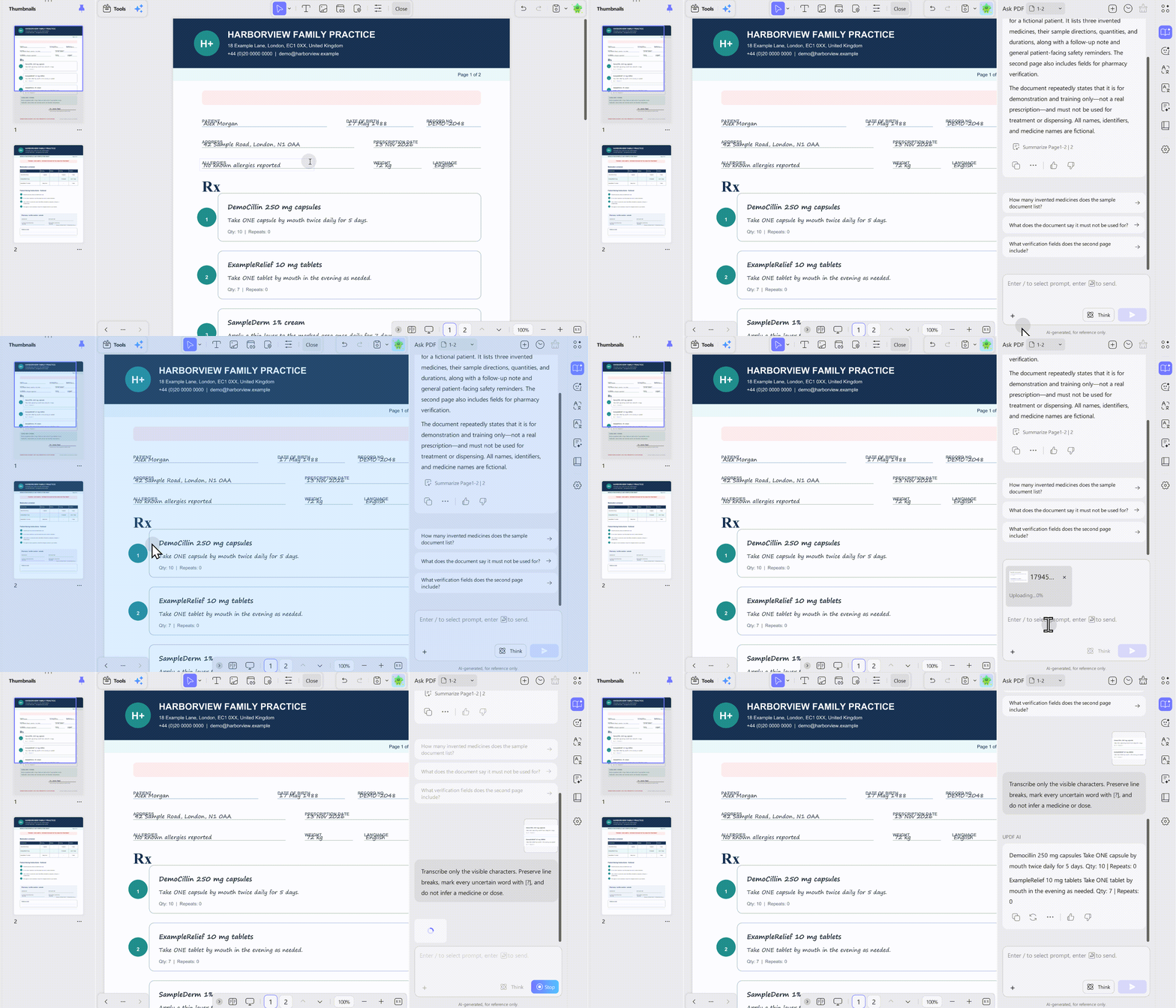
Review the result. Compare it with the page, annotate uncertainties, archive the original, and redact unrelated identifiers on a copy before sharing.
UPDF AI may explain ordinary terms or organize extracted information, but it must not diagnose, recommend a drug, or decide a dose. AI analysis uploads relevant content to UPDF Cloud; local editing and redaction are separate.
4. Ask a General AI Chatbot—With a Narrow Prompt
A multimodal chatbot can inspect an image, but broad questions invite it to fill gaps. Use a transcription-only instruction:
Copy the visible handwriting exactly. Do not identify or recommend a medication. Mark unclear characters and list up to three possible readings without choosing one. Do not expand abbreviations. I will confirm the result with a pharmacist.
Remove unnecessary identifiers, check how the service uses health data, and upload only what the task requires. If the chatbot and page disagree, stop.
5. Use the Method That Still Wins: Ask a Pharmacist or Prescriber
A pharmacist has drug knowledge, clinical context, and the ability to contact the prescriber. Yet unreadable writing remains difficult. In one small study of 20 prescriptions and 300 readings, pharmacists had a median correct-reading rate of 75%. This is not a universal accuracy rate; it shows why confirmation matters.
Bring the original or clearest full-page image. Ask the pharmacist to verify medicine, strength, form, route, frequency, and duration. If anything remains unclear, contact the prescriber rather than infer the answer, as WHO medication-safety guidance recommends.
When the Reader Gets It Wrong: Safety Tips
Some recognition errors are more dangerous than ordinary spelling mistakes:
- QD versus QID: “Daily” can be confused with “four times daily.” The Joint Commission lists QD as error-prone.
- U versus 0: A handwritten “U” for units can look like a zero, turning a dose such as 10 units into 100.
- µg versus mg: FDA guidance warns the microgram symbol can be mistaken for milligrams;
mcgis preferred. - Decimal points:
1.0 mgcan be read as10 mg, while.5 mgcan be read as5 mgif the decimal is missed.
If the result is unclear, follow this fallback:
- Retake the photo in better light, include the entire prescription, and avoid filters that erase faint strokes.
- Try a second transcription method only to identify uncertainty. If the outputs disagree, stop.
- Call the prescriber's office and ask for the medicine name and complete directions to be repeated or reissued clearly.
- Take the original to a pharmacist and ask for confirmation before taking or giving the medication.
Never use a reader to start, stop, substitute, split, or change a dose. For an incorrect dose or urgent reaction, contact emergency services or poison control instead of troubleshooting the image.
Is It Safe to Upload Your Prescription Online?
A prescription contains sensitive health information, potentially including identity, medical-record, prescriber, diagnosis, and medication details.
Before uploading, ask:
- Does the tool process the file locally or transmit it to a server?
- How long is the image retained, and can you delete it?
- Is the content used for model training, analytics, or advertising?
- Is the service covered by health-privacy rules in your country, or is it simply a consumer app?
- Can you perform the task on a copy with unnecessary identifiers permanently redacted?
UPDF states that local PDF tools can keep files on-device, while AI analysis uploads relevant content and does not train general-purpose AI models. Duplicate the file, use local PDF redaction or UPDF Redaction tool first to remove unneeded identifiers, and upload only the smallest useful region if policy and law permit. Keep the original.
Windows • macOS • iOS • Android 100% secure
Frequently Asked Questions
Can AI read any doctor's handwriting?
No. Accuracy depends on image quality, writing, language, abbreviations, and context. A reader should be able to return “uncertain”; fluent text does not prove a medicine or dose is correct.
Is Google's prescription handwriting reader available in Google Lens?
Google's official 2022 announcement said the medicine-highlighting system was under development and intended to assist humans in the loop. It did not announce a general public release date. Standard Lens text recognition may extract visible characters, but it should not be represented as a dedicated prescription reader.
What should I do if no tool can read the prescription?
Stop trying to resolve it through more guesses. Contact the prescribing clinic or take the original to a pharmacist. Ask for a clearly printed or electronic replacement that states the medicine, strength, dosage form, route, frequency, and duration.
Can UPDF OCR a handwritten prescription?
UPDF's standard OCR is for printed text in scanned PDFs and images. For a small handwritten region, UPDF AI can attempt a transcription from an image or screenshot, but that content is sent for AI processing and the output may be wrong. Use it only to prepare questions for a qualified professional.
Conclusion
A doctor handwriting reader can make a prescription easier to discuss, but it cannot make an uncertain instruction safe. Use dedicated readers, OCR, UPDF, or a chatbot only for tentative transcription. Preserve the original, protect personal information, and mark uncertainty instead of guessing. Most importantly, confirm the medicine, dose, and directions with a pharmacist or prescriber before acting on any result.
Try UPDF on a copy of your scanned medical PDF to extract printed text, redact unnecessary identifiers, and prepare unclear handwriting for professional verification.
Windows • macOS • iOS • Android 100% secure




 Grace Curry
 Lizzy Lozano

 Enid Brown
 Engelbert White