 UPDF
UPDF
 UPDF for Windows
 UPDF for Mac
 UPDF for iPhone/iPad
 UPDF for Android
 Nomostar
 UPDF AI Online
 UPDF Sign
 IvyCraft
 Edit PDF
 Annotate PDF
 Create PDF
 PDF Form
 Edit links
 Convert PDF
 OCR
OCR PDF to Word
 PDF to Image
 PDF to Excel
 Organize PDF
 Merge PDF
 Split PDF
 Crop PDF
 Rotate PDF
 Protect PDF
 Sign PDF
 Redact PDF
 Sanitize PDF
 Remove Security
 Read PDF
 UPDF Cloud
 Compress PDF
 Print PDF
 Batch Process
 About UPDF AI
 UPDF AI Solutions
 AI User Guide
 FAQ about UPDF AI
 Summarize PDF
 Translate PDF
 Chat with PDF
 Chat with AI
 Chat with image
 PDF to Mind Map
 Explain PDF
 PDF AI Tools
 Image AI Tools
 AI Chat Tools
 AI Writing Tools
 AI Study Tools
 AI Working Tools
 Other AI Tools
 AI Bookmark Generation
 AI Bookmark Summary
 AI Watermark Generation
 AI Background Generation
 AI Sticker Generation
 AI Stamp Generation
 AI Editing Suite
 UPDF Copilot
 AI Page Management
 AI Semantic Search
 PDF to Word
 PDF to Excel
 PDF to PowerPoint
 Enterprise Solution
 Enterprise Sign
 Enterprise AI
 Enterprise Plan
 Enterprise User Guide
 Enterprise Webinar
 Banking
 Healthcare
 Insurance
 Legal
Legal Manufacturing
 Government
 Researchers & PhDs
 Solopreneurs & Freelancers
 Lawyers & Legal Professionals
 Real Estate Agents & Brokers
 Education Solution
 Customer Stories
 User Guide
 UPDF Tricks
 FAQs
FAQs UPDF Reviews
 Download Center
 Blog
Blog Newsroom
 Tech Spec
 Updates
 UPDF vs. Adobe Acrobat
 UPDF vs. Foxit
 UPDF vs. PDF Expert

Filing the FAFSA is faster when students and contributors prepare everything early together. Federal Student Aid launched the 2027–28 FAFSA to the general public on September 23, 2026. Students can complete and submit the form through StudentAid.gov.
A step-by-step FAFSA checklist makes preparation easier and keeps important tasks organized clearly. You can also download a PDF planner as an independent resource for planning. Families can open it in UPDF to check tasks and add non-sensitive notes.
Want a simple way to fill out the planner and keep every deadline organized? Download UPDF free to open, annotate, and save the FAFSA checklist PDF on your device.
Windows • macOS • iOS • Android 100% secure
Part 1. Quick FAFSA Checklist for 2027–28
Use this 2027–28 FAFSA checklist to prepare important details before opening the form. Use the checklist below to track preparation, submission, and follow-up tasks:
- A StudentAid.gov account for the student
- Separate StudentAid.gov accounts for required contributors
- Personal information for the student and contributors
- Consent for federal tax information transfer
- Child support information, if applicable
- Current asset information, if required
- A list of colleges or career schools
- Verified Federal School Codes
- Federal, state, and school deadlines
- Final review and electronic signatures
- A reviewed FAFSA Submission Summary
Part 2. Create the Required StudentAid.gov Accounts
StudentAid.gov accounts should be created first because every participant needs separate access credentials. Let's prepare each account carefully before moving to contributor details and financial information:
- Accurate Details: Use the correct legal name, date of birth, email address, mailing address, and other requested account information.
- One Account Per Person: The student and each required contributor should use separate accounts.
- Private Logins: Keep usernames and passwords private because each account belongs to one person.
- Early Setup: Create accounts early in case identity verification or account recovery takes time.
- Roles, Not Payments: Providing contributor information does not mean paying the student's college costs.
Identify Your FAFSA Contributors
Contributor requirements depend on the student's dependency, marital status, and family situation overall. Besides the student, these people may also need to provide required information:
- Parent: A biological or adoptive parent may need to participate as a contributor.
- Parent's Spouse: A stepparent may also need to provide required FAFSA information.
- Student's Spouse: A married student may need their spouse to participate too.
Confirm required contributors using the live FAFSA instructions or Federal Student Aid's "Who's My FAFSA Parent?" tool when applicable.
Track Contributor Progress
Use your FAFSA application checklist to track each contributor's progress safely:
- Account Needed: The contributor still needs to create a StudentAid.gov account first.
- Account Pending: The contributor's account exists but still needs another required step.
- Invitation Sent: The contributor has received an invitation to access the FAFSA form.
- Consent Completed: The contributor has finished the required consent and approval process.
- Signature Completed: The contributor has completed and signed their required FAFSA section.
These check marks or highlights show pending, waiting, and completed contributor tasks.
Gather the Personal and Family Information You May Need
If you're asked, "What do I need for FAFSA?," start with basic personal information.
- Legal Details: Gather the correct legal name and date of birth required.
- Contact Information: Prepare the mailing address, email address, and current phone number.
- Marital Status: Confirm marital status and the student's state of legal residence.
- Dependency Information: Prepare answers needed to determine the student's dependency status correctly.
- Parent or Spouse Details: Gather their information when the FAFSA form requires it.
- Special Circumstances: Keep relevant records available when unusual family circumstances may apply.
Follow the live FAFSA form because required questions can vary by situation.
Part 3. Prepare Tax, Income, Child Support, and Asset Information
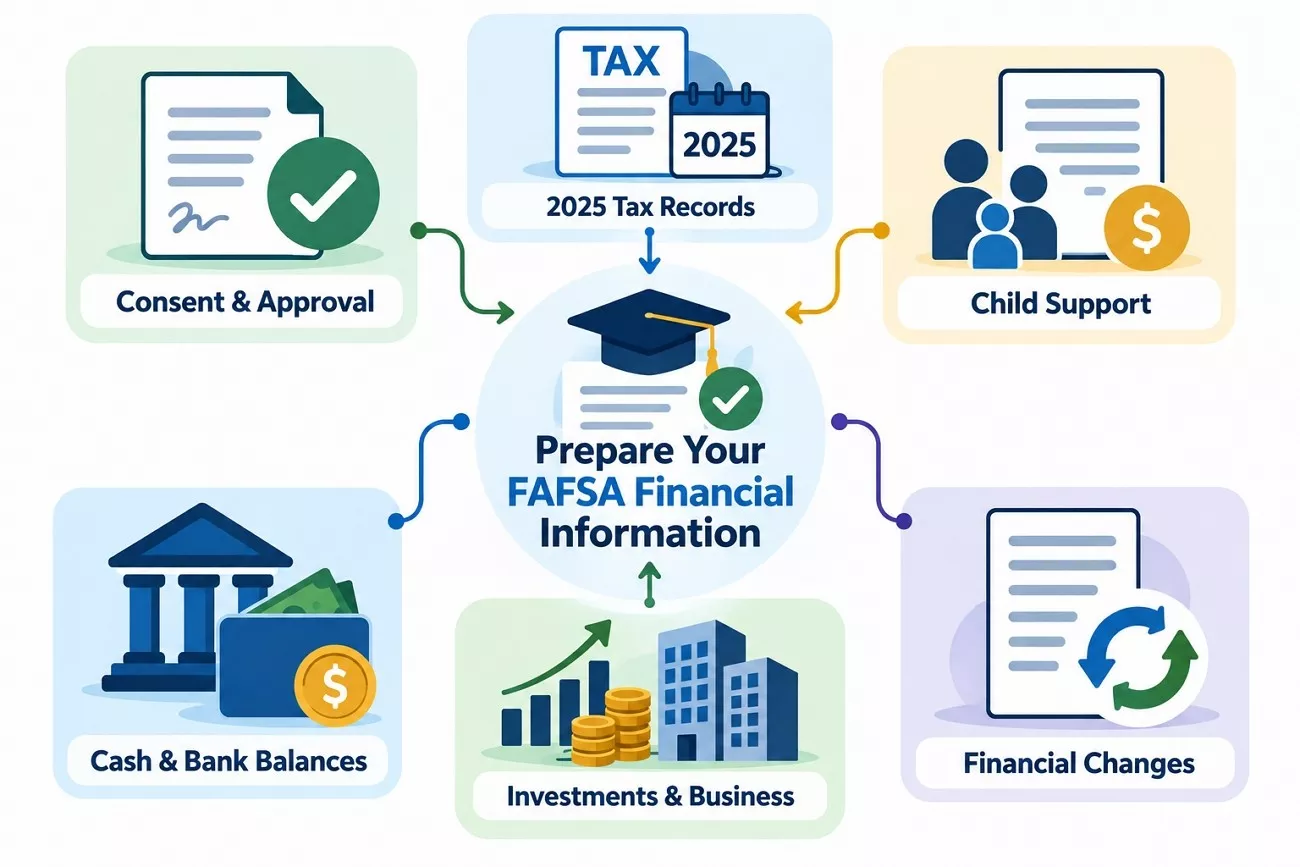
Financial information is another important part of your 2027–28 FAFSA checklist preparation process. The 2027–28 FAFSA uses tax information from the 2025 tax year:
- Consent and Approval: Required contributors must approve federal tax information access when requested.
- Tax Records: Keep relevant 2025 tax documents nearby for possible follow-up questions.
- Child Support: Prepare the amount of child support received during the last complete calendar year when the form asks for it.
- Cash and Bank Balances: Record current cash, checking, and savings amounts when required.
- Investments and Businesses: Prepare current values for investments, real estate, businesses, and farms that the FAFSA specifically requires you to report.
- Financial Changes: Keep records explaining major financial changes for possible school review later.
Privacy Reminder: Never store complete SSNs, tax IDs, bank details, tax returns, or StudentAid.gov passwords. Share sensitive information only through StudentAid.gov or an authorized secure school portal.
Part 4. Build Your FAFSA School List and Deadline Tracker
Prepare your school list before starting FAFSA, including every college or career school you're considering. The table below helps track each school's codes, deadlines, forms, and application status:
| What to Record | What to Note |
|---|---|
| Official School Name | Use the name shown in FAFSA search |
| Federal School Code | Verify the code before submitting |
| Application Status | Planning, applied, or admitted |
| Financial Aid Webpage | Check aid deadlines and required forms |
| FAFSA Priority Deadline | Record the school's priority date |
| State Deadline | Use your state's required deadline |
| Institutional Aid Form | Note any separate required aid form |
| CSS Profile or Documents | Check whether additional documents are needed |
Note: The 2027–28 online FAFSA allows students to list up to 20 schools at a time.
Record a Different Priority Deadline for Each School
Each deadline comes from a different source, so students should track them. Federal Student Aid notes that school deadlines are often earlier than federal deadlines.
- Federal Deadline: Track the final federal FAFSA submission deadline for the correct award year.
- State Deadline: Check your state's date on the official FAFSA deadlines page.
- School Priority Deadline: Record each college's individual deadline for priority aid consideration.
- Scholarship Deadline: Track dates separately because each scholarship provider sets its own schedule.
- Supplemental Form Deadline: Note deadlines for CSS Profile or other required school forms.
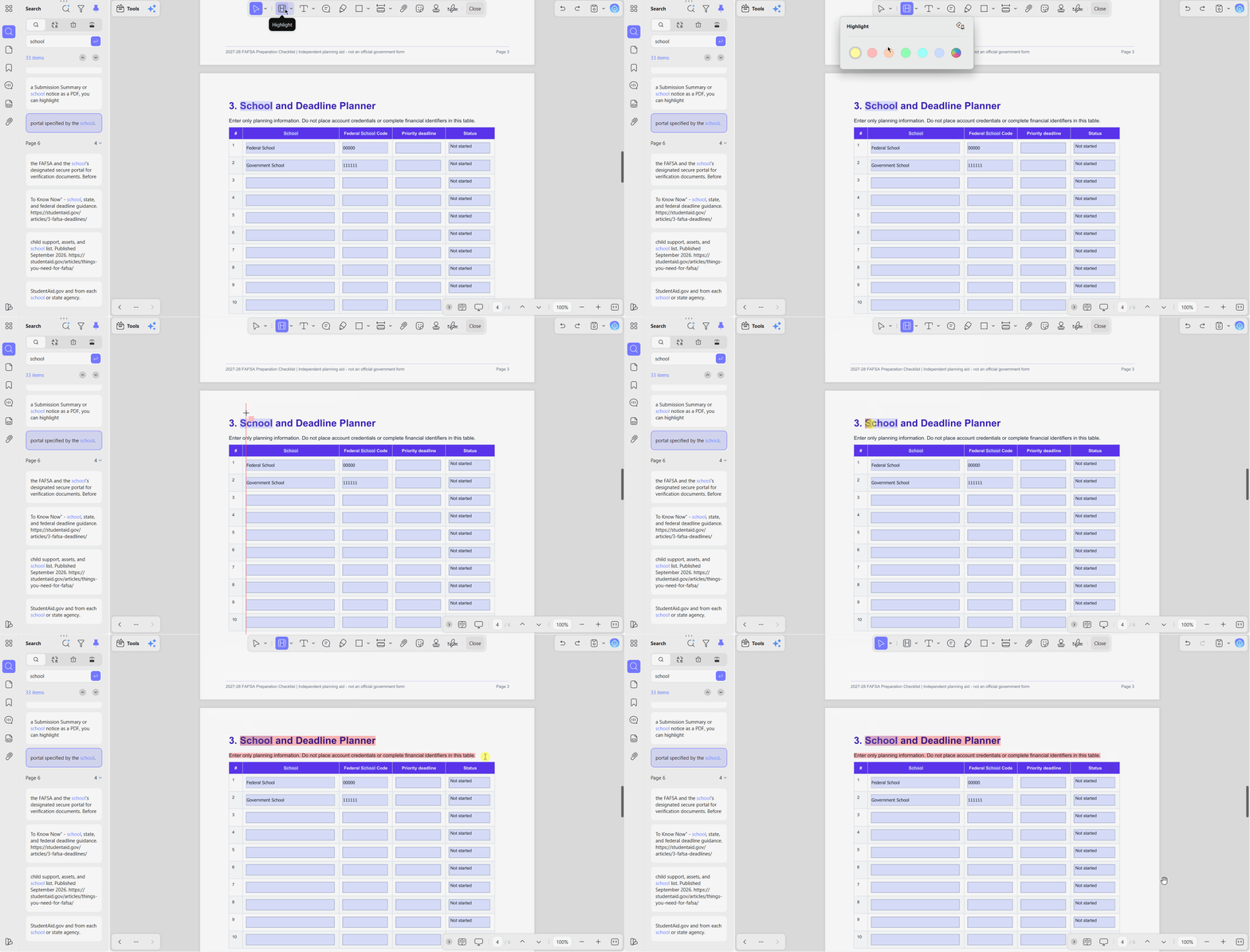
A FAFSA application checklist can keep school codes, deadlines, and remaining tasks together. In UPDF, highlight colors and check marks can show which schools are ready, pending, or complete. You can start with the free version of UPDF without entering a credit card.
Windows • macOS • iOS • Android 100% secure
Part 5. Download the 2027–28 FAFSA Checklist PDF
Our checklist for FAFSA planning keeps important preparation details together in one simple PDF. It covers accounts, contributors, school codes, deadlines, financial records, submission checks, and follow-up tasks. Print the checklist or open it in UPDF to add notes, dates, and highlights. You can use UPDF's free version without entering a credit card to begin.
Download the 2027–28 FAFSA Checklist PDF
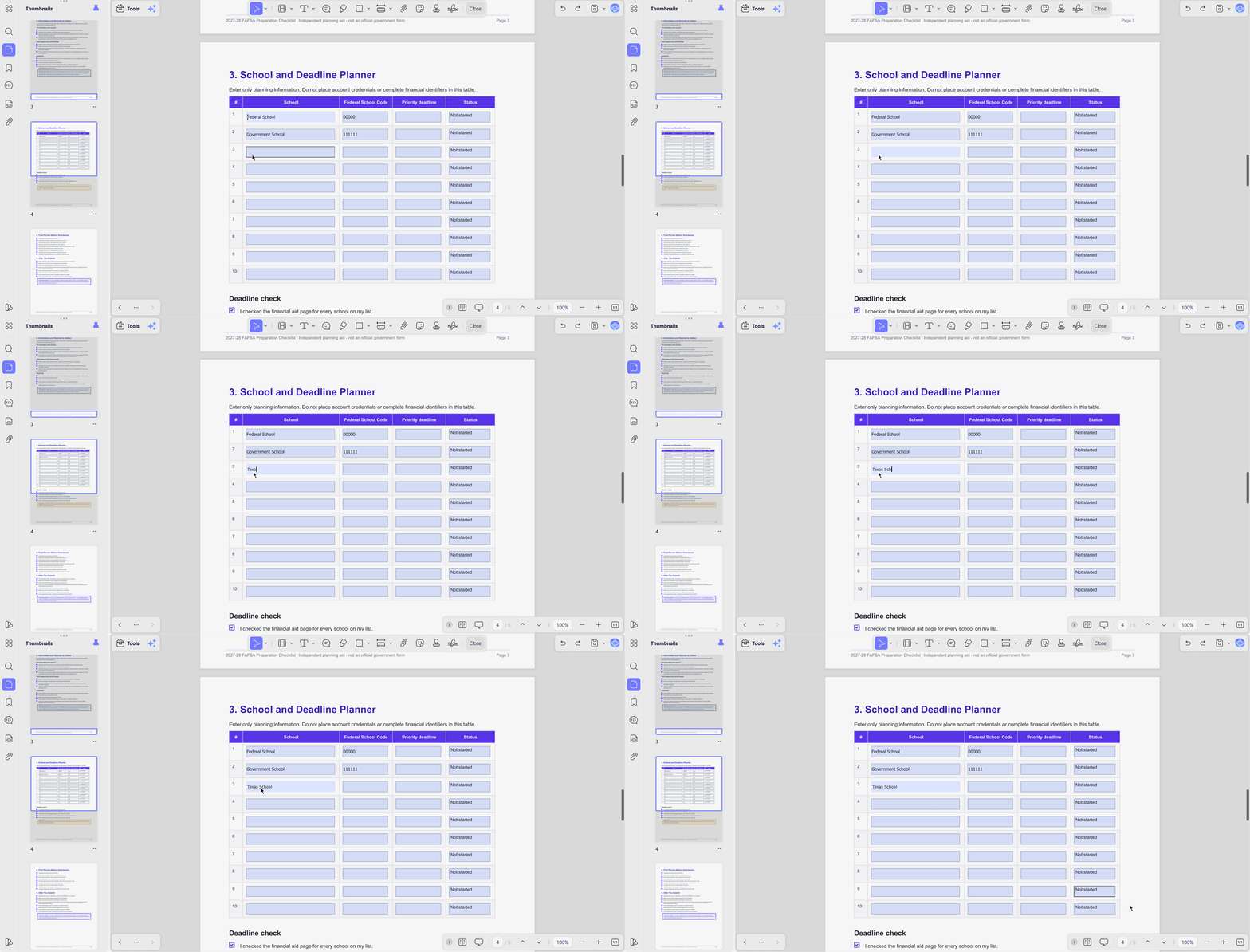
The 6-page planner is fillable, so you can complete its fields directly in UPDF. Below are the main ways to use the planner while keeping everything organized:
Ready to work through the checklist? Download UPDF free to fill in the planner, highlight deadlines, and save your progress in one place.
Windows • macOS • iOS • Android 100% secure
- Fill In the Planner: Enter deadlines, school codes, and tasks in the fillable fields.
- Color-Code Each Status: Mark items as not started, waiting for contributor, or completed.
- Separate Deadlines: Use each school row to record its own priority deadline clearly.
- Add Bookmarks: Use bookmarks for student, parent, and school sections.
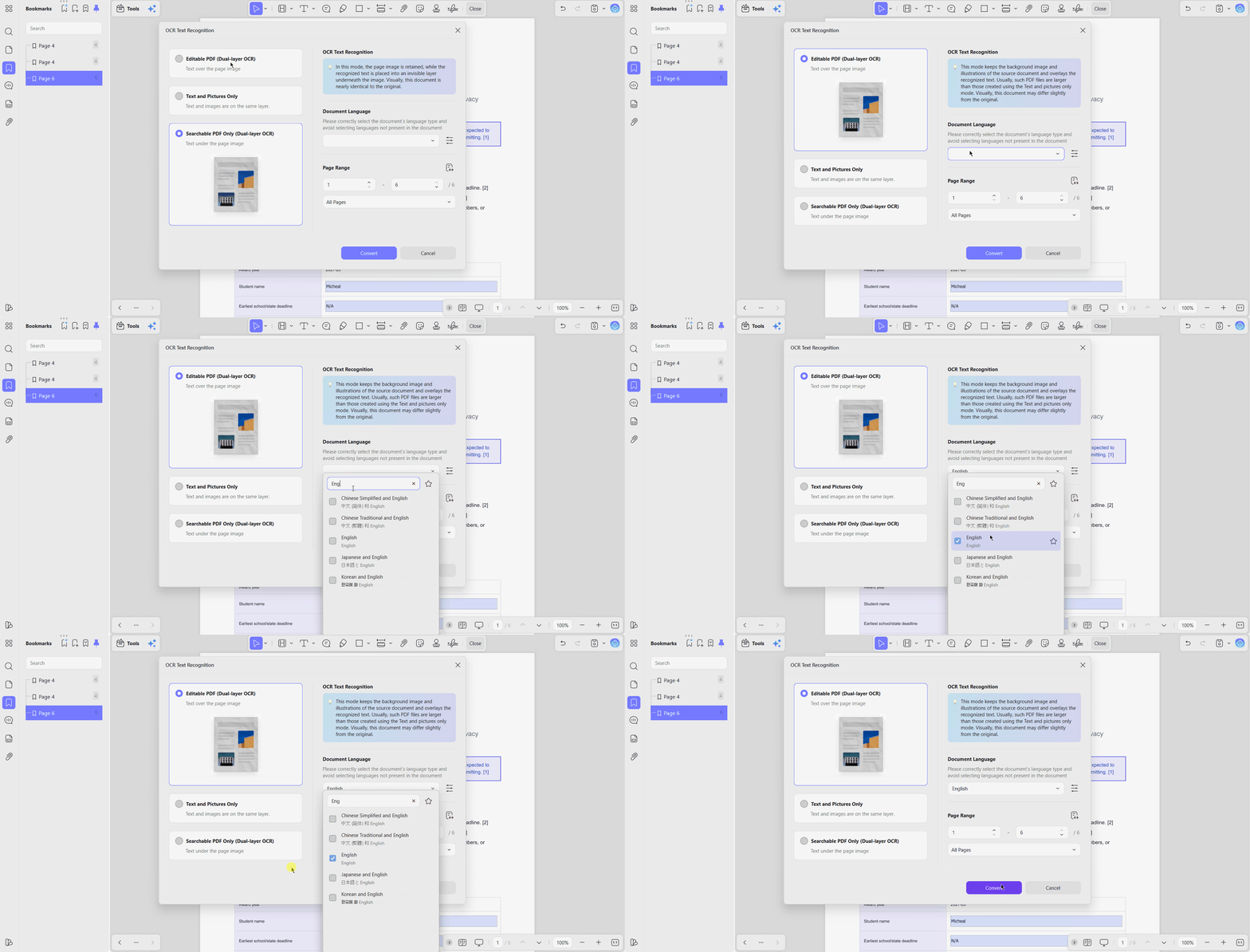
- Handle Scanned Extras: Run OCR on non-searchable school instructions before reviewing or highlighting them.
- Protect Sensitive Data: Never record full SSNs, tax IDs, bank details, or passwords.
The free version adds a trial watermark when you save and caps OCR use, so compare UPDF's plans if you need more.
Part 6. Review the FAFSA Before You Submit It
Use this final FAFSA application checklist before submitting the completed form:
- Correct Award Year: Make sure the 2027–28 FAFSA is selected.
- Student Information: Check that details match the StudentAid.gov account.
- Contributor Sections: Confirm every required contributor has completed their section.
- Consent and Approval: Make sure all required approvals are complete.
- School List: Check that every intended school is included.
- Federal School Codes: Verify each code before submitting the form.
- Financial Information: Review answers for the correct requested periods.
- Form Warnings: Fix missing answers and any remaining alerts.
- Required Signatures: Confirm the student and contributors have signed.
- Submission Ready: Verify all required sections and signatures are complete before submitting. Save the confirmation page afterward.
Complete signing in the "Review & Sign" section before submitting your FAFSA form. UPDF can organize supporting documents but submit the FAFSA only through StudentAid.gov securely.
Part 7. What to Do After Submitting the FAFSA
After submitting the FAFSA, review your status and complete any remaining follow-up tasks:
- Check Your Status: Open "My Activity" and review the current FAFSA status.
- Complete Open Items: Confirm no contributor still needs to act or sign.
- Review Your Summary: Check the FAFSA Submission Summary after the form finishes processing.
- Check Your SAI: Review your Student Aid Index and estimated federal student aid information. Your schools will determine your final aid offers.
- Correct Errors: Make corrections when information in your submitted FAFSA is incorrect.
- Respond to Verification: Send requested documents to each school by its deadline.
- Use Secure Channels: Submit sensitive records through approved portals or StudentAid.gov only.
- Compare Aid Offers: Review grants, work-study, loans, and other aid from schools.
- Track Other Deadlines: Keep checking state, scholarship, and institutional aid deadlines separately.
Keep your Submission Summary, school instructions, and related PDFs together for easier review. With UPDF's PDF reader, you can highlight actions, add deadlines, and bookmark important pages.
Part 8. Organize Scanned Financial Aid Documents with OCR
Some school instructions and supplemental forms may arrive as scanned PDF documents. Adding them to your checklist for FAFSA can make related materials easier to review.
Make Scanned PDFs Searchable with OCR
UPDF's OCR tool can turn scanned pages into searchable and selectable text. Check names, dates, amounts, and identification numbers carefully because OCR can misread characters.
Organize Financial Aid PDF Pages
Use UPDF to insert, delete, rearrange, or split pages when organizing financial aid documents. These PDF reading techniques can also make school instructions easier to review and manage.
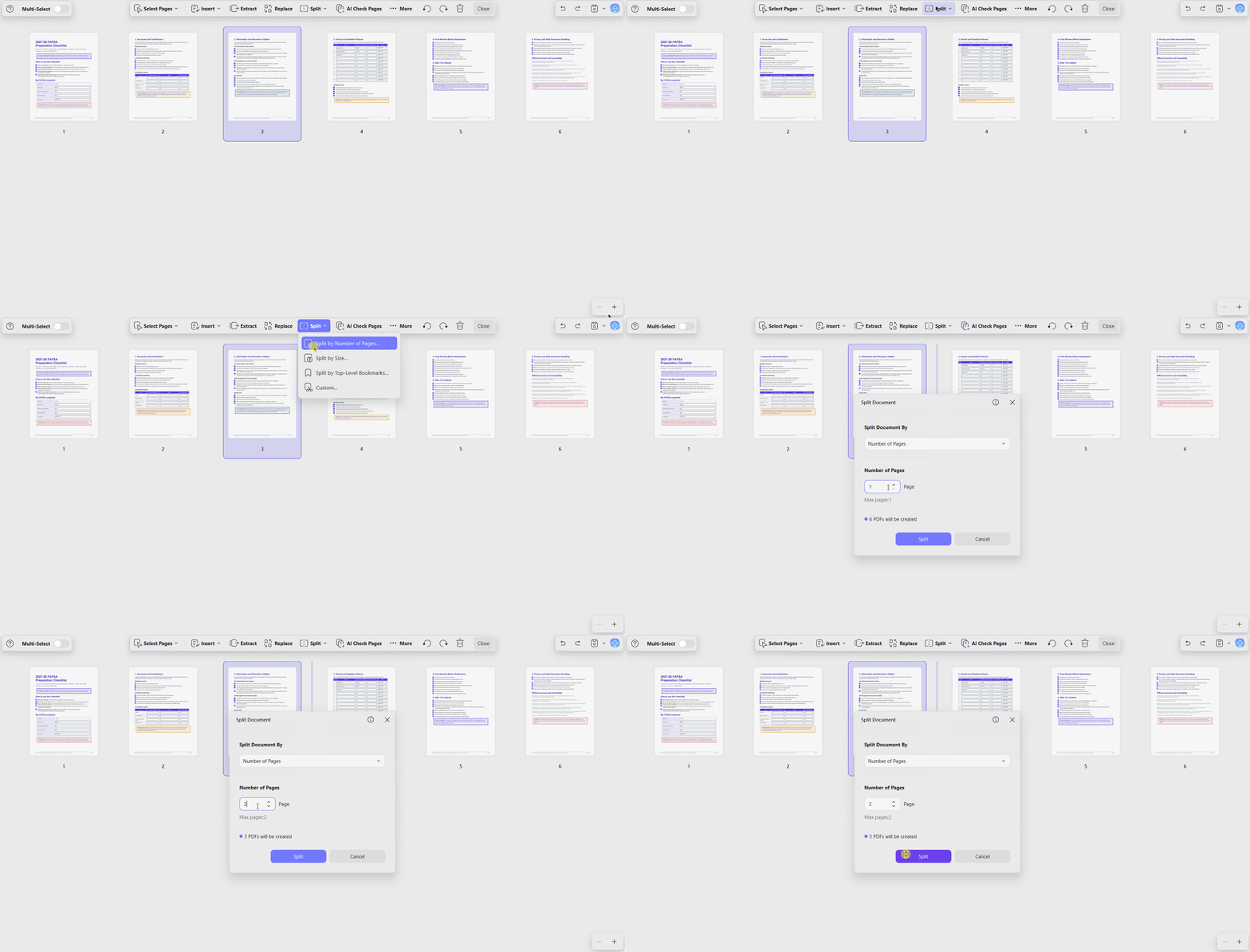
OCR and PDF organization only help manage documents, not submit them. Use secure school portals for required financial aid records.
Part 9. Extra UPDF Tools for College Research
After completing your FAFSA application checklist, UPDF AI can support later academic research. These tools do not submit FAFSA, but they can help with coursework and college research.
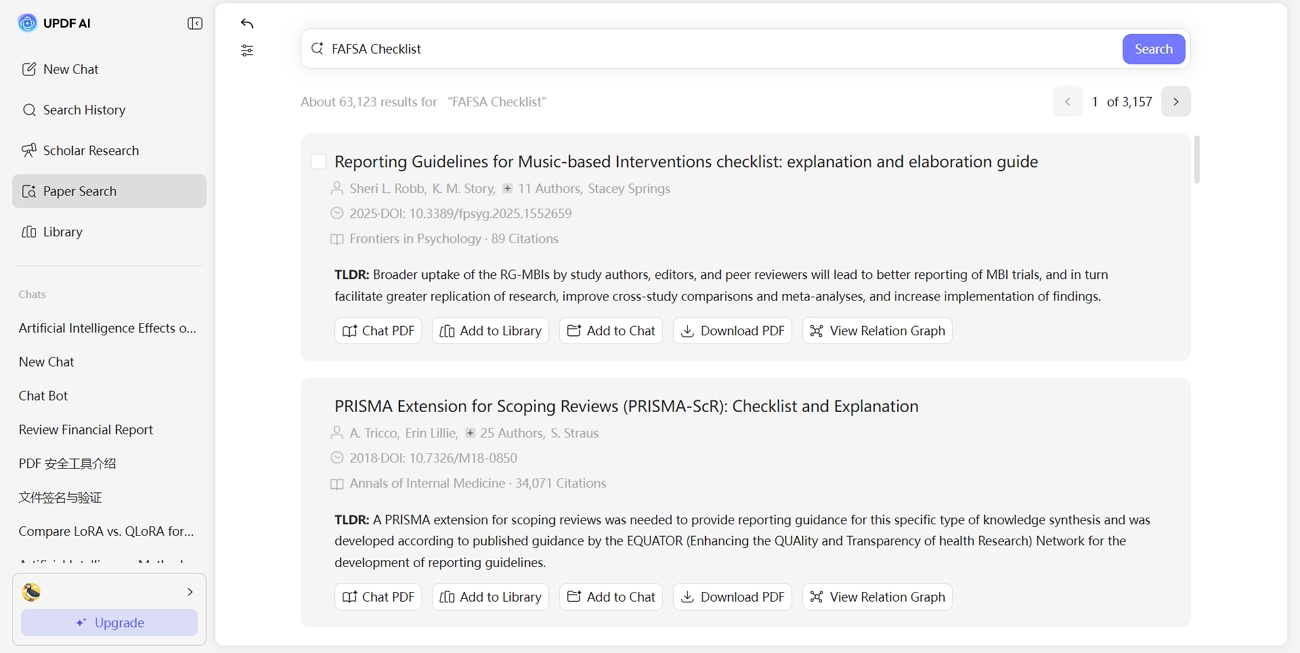
- Paper Search: Finds academic papers related to a topic and surfaces useful research sources. It can also provide citation-backed answers through DeepThink for faster academic review.
- Scholar Research: Builds a research-style report from academic sources and organizes the findings clearly. It also includes references and citations that can support deeper study.
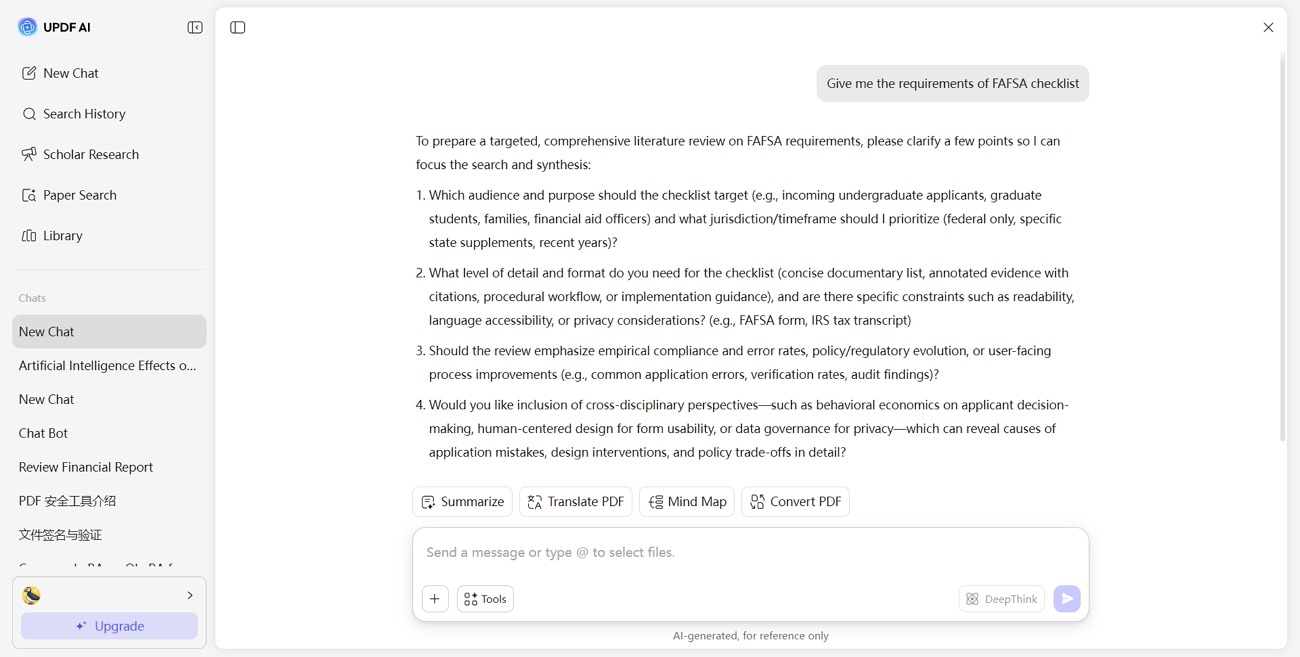
Both tools run through UPDF AI, which includes limited free prompts before upgrading. UPDF also provides more tips for students for managing coursework and study PDFs.
Part 10. Common FAFSA Preparation Mistakes
Preparation mistakes can slow FAFSA progress or create problems with financial aid. The table below shows common mistakes and simple ways to avoid them:
| Mistake | Better Approach |
|---|---|
| Waiting for the Federal Deadline | Record earlier state and school deadlines |
| Sharing One StudentAid.gov Account | Give each person a separate account |
| Inviting the Wrong Contributor | Confirm who needs to participate first |
| Forgetting Consent or Signatures | Track each contributor's completion status |
| Using the Wrong Federal School Code | Double-check every school code |
| Assuming Deadlines Are the Same | Record each school's priority deadline separately |
| Skipping the FAFSA Submission Summary | Review it after processing is complete |
| Ignoring Verification Requests | Submit documents by the school's deadline |
| Storing Sensitive Data Unsafely | Track progress, not private identity details |
| Emailing Financial Documents | Use the school's secure portal instead |
Frequently Asked Questions
What documents do I need to complete the FAFSA?
Most federal tax information transfers directly from the IRS after required consent. Students may still need account details, contributor information, school choices, asset records, child support information, and supporting records depending on their circumstances.
Does each FAFSA contributor need a StudentAid.gov account?
Each required FAFSA contributor needs a separate StudentAid.gov account to complete and sign sections individually. Never share login credentials because each contributor must access and complete their own account privately.
Do I need my tax return to complete the FAFSA?
Most families do not enter tax figures because consent allows direct IRS data transfer automatically. Keep 2025 tax records nearby for possible follow-up questions or school verification requests later on.
How many schools can I list on the FAFSA?
Federal Student Aid specifications allow up to 20 schools online and 10 on paper for the FAFSA. Confirm the online school limit again after the 2027–28 FAFSA form officially launches for accuracy.
Is the federal FAFSA deadline the only deadline I need to follow?
The federal deadline is not the only FAFSA deadline students should track each year. State and school priority deadlines may arrive earlier and affect available financial aid for students.
Can I save my FAFSA checklist as a PDF?
Our downloadable FAFSA checklist is already a PDF you can print or save for planning. In UPDF, you can tick boxes, fill fields, add highlights, and save progress easily later.
Is it safe to put my SSN in a FAFSA checklist?
Do not store your full SSN inside a general FAFSA planning checklist file for safety. Enter identity numbers, account details, and logins only through StudentAid.gov or secure school portals instead.
Can UPDF submit the FAFSA for me?
UPDF cannot submit the FAFSA or operate inside the official online application form for you. It only helps organize related PDFs, while FAFSA submission happens through StudentAid.gov itself online securely.
Conclusion
To conclude, preparing early makes the 2027–28 FAFSA process much easier to manage. Use a checklist for FAFSA to organize accounts, contributor details, financial information, and schools. Track every state and school priority deadline instead of relying only on federal dates.
Download the 2027–28 FAFSA Checklist PDF and open it in UPDF to track tasks, deadlines, and non-sensitive notes in one place. You can begin with UPDF's free version without entering a credit card.
Download UPDF free to complete the planner and keep your FAFSA preparation organized.
Windows • macOS • iOS • Android 100% secure








 Enola Davis

 Italo Rossi
 Enid Brown