 UPDF
UPDF
 UPDF for Windows
 UPDF for Mac
 UPDF for iPhone/iPad
 UPDF for Android
 Nomostar
 UPDF AI Online
 UPDF Sign
 IvyCraft
 Edit PDF
 Annotate PDF
 Create PDF
 PDF Form
 Edit links
 Convert PDF
 OCR
OCR PDF to Word
 PDF to Image
 PDF to Excel
 Organize PDF
 Merge PDF
 Split PDF
 Crop PDF
 Rotate PDF
 Protect PDF
 Sign PDF
 Redact PDF
 Sanitize PDF
 Remove Security
 Read PDF
 UPDF Cloud
 Compress PDF
 Print PDF
 Batch Process
 About UPDF AI
 UPDF AI Solutions
 AI User Guide
 FAQ about UPDF AI
 Summarize PDF
 Translate PDF
 Chat with PDF
 Chat with AI
 Chat with image
 PDF to Mind Map
 Explain PDF
 PDF AI Tools
 Image AI Tools
 AI Chat Tools
 AI Writing Tools
 AI Study Tools
 AI Working Tools
 Other AI Tools
 AI Bookmark Generation
 AI Bookmark Summary
 AI Watermark Generation
 AI Background Generation
 AI Sticker Generation
 AI Stamp Generation
 AI Editing Suite
 UPDF Copilot
 AI Page Management
 AI Semantic Search
 PDF to Word
 PDF to Excel
 PDF to PowerPoint
 Enterprise Solution
 Enterprise Sign
 Enterprise AI
 Enterprise Plan
 Enterprise User Guide
 Enterprise Webinar
 IT
IT Education
 Construction
 Financial Service
 Healthcare
 Insurance
 Legal
Legal Manufacturing
 Government
 Researchers & PhDs
 Solopreneurs & Freelancers
 Lawyers & Legal Professionals
 Real Estate Agents & Brokers
 Education Solution
 Customer Stories
 User Guide
 UPDF Tricks
 FAQs
FAQs UPDF Reviews
 Download Center
 Blog
Blog Newsroom
 Tech Spec
 Updates
 UPDF vs. Adobe Acrobat
 UPDF vs. Foxit
 UPDF vs. PDF Expert

If you want to reserve a part of your paycheck for your retirement plan or loan repayments, you need a payroll deduction form. This form allows your employer to withhold a specific amount from your salary. It is also used to deduct funds for taxes, insurance, and charity donations.
Payroll forms ensure your money goes exactly where you need it. At the same time, they help the company process payroll accurately and avoid errors.
But where can you get these forms? And how can you complete them correctly? This guide covers everything you need to know, including the definition of payroll deduction forms, templates, step-by-step instructions, and tips to avoid mistakes.
You will also learn about UPDF, a powerful tool that helps you fill out, organize, and manage payroll forms more productively. Click below to download and try it for free.
Windows • macOS • iOS • Android 100% secure
Part 1. What is a Payroll Deduction Authorization Form?
A payroll deduction form is a document in which an employee formally allows the employer to withhold specific amounts from their wages. These amounts are taken from each paycheck according to the employee's consent or the official legal requirements.
This form is very important in legal compliance. It allows employers to meet payroll requirements at the local, state, or federal level. At the same time, they protect workers from unapproved deductions from their salaries.
Moreover, payroll forms provide documentation to reduce disputes and support payroll audits. As a result, it ensures the employee wages are handled more accurately and transparently.
What's Included in a Payroll Deduction Form?
Mainly, payroll forms include mandatory amounts, such as federal or income taxes, and voluntary amounts. Voluntary deductions include health insurance costs, contributions to retirement plans, repayment of loans, and charitable donations.
The form requires each deduction to be clearly listed along with the amount or percentage and the date when it becomes effective. Tools like UPDF can help you manage these details more seamlessly—by highlighting key sections, annotating employee instructions, and checking that all required fields are completed before submission.
Windows • macOS • iOS • Android 100% secure
Part 2. Payroll Deduction Form Template and How to Access It
A payroll deduction form template is a pre-designed document that includes all required fields organized in a standard structure. It can save employers from creating a form from scratch.
There are several online resources where you can find templates for these forms. Here are some official and third-party sources.
U.S. Federal Forms for Payroll Deductions
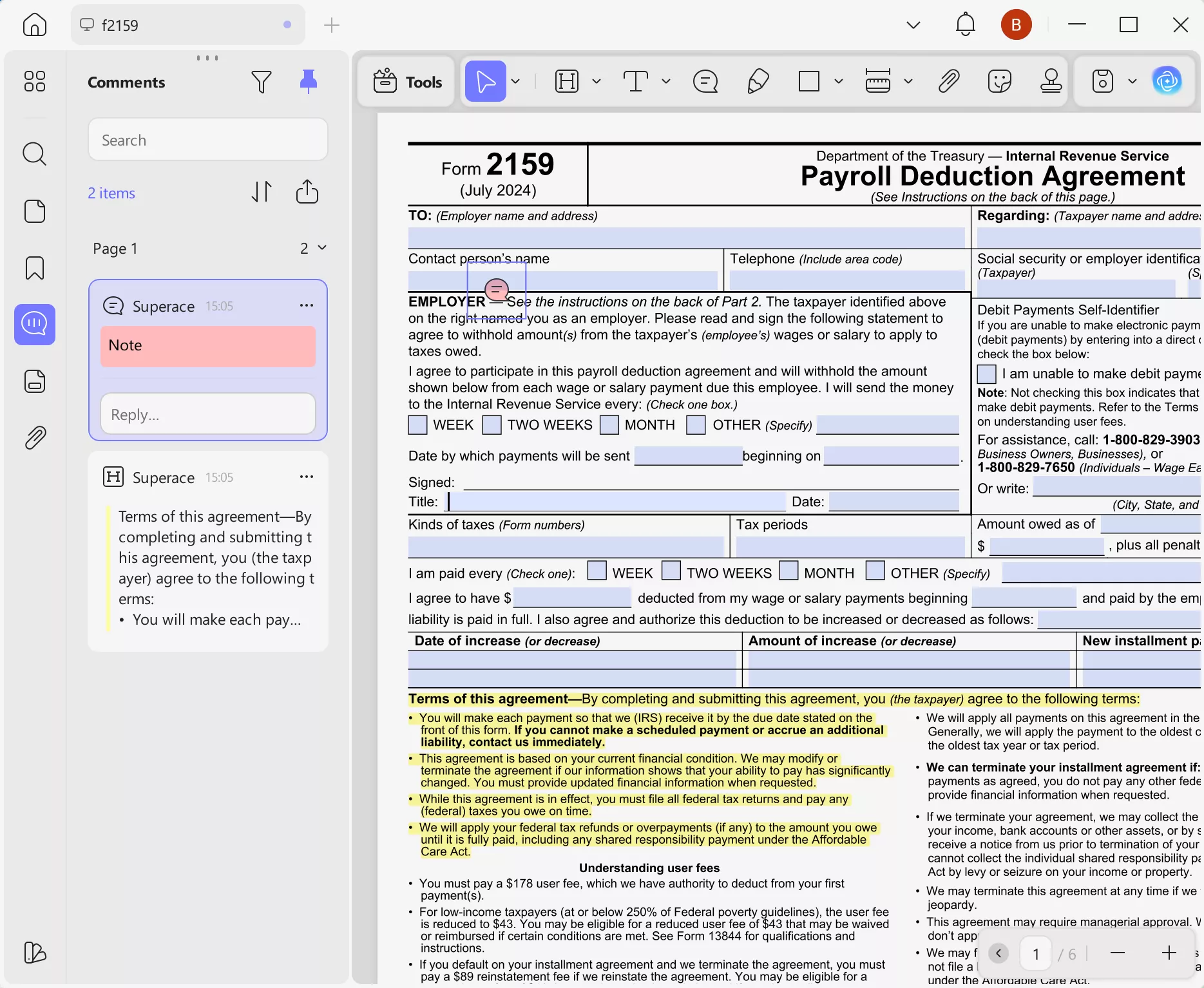
US federal forms for payroll deductions include letters for withholding income tax. And these are provided officially by the IRS (Internal Revenue Service) and other government sources:
Form W-4 (Employee's Withholding Certificate)
This form instructs employers on how much federal income tax to withhold from an employee's paycheck. You can click here to download this form directly from the IRS website.
Form 2159 (Payroll Deduction Agreement)
Form 2159 is a voluntary payroll deduction agreement to pay off federal tax debts. You can download the PDF here directly from the IRS website.
Form 1187 (Request for Payroll Deductions for Labor Organization Dues)
It is used by the federal government employees to allow deduction of union membership fees. It is provided by the Office of Personnel Management (OPM). You can download it here.
Generic Payroll Deduction Template
If you're looking for a general form, such as for employee loans or benefits, you can find several generic payroll deduction templates online. Professional HR organizations like SHRM offer sample forms. However, they require registration with a paid account. If you want a free template, you can download it from here.
After downloading the template, you can open it in UPDF to fill out, organize, and save it digitally. UPDF supports multiple formats like PDF, Word, and Excel. This makes it easier to share the form or manage employee records.
Part 3. How to Fill Out a Payroll Deduction Form
To fill out a payroll deduction form, you will need a tool that supports filling out digital forms. UPDF is the ideal solution. It supports both static and interactive PDF forms. Moreover, its automatic form field recognition feature helps you fill out each field without much effort.
Here's how it works.
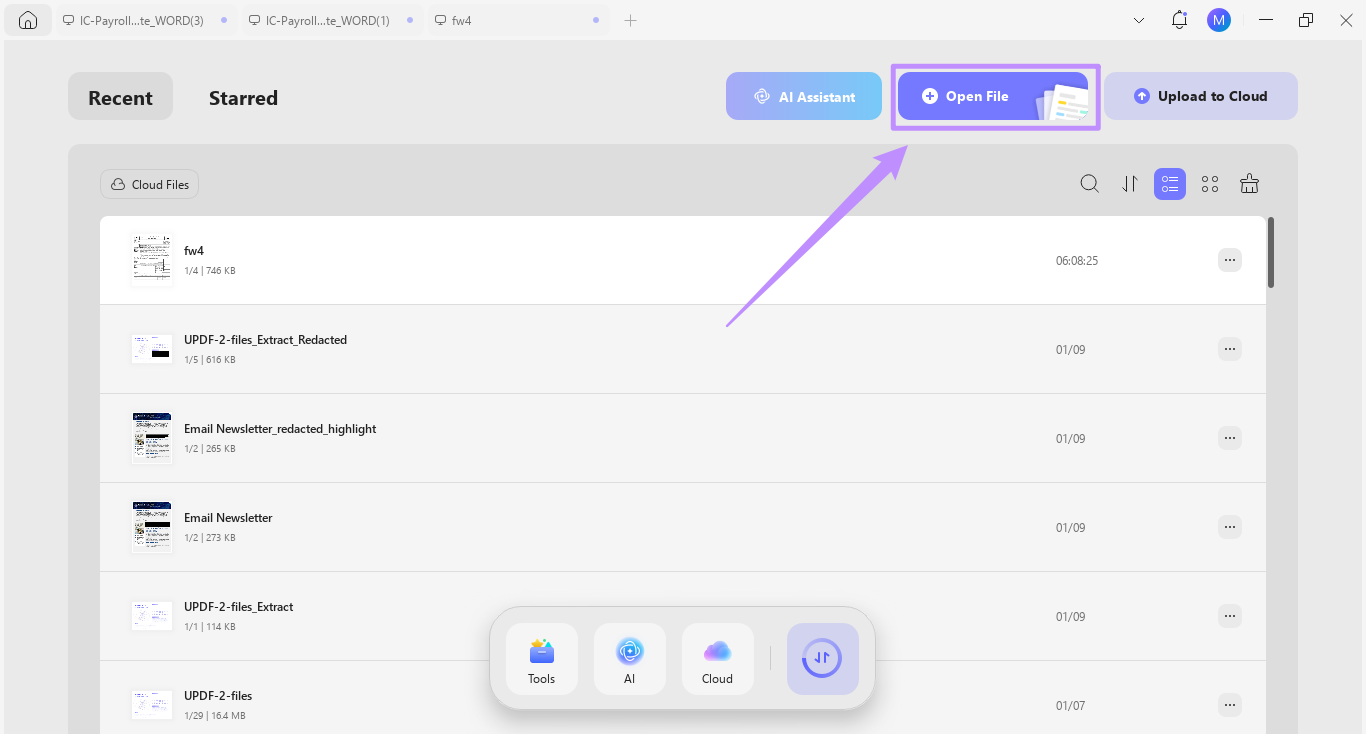
Step 1. Download and install UPDF on your computer. Then, launch it and click "Open File" to import the PDF form.
Windows • macOS • iOS • Android 100% secure
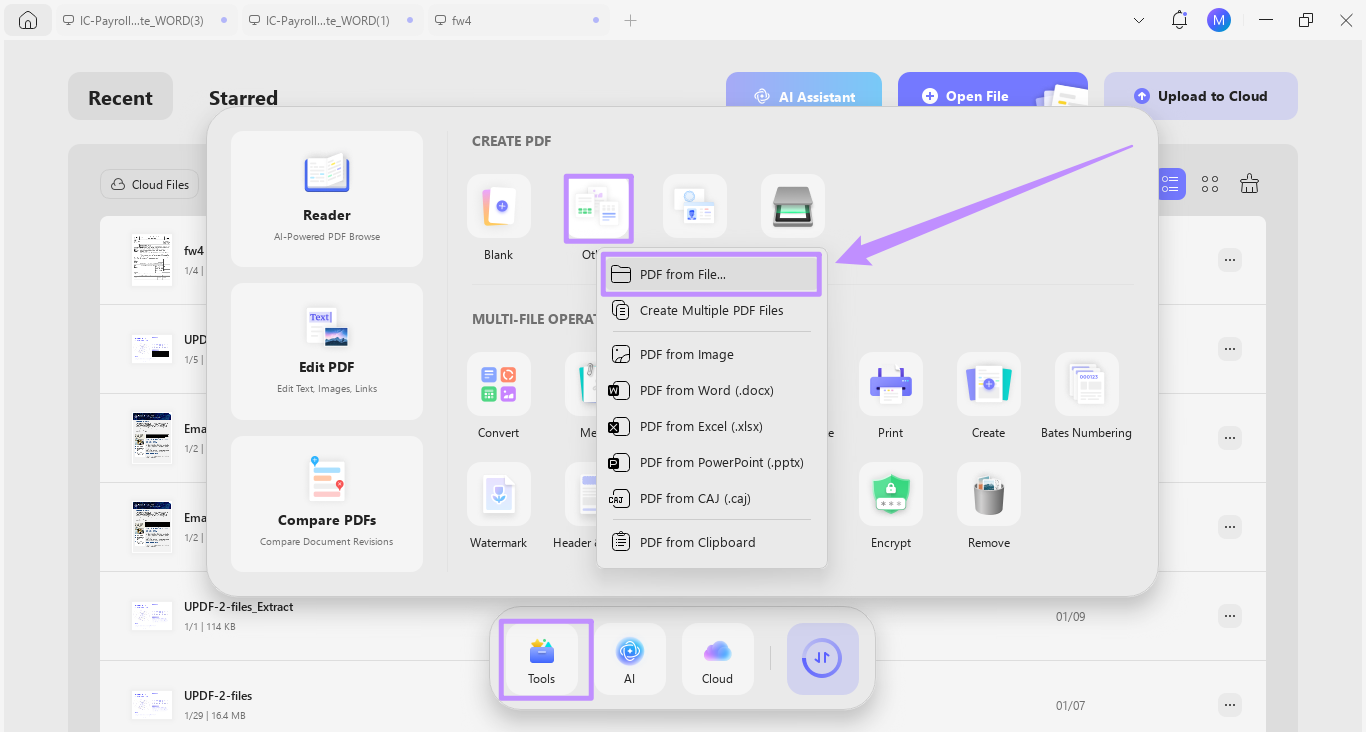
Tip: If the form is in Word or any other format, go to "Tools" and click "Other." Then, choose "PDF from file." After that, select the desired file to import.
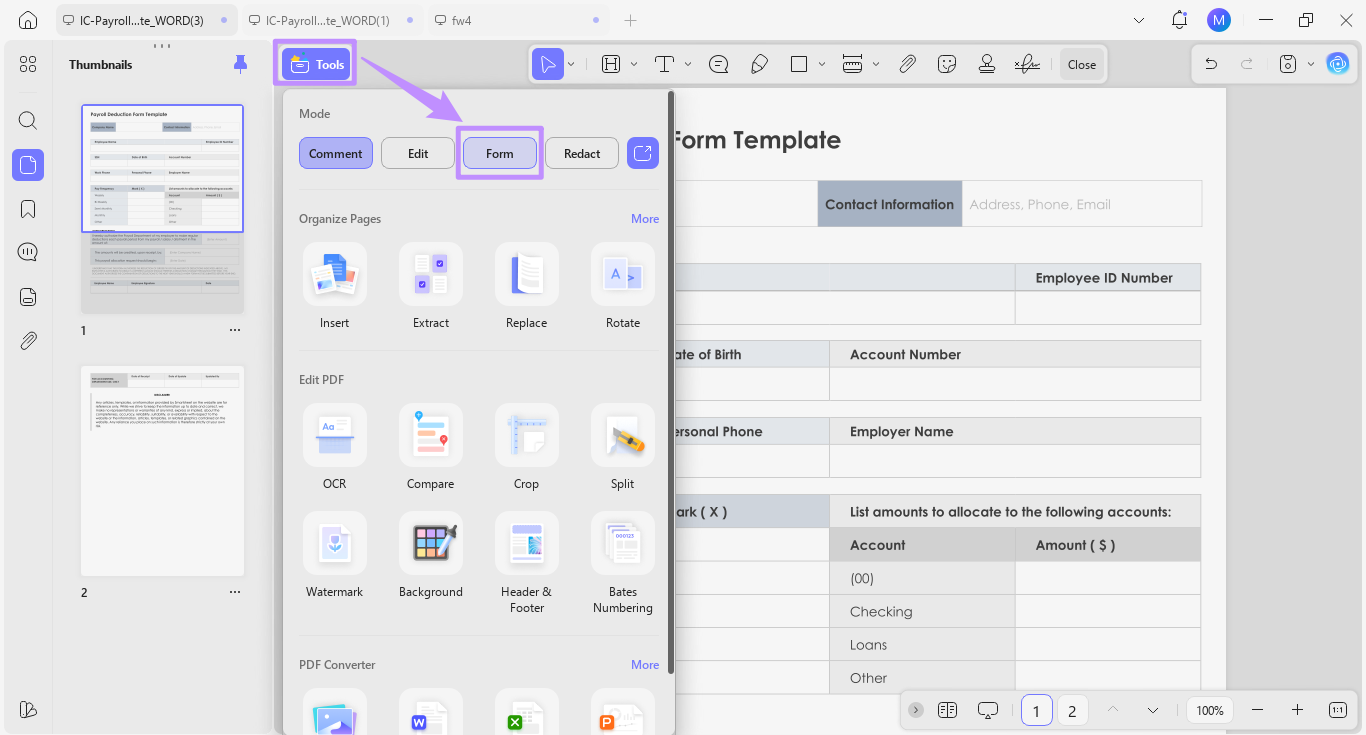
Step 2. Once your file is opened, you can start filling it right away if it is an interactive form. For non-interactive forms, click "Tools" from the top and choose "Form."
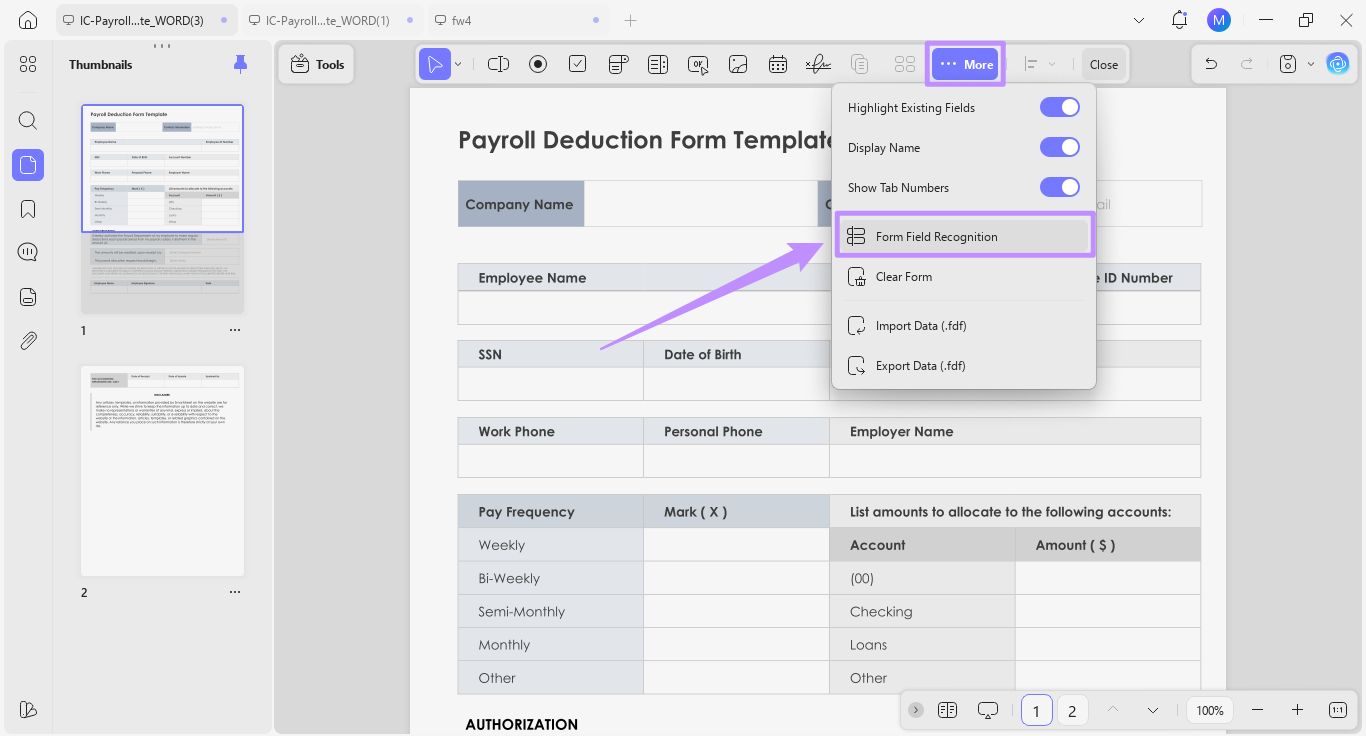
Step 3. Click "More" from the top toolbar and select "Form Field Recognition." Then, click "Continue" from the pop-up to confirm.
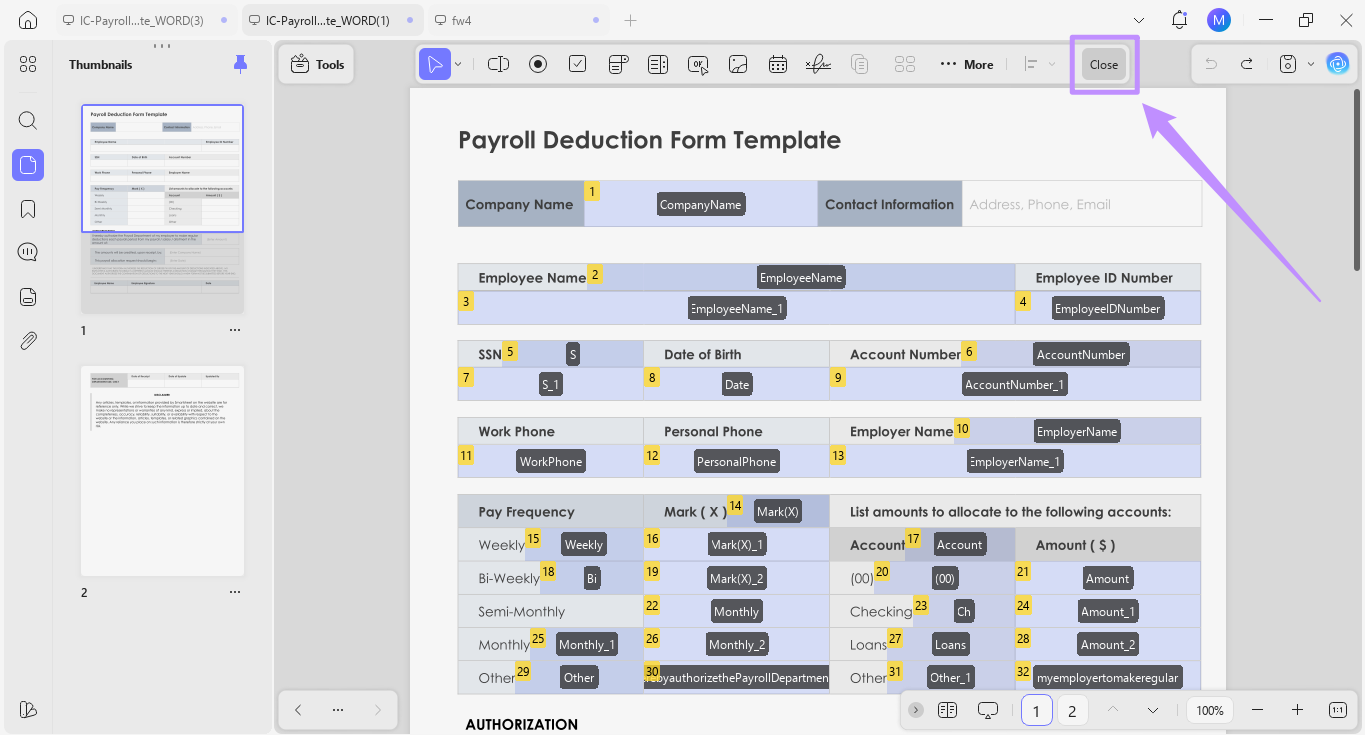
Step 4. UPDF will recognize all fields and make them interactive. Now, click "Close" from the top toolbar to go back to the reading mode. Click on each field to fill out your form as needed.
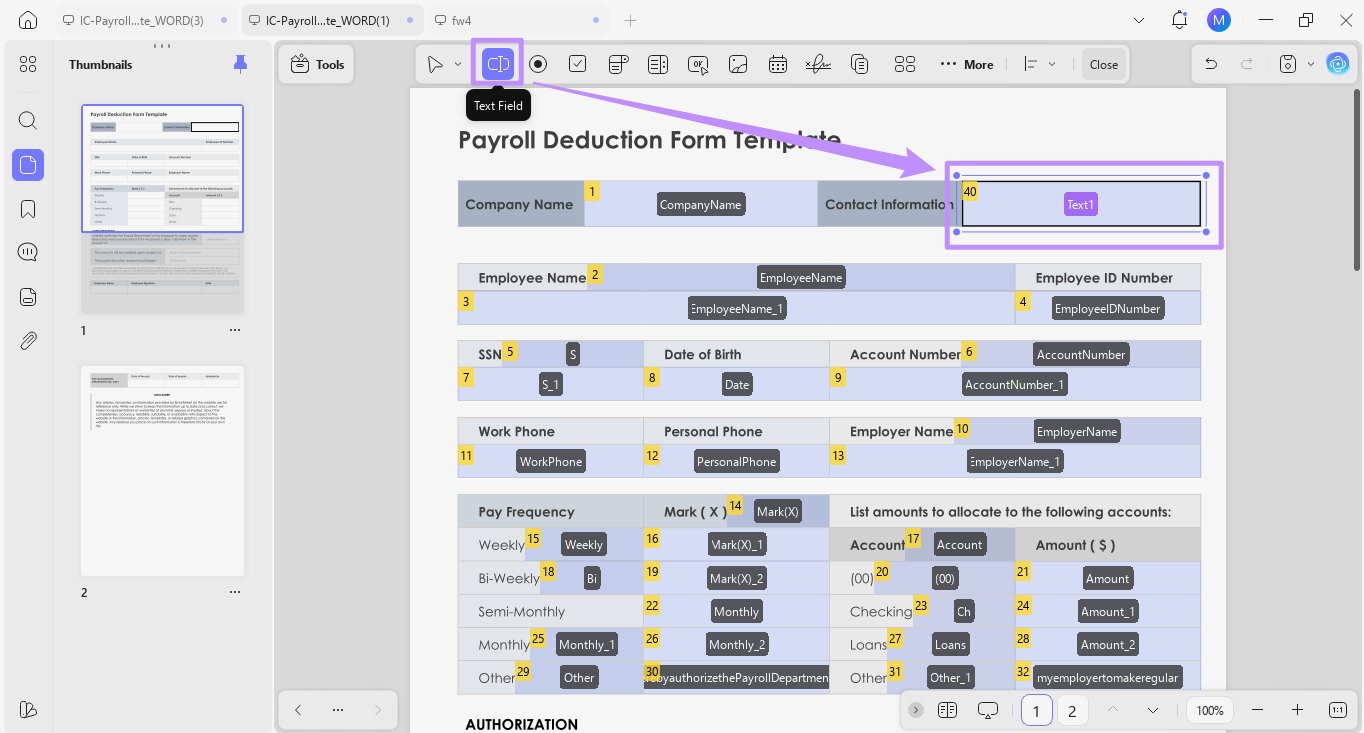
Step 5. If a field is not recognized, you can make it editable manually. To do this, go to "Tools" and choose "Form." Then, select the "Text field" tool from the top and click and drag the cursor over the desired area.
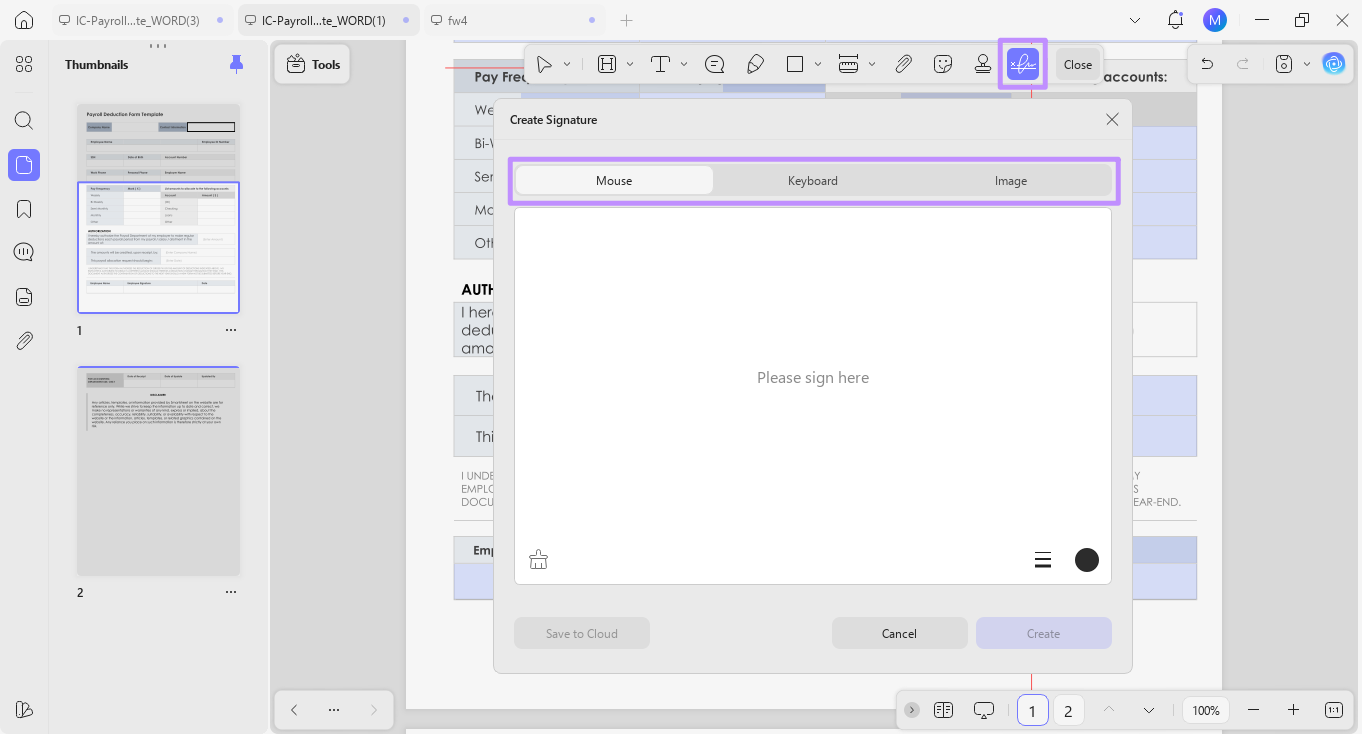
Step 6. To add a signature to the form, go to "Tools" and select "Comment." Then:
- Click "Signature" from the top toolbar.
- Click "Create" from the menu.
- Set a signature using your mouse, keyboard, or by uploading an image.
Tip:
Part 4. Best Practices and Common Mistakes
When filling out payroll deduction forms, you must include accurate information in all fields. Errors can cause unnecessary disputes between the employer and the employee. Here are some tips to avoid mistakes.
- Use Latest Forms: For federal deductions, make sure to download the latest version of the form directly from government websites such as the IRS and OPM. Outdated forms may not align with the new legal requirements.
- Complete All Required Fields: Missing information, such as employee ID numbers, deduction amounts, or effective dates, can delay the payroll process. So, verify that every section is filled in.
- Use Exact Deduction Amounts: Avoid adding unclear figures or estimates. Specify exact dollar amounts or percentages as required.
- Align Pay Frequency: Make sure the deduction amount matches the selected pay frequency. This will prevent less or more pay deduction.
- Review Authorization Language: As an employer, ensure the authorization statement is clear and legally valid. Meanwhile, employees should fully understand what they are authorizing.
Part 5. UPDF for Payroll Deduction Forms
Filling out payroll deduction forms requires careful calculations and a clear understanding of rules. Even small mistakes can cost you money and cause legal issues. To make sure everything is accurate, you need a tool that not only lets you complete forms but also helps you do it right.
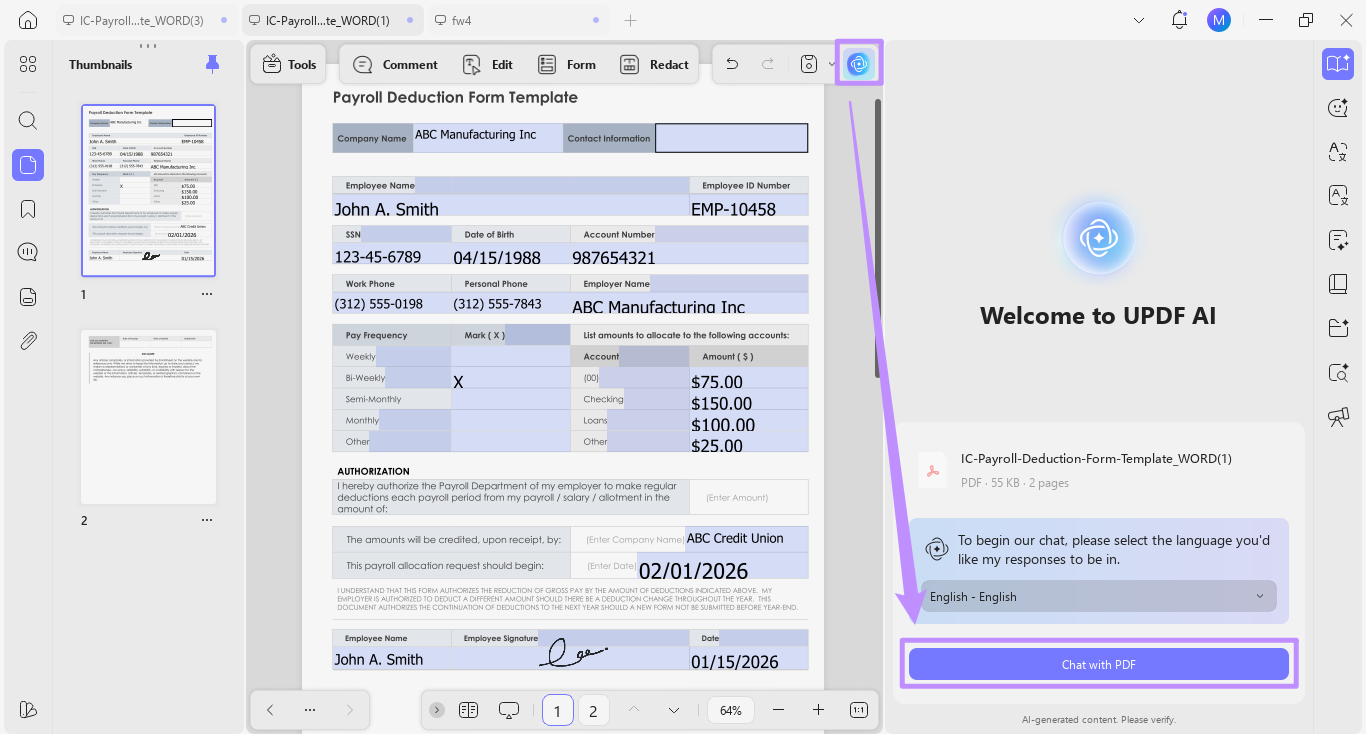
UPDF is an excellent tool for this purpose. It allows you to fill out both interactive and non-interactive forms. Its built-in AI assistant helps understand how to fill out each field, calculate amounts or percentages, and understand complex legal language. Once completed, you can easily share the payroll form via email or a direct link.
Key Features of UPDF:
- Fill and edit forms with automatic field recognition, checkboxes, radio buttons, dropdowns, and more.
- Mark required fields with highlights, squigly lines, shapes, etc.
- Add instructions using text comments, sticky notes, callouts, and more.
- Merge multiple forms and rearrange them by employee or department for better organization.
- Protect forms with open and permission passwords to restrict access and editing.
- Add digital signatures to speed up the approval process and make forms legally valid.
- Use UPDF AI to check forms, calculate deductions, and highlight incomplete entries to reduce errors
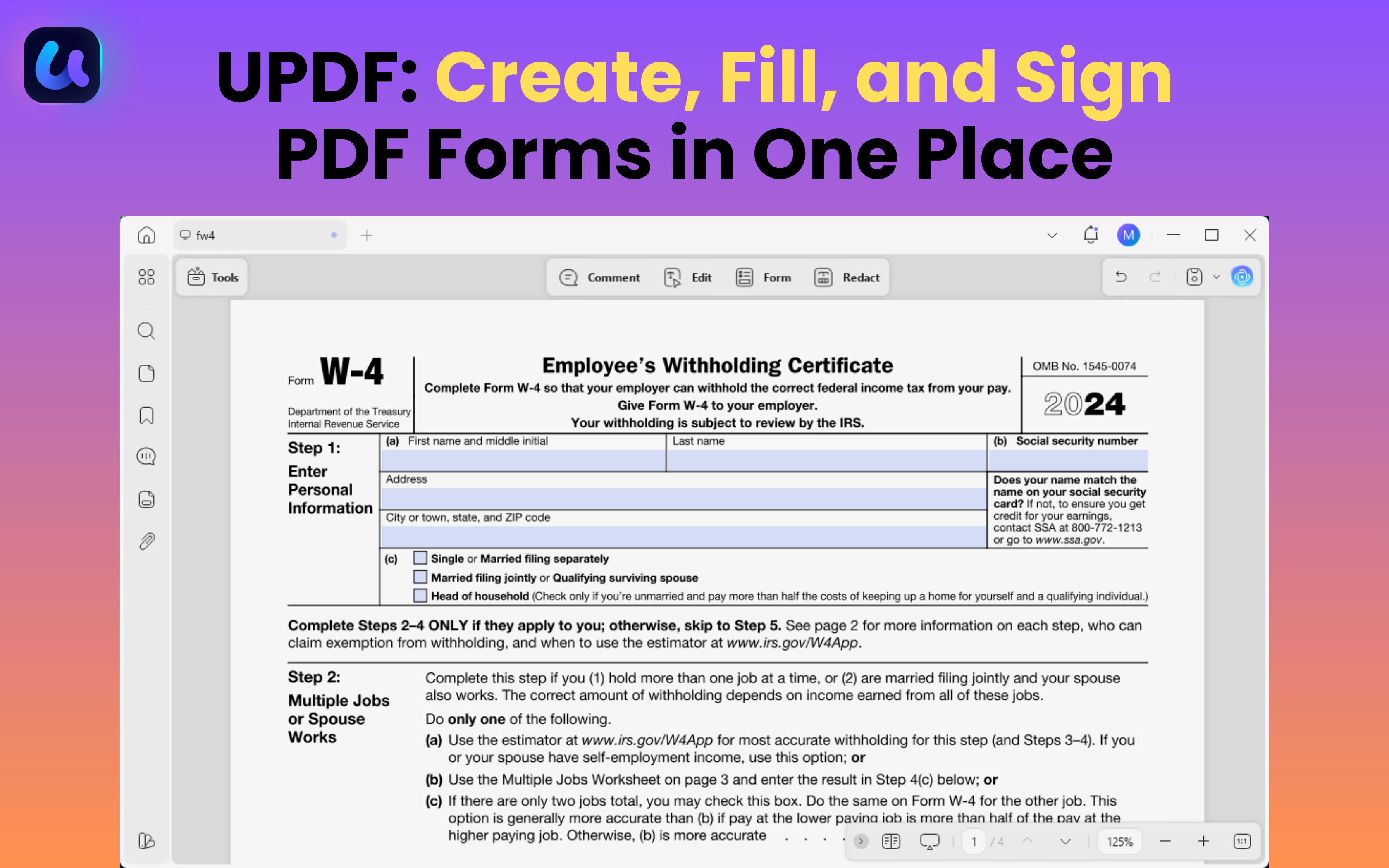
Fill, Sign, and Create Forms Using UPDF:
If you want to learn more about UPDF, you can try its features for free without time limits. Download and get started today. And if you want unlimited access to all its features, you can buy UPDF here with affordable price plans.
Windows • macOS • iOS • Android 100% secure
Conclusion
That's all about payroll deduction forms and how to fill them out accurately. You can start with a standard form template for tax or voluntary deductions. To speed up the process, UPDF can help you fill out these forms with automatic field recognition. Moreover, you can add notes, apply digital signatures, and share forms directly.
In addition, UPDF AI can help you ensure every entry is accurate and in line with the legal requirements. Overall, it's an all-in-one solution to handle payroll deduction forms more productively. So, don't wait. Download and try UPDF today!











 Enola Davis
 Bruna Almeida