UPDF
UPDF
 UPDF for Windows
 UPDF for Mac
 UPDF for iPhone/iPad
 UPDF for Android
 Nomostar
 UPDF AI Online
 UPDF Sign
 IvyCraft
 Edit PDF
 Annotate PDF
 Create PDF
 PDF Form
 Edit links
 Convert PDF
 OCR
OCR PDF to Word
 PDF to Image
 PDF to Excel
 Organize PDF
 Merge PDF
 Split PDF
 Crop PDF
 Rotate PDF
 Protect PDF
 Sign PDF
 Redact PDF
 Sanitize PDF
 Remove Security
 Read PDF
 UPDF Cloud
 Compress PDF
 Print PDF
 Batch Process
 About UPDF AI
 UPDF AI Solutions
 AI User Guide
 FAQ about UPDF AI
 Summarize PDF
 Translate PDF
 Chat with PDF
 Chat with AI
 Chat with image
 PDF to Mind Map
 Explain PDF
 PDF AI Tools
 Image AI Tools
 AI Chat Tools
 AI Writing Tools
 AI Study Tools
 AI Working Tools
 Other AI Tools
 AI Bookmark Generation
 AI Bookmark Summary
 AI Watermark Generation
 AI Background Generation
 AI Sticker Generation
 AI Stamp Generation
 AI Editing Suite
 UPDF Copilot
 AI Page Management
 AI Semantic Search
 PDF to Word
 PDF to Excel
 PDF to PowerPoint
 Enterprise Solution
 Enterprise Sign
 Enterprise AI
 Enterprise Plan
 Enterprise User Guide
 Enterprise Webinar
 IT
IT Education
 Construction
 Financial Service
 Healthcare
 Insurance
 Legal
Legal Manufacturing
 Government
 Researchers & PhDs
 Solopreneurs & Freelancers
 Lawyers & Legal Professionals
 Real Estate Agents & Brokers
 Education Solution
 Customer Stories
 User Guide
 UPDF Tricks
 FAQs
FAQs UPDF Reviews
 Download Center
 Blog
Blog Newsroom
 Tech Spec
 Updates
 UPDF vs. Adobe Acrobat
 UPDF vs. Foxit
 UPDF vs. PDF Expert

Form 1099 is one of the many forms that you will have to fill out when doing your federal income taxes. Like most forms that you will have to fill out during tax season, form 1099 is meant to provide the government with information about your income so they can determine how much taxes to withhold.
In this guide, we will look at the 1099 form in greater detail; what it is, whether or not you need to fill it out and how to fill out a 1099 form electronically using an easy tool - UPDF. You can click the button below to download first.
Windows • macOS • iOS • Android 100% secure
What is Form 1099
Form 1099 is the tax document that you will have to fill out to report non-salary income to the IRS for federal tax purposes. There are more than 20 different variations of form 1099, but the most common is the 1099-NEC. The IRS requires all persons who pay independent contractors earning more than US$600 in a financial year to fill out form 1099-NEC.
A different variation of 1099 tax document is used to report money made from prize winnings, tax dividends, interest from investments, state tax refunds, sale of property, and even credit card debt forgiveness.
Form 1099-MISC vs. 1099-NEC
Form 1099-MISC is used to report trade or business payments that are unrelated to nonemployee compensation. These can include payments like at least $10 in royalties, rent, prizes and awards, medical and health card payments, payments to an attorney, and crop insurance proceeds.
Form 1099-NEC on the other hand is the form that you will fill out whenever you pay an independent contractor $600 or more in compensation. The IRS will use the information provided on this form to verify your income and therefore determine your tax levels.
Note
How to Download Form 1099
You can download a copy of form 1099 from the official IRS website or state tax website. There are also some third-party software and services that will allow you to download form 1099 directly if you choose to use a third-party service to fill out the form. Form 1099 can be downloaded in PDF format and you can choose to print it out or use a PDF program to fill out the form.
When Do I Need to Fill Out Form 1099?
Report payments on 1099-MISC Form or 1099-NEC Form only if they’re made as part of a trade or business; personal payments don’t count. A trade or business generally means operating for profit, but nonprofits are also treated as engaged in a trade or business for these purposes. The reporting rules also apply to certain trusts, tax-exempt organizations, some farmers’ cooperatives, widely held fixed investment trusts, and payments made by federal, state, or local government agencies.
If you pay an independent contractor $600 or more in a calendar year for services performed in the course of your trade or business, you generally must file Form 1099-NEC with the IRS and provide a copy to the contractor. The threshold applies per payee, and the payment must be for nonemployee compensation in your business (not personal expenses).
If you are an independent contractor (the recipient of the payment), you are not responsible for filing Form 1099-NEC yourself; instead, the payer should issue it to you. However, even if you do not receive a 1099-NEC, you must still report all your business income on your tax return.
For more 1099 miscellaneous information, please check Specific Instructions for Form 1099-MISC.
How to Fill Out IRS Form 1099
The most convenient way to fill out a form 1099 is to use a PDF form-filling solution like UPDF. UPDF is an AI-powered, all-in-one PDF editor designed to handle every PDF task with ease. Its comprehensive toolset covers nearly all the essential functions you’d expect from Acrobat Pro, but at a more affordable and cost-effective price. This tool uses form field recognition to convert any non-fillable forms into fillable ones. It helps visualize all pre-existing fields for a convenient form-filling experience on your mobile and desktop. Under the UPDF free version, all features are available with trial watermarks added.
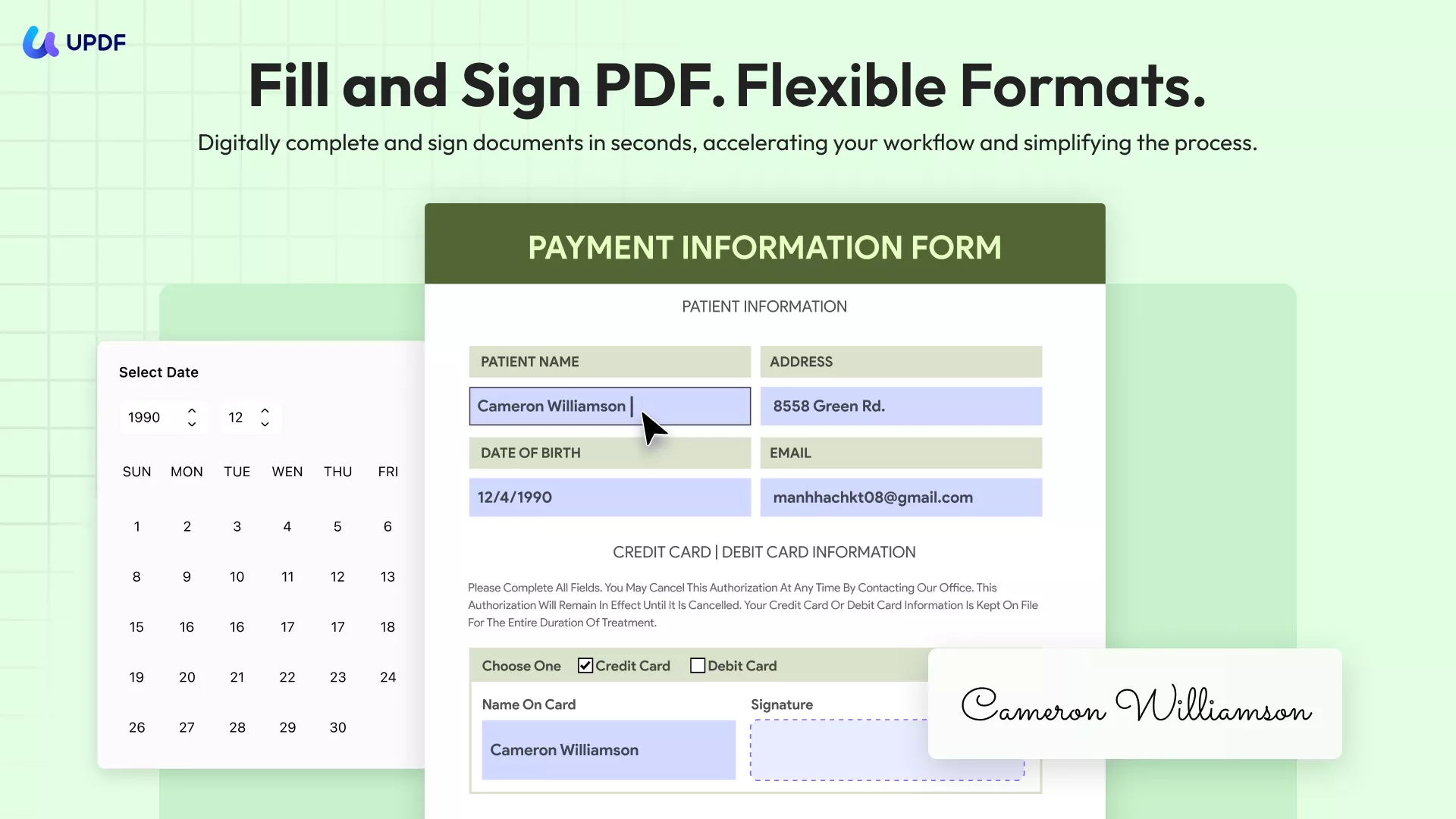
Here's how you can use it to fill out form 1099:
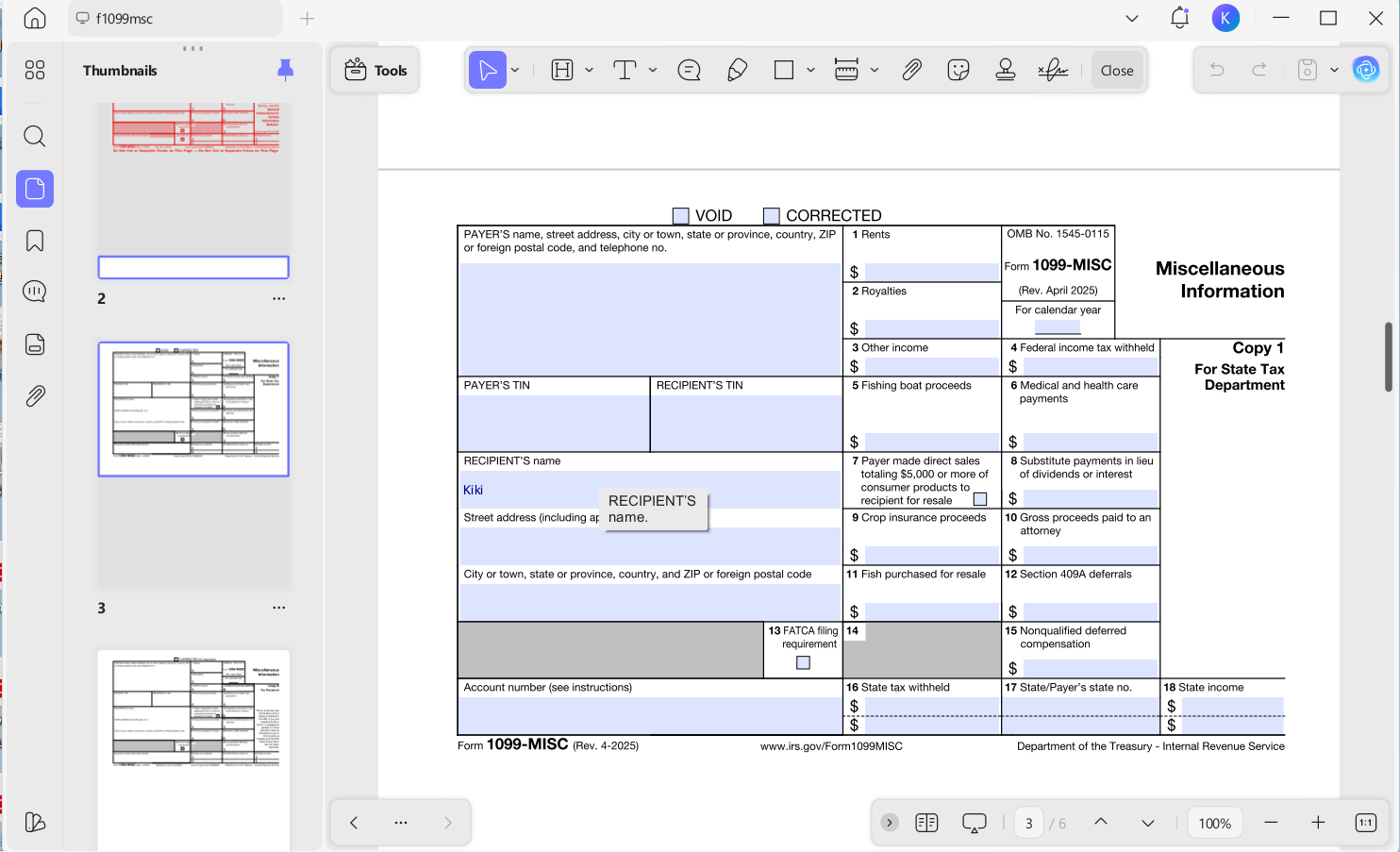
Step 1: Open the Form
Start by downloading the correct form 1099 that you want to fill out. Dwonload UPDF and open it in UPDF.
Windows • macOS • iOS • Android 100% secure
Step 2: Fill out the Form 1099
Click the required fields to enter the necessary information, and be sure to select the correct checkboxes. Before proceeding to the next step, double-check that all the details on the form are accurate.
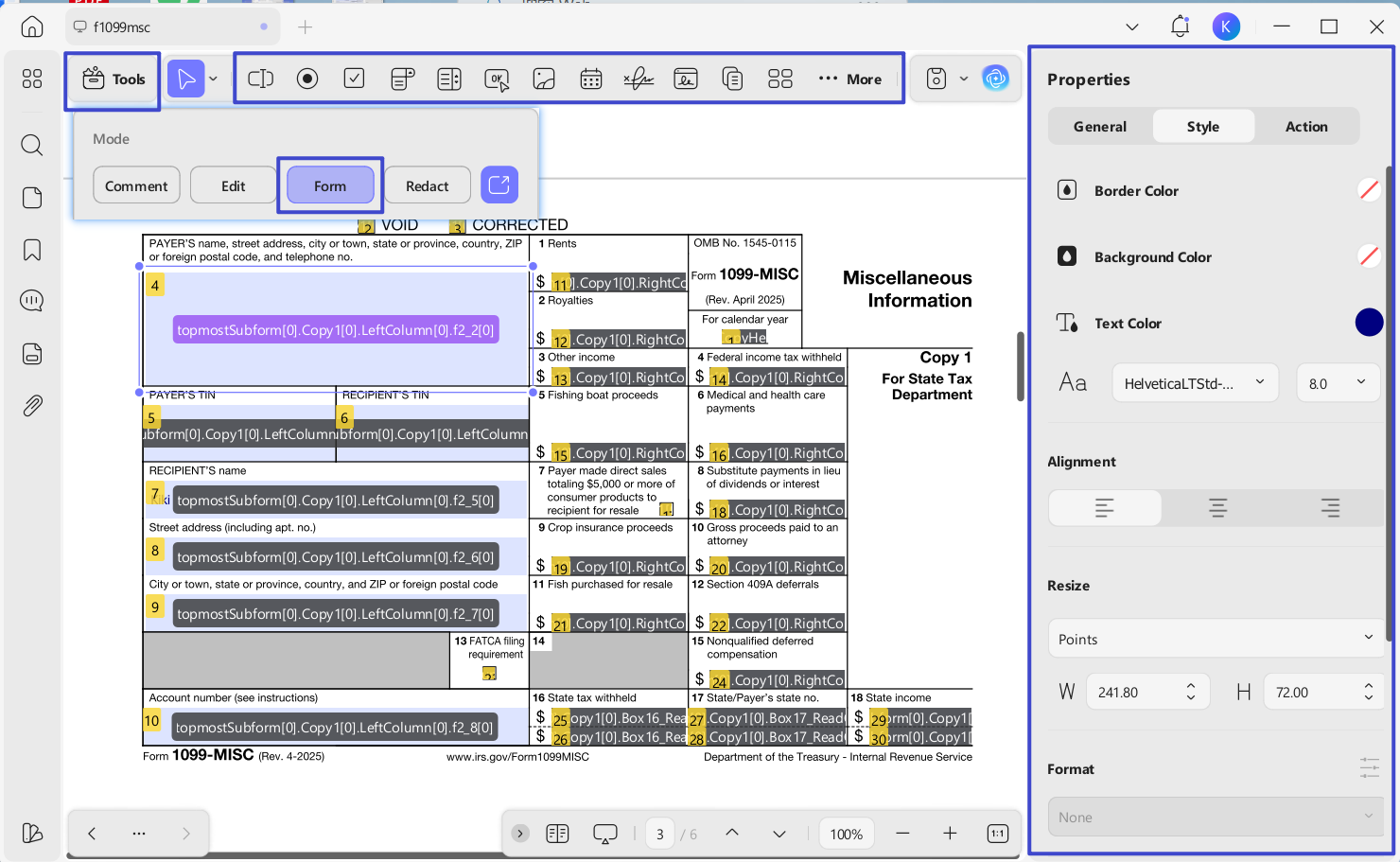
Step 3: Edit the Form 1099
If you want to supplement other content, please turn to Form mode under Tools section. Then, kindly check the top menu. It can add Text Fields, Check Boxes, Radio Buttons, Dropdowns, List Boxes, Buttons, etc. Double-click the existing form fields to change the properties.
Step 4: Sign the Form 1099
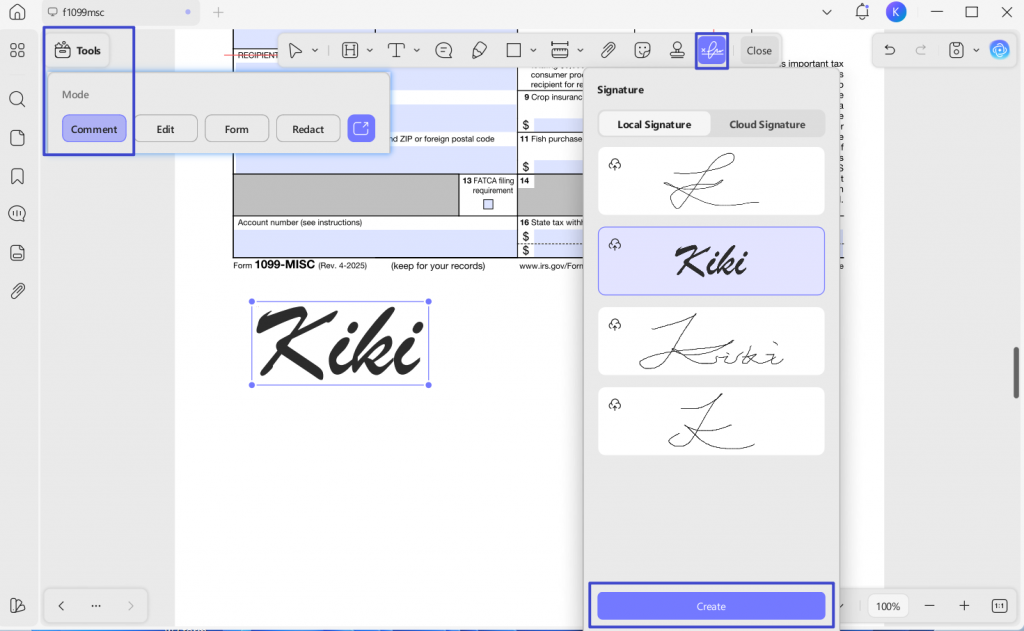
Click the “Comment” icon on the left toolbar. After completing the form, go to the “Signature” tool to add your signature. Select “Create” to generate your signature, then choose it and place it onto the form.
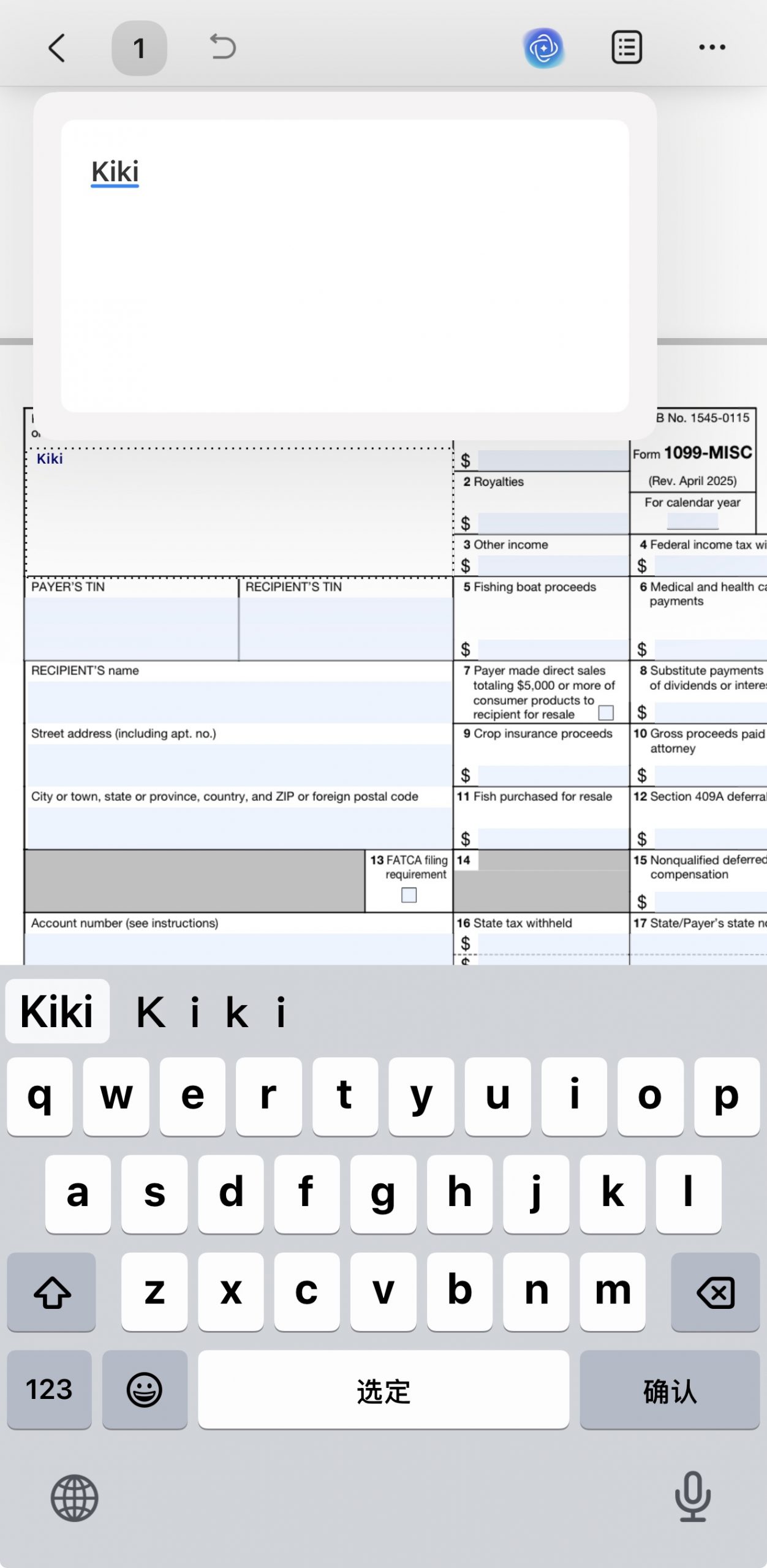
You can also import the form 1099 into UPDF mobile app and click to fill the form easily. Start from downloading UPDF from App Store or Google Play!
Windows • macOS • iOS • Android 100% secure
Video Tutorial on How to Fill Out a PDF Form
The Best All-in-one PDF Editor and Converter
UPDF is a revolutionary new and highly effective PDF editor and converter that is designed to make all PDF functions including filling out PDF forms that much easier. This is thanks to its very simple user interface that you can use in various ways even if you have never used a PDF program before. This will be the most cost-effective tool on the market. You can download it to try and check its price here.
Windows • macOS • iOS • Android 100% secure

It has very useful features that all work together to create, edit, annotate, and convert PDFs. These features and pros include the following:
- It is the most complete PDF form filler in the market, allowing you to add text and edit the text in the 1099 form or any other PDF file easily and quickly; just as you would when working with a Word processor.
- It also allows you to authenticate the form once it is completed by adding a valid and binding signature to the document.
- It also comes with a lot of cool annotation features that can make collaboration on a document easy, ideal when you're getting help filling out form 1099 and you'd like to share your thoughts.
- The OCR feature lets you convert scanned PDF documents into searchable and editable PDFs.
- It allows you to add passwords and permissions to your PDF documents for protection.
- Its easy document-sharing features mean that you can send the form to others very quickly and without having to exit UPDF.
Common Mistakes to Avoid when Filling Out Form 1099
The following are some of the most common mistakes that we see with users when filling out form 1099;
- Failing to fill out the correct form 1099. It is important to check the variation of form 1099 that you are required to fill out before starting the filing process.
- Failing to file by the due date. This is a common mistake that can be avoided by starting early.
- Reporting the wrong Taxpayer ID Number (TIN) or forgetting to report the TIN.
- Providing incorrect details on the form.
- Filing a paper return when electronic filing is required.
- The improper formatting of name, address, and other personal details. Checking and rechecking the details on the form before submitting it can help you avoid this all-too-common error.
- Failing to ensure that the form 1099 is machine readable. The best way to avoid this problem is to file electronically (unless paper filing is required). The IRS machine reading process will favor forms that are filled in with dark ink and in clearly legible letters.
Conclusion
Filing any kind of IRS form including form 1099 can be quite challenging, especially since you need to make sure that you are selecting the correct form 1099 to file. The key is to start by determining the variation of form 1099 you need to fill out, start the filing process early, and if filing electronically, choose UPDF to simplify the process further. Asking for help when you need it will also help you avoid some of the common pitfalls experienced by many during tax season. Download UPDF today to fill out form 1099.
Windows • macOS • iOS • Android 100% secure








 Enola Miller
 Enid Brown
 Lizzy Lozano