 UPDF
UPDF
 UPDF for Windows
 UPDF for Mac
 UPDF for iPhone/iPad
 UPDF for Android
 Nomostar
 UPDF AI Online
 UPDF Sign
 IvyCraft
 Edit PDF
 Annotate PDF
 Create PDF
 PDF Form
 Edit links
 Convert PDF
 OCR
OCR PDF to Word
 PDF to Image
 PDF to Excel
 Organize PDF
 Merge PDF
 Split PDF
 Crop PDF
 Rotate PDF
 Protect PDF
 Sign PDF
 Redact PDF
 Sanitize PDF
 Remove Security
 Read PDF
 UPDF Cloud
 Compress PDF
 Print PDF
 Batch Process
 About UPDF AI
 UPDF AI Solutions
 AI User Guide
 FAQ about UPDF AI
 Summarize PDF
 Translate PDF
 Chat with PDF
 Chat with AI
 Chat with image
 PDF to Mind Map
 Explain PDF
 PDF AI Tools
 Image AI Tools
 AI Chat Tools
 AI Writing Tools
 AI Study Tools
 AI Working Tools
 Other AI Tools
 AI Bookmark Generation
 AI Bookmark Summary
 AI Watermark Generation
 AI Background Generation
 AI Sticker Generation
 AI Stamp Generation
 AI Editing Suite
 UPDF Copilot
 AI Page Management
 AI Semantic Search
 PDF to Word
 PDF to Excel
 PDF to PowerPoint
 Enterprise Solution
 Enterprise Sign
 Enterprise AI
 Enterprise Plan
 Enterprise User Guide
 Enterprise Webinar
 IT
IT Education
 Construction
 Financial Service
 Healthcare
 Insurance
 Legal
Legal Manufacturing
 Government
 Researchers & PhDs
 Solopreneurs & Freelancers
 Lawyers & Legal Professionals
 Real Estate Agents & Brokers
 Education Solution
 Customer Stories
 User Guide
 UPDF Tricks
 FAQs
FAQs UPDF Reviews
 Download Center
 Blog
Blog Newsroom
 Tech Spec
 Updates
 UPDF vs. Adobe Acrobat
 UPDF vs. Foxit
 UPDF vs. PDF Expert

Bangla is a demanding script for optical character recognition. Conjunct characters (যুক্তাক্ষর) combine multiple consonants into one glyph, while vowel marks attach above, below, and around the letter they modify. Many engines also convert Bangla numerals (০১২৩) to Latin digits without warning. A tool that handles English cleanly can still fail badly here.
A page that looks like text may still be stored as an image. You can start with the video below for an introduction to recognizing text in PDFs with UPDF OCR.
We tested 4 tools for different Bangla OCR needs, with each serving a specific purpose. UPDF AI Online handles scanned Bangla PDFs and lets you translate or summarize extracted text easily. BanglaOCR.com handles quick recognition, while i2OCR extracts text from simple images without much effort required. FastOCR focuses on Bangla material, including government documents, land records, and old archival print files.
Recognition is only the first step for most people because the extracted text usually needs editing. Our guide on how to make a scanned PDF editable covers what happens once the characters are recognized.
How We Tested the Bangla OCR Tools
We tested each Bangla OCR tool with identical files to keep comparisons accurate and fair. Below are the 4 test files we used to check common recognition problems:
- A clear printed Bangla image established the baseline for each tool's recognition accuracy.
- Mixed Bangla and English text tested how well each tool handled both scripts.
- Bangla numerals, punctuation, and compound characters revealed common recognition errors across the tools.
- A 3-5 page scanned PDF tested both printed and handwritten Bangla text.
Our testing covered recognition accuracy, script handling, document support, usability, output options, and current product limits. Compound characters, vowel marks, Bangla numerals, mixed language text, and handwriting recognition were also checked.
Next, we evaluated reading order, layout retention, scanned PDF support, processing time, and export options. Finally, free allowances, pricing, upload limits, privacy terms, and login requirements were verified that day.
Testing Information: We tested all four tools on browser.
The test set included printed Bangla, mixed Bangla English, handwriting, and a multi-page scanned PDF.
Quick Comparison of the Best Bangla OCR Tools
Choosing the right Bangla OCR tool depends on accuracy, features, limits, and cost. The table below compares 4 tools using results recorded from our shared test files:
| Criterion | UPDF AI Online | BanglaOCR.com | i2OCR Bengali | FastOCR Bengali |
| Supported Inputs | Images, PDFs, and pasted screenshots | Images, PDFs, and phone photos | JPG, PNG, TIFF, BMP, GIF, WEBP, and PDF | JPG, PNG, GIF, WebP, BMP, and PDF |
| Direct Scanned-PDF Support | Yes, current UPDF AI pages support direct scanned PDF uploads | Yes, page by page | Yes, one page free per run | Yes, though PDFs need a free account |
| Handwriting Support | Yes through AI image recognition | Printed and handwritten Bangla | Not claimed for handwriting | Partial; vendor claims 60-75% on clean handwriting |
| Bangla-English Mixed Text | Multilingual extraction supported | Mixed Bangla and English recognition | Language set manually per run | Bilingual pages explicitly supported |
| Export Formats | Chat text, copyable and re-promptable | Text, structured JSON or Excel for forms | Text, Word, HTML, searchable PDF | Searchable PDF, raw text, or direct copy |
| Tested Accuracy | 94% | 91% | 87% | 89% |
| Free Plan | 5 documents, 100 AI responses, up to 100 pages per PDF | Free with a daily page limit, no signup | One image or one PDF page per run | Unlimited free image OCR, no signup |
| Paid Plan | AI Assistant: $29/quarter or $79/year | Professional: about $12/month; Business: about $49/month | Premium bulk OCR available | Pro: $9.99/month for 1,500 document pages; MAX: $29.99/month for 8,000 pages |
| Login Required | Account needed | No signup required | No signup required | Not for images; free account for PDFs |
| File Size Limits | Free online: 10MB per file; paid online: up to 100MB per PDF | Maximum 15MB | Images: 20MB; PDFs: 200MB | 20 MB images, 1 GB PDFs |
| Best Use Case | Scanned PDFs needing follow-up AI work | Quick free extraction and Bangla forms | A single clean image or page | Government, legal, and archival Bangla documents |
Note: Pricing and limits checked on September 2, 2026.
#1 UPDF AI Online — Best Overall for Scanned Bangla PDFs
UPDF AI Online accepts scanned Bangla PDFs or images directly, without splitting PDFs into images first. This direct upload option saves considerable time when working with scanned documents containing multiple pages.
Extracted text stays inside the AI workspace, where you can correct errors, translate, or summarize content. You can also restructure extracted information into tables, while other tools simply provide raw text.
Best For:
- Multi-page Bangla PDFs needing translation, summaries, restructuring, or conversational recognition error correction afterward.
Not For:
- People wanting quick extraction without accounts or offline processing for confidential documents instead.
1. What We Tested
Let's look at how UPDF AI Online performed across the different Bangla files we tested:
- Printed Text: Recognized clear Bangla text accurately while keeping most compound characters and vowel marks correct.
- Bangla Numerals: Preserved Bangla numerals correctly without unexpectedly changing them into Latin digits during extraction.
- Handwriting Recognition: Read clear handwritten Bangla reasonably well, although some difficult characters required manual correction afterward.
- Multi-Page PDF: Processed the scanned PDF while maintaining readable text order across all tested pages.
- Direct PDF Upload: Accepted the scanned Bangla PDF directly without requiring pages to be converted into images.
- Correction and Translation: Follow-up prompts corrected recognition mistakes and translated extracted Bangla text clearly.
Recognition is one part of a wider workflow. The browser route is compared against desktop processing in our guide on how to OCR a PDF online.
2. Free Plan, Pricing, and Limits
UPDF offers 100 free AI prompts, giving users room to try Bangla OCR before upgrading. The following breakdown covers the current free plan, pricing, file limits, and storage:
- Free Documents: Upload up to 5 PDFs, with a limit of 100 pages per PDF.
- File Size: Free files support 10 MB per PDF, while paid online files reach 100 MB.
- Current Price: UPDF AI costs $29 quarterly or $79 annually, with no monthly plan listed.
- Paid Limits: Get unlimited PDFs, questions, and pages, plus 100 PDFs per online collection.
- Cloud Storage: The paid AI plan includes 102 GB storage, compared with 1 GB free.
3. Simplified Steps
Now, follow the steps below to extract Bangla text from your scanned PDF:
Step 1. Once you open UPDF AI Online, press "Upload File" to upload your Bangla scanned PDF. After that, click "Start Chat with PDF" to enter the chat interface.
Step 2. Next, enter the prompt in the chat box: "Extract all Bangla text from this scanned PDF. Preserve the paragraphs and do not translate it." and press "Send."
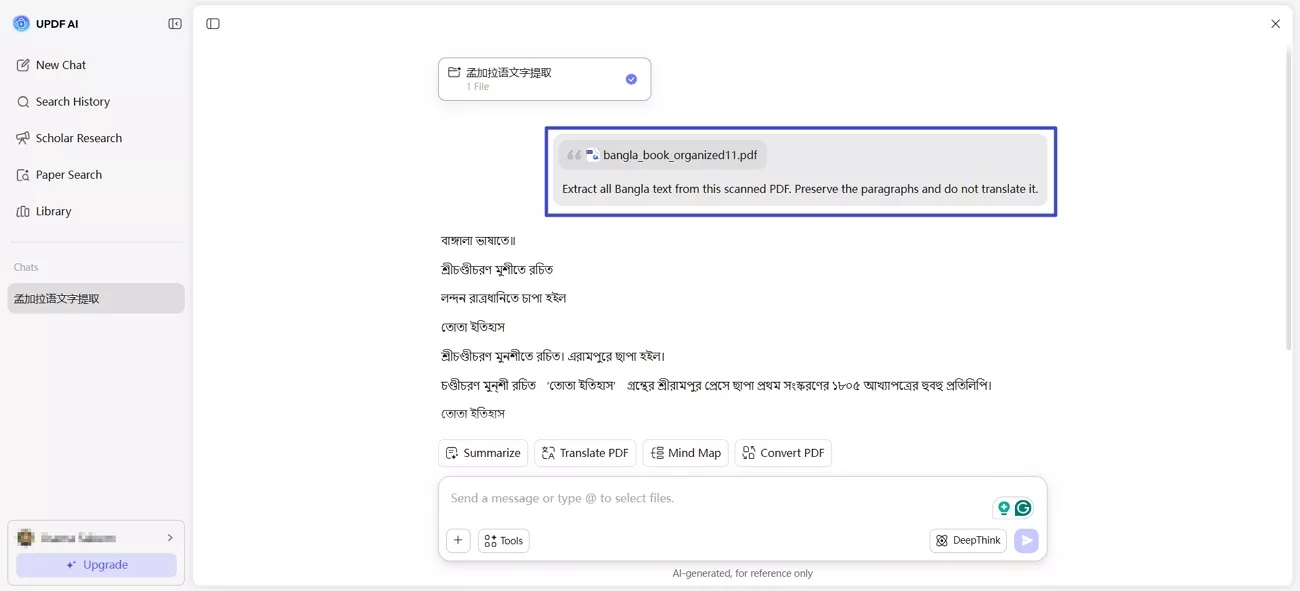
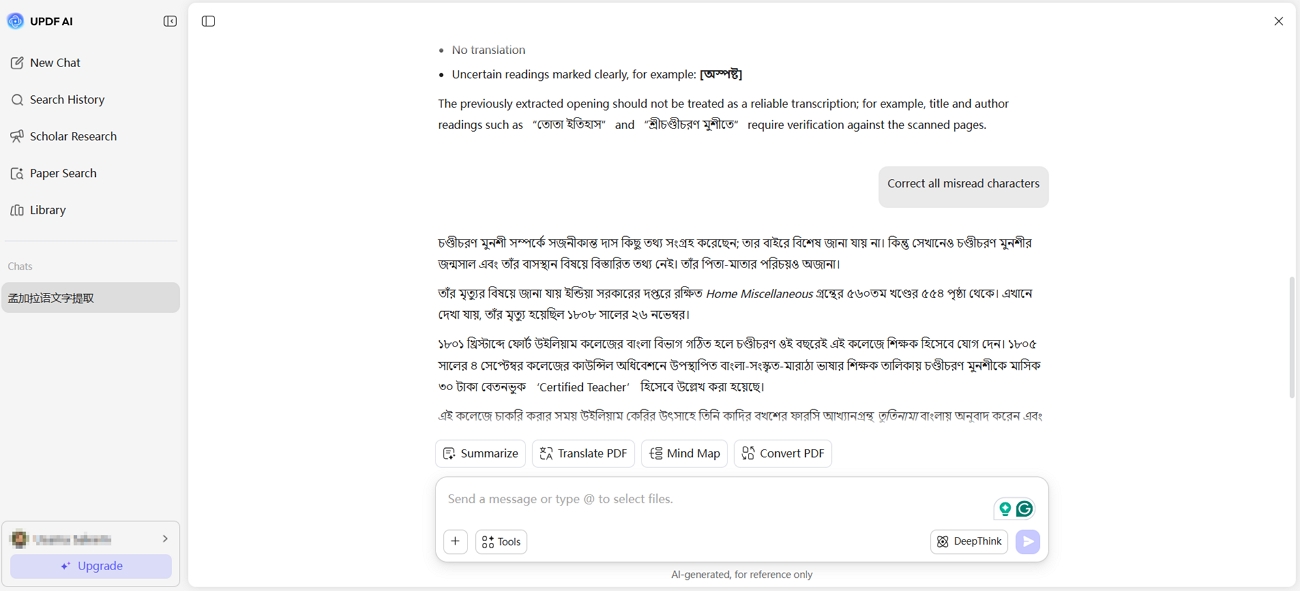
Step 3. After that, review the output and ask UPDF AI to correct any misread characters or translate any passage if needed.
Working with scanned Bangla PDFs that need translation or summarizing afterward? Try UPDF AI Online free and extract, correct, and refine your text in one place.
Tip
#2 BanglaOCR.com — Best for Quick Free Bangla OCR
This tool focuses specifically on Bangla OCR instead of supporting hundreds of languages through one general system. Its handwriting model is designed for Bangla samples and handles both printed and handwritten content.
BanglaOCR.com also supports structured extraction from bank, KYC, insurance, and government forms with mixed content. Bangla numerals and ৳ amounts remain unchanged instead of being automatically converted into other formats.
Best For:
- Quick free extraction, Bangla numerals, conjuncts, handwriting, and forms containing mixed content together.
Not For:
- Longer documents with usage limits or tasks needing translation and editing within one workspace.
What We Tested and Verified
Here is what we found when checking BanglaOCR's recognition, PDF handling, output, and limits:
- Recognition Results: Our samples returned 91% accuracy, though handwriting and difficult Bangla characters produced a few mistakes.
- PDF Handling: Multi-page PDFs are supported, with uploaded files limited to 15 MB.
- Output Options: Extracted text can be copied or exported, with additional formats available on paid plans.
- Plans and Limits: Free users receive 30 pages monthly, while paid plans increase usage and features.
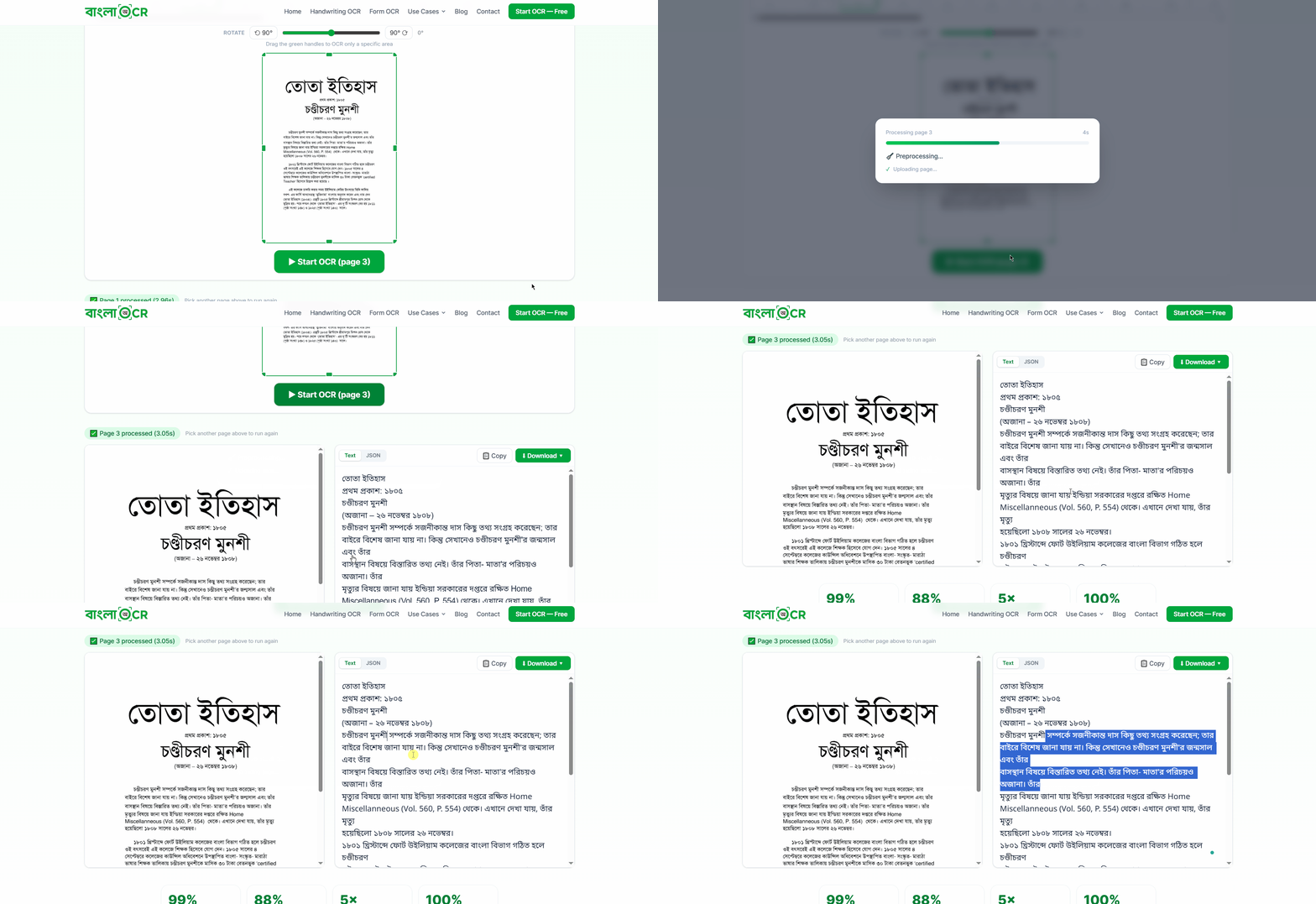
BanglaOCR lists 99% printed text accuracy and 88% handwriting accuracy on its website. These published figures should not be treated as results from our own test files.
Extracting characters is separate from making a document usable afterward, a distinction covered in our guide on how to recognize text in a scanned PDF.
#3 i2OCR Bengali OCR — Best for Simple Image-to-Text Tasks
i2OCR provides separate Bangla OCR tools for images and PDFs, both working directly online. Users can export recognized content as plain text, Word, HTML, or searchable PDF files.
Free image recognition handles one image per conversion, while bulk processing requires premium access. The PDF tool processes one page per free run, making 5-page scans repetitive.
Best For:
- A single clean image or one printed page when the output must land in Word or as a searchable PDF.
Not For:
- Multi-page documents on the free tier, handwriting, or anyone sensitive to on-page advertising.
What We Tested and Verified
Look what we found when checking i2OCR's recognition, free usage, output options, and privacy:
- Recognition Results: Clear printed Bangla works best, while handwriting, poor images, vowel marks, and conjuncts can reduce accuracy.
- Free Usage: One image or PDF page runs free each time, while multiple pages require premium processing.
- Output and Usability: Results export to text, Word, HTML, or searchable PDF, with most pages finishing within seconds.
- Privacy: Images support up to 20 MB and PDFs 200 MB, with files deleted within 30 minutes.
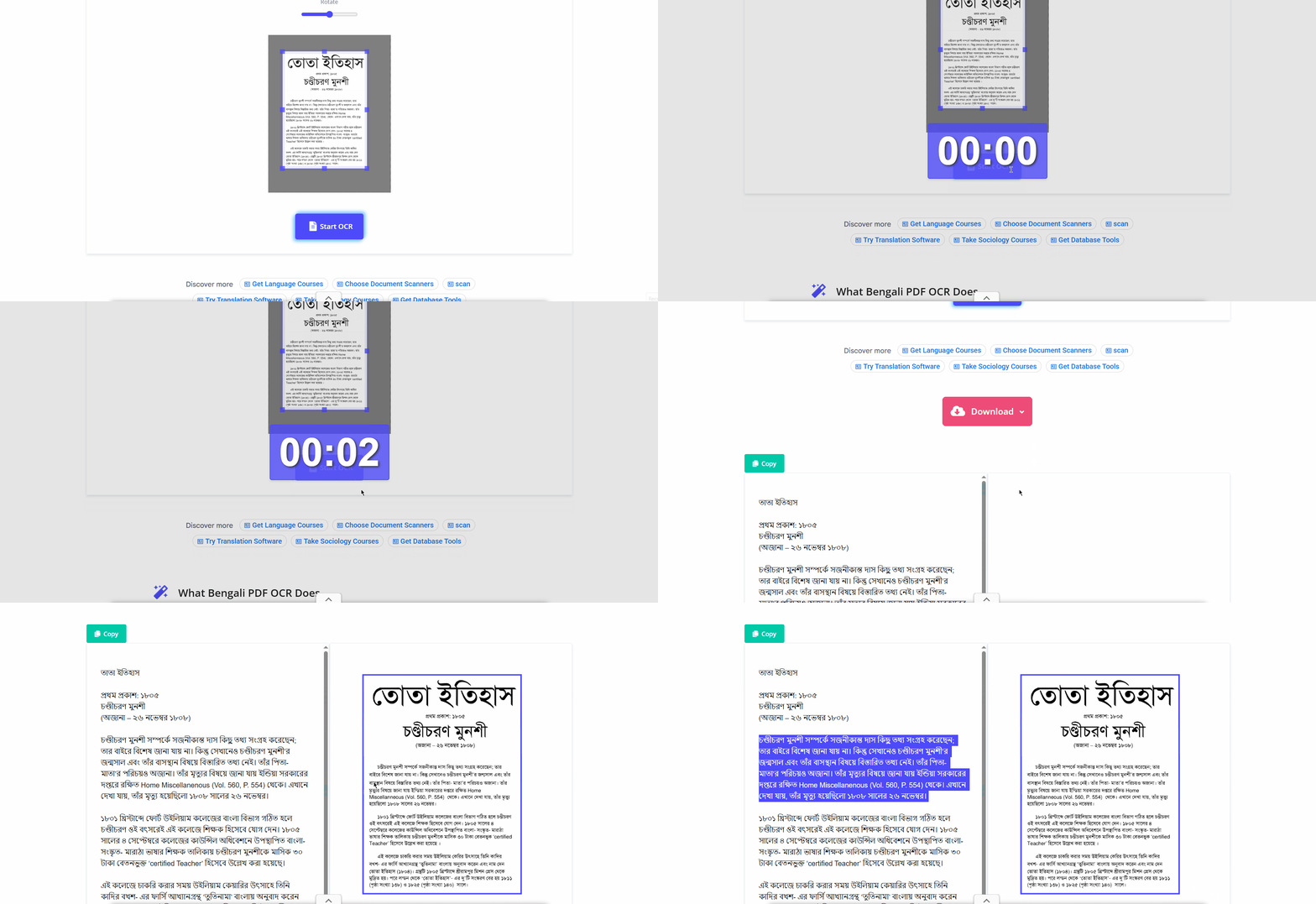
Its searchable PDF export is the useful output here, since a searchable file can be indexed and quoted from later. The mechanics are explained in our guide on how to copy text from a scanned PDF.
#4 FastOCR Bengali — Best for Bangla Government and Archival Documents
Designed around Bangla OCR, FastOCR addresses script challenges that often cause recognition problems elsewhere. Its system handles conjunct consonants that combine and change their shapes within Bangla words frequently. Vowel signs appearing before, after, above, or below consonants receive specific recognition attention here.
FastOCR targets legal papers, deeds, land records, government IDs, certificates, and academic publications. It also handles scanned books and historical newspaper archives, making official document processing practical.
Best for:
- Bangladeshi and Indian government documents, land records, legal deeds, and archival print. Anyone needing unlimited free image OCR without an account.
Not for:
- Heavy PDF work without registering, or documents where handwriting accuracy is critical.
What We Tested and Verified
Our tests focused on FastOCR's accuracy and performance across the most challenging Bangla documents.
- Recognition Results: Accuracy reached 89%, with complex conjuncts causing more errors than clear printed characters.
- Handwriting: Recognition was less accurate than printed text, especially with unclear or closely connected Bangla characters.
- Mixed Language Pages: Bangla and English remained readable together, with only minor recognition errors in mixed content.
- Processing and Output: Large scanned PDFs processed smoothly, with searchable PDF and text output available afterward.
- Access and Terms: Guest image OCR is available, while PDF processing requires an account and paid limits vary.
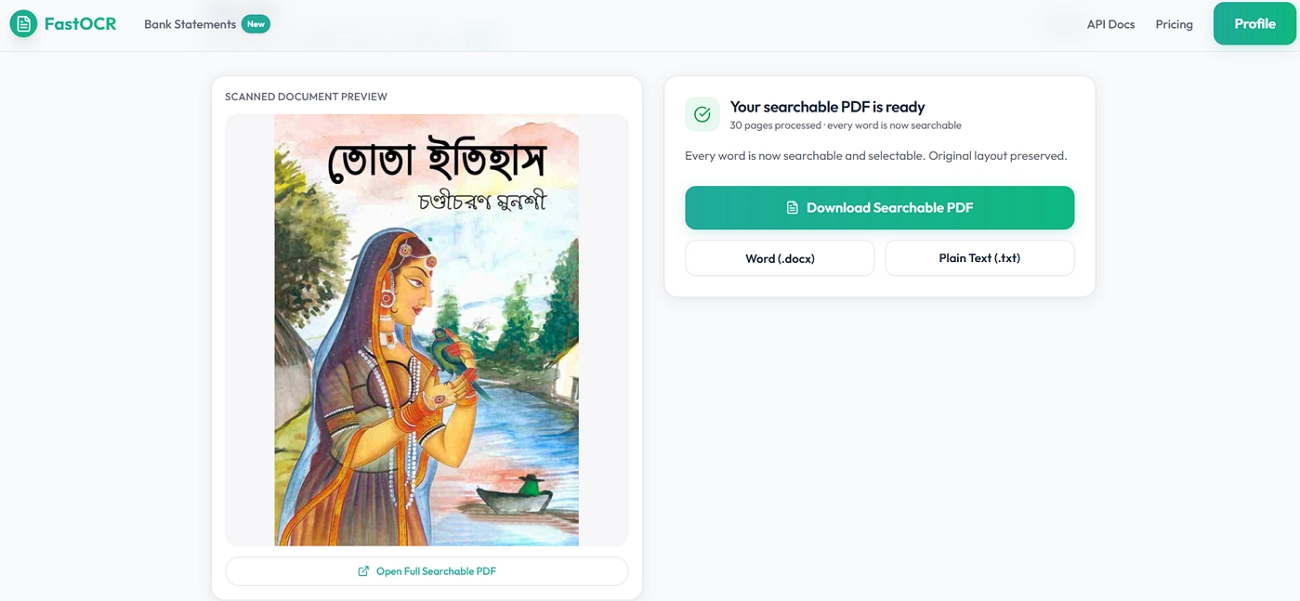
FastOCR reports 95% printed Bengali accuracy and 60% to 75% for clean handwriting. Complex conjuncts and faded print can lower these figures, which remain published accuracy claims.
Image OCR works freely without signup, while PDF processing requires creating a free account. Limits reach 20 MB for images and 1 GB for PDFs, with multiple output options.
Which Bangla OCR Tool Should You Choose?
Picking the right Bangla OCR tool depends more on your task than overall rankings. Let's compare which option works best for each common task before moving forward:
- Scanned Bangla PDFs + Translation or Analysis: UPDF keeps extraction and follow-up work together.
- A Quick Free OCR Task: BanglaOCR needs no account and handles Bangla script.
- One Simple Image: i2OCR works well when Word or searchable PDF output matters.
- Bangla Localized or Government Documents: FastOCR targets land records, IDs, certificates, and archival print.
- Offline OCR, Editable PDFs, or Supported Languages: UPDF Desktop supports offline processing, including Thai.
Need More Than Bangla Text Extraction? Try UPDF Desktop
UPDF Desktop offers 2 distinct capabilities when your needs extend beyond Bangla text extraction. For Bangla specifically, integrated UPDF AI extracts text from documents using direct prompts worldwide.
UPDF Desktop uses professional OCR supporting 38 languages, including Thai, but excluding Bangla OCR. Within supported languages, it converts scanned files into genuinely searchable or editable PDF documents. Our guide explains how to make a PDF searchable using available desktop recognition settings.
Desktop OCR provides greater control, letting users select specific page ranges before starting recognition. Output modes include Editable PDF, Text and Pictures Only, or Searchable PDF Only options. Choose the appropriate mode depending on whether your document requires editing or only indexing.
After recognition, files remain available for editing, annotating, converting, organizing, and protecting within UPDF. Long documents, confidential materials, and offline environments generally favor desktop processing over browser uploads.
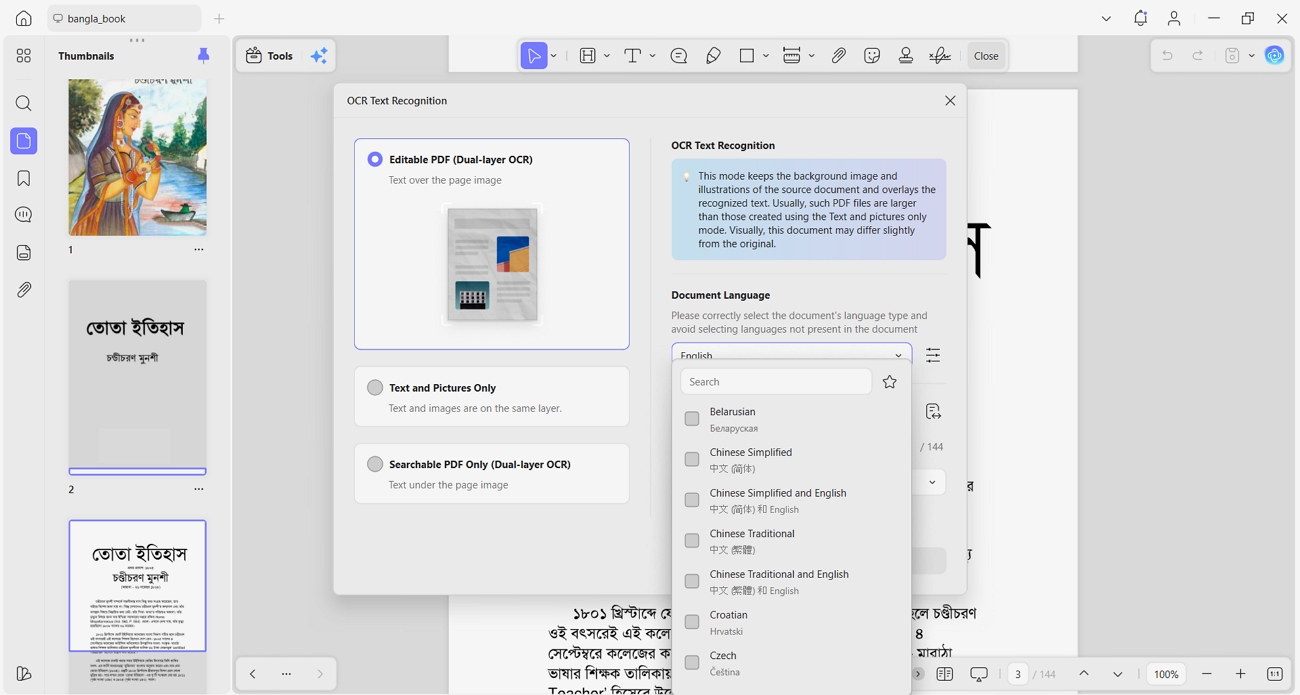
For longer scanned documents, offline processing, or OCR in supported languages such as Thai, download UPDF for free. It recognizes the text and edits the resulting PDF in one workspace.
Windows • macOS • iOS • Android 100% secure
FAQs About Bangla OCR
What is the best Bangla OCR for scanned PDFs?
UPDF AI Online performed best on scanned PDFs, reaching 94% accuracy during testing. It handled multi-page files while keeping extracted text readable and properly ordered. Follow-up prompts also allowed recognition errors, translations, and summaries within one workspace.
Can Bangla OCR recognize handwriting?
Yes, several tested tools can recognize handwriting, although results varied considerably between them. UPDF handled clear handwriting reasonably well, while difficult characters sometimes required manual corrections. BanglaOCR reached 91% overall accuracy, with handwriting contributing to some recognition mistakes observed.
Can I extract Bangla and English from the same PDF?
Yes, UPDF, BanglaOCR, and FastOCR handled mixed Bangla and English content during testing. FastOCR kept both scripts readable together, with only minor recognition errors appearing. i2OCR requires selecting recognition languages manually, making mixed script processing less convenient.
Is there a free Bangla OCR without registration?
Yes, BanglaOCR and i2OCR both provide free recognition without requiring account registration first. BanglaOCR provides 30 free pages monthly, while i2OCR processes one page per conversion. UPDF requires an account but includes 5 documents and 100 free AI responses.
Final Verdict
To summarize, the best Bangla OCR tool depends on your documents and required workflow. Look at your main task first, then choose the tool that matches it best.
- UPDF AI Online: Scanned PDFs needing correction, translation, summarizing, or further AI analysis.
- BanglaOCR: Quick free extraction, Bangla-focused recognition, handwriting, and filled form processing.
- i2OCR: Single images or pages needing Word, text, or searchable PDF export.
- FastOCR: Government, legal, land record, certificate, and archival Bangla document recognition.
- UPDF Desktop: Offline workflows, 38 supported OCR languages, searchable PDFs, and further editing.
Ready to pull Bangla text out of a scanned document and actually work with it? Try UPDF AI Online free and extract, translate, and refine in a single workspace.



 Delia Meyer

 Enola Miller
 Enola Davis