UPDF
UPDF
 UPDF for Windows
 UPDF for Mac
 UPDF for iPhone/iPad
 UPDF for Android
 UPDF AI Online
 UPDF Sign
 Edit PDF
 Annotate PDF
 Create PDF
 PDF Form
 Edit links
 Convert PDF
 OCR
OCR PDF to Word
 PDF to Image
 PDF to Excel
 Organize PDF
 Merge PDF
 Split PDF
 Crop PDF
 Rotate PDF
 Protect PDF
 Sign PDF
 Redact PDF
 Sanitize PDF
 Remove Security
 Read PDF
 UPDF Cloud
 Compress PDF
 Print PDF
 Batch Process
 About UPDF AI
 UPDF AI Solutions
 AI User Guide
 FAQ about UPDF AI
 Summarize PDF
 Translate PDF
 Chat with PDF
 Chat with AI
 Chat with image
 PDF to Mind Map
 Explain PDF
 PDF AI Tools
 Image AI Tools
 AI Chat Tools
 AI Writing Tools
 AI Study Tools
 AI Working Tools
 Other AI Tools
 AI Bookmark Generation
 AI Bookmark Summary
 AI Watermark Generation
 AI Background Generation
 AI Sticker Generation
 AI Stamp Generation
 AI Editing Suite
 UPDF Copilot
 AI Page Management
 AI Semantic Search
 PDF to Word
 PDF to Excel
 PDF to PowerPoint
 Enterprise Solution
 Enterprise Sign
 Enterprise AI
 Enterprise Plan
 Enterprise User Guide
 Enterprise Webinar
 Banking
 Healthcare
 Insurance
 Legal
Legal Manufacturing
 Government
 Education Solution
 Customer Stories
 User Guide
 UPDF Tricks
 FAQs
FAQs UPDF Reviews
 Download Center
 Blog
Blog Newsroom
 Tech Spec
 Updates
 UPDF vs. Adobe Acrobat
 UPDF vs. Foxit
 UPDF vs. PDF Expert

In the fast-paced world of technology and global information, your tools either propel you forward or hold you back. For years, the PDF editor market has been dominated by legacy software that is often bloated, overpriced, and slow to innovate.
Today, forward-thinking tech professionals and policy analysts are making a strategic shift. From independent consultants to growing enterprise teams, users are moving away from the 'Enterprise Tax' of legacy software and adopting UPDF.
Here is why UPDF is becoming the new standard for professional document management in 2026.
🚀 2026 Q2 Early Access: UPDF 2.5
- 10 AI Agents: Auto-Bookmarking, Summarizing & Page Audits.
- AI-Powered Semantic Search: Find meaning, not just keywords, across your PDF.
- Exclusive Offer: Includes 7 Days of free Unlimited AI (cancel anytime).
1. Beyond the Interface: A High-Performance Engine
For the Technophile, software beauty is more than skin deep. While competitors still rely on legacy codebases that drain system resources, UPDF is built on a modern, lightweight architecture.
- Lightning-Fast Rendering: Open 2GB+ technical manuals or high-resolution political archives without the "Application Not Responding" cursor.
- Minimalist Footprint: UPDF consumes up to 90% less RAM than Adobe Acrobat, allowing you to keep 20+ tabs open while running heavy development tools or research databases in the background.
- Multi-Platform Sync: One license grants you full access across Windows, macOS, iOS, and Android. Start an annotation on your workstation, and finish it on your tablet during your commute.
Windows • macOS • iOS • Android 100% secure
Evolution Beyond Editing
See UPDF 2.0 in action: Watch how our neural engine processes 500+ pages in under 3 minutes.
The Horizon: UPDF 2.5 is Arriving Early Q2
2. Precision Tools for Deep Information Work
For News Readers, Researchers, and Legal Professionals, a PDF editor is a critical tool for extracting truth from data. UPDF provides a specialized toolkit designed for high-stakes information processing.
- AI-Powered Insight: Summarize a 100-page policy brief in seconds. Translate complex technical whitepapers with industry-leading accuracy.
- Advanced Redaction: Permanently remove sensitive PII (Personally Identifiable Information) or classified data at the byte level. It’s not just "covered"—it’s gone.
- Smart OCR: Convert historical scans or low-quality news clippings into pixel-perfect, searchable text with support for 38 languages.
3. The Enterprise Advantage: Centralized Control
IT Managers and Business Owners need more than just "features"—they need control. UPDF Enterprise is designed to simplify the life of an IT Administrator.
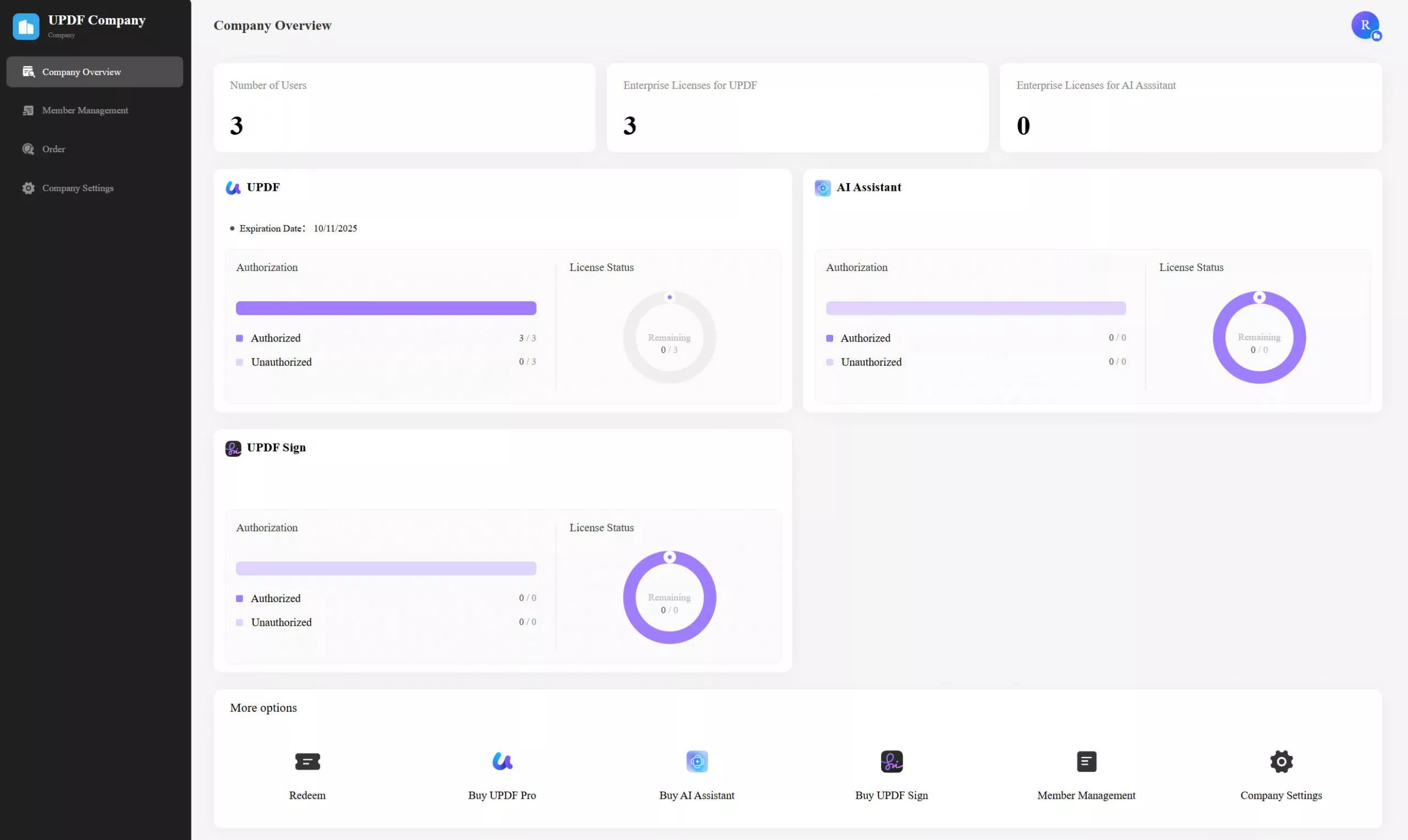
The UPDF Admin Console
Manage your organization’s document security from a single, intuitive dashboard:
- Instant Seat Management: Assign, revoke, and reassign licenses as your team scales.
- Asset Protection: Ensure company documents stay within the company. When an employee leaves, their license and access are easily managed.
- Seamless Team Onboarding: Get your entire organization up and running in minutes. With one account for all platforms, your team can access professional PDF tools on Windows, Mac, and mobile without complex setups.
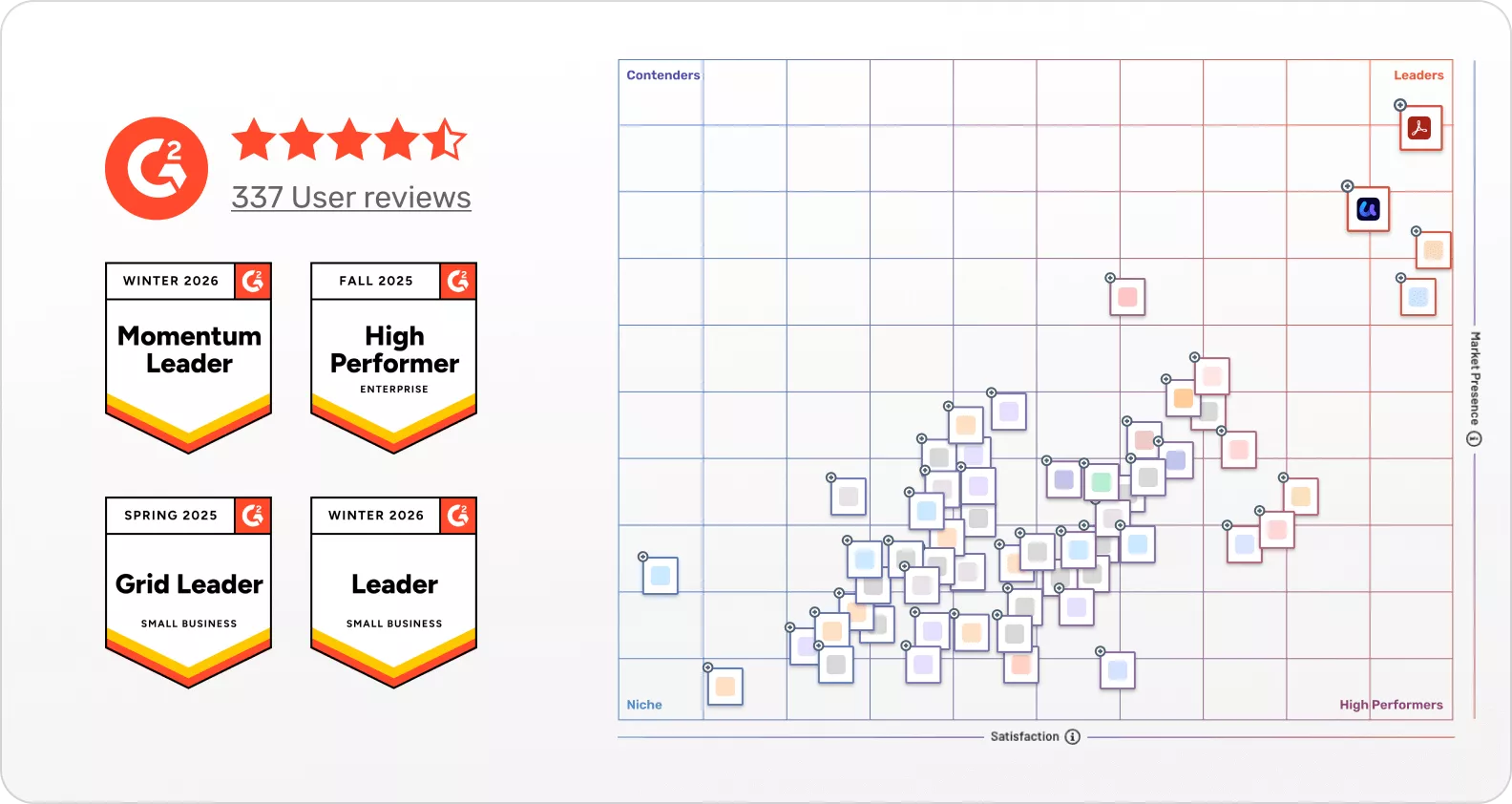
Trusted by IT professionals worldwide. UPDF’s consistent recognition as a G2 Leader 2026 reflects our commitment to enterprise-grade excellence.
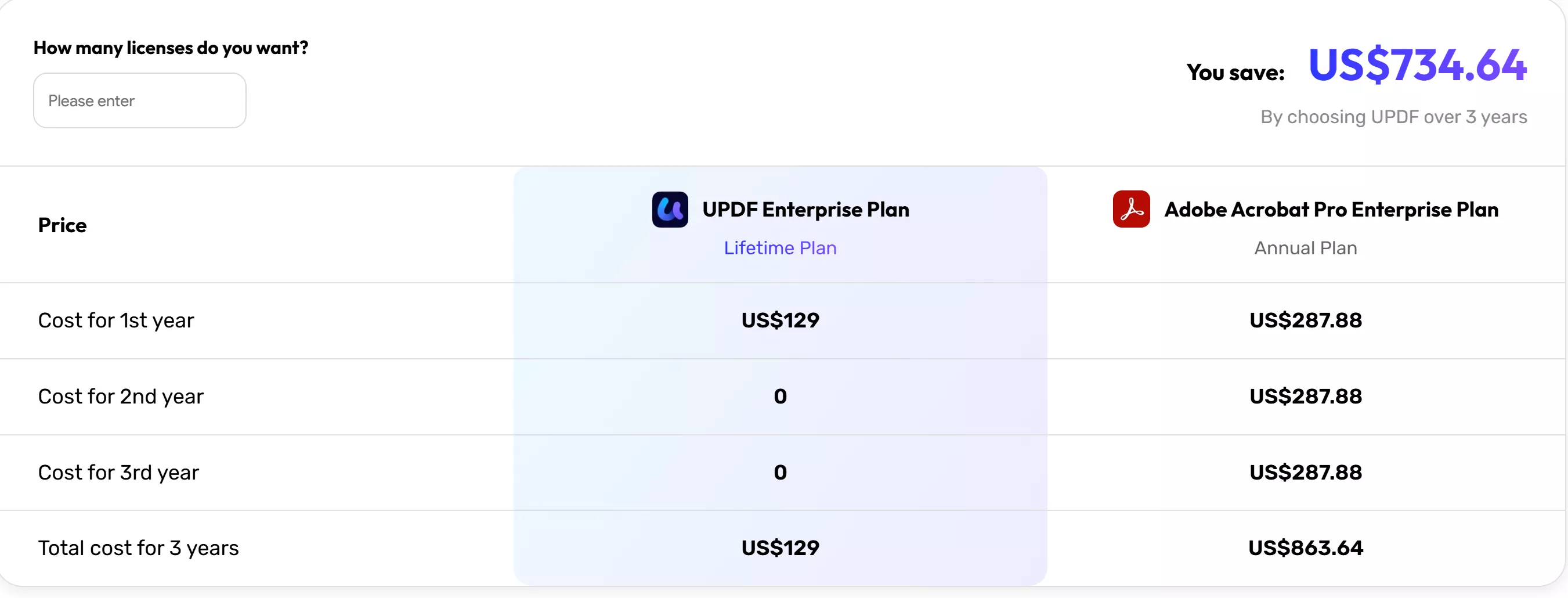
4. The 2026 Benchmark: How We Compare
Stop overpaying for features you don't use. See how UPDF stacks up against the "Legacy Giants" and "Niche Players."
| Feature | Adobe Acrobat Pro | PDF Expert (Mac Only) | UPDF (Enterprise) |
| Performance | High RAM Consumption | Moderate | Ultra-Light & Fast |
| Cross-Platform | Fragmented Licensing | Apple Only | 1 License for 4 Platforms |
| AI Integration | Expensive Add-on | Limited | Full AI Assistant Built-in |
| Admin Console | Complex / Dated UI | None | Centralized & Modern |
| Pricing | High Enterprise Fees | Single-user focus | Up to 60% More Affordable |
More than just specs. Watch the video below to see why modern firms are choosing UPDF Enterprise over legacy solutions.
5. Strategic Q1 Offer: Future-Proof Your Toolkit
As you finalize your Q1 budget, consider the ROI of your software stack. UPDF offers a rare combination of Enterprise power at SME pricing.
Enterprise & Team Plans
- Volume Discounts: Massive savings for teams of 5+.
- Dedicated Support: Priority 24/7 technical assistance for enterprise partners.
Explore Enterprise Pricing — Lock in Q1 rates now.
Individual Power-User Plans
- UPDF Pro Lifetime: One payment, forever yours. Includes lifetime free updates and major version upgrades (including the upcoming 2.5).
- The AI Advantage: Add UPDF AI to your Pro Lifetime checkout and get 7 days of Unlimited AI usage for FREE.
6. The Final Word: Don't Just Renew. Upgrade.
The "Standard" choice is no longer the "Best" choice. In 2026, efficiency is your most valuable currency. Whether you are building the next big tech platform or analyzing global political shifts, UPDF gives you the speed, security, and intelligence to do it better.
Ready to experience the future of PDF?
[Download Free Trial] Join 10M+ professionals worldwide. No credit card required. Windows/Mac/Mobile.
Windows • macOS • iOS • Android 100% secure





 Enrica Taylor
 Enid Brown
 Enola Miller