 UPDF
UPDF
 UPDF for Windows
 UPDF for Mac
 UPDF for iPhone/iPad
 UPDF for Android
 Nomostar
 UPDF AI Online
 UPDF Sign
 IvyCraft
 Edit PDF
 Annotate PDF
 Create PDF
 PDF Form
 Edit links
 Convert PDF
 OCR
OCR PDF to Word
 PDF to Image
 PDF to Excel
 Organize PDF
 Merge PDF
 Split PDF
 Crop PDF
 Rotate PDF
 Protect PDF
 Sign PDF
 Redact PDF
 Sanitize PDF
 Remove Security
 Read PDF
 UPDF Cloud
 Compress PDF
 Print PDF
 Batch Process
 About UPDF AI
 UPDF AI Solutions
 AI User Guide
 FAQ about UPDF AI
 Summarize PDF
 Translate PDF
 Chat with PDF
 Chat with AI
 Chat with image
 PDF to Mind Map
 Explain PDF
 PDF AI Tools
 Image AI Tools
 AI Chat Tools
 AI Writing Tools
 AI Study Tools
 AI Working Tools
 Other AI Tools
 AI Bookmark Generation
 AI Bookmark Summary
 AI Watermark Generation
 AI Background Generation
 AI Sticker Generation
 AI Stamp Generation
 AI Editing Suite
 UPDF Copilot
 AI Page Management
 AI Semantic Search
 PDF to Word
 PDF to Excel
 PDF to PowerPoint
 Enterprise Solution
 Enterprise Sign
 Enterprise AI
 Enterprise Plan
 Enterprise User Guide
 Enterprise Webinar
 IT
IT Education
 Construction
 Financial Service
 Healthcare
 Insurance
 Legal
Legal Manufacturing
 Government
 Researchers & PhDs
 Solopreneurs & Freelancers
 Lawyers & Legal Professionals
 Real Estate Agents & Brokers
 Education Solution
 Customer Stories
 User Guide
 UPDF Tricks
 FAQs
FAQs UPDF Reviews
 Download Center
 Blog
Blog Newsroom
 Tech Spec
 Updates
 UPDF vs. Adobe Acrobat
 UPDF vs. Foxit
 UPDF vs. PDF Expert

PDF editing has remained frustratingly expensive and complicated for professionals seeking reliable document management tools. Adobe Acrobat subscriptions drain budgets annually as legacy software continues struggling with modern AI-powered workflows today. This UPDF review reveals how the first AI-first PDF editor combines professional power with a sleek design.
Traditional PDF tools force users into recurring payments that increase yearly without adding meaningful value. Hidden maintenance fees and platform limitations create barriers when teams need seamless cross-device collaboration most. Let's explore why UPDF delivers professional power without the subscription trap or compatibility headaches.
- Subscription models force ongoing payments that accumulate to thousands over just five years.
- Legacy PDF editors lack AI features for summarizing lengthy contracts or research documents.
- Platform restrictions prevent seamless editing when switching between desktop and mobile device workflows.
- Hidden upgrade fees appear after purchase, blocking access to newer versions or features.
Stop settling for expensive subscriptions and download UPDF free today to experience faster editing yourself.
Windows • macOS • iOS • Android 100% secure
Part 1. UPDF vs. The Giants: A Head-to-Head Comparison
The PDF editor market features established names like Adobe Acrobat, Foxit, and PDF Expert. In the UPDF review, we will compare how these tools stack up against modern AI-powered alternatives.
Why UPDF Has The Edge
UPDF outperforms legacy competitors through faster performance, transparent pricing, and advanced AI capabilities. The features discussed below show why professionals are switching from expensive traditional editors:
- Speed and Performance: UPDF loads large multi-page files significantly faster than Adobe Acrobat or Foxit readers. This speed advantage saves professionals valuable time when handling contracts or technical documentation daily.
- Transparent Pricing: Traditional editors charge hidden maintenance fees that increase costs after your initial purchase. UPDF offers clear lifetime pricing without surprise renewals or forced subscription plans annually.
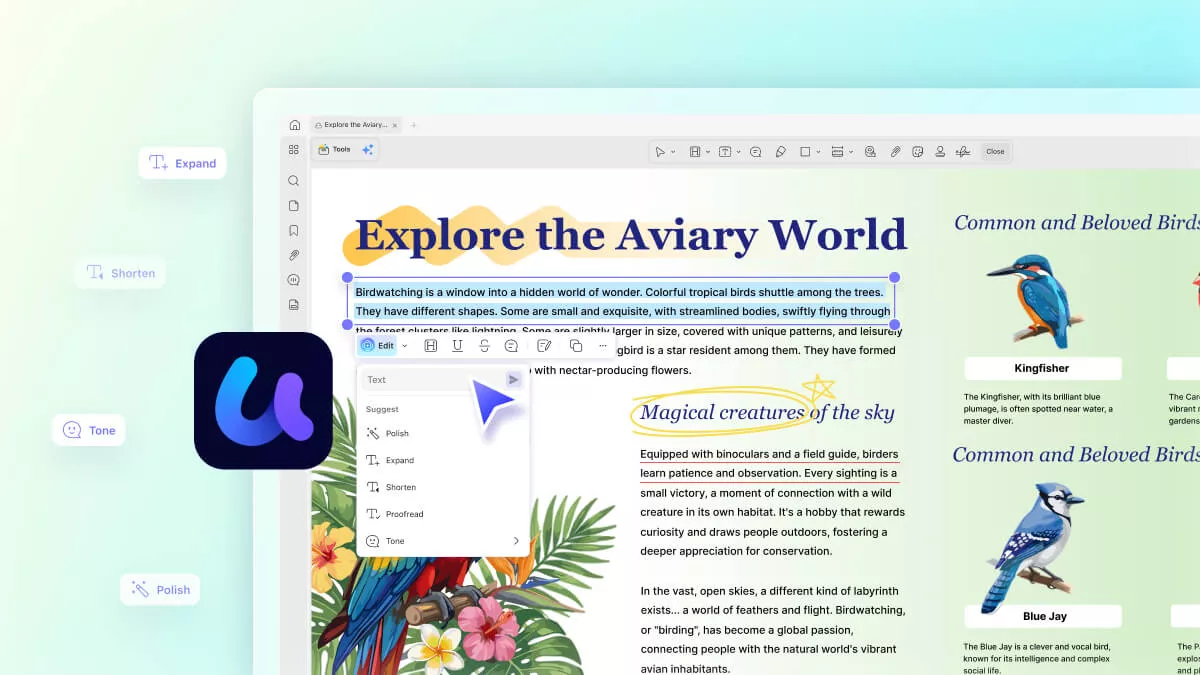
- AI Integration: UPDF features 10 specialized AI Agents that summarize, generate bookmarks, create stickers, and more. Legacy tools lack these intelligent features that modern workflows require for efficient document processing.
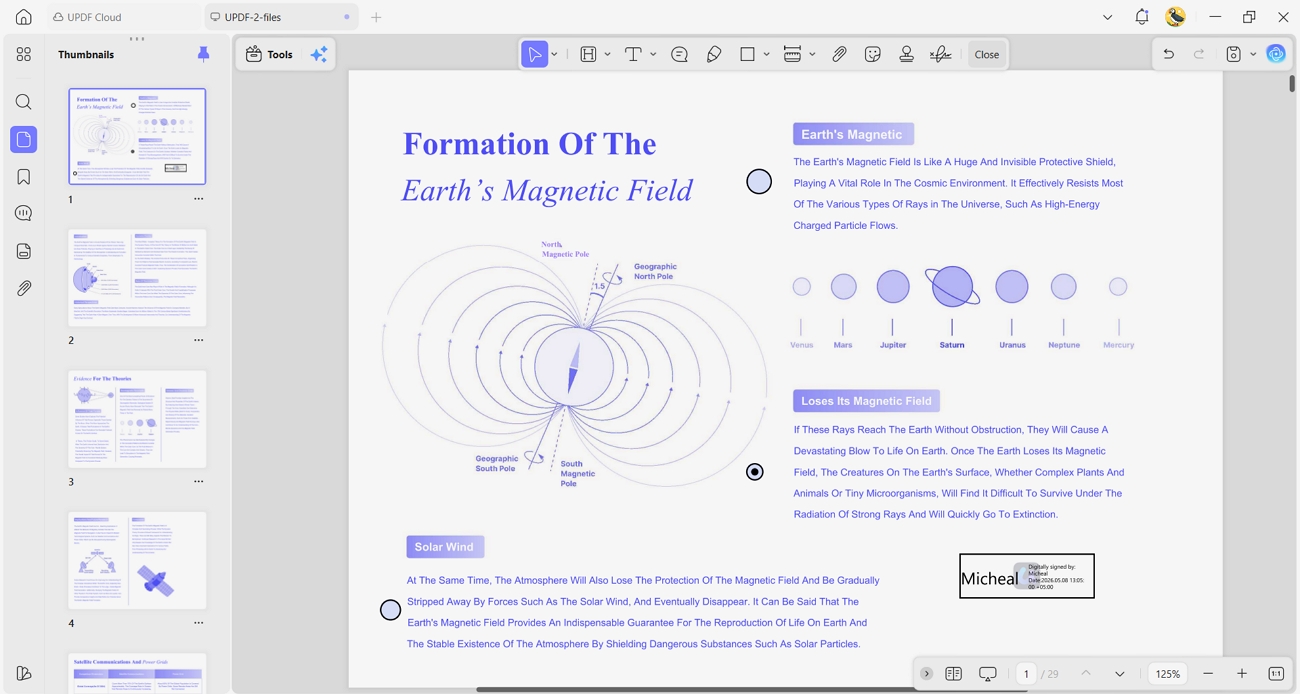
- User Interface Design: It offers a clean, minimalist interface that reduces clutter compared to Adobe's overwhelming menus. The intuitive layout lets users find editing tools instantly without navigating complex nested options.
Comparing The Best PDF Editors 2026
Traditional PDF editors trap users into expensive recurring subscriptions. Look at the comparison table below to see how these tools measure up.
| Feature | UPDF | Adobe Acrobat | Foxit PDF Editor | PDF Expert |
| Pro Pricing | $49.99/year, $79.99/lifetime | $239.88/year | $129.99/year, $139.99/perpetual | $49.99/year, $139.99/lifetime |
| AI Features | ✓ (10 AI Agents) | ✗ | ✗ | ✗ |
| One-Time Purchase | ✓ | ✗ | ✓ | ✓ |
| Cross-Platform | ✓ | ✓ | ✓ | Mac Only |
| Enterprise Version | ✓ | ✓ | ✓ | ✗ |
Want more detailed feature-by-feature breakdowns? See our in-depth comparisons: Acrobat vs UPDF, Foxit vs UPDF, and PDF Expert vs UPDF.
Part 2. What Real Users Say: Reputation & Community
This UPDF review relies on third-party ratings to provide honest feedback from actual users. Independent platforms verify customer satisfaction scores, ensuring transparency and building trust through real experiences. Let's look at what verified platforms are saying about UPDF's performance and features.
- Trustpilot: 4.0/5
- G2: 4.5 /5 (Spring 2026 Leader and High Performer Enterprise Recognition)
What Daily Users are Saying About UPDF?
Real user feedback reveals both strengths and areas where UPDF continues improving based on customer requests. Now, let's explore what verified users appreciate most and what features they want added:
- Cross-Platform PDF Organization: User appreciates reorganizing personal and professional PDFs with built-in AI features and accessible subscription pricing.
- Best Adobe Acrobat Alternative: User praises easy editing, intuitive dashboard, digital signatures, and AI Scholar Research tool for discovering academic papers with expanded keyword searches.
- Basic Features in Pro Plan: Pro Lifetime user frustrated that basic features like page numbering, cropping, and image-to-PDF conversion are missing.
- More Language Support Needed: User requests additional menu languages like Thai, Ukrainian, and Polish for translation and mentions setup difficulties with MS Office support integration.
Beyond written reviews, watching real users test UPDF provides visual proof of its performance. See this detailed video review showcasing editing speed, AI features, and interface design in action.
Join the UPDF Community
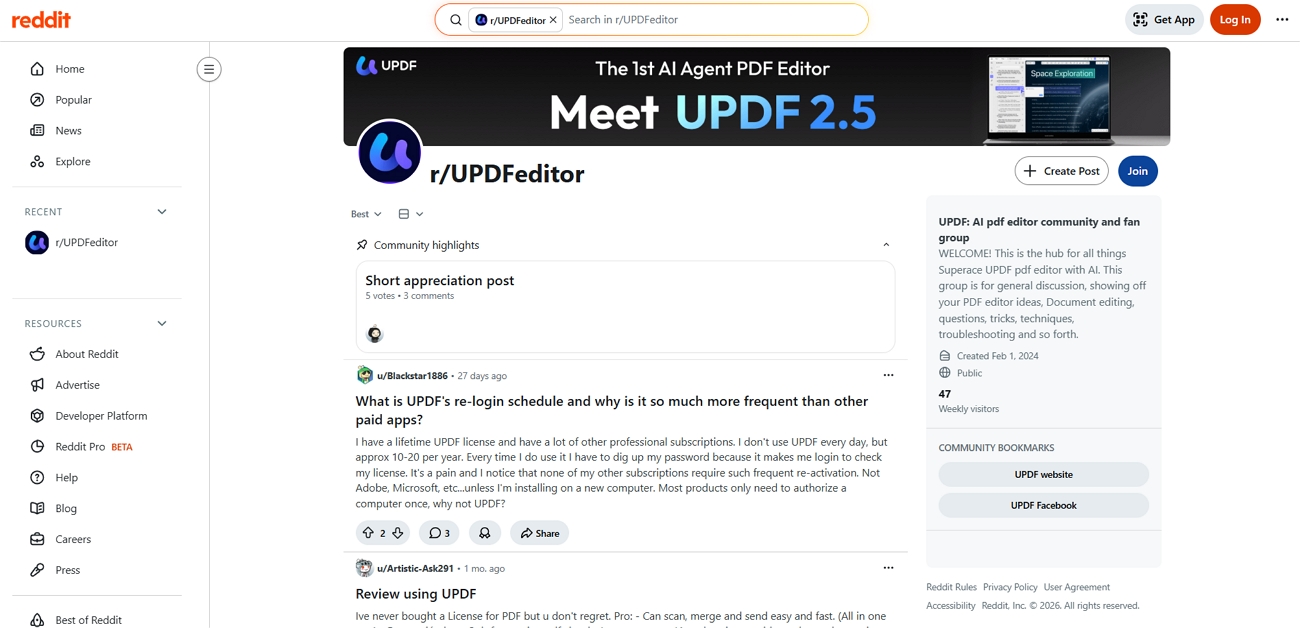
Active users connect through the UPDF Reddit for direct support and shared experiences. The community provides troubleshooting help, feature tips, and real feedback from professionals using UPDF.
Global companies are abandoning legacy PDF tools and switching to UPDF. Read our Customer Stories to see how industry leaders scaled their productivity.
Part 3. Pricing: The 1/4 Cost Advantage
UPDF costs roughly 30% of what Adobe Acrobat Pro charges annually for similar features. Adobe's annual subscription costs $239.88 yearly, while UPDF starts at just $49.99/year. Professionals waste thousands over 5 years paying for Adobe when UPDF delivers identical capabilities. These advantages make UPDF the smarter financial choice for individuals seeking value:
- Transparent Pricing: UPDF eliminates hidden maintenance fees or surprise renewals that legacy editors charge after purchase.
- Annual Savings: Switching from Adobe to UPDF saves professionals over $190 every single year immediately.
- Budget-Friendly: Small businesses reduce software costs dramatically without sacrificing professional editing power or advanced features.
Own UPDF Forever With One Payment
UPDF offers a Lifetime Plan that lets you pay once and access all future updates without recurring fees. This single license works seamlessly across 4 devices simultaneously.
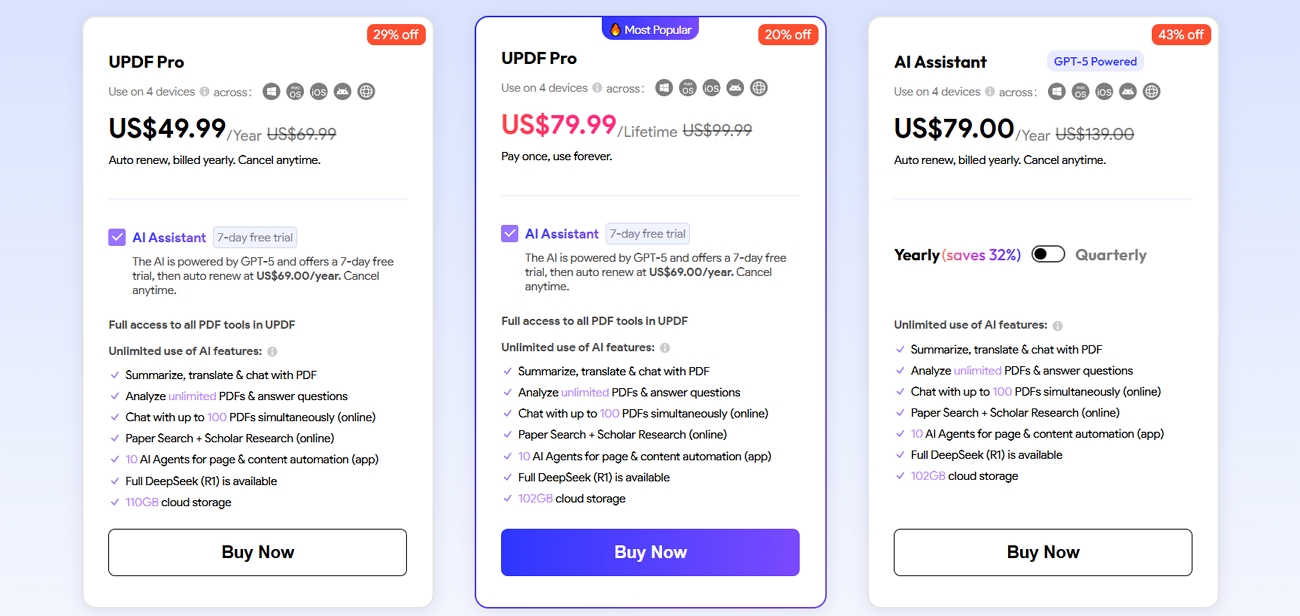
Explore all available options and secure your plan at the latest UPDF Pricing & Plans.
Part 4. UPDF Enterprise: Scale with Confidence
IT managers control all company licenses from one centralized enterprise management dashboard. They can authorize new employees and reassign licenses when staff members leave. This UPDF review shows Enterprise pricing starts at $79.00/year or $129 lifetime. Let's look at what the UPDF Enterprise plan offers for growing organizations.
- Enterprise Management Dashboard: Manage all licenses, team members, and virtual company assets from one comprehensive control panel.
- Flexible License Management: Control authorization and assign duties to team members with straightforward and adaptable license controls.
- User Limit: Invite unlimited members, but concurrent users match purchased licenses and reassign departing employees' licenses immediately.
- Special Avatar: Enterprise accounts display a special logo badge distinguishing business accounts from personal user accounts.
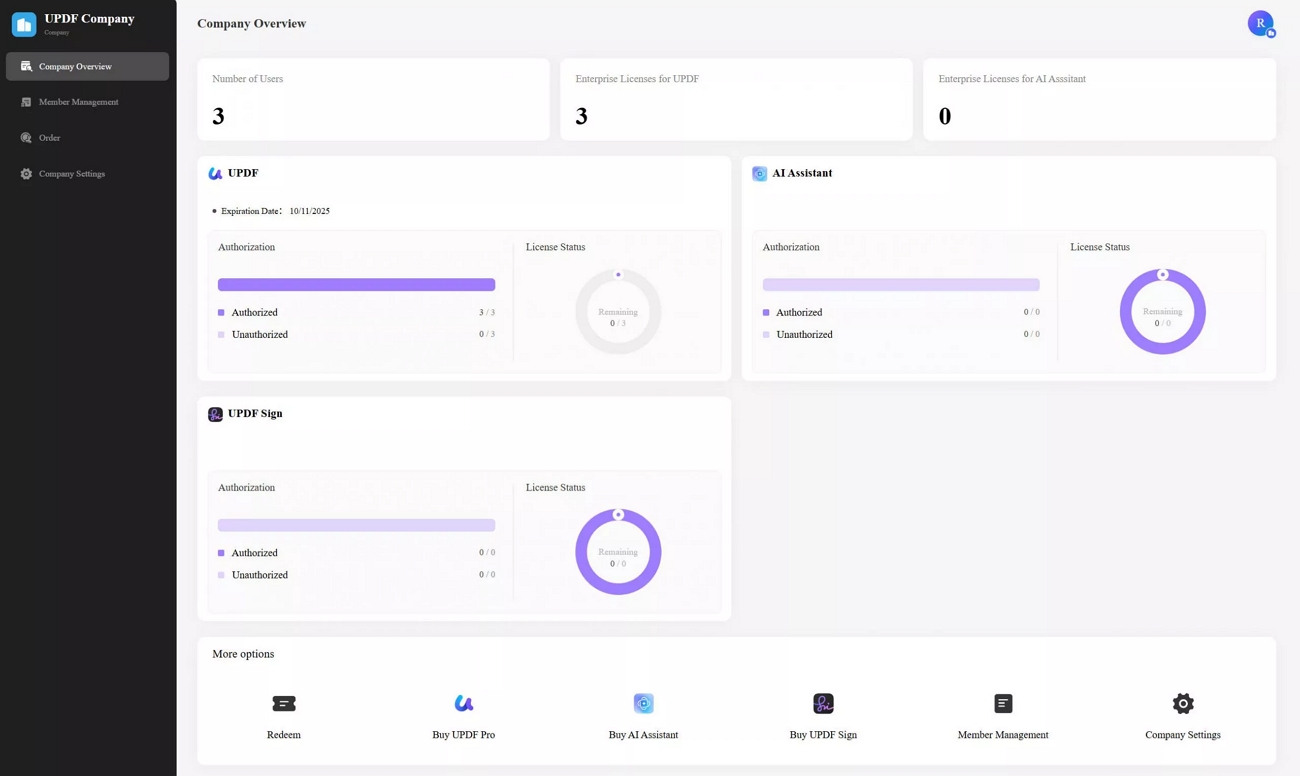
UPDF reduces corporate overhead by eliminating redundant software costs. The PDF Efficiency Report demonstrates measurable time savings and productivity gains for business teams. Enterprise features deliver professional-grade controls designed for technical buyers and IT managers. Check the Enterprise User Guide for complete deployment specifications and detailed implementation instructions.
Part 5. Feature Deep-Dive: Powered by AI Agents
UPDF transforms document workflows with ten specialized AI agents automating complex tasks. Look at the powerful features that make UPDF version 2.5 stand out.
Intelligent Document Processing (AI Agents)
Imagine a legal firm analyzing a massive 500-page contract in just minutes automatically. UPDF AI Agents summarize documents, translate content across 60+ languages, and explain jargon instantly. The 10 AI agents include bookmark generation, semantic search, watermark creator, and editing suite. Watch this UPDF review video to learn more about version 2.5's new features:
Windows • macOS • iOS • Android 100% secure
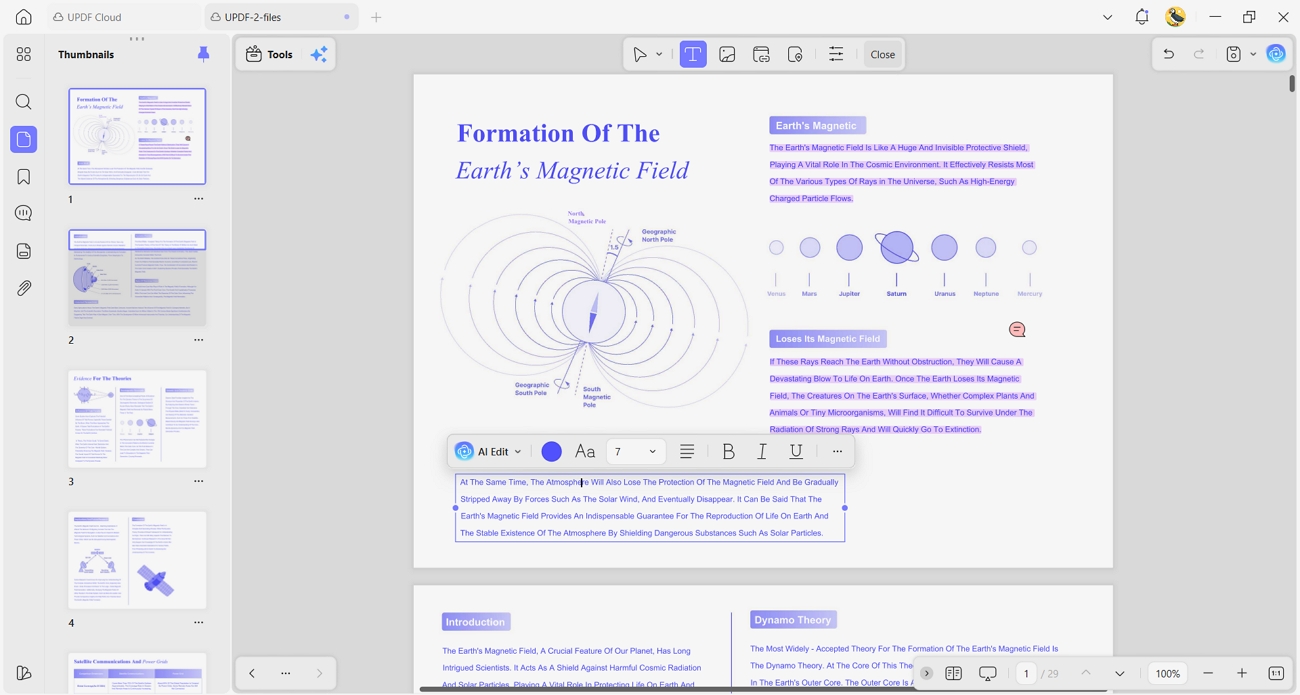
Editing & Annotation
Students marking up textbooks or designers correcting PDF mockups need simple editing tools daily. UPDF lets you edit text, images, and links as easily as Microsoft Word. No complicated conversions required, just click and start editing like a regular document.
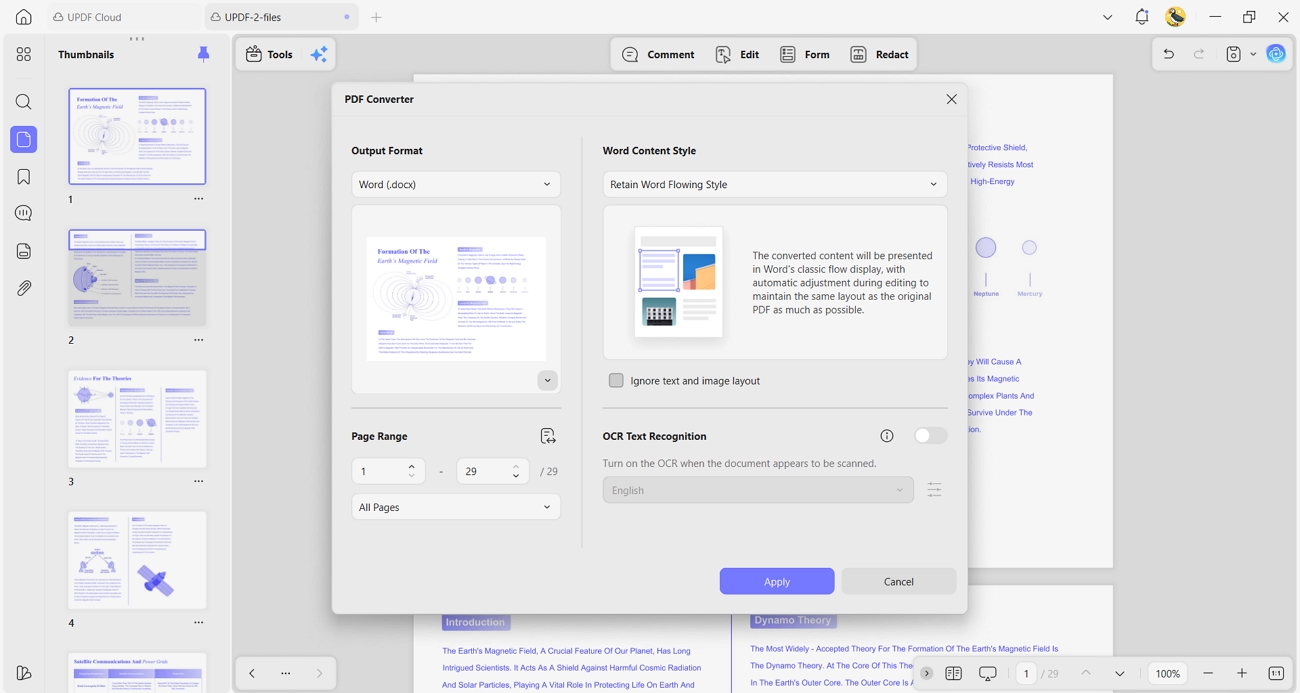
PDF Conversion & OCR
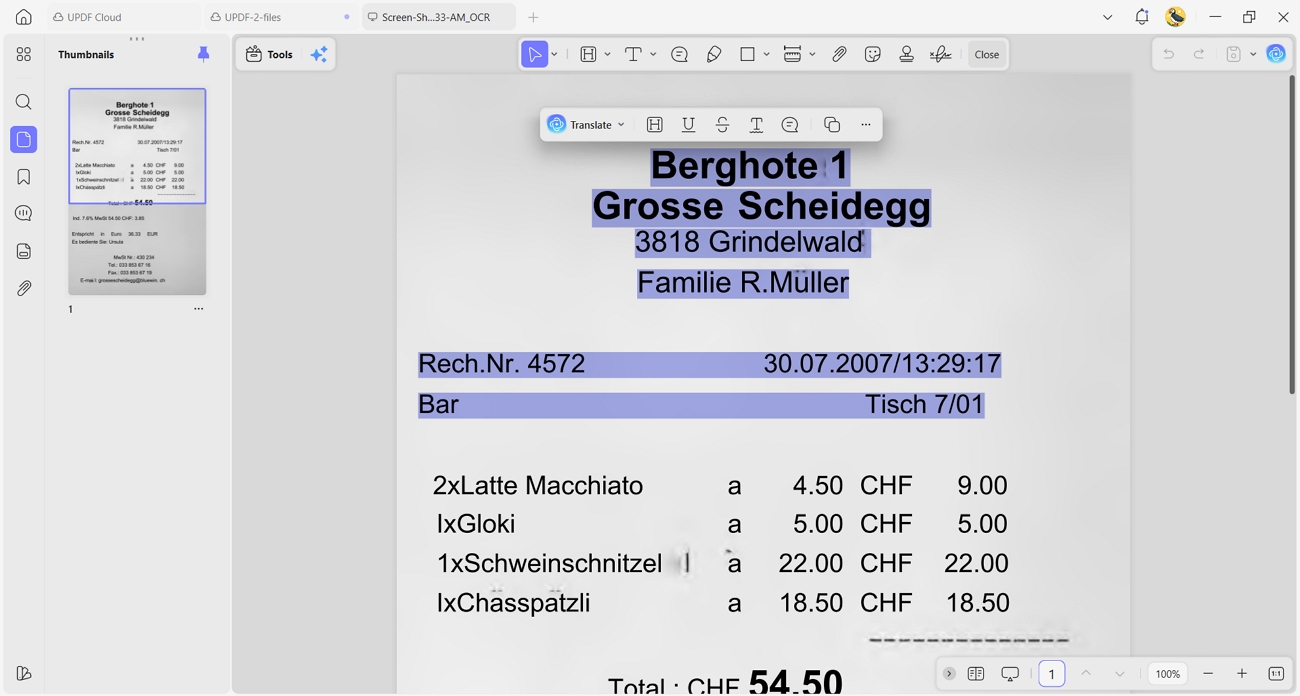
Converting scanned paper receipts into searchable, editable digital records saves time and effort.
UPDF's OCR technology recognizes text in images and makes everything searchable and editable. Transform any scanned document into a functional PDF with accurate text recognition.
Secure Forms & E-Signatures
Busy realtors send contracts and collect legally binding signatures immediately on mobile devices. UPDF's e-signature feature streamlines paperwork without printing and mailing physical documents.
Part 6. Added Value: Security & Performance (Expert Addition)
This UPDF review highlights enterprise-grade security and cross-platform flexibility for all users. Let's look at two critical advantages that set UPDF apart today.
- ISO 27001 Certified: UPDF meets international information security standards crucial for European and US compliance.
- Universal License: One purchase covers Windows, Mac, iOS, and Android without buying separate subscriptions.
FAQs
Is UPDF safe to use?
Yes, UPDF is ISO 27001 certified and uses strong encryption to protect data. Your files stay on your local storage and are never uploaded to the internet.
Can I use UPDF offline?
Yes, UPDF works completely offline for local document editing and protects user privacy. You only need an internet connection during registration, activation, and installing optional AI plugins.
Does the lifetime license include AI?
The lifetime license covers all core PDF features, but AI is a separate add-on. You need to purchase AI credits separately to access advanced AI features.
Conclusion
To summarize, this UPDF review demonstrates that premium branding doesn't always translate to superior workflow efficiency for modern teams. UPDF delivers faster performance, smarter AI integration, and user-centric design at a fraction of traditional costs. Stop overpaying for legacy software and download UPDF for free now.
Windows • macOS • iOS • Android 100% secure






 Enola Miller
 Enya Moore

 Delia Meyer