 UPDF
UPDF
 UPDF for Windows
 UPDF for Mac
 UPDF for iPhone/iPad
 UPDF for Android
 Nomostar
 UPDF AI Online
 UPDF Sign
 IvyCraft
 Edit PDF
 Annotate PDF
 Create PDF
 PDF Form
 Edit links
 Convert PDF
 OCR
OCR PDF to Word
 PDF to Image
 PDF to Excel
 Organize PDF
 Merge PDF
 Split PDF
 Crop PDF
 Rotate PDF
 Protect PDF
 Sign PDF
 Redact PDF
 Sanitize PDF
 Remove Security
 Read PDF
 UPDF Cloud
 Compress PDF
 Print PDF
 Batch Process
 About UPDF AI
 UPDF AI Solutions
 AI User Guide
 FAQ about UPDF AI
 Summarize PDF
 Translate PDF
 Chat with PDF
 Chat with AI
 Chat with image
 PDF to Mind Map
 Explain PDF
 PDF AI Tools
 Image AI Tools
 AI Chat Tools
 AI Writing Tools
 AI Study Tools
 AI Working Tools
 Other AI Tools
 AI Bookmark Generation
 AI Bookmark Summary
 AI Watermark Generation
 AI Background Generation
 AI Sticker Generation
 AI Stamp Generation
 AI Editing Suite
 UPDF Copilot
 AI Page Management
 AI Semantic Search
 PDF to Word
 PDF to Excel
 PDF to PowerPoint
 Enterprise Solution
 Enterprise Sign
 Enterprise AI
 Enterprise Plan
 Enterprise User Guide
 Enterprise Webinar
 Banking
 Healthcare
 Insurance
 Legal
Legal Manufacturing
 Government
 Researchers & PhDs
 Solopreneurs & Freelancers
 Lawyers & Legal Professionals
 Real Estate Agents & Brokers
 Education Solution
 Customer Stories
 User Guide
 UPDF Tricks
 FAQs
FAQs UPDF Reviews
 Download Center
 Blog
Blog Newsroom
 Tech Spec
 Updates
 UPDF vs. Adobe Acrobat
 UPDF vs. Foxit
 UPDF vs. PDF Expert

The higher textbook prices in 2026 have made 99% of students try to save money on course books. In total, 76% of students search online for free versions, and 70% skip buying some required textbooks. At Virginia Commonwealth University, 75% of students say they worry about textbook costs, and 14% are worried.
Many learners turn to textbook PDF download options to keep studying rather than buying books. Let's see everything you wanna know about downloading textbook PDFs.
Part 1. How to Find Textbook PDF to Download?
Not all places that offer textbooks are equal, and each type carries different risks. Some sources give fully legal free college textbooks in PDF format, while others only allow online reading or borrowing. Some sites share huge collections but often include poor scans, unsafe files, or illegal downloads. Now we will look at three layers of textbook sources and how they match student needs:
Layer 1. 100% Legitimate Open Educational Resources (OER)
These platforms share legal textbooks that many colleges and schools already use. Look at the table below for a quick view of uses and basic formats:
| Platform | Collection Size | Suitable Scenarios | Format Options |
| OpenStax | Dozens of core textbooks | College intro courses | Online, PDF, print |
| Open Textbook Library | About 1,800+ textbooks | Many college subjects | Mostly PDF links |
| LibreTexts | Large subject libraries | STEM and more | Web pages, exportable |
| Project Gutenberg | 70,000+ ebooks | Classics and older texts | EPUB, PDF, online |
Many universities now adopt OpenStax and LibreTexts to save students money. These free textbooks support real courses at large colleges and help lower textbook costs.
Note: “Free” does not always mean you get an instant PDF file. Some OER platforms only allow web-based reading, and you may need a tool like UPDF to save pages and combine them into one organized PDF for offline study.
Windows • macOS • iOS • Android 100% secure
Layer 2. Public Domain and Government Knowledge Repositories
These libraries hold huge collections of older or public‑domain books that students can often access for free. Many learners use them when they cannot find a newer edition, but still need to download a textbook PDF for free. The table below shows each platform’s size, best use, and what kind of files you usually get:
| Platform | Collection Size | Suitable Scenarios | Format Options |
| Internet Archive | About 4.4M eBooks | Older textbooks, historic editions, government reports | Scanned PDF, EPUB, online reader |
| HathiTrust | Over 10M volumes | Public‑domain academic books, shared university collections | Page images, some full‑view PDF |
| Google Books | Tens of millions of scanned books | Previews, full‑view public‑domain titles | Online viewer, some PDF or EPUB |
| DOAB | 30,000+ open-access books | Academic monographs and textbooks from publishers | Publisher PDF, EPUB download links |
Note: Scanned PDFs from these libraries often contain blurry pages, crooked text, or missing sections. Many files lack OCR, so you cannot search or select the text. You may need a PDF editing tool like UPDF to clean pages, add OCR, and improve navigation.
Layer 3. Aggregated and Community-Shared Knowledge Base
Many students use these shared libraries when they cannot find the needed books on official sites. For some, they seem like a quick shortcut for textbook PDF download, but they bring serious risks. Review the table below to compare basic size, main use, and usual file types:
| Platform | Collection Size | Suitable Scenarios | Format Options |
| Z-Library | About 22.5M books | Hard‑to‑find textbooks | PDF, EPUB, other |
| Library Genesis | Around 2.4M nonfiction books | Academic and technical books | Mainly PDF |
| Anna's Archive | Combines data from Z‑Library, LibGen | Last‑resort meta search | Mixed from sources |
| PDF Drive/WeLib | Tens of millions of eBooks claimed | General eBook hunting | Mostly PDF |
Note: Some free textbook sites come with serious risks you should understand before using them. Files can hide malware, break copyright laws, or vanish when domains are seized or blocked. Look at the points below before you decide to trust any source.
- Malware Risks: Many shared textbook PDFs come from unknown uploaders and untrusted servers online. Dangerous files can exploit recent PDF security flaws to silently infect your device.
- Legal Risks: Some platforms host copyrighted textbooks without permission from authors and publishers. In some countries, downloading those copies can break copyright law and cause trouble.
- Unstable Access: Shadow libraries often lose domains after court orders or government takedowns. Users keep chasing new mirror links shared in online communities and forums.
Part 2. How to Manage Downloaded PDF Textbook?
Many students feel lost after they download a textbook PDF free and open it for the first time. Next, let's look at simple issues that appear and quietly slow down daily study progress:
- Hard to find pages quickly when chapters are all in one file.
- Notes get messy because different apps cannot sync highlights and comments correctly.
- Big scanned files open slowly and make older laptops or phones lag badly.
- Text is not searchable when the PDF is only images from a scanner.
- File names are confusing, so students forget which version has their latest notes.
How UPDF Makes Studying Easier
Managing a long textbook PDF download alone can feel confusing, slow, and very overwhelming. This is where UPDF comes in, giving students a single place to manage all their study files. UPDF lets you read, highlight, and comment clearly, so key ideas stay easy to review later.
Moreover, you can organize pages, merge chapters, and rename files, so everything feels clean and simple. With UPDF AI, you can summarize chapters, ask questions, and understand difficult concepts faster. Now, go through the steps below to manage every textbook PDF in a clear way using UPDF:
Windows • macOS • iOS • Android 100% secure
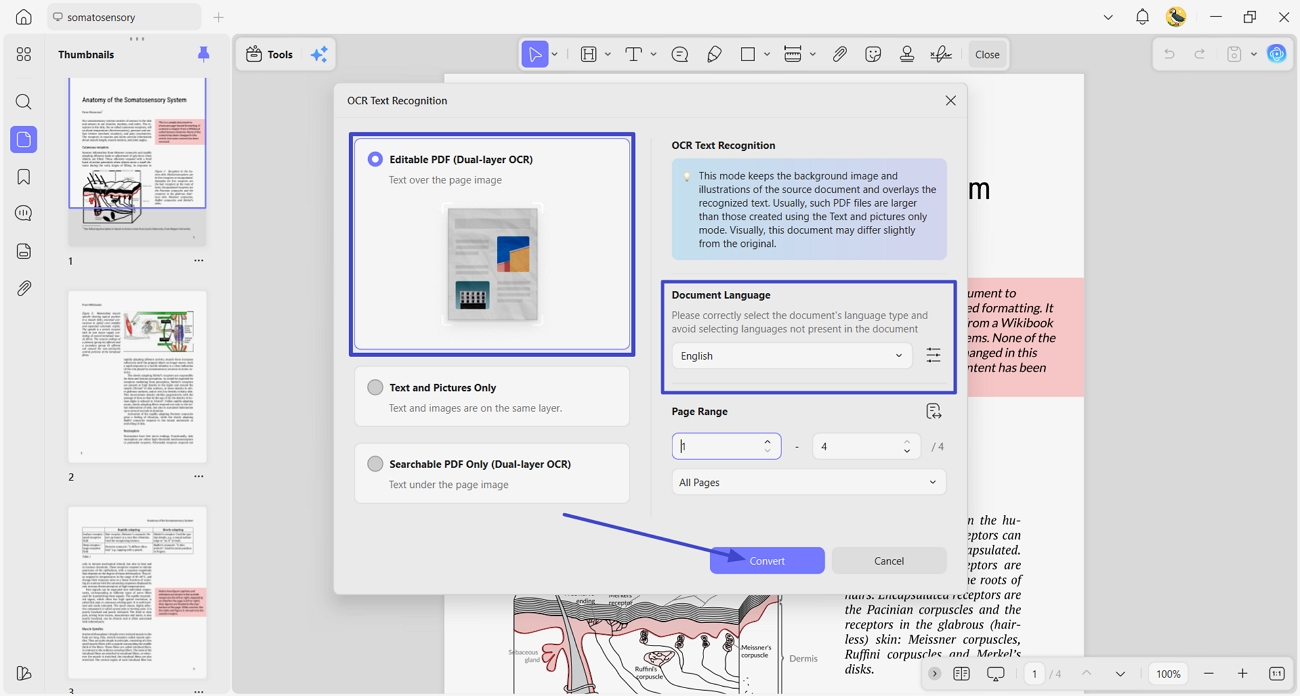
Step 1. Perform OCR for Scanned Pages
After downloading the opening of the textbook PDF in UPDF, access the OCR feature. Next, choose the “Editable OCR” type, select the languages, and click the “Convert” button.
Step 2. Annotate PDF Textbook
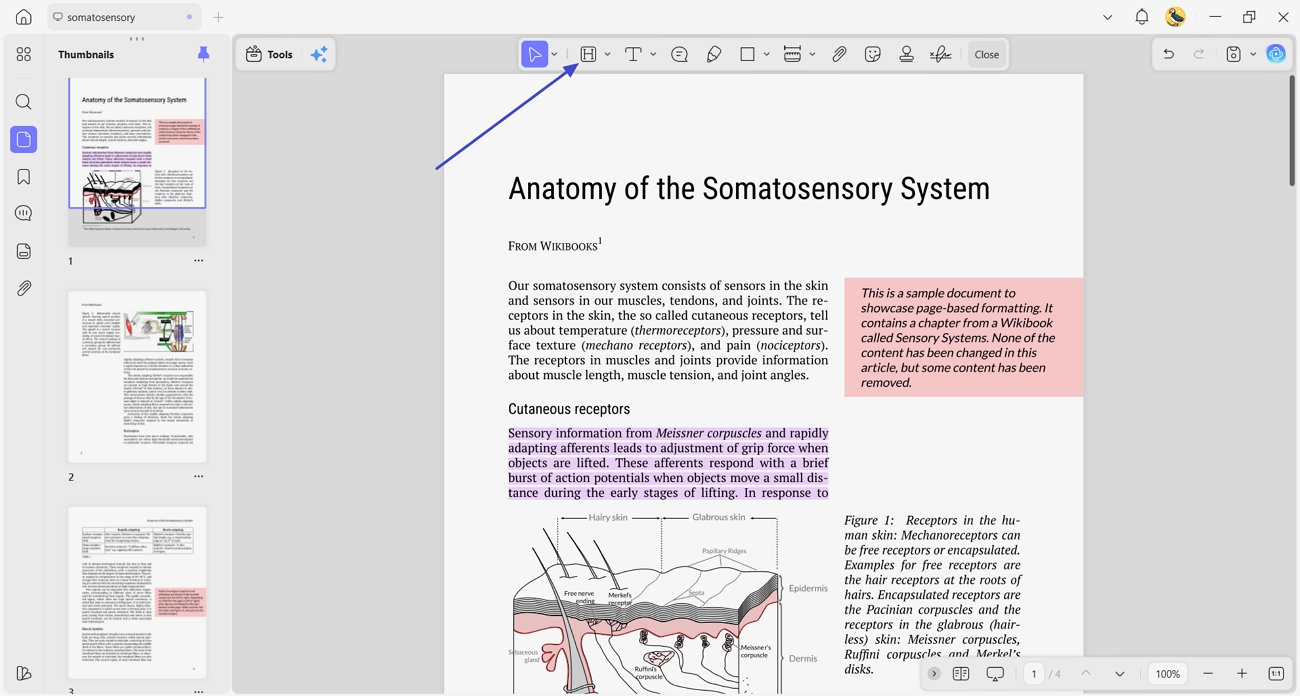
Next, access the “Comment” feature and choose the “Highlight” tool. Afterward, mark the important paragraphs so they appear first.
Step 3. Summarize Textbook
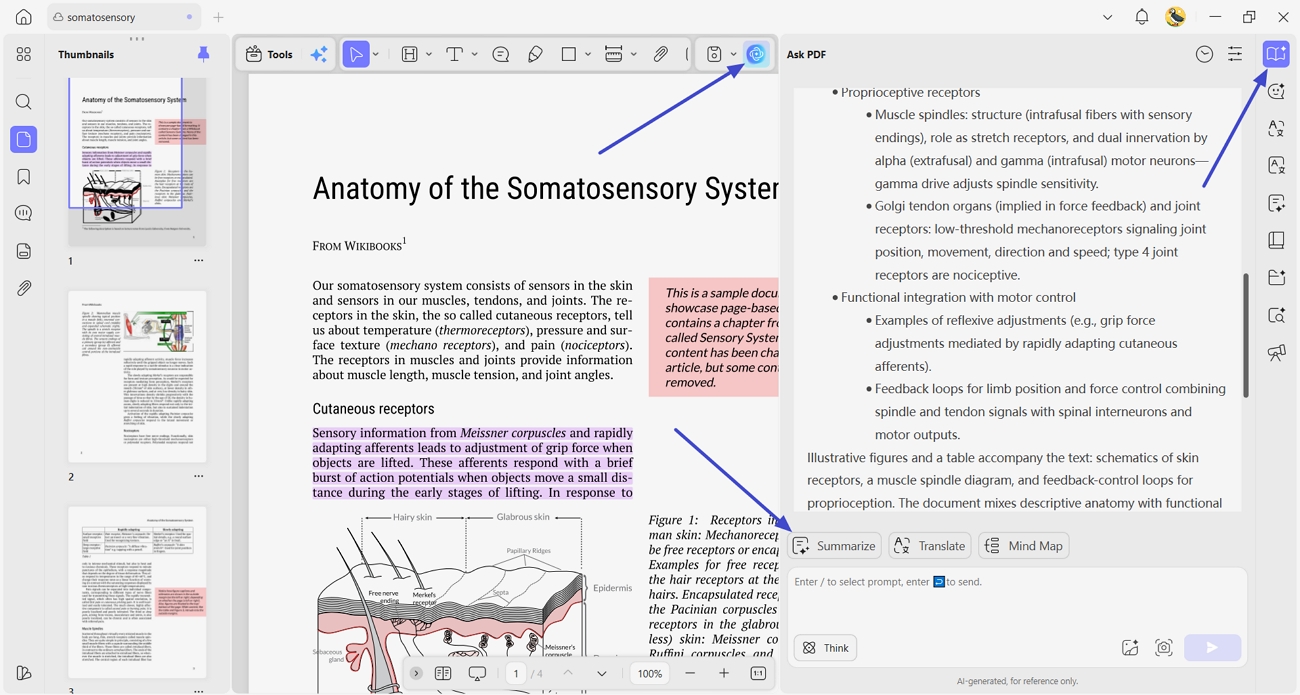
Next, click the “UPDF AI” icon and press the “Summarize” button above the chatbox to select the pages to summarize.
Step 4. Export Final PDF
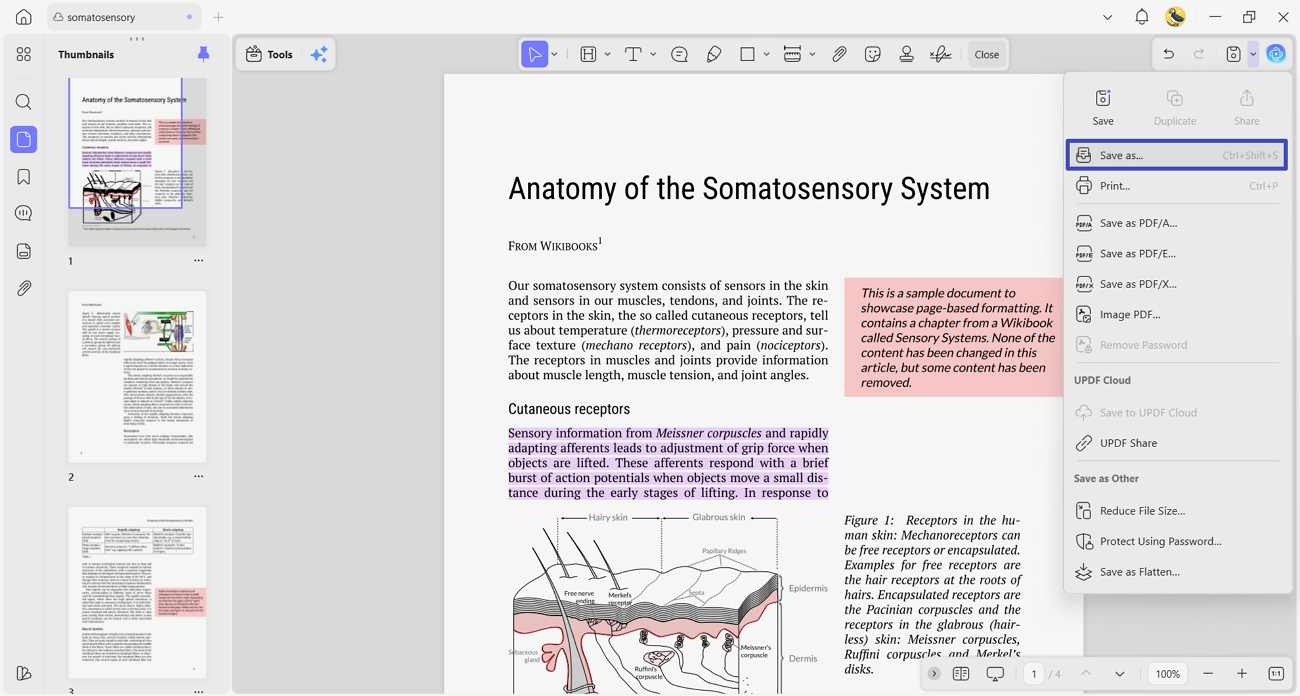
Lastly, access the “Save” options menu and press the “Save As” button to save the edited version of the textbook PDF separately.
FAQs
- How can I make a scanned textbook PDF searchable and selectable?
You can use OCR to turn a scanned textbook PDF into searchable, selectable text. UPDF has a built-in OCR tool that quickly recognizes text and keeps your formatting.
- How do I merge PDFs, PPTs, and Word notes into one study file?
First, gather your PDFs, PPTs, and Word notes for one course. Then open them in UPDF and use the merge tool to create a single, organized file. After merging, reorder pages and rename the combined file so studying feels simple and focused.
- Is there a tool that can summarize a textbook or answer questions based on it?
Yes, UPDF AI can summarize chapters and answer questions based on your uploaded textbook. You simply open the book in UPDF AI, then ask questions or request clear summaries. This helps you grasp difficult topics faster without rereading every page.
- Are free PDF textbooks from the internet safe, or do they carry malware risks?
Free PDF textbooks from random free textbook sites can sometimes hide malware or unsafe links inside. It is safer to use trusted platforms and scan every file with good antivirus software.
Final Words
To conclude, once a textbook PDF download is saved, the biggest problem is managing pages, notes, and focus. This guide explained how to handle files more effectively and avoid risky or unsafe online study habits. For a cleaner organization, powerful study tools, and AI help in one place, UPDF is the recommended option.
Windows • macOS • iOS • Android 100% secure






 Lizzy Lozano
 Enrica Taylor
