 UPDF
UPDF
 UPDF for Windows
 UPDF for Mac
 UPDF for iPhone/iPad
 UPDF for Android
 Nomostar
 UPDF AI Online
 UPDF Sign
 IvyCraft
 Edit PDF
 Annotate PDF
 Create PDF
 PDF Form
 Edit links
 Convert PDF
 OCR
OCR PDF to Word
 PDF to Image
 PDF to Excel
 Organize PDF
 Merge PDF
 Split PDF
 Crop PDF
 Rotate PDF
 Protect PDF
 Sign PDF
 Redact PDF
 Sanitize PDF
 Remove Security
 Read PDF
 UPDF Cloud
 Compress PDF
 Print PDF
 Batch Process
 About UPDF AI
 UPDF AI Solutions
 AI User Guide
 FAQ about UPDF AI
 Summarize PDF
 Translate PDF
 Chat with PDF
 Chat with AI
 Chat with image
 PDF to Mind Map
 Explain PDF
 PDF AI Tools
 Image AI Tools
 AI Chat Tools
 AI Writing Tools
 AI Study Tools
 AI Working Tools
 Other AI Tools
 AI Bookmark Generation
 AI Bookmark Summary
 AI Watermark Generation
 AI Background Generation
 AI Sticker Generation
 AI Stamp Generation
 AI Editing Suite
 UPDF Copilot
 AI Page Management
 AI Semantic Search
 PDF to Word
 PDF to Excel
 PDF to PowerPoint
 Enterprise Solution
 Enterprise Sign
 Enterprise AI
 Enterprise Plan
 Enterprise User Guide
 Enterprise Webinar
 IT
IT Education
 Construction
 Financial Service
 Healthcare
 Insurance
 Legal
Legal Manufacturing
 Government
 Researchers & PhDs
 Solopreneurs & Freelancers
 Lawyers & Legal Professionals
 Real Estate Agents & Brokers
 Education Solution
 Customer Stories
 User Guide
 UPDF Tricks
 FAQs
FAQs UPDF Reviews
 Download Center
 Blog
Blog Newsroom
 Tech Spec
 Updates
 UPDF vs. Adobe Acrobat
 UPDF vs. Foxit
 UPDF vs. PDF Expert

A budget planner is a tool that helps individuals organize income and plan savings in a structured way. It makes financial management simpler and enables users to track spending habits over a long period of time in a better way. However, some individuals face difficulties in making realistic budgets, customizing rigid templates, and utilizing tools that offer little guidance.
With many budgeting options available today, choosing the right tool for budget planning can feel confusing for modern users everywhere. This article compares the top 4 budget planners to help readers confidently select the best option.
Part 1. Compare Top Budget Planner Tools
Before exploring the best budget planner options, let's take a quick look at the table to see which stands out.
| Tool | Free Templates | Customization Level | AI Budget Planning | Editing Flexibility | Best For | Collaboration |
| UPDF | Highest (Modify any text, table, or data) | (Automated logic & saving plans) | Total freedom to adjust budget items, formulas, and layouts | Users seeking smart, highly personalized tracking | Cloud share, sync | |
| MoneyHelper Budget Planner | Low | Limited to filling predefined input fields | Beginners who need step-by-step guidance | Export, share file | ||
| Canva | (Premium templates are paid) | High | Strong visual editing but requires manual calculations | Visual planners who prioritize aesthetics | Shared Canva projects | |
| Schwab Monthly Budget Planner | (Structured monthly budget worksheet) | Low | Basic data entry on a static worksheet | Conservative savers who prefer simple lists | Print or download |
Part 2. Best 4 Budget Planner Tools to Manage Your Finances
The selection of the right budget planner depends on your personal needs, including customization and visual design. Now, we will explore four popular budget planners and highlight their key features for informed decisions.
1. UPDF
It is a versatile PDF editor designed to handle documents beyond traditional budgeting applications. It's free template center offers ready-to-use budget planner PDFs to make it easy for users to start planning quickly. The built-in AI assistant helps generate logical budget plans by allocating income, expenses, and savings.
Beyond creating budgets, UPDF provides full PDF editing capabilities so every detail can be customized accurately.
How to Create a Budget Plan with UPDF
One of the biggest advantages of UPDF is its cross-platform accessibility. Whether you are at your desk or on the go, you can manage your finances effortlessly. UPDF is available on iOS and Android, allowing mobile users to download templates directly to their phones and follow these same steps to build a customized budget plan anytime, anywhere. For the purpose of this guide, we will demonstrate the process using UPDF for Windows to show you the full range of customization and AI features available. First, you'll have to download UPDF for free.
Windows • macOS • iOS • Android 100% secure
Step 1. Download the Budget Plan Template and Import it into UPDF
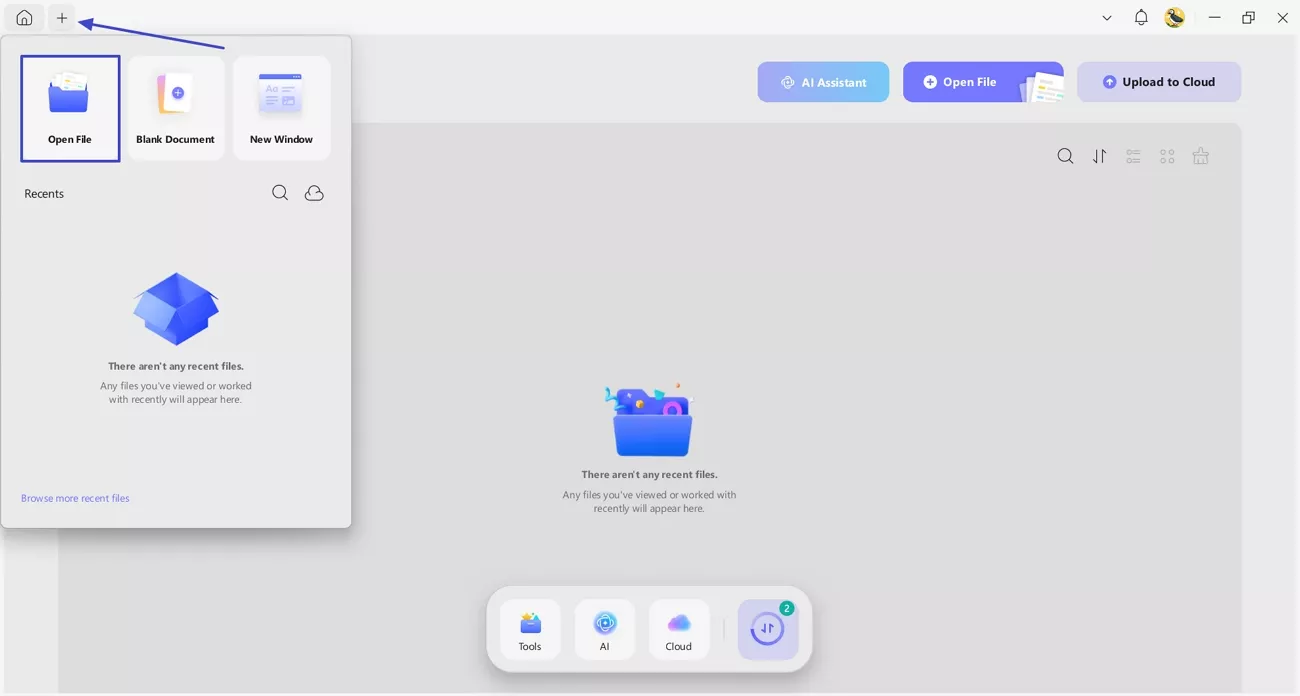
First, download a suitable budget plan from the Budget Plan 1, Budget Plan 2, or Budget Plan 3 templates. Next, press the "+" icon at the top of the UPDF's interface and click the "Open File" option to import the file.
Step 2. Use UPDF AI to Create a Scientific Budget Plan
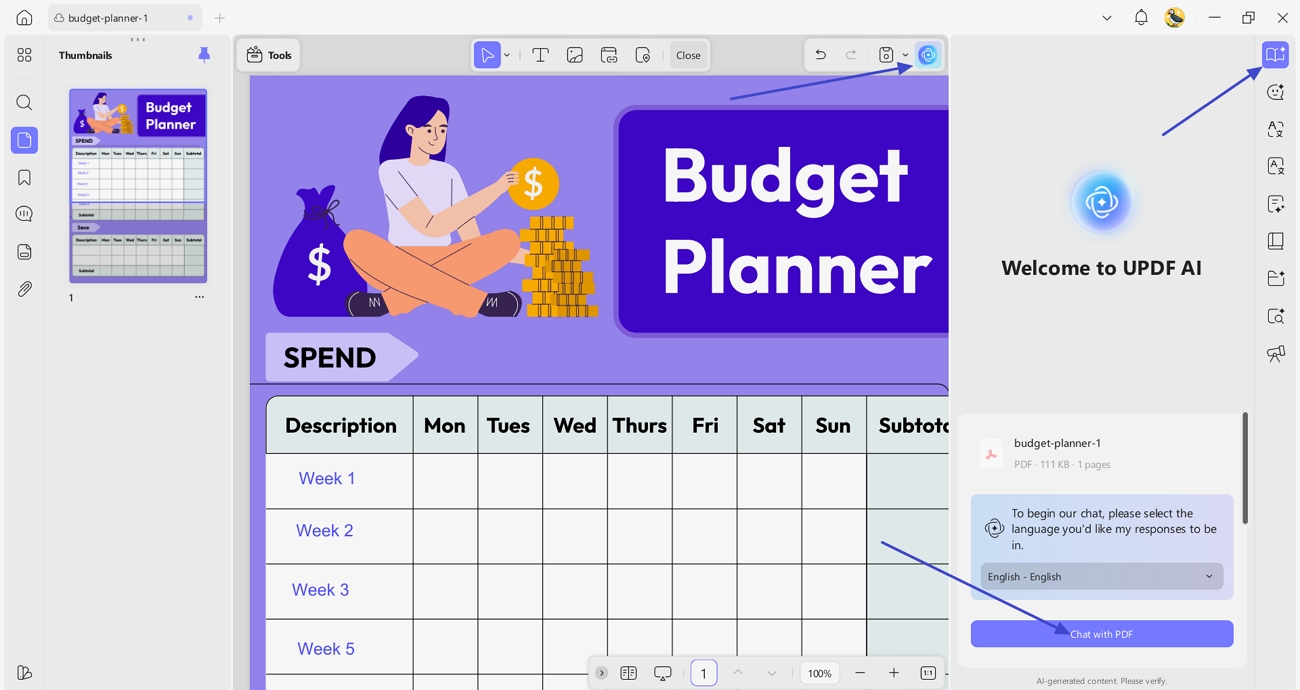
Next, press the "UPDF AI" icon and click the "Ask PDF" option. Afterwards, press the "Chat with PDF" option to begin chatting with PDF.
Step 3. Ask UPDF to Create a Budget Plan
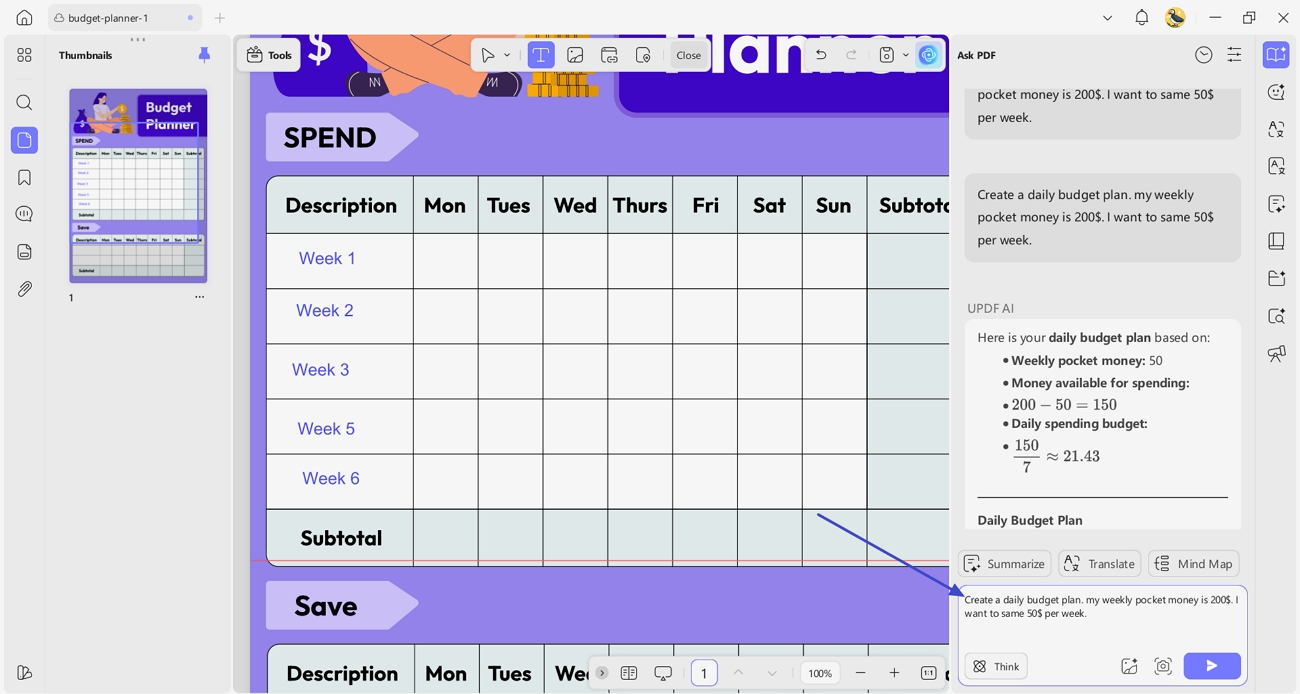
Once you access that chat, press the ask the UPDF AI to create a budget plan by giving the total budget and saving expectations.
Step 4. Insert Generated Content into UPDF
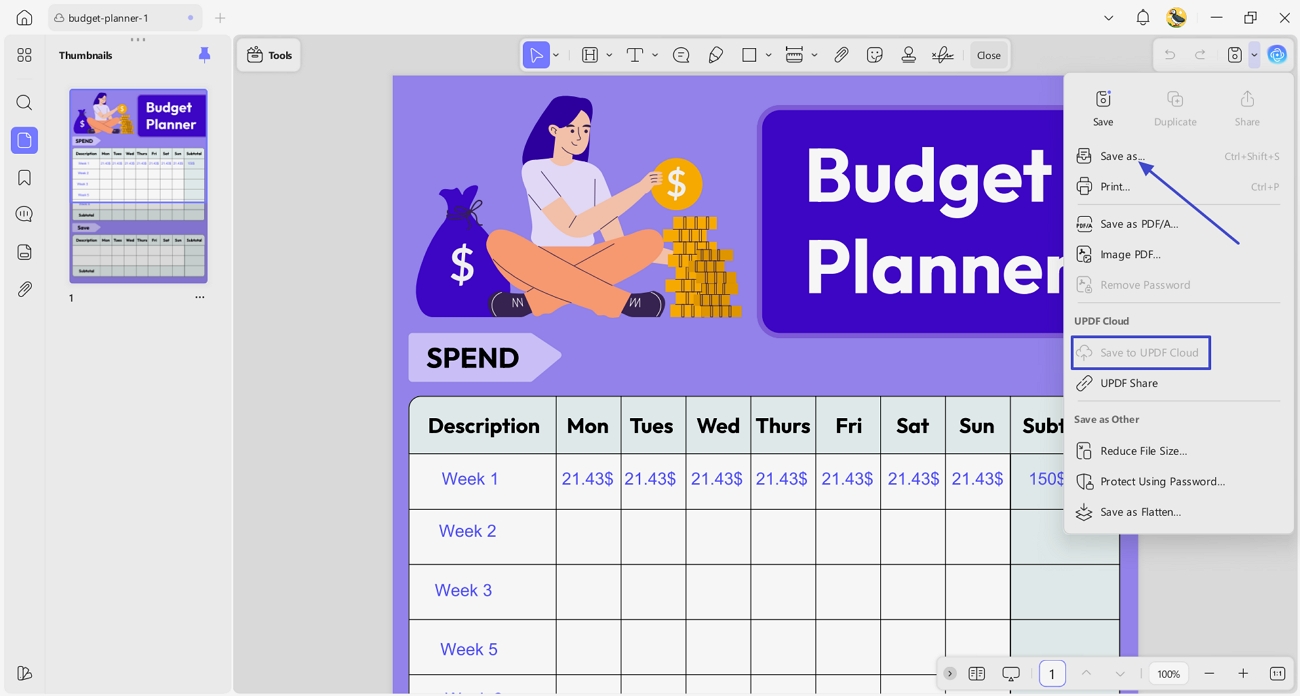
Afterwards, copy the generated values and paste them into the template using the PDF editing interface. Next, press the "Save As" option to save the PDF and click the "Save to Cloud" button to save the template to UPDF Cloud.
Key Features for Budget Planning
- PDF Editing: Fully edit every section of your budget templates, including text, numbers, and layout.
- AI-Based Suggestions: Get AI assistance to allocate income, expenses, and savings in a logical way for a realistic budget plan.
- Editable PDF Templates: Use ready-made budget templates and customize them according to your financial needs.
Pros:
- Helps users create realistic budgets without manual calculations efficiently.
- Saves time by easily combining AI guidance with editable templates.
- Improves financial organization and planning accuracy for better decisions.
Cons:
- Vague text prompts can produce unpredictable results in AI tools
2. MoneyHelper Budget Planner
MoneyHelper Budget Planner empowers users to confidently master their finances and take full control of their finances. It guides you step by step through setting realistic spending goals to help you grasp key financial priorities and make smart choices. This budget planner is ideal for beginners seeking straightforward advice with no complicated calculations or advanced features needed.
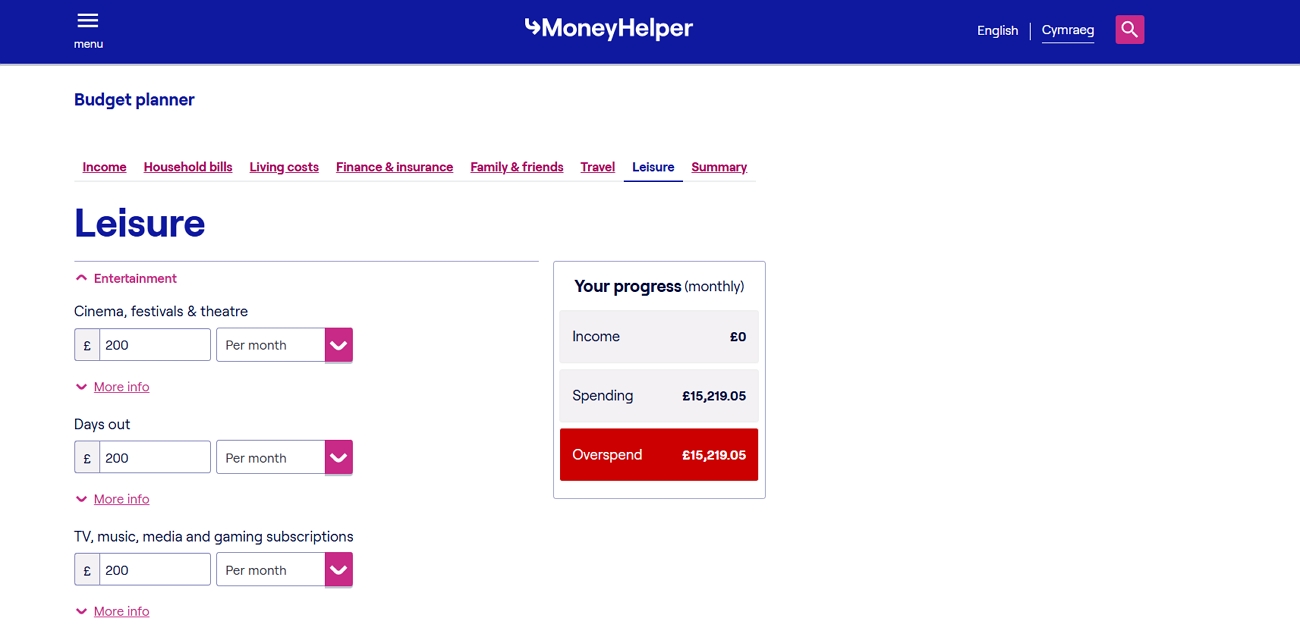
How It Works
- Start by entering all sources of income, such as wages and other earnings.
- Add monthly bills, regular payments, and occasional costs to get a full picture of spending.
- The planner calculates totals, highlights differences between planned and actual spending, and shows remaining money.
- Adjust spending habits, plan savings, and create realistic budgets based on the results.
Pros:
- Provides clear visual breakdowns that highlight spending patterns quickly.
- Helps users prioritize essential expenses over non-essential discretionary purchases.
Cons:
- Lacks automation for importing bank transactions from multiple accounts.
- Limited flexibility for unconventional or irregular financial situations.
Best For: Beginners who want guidance rather than full editing flexibility.
3. Canva Budget Templates
Canva offers templates that are designed to help users organize personal finances visually. The templates enable you to make trackers and planners custom-made with no advanced design knowledge required. Budgets can be customized to meet personal financial goals using easily accessible editing tools.
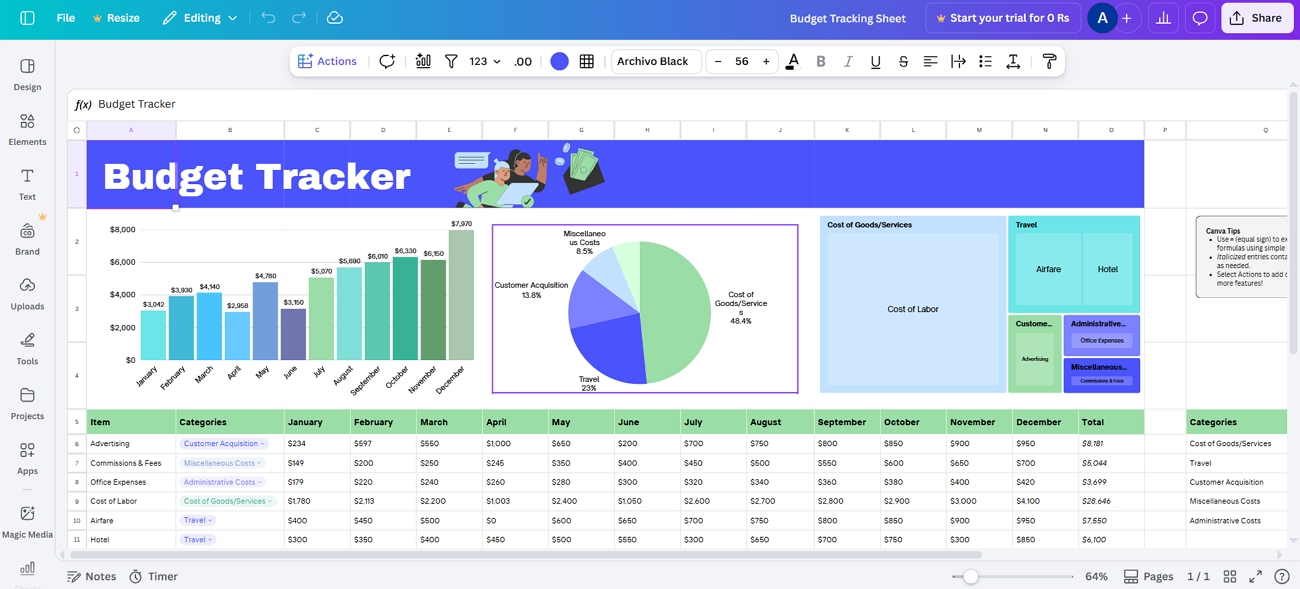
How It Works
- Select a budget planner template and open it in your Canva account.
- Replace placeholder text with your income and savings information.
- Customize colors and layout, then download your finished design.
Pros:
- Visually rich templates help users understand budget data at a glance.
- Design flexibility allows personalized layouts without needing professional graphic design experience.
Cons:
- Lacks automated calculations, requiring users to manually update numbers regularly.
- Not ideal for long-term budgeting due to repeated manual edits.
Best For: This tool is best for users who prefer visually designed budgets and simple manual tracking.
4. Schwab Monthly Budget Planner
The Schwab Moneywise Monthly Budget Planner is designed to help you organize your income and savings in a single interface. It tracks your monthly spending so that you can understand the patterns of spending in order to save more money towards your goals. This planner also supports informed financial decision‑making by encouraging you to regularly adjust your budget.
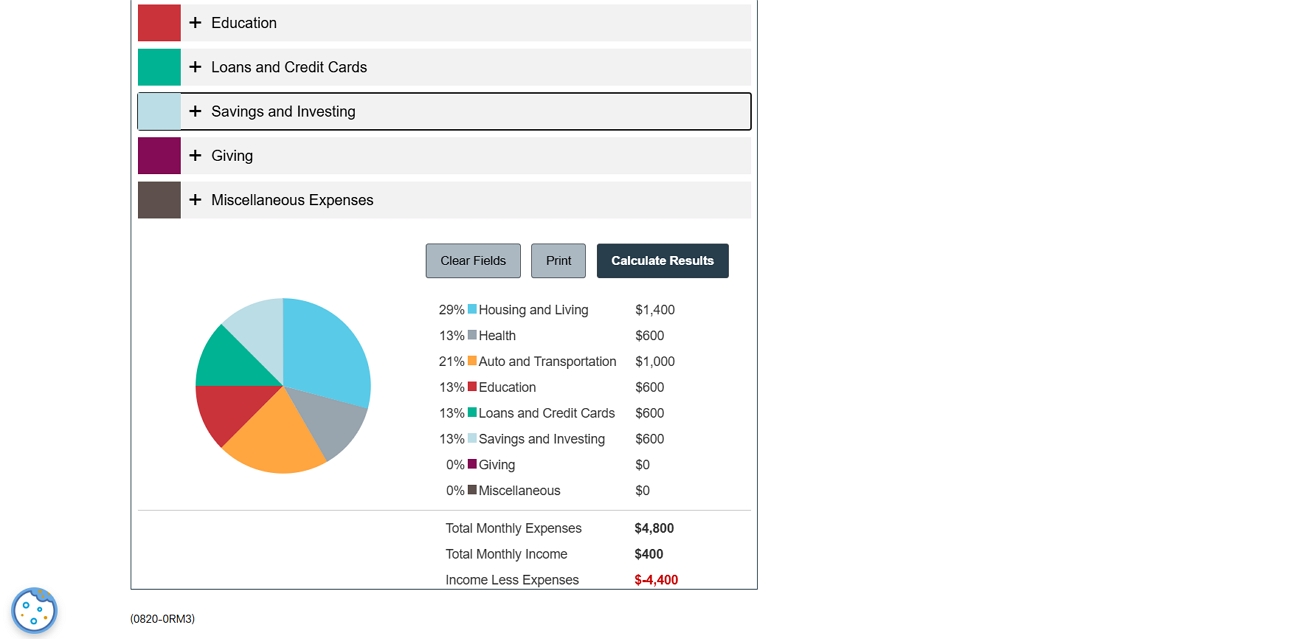
How It Works
- Enter your monthly income to calculate your total available funds.
- List all your expenses in categories like housing and food.
- It compares them with your income and shows how much you have left.
Pros:
- Detailed category breakdown highlights overspending you might otherwise overlook.
- Clear income‑vs‑expense summary makes cash‑flow gaps immediately visible.
Cons:
- Static layout offers little customization for irregular expenses.
- No built‑in bank syncing, unlike many modern budgeting apps.
Best For: This planner is best for beginners and disciplined savers who prefer a simple spreadsheet‑style approach to tracking expenses.
Part 3. Bonus: Other UPDF Features Useful for Budget Planning
A great budget planner shouldn't just sit on your hard drive; it should evolve with your financial life. Beyond basic data entry, UPDF offers several "quality-of-life" features that make long-term financial tracking much less of a chore.
Windows • macOS • iOS • Android 100% secure
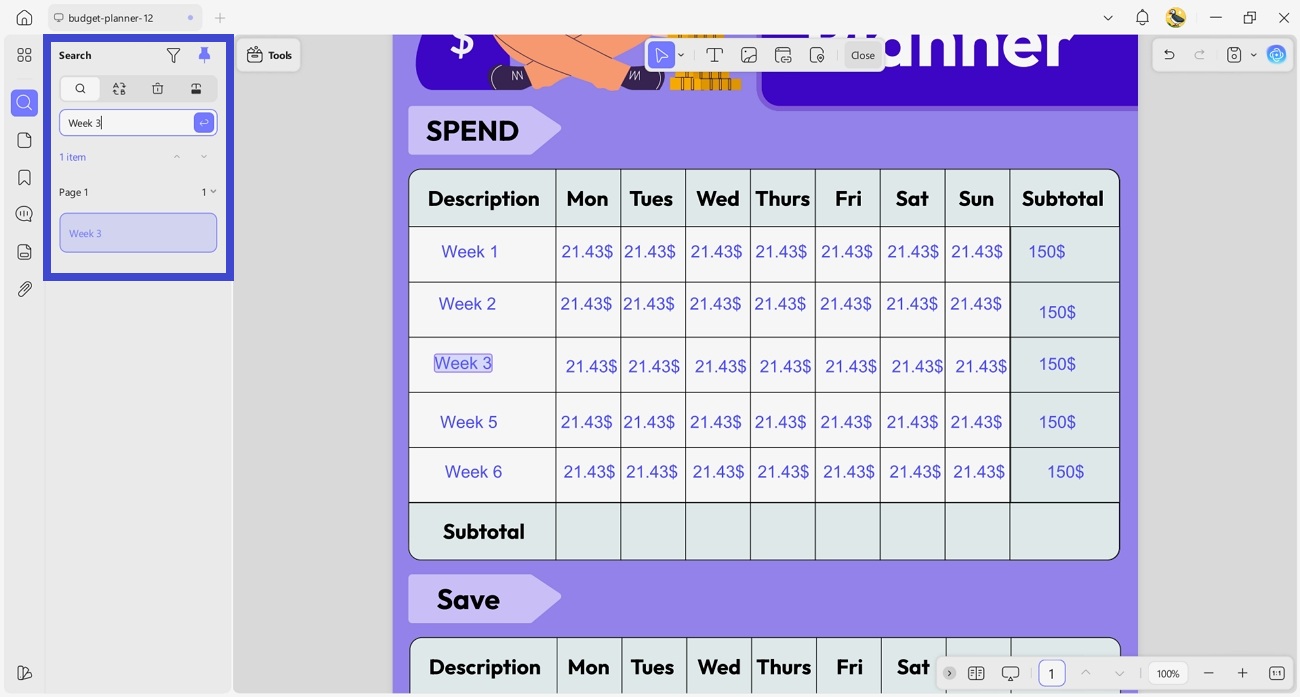
1. Instant Search for Specific Expenses: As budgets grow over time, finding specific expense items can be difficult. With the PDF Search tool, you can instantly locate any entry—like "Netflix" or "Rent"—saving you from manual hunting and making year-end reviews a breeze.
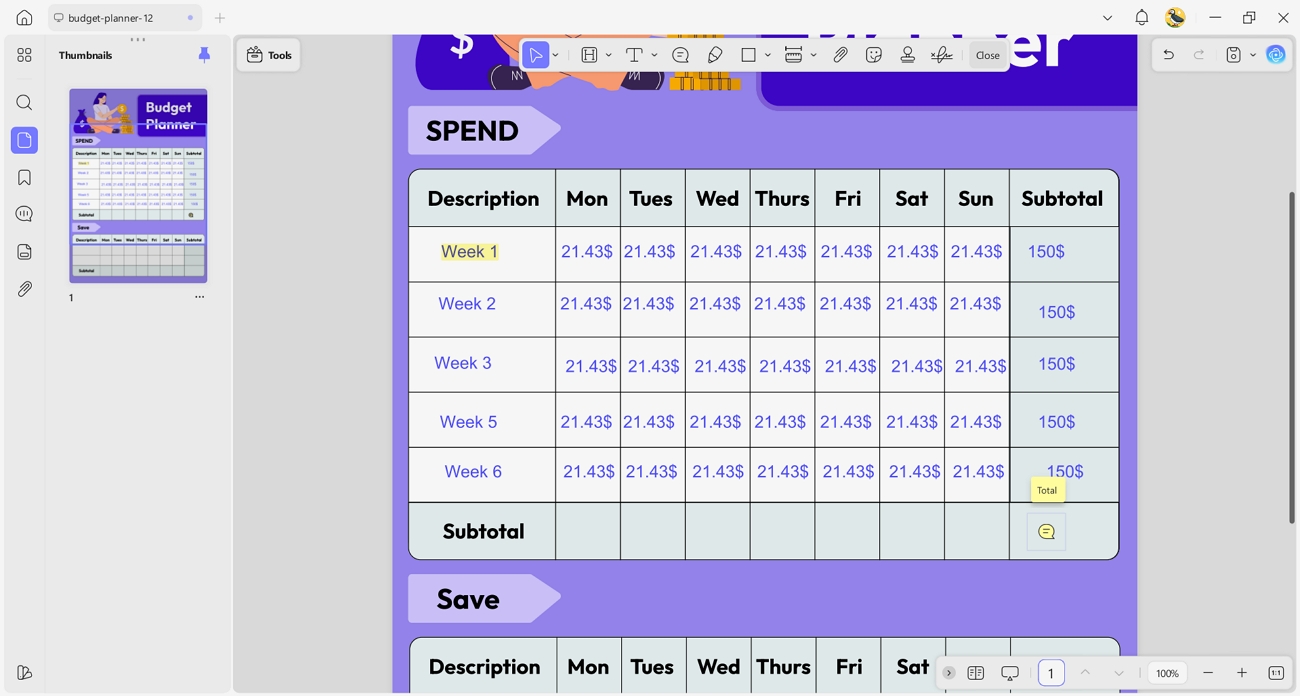
2. Strategic Highlighting and Contextual Notes: Highlighting allows users to mark overspending areas or important cost categories that need attention. Comments let users add context or feedback to support better decisions during future budget reviews.
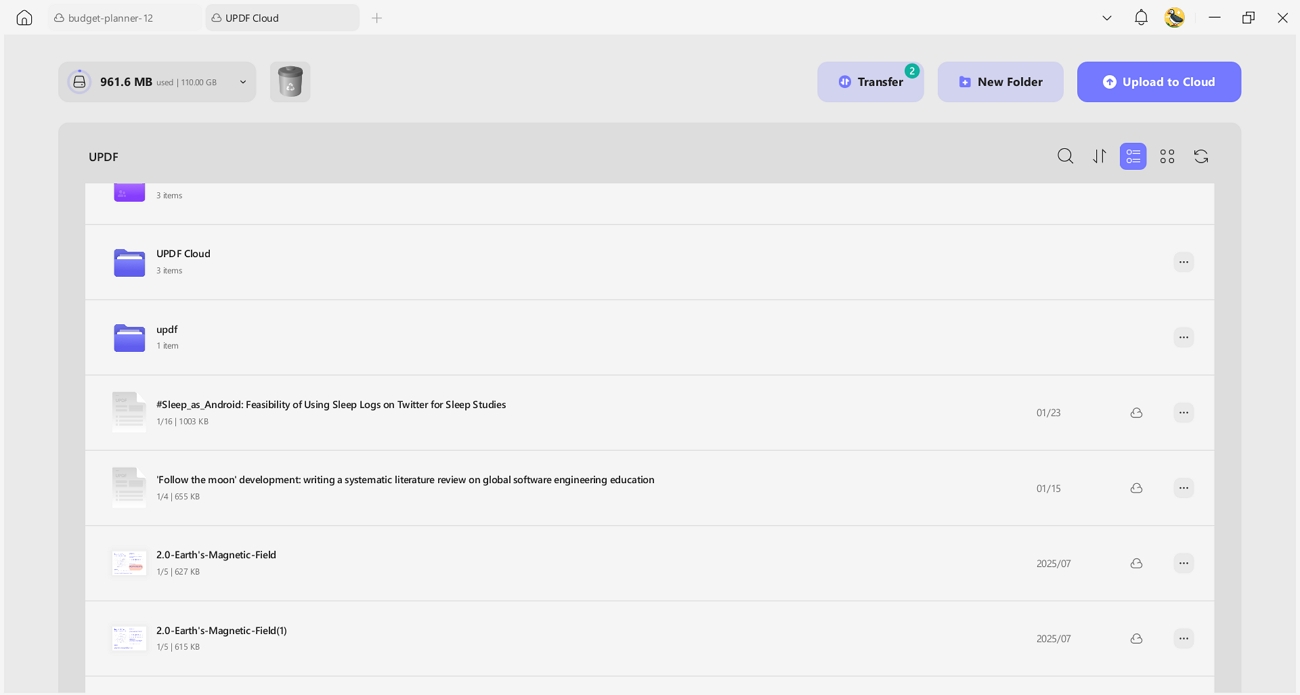
3. Seamless Sync for "On-the-Go" Budgeting: Budget planning often happens on multiple devices throughout the day. Cloud sync lets users review and update their budget planner across devices without losing progress.
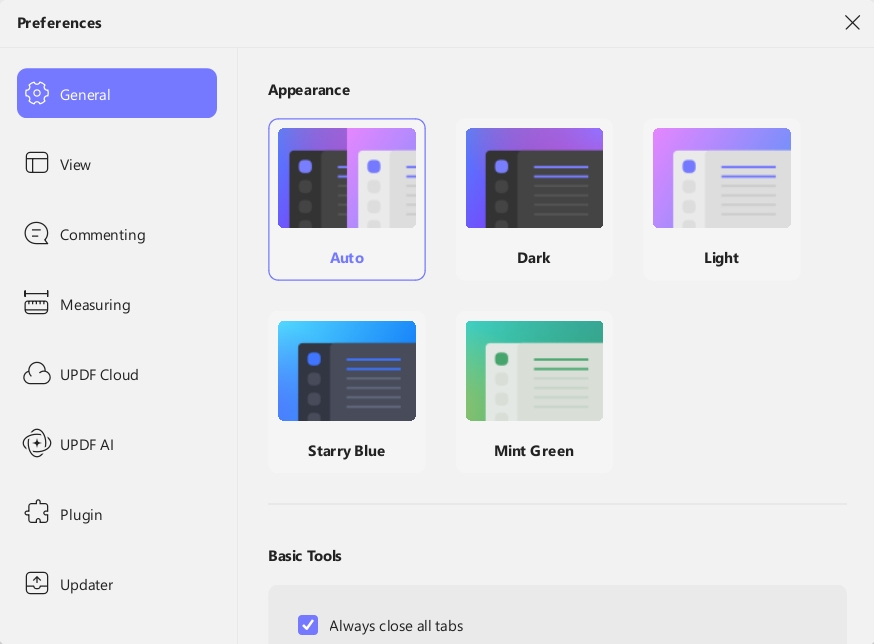
4. Eye-Friendly Dark Mode for Late-Night Planning: Some users prefer reviewing financial data at night or during long sessions. Dark mode provides a more comfortable viewing experience, aligning with personal preferences, and encourages regular budget checks.
Discover how these features can simplify your budgeting process by downloading UPDF for a free trial today.
Windows • macOS • iOS • Android 100% secure
You can also watch the UPDF introduction video to see how the tool works in practice.
Part 4. FAQs About the Budget Plan
Q1. What is the best budget planner for beginners?
From all options, UPDF is the best choice for beginners because it offers guided PDF templates. It provides AI assistance to help create realistic budgets without overwhelming complexity.
Q2. Are budget planner templates free?
Many budget planner templates, including those in UPDF, are available for free download online. Some premium templates may require payment, but free options cover most basic budgeting needs.
Q3. Can AI help with budget planning?
Yes, AI can analyze income and expenses to suggest logical budgeting strategies. It can also help allocate savings, highlight overspending areas, and create realistic financial plans.
Q4. Can I customize a budget planner PDF?
PDF templates created with UPDF can be fully customized, allowing users to adjust text, layout, and design.
Q5. Is UPDF good for personal budgeting?
Yes, UPDF works well for personal budgeting by combining templates, editing, and AI guidance in an efficient way.
Conclusion
In summary, the right budget planner helps users organize income and plan savings. This guide compared four top tools and highlighted their main features to help readers make informed decisions. For those seeking customization and AI-backed guidance, UPDF offers a powerful solution to simplify budgeting and improve financial control.








 Lizzy Lozano
 Delia Meyer
 Enola Davis