 UPDF
UPDF
 UPDF for Windows
 UPDF for Mac
 UPDF for iPhone/iPad
 UPDF for Android
 Nomostar
 UPDF AI Online
 UPDF Sign
 IvyCraft
 Edit PDF
 Annotate PDF
 Create PDF
 PDF Form
 Edit links
 Convert PDF
 OCR
OCR PDF to Word
 PDF to Image
 PDF to Excel
 Organize PDF
 Merge PDF
 Split PDF
 Crop PDF
 Rotate PDF
 Protect PDF
 Sign PDF
 Redact PDF
 Sanitize PDF
 Remove Security
 Read PDF
 UPDF Cloud
 Compress PDF
 Print PDF
 Batch Process
 About UPDF AI
 UPDF AI Solutions
 AI User Guide
 FAQ about UPDF AI
 Summarize PDF
 Translate PDF
 Chat with PDF
 Chat with AI
 Chat with image
 PDF to Mind Map
 Explain PDF
 PDF AI Tools
 Image AI Tools
 AI Chat Tools
 AI Writing Tools
 AI Study Tools
 AI Working Tools
 Other AI Tools
 AI Bookmark Generation
 AI Bookmark Summary
 AI Watermark Generation
 AI Background Generation
 AI Sticker Generation
 AI Stamp Generation
 AI Editing Suite
 UPDF Copilot
 AI Page Management
 AI Semantic Search
 PDF to Word
 PDF to Excel
 PDF to PowerPoint
 Enterprise Solution
 Enterprise Sign
 Enterprise AI
 Enterprise Plan
 Enterprise User Guide
 Enterprise Webinar
 IT
IT Education
 Construction
 Financial Service
 Healthcare
 Insurance
 Legal
Legal Manufacturing
 Government
 Researchers & PhDs
 Solopreneurs & Freelancers
 Lawyers & Legal Professionals
 Real Estate Agents & Brokers
 Education Solution
 Customer Stories
 User Guide
 UPDF Tricks
 FAQs
FAQs UPDF Reviews
 Download Center
 Blog
Blog Newsroom
 Tech Spec
 Updates
 UPDF vs. Adobe Acrobat
 UPDF vs. Foxit
 UPDF vs. PDF Expert

Paying full price for a PDF editor when you only need a few essential features can feel unnecessary. PDF-XChange Editor is a well-known PDF tool with strong editing, annotation, and conversion capabilities, which is why many users actively look for promo codes or discounts before purchasing.
This article walks you through where to find valid PDF-XChange promo codes and what to do when official discounts are limited. If you’re comparing alternatives with more flexible pricing, UPDF is worth considering. It offers a modern interface, powerful editing tools, and more affordable plans for everyday PDF tasks.
You can use an UPDF coupon to get 10% off any plan on the pricing page. If you want to know exactly how to apply the coupon and where it works, check out this step-by-step guide before purchasing.
With the coupon applied, you can get a lifetime PDF editor for as low as USD $71.99, making UPDF a cost-effective option when PDF-XChange discounts aren’t available.
Copy this UPDF coupon code (ENARTICLE) and click the image below to buy a lifetime plan.

Part 1. Does PDF-XChange Really Offer Promo Codes?
PDF-XChange is a well-known PDF editor, but when it comes to promo codes, availability is limited. Unlike some software brands that run frequent public discounts, PDF-XChange does not consistently offer long-term or widely advertised promo codes. Most users searching for a "PDF-XChange Editor promo code" discover that savings depend more on timing and purchase type than on permanent coupon offers.
How Discounts Usually Work
- No Ongoing Public Promo Codes: PDF-XChange rarely provides reusable or evergreen coupon codes for individual users.
- Occasional Official Sales: Limited-time discounts may appear during special events, holidays, or version releases.
- Volume Licensing Discounts: Businesses can save through enterprise user packs, such as 3, 5, 10, or even 25-user licenses.
- Higher Upfront Cost for Individuals: Solo users often pay full price unless a sale is active.

Because of these limitations, many users explore alternatives that offer clearer pricing and long-term value. UPDF is a cost-effective option worth considering, especially if you prefer a perpetual PDF editor with lifetime free updates. By using the coupon code ENARTICLE, you can unlock additional savings and avoid waiting for uncertain promotions. Copy the coupon code and click the image below to use it!

Part 2. Third-Party Websites That List PDF-XChange Promo Codes
Many coupon and deal platforms partner with software brands or community coupon hunters to compile and share promo codes, and PDF XChange is no exception. These sites scour the web for limited-time offers, email-subscriber deals, and seasonal discounts you might not otherwise notice. Here are a few third-party websites that provide PDF XChange Promo Codes:
1. WorthePenny
WorthePenny is one of the platforms that provides PDF-XChange promo code for up to 60% off in total. You can copy the code from the site and paste it into your order summary before checking out. The single-user plan for PDF-XChange is $62, which, after the 17% discount, becomes $51.46. Let us learn how you can apply code using this website:
Step 1. Open the PDF XChange editor plus promo code website on your browser and browse through the different discount codes available for PDF XChange. Once you have chosen the coupon, click on the "Show Offer" button.
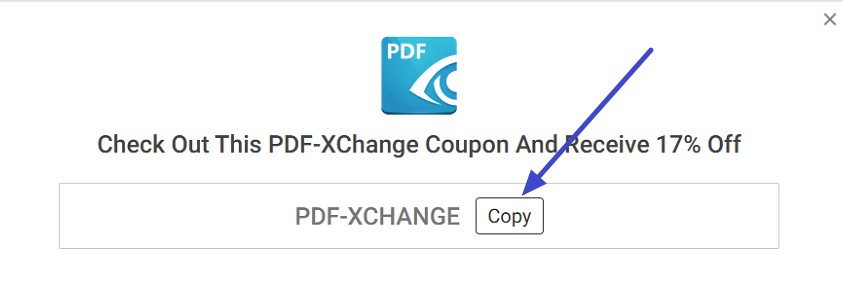
Step 2. The code will be displayed in the following interface; select the "Copy" option to copy it.
Step 3. Now, head to the PDF XChange website and select your plan, press the "Add To Cart" button to proceed with the purchase.
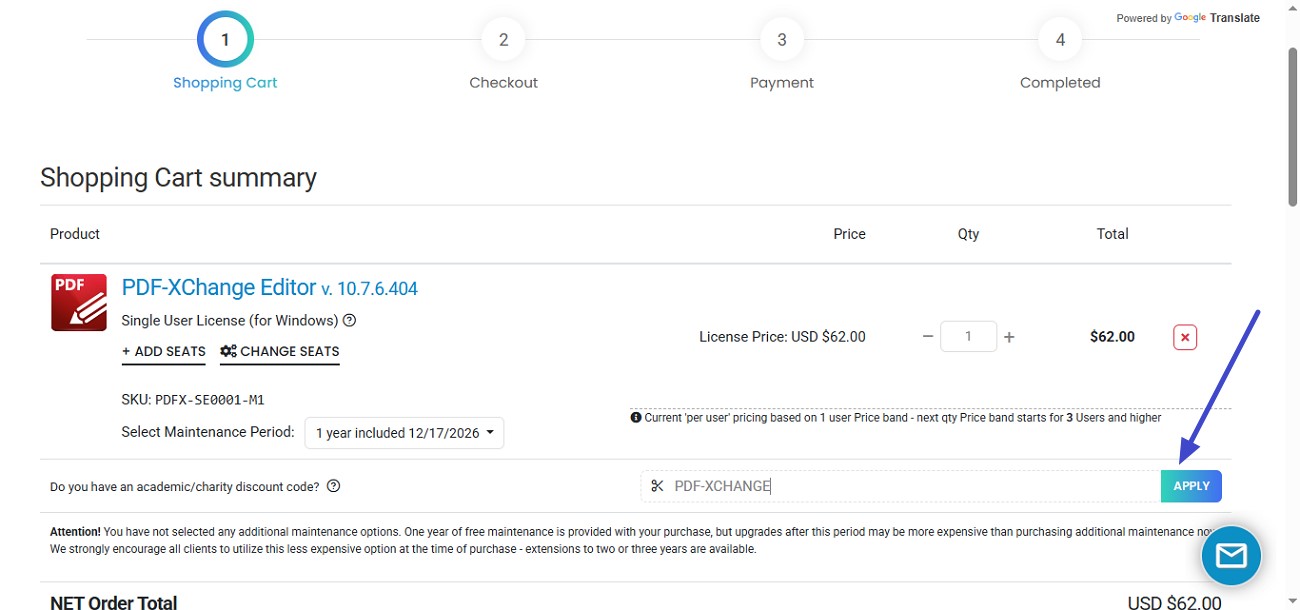
Step 4. Paste the code in the "Discount Code" field in the following interface and press "Apply." If the code is successfully applied, proceed with the purchase, otherwise try other options to get a valid code.
1. Valuecom
This is another site that offers discount codes for different tools. It provides the list of all the applicable codes along with their details and expiry dates. To learn how to use this discount website for the PDF XChange promo code, read the steps mentioned next:
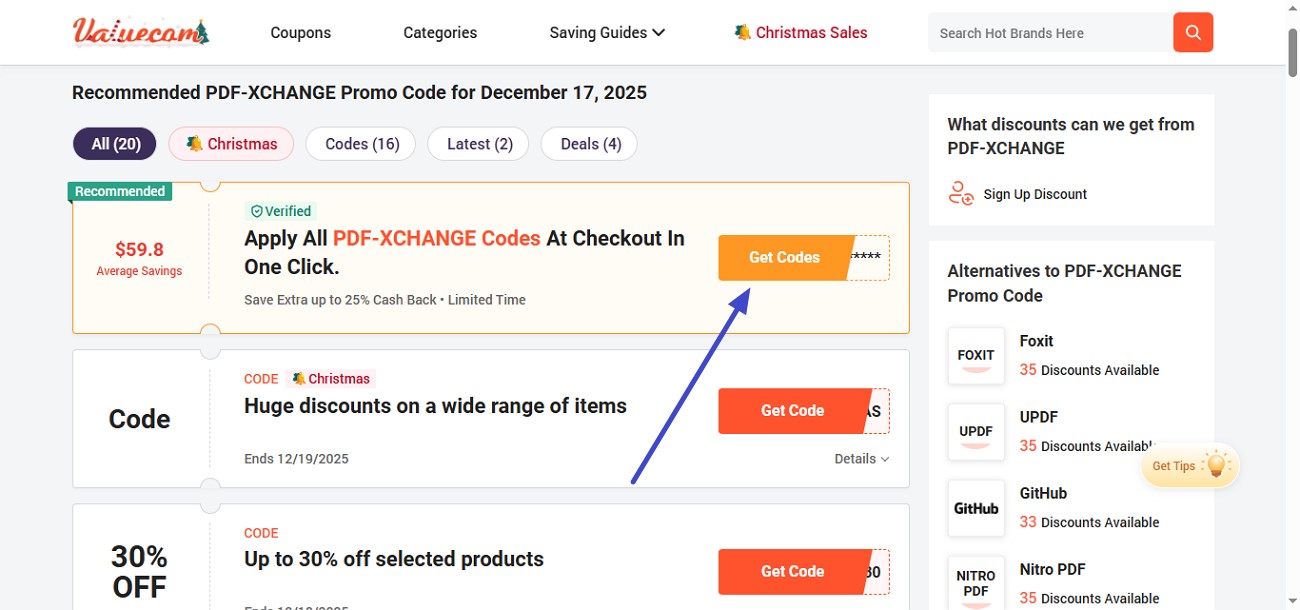
Step 1. Head to the website and choose the promo with the maximum discount. Press the "Get Codes" option to reveal the codes.
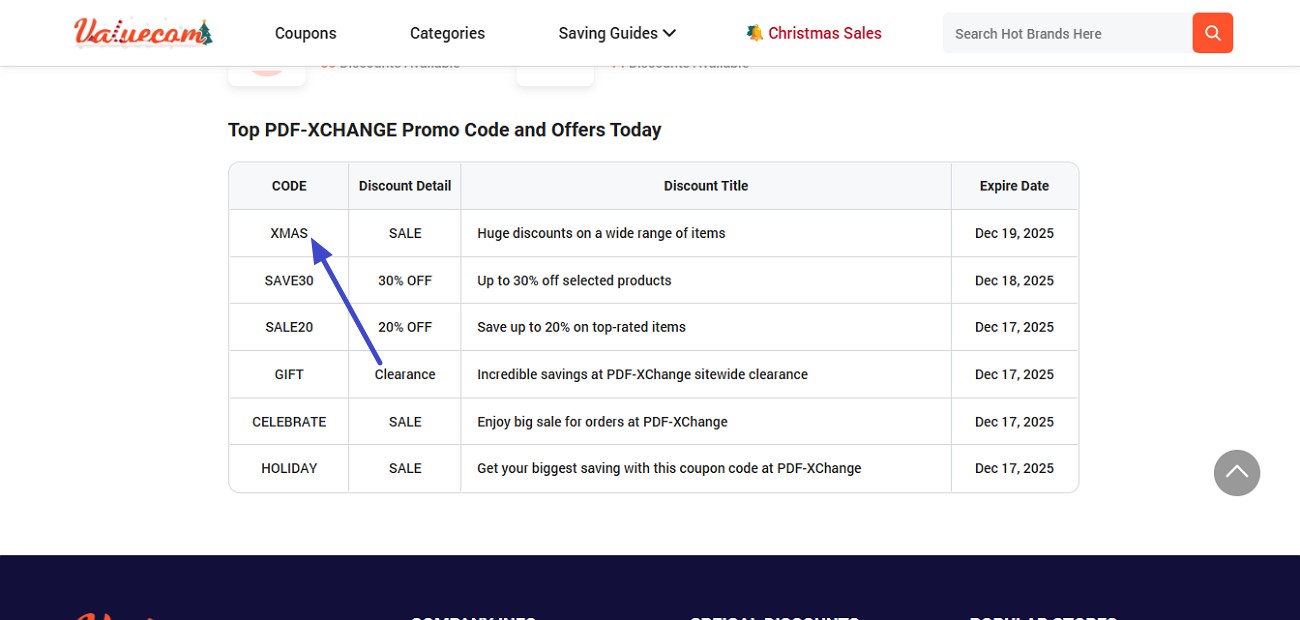
Step 2. From the table in the following interface, choose the code of your choice and copy it to the clipboard.
Step 3. Visit the PDF XChange website, choose a plan, and paste the code in the "Discount Code" field. Press the "Apply" button to apply the added promotion code at checkout.
1. Promopro
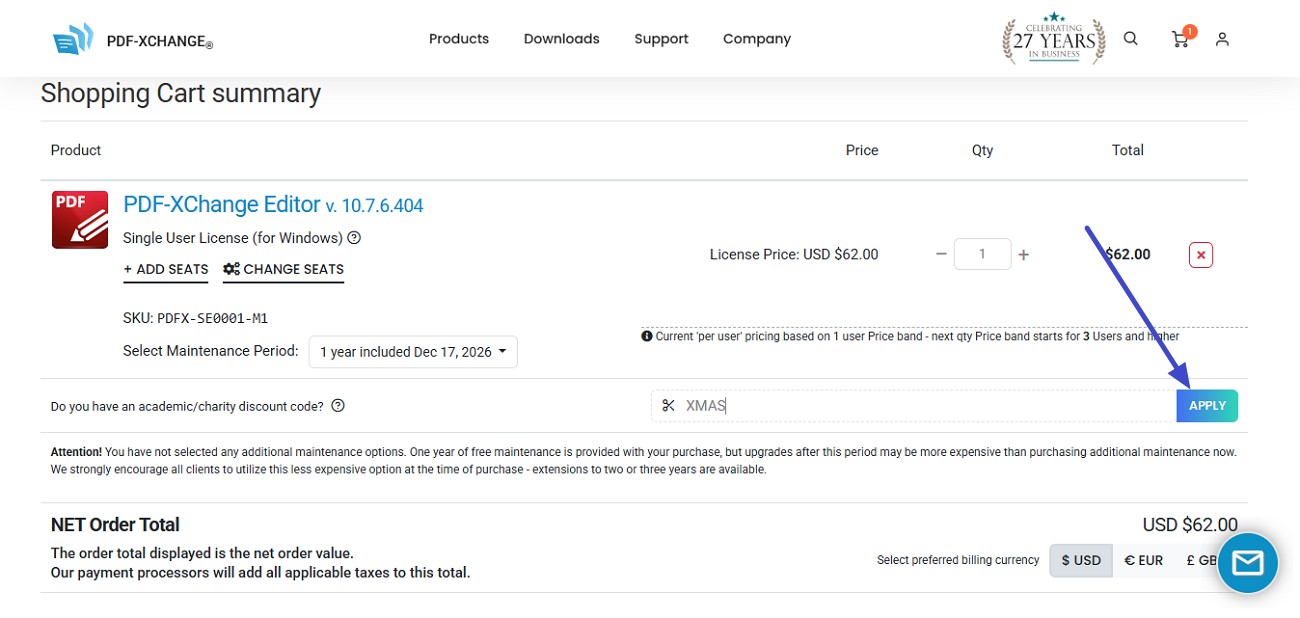
Promopro is a similar website that allows users to buy tools at discounted prices. You get various vouchers on this site which you can apply to checkout. Promopro offers up to 30% discounts, which means if you buy a perpetual license of $62, it will cost you $43.2 after applying the code. If you do not know how to use this website, read the steps provided below:
Step 1. After accessing the PDF XChange editor promo code website, choose the offer and press the "Get Code" button.
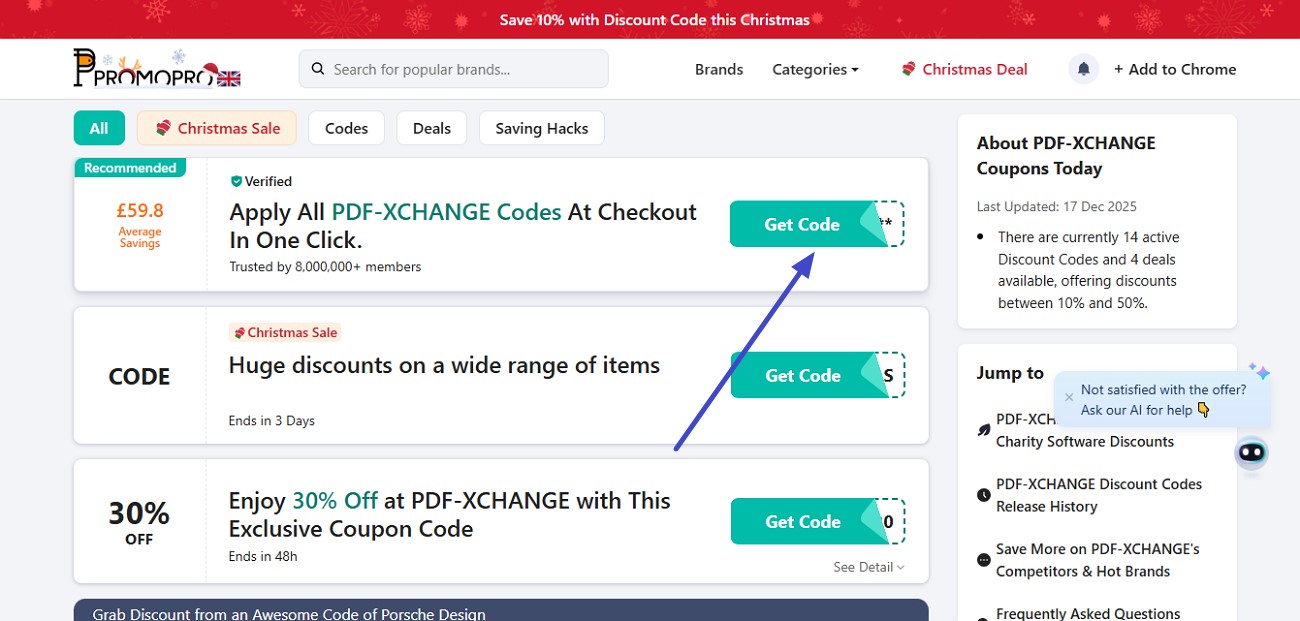
Step 2. Choose the relevant code from the list and copy it to the clipboard by selecting it.
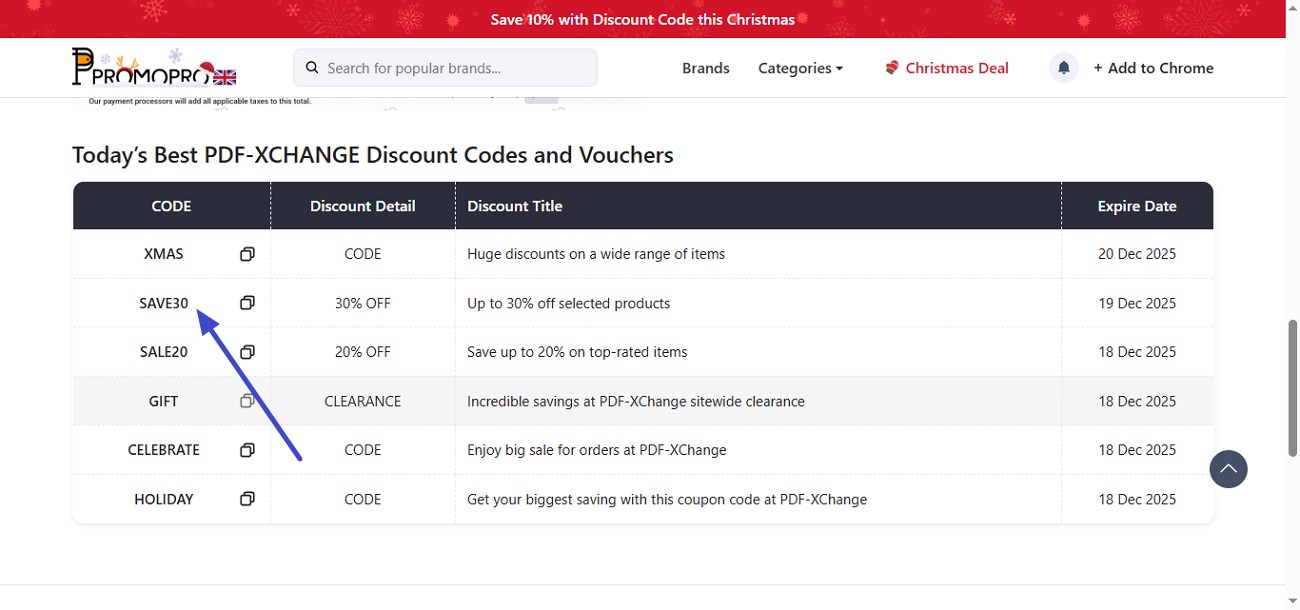
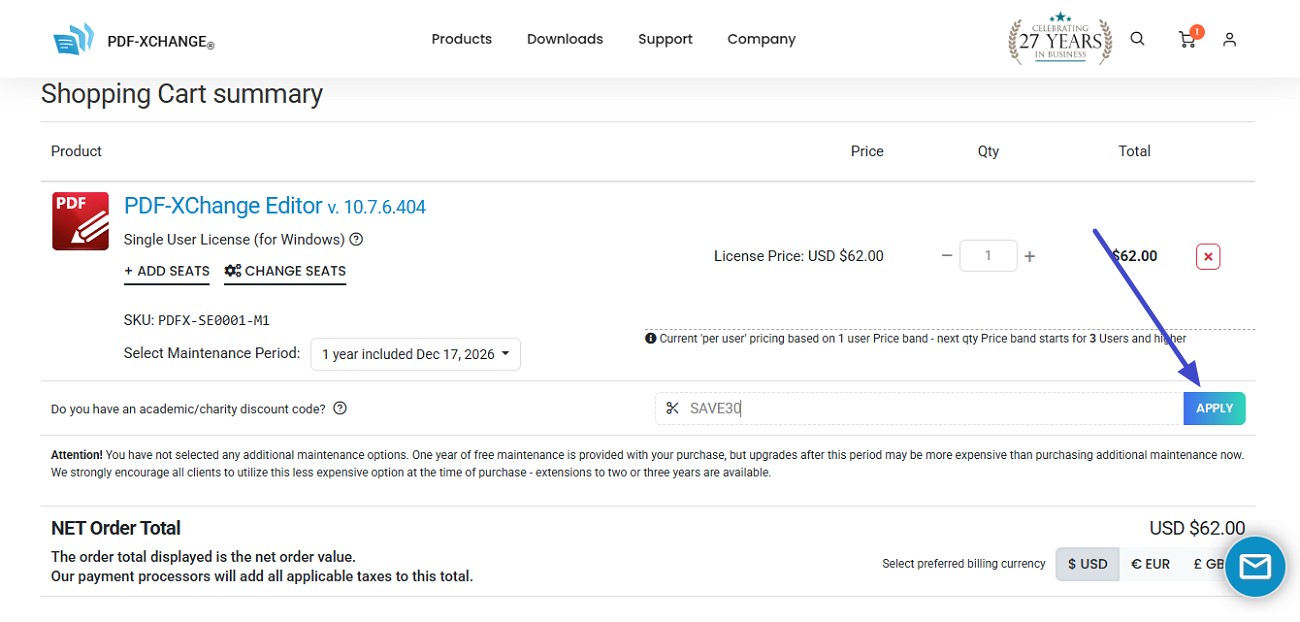
Step 3. Now choose the plan from the PDF XChange website and apply the code using the "Apply" button. Follow the instructions to make the purchase once the code is applied.
Important Disclaimer
Not all listed promo codes are guaranteed to work; some may be outdated. A few codes could have expired or be region-limited. You may need to try multiple codes before finding one that applies successfully.
Part 3. PDF-XChange Pricing Overview
Personal Licenses
| Plan | Pricing |
| Single User | $62.00/year |
Enterprise Licenses:
For enterprise users, volume licensing is available in tiered packs such as 3, 5, 10, or 25 user licenses (and beyond), allowing organizations to purchase multiple seats at once. While this tiered structure does help businesses save compared to buying one license at a time, PDF-XChange currently does not offer a dedicated admin console for centralized license management, meaning IT teams may need to handle installations and key distribution manually.
| Plans | Pricing |
| 3 Users Pack | $168/year |
| 5 Users Pack | $277/year |
| 10 Users Pack | $534/year |
PDF-XChange delivers flexible licensing options for both individual users and larger teams, but it lacks advanced enterprise-level management features that some organizations may expect for large-scale deployments. This structure is cost-effective but may require more hands-on administration for bigger groups.
Part 4. When Promo Codes Fail, UPDF Delivers Consistent Value
If you do not want to rely on the PDF XChange promo code and are looking for a reliable, all-in-one PDF editor, UPDF is a great choice. It is a modern, all-in-one PDF editor designed for users who want powerful features without complicated pricing or unreliable discounts. The tool covers everything from editing text and images to annotating, converting, and compressing.
Windows • macOS • iOS • Android 100% secure
Unlike many traditional PDF tools, UPDF focuses on simplicity, cross-platform support, and long-term value. One license works seamlessly across Windows, macOS, iOS, and Android, making it ideal for users who switch between devices. With a perpetual license option and lifetime free updates, UPDF appeals to individuals and teams who prefer predictable costs and a smoother PDF workflow.
UPDF Promo Code Details
- Code: ENARTICLE
- Discount: 10% off your purchase
- Applies to: All UPDF products and plans
Use the UPDF Promo Code Now >>
How to Use the UPDF Promo Code
As discussed, UPDF offers extremely amazing discounts to its users. Let us now have a look at the steps for using a promo code for our purchase.
Step 1. Access the Buying Page
To make your purchase, acquire UPDF on your web browser and access its purchase page. From here, locate the "Buy Now" button and click on it.
Step 2. Select Plan and Buy
In the following interface, choose the plan that best suits your needs and press the "Buy Now" button located at the bottom.
Step 3. Apply Promo Code
Next, review the Order Summary and click on the "I have A Coupon" option located at the bottom. Enter the code ENARTICLE in the designated field and hit the "Apply" button. Follow further instructions on the screen to successfully complete your purchase once the promo code is applied.
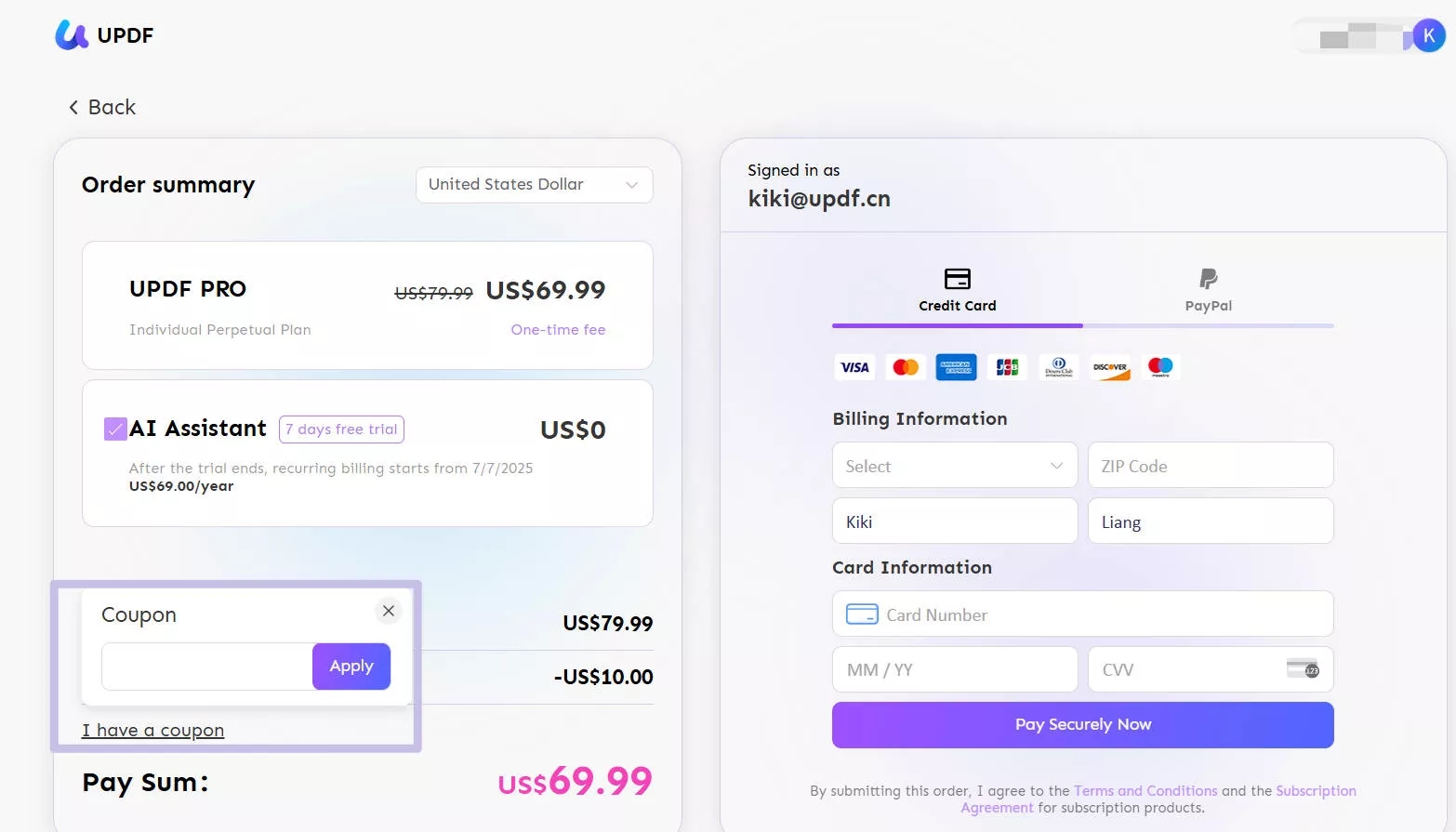
For step-by-step visual help, see the UPDF coupon guide, which walks through entering and applying promo codes at checkout.
Part 5. PDF-XChange vs. UPDF: Which Delivers Better Value for Your Money?
Price alone doesn't always tell the full story. While a PDF-XChange promo code may appear competitive when a third-party promo code works, UPDF offers a clearer, more predictable pricing model with a guaranteed discount. Below is a side-by-side comparison to help you quickly see where each tool stands in terms of cost and overall value:
| Base Price | After Discount | |
| UPDF Pro Lifetime | $69.99 | $62.99 (confirm) |
| PDF XChange 1 Year | $62.00 | $40 - $50 (not guaranteed) |
The decision becomes easier, UPDF delivers stronger cost-performance with a simpler checkout process, no code testing, and long-term value through lifetime updates. Let us now have a look at the comparison between the features of both tools:
| Features | PDF-XChange | UPDF |
| PDF editing & annotation | ✓ | ✓ |
| OCR | ✓ | ✓ |
| PDF conversion & compression | ✓ | ✓ |
| Cross-platform support (Win/Mac/iOS/Android) | ✕ | ✓ |
| Admin console | ✕ | ✓ |
| Team & enterprise usability | Limited | ✓ |
For a deeper breakdown of features, pricing logic, and real-world performance, you can check this detailed PDF-XChange vs UPDF comparison to see how both tools stack up side by side.
Note for Readers: The information on the comparison page is based on UPDF writers' hands-on testing with PDF-XChange Editor version Build 10.3.0.386. If you notice any inaccuracies or updates that should be reflected, please reach out to our support team at [email protected].
Conclusion
To sum it up, this article provided a detailed overview of the PDF XChange Promo Code and how you can use it. The article also highlighted the limitations of unpredictable or expired codes and why pricing clarity matters when choosing a PDF editor. For users who prefer a simpler, more reliable option, UPDF stands out with transparent pricing, a guaranteed discount, and strong cross-platform features.
Windows • macOS • iOS • Android 100% secure








 Enola Miller
 Enya Moore
 Lizzy Lozano
 Enola Davis