UPDF
UPDF
 UPDF for Windows
 UPDF for Mac
 UPDF for iPhone/iPad
 UPDF for Android
 Nomostar
 UPDF AI Online
 UPDF Sign
 IvyCraft
 Edit PDF
 Annotate PDF
 Create PDF
 PDF Form
 Edit links
 Convert PDF
 OCR
OCR PDF to Word
 PDF to Image
 PDF to Excel
 Organize PDF
 Merge PDF
 Split PDF
 Crop PDF
 Rotate PDF
 Protect PDF
 Sign PDF
 Redact PDF
 Sanitize PDF
 Remove Security
 Read PDF
 UPDF Cloud
 Compress PDF
 Print PDF
 Batch Process
 About UPDF AI
 UPDF AI Solutions
 AI User Guide
 FAQ about UPDF AI
 Summarize PDF
 Translate PDF
 Chat with PDF
 Chat with AI
 Chat with image
 PDF to Mind Map
 Explain PDF
 PDF AI Tools
 Image AI Tools
 AI Chat Tools
 AI Writing Tools
 AI Study Tools
 AI Working Tools
 Other AI Tools
 AI Bookmark Generation
 AI Bookmark Summary
 AI Watermark Generation
 AI Background Generation
 AI Sticker Generation
 AI Stamp Generation
 AI Editing Suite
 UPDF Copilot
 AI Page Management
 AI Semantic Search
 PDF to Word
 PDF to Excel
 PDF to PowerPoint
 Enterprise Solution
 Enterprise Sign
 Enterprise AI
 Enterprise Plan
 Enterprise User Guide
 Enterprise Webinar
 Banking
 Healthcare
 Insurance
 Legal
Legal Manufacturing
 Government
 Researchers & PhDs
 Solopreneurs & Freelancers
 Education Solution
 Customer Stories
 User Guide
 UPDF Tricks
 FAQs
FAQs UPDF Reviews
 Download Center
 Blog
Blog Newsroom
 Tech Spec
 Updates
 UPDF vs. Adobe Acrobat
 UPDF vs. Foxit
 UPDF vs. PDF Expert

Gauth Math, a math learning and practice app to help learners solve problems with ease and get step-by-step answers. It is suitable for students, teachers, and self-learners wanting a good tool that enhances their math skills. This app covers various subjects, has guided exercises, and enables users to monitor their progress without any problems.
However, to get quick assistance with homework documents, the UPDF AI is the #1 tool available online that can be used as a simple and effective alternative. Interested users can directly click the button below to give it a try for free. Read this guide to explore how Gauth Math works, its features, and how it makes math practice more productive.
Part 1. Key Features Of Gauth Math
Gauth Math offers a series of useful features that assist learners in solving mathematical problems without much anxiety. The platform makes the problem-solving process straightforward, hence helping learners concentrate on learning rather than spending extra time figuring out complex steps on their own.
1. Support For Multiple Subjects
The platform has a broad scope of topics, such as algebra, geometry, calculus, and statistics, among others. This makes it an appropriate tool for school students, college students, and anyone revising math.

2. Instant Solutions Via Photo Or Upload
It enables learners to take a picture of a mathematical problem, upload it on the platform, and receive the solution in real time. With this, users save a great deal of time and avoid the hassle of typing long and complex formulas or equations. However, it only supports JPG, JPEG, and PNG image formats.

3. Practice Exercises And Progress Tracking
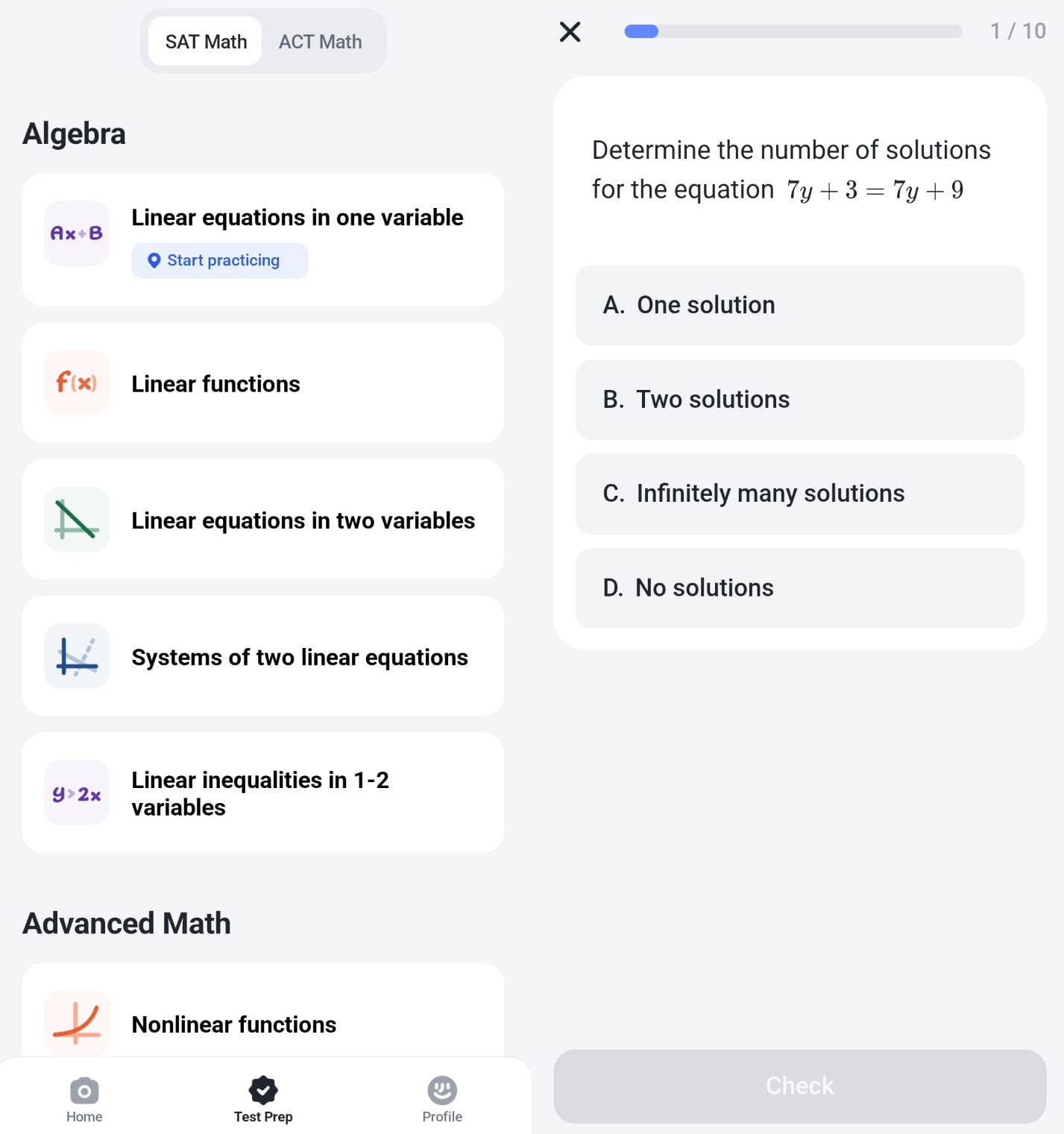
Gauth Math also has guided exercises, which help learner improve their math by practicing regularly. These exercises are tailored to suit various levels of competencies ,and therefore, learning becomes gradual and easy. The tool enables learners to view their previous attempts and monitor their improvement over a period of time. This helps them identify weak areas and improve accordingly on a regular basis.
4. AI-Powered Calculator
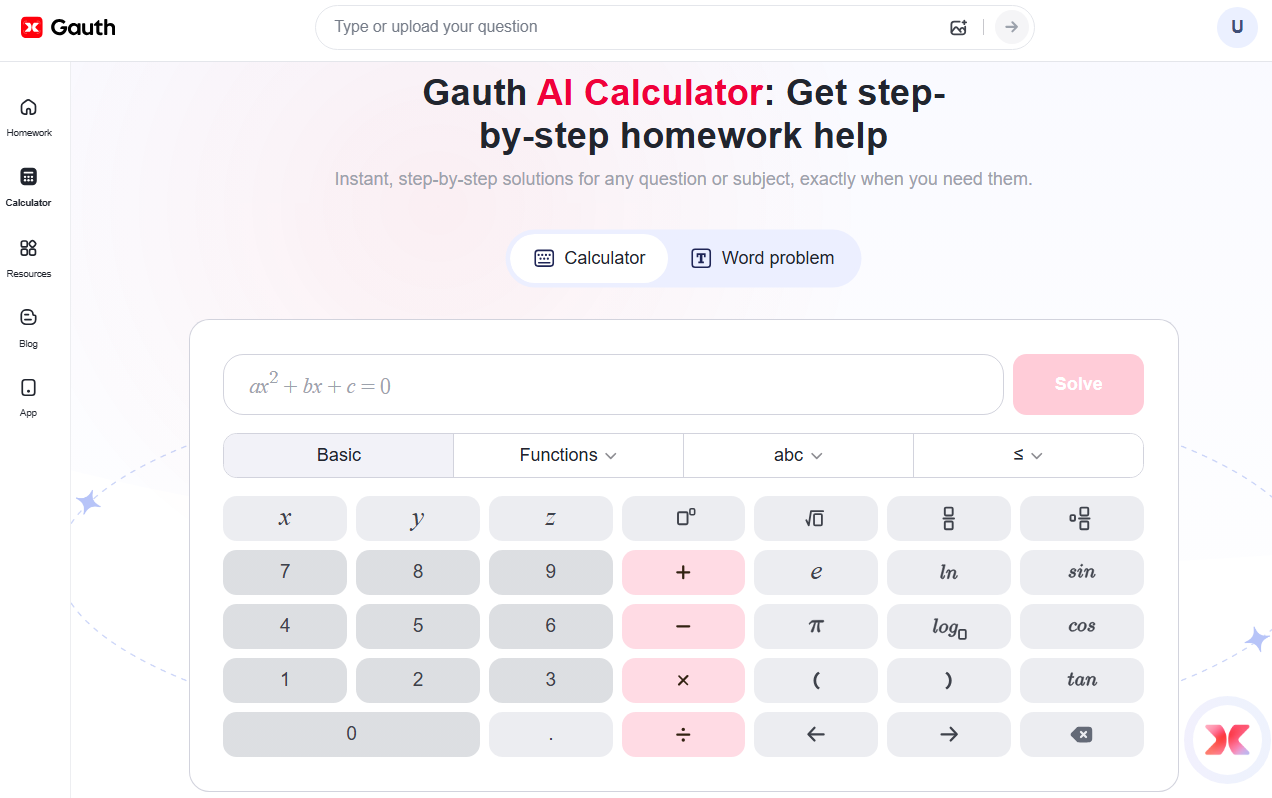
Gauth app offers a scientific calculator that easily handles integrals, complex expressions, matrices, and advanced math operations. It provides clear steps for each problem, helping users understand how the answer was actually calculated.
5. Live Tutor And Expert Support
In case a learner faces difficult problems or needs deeper clarification, they can connect with real tutors for guidance. The platform allows them to ask questions and get clear explanations in a short time.

Part 2. How Gauth Math Works
Gauth Math is designed to make learning simple for students, teachers, and anyone practicing math on their own. Starting from the moment users sign up to the part where they review their progress, the process stays smooth.
Steps to Use Gauth Math
Read a detailed explanation of how the platform works below:
1. Create an Account
Initially, download the Gauth app from the Play Store or App Store and sign up quickly. Only the basic information is required, such as an email or a phone number. However, you can also sign in using your Gmail or Facebook ID.
2. Choose Topics
Once the account is created, the home screen opens, where users can see subjects, scan and search options, and the live tutor option. Gauth Math offers multiple subjects, which include math, history, biology, and physics. This helps learners focus on the exact subject they want to strengthen their grip on. Teachers can also use it to guide students toward certain topics.

3. Practice Problems
Once a topic is selected, users can start solving problems. Gauth Math gives multiple ways to enter a question:
- Typing the question inside the AI search bar
- Uploading or scanning a picture of a math question
- Using the AI calculator for advanced expressions
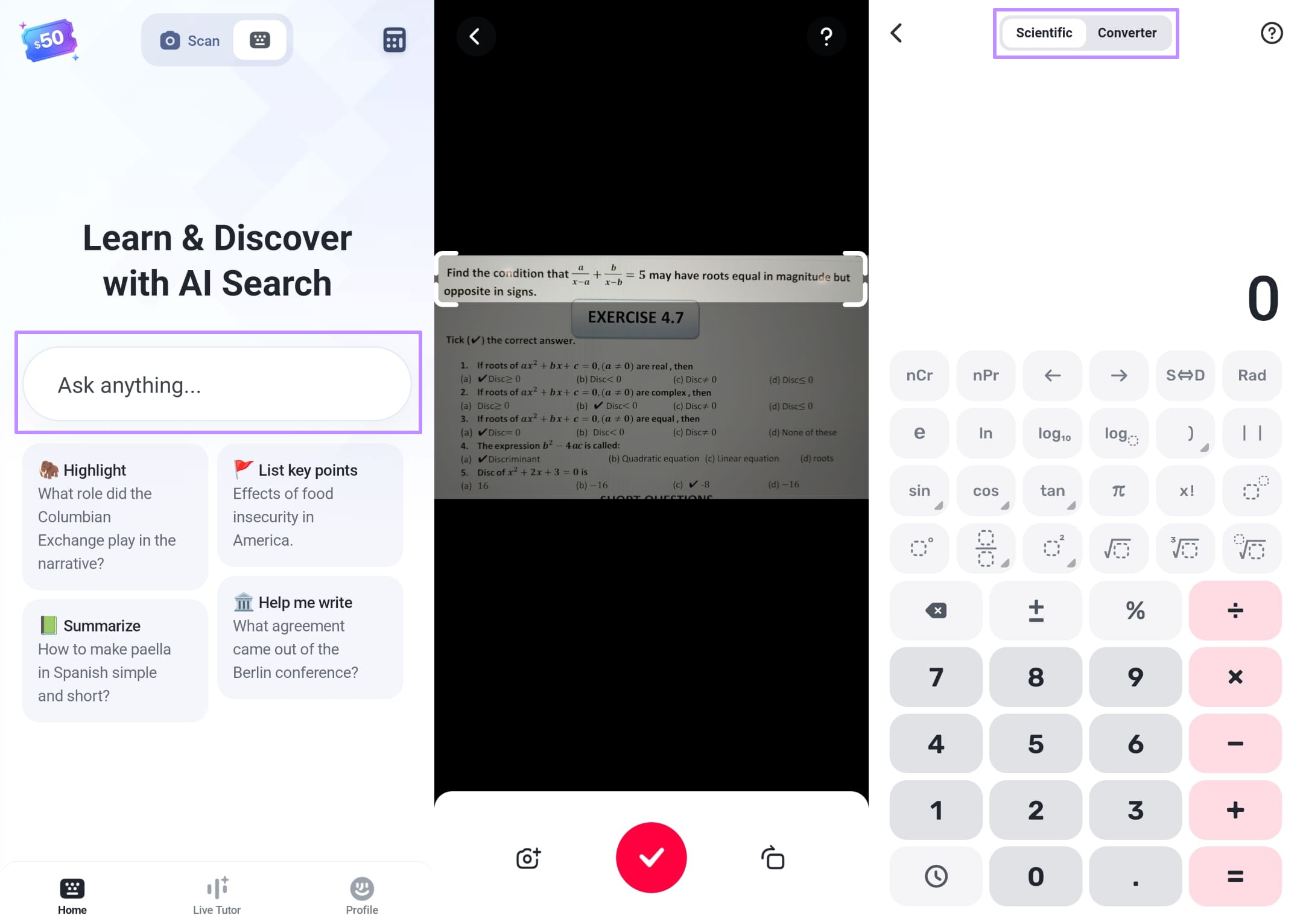
Afterwards, Gauth provides step-by-step written explanations of each query in clear language to help learners understand the logic behind the answer. For many learners, this proves to be helpful as it shows the steps regarding how a problem is solved, not only the final result.
4. Track Results And Test Prep
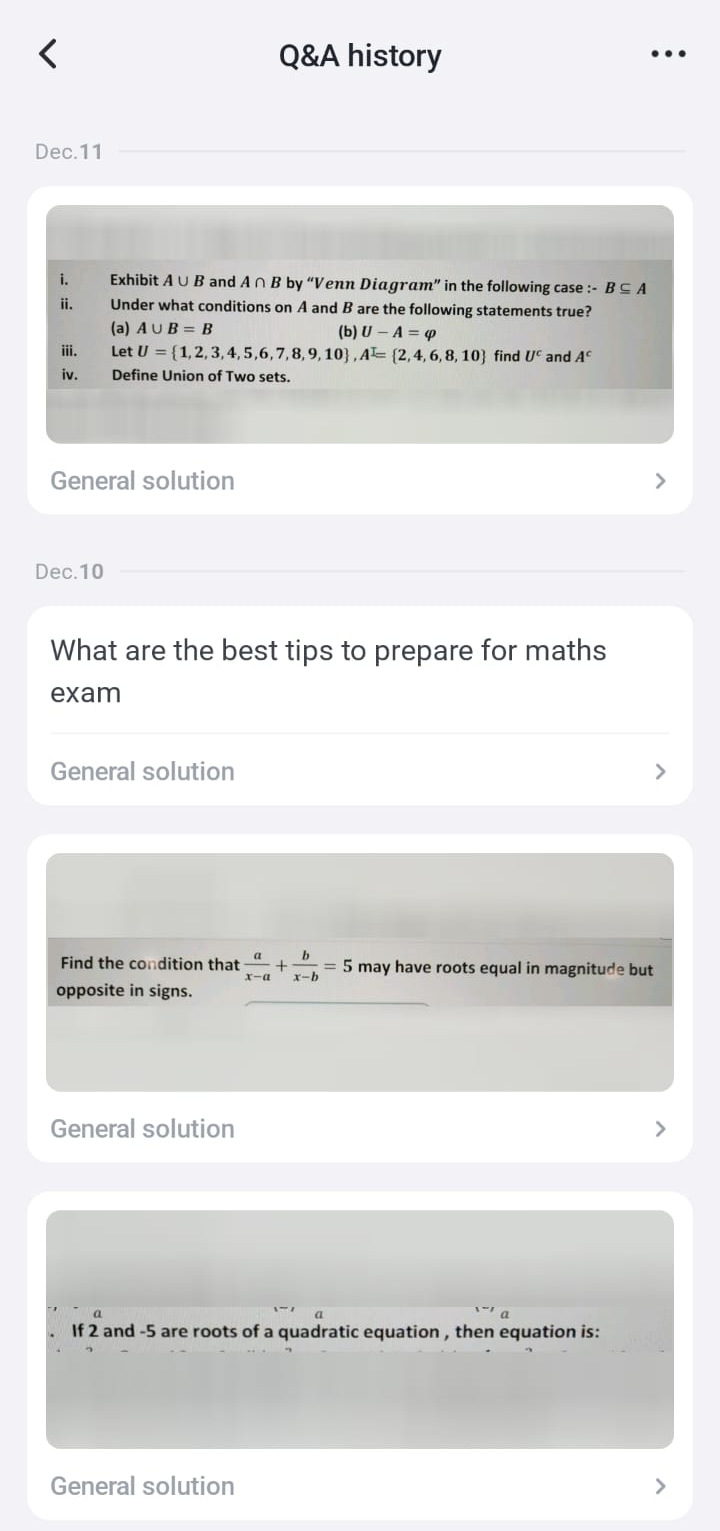
Gauth Math also records a user’s activity, such as "Q&A History." This includes the questions you have searched for via image or by writing. Learners can also prepare for SAT Math or ACT Math and choose from different topics as per their area of interest.
Real Case Examples Of Gauth Math
Below are some real case examples of Gauth Math results after user query:
Case 1: Solving Math Equation
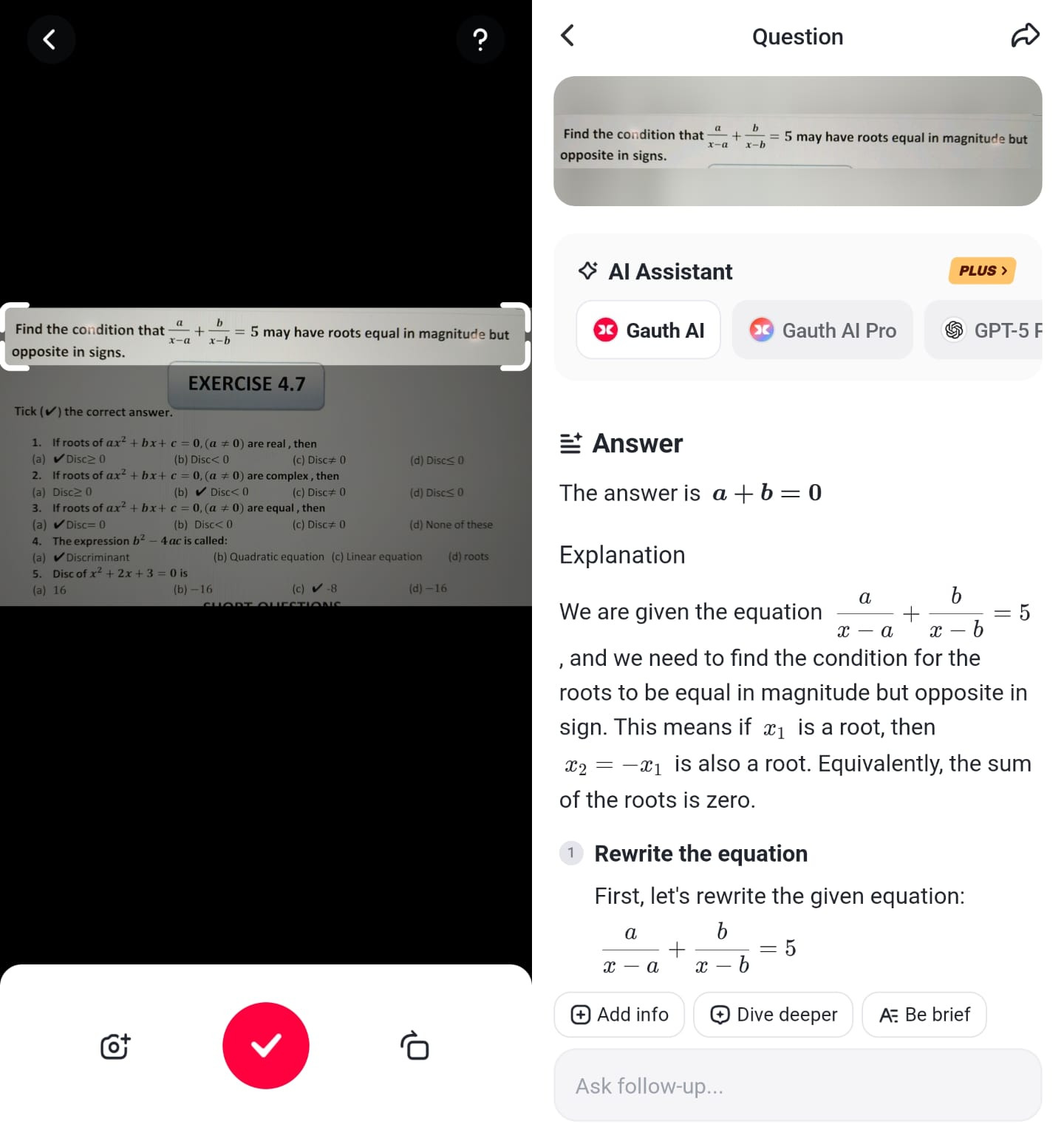
Use the scan feature to capture the required math question, then crop the image so it only contains the problem and removes any extra details. Once done, tap the "Tick" button. The app will process the question and display a complete step-by-step explanation. Users can also ask follow-up questions or request a shorter explanation if they want a quick review.
Case 2: Search About Any Topic
Head to the "Search" option and type your query, such as "What are the best tips to prepare for a maths exam." The app will show a clear and detailed list of practical tips which may include study methods, practice strategies, common mistake areas, and quick revision ideas. Users can scroll through the results, save helpful points, or ask for additional info to better prepare for upcoming tests.

Case 3: Ask From Live Tutor
Switch to the "Live Tutor" and scan or type your questions. Choose from "Basic Tutor" or "Expert Tutor" before starting. The live tutor will start analyzing the question and begin explaining the answer in simple and detailed steps. You can pause or interrupt the AI tutor at any time, ask any follow-up questions using the mic, and adjust the speed or captions for easier understanding.

Gauth Math Pricing
Gauth Math provides both free and paid versions along with 3-day free trial. Free version includes limited daily questions, basic step-by-step help, and access to common math topics. However, the Plus plans come with 2000 credits/month for assignment solver (1 assignment ≈ 50 credits), unlimited scans, full detailed explanations, faster response times, and more advanced topics and tools. The Plus plan pricing is as follows:
- 1 Month: $11.96 Per Month
- 3 Months: $10.66 Per Month ($31.99 Billed Quarterly)
- 12 Months: $8.33 Per Month ($99.99 Billed Annually)
Ratings On Different Platforms
Gauth Math receives strong ratings across major app stores:
- Google Play Store: Praised for fast solving and clear steps, with a 4.2 user rating.
- App Store: Users appreciate its simple design and direct answers, with a 4.8 user rating.
These ratings show that most users find the app dependable for regular math study.
Pros And Cons Of Gauth Math
Pros:
- Simple workflow that helps students quickly solve individual math problems.
- Covers many math topics, making it useful for different grade levels.
- Step-by-step solutions help users understand each step clearly.
- Live tutors offer extra help for difficult or confusing questions.
Cons:
- Several advanced tools and unlimited scans require a paid plan.
- Works best for single problems, not full homework sheets or mixed questions.
- Word problems and handwritten queries may need multiple attempts.
- Limited support for complete documents or PDFs, which affects users' handling of full homework files.
While Gauth Math works well for solving single questions, some users need a tool that handles complete homework files, long worksheets, and full PDF documents more smoothly. This is where UPDF AI becomes helpful. It offers wider file support and can process entire documents at once, making it easier for learners who often work with full assignments rather than single problems.
Part 3. UPDF AI: A Complete Homework Helper

For students who frequently deal with full assignments rather than isolated questions, a more comprehensive solution is needed. This is where UPDF AI Online stands out. It is a powerful, all-in-one AI assistant for PDF documents and homework tasks.
Users can scan or upload PDF files, images, or multi-page assignments, and UPDF AI will instantly process the content. The tool allows students to summarize PDFs, chat with the document for answers, translate content, convert files into mind maps, and even ask questions directly. Its AI also supports multi-file chat, proofreading, grammar checking, and generating summaries or emails from document content, making it an ideal companion for managing complex homework efficiently.
With UPDF AI homework helper, learners no longer need to handle problems one by one. They can manage complete assignments in a single platform, save time, and ensure accuracy across multiple subjects and formats. It perfectly complements tools like Gauth Math for a complete study experience.
Conclusion
Overall, Gauth Math is a good app when it comes to solving separate mathematical tasks, step-by-step descriptions, and having a live tutor. It is effective for those students asking single questions or training in certain subjects. Nevertheless, students who work with full-sized homework files, multi-page worksheets, or PDFs might require a more in-depth solution. For those cases, UPDF AI provides an all-in-one platform to manage complete assignments efficiently, summarize content, and simplify complex homework tasks, making it a valuable companion alongside Gauth Math.









 Lizzy Lozano
 Enola Miller
 Enid Brown