 UPDF
UPDF
 UPDF for Windows
 UPDF for Mac
 UPDF for iPhone/iPad
 UPDF for Android
 UPDF AI Online
 UPDF Sign
 Edit PDF
 Annotate PDF
 Create PDF
 PDF Form
 Edit links
 Convert PDF
 OCR
OCR PDF to Word
 PDF to Image
 PDF to Excel
 Organize PDF
 Merge PDF
 Split PDF
 Crop PDF
 Rotate PDF
 Protect PDF
 Sign PDF
 Redact PDF
 Sanitize PDF
 Remove Security
 Read PDF
 UPDF Cloud
 Compress PDF
 Print PDF
 Batch Process
 About UPDF AI
 UPDF AI Solutions
 AI User Guide
 FAQ about UPDF AI
 Summarize PDF
 Translate PDF
 Chat with PDF
 Chat with AI
 Chat with image
 PDF to Mind Map
 Explain PDF
 PDF AI Tools
 Image AI Tools
 AI Chat Tools
 AI Writing Tools
 AI Study Tools
 AI Working Tools
 Other AI Tools
 AI Bookmark Generation
 AI Bookmark Summary
 AI Watermark Generation
 AI Background Generation
 AI Sticker Generation
 AI Stamp Generation
 AI Editing Suite
 UPDF Copilot
 AI Page Management
 AI Semantic Search
 PDF to Word
 PDF to Excel
 PDF to PowerPoint
 Enterprise Solution
 Enterprise Sign
 Enterprise AI
 Enterprise Plan
 Enterprise User Guide
 Enterprise Webinar
 Banking
 Healthcare
 Insurance
 Legal
Legal Manufacturing
 Government
 Education Solution
 Customer Stories
 User Guide
 UPDF Tricks
 FAQs
FAQs UPDF Reviews
 Download Center
 Blog
Blog Newsroom
 Tech Spec
 Updates
 UPDF vs. Adobe Acrobat
 UPDF vs. Foxit
 UPDF vs. PDF Expert

Many users struggle to identify the most relevant scholarly articles. This is where they start using Semantic Scholar to highlight influential studies and uncover meaningful connections between papers and research topics. It helps users focus on accurate research and stay up to date on emerging trends in academic studies and professional work.
Despite its powerful search capabilities, some users still find it difficult to handle several papers and draw relevant insights. Researchers often spend significant time reading abstracts and compiling related studies. These difficulties can slow their workflow and make it harder to maintain a well-organized library of research findings. Now, let's find out the main ways researchers and students use it:
- Many researchers use it to identify relevant scholarly articles across disciplines.
- Users track citations to identify the most influential studies and assess their research impact.
- It enables analysis of academic trends and developments over time within specific research areas.
- Researchers explore connections among papers, authors, and institutions to identify opportunities for collaboration.
To simplify research management, UPDF AI Online helps users search, save, and organize papers in one place. In this guide, we will explore how Semantic Scholar AI works and show how UPDF AI Online can improve academic research for accurate outcomes. Interested users can click the button below to sign up for UPDF AI Online first!
Part 1. What Is Semantic Scholar Used For?
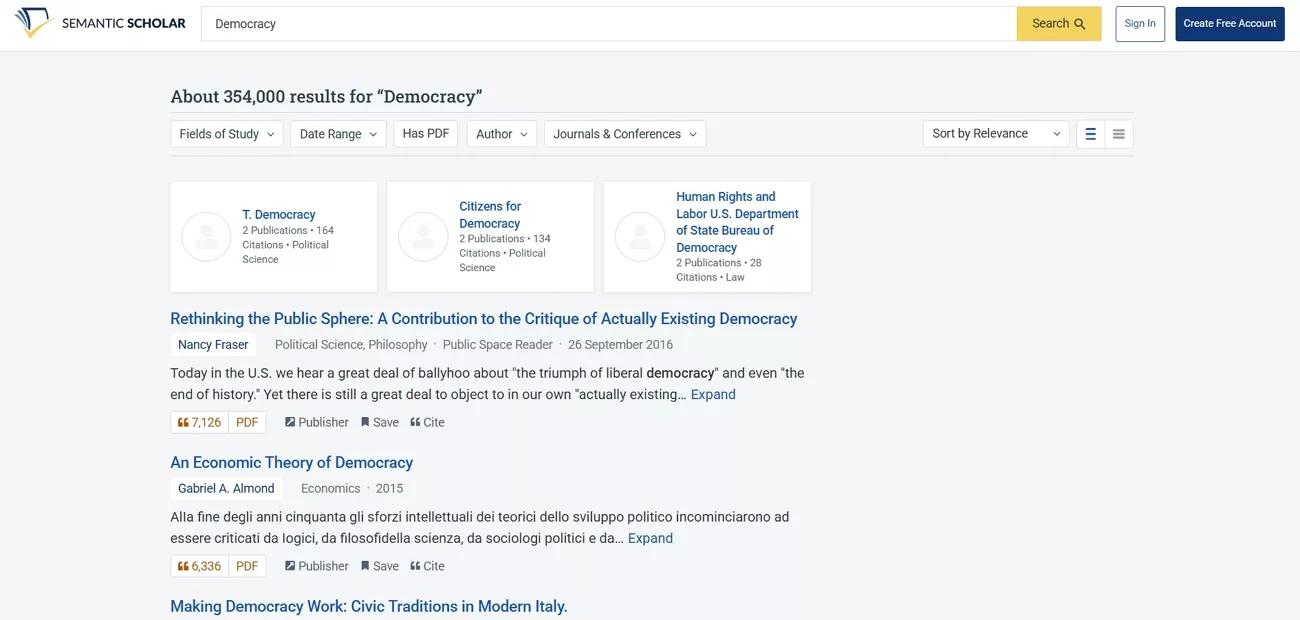
This tool serves a vital role in helping researchers locate and evaluate relevant academic papers. Next, we will explore its core functions and the common scenarios where researchers rely on them.
Core Purposes
First, let's look at the main ways Semantic Scholar supports researchers and students in their academic work.
- Users discover relevant research papers through an AI-supported search that ranks by relevance, quality, and influence.
- Readers can quickly assess a paper's importance by checking citations, key figures, and impact indicators before a full read.
- Researchers maintain a structured personal library so key findings stay accessible for future projects.
Common User Scenarios
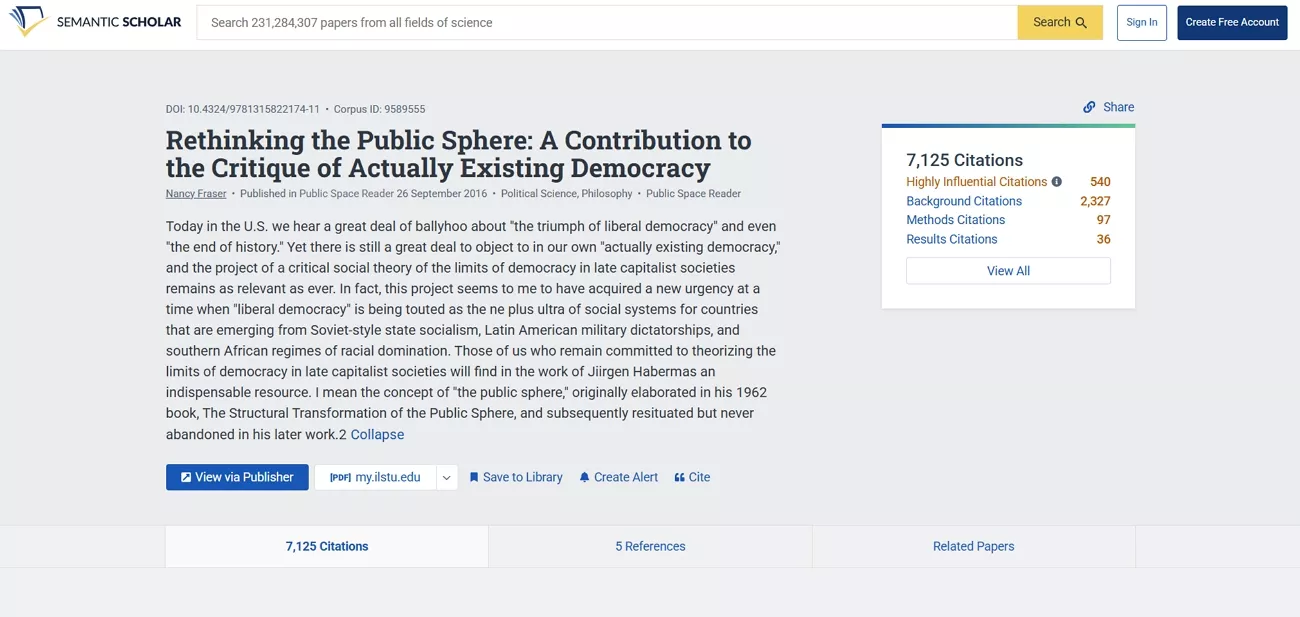
Having discussed the core purposes, we'll highlight some common situations where users rely on this tool.
- Conduct thorough literature reviews for theses and research projects across various academic disciplines.
- Identify gaps in existing studies to develop innovative research ideas and propose contributions.
- Monitor emerging trends and continuous developments within specific research areas to stay updated.
- Explore potential collaborators by analyzing publication history and research interests for possible partnerships.
- Organize and track selected papers systematically to support writing and long-term research projects.
Part 2. How Semantic Scholar Works?
Many users often think about how this tool works and helps in academic and professional tasks. To understand its full potential, let's explore how Semantic Scholar AI collects data and processes information to deliver insights.
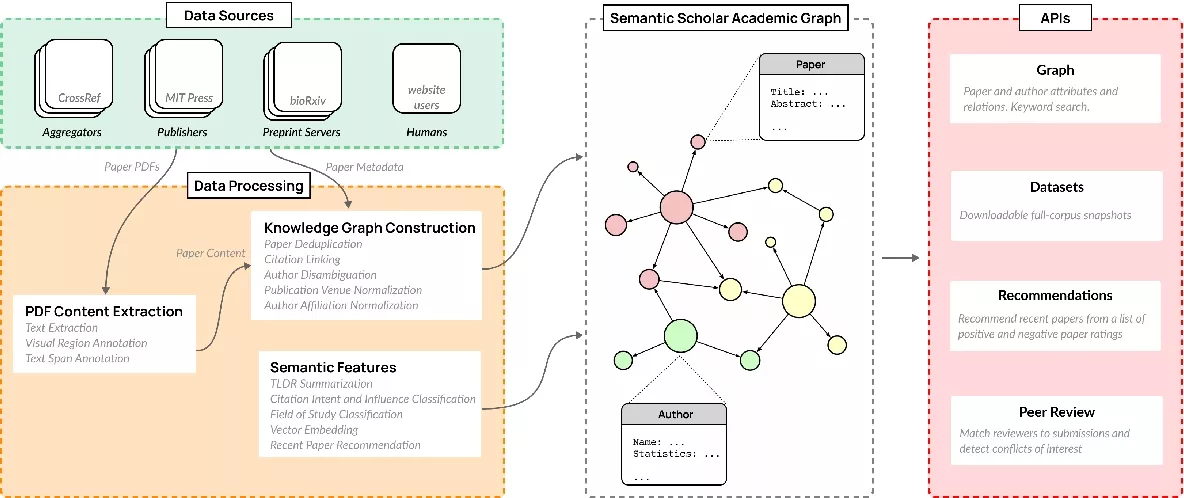
Semantic Scholar's Data Sources
Semantic Scholar aggregates metadata and full text from a mix of public and proprietary sources with major publishers and open repositories. Content comes from partners such as PubMed, Springer Nature, IEEE, ACM, Wiley, arXiv, and Unpaywall. This provides coverage of hundreds of millions of papers across STEM and SSH fields.
Core Features
Now, let's uncover core features of Semantic Scholar that help users find, understand, and organize research.
- Smart Semantic Search: It applies AI to the query to interpret the user's intent and returns highly relevant papers rather than merely matching exact query terms.
- Citation Graph and Influence Metrics: Displays papers that cite one another in addition to those of importance in order to help users track the growth of ideas over time.
- Related Papers and Recommendations: Suggest similar or follow-up studies based on content, citations, and topics to support deeper exploration of a field.
- Paper Understanding Aids: Shows the abstract key ideas and citation notes so users can quickly see what a paper is about.
- Libraries and Alerts: Enables users save papers into collections and receive updates or recommendations tailored to their interests and prior activity.
Scholar Research Use Cases
Having discussed the core features of Scholar Research AI, let's look at the use cases in real research workflow contexts.
1. Literature Review Building
Researchers use Semantic Scholar to search a topic, surface key and highly cited papers, and map foundational versus recent work. The citation graph and related-paper suggestions help connect studies and structure a coherent literature review.
2. Method and Technique Discovery
Users look up specific methods, models, or statistical techniques to see how they have been applied across different studies. This helps them compare implementations, refine their approach, and identify benchmark papers to cite.
3. Tracking Authors and Research Groups
Scholars follow the work of particular authors, labs, or institutions by searching their profiles and recent publications. This use case supports staying current with a niche community and identifying potential collaborators or supervisors.
4. Supporting Academic Writing and Referencing
Students and researchers collect relevant papers into libraries while drafting theses, articles, or grant proposals. Semantic Scholar then serves as a source of structured citations and evidence that can be cited, compared, and reused.
5. Exploring New or Adjacent Fields
When entering a new area, users search broad topics to understand the main themes, influential papers, and active venues. This exploratory use case reduces the time required to gain initial orientation and identify promising research directions.

Strengths and Limitations
Finally, after analyzing user reviews and feedback, let's discuss where Semantic Scholar excels and where it lags.
Pros:
- Semantic TLDR summaries often help users scan complex papers faster.
- Semantic Reader annotations make dense PDFs easier to navigate and understand.
- Topic and citation graphs reveal connections users would otherwise easily overlook.
Cons:
- Coverage for humanities and niche subfields can feel frustratingly incomplete.
- Non‑English research often appears patchy, which leaves multilingual scholars underserved.
- TLDR summaries sometimes oversimplify arguments, hiding important methodological nuances.
Part 3. A More Practical Way to Work With Papers: UPDF AI Online
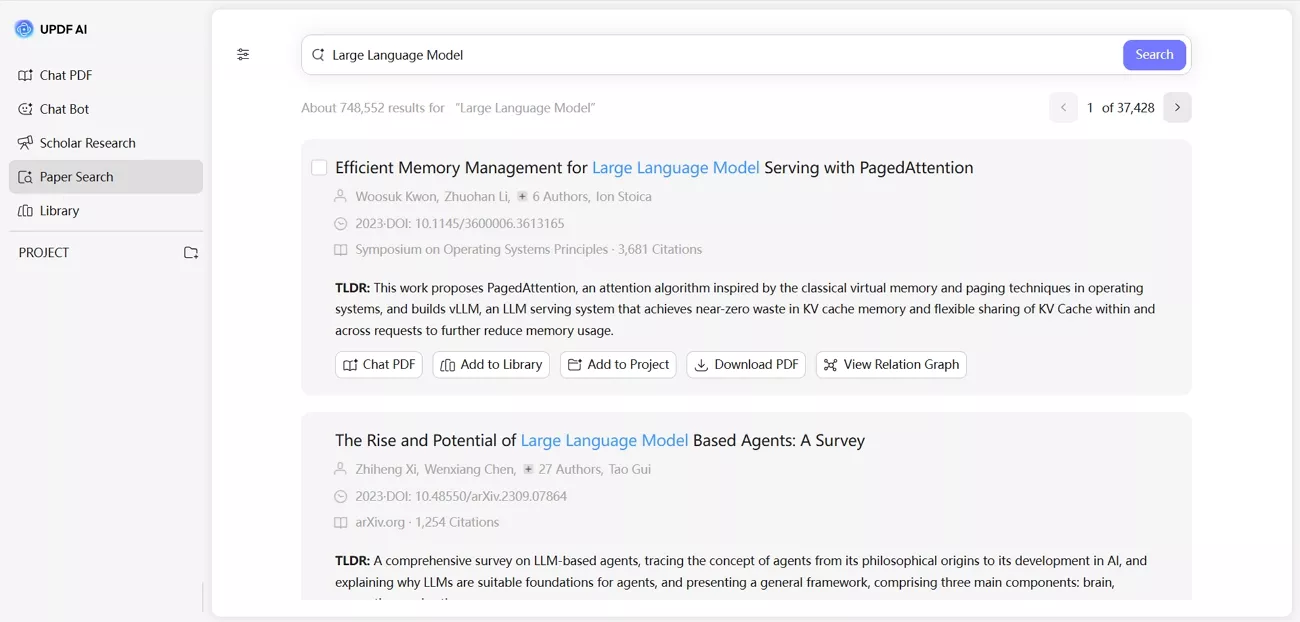
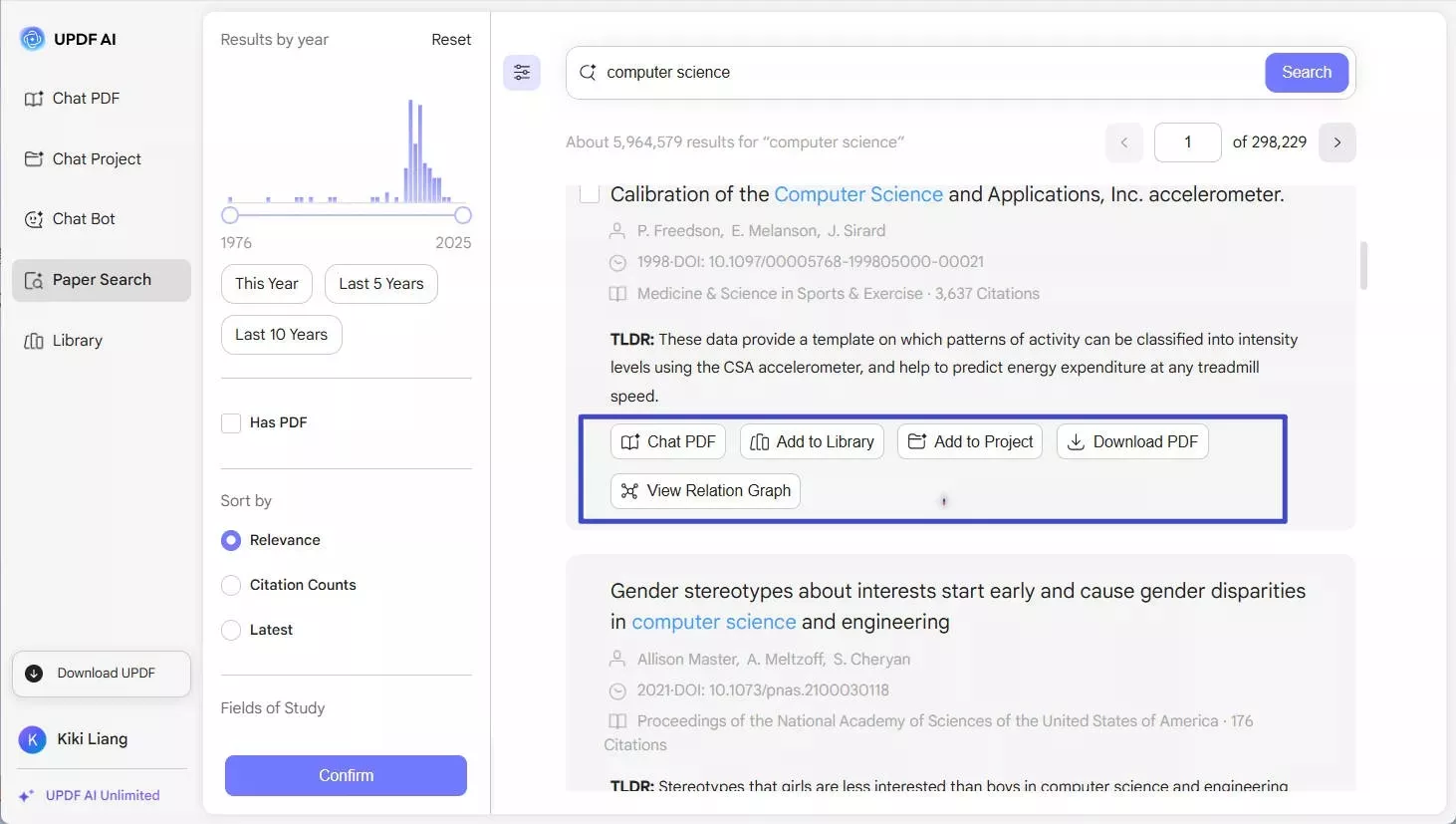
After using the Semantic Scholar tool, many users often face difficulties managing scattered papers. This is where UPDF AI Online positions itself as a practical Semantic Scholar alternative for researchers. It includes a Paper Search feature that enables users to search for academic papers online and access core publication metadata through a single interface.
Unlike other tools, UPDF AI Paper Search offers built-in filters, AI summaries, and interactive tools to organize the analysis and results. Users can narrow their search results using filters such as year, subject area, or availability of a PDF. They can also consult the AI about the papers and assess how they are related for improved literature reviews.
What is New in Paper Search New Version
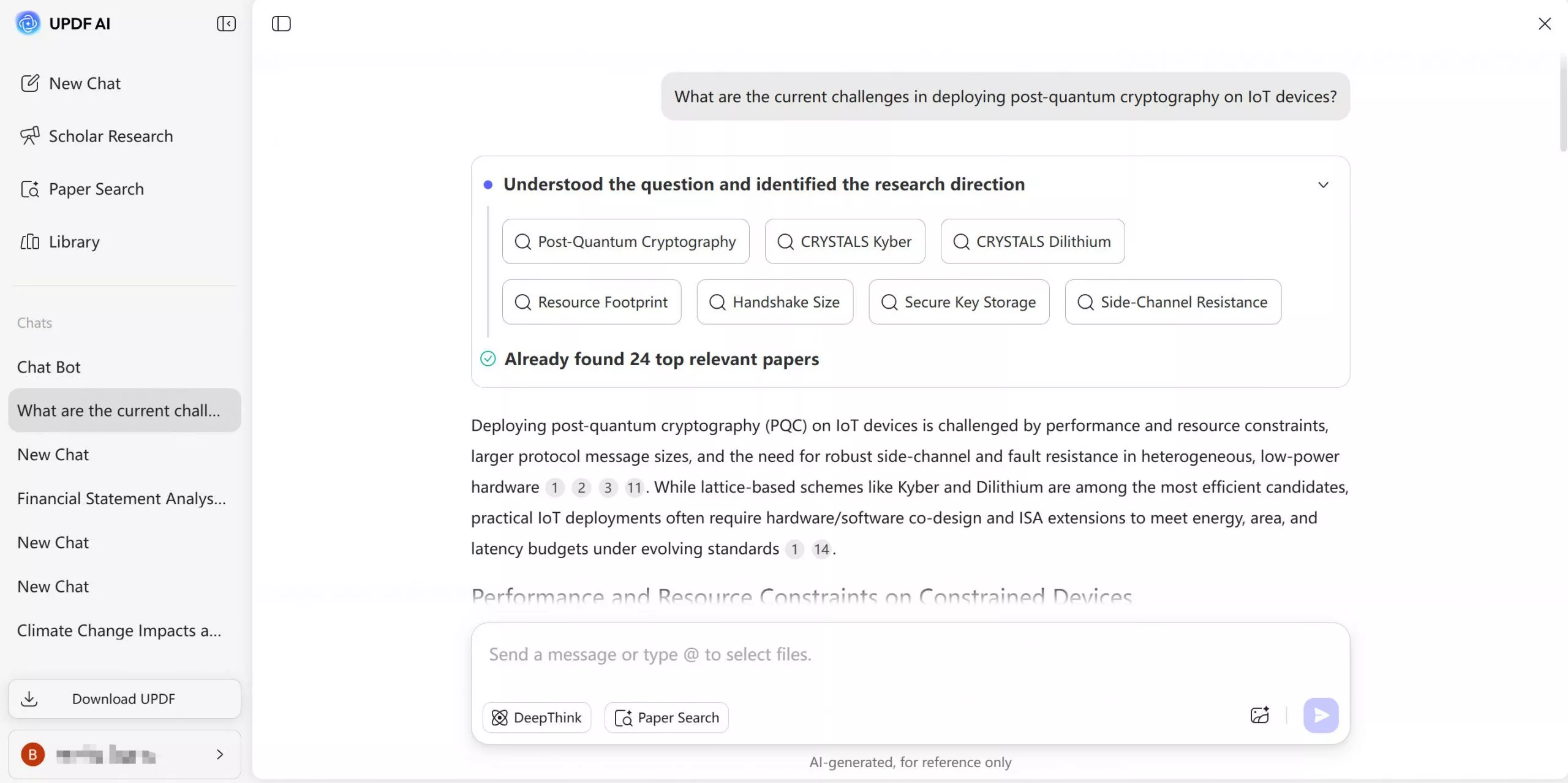
In the new Paper Search version, UPDF AI now offers two search modes for finding academic papers. You can search by simple keywords for quick results or use advanced options like DOI/PMID and filters for more in-depth research.
Search Mode 1: Keyword Search
This mode lets you type in simple keywords, topics, or paper titles and quickly see a list of matching academic papers. It works like the current version of Paper Search, giving fast, relevant results with basic filters for easy browsing and discovery.
Search Mode 2: Statement/Question Search
A newly introduced mode that lets you type a full research question or statement instead of just keywords. It then scans relevant papers and gives you a direct answer synthesized from those sources. This new mode is designed for fast idea validation and highly targeted academic research.
Why This Mode Matters for Researchers
Having discussed upgrades in UPDF AI Paper Search, let's understand why this mode matters for researchers who want clearer results beyond what Semantic Scholar typically provides.
- Speeds up idea validation so researchers can quickly see whether a direction is worth pursuing.
- Reduces fragmentation by pulling insights from multiple relevant papers into one focused view.
- Lowers the cost of multiple research iterations by shortening search and reading time.
- Uses abstracts and metadata to match papers more precisely to the research topic.
- Delivers concise answers that minimize information overload and keep attention on key findings.
Part 4. Semantic Scholar vs UPDF AI Online (Feature Comparison)
To better understand the differences, let's compare the key features of Semantic Scholar AI and UPDF AI Online side by side.
| Feature | UPDF AI Paper Search | Semantic Scholar |
| Corpus Size | 220M+ peer‑reviewed academic papers | 220M+ scientific papers |
| Search Modes | Keyword, title, DOI/PMID, plus new statement/question search for direct answers | Semantic keyword, author, venue, topic search |
| Add Papers to Personal Library | Yes | Yes |
| Download PDF Papers | Yes | Yes |
| Chat with PDF (summarize, translate, explain, Q & A) | Yes | No |
| AI-assisted Understanding after Search | Yes | No |
| One-place to Search, Read, and Analyze Papers | Yes | No |
Conclusion
To conclude, this article has explored the capabilities of Semantic Scholar and how it supports academic research. While Semantic Scholar excels at discovering and analyzing scholarly papers, managing multiple documents and extracting key insights can remain challenging. If you want to search relevant papers using keywords and question statements, UPDF AI Online is recommended for an improved research workflow.





 Enola Davis
 Engelbert White
 Enya Moore

I rely on the Semantic Scholar API for querying research papers, downloading articles, and getting citation details. Are there other similar APIs out there?
- Flashy-Face1865