UPDF
UPDF
 UPDF for Windows
 UPDF for Mac
 UPDF for iPhone/iPad
 UPDF for Android
 UPDF AI Online
 UPDF Sign
 Edit PDF
 Annotate PDF
 Create PDF
 PDF Form
 Edit links
 Convert PDF
 OCR
OCR PDF to Word
 PDF to Image
 PDF to Excel
 Organize PDF
 Merge PDF
 Split PDF
 Crop PDF
 Rotate PDF
 Protect PDF
 Sign PDF
 Redact PDF
 Sanitize PDF
 Remove Security
 Read PDF
 UPDF Cloud
 Compress PDF
 Print PDF
 Batch Process
 About UPDF AI
 UPDF AI Solutions
 AI User Guide
 FAQ about UPDF AI
 Summarize PDF
 Translate PDF
 Chat with PDF
 Chat with AI
 Chat with image
 PDF to Mind Map
 Explain PDF
 PDF AI Tools
 Image AI Tools
 AI Chat Tools
 AI Writing Tools
 AI Study Tools
 AI Working Tools
 Other AI Tools
 AI Bookmark Generation
 AI Bookmark Summary
 AI Watermark Generation
 AI Background Generation
 AI Sticker Generation
 AI Stamp Generation
 AI Editing Suite
 UPDF Copilot
 AI Page Management
 AI Semantic Search
 PDF to Word
 PDF to Excel
 PDF to PowerPoint
 Enterprise Solution
 Enterprise Sign
 Enterprise AI
 Enterprise Plan
 Enterprise User Guide
 Enterprise Webinar
 Banking
 Healthcare
 Insurance
 Legal
Legal Manufacturing
 Government
 Education Solution
 Customer Stories
 User Guide
 UPDF Tricks
 FAQs
FAQs UPDF Reviews
 Download Center
 Blog
Blog Newsroom
 Tech Spec
 Updates
 UPDF vs. Adobe Acrobat
 UPDF vs. Foxit
 UPDF vs. PDF Expert

Have you ever needed to support your essay, thesis, or research article with trusted academic sources? JSTOR is a popular platform for this purpose. It can help you perform literature reviews, historical research, and even download citations.
But how does this platform work? If you’re new to JSTOR academic journals, this guide offers everything you need to get started easily. I will share a complete review of JSTOR, including how it works, its limitations, and more.
But if you want to research faster, UPDF AI offers a new AI-driven solution to find papers, read and analyze them for a deeper understanding. Visit it now to get started!
Part 1. What is JSTOR?
JSTOR stands for Journal Storage. It is an online library that hosts thousands of academic journals, books, primary sources, images, and more. It works as a searchable platform that lets you find scholarly content across over 75 disciplines. It also allows you to download, read online, and access different citation formats.
The Company Behind JSTOR
Initially, JSTOR started as a standalone non-profit company in 1994. Later on, it merged with Ithaka Harbors, Inc., in January 2009. Ithaka is also a non-profit American organization, originally created as an oversight body for JSTOR. It was founded in 2003 by Kevin M. Guthrie, who also directed the foundation of JSTOR in 1995. Currently, the company is headquartered in New York City. And according to the most recent financial data, Ithaka Harbors reported revenue of $126 million and expenses of $112 million for 2024.
JSTOR’s Mission and Purpose:
JSTOR's mission is to provide better access to knowledge and learning at a global scale. The goal is to make content easier to discover, no matter where you are. To achieve this, it works with various publishers, libraries, and museums across the world.
Pricing Plans:
For unlimited access to JSTOR academic journals, you can subscribe to JPASS. This is available with two price plans, as shown below:
Monthly Plan:
- $19.50/month
- Read without limits for 1 month
- Download 10 PDF articles
Yearly Plan:
- $199/year
- Read without limits for 1 year
- Download 120 PDF articles
Open and Free Content Type:
Apart from subscription, you can also download from JSTOR for free. This is made possible by open-access journals, books, primary sources, media, and historical archives. Moreover, if you create a free account, you can read up to 100 articles online every 30 days.
JSTOR Website Traffic:
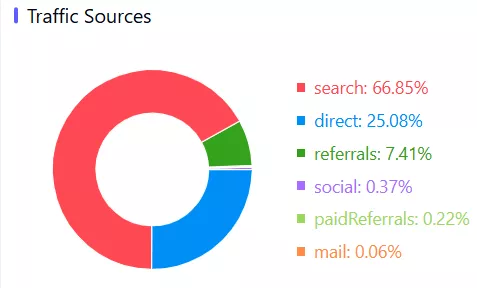
Data shows that JSTOR attracts 17.04 million monthly visits from around the world. Moreover, people view 6.94 pages at every visit and spend nearly 5 minutes per session, even with a bounce rate of 42.8%.
In addition, up to 66.85% of JSTOR’s traffic comes from search engines alone. These numbers highlight the platform as an essential tool for academic research and discovery.
Geographically, the United States makes up 40.19% of all visits. This is followed by the UK, Canada, Germany, and Australia.

Also, the platform’s traffic has greatly increased from 12.5 million in September 2025 to 17 million in November 2025. This trend shows a steady growth in JSTOR's popularity and demand.
Part 2. How to Access JSTOR Research Papers?
You can access JSTOR research papers through your university or school library login. Otherwise, you can create a free personal account.
To help you understand how it works, here’s a step-by-step guide.
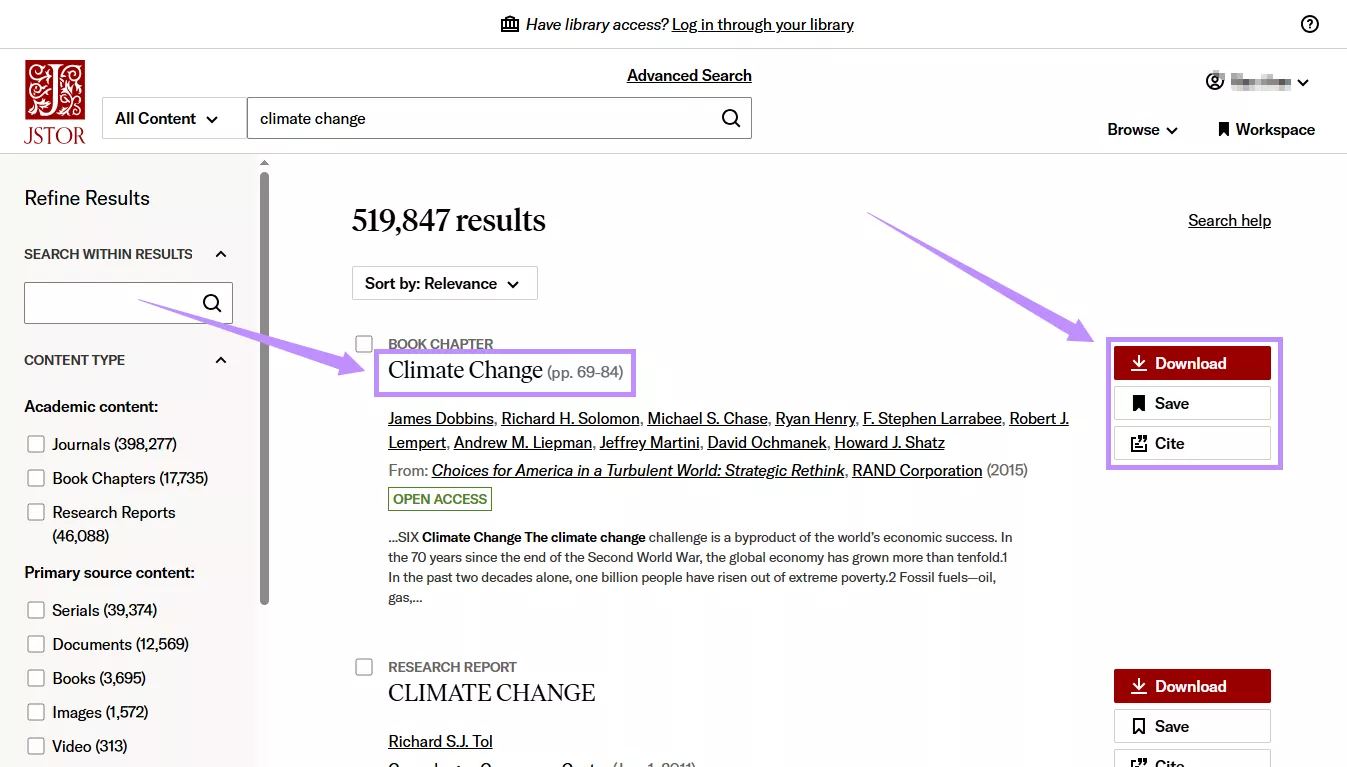
Step 1. Visit the JSTOR website and log in or create an account. Then, type your desired title or keywords in the search bar and press “Enter.”
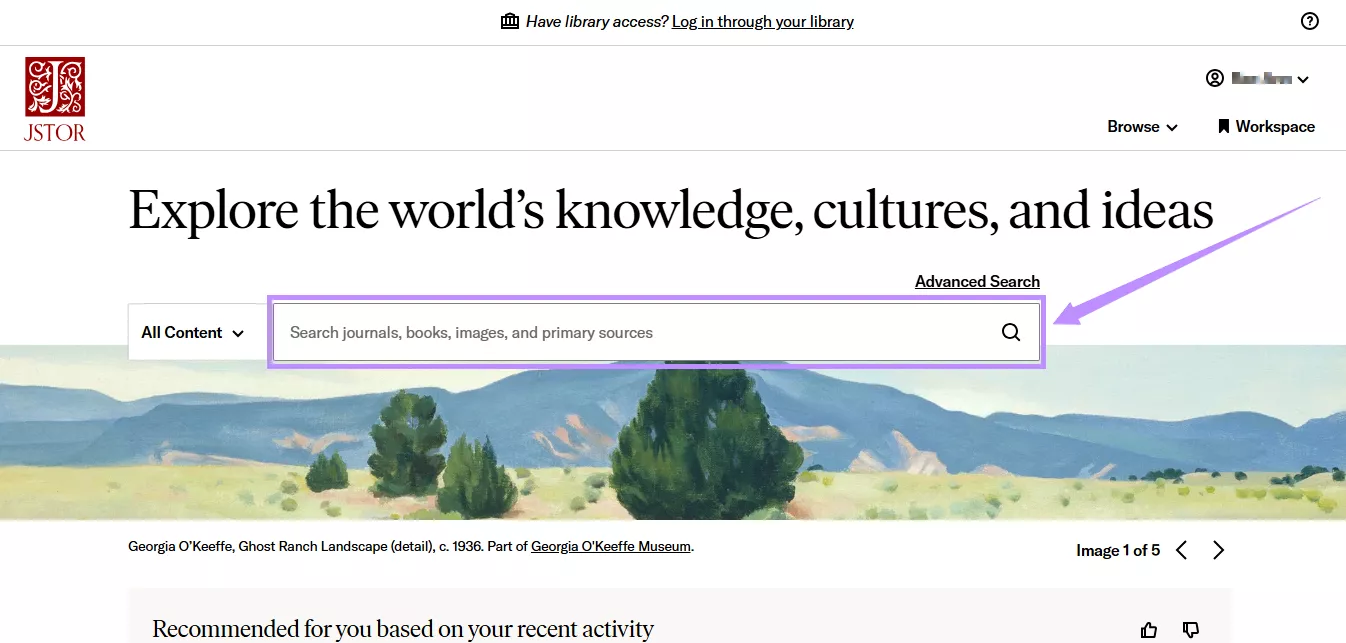
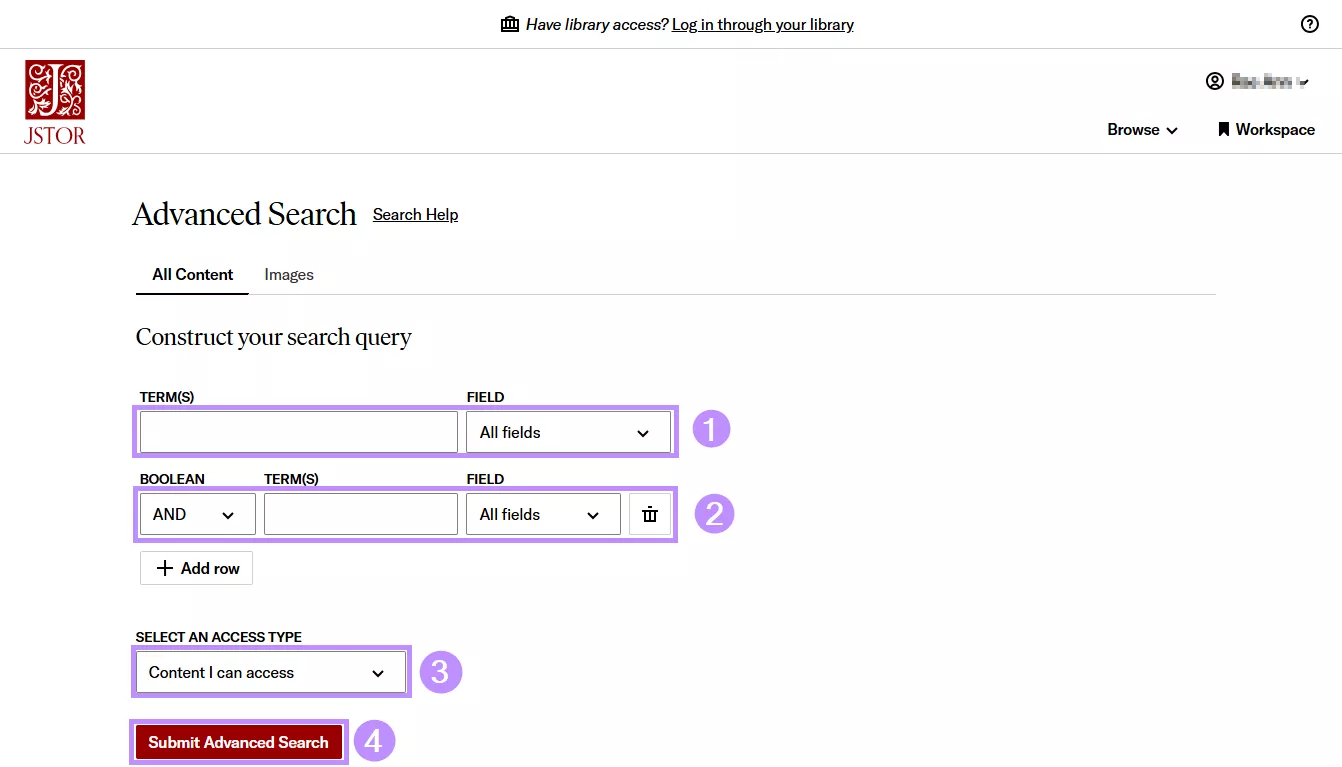
Step 2. For more precise results, click “Advanced Search” above the search bar. Then, on the next page:
- Enter keywords under “Term(s).” Then, select the appropriate “Field” (such as title, author, or abstract).
- Click the “Boolean” dropdown and choose a modifier. Then, enter relevant keywords under the “Term(s)” field.
- If you're using a free account, click the “Select an Access Type” dropdown and choose “Content I can access.” Otherwise, select “Everything.”
- Finally, click “Submit Advanced Search” to proceed.
Step 3. Now, you will see several titles on your page. Use the filters on the left panel to narrow the results.
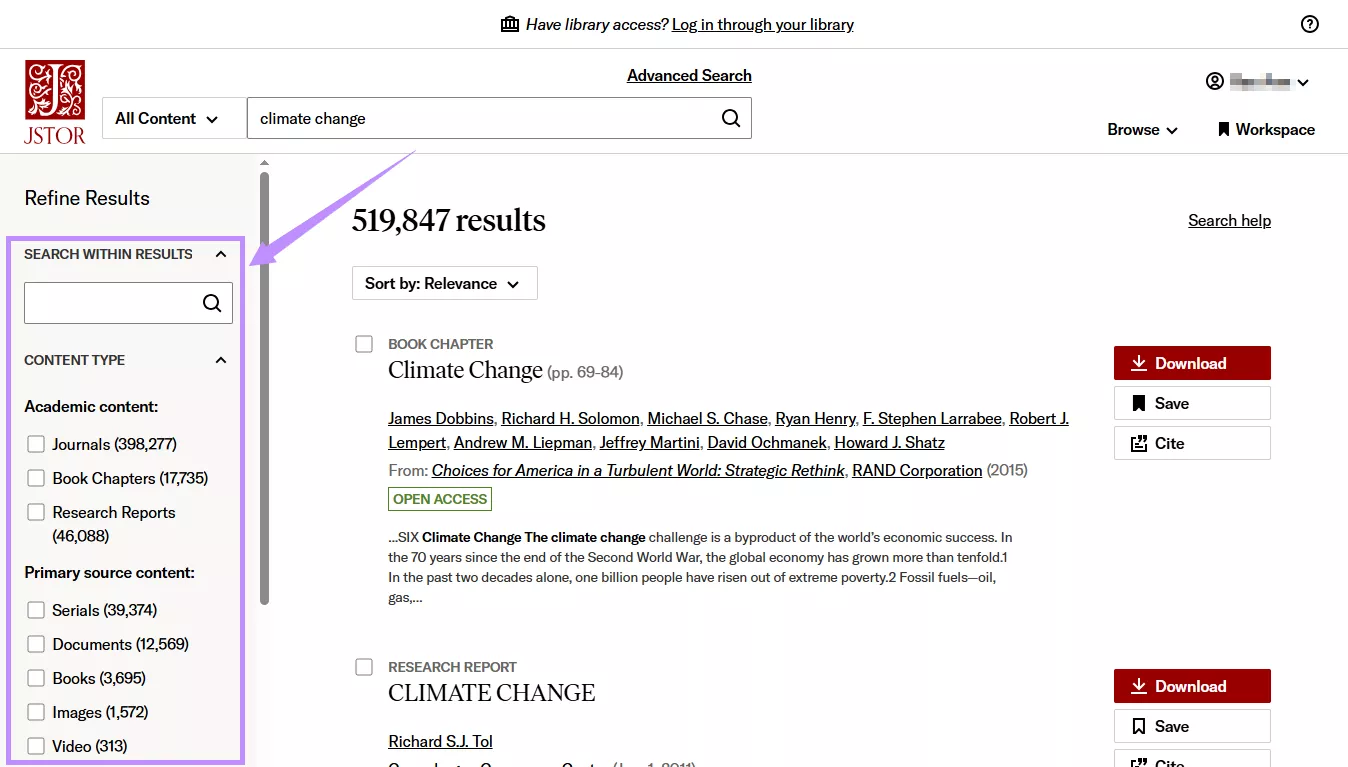
Step 4. Next, click on your desired title to view it online. Alternatively, click “Download” to read it offline.
Step 5. If you're building a reading list, click “Save” to add the title to your Workspace.
Step 6. Click “Cite” to view different citation styles. You can copy or export them as needed.
Limitations of Using JSTOR:
When exploring the JSTOR research papers, I found materials that I could only read online instead of downloading. Moreover, some titles require you to pay or use an interlibrary loan to save a permanent copy. That means, it’s not exactly “free.” Your level of access depends on your current library affiliation and permissions.
But I still view JSTOR as a helpful traditional platform for finding curated research papers. However, research habits are changing. Today, AI can help you conduct a literature search much faster. UPDF AI Paper Search is one such tool that can help you research more productively.
Part 3. How UPDF AI Complements JSTOR?
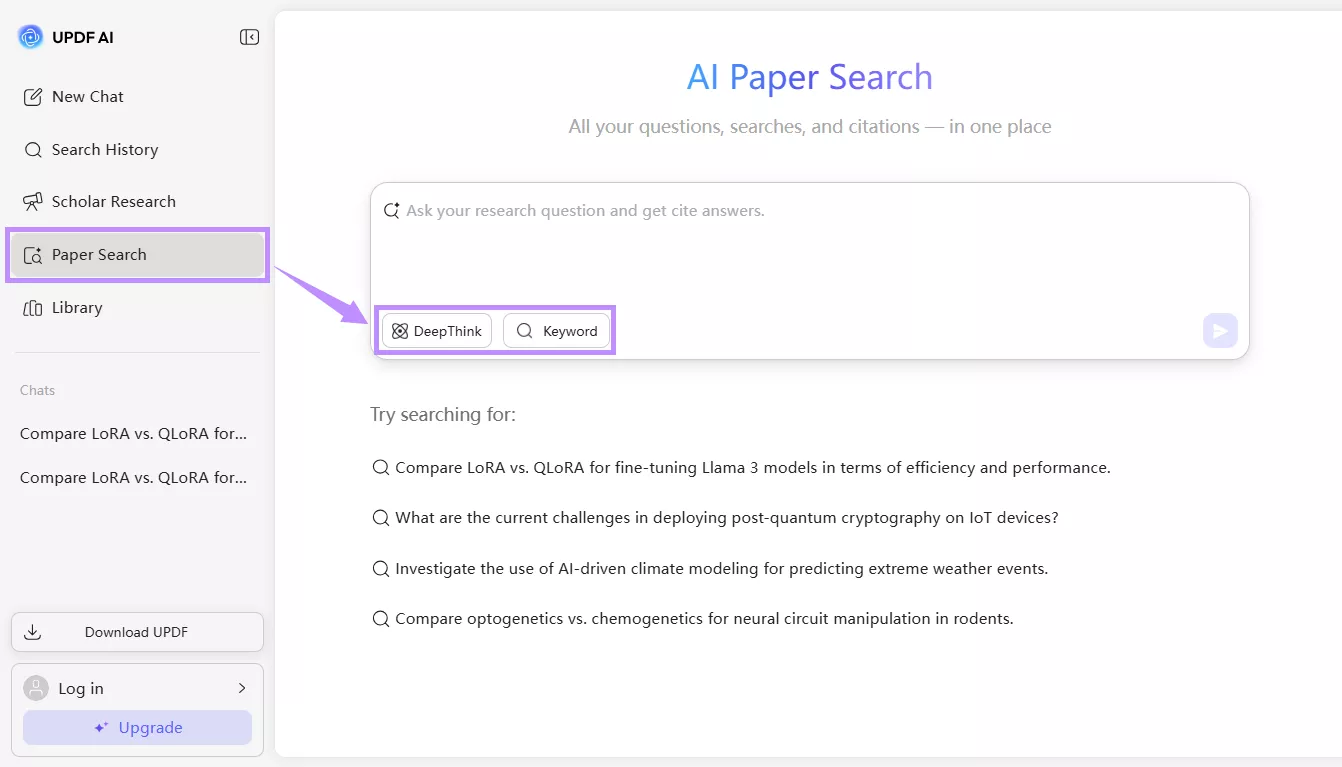
UPDF AI is a powerful AI-driven platform that helps me find scholarly literature from a massive online database in just minutes. Just like JSTOR, I can use it as a traditional academic search engine to find research papers. But unlike JSTOR academic journals, it offers an advanced DeepThink mode. I can use it to directly ask research questions. The AI quickly analyzes the research direction and scans a large amount of relevant literature. Then, it provides a comprehensive answer, complete with citations.
Apart from finding papers, UPDF AI is a complete solution that has helped me accelerate my research workflow when writing. After entering a query, I can save the titles I need in a cloud-based library. Moreover, it provides detailed citation graphs to find and explore related content. And if I struggle to understand the technical terms or methodologies, it allows me to add papers to its PDF AI chat for direct queries.
Key Features of UPDF AI Paper Search
- Dual Search Modes: A standard keyword-based search mode and the advanced DeepThink mode for asking full research questions and receiving cited answers.
- Covers Millions of Content: I can search across more than 220 million academic papers using keywords, article titles, DOIs, or PMIDs.
- Find Relevant Titles Faster: This article summarizer AI provides detailed metadata and AI-generated summaries to help me judge if a paper is worth deeper reading.
- Apply Literature-Based Filters: I can filter results by publication year, field of study, and open-access availability. These help me narrow results to the most relevant studies.
- Open-Access Downloads: When available, I can directly download free versions of articles to read comfortably offline.
2. Direct Comparison: JSTOR vs UPDF AI Paper Search
| Aspect | JSTOR | UPDF AI Paper Search |
| Main purpose | Providing curated access to scholarly content | Exploring and analyzing scholarly literature faster |
| Search capabilities | More traditional: keyword-based search, Boolean operators, field-specific queries, and filters | More exploratory: keyword-based search with filters and AI-powered DeepThink mode that answers research questions with cited papers |
| Content coverage | Journals, books, primary sources, images, audio, and video | Peer-reviewed journal articles, academic papers, research theses, and conference papers |
| AI Features | Assess text relevance, find related content, suggest similar topics, and answer questions about articles | AI summaries, TLDRs, relation graphs, chat with PDFs, and cross-paper insights, etc. |
| Document interaction | Read online, download, save to Workspace, generate citations, etc. | Read available texts, view metadata, chat with PDFs, explore citation relationships, manage libraries, and interact conversationally |
| Cost | Limited free content $19.50 /month, $199/ year | Free for the first 100 prompts For heavier research use: $29/quarter, $79/year |
In short, JSTOR and UPDF AI have their own unique strengths. I use UPDF AI to search titles faster, compare multiple papers, and identify key arguments and trends. Meanwhile, JSTOR's advanced search tool helps me design complex queries with Boolean operators. I can also download citations directly. So. They’re the perfect partners in research rather than competitors.
Conclusion
To sum up, JSTOR academic journals and scholarly content can help you manually research literature, download, save, or cite it easily. But if you want to speed up your research workflow, UPDF AI is the ideal option. You can not only search papers but also satisfy your queries with cited back answers. It's a tool built for deeper analysis and exploration, but with much less effort and time. Plus, you can get started with 100 free prompts. So, don’t wait. Try UPDF AI Online today!







 Enola Davis
 Bruna Almeida
 Engelbert White