 UPDF
UPDF
 UPDF for Windows
 UPDF for Mac
 UPDF for iPhone/iPad
 UPDF for Android
 UPDF AI Online
 UPDF Sign
 Edit PDF
 Annotate PDF
 Create PDF
 PDF Form
 Edit links
 Convert PDF
 OCR
OCR PDF to Word
 PDF to Image
 PDF to Excel
 Organize PDF
 Merge PDF
 Split PDF
 Crop PDF
 Rotate PDF
 Protect PDF
 Sign PDF
 Redact PDF
 Sanitize PDF
 Remove Security
 Read PDF
 UPDF Cloud
 Compress PDF
 Print PDF
 Batch Process
 About UPDF AI
 UPDF AI Solutions
 AI User Guide
 FAQ about UPDF AI
 Summarize PDF
 Translate PDF
 Chat with PDF
 Chat with AI
 Chat with image
 PDF to Mind Map
 Explain PDF
 PDF AI Tools
 Image AI Tools
 AI Chat Tools
 AI Writing Tools
 AI Study Tools
 AI Working Tools
 Other AI Tools
 AI Bookmark Generation
 AI Bookmark Summary
 AI Watermark Generation
 AI Background Generation
 AI Sticker Generation
 AI Stamp Generation
 AI Editing Suite
 UPDF Copilot
 AI Page Management
 AI Semantic Search
 PDF to Word
 PDF to Excel
 PDF to PowerPoint
 Enterprise Solution
 Enterprise Sign
 Enterprise AI
 Enterprise Plan
 Enterprise User Guide
 Enterprise Webinar
 Banking
 Healthcare
 Insurance
 Legal
Legal Manufacturing
 Government
 Education Solution
 Customer Stories
 User Guide
 UPDF Tricks
 FAQs
FAQs UPDF Reviews
 Download Center
 Blog
Blog Newsroom
 Tech Spec
 Updates
 UPDF vs. Adobe Acrobat
 UPDF vs. Foxit
 UPDF vs. PDF Expert

The Internal Revenue Service (IRS) requires businesses to fill out the W-2 and W-4 forms. Both these tax forms serve different purposes. For the W-2 form, an employer needs to fill out the form using the personnel data and payroll record. In contrast, the W-4 form is completed by the employees to provide their withholding information. As the names of these tax forms resemble a lot, many employers and employees remain confused about it. Therefore, this guide provides a detailed comparison of W-2 vs. W-4 and how to fill them with UPDF.
W-2 vs. W-4 – A Quick Overview
Before we dive deep into the differences between W-2 vs. W-4, it is important to clarify their basics.
What is W-2?
W-2 is a tax form that the employer fills in to mention employee earnings and tax withholdings to the Social Security Administration (SSA) and state government agencies. The tax form reflects the gross earnings of employees and all the deductions from income, such as Medicare or Social Security taxes, dependent care, etc.
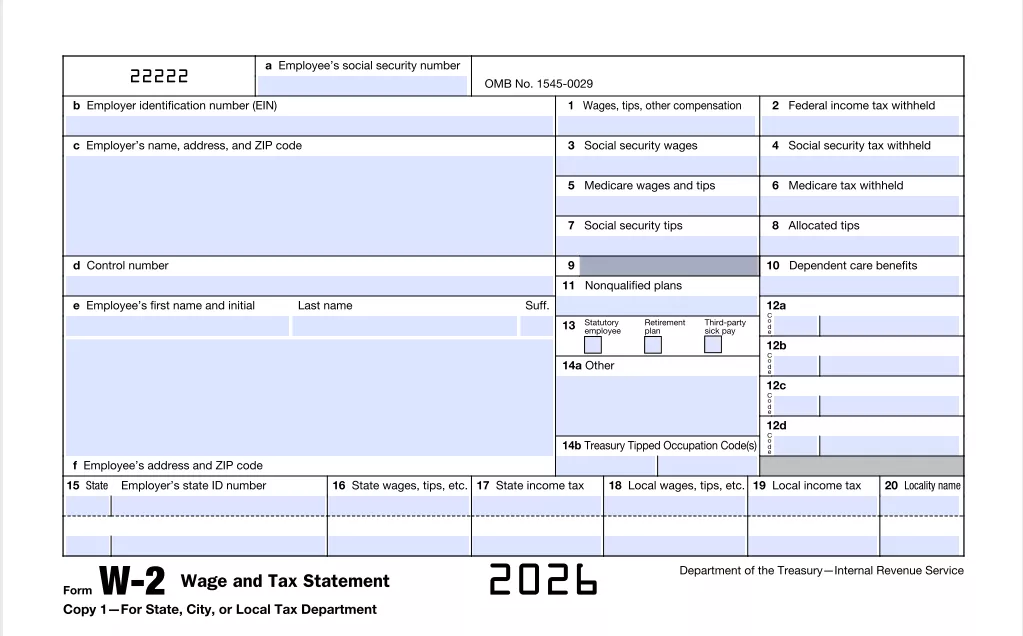
The employer must fill out a W-2 tax form using personnel data and payroll records. Below are the key points to fill in a W-2 form:
- The employee's Social Security number (SSN).
- The employer's name, address, zip code, and employer identification number (EIN).
- Wages
- Tips
- Withheld Social Security and federal income taxes
- Withheld Medicare, state, and local income taxes
- Employer-sponsored health coverage
- Dependent care benefits
- Allocated tips
- Nonqualified plans
- Deferred compensation
Employers are required to provide employees with a filled W-2 form no later than January 31 of the following year (If that date falls on a weekend, the due date for filing with the SSA will be extended to the following business day, Monday). The copies of the W-2 form are also submitted to the Social Security Administration (SSA) and state and local authorities.
What is W-4?
W-4 is the employee's withholding certificate that helps the employer withhold the correct federal income tax from the employee's paycheck. The key points to fill in a W-4 form include:
- Name, address, and marital status of the employee
- Multiple jobs or spouse works
- Claim dependents
- Withholding adjustments
- Employee signature
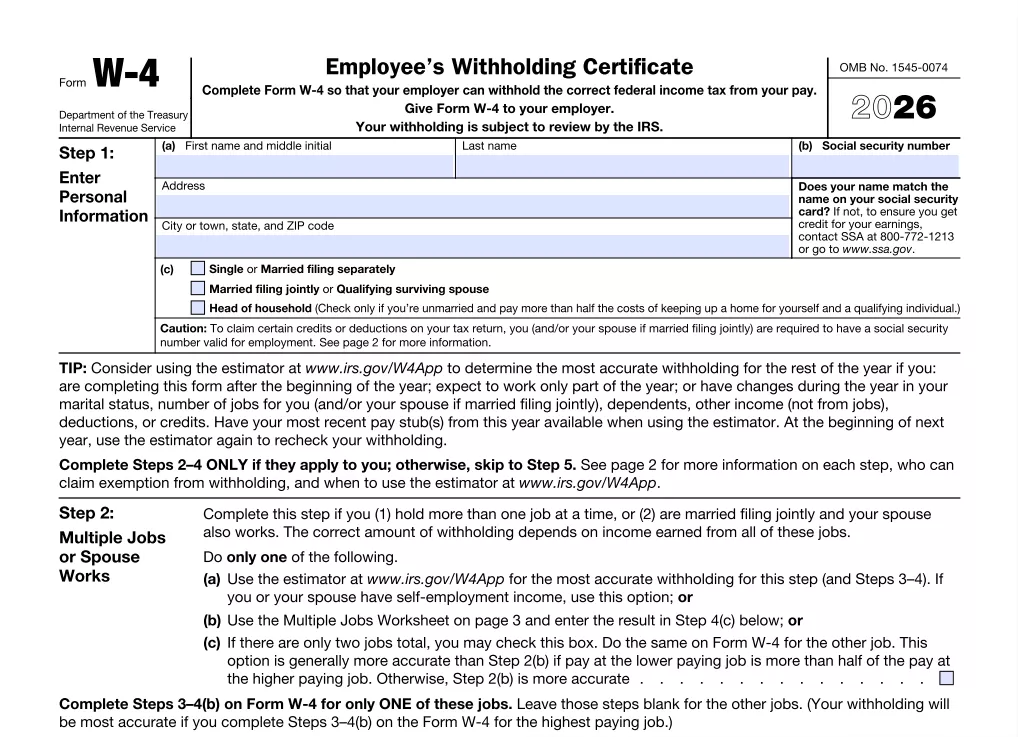
The employees are usually asked to fill out the W-4 form at the time of their hiring so that the employer can adjust the payroll accordingly. However, employees can make changes to the W-4 form at any time.
Direct Answer
W-2 vs. W-4 – 5 Key Differences
The above overview of W-2 and W-4 tax forms reflects that they are a lot different from each other and come with different purposes. So, below are the five key W-2 vs. W-4 differences worth knowing:
1. Purpose
The purpose of the W-2 form is to get the employees' earnings and tax withholding information. In contrast, the purpose of the W-4 form is to create an employee's withholding certificate so that the employer withholds the required tax.
2. Information Filled
The W-2 form contains multiple boxes that require the employee to fill in proper details about the employee's complete earnings. This includes salary, tips, compensation, etc. Besides that, the W-2 form also requires proper details on taxes withheld, Medicare and Social Security contributions, etc.
The W-4 form contains a few boxes and mostly asks for information related to the employee's tax withholding preferences. It requires the employees to add the number of allowances, filing status, and other withholding they want. So, there is no information about the earnings or tax deductions.
3. Filled By
The employer fills out the W-2 form, and copies are sent to the employee, Social Security Administration, and state/local agencies. In contrast, employees fill out the W-4 form during the onboarding day or before the first salary.
4. Submission Time
The W-2 form should be provided to employees no later than January 31 of the following year (If that date falls on a weekend, the due date for filing with the SSA will be extended to the following business day, Monday). On the other hand, the W-4 form is not submitted to any external entity. It should be filled and given to the employer before the employees receive their first salary.
5. Submission Frequency
The employer fills out the W-2 form once per year for each employee. In contrast, employees first fill out the W-4 forms on the first day of the job. Afterward, employees fill out the W-4 form again when they face any personal or financial changes.
How to Fill IRS W-2 and W-4 Tax Forms
The W-2 and W-4 tax forms are accessible from the IRS website. It also provides detailed instructions on how to fill the various boxes in these tax forms. Once you have downloaded the W-2 and W-4 tax forms, you need a PDF form-filling tool to easily fill all the boxes. This is where UPDF comes into action.
UPDF is an advanced and powerful PDF editor and form-filling tool that provides the most intuitive interface to easily and instantly fill forms. It intelligently identifies all the fillable boxes in the form and allows you to fill the entries easily. Besides that, it also allows you to draw or upload your sign for the W-4 form.
About UPDF
Follow the below steps to learn how to fill W-2 and W-4 tax forms with UPDF:
- Download W-2 and W-4 tax forms from the IRS website.
- Download and launch UPDF.
Windows • macOS • iOS • Android 100% secure
- Open either W-2 or W-4 PDF form with UPDF.
- After that, switch to the Comment mode from "Tools", click the form fields and fill out them using UPDF. If you want to add signature to the form, just click the "Signature" icon under "Comment" mode and select "Create" to create one.
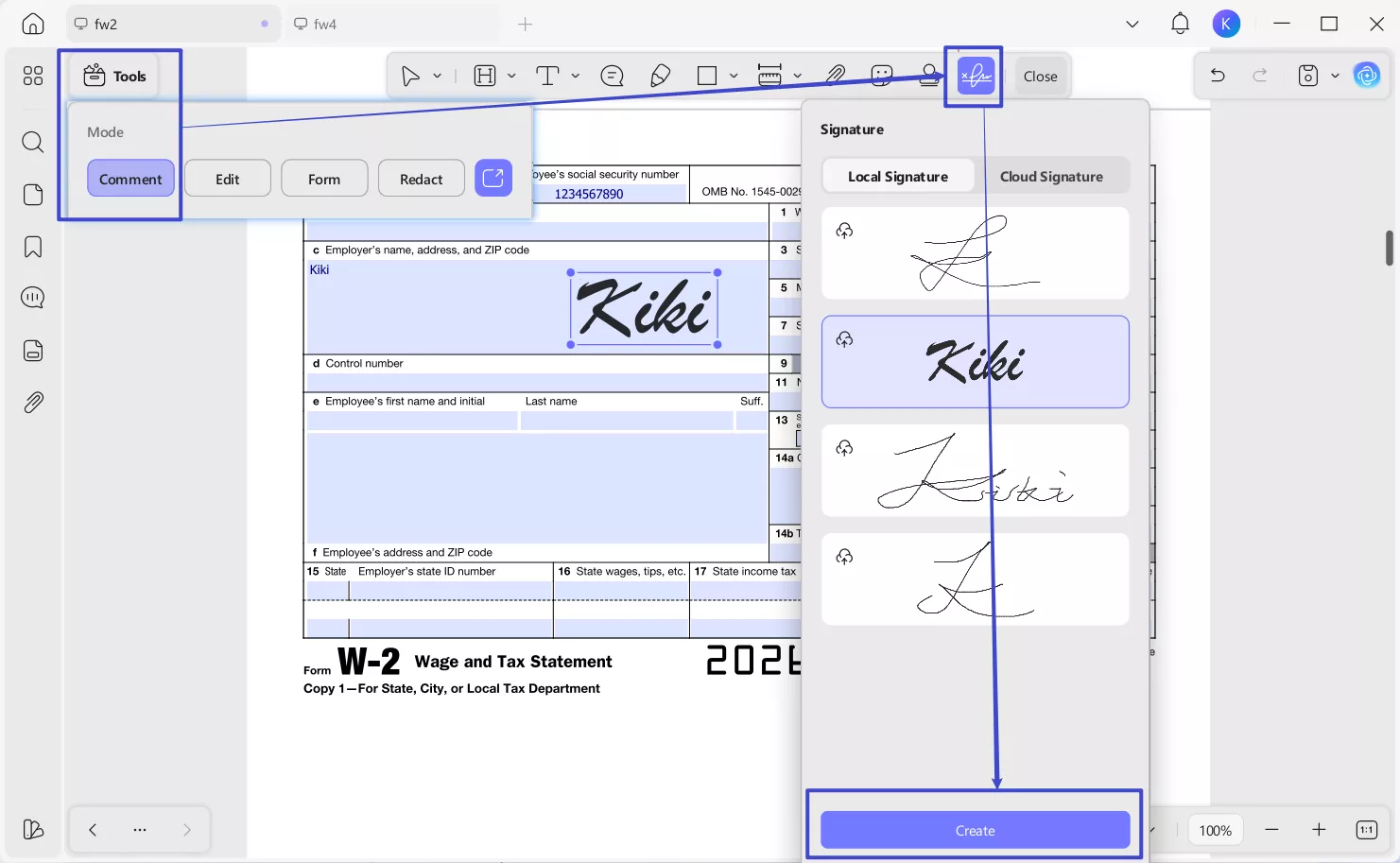
- Once all the entries are added, you can click the "Save" icon from the right sidebar and save the document on your device.
You can also fill your IRS W-2 and W-4 tax forms on your mobile devices.
- Download UPDF mobile app from App Store or Google Play. Then, import your PDF form W-2 or W-4 by tapping the "+" symbol in the bottom-right corner or choosing any existing PDF files.
Windows • macOS • iOS • Android 100% secure
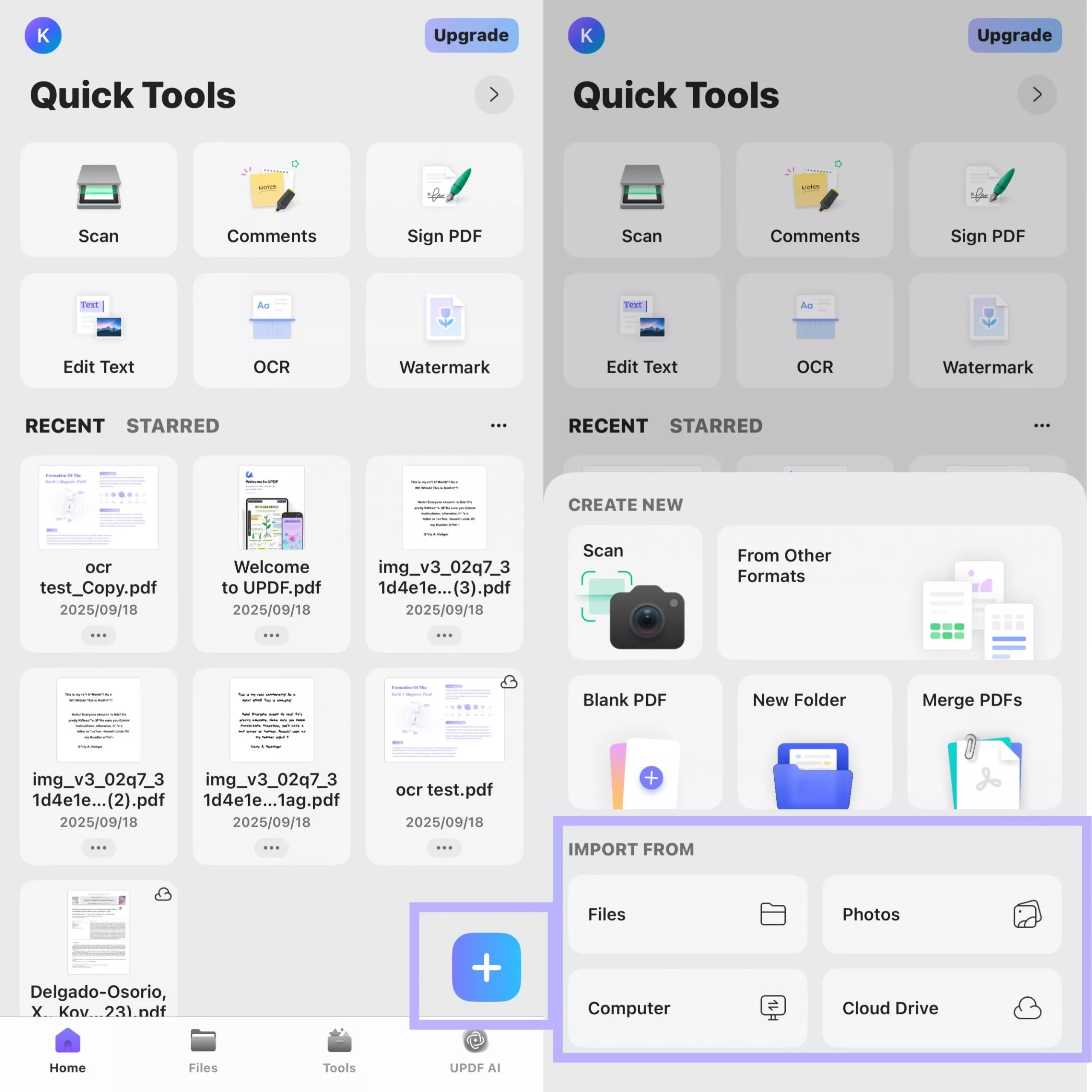
After you open the form with UPDF, UPDF will automatically highlight the existing fields for you. Tap directly on a form field that needs to be filled out. A pop-up window will appear, allowing you to enter your information.
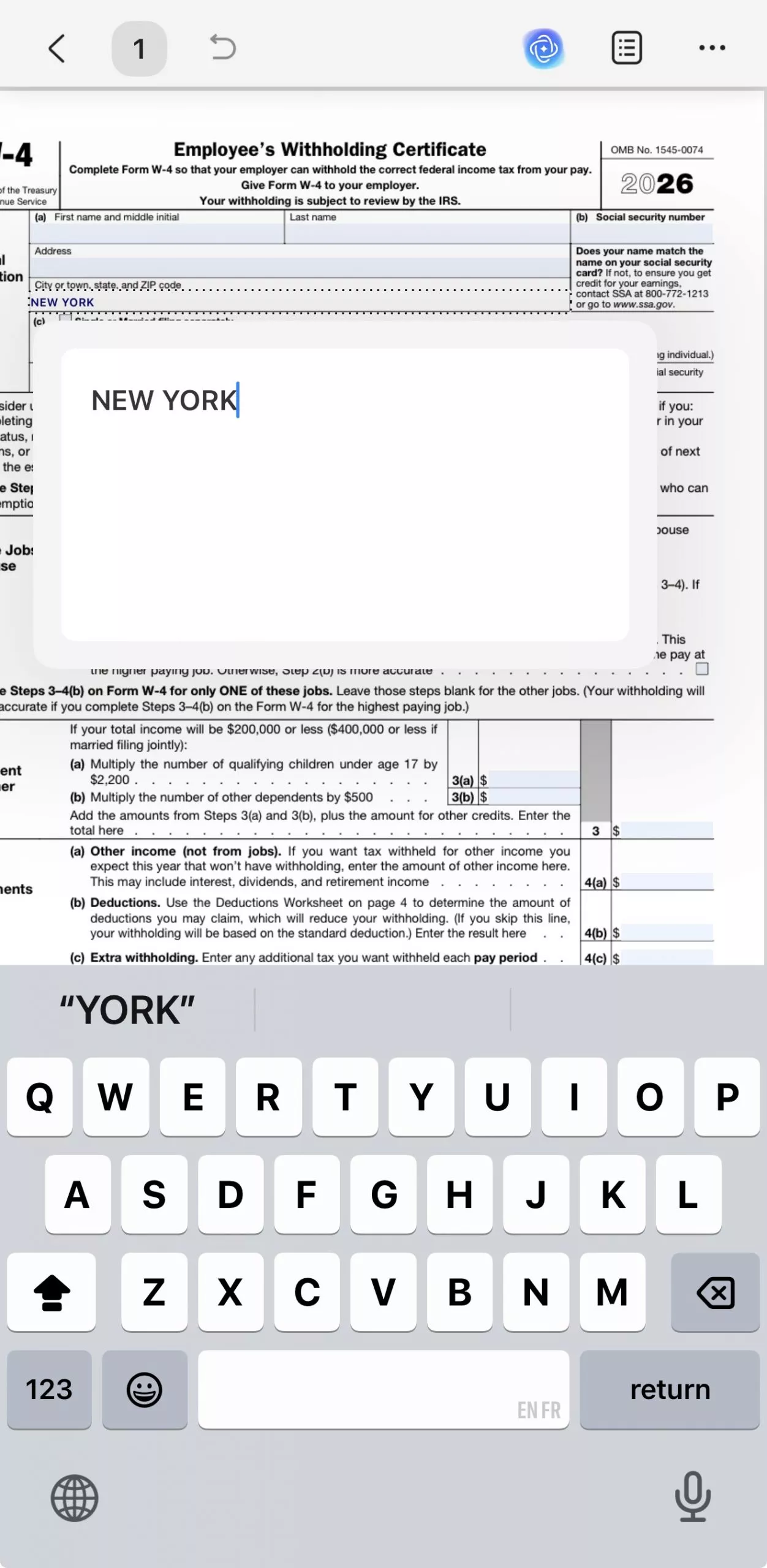
After entering the text, tap a blank area of the form to exit the current field. Then, tap another form field to continue entering information. Repeat this process until all form fields are completed.
That's it! This way, UPDF provides a one-stop platform to fill the boxes in W-2 and W-4 easily. To know more details about what to add in the field boxes, UPDF also provides a detailed guide on all the entries of W-2 and W-4. So, simply download UPDF and quickly fill out the tax form without any hassle.
Windows • macOS • iOS • Android 100% secure
Wrapping Up
IRS W-2 and W-4 are essential tax forms companies must fill in to comply with the IRS regulations. Therefore, this guide talked in detail about all the key information you need to understand the basics and differences between W-2 vs. W-4. Besides that, this guide also recommends installing UPDF to have a seamless way to fill and sign tax forms. So, keep this guide as your reference and download UPDF to easily fill out tax forms anytime.
Windows • macOS • iOS • Android 100% secure









 Enid Brown
 Lizzy Lozano
 Enya Moore
 Delia Meyer
 Enola Davis
A Question Many Ask
Proper way to fill out W-4 when married filing jointly
Odd-Perspective8704