 UPDF
UPDF
 UPDF for Windows
 UPDF for Mac
 UPDF for iPhone/iPad
 UPDF for Android
 UPDF AI Online
 UPDF Sign
 Edit PDF
 Annotate PDF
 Create PDF
 PDF Form
 Edit links
 Convert PDF
 OCR
OCR PDF to Word
 PDF to Image
 PDF to Excel
 Organize PDF
 Merge PDF
 Split PDF
 Crop PDF
 Rotate PDF
 Protect PDF
 Sign PDF
 Redact PDF
 Sanitize PDF
 Remove Security
 Read PDF
 UPDF Cloud
 Compress PDF
 Print PDF
 Batch Process
 About UPDF AI
 UPDF AI Solutions
 AI User Guide
 FAQ about UPDF AI
 Summarize PDF
 Translate PDF
 Chat with PDF
 Chat with AI
 Chat with image
 PDF to Mind Map
 Explain PDF
 PDF AI Tools
 Image AI Tools
 AI Chat Tools
 AI Writing Tools
 AI Study Tools
 AI Working Tools
 Other AI Tools
 AI Bookmark Generation
 AI Bookmark Summary
 AI Watermark Generation
 AI Background Generation
 AI Sticker Generation
 AI Stamp Generation
 AI Editing Suite
 UPDF Copilot
 AI Page Management
 AI Semantic Search
 PDF to Word
 PDF to Excel
 PDF to PowerPoint
 Enterprise Solution
 Enterprise Sign
 Enterprise AI
 Enterprise Plan
 Enterprise User Guide
 Enterprise Webinar
 Banking
 Healthcare
 Insurance
 Legal
Legal Manufacturing
 Government
 Education Solution
 Customer Stories
 User Guide
 UPDF Tricks
 FAQs
FAQs UPDF Reviews
 Download Center
 Blog
Blog Newsroom
 Tech Spec
 Updates
 UPDF vs. Adobe Acrobat
 UPDF vs. Foxit
 UPDF vs. PDF Expert

Proper citation of a textbook is a core requirement of academic writing. Understanding how to cite a textbook correctly helps give authors due credit and builds readers' confidence in your studies. Citing accurately also reduces the plagiarism risk and grading issues. These days, as many students rely on digital textbooks for their studies, finding details such as the author, edition, or publication year can take up a lot of their time.
UPDF AI Online supports this process as a productivity helper during academic work. It helps students locate key citation details while reading digital textbooks, allowing them to focus more on writing. For students aiming to work faster without missing citation basics, UPDF AI Online is worth exploring.
Part 1. What Information You Need To Cite A Textbook
Correct textbook citation depends on collecting accurate source details. However, incorrect or missing information may weaken your academic work. Saying this, most citation styles rely on the same core elements, even if the order changes.
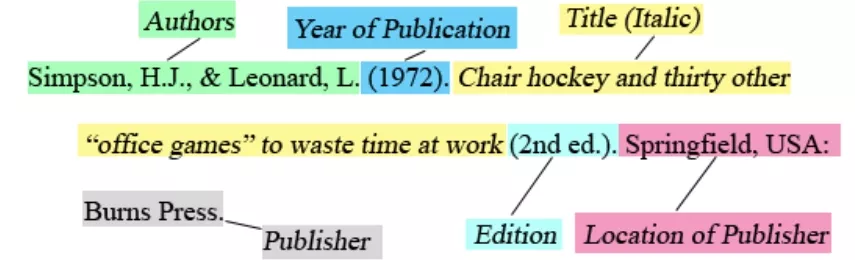
Core Elements Required For Textbook Citations
- Author Or Editor Name: Always start with the primary author. In case there is no author listed, prefer the editor’s name instead. Names should appear exactly as written in the textbook.
- Textbook Title: Include the full title and subtitle, and do not shorten or modify the wording. Titles help readers clearly identify the source.
- Edition Number: Many textbooks are updated regularly. Listing the correct edition ensures your source matches the referenced material.
- Publication Year: This shows how current the information is, as some subjects require the most recent edition for academic accuracy.
- Publisher Name: The publisher confirms the textbook’s authenticity. This detail is usually found near the copyright information.
- Page Numbers/Chapter Details: Use page numbers for direct quotes or specific references. For digital textbooks, chapter titles may be used when page numbers vary.
Each of the above elements helps readers locate the same textbook without confusion.
Print Vs Digital Textbooks
Print and digital textbooks require the same citation information. However, the way data is accessed is the main difference here. Printed textbooks display details on the cover or copyright page. Digital textbooks may spread this information across menus or sections. This underscores the importance of careful review when gathering citation details.
Part 2. How To Cite A Textbook In Different Citation Styles
Textbook citations differ depending on the style you use. Below are the general formats and examples on how to cite a textbook APA, MLA, and Chicago styles. These examples show how to include all key details accurately.
1. APA Style Textbook Citation
General Format: Author Last Name, First Initial. (Year). Book title: Subtitle (Edition). Publisher.
Example: Smith, J. (2021). Introduction to Psychology (3rd ed.). Academic Press.
Notes:
- APA is commonly used in the social sciences.
- Include the edition only if it is not the first.
- Use italics for the book title and subtitle.
2. MLA Style Textbook Citation
General Format: Author Last Name, First Name. Book Title: Subtitle. Edition, Publisher, Year.
Example: Smith, John. Introduction to Psychology. 3rd ed., Academic Press, 2021.
Notes:
- MLA is used mainly in the humanities.
- Include the edition before the publisher.
- Italicize the full book title, not chapter titles.
3. Chicago Style Textbook Citation
General Format (Notes And Bibliography): Author First Name Last Name. Book Title: Subtitle. Edition. Place of Publication: Publisher, Year.
Example: John Smith. Introduction to Psychology. 3rd ed. New York: Academic Press, 2021.
Notes:
- Chicago style is common in history and some social sciences.
- Include the place of publication along with the publisher.
- Edition is listed after the title.
Also Read: AMA Citation Generator >>
Part 3. How UPDF AI Online Helps You Cite A Textbook More Efficiently
Here are some use cases UPDF AI can help you cite a textbook properly:
Common Use Cases
Working With Digital Textbooks
Students prefer eBooks for study or reference as these textbooks store key information such as author, edition, or publication year in menus or metadata rather than on the visible title page. Locating these details manually takes time, largely when textbooks are lengthy or split into multiple files.
Handling Scanned Or Image-Based Textbooks
Scanned textbooks are essentially images, which makes text difficult to search. In this regard, extracting author names, edition details, or page numbers from a scanned copy usually requires manual reading or OCR software, which slows down the work and is prone to mistakes.
Confirming Details While Writing Assignments
Students often check specific chapters, page numbers, or editions when drafting essays or research papers. Juggling between the textbook and the writing document multiple times always interrupts the workflow and increases the possibility of errors during citation.
Referencing Multiple Editions
Mostly, academic textbooks, even subject specific, are updated frequently which may lead to students accidentally citing outdated editions. Ensuring that edition, year, and the publisher match the version being referenced is crucial for credibility.
Chapter-Specific Or Partial Citations
Some assignments require citing only specific chapters or sections and not an entire book. Locating chapter titles and page ranges, particularly in digital or scanned formats, that also be done manually, which may prove to be tedious without organized access to the content.
How To Use UPDF AI Online For Textbook Citation
Below are the steps on how to use the UPDF AI Online tool to cite textbooks:
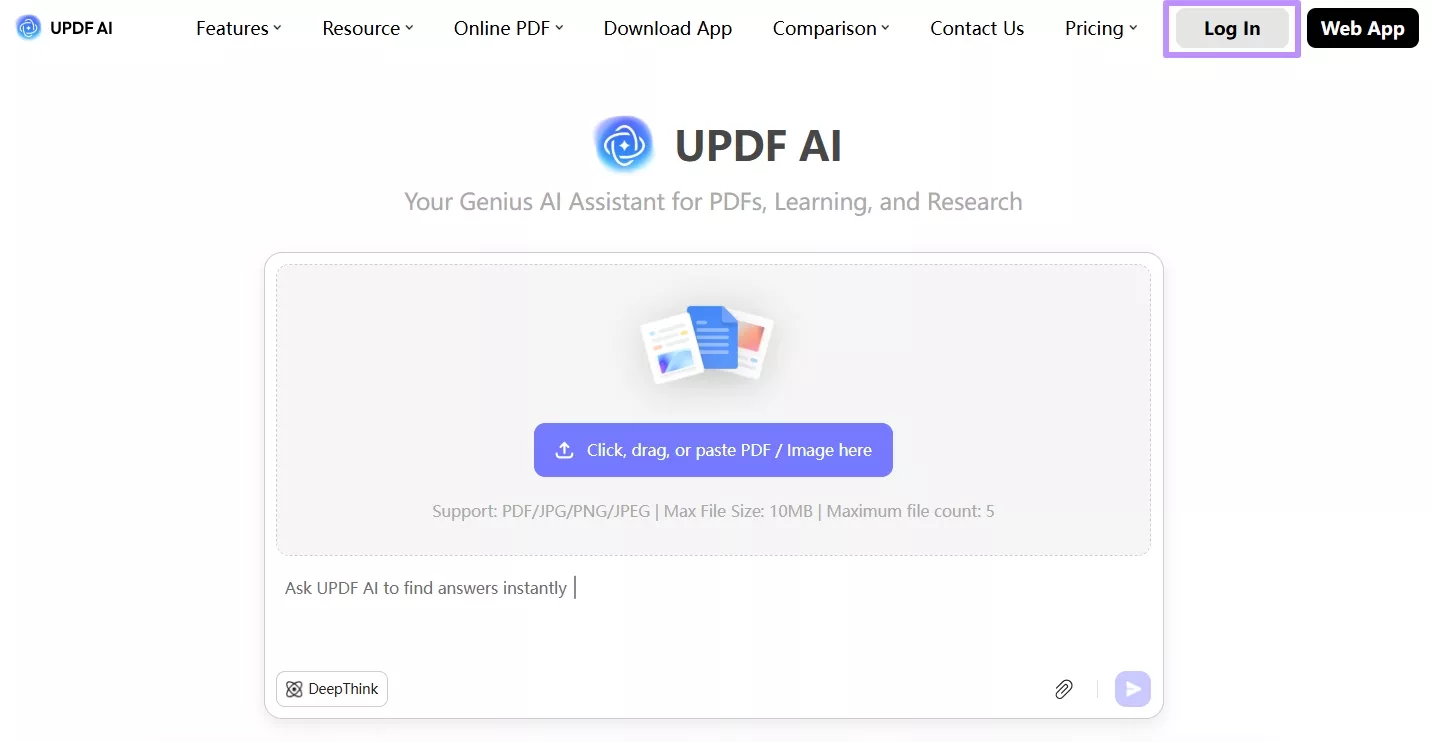
Step 1. Visit the UPDF AI Online platform using your browser and hit the "Log In" button in the top right corner to sign in to your account using your credentials.
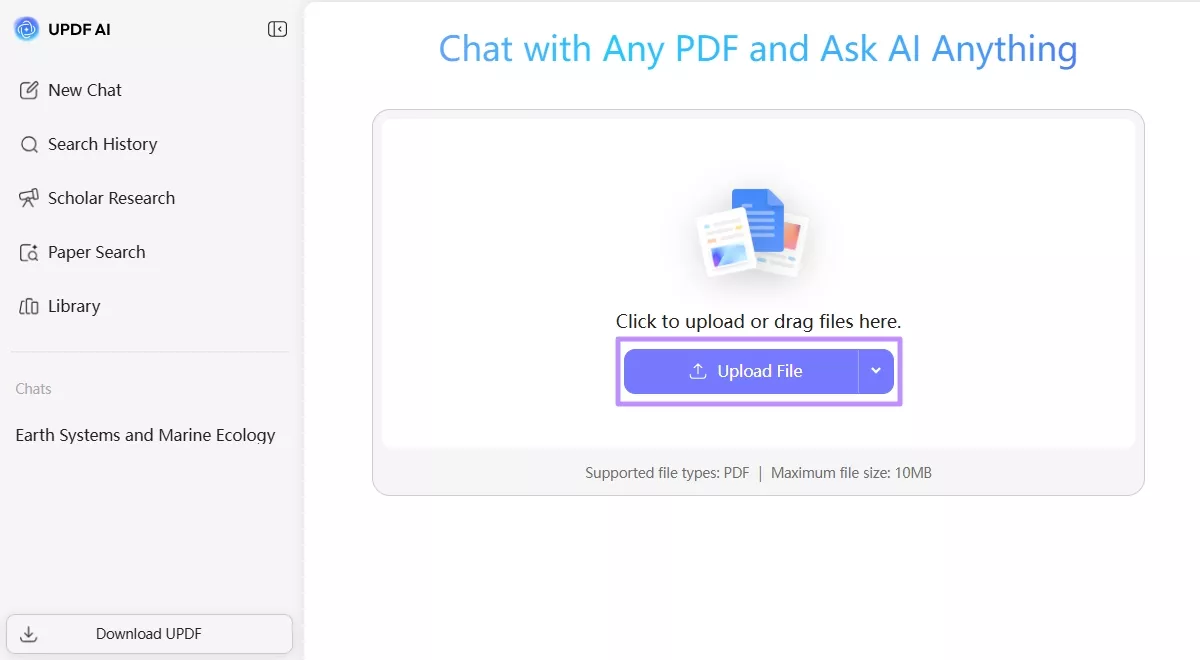
Step 2. Next, click the "Upload File" button to upload your digital or scanned textbook. The tool supports PDF files.
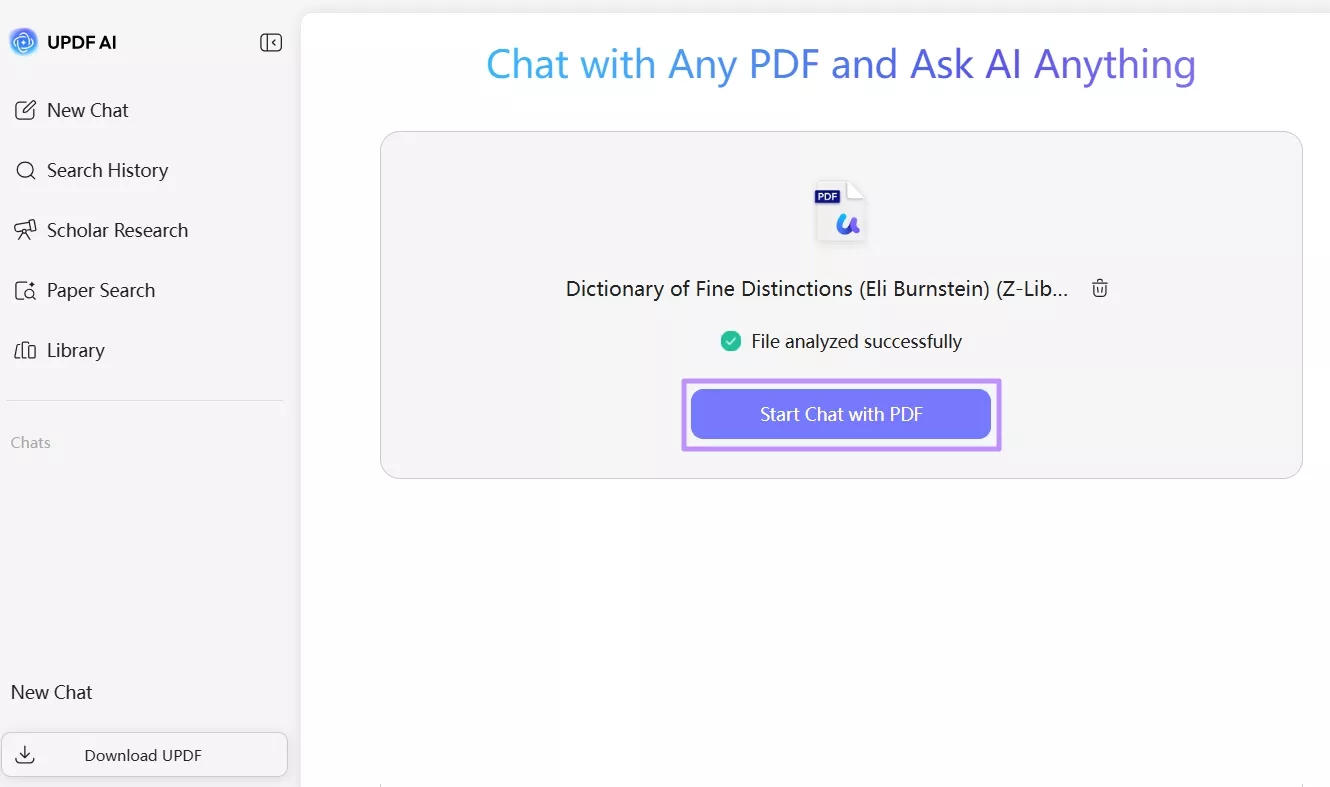
Step 3. Now, press the "Start Chat with PDF" button and UPDF AI will start scanning the document to grasp its structure and content.
Step 4. When done, proceed by requesting key information such as author name, edition, publication year, publisher, and page or chapter details from the tool using the "Ask Something" chat box.
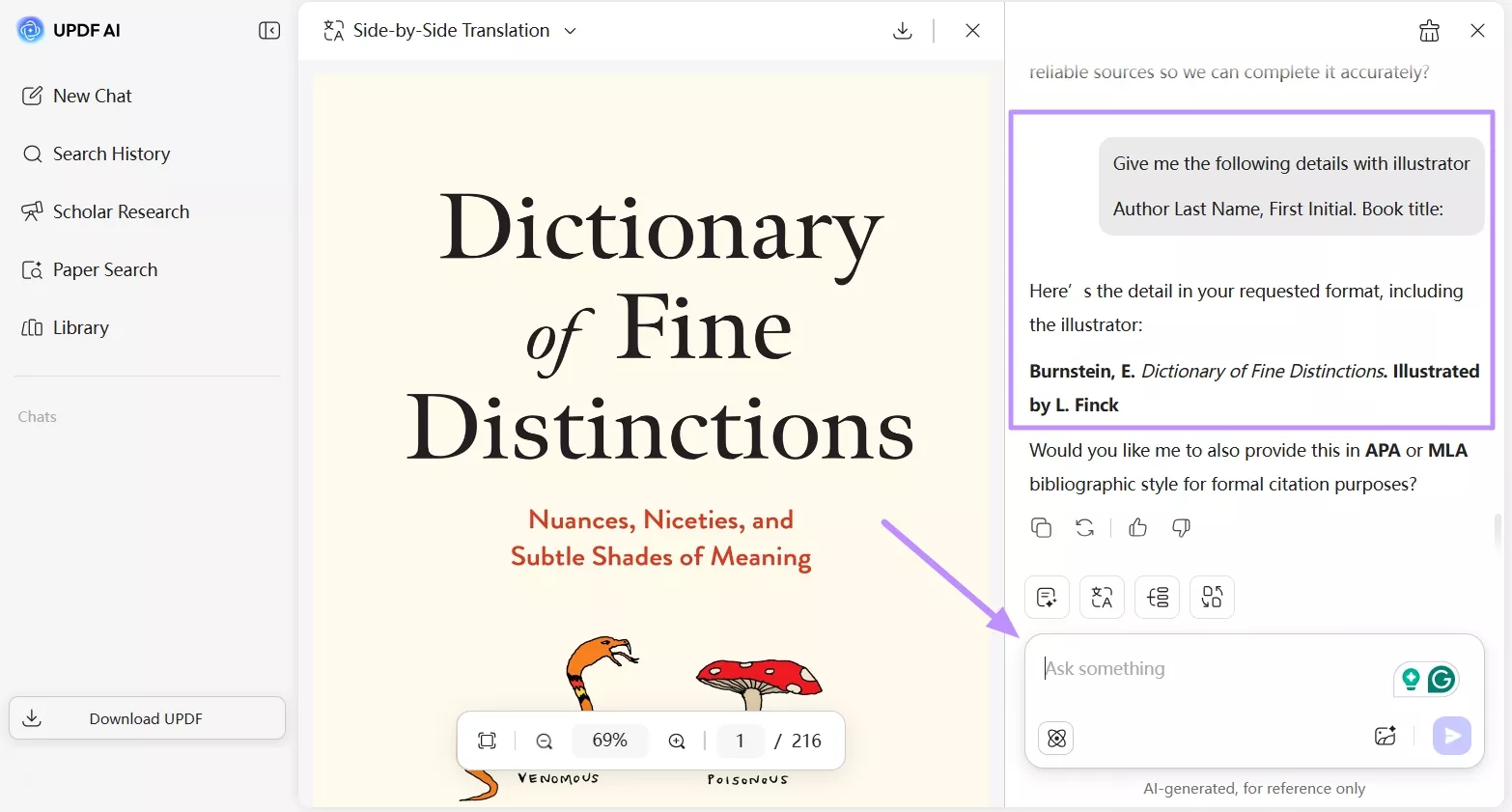
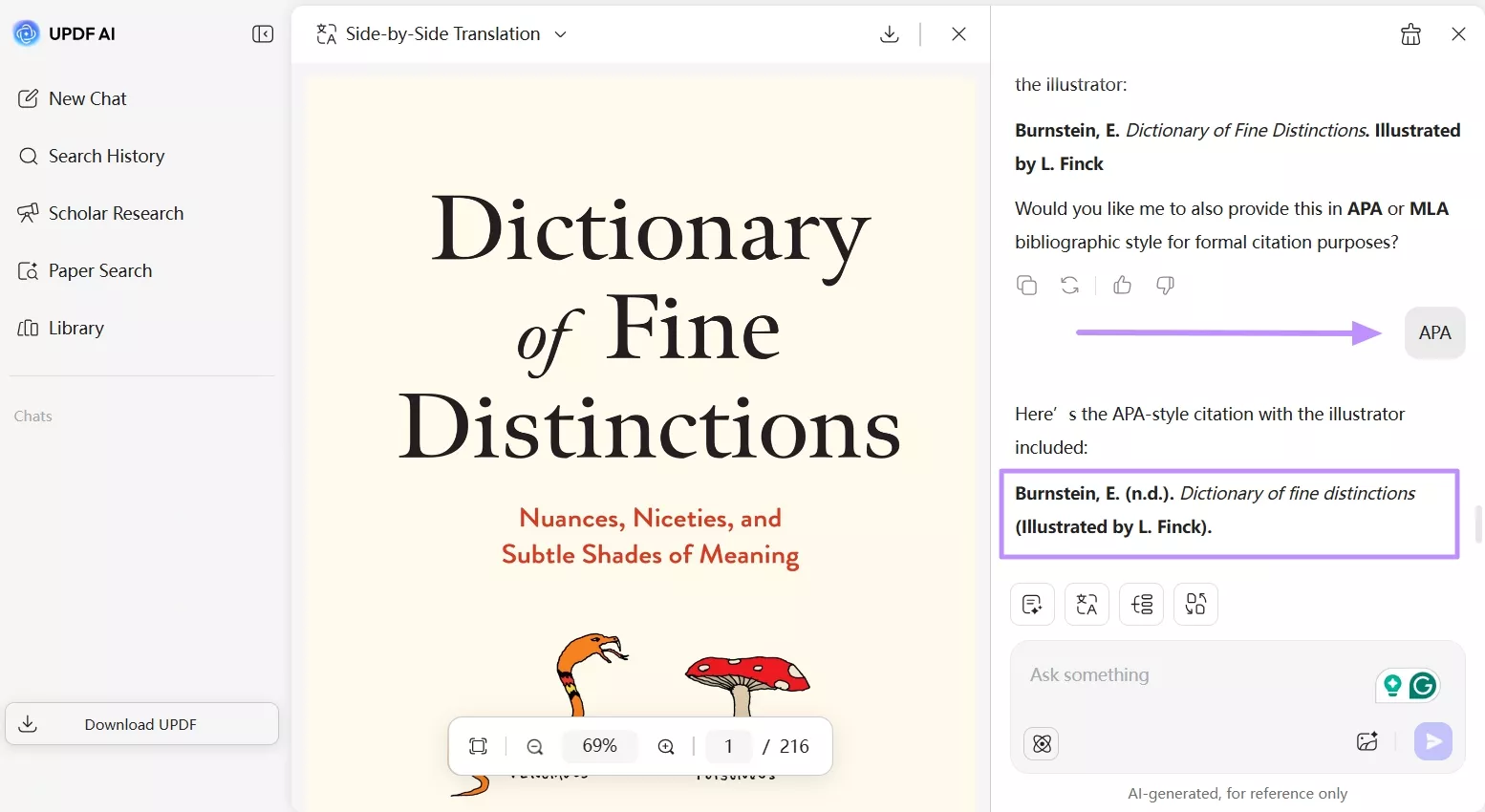
Step 5. Carefully check the results to ensure they match the textbook word-for-word. Once verified, ask UPDF AI to apply the verified information to APA, MLA, or Chicago citation formats as required.
Unique Benefits Of UPDF AI Online
1. Processes Scanned And Image-Based Texts Intuitively
Unlike many tools, which require the text to be in digital form, UPDF AI Online is capable of processing scanned or image-based textbooks and finding the required sections of the citation.
2. Reduces Workflow Interruptions
Students are able to extract and verify citation information without having to switch between documents, along with writing. This facilitates the process of research-writing and makes it more streamlined.
3. Accurate Chapter And Page Detection
For assignments requiring citations from specific sections, UPDF AI Online identifies chapters and page numbers, even when they differ from print versions.
4. Centralizes Citation Details
All the information extracted is readily available in one place, thus eliminating errors associated with taking notes manually or through a number of sources.
By addressing these real-world use cases and offering practical solutions, UPDF AI Online ensures that citing textbooks is faster, accurate, and less stressful for students dealing with multiple sources.
Part 4. Tips For Citing Digital And Scanned Textbooks
Citing digital or scanned textbooks can be tricky, but following a few practical tips makes the process more accurate and straightforward.
1. When Page Numbers Differ From Print Versions
Many digital textbooks have different pagination from print copies. Always check the version you are using and note the page or location number accordingly. If citing a specific quote, mention the chapter or section alongside page numbers to avoid confusion.
2. Handling Scanned PDFs
Since scanned textbooks are normally in the form of images, it may be hard to copy or search through text. To facilitate easier citing, convert scanned PDF into an editable format, like Microsoft Word. UPDF AI Online can convert scanned PDFs into Word files so that you can easily locate the author, edition, and page numbers, and remain able to access the text.
3. Citing Chapters Instead Of The Whole Book
When assignments require you to reference only a specific chapter or section, make sure to include the page range and the chapter title in your citation. This helps readers understand the context and shows the referencing accuracy which is crucial when textbook contains large number of topics.
Conclusion
Building authority of your academic work requires proper textbook citation. Collecting info like author names, editions, publication years, and page numbers is always time-taking. This becomes more complex when dealing with digital or scanned textbooks. Challenges such as differing page numbers, multiple editions, or chapter-specific citations add further complexity to this task.
Here, UPDF AI Online simplifies these complex tasks by extracting and organizing the required citation information efficiently. With its ability to handle both digital and scanned textbooks, convert files, and detect chapters or even pages, it gives students ample time to shift their focus to writing and research while ensuring citations are precise and complete.









 franck Petit

 Enola Miller
