 UPDF
UPDF
 UPDF for Windows
 UPDF for Mac
 UPDF for iPhone/iPad
 UPDF for Android
 UPDF AI Online
 UPDF Sign
 Edit PDF
 Annotate PDF
 Create PDF
 PDF Form
 Edit links
 Convert PDF
 OCR
OCR PDF to Word
 PDF to Image
 PDF to Excel
 Organize PDF
 Merge PDF
 Split PDF
 Crop PDF
 Rotate PDF
 Protect PDF
 Sign PDF
 Redact PDF
 Sanitize PDF
 Remove Security
 Read PDF
 UPDF Cloud
 Compress PDF
 Print PDF
 Batch Process
 About UPDF AI
 UPDF AI Solutions
 AI User Guide
 FAQ about UPDF AI
 Summarize PDF
 Translate PDF
 Chat with PDF
 Chat with AI
 Chat with image
 PDF to Mind Map
 Explain PDF
 Scholar Research
 Paper Search
 AI Proofreader
 AI Writer
 AI Homework Helper
 AI Quiz Generator
 AI Math Solver
 PDF to Word
 PDF to Excel
 PDF to PowerPoint
 Enterprise Solution
 Enterprise Sign
 Enterprise AI
 Enterprise Plan
 Enterprise User Guide
 Enterprise Webinar
 Banking
 Healthcare
 Insurance
 Legal
Legal Manufacturing
 Government
 Education Solution
 Customer Stories
 User Guide
 UPDF Tricks
 FAQs
FAQs UPDF Reviews
 Download Center
 Blog
Blog Newsroom
 Tech Spec
 Updates
 UPDF vs. Adobe Acrobat
 UPDF vs. Foxit
 UPDF vs. PDF Expert

Markdown editors have revolutionised the way we write and format text, as they offer an easy and efficient way to create tidy documents with minimal distractions or formatting issues. If you've ever tried to move text from a Word document into a CMS - such as WordPress - then you'll understand how frustrating it can be to search for hiccups in the formatting and then try to edit it all after it's been transferred. In this article, we'll explore the top five Markdown editors for Mac to help you choose the best tool for your writing needs. As a bonus, we also introduce an AI-integrated PDF editor that help you export chat history to Markdown files. Try it now.
Windows • macOS • iOS • Android 100% secure
The Top 5 Mac Markdown Editors
1. Bear
Bear is a sleek and intuitive option for Mac users - it's a note taking tool which offers a clean interface and a "focus mode", perfect for distraction-free writing.

Features: Bear offers twelve different writing themes, and some innovative features which include: exporting notes to Markdown format, the ability to encrypt files, cross-note links, and tags. You can also backup and restore files made with Bear, and sync seamlessly across devices using iCloud.
Pricing: Bear offers a free version with limited features, but you can upgrade to the premium version for US$2.99 per month or US$29.99 per year. Both of these options include a 14-day free trial.
Ratings: Some positive things about Bear is that its price is relatively low and that it's simple to use, but some negatives include the fact that users can only access the iCloud sync feature with the paid version.
At the moment, Bear is rated 4.6/5 on G2. Reviewer Rohit S. had this to say about their experience:
2. Byword
Byword is an easy-to-use text editor with Markdown support. Similar to Bear, it also has a distraction free mode.

Features: Byword offers options to change font and background colour, the ability to access typewriter mode, hotkeys support, syntax auto-completion, integration with social media platforms, and the ability to export to PDF, HTML, RTF, Word and Latex.
Pricing: Byword does not offer a version, and it is priced at US$10.99 in the iOS App Store.
Ratings: Some pros of Byword include that it's very customisable and that the user can publish directly to WordPress or other platforms, however some of its cons are that it isn't free to use and its auto-save feature isn't always reliable.
This Markdown tool is currently rated 4.7/5 on the iOS App Store and user Hhollick backed up their 5-star review with this comment:
Hhollick, from the iOS App Store
3. Ulysses
Ulysses is a robust Markdown editor which is suitable for both casual writers and professionals.

Features: This Markdown editor has a great set of features, including the ability to arrange files in sections, a cloud-synchronisable library, export to CMS or local files, structure files using tags, and compatibility with footnotes, images, links and tables. Ulysses is also highly personalisable.
Pricing: Ulysses is available as a free version, with the option to pay US$39.99 per year to access all of its features.
Ratings: The most positive aspects of Ulysses are that it possesses a vast array of features, and it provides the ability to post directly to some CMS platforms. A not-so-great aspect is that the subscription prices are quite high.
Ulysses is rated an incredible 5/5 in the iOS App Store, and this is what user Milushkin had to say:
Milushkin, from the iOS App Store
4. Typora
Typora stands out for its live preview feature, allowing users to see their Markdown syntax rendered in real-time as they type.

Features: This platform offers the ability to carry out mathematics-related functions as well as being able to access previous versions of your Markdown files, and the ability to create flowcharts, sequences, and Mermaid diagrams.
Pricing: Typora is US$14.99 to download.
Ratings: A negative that has been pointed out by users about Typora is that the immediate rendering of files can be distracting. However, other users have highlighted this as a positive aspect, along with the ability to support LateX expressions and tables for Markdown Extra.
It's rated a fantastic 5/5 on Product Hunt, and user Mjgriffin made the following comment about their experience with Typora:
Mjgriffin, from Product Hunt
5. MacDown
MacDown is a versatile yet simple open-source Markdown editor which is highly customisable and is suitable for developers and writers.

Features: MacDown offers built-in customisable themes, customisable line-spacing and text insets, syntax highlighting and linking between Markdown pages.
Pricing: MacDown is completely free to use.
Ratings: Some great things about MacDown are that it is free and accessible for all Mac users, it has a split-screen view, and supports the linking of Markdown pages. A not-so-great aspect is that the split-screen eats up a lot of RAM, and users have reported that you may need to restart MacDown occasionally as it can be unstable.
MacDown is currently rated at 4.2/5 on Mac Update, with user Akanico saying this:
Assistant Professor, Rachel Bonnis, from Mac Update
6. NotePlan
NotePlan stands out as a premier Markdown editor for Mac, blending advanced note-taking with deeply integrated calendar features, and syncing effortlessly across Mac, iPhone, iPad, and the web for a cohesive, all-in-one productivity experience.
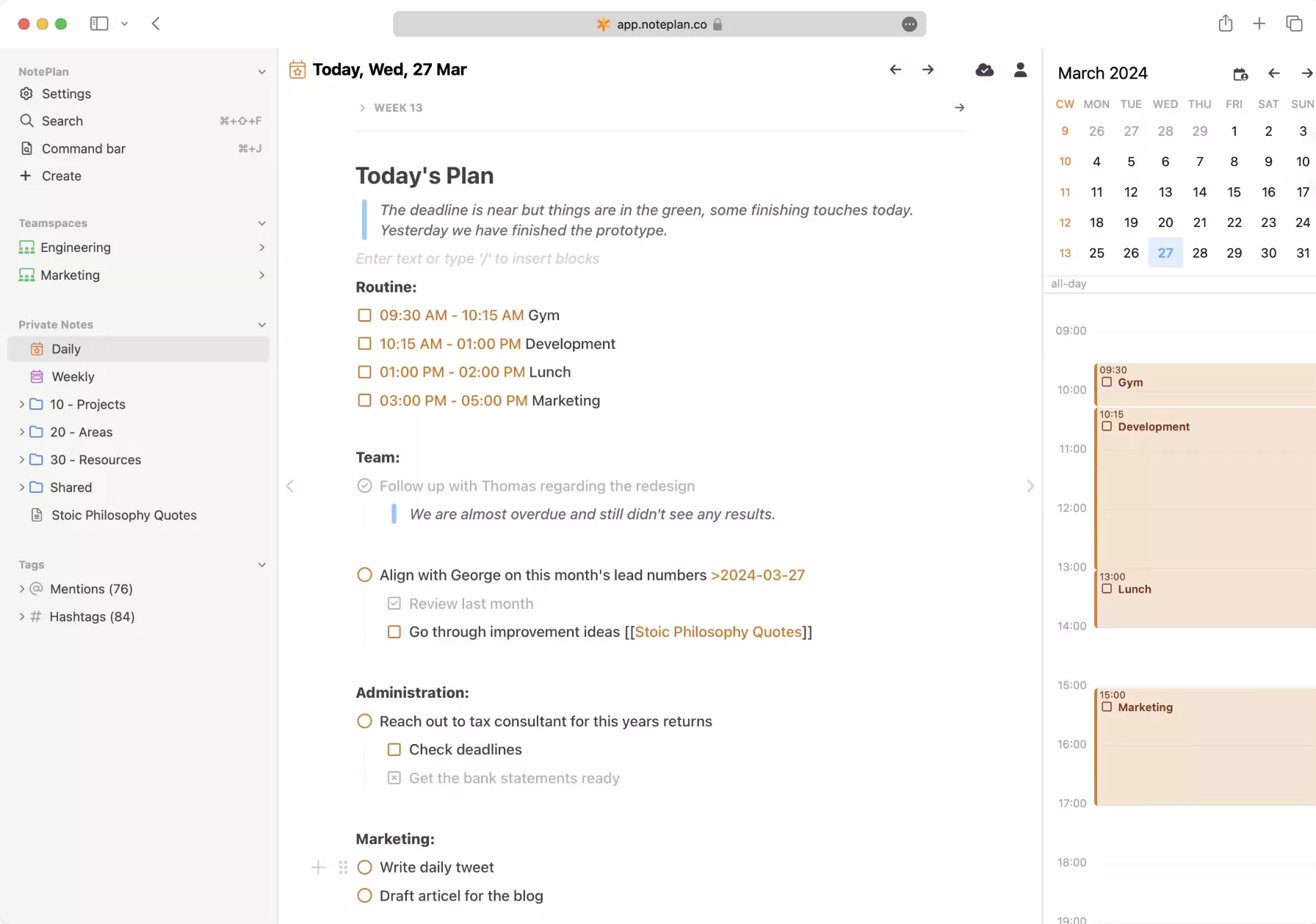
Features: With its clean, distraction-free interface, you can focus on writing in Markdown, while powerful search and tagging tools help you organize ideas efficiently.
Pricing: 14 day free trial. Paid plan starting with $9.99/month
Ratings: NotePlan stands out for its seamless integration of notes and calendar, enabling efficient task and project management. It also syncs via iCloud across Mac, iPhone, iPad, and the web. However, it lacks a built-in publishing feature like WordPress or Medium, which makes the process a bit cumbersome.
MacDown is currently rated at 4.8/5 on the App Store, with user saying this:
LDunville, from the App Store
Bonus Solution: Export AI Chat Content to Markdown File
If you want to improve your writing skills, I would like to recommend UPDF to you. It is a feature-rich, all-in-one PDF editor. Its innovative tools, such as annotation, OCR, organizing, and PDF conversion, can perfectly address the challenges you encounter during the writing process and optimize your overall writing experience. Let me give you a brief introduction to the features that truly impressed me.
Windows • macOS • iOS • Android 100% secure
- PDF Creation: Effortlessly create stunning PDFs from Word, images, or even clipboard content. You can also create a PDF Portfolio in just a few clicks!
- Annotate PDFs: Highlight content, drop a comment, draw a shape, and mark up your PDF however you like.
- Batch Processing: You can batch convert, compress PDF files, OCR and so on to save your time.
In addition, with the powerful UPDF AI, you can summarize PDFs, instantly translate any language, obtain detailed information to better understand the content of a file, and enhance your writing.
Next, I will show you how to use UPDF AI to export its chat content into a Markdown file.
- Select the "Chat" option within UPDF AI.
- Ask the chatbot a question or give it a prompt in order to get the information you need.
- Click the "Export" button at the bottom of the chat box.
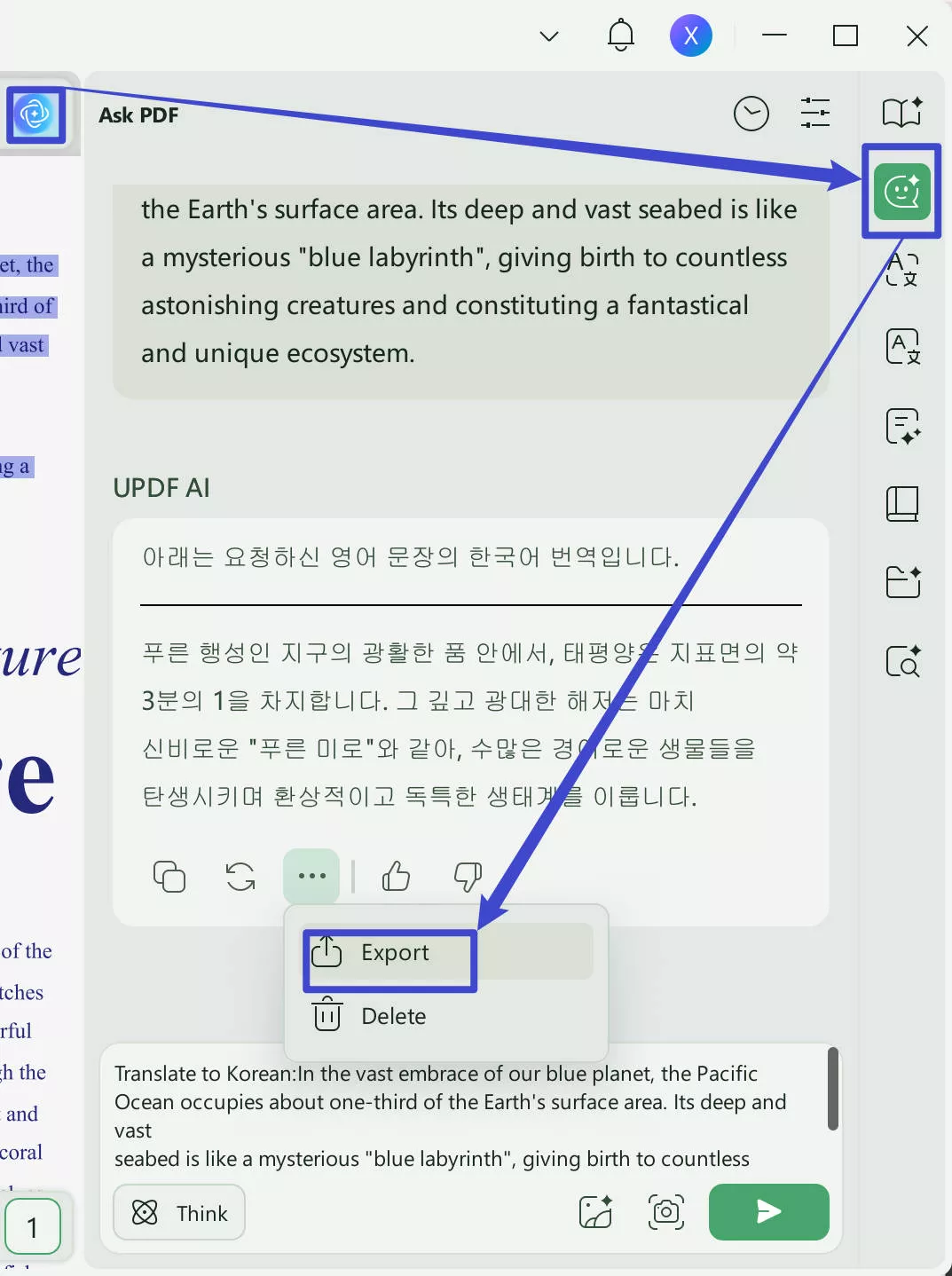
- Choose what type of file you'd like to export the text as. You can export the result to markdown file here.
- Give your file a name and a save location, and click "Export".
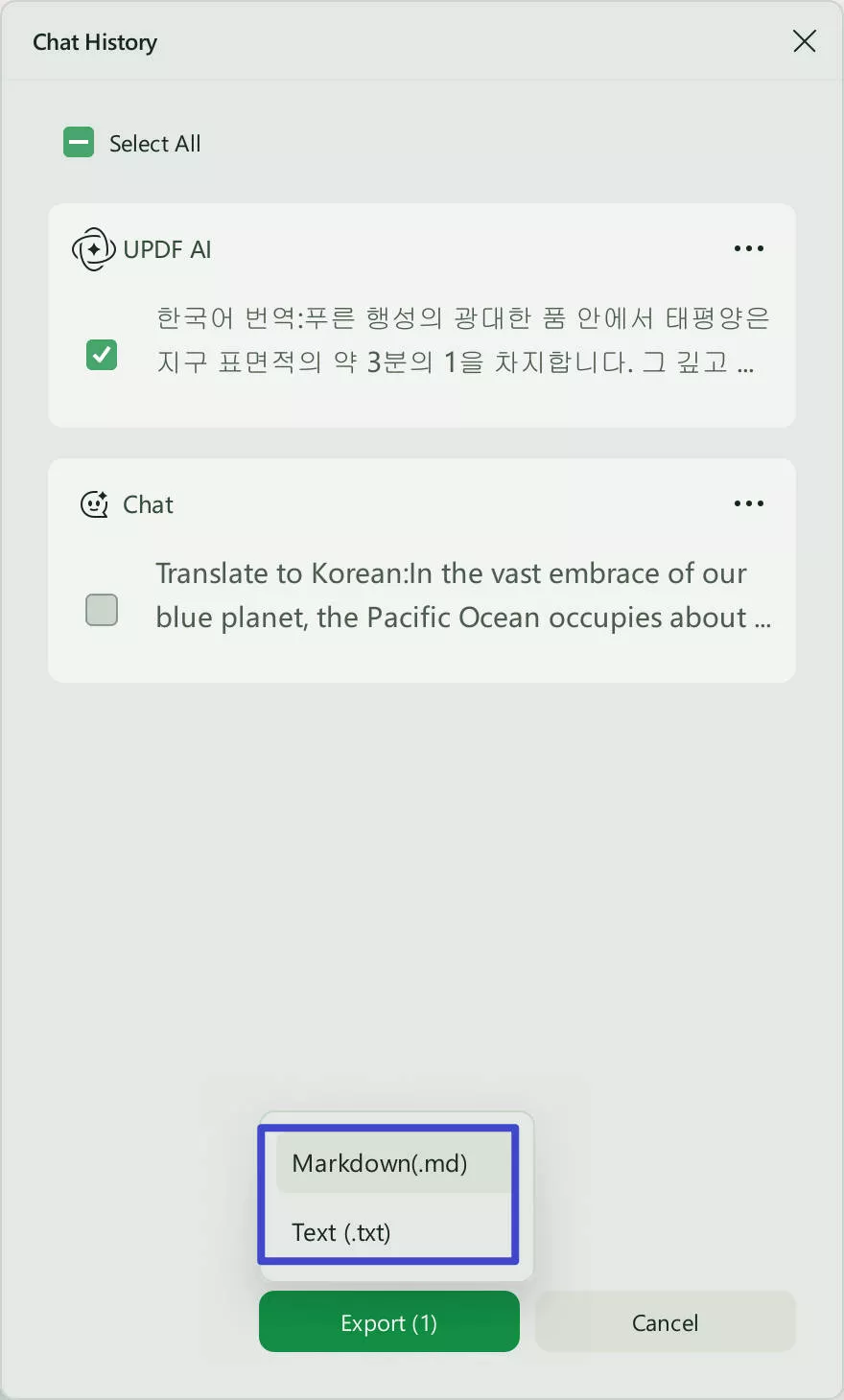
That's it! And now you can edit your markdown files in those markdown editors I recommended before and start your wonderful writing journey!
By the way, if you'd like to learn more about UPDF or UPDF AI and its wide range of capabilities, watch the video below or visit HowToGeek for an impartial and detailed review.
✨Discount Notice!
FAQs about Markdown Editor for Mac
Q1. What is a Markdown file?
A Markdown file is a lightweight markup language used to add formatting elements to text documents, allowing for seamless conversion to HTML and other formats.
Q2. What can a Mac Markdown editor do?
A Mac Markdown editor enables users to create, edit, and format text using Markdown syntax, providing a streamlined writing experience. It's an easy text-to-HTML conversion tool that you can use to format lists, headers, and you can also use it to add images, videos, and URLS without the use of formal text editors or HTML tags.
Q3. Can I edit a Markdown file on Mac?
Yes, Mac users can edit Markdown files using dedicated Markdown editors or even plain text editors with Markdown syntax highlighting.
Q4. What is the best Markdown editor for Mac?
The best Markdown editor for Mac will depend on the user's individual preferences and requirements. All the 5 tools listed in this article will help you, including Bear, Byword, Ulysses, Typora, and Macdown.
Conclusion
Markdown editors offer a convenient and efficient way to write and format text on Mac devices. Whether you want to prioritise simplicity, customisation, or prefer the more advanced features, there's a Markdown editor out there to suit your needs.
For those seeking additional productivity tools, a powerful AI chatbot, and the ability to handle your PDFs quickly and effectively, consider downloading and exploring UPDF and UPDF AI. Why not enhance your writing experience today, and elevate your creativity with UPDF.
Windows • macOS • iOS • Android 100% secure





 Lizzy Lozano

 Enya Moore

 Enid Brown
Rohit S. from G2