 UPDF
UPDF
 UPDF for Windows
 UPDF for Mac
 UPDF for iPhone/iPad
 UPDF for Android
 Nomostar
 UPDF AI Online
 UPDF Sign
 IvyCraft
 Edit PDF
 Annotate PDF
 Create PDF
 PDF Form
 Edit links
 Convert PDF
 OCR
OCR PDF to Word
 PDF to Image
 PDF to Excel
 Organize PDF
 Merge PDF
 Split PDF
 Crop PDF
 Rotate PDF
 Protect PDF
 Sign PDF
 Redact PDF
 Sanitize PDF
 Remove Security
 Read PDF
 UPDF Cloud
 Compress PDF
 Print PDF
 Batch Process
 About UPDF AI
 UPDF AI Solutions
 AI User Guide
 FAQ about UPDF AI
 Summarize PDF
 Translate PDF
 Chat with PDF
 Chat with AI
 Chat with image
 PDF to Mind Map
 Explain PDF
 PDF AI Tools
 Image AI Tools
 AI Chat Tools
 AI Writing Tools
 AI Study Tools
 AI Working Tools
 Other AI Tools
 AI Bookmark Generation
 AI Bookmark Summary
 AI Watermark Generation
 AI Background Generation
 AI Sticker Generation
 AI Stamp Generation
 AI Editing Suite
 UPDF Copilot
 AI Page Management
 AI Semantic Search
 PDF to Word
 PDF to Excel
 PDF to PowerPoint
 Enterprise Solution
 Enterprise Sign
 Enterprise AI
 Enterprise Plan
 Enterprise User Guide
 Enterprise Webinar
 IT
IT Education
 Construction
 Financial Service
 Healthcare
 Insurance
 Legal
Legal Manufacturing
 Government
 Researchers & PhDs
 Solopreneurs & Freelancers
 Lawyers & Legal Professionals
 Real Estate Agents & Brokers
 Education Solution
 Customer Stories
 User Guide
 UPDF Tricks
 FAQs
FAQs UPDF Reviews
 Download Center
 Blog
Blog Newsroom
 Tech Spec
 Updates
 UPDF vs. Adobe Acrobat
 UPDF vs. Foxit
 UPDF vs. PDF Expert

Quick answer:
Here is the detail most citation tools quietly skip: CSE is not one format. The CSE Manual defines three separate documentation systems — name-year, citation-sequence, and citation-name — and they cannot be mixed in one paper. Pick the wrong one and the reference list has to be rebuilt from scratch, not just reformatted. That constraint drives the comparison below.
The current edition is the CSE Manual, 9th edition (2024). Edition matters for journal-name abbreviation, et-al thresholds, and DOI handling — and as Part 3 shows, the edition label a tool displays is not always the edition it applies.
Part 1. Which CSE Citation Generator Should You Use?
| Your situation | Recommended tool | Best for |
|---|---|---|
| Your source is a PDF with no DOI | UPDF AI | Preprints, technical reports, scans — reads the fields off the page instead of a blank form |
| Standard lookup from URL, DOI, or ISBN | MyBib | All three CSE systems free, no account, exports to Word and Google Docs |
| You want the reference-list rules explained as you work | BibGuru | Clearest CSE guide of the four; ad-supported free tier |
| You also need plagiarism and grammar checks | Chegg Writing | Bundled writing suite, paid after the trial |
Part 2. Generating CSE Citations from a PDF with UPDF AI
Most citation generators are lookup tools. You give them an identifier — a DOI, ISBN, or URL — and they pull the metadata from a database. Some accept a PDF upload too, but that upload is still a lookup: it reads the DOI out of the file and queries the same index.
That breaks when the paper has no DOI. A preprint not yet posted, a departmental technical report, a supplementary chapter, a scan. The lookup returns nothing and the tool falls back to a blank form, so you are reading the title page and typing the volume number by hand.
UPDF's AI Assistant reads the document you have open and pulls the citation fields out of the paper itself. The source of truth is the PDF rather than an index that never captured it — which turns the job from transcribing fields into checking them.
Download UPDF and try it on the papers already in your reference folder.
Windows • macOS • iOS • Android 100% secure
How to Generate a CSE Citation from a PDF
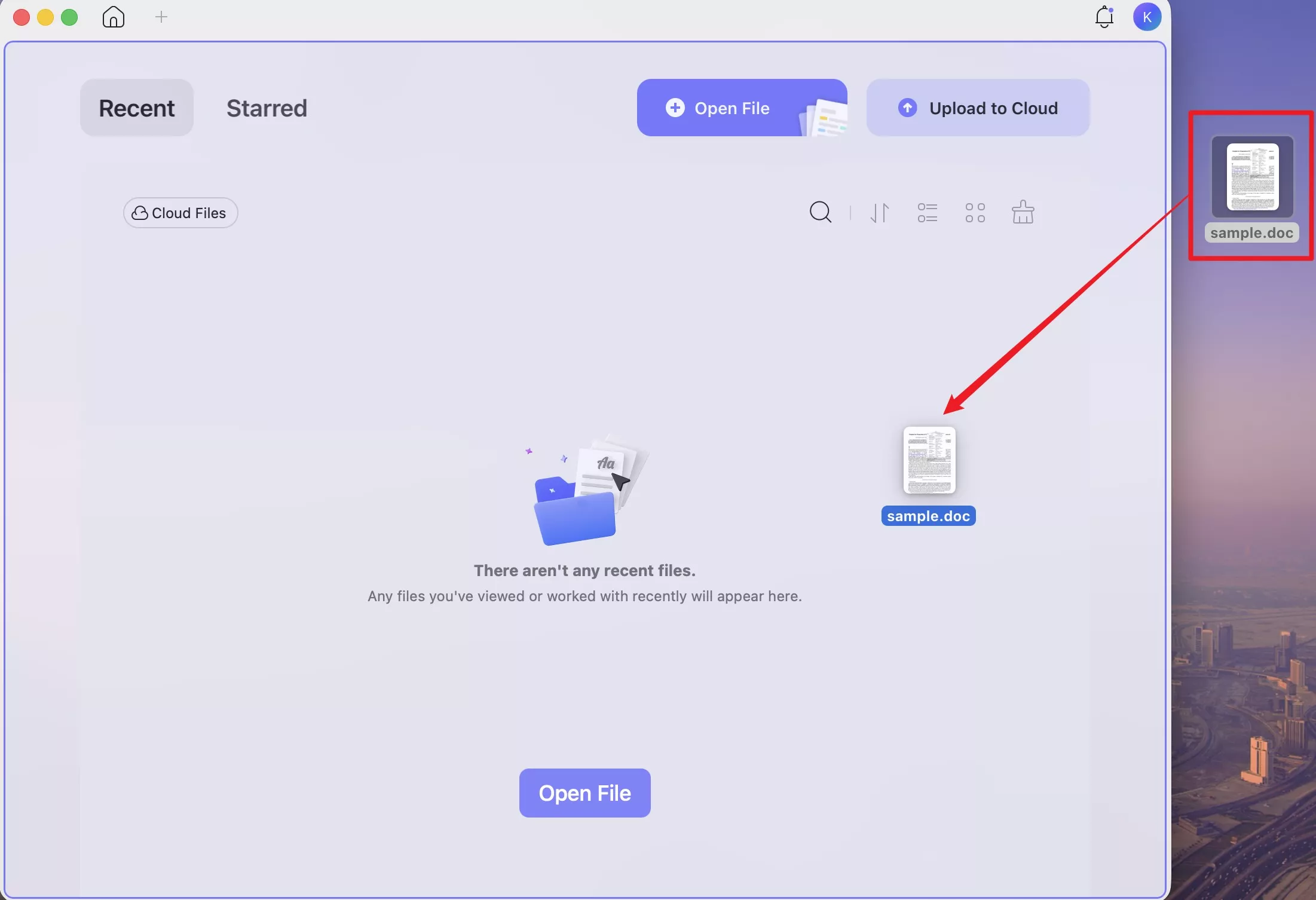
Step 1. Open the paper in UPDF. If it is a Word file or an image of a title page, drag it directly onto the UPDF desktop window — UPDF converts it to PDF automatically, without going through a convert menu first.
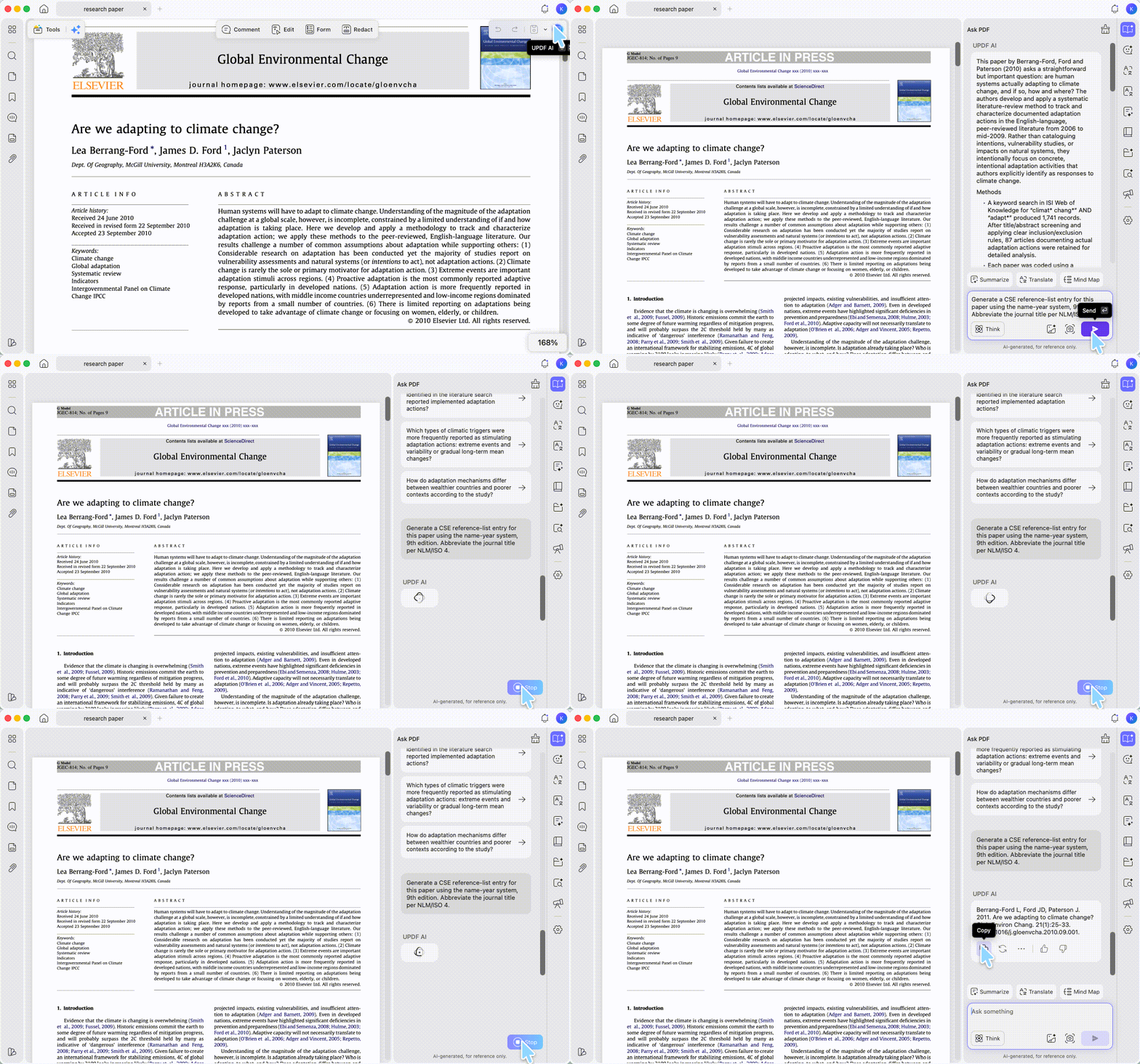
Step 2. Open the Ask PDF panel on the right so the AI reads the open document rather than answering from general knowledge.
Step 3. Specify the system, not just the style. This is the step people get wrong:
"Generate a CSE reference-list entry for this paper using the name-year system, 9th edition. Abbreviate the journal title per NLM/ISO 4."
Naming the system (name-year, citation-sequence, or citation-name) and the edition is what produces a usable entry. Prompting for "CSE format" alone leaves the tool to guess.
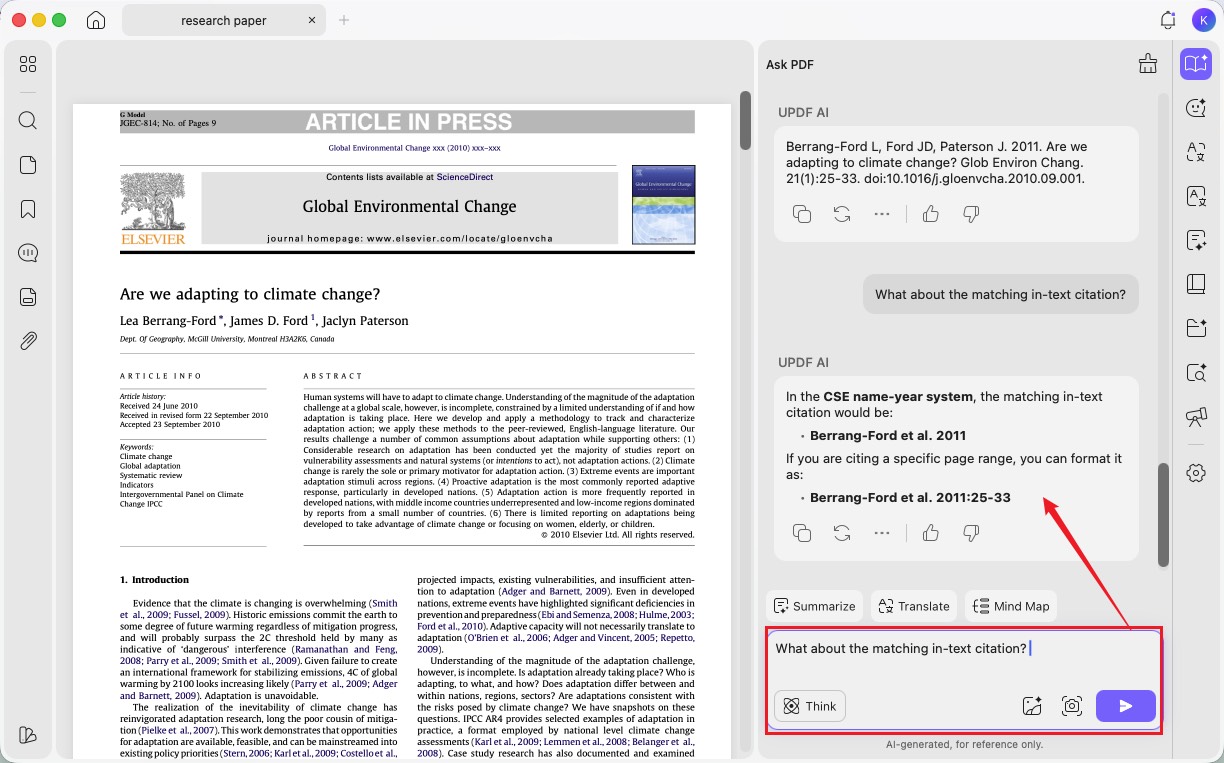
Step 4. Ask for the matching in-text citation as a follow-up question. The panel keeps the paper in context, so "What about the matching in-text citation?" is enough — no need to rebuild the prompt.
Step 5. Check the entry against your source before pasting it. Verify the journal abbreviation, the volume(issue):page string, and the DOI.
Windows • macOS • iOS • Android 100% secure
Best for:
- PDFs without DOIs, preprints, scanned reports, and any source your library database does not index.
Skip if:
- building a 60-source bibliography from web pages — a dedicated generator with a search bar and a saved project is faster, and handles renumbering when you insert a source.
You can also generate CSE citations with UPDF AI Online if you would rather not install anything.
Part 3. Free CSE Citation Generators Compared
1. MyBib
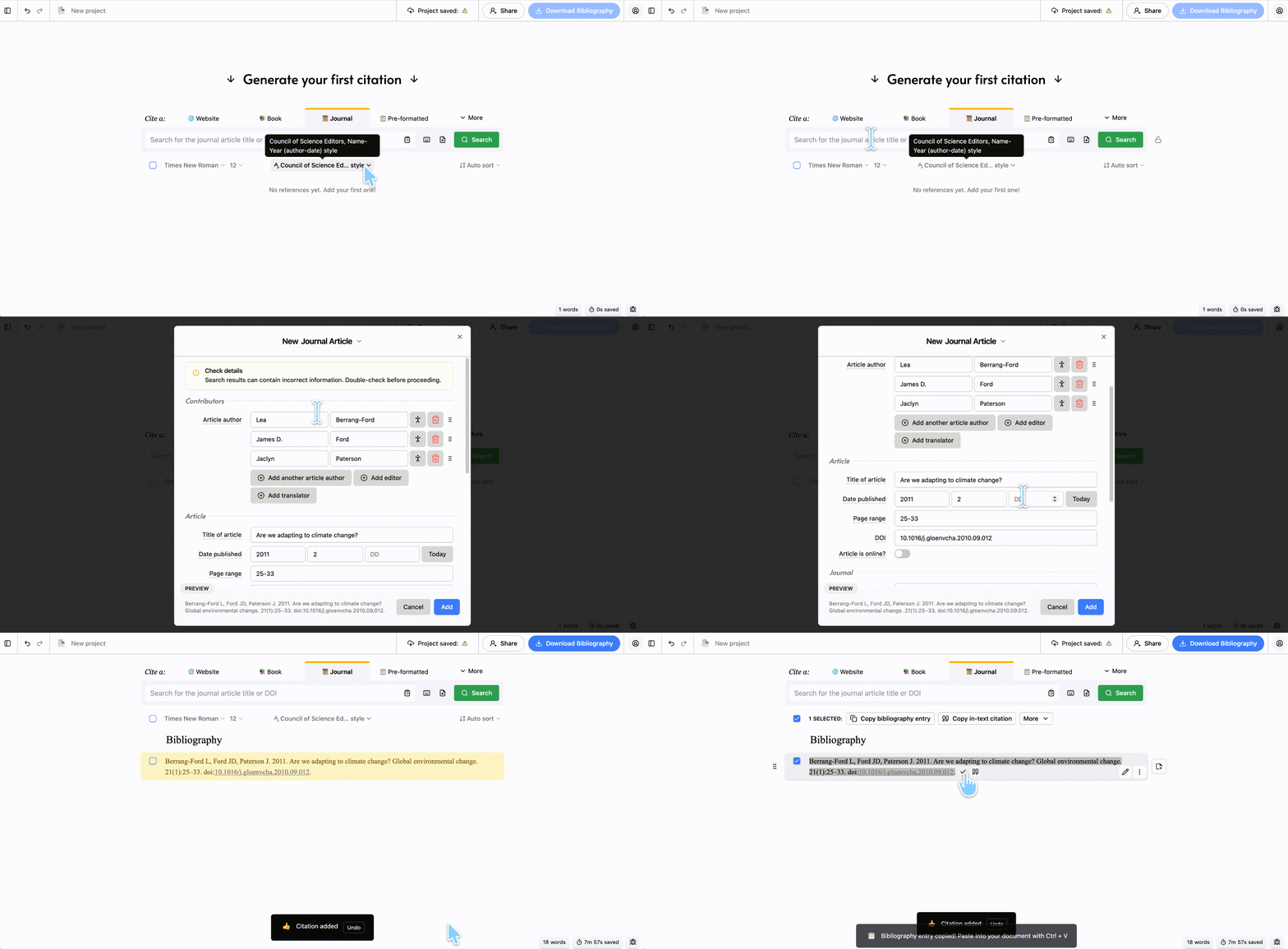
MyBib generates CSE citations free with no account required, autocites from a URL, ISBN, or DOI, and exports reference lists to Microsoft Word and Google Docs. Searching "cse" in its style picker returns all three systems — name-year, citation-name, and citation-sequence (in both plain-numeric and bracketed variants).
One limitation to know about: MyBib still refers to the 8th edition of the manual.
Best for:
- most CSE citations — free, unrestricted, and no signup.
Skip if:
- PDFs with no DOI. MyBib accepts a PDF upload, but the upload is a lookup — it reads the identifier and queries a database.
2. BibGuru
BibGuru documents all three CSE systems with worked examples for journals, books, dissertations, and websites. Its explanation of the citation-name versus citation-sequence distinction is the clearest of the four tools.
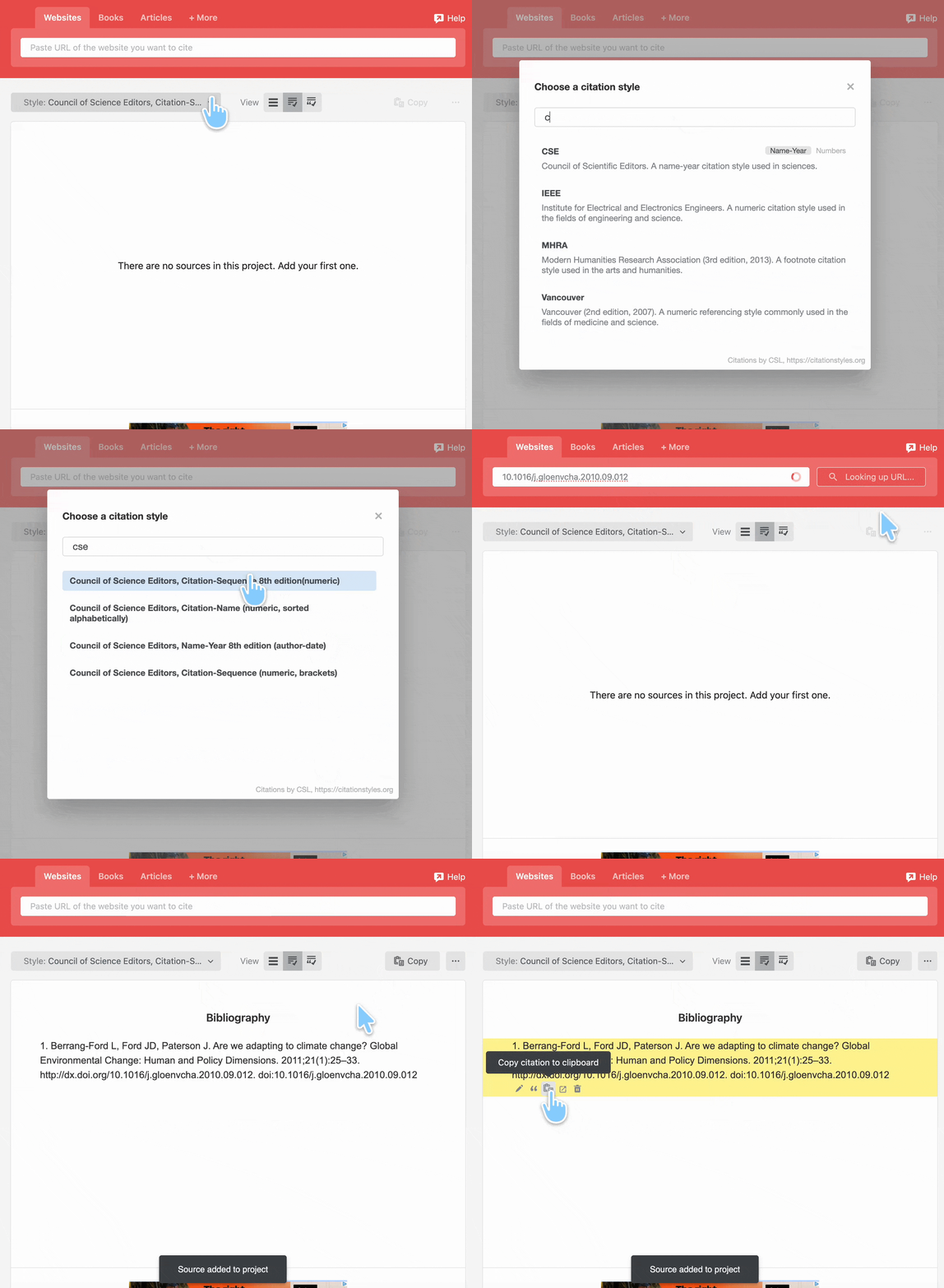
Two things to check. BibGuru's style picker labels its CSE entries inconsistently — two read "8th edition," one carries no edition at all — so the picker is not a reliable guide to which edition you are getting. And the free tier is ad-supported; BibGuru Plus removes ads and adds sync and project folders for $4.99/month after a 3-day trial, none of which changes the CSE output.

Best for:
- learning the reference-list rules while you build the list.
Skip if:
- paying for better CSE accuracy — Plus does not provide it.
3. Chegg
Chegg bundles its citation generator with a plagiarism checker and grammar tools, and maintains a CSE page with in-text and reference examples for all three systems. For a student already writing in that ecosystem, keeping citations and plagiarism checks in one place has real value.
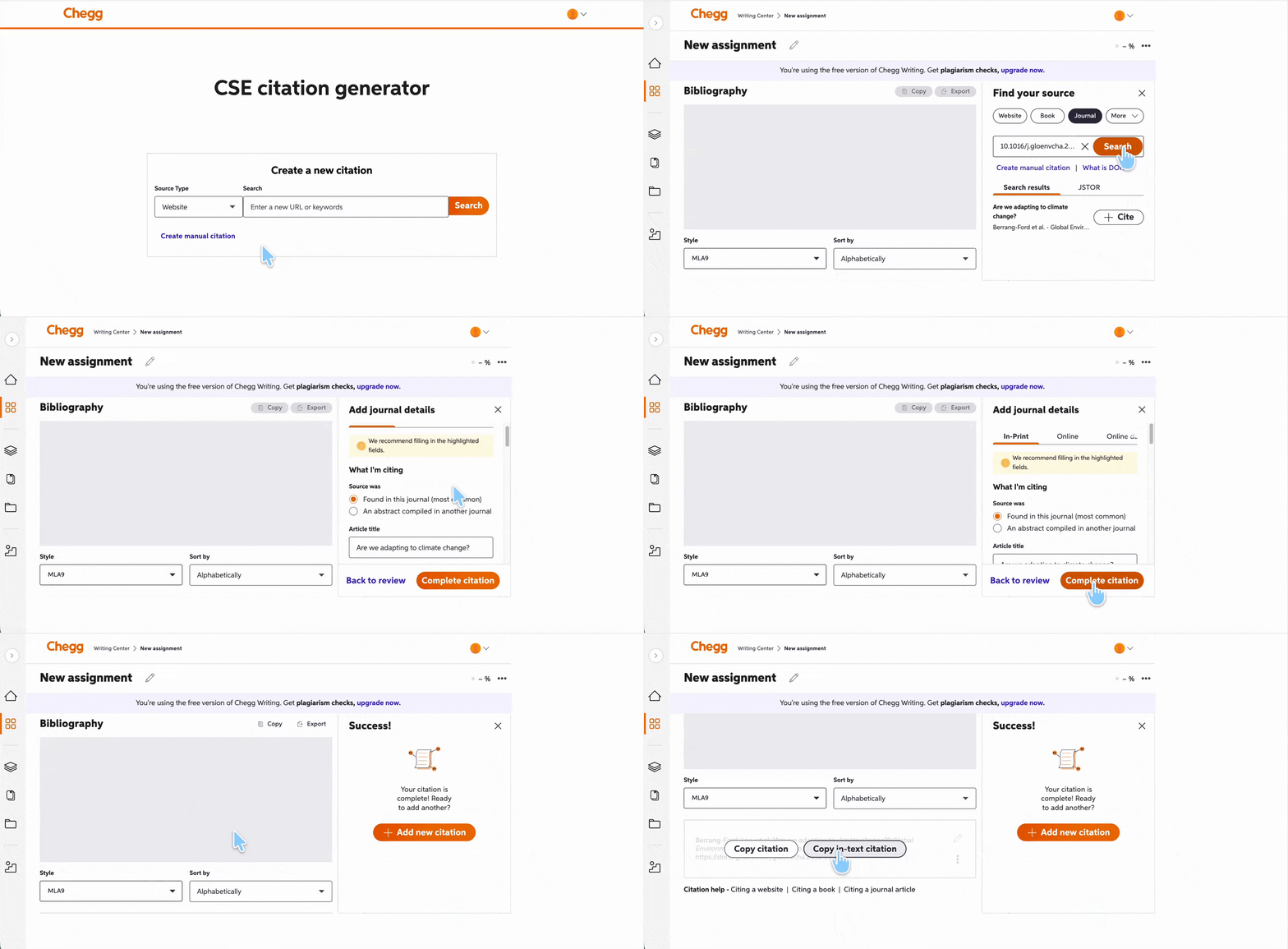
Pricing is the constraint: Chegg Writing runs $9.95/month after a 3-day free trial that auto-enrolls unless cancelled. The visible CSE guide dates to 2021, predating the 9th edition.
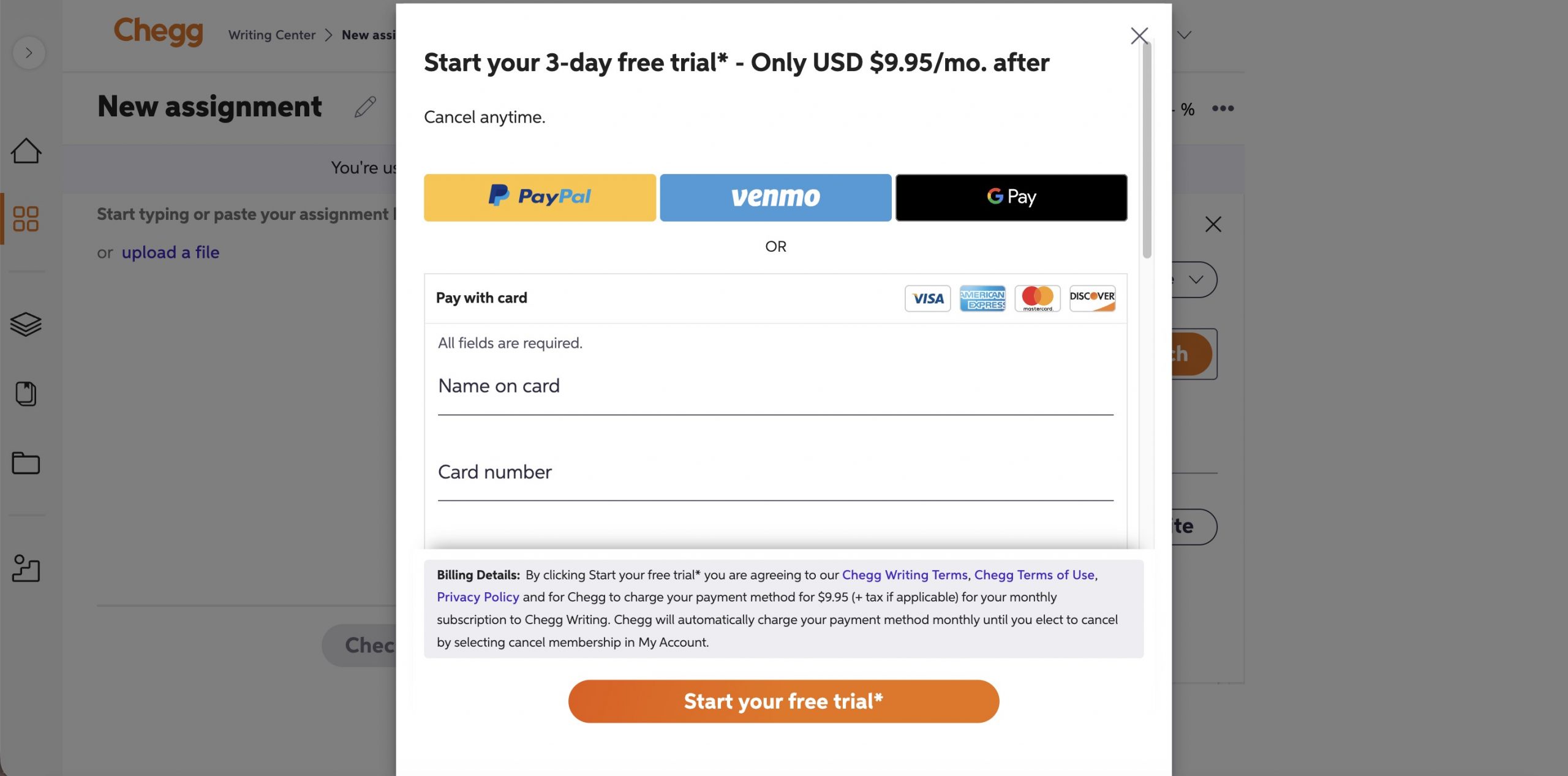
Best for:
- students who want citations, plagiarism scanning, and grammar checking bundled.
Skip if:
- anyone who only needs citations — the free options cover that without a subscription.
Decision Table
| Tool | CSE systems | Cost | Account | Main limitation |
|---|---|---|---|---|
| UPDF AI | All three (prompt-specified) | Free tier: 100 AI uses; AI Assistant from $79/yr | ✓ | Output must be verified; not a bulk bibliography builder |
| MyBib | All three | Free | ✗ | Docs understate support; no-DOI PDFs fall back to manual entry |
| BibGuru | All three | Free with ads; Plus $4.99/mo | ✗ For basic use | Edition labels unreliable; ads on free tier |
| Chegg Writing | All three documented | $9.95/mo after 3-day trial | ✓ | Paid; CSE guide dates to 2021 |
Part 4. Name-Year vs Citation-Sequence vs Citation-Name
Name-year: the author's surname and publication year go in parentheses in the text — (Berrang-Ford et al. 2011). The reference list is alphabetical and unnumbered.
Citation-sequence: superscript numbers appear in the text, numbered in the order sources first appear. Reference 1 is whatever you cited first.
Citation-name: superscript numbers again, but the reference list is alphabetized first and then numbered. If a work by Meyer lands at position 43 alphabetically, every in-text reference to Meyer is 43, no matter where it appears.
The axis that separates them: name-year identifies sources by who and when; citation-sequence numbers by order of appearance; citation-name numbers by alphabetical position. Think of a numbered coat check — citation-sequence hands out tickets as people arrive, citation-name assigns tickets by surname before the doors open.
This is why "use numbered CSE citations" is incomplete instruction. Both numbered systems look identical in the text and differ entirely in the reference list.
Part 5. Cleaning Up the Paper Around the Citations
Citations are one part of a submission. Two UPDF AI features handle the work on either side of them.
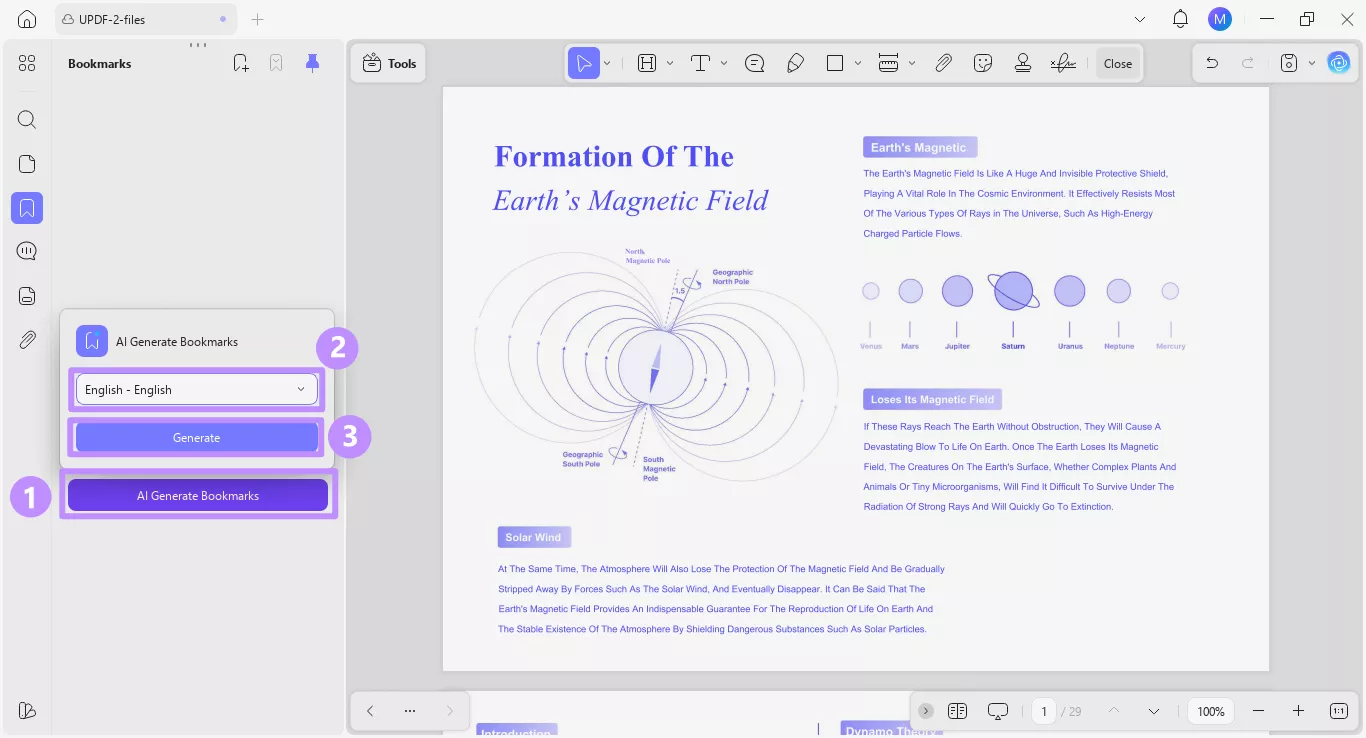
AI Bookmark Generator. Long reference-heavy PDFs — a 300-page methods handbook, a thesis you are mining for sources — often arrive with no table of contents, so finding the section you need to cite means scrolling. AI Bookmark Generator builds a navigable chapter outline in one pass, so you can jump straight to the chapter you are citing.
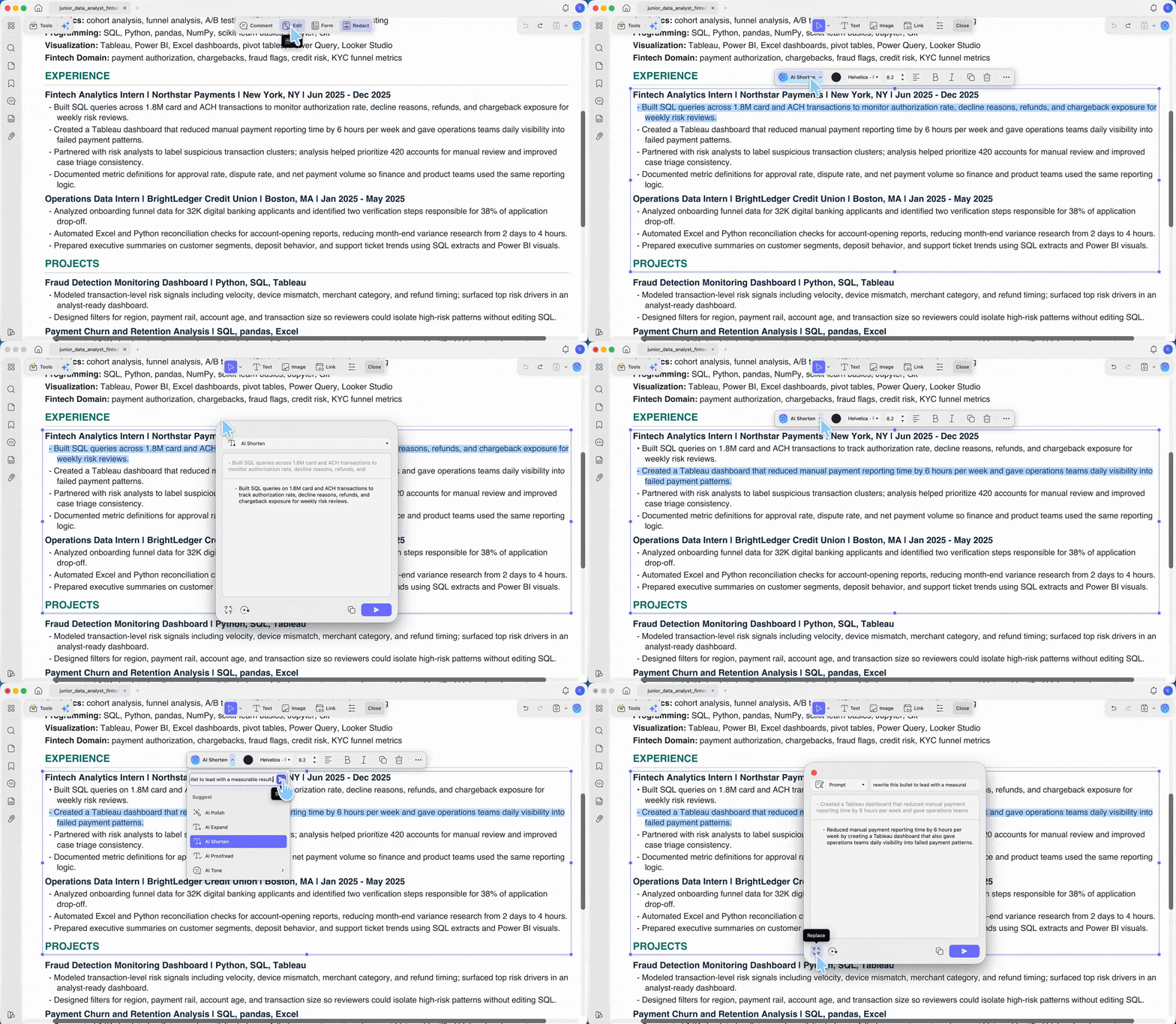
AI Editing Suite. Once citations are placed, the surrounding prose usually needs tightening. AI Editing Suite works inside UPDF's Edit mode: select a paragraph, and the floating toolbar offers AI Polish, AI Expand, AI Shorten, AI Proofread, and AI Tone, or you can type a custom instruction. The output appears in a response window with Replace, Continue Writing, and Copy — nothing changes in the document until you approve it. That review step matters in academic writing, where an unreviewed rewrite can alter a claim you have just cited a source for.
Try both on a paper you are working on now.
Windows • macOS • iOS • Android 100% secure
Part 6. Edge Cases: When Generated CSE Citations Break
Journal abbreviations come out wrong. CSE requires abbreviated journal titles, and generators frequently emit the full name. Look the abbreviation up in the NLM Catalog and correct it manually — this is the single most common CSE error in generated reference lists.
The style label said 8th edition. Display labels in CSL-based pickers do not reliably match the formatting applied. Generate one reference, check it against the official quick guide, then format the rest.
The source is a personal communication. Interviews and emails are not included in a CSE reference list at all. They are cited parenthetically in the text only. A generator that produces a reference-list entry for one has given you an entry to delete.
No author, or no date. CSE has defined fallbacks: for an unknown author, use the first few words of the title followed by an ellipsis; for an unknown date, use
[date unknown]. Most generators leave the field blank instead.
More than 10 authors. List the first 10 followed by
et al.in the reference list. Generators often truncate at 3 or 6, borrowing an APA rule that does not apply.
An article number became a page range. Some journals publish article numbers instead of page ranges. Feed the correction back with the field name attached — "article number: e10427" — not the bare value.
Your PDF is a scan and the AI cannot read it. If the AI Assistant cannot extract text, the file is an image. Run OCR first with UPDF, and you can tick multiple languages in a single pass.
You mixed two systems. If your reference list is alphabetical but your in-text citations are superscript numbers assigned by order of appearance, you have blended citation-name and citation-sequence. Pick one and rebuild the numbering — this is the failure that costs marks most often.
Part 7. FAQ
1. Is CSE the same as CBE?
Yes — CBE was renamed CSE in 2000. Older guides may still say CBE.
2. Do I need the DOI in a CSE reference?
Include it when one exists. For online articles without a DOI, give the URL and an access date.
3. Does CSE use footnotes?
No. All three systems use in-text parenthetical references or superscript numbers pointing to an end reference list.
Conclusion
The right CSE citation generator depends less on which tool is "best" and more on which of the three CSE systems your paper uses — and on whether your sources have DOIs. MyBib covers DOI, ISBN, and URL lookups free and without an account, BibGuru explains the three systems most clearly, and UPDF AI covers the case that sends the others to a blank entry form: a PDF with no DOI. AI Bookmark Generator and AI Editing Suite handle navigation and prose cleanup around the citations.
Download UPDF free and generate a CSE citation from a paper you are already working with.
Windows • macOS • iOS • Android 100% secure







 Enrica Taylor
 Lizzy Lozano
 Enid Brown
