 UPDF
UPDF
 UPDF for Windows
 UPDF for Mac
 UPDF for iPhone/iPad
 UPDF for Android
 Nomostar
 UPDF AI Online
 UPDF Sign
 IvyCraft
 Edit PDF
 Annotate PDF
 Create PDF
 PDF Form
 Edit links
 Convert PDF
 OCR
OCR PDF to Word
 PDF to Image
 PDF to Excel
 Organize PDF
 Merge PDF
 Split PDF
 Crop PDF
 Rotate PDF
 Protect PDF
 Sign PDF
 Redact PDF
 Sanitize PDF
 Remove Security
 Read PDF
 UPDF Cloud
 Compress PDF
 Print PDF
 Batch Process
 About UPDF AI
 UPDF AI Solutions
 AI User Guide
 FAQ about UPDF AI
 Summarize PDF
 Translate PDF
 Chat with PDF
 Chat with AI
 Chat with image
 PDF to Mind Map
 Explain PDF
 PDF AI Tools
 Image AI Tools
 AI Chat Tools
 AI Writing Tools
 AI Study Tools
 AI Working Tools
 Other AI Tools
 AI Bookmark Generation
 AI Bookmark Summary
 AI Watermark Generation
 AI Background Generation
 AI Sticker Generation
 AI Stamp Generation
 AI Editing Suite
 UPDF Copilot
 AI Page Management
 AI Semantic Search
 PDF to Word
 PDF to Excel
 PDF to PowerPoint
 Enterprise Solution
 Enterprise Sign
 Enterprise AI
 Enterprise Plan
 Enterprise User Guide
 Enterprise Webinar
 IT
IT Education
 Construction
 Financial Service
 Healthcare
 Insurance
 Legal
Legal Manufacturing
 Government
 Researchers & PhDs
 Solopreneurs & Freelancers
 Lawyers & Legal Professionals
 Real Estate Agents & Brokers
 Education Solution
 Customer Stories
 User Guide
 UPDF Tricks
 FAQs
FAQs UPDF Reviews
 Download Center
 Blog
Blog Newsroom
 Tech Spec
 Updates
 UPDF vs. Adobe Acrobat
 UPDF vs. Foxit
 UPDF vs. PDF Expert

You open a Study With Me video at 2 a.m. The creator doesn't talk. Doesn't teach. Just sits there, flipping pages, occasionally sipping water. You feel accompanied. You open your 300-page English textbook. Forty minutes later, the video is still playing. Your textbook is still on page three.
Study With Me solves the "sitting down" problem. It does not solve the "learning the material" problem. You get someone sitting next to you at the desk. You don't get someone helping you digest the textbook.
This is where UPDF enters the picture — not as another ambience tool, but as the productivity layer that Study With Me fundamentally lacks.
Why Study With Me Alone Leaves the Job Half Done
To understand the gap, look at what SWM actually provides.
Controllable peer pressure. SWM videos offer a reference point — someone else is studying — but with an exit button. You can pause, close the tab, walk away. Researchers at ACM found that viewers used SWM videos primarily to construct a "personally desired ambience" when external conditions prevented studying in a suitable environment. The value is environmental, not instructional.
Low-cost ritual. On YouTube, SWM videos accumulated over 520 million views in 2026 alone. Pressing play has become a ritual for "I'm about to study."
Emotional buffering. Large-scale analytics of 393 SWM videos and 164,611 associated YouTube comments revealed that positive sentiment appeared in about half of all comments, with viewers praising ambient music and visual aesthetics for enhancing emotional engagement.
None of these benefits address what happens after you open the textbook: reading 80 pages of dense academic PDF, synthesizing six lecture decks into one review outline, or translating a 40-page foreign-language paper before a group meeting. Study With Me operates entirely at the atmosphere layer. UPDF operates at the production layer.
The Missing Half: From "Sitting Down" to "Producing Output"
A complete learning cycle has three stages: start → input → output. SWM handles the start. Input and output require tools.
When you finally sit at the desk under SWM's companionship, the real obstacles are not motivational:
- Your professor sent an 80-page English PDF. You need to read it, extract core arguments, and take notes. Manually, that's three hours.
- It's finals week. You have six lecture decks, three textbook chapters, and two reference papers scattered across folders. You need one unified review document — but merging them means endless switching between files.
- You annotated key points on your iPad in the library. At home on your laptop, the annotations aren't there. Your notes live in two disconnected places.
These aren't discipline failures. They're workflow failures — the absence of an efficient intermediary between input and output.
UPDF fills this gap. It is not an ambience provider. It is a document processing engine. Over 4 million users rely on it, and UPDF AI has generated more than 300 million study notes. The number itself signals a pattern: learners are already using "companionship + tool" as a combined workflow.
Four Scenarios: What UPDF Actually Does While Your Study With Me Video Plays
Let's check these four scenarios to see how UPDF can help in studying, make truly study alongside the content creators you love. UPDF AI can be used online or in the built-in UPDF app, supporting Windows, Mac, iOS and Android devices.
Choose whichever method is most convenient; using the app is best, as it offers a wide range of additional features—such as editing and reading—that you can utilize.
Windows • macOS • iOS • Android 100% secure
Scenario 1: Turn Your Textbook into Structured Notes While the Video Runs
What you do: Open a 90-minute Study With Me video. Upload your textbook PDF to UPDF AI.
What happens: Choose Ask PDF, UPDF AI parses the document, identifies core concepts, and generates structured study notes for review or exam preparation. You can ask it to create flashcards targeting key definitions, or generate a mind map to visualize relationships between concepts within a chapter.
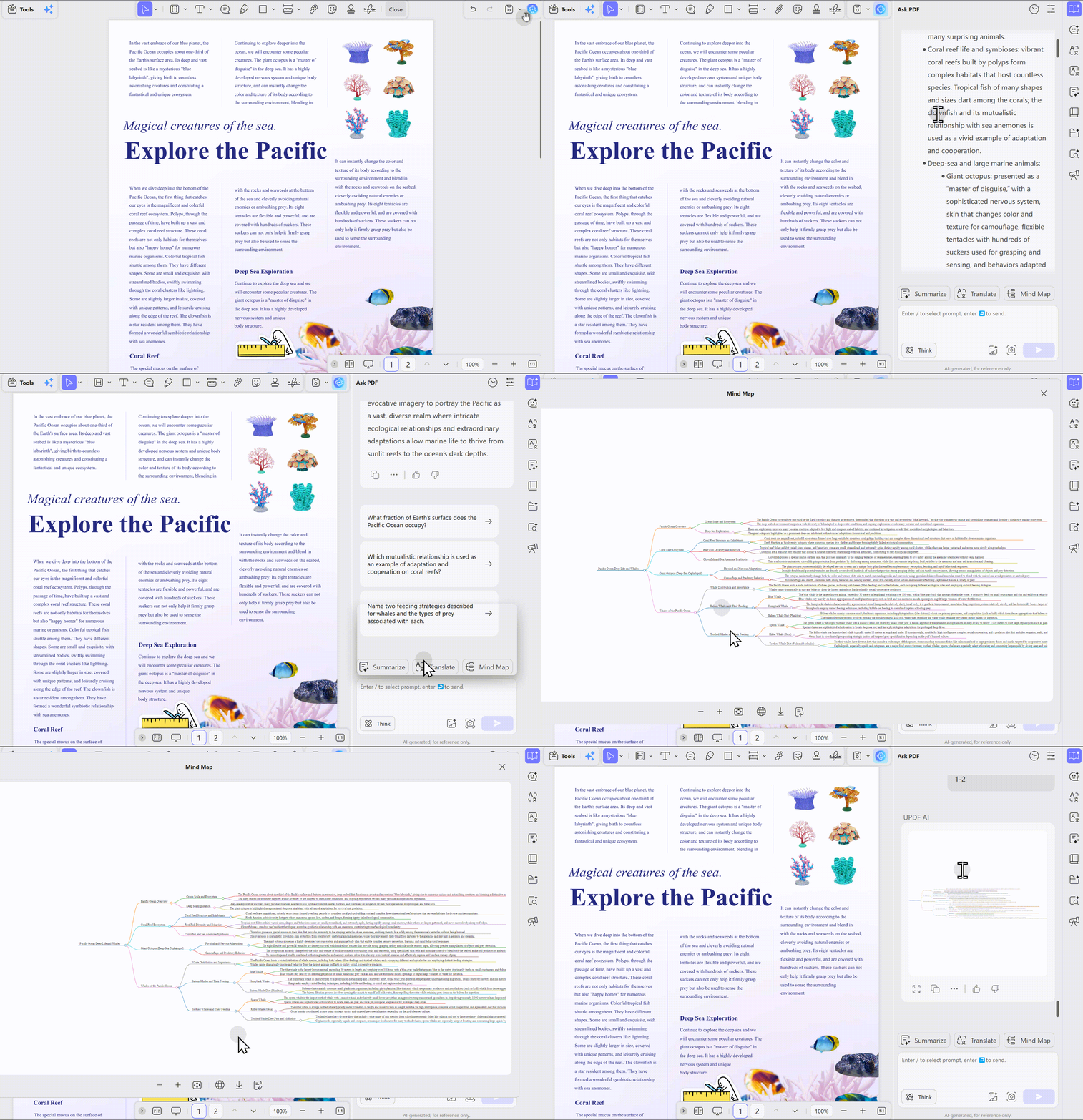
Why this beats manual note-taking: When you take notes by hand while reading, your attention constantly switches between "reading" and "writing." Cognitive load spikes. Letting AI handle the first pass of extraction and structuring means you annotate on top of a foundation instead of building from zero.
Scenario 2: Merge Scattered Materials into One Review Document
What you do: Upload your professor's PDF slides, three textbook chapters, and two reference papers into UPDF AI.
What happens: UPDF AI supports multi-document folder analysis, automatically identifying cross-file connections and generating a comprehensive study guide covering the full course scope. When you're reviewing macroeconomics, the IS-LM model from the textbook, the supplementary case from the professor's slides, and the empirical data from the paper get consolidated — instead of forcing you to flip between three files.
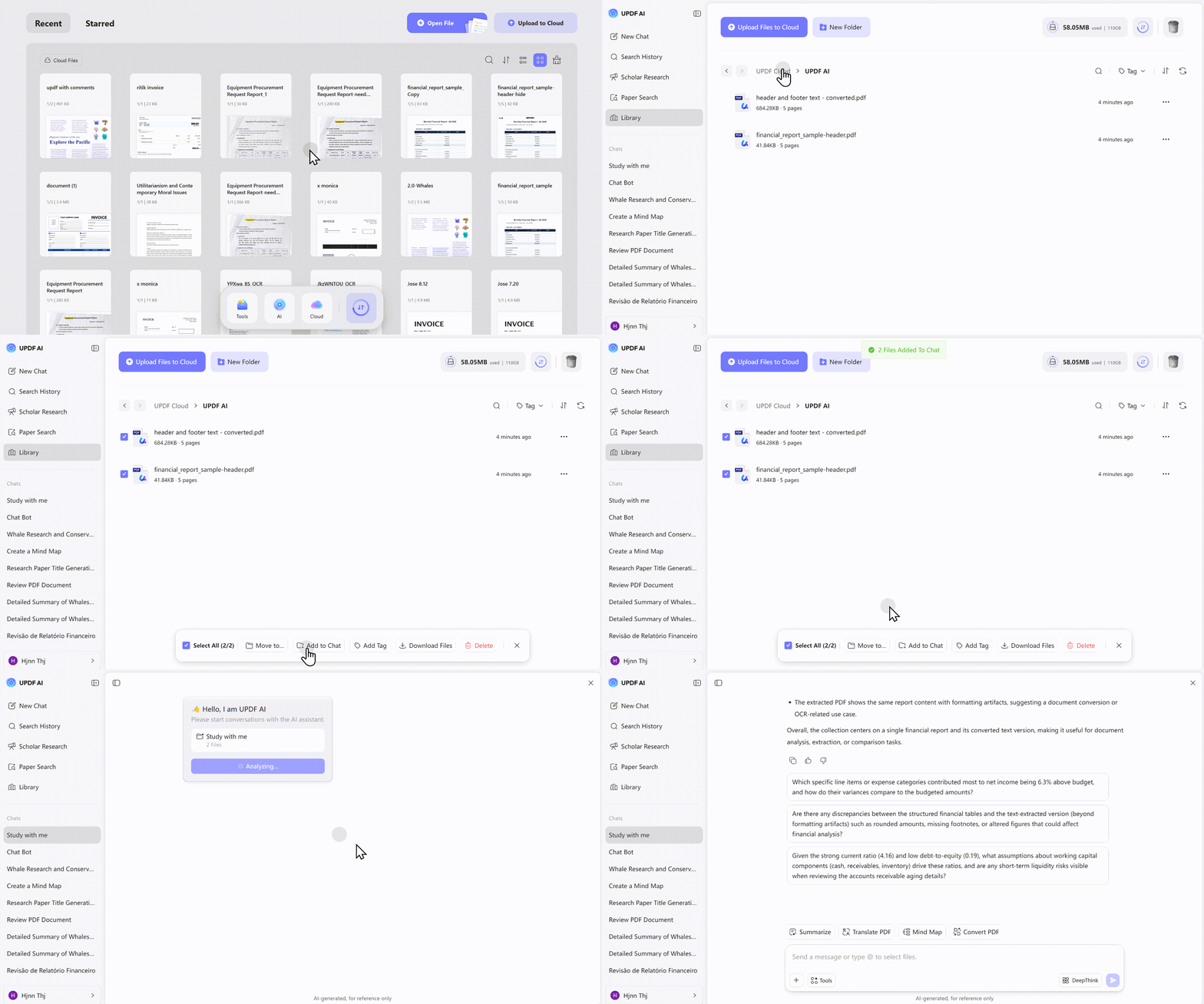
What this does is perform the mechanical action of "pulling content on the same topic from multiple files into one place" — a task you would otherwise do manually.
Scenario 3: Read Foreign-Language Papers Without Switching Apps
What you do: Your advisor sends a 40-page Portguese paper. You need to present at next week's group meeting. You don't want to translate sentence by sentence, and you don't want to toggle between a translator and a PDF reader.
What happens: UPDF AI supports full-document translation and side-by-side comparison mode. In the two-column view, source text and translation display simultaneously with color-coded correspondence, preserving the original PDF layout. For a quick structural overview, generate an AI summary organized by background, research question, methodology, findings, and limitations — then decide which sections deserve close reading.
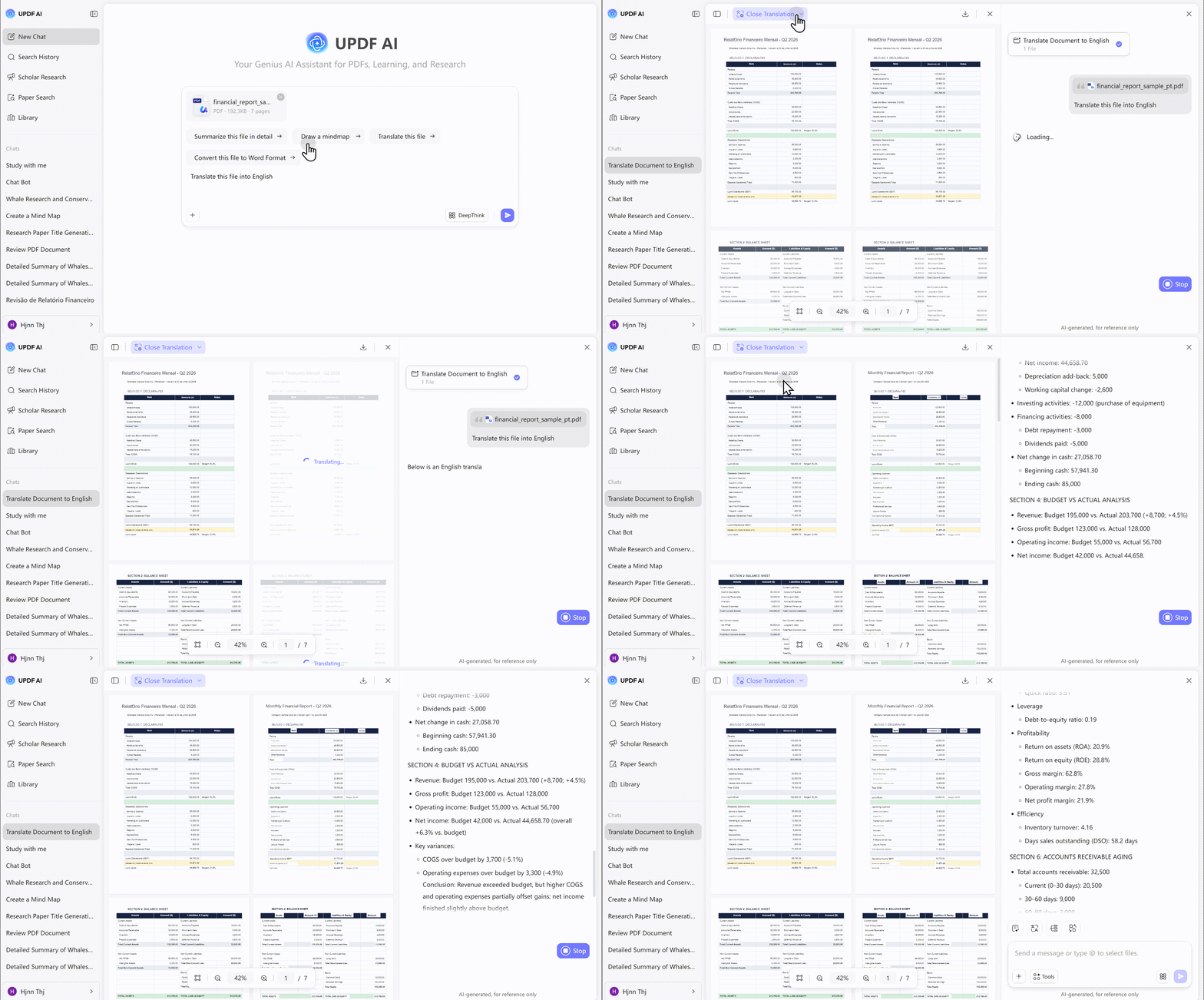
UPDF AI has processed over 46 million academic documents for translation, and it preserves technical terminology across disciplines.
The more practical advantage: UPDF AI supports both GPT-5.6 and DeepSeek R1 models. For fast summaries, GPT-5 responds quickly. For methodology-heavy papers that require deeper reasoning, switching to DeepSeek R1's deep thinking mode produces more accurate analysis of complex concepts.
Scenario 4: From Watching Someone Study to Talking to Your Document
What you do: The SWM video gives you focus time, but you're stuck on a concept in your reading. Instead of opening a search engine, you select the passage in UPDF AI and ask directly.
What happens: UPDF AI lets you chat directly with PDF content — asking questions, requesting explanations of specific paragraphs, and getting analysis tied to the document's context. Learning shifts from passive reading to active dialogue. You stop watching someone else study and start discussing the material you're reading.
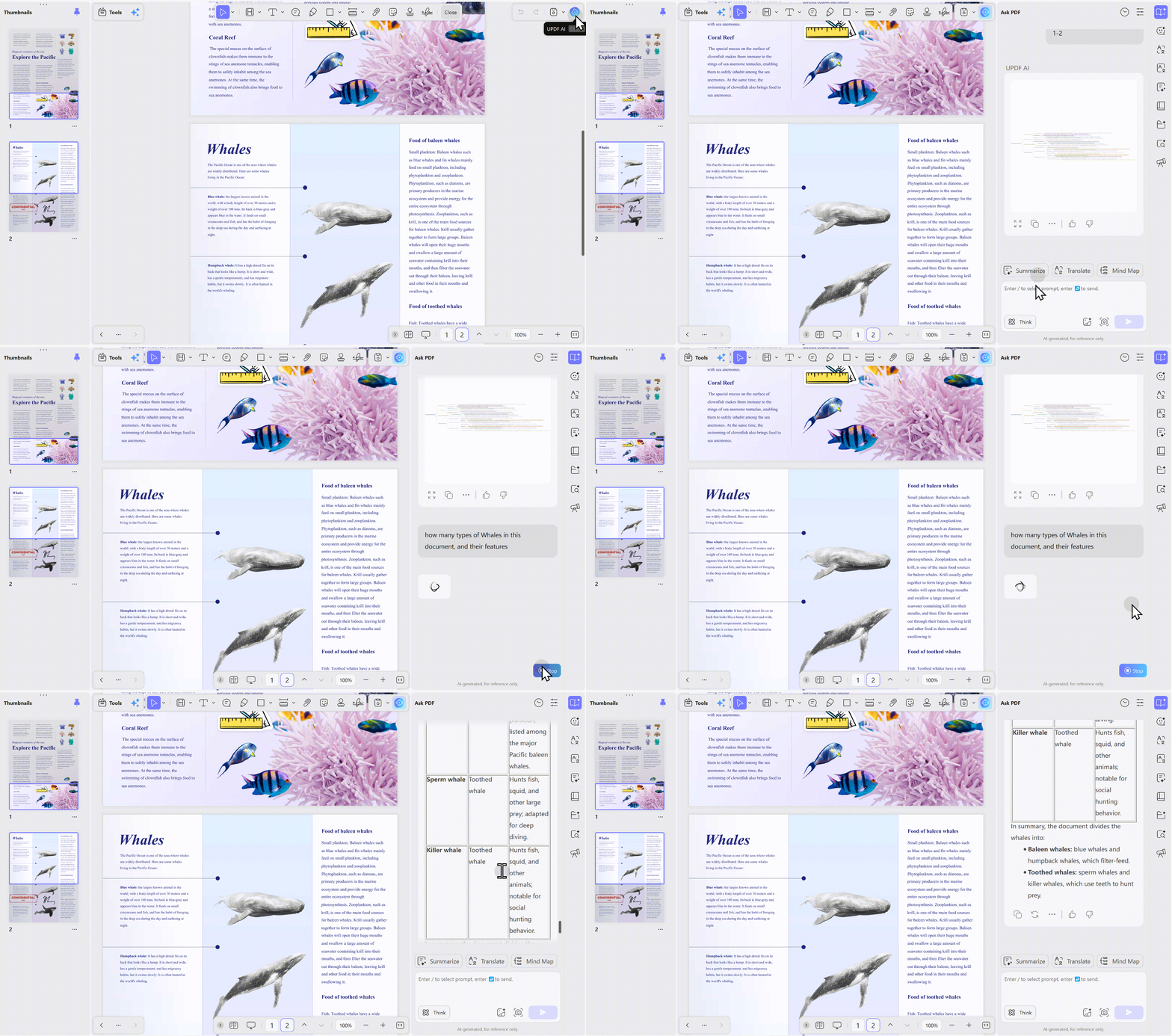
UPDF also supports Windows, Mac, iOS, and Android with account-level synchronization. Annotations made on iPad in the library are available on your laptop at home. A reviewer on iPad workflow noted: "I often use it for reading literature — the note-taking is genuinely useful, and the AI makes reading papers very convenient. I sync to cloud space so I can switch devices and continue reading whether I'm in the dorm or the library".
Windows • macOS • iOS • Android 100% secure
Why UPDF Over Other AI PDF Tools for This Workflow
The market has no shortage of AI PDF tools. But academic learning scenarios impose requirements that differ from office use.
A comparison article noted that academic use demands more than "quick summaries" — it requires tools that can explain methodology, compare data across documents, and handle multi-file integration. From the specific needs of learners using SWM as a focus ritual, several UPDF features stand out:
Editing plus AI in one workspace. Chat PDF handles "questions and answers" well, but you cannot annotate, edit, and adjust formatting in the same tool. UPDF embeds AI inside a full PDF editor, so generated notes can be directly added to the document using the built-in editing tools. A direct comparison concluded: "Chat PDF is great for summarizing, translating, and explaining PDFs, but if you want to interact with AI while editing the PDF file at the same time, UPDF is the stronger and more cost-effective choice".
Dual AI model switching. GPT-5.6 and DeepSeek R1 serve different purposes. Fast skimming through lecture notes favors GPT-5's speed. Deep analysis of a complex methodology paper benefits from DeepSeek R1's reasoning depth.
Multi-file folder analysis. Learning inherently involves multiple documents — textbooks, slides, papers, past exams. UPDF AI's cross-file analysis outperforms single-document tools in this specific context.
Cross-platform sync. Students move between devices. UPDF's account-level cloud sync keeps materials consistent without manual file transfers.
Windows • macOS • iOS • Android 100% secure
How to Start: A Practical Workflow
If you want to try the "SWM for ambience + UPDF for output" combination, here is a concrete sequence:
- Open your usual Study With Me video to establish the study ritual.
- Upload the PDF you need to process — textbook chapter, lecture slides, or paper — to UPDF AI.
- Choose your operation based on the task: for textbook reading, use "generate study notes" or "generate mind map"; for papers, use "summary" plus "side-by-side translation"; for review, use "multi-file folder analysis" to consolidate all materials.
- Annotate on top of the AI-generated notes, adding your own understanding and highlights. UPDF's editing tools let you add text and sticky notes directly to the PDF.
- After the session, everything is saved in the document. Next time you open it, all annotations and generated content are in place.
Bonus: The Data Behind the Gap
The 2025 Frontiers study on 509 SWM users confirmed that peer support works — it predicts motivation and reduces anxiety. But it also documented the ceiling: "susceptibility to distractions and irregular study engagement" remain persistent issues. The SWM experience is real and valuable. It just operates at a different layer than actual learning output.
UPDF's 4 million users and 300 million study notes represent the other half of the equation — the half where content actually gets processed, structured, and absorbed. Study With Me handles getting you to the desk. UPDF handles what happens after you get there.
Closing
If Study With Me helps you clear the first hurdle — sitting down and starting — then the road after that hurdle is where UPDF belongs.
The last mile of learning is still yours to walk. But you can walk it with better equipment. Let SWM handle the atmosphere. Let UPDF handle the textbook, the papers, the translations, and the review materials.
Next time you open a Study With Me video, upload your textbook to UPDF first. Companionship provides the mood. The tool provides the output.
Windows • macOS • iOS • Android 100% secure







 Lizzy Lozano
 Engelbert White

 Enola Miller